

Your workspace should inspire productivity, not frustration. Yet tangled cables dangling beneath your desk create visual chaos, collect dust, and pose genuine tripping hazards.
Whether you’re setting up a home office, upgrading your gaming station, or simply tired of wrestling with power cords every time you adjust your chair, the right cable management system transforms your environment. This guide covers metal trays, fabric organizers, wire sleeves, and hook-and-loop solutions to help you choose the perfect fit for your desk setup.
Quick answer
This guide compares 10 picks, with Adjustable Under Desk Cable Tray, 17-30 Inch ranked first. Mzmaxy 25" Under Desk Cable Management Tray, No-Drill holds the highest customer rating among them. Alex Tech 10ft Wire Loom Cable Sleeve Split Sleeving has the most customer reviews.

Pros
- Tool-free installation with clamp design protects desks from damage
- Exceptional weight capacity at 50+ lbs handles multiple power adapters and devices
- Adjustable length fits various desk sizes and narrow or conference table edges
- Durable carbon steel construction resists rust and daily wear
- Flexible mounting options accommodate different desk configurations and layouts
Cons
- Limited to desks between 0.4 and 1.6 inches thick, may not fit very thin or extremely thick surfaces
- Requires adequate desk edge clearance for the clamp mechanism to function properly
- May need positioning adjustments if cable load shifts over time despite 50 lb capacity
The GOENDR Under Desk Cable Management Tray is a practical solution for anyone struggling with cable clutter. It's designed for home office workers, gamers, content creators, and professionals who want a clean, organized workspace without the mess of tangled cords and power adapters.
The standout feature is its adjustable 17 to 30-inch length combined with a tool-free clamp installation. You get professional-grade cable management without drilling holes or damaging your desk. The anti-slip pads keep it firmly in place, while the two mounting directions let you orient it however your setup demands. In real-world use, this flexibility means one product works for most desk configurations.
Build quality is where this tray excels. The all-metal carbon steel construction with an anti-rust baked finish feels sturdy and industrial. At over 50 lbs capacity, it handles multiple large power adapters, extension cords, and monitor cables without sagging or flexing. The open-bottom design promotes airflow to prevent overheating, a thoughtful detail for safety-conscious users.
The main limitation is desk compatibility, it only works on edges between 0.4 and 1.6 inches thick. Very thin tempered glass desks or extremely thick solid wood edges may not fit the clamp. Additionally, while the capacity is generous, repositioning heavy loads occasionally may be necessary as cables settle.
This is a solid buy for anyone wanting durable, no-nonsense cable organization. It's particularly valuable for game setups, remote work stations, and any desk drowning in cords. The combination of durability, ease of installation, and thoughtful design makes it a smart investment in workspace productivity and safety.
Installation takes minutes with no tools required. The clamp mechanism fits desk edges from 0.4 to 1.6 inches thick and works on wood, metal, glass, and composite surfaces. Anti-slip pads protect your desktop from scratches while keeping the tray stable.
The dual mounting directions are a key advantage, allowing you to mount the tray either inward toward the desk or outward depending on your cable routing and space constraints. This flexibility means you can optimize cable flow for your specific setup, whether you're running power cables to the left or right side of your desk.
This tray hides exposed cables completely, creating a cleaner aesthetic while reducing tripping hazards and fire risks from exposed wiring. The expandable design lets you customize the length from 17 to 30 inches to fit your specific desk dimensions perfectly.
Multiple bottom slots support cable ties for securing individual wires in place. The open mesh structure allows excellent airflow around cables and power supplies, helping prevent heat buildup and extending the lifespan of your equipment. For gaming setups or workstations with many peripherals, this ventilation is crucial.

Pros
- Heavy-duty metal mesh construction holds up to 15 lbs without bending or sagging
- Universal clamp system works on various desk thicknesses without drilling or permanent damage
- Excellent visibility and airflow prevent dust buildup and equipment overheating
- Quick installation and flexible positioning make it ideal for evolving home office setups
- Significantly improves workspace aesthetics while protecting cables from tangling and damage
Cons
- Requires assembly of two sections using screws, though setup is straightforward
- Limited depth may not accommodate very large power strips or multiple adapters oriented horizontally
- Black color may show dust accumulation more visibly than lighter finishes
The Mzmaxy 25-inch cable tray is a practical solution for anyone struggling with cable clutter under their desk. Designed for home office workers, IT professionals, and anyone with multiple devices, this under-desk organizer transforms a tangled mess into a clean, organized workspace without requiring drilling or permanent desk modifications.
The standout feature is the no-drill clamp system paired with non-slip rubber pads. Installation is genuinely fast, taking just a few minutes to secure the tray firmly to your desk edge. The 25-inch length provides ample space for power strips, network switches, cable adapters, and bundled excess cabling. Real-world users report that the mesh design offers excellent visibility when you need to add or adjust cables, while still concealing the contents from view above the desk.
Build quality is solid throughout. The sturdy metal construction with mesh body balances strength with airflow, preventing power supplies from overheating while reducing dust accumulation inside the tray. The open side design makes routing cables effortless and allows you to quickly unplug or swap devices without completely dismantling your setup. The flexible installation angle means you can position it exactly where you need it.
The main consideration is that assembly requires connecting two sections with screws, though most users complete this in under 5 minutes. Additionally, if you have exceptionally large power adapters or need to store multiple outlet strips side-by-side, the depth may feel slightly tight, though customer feedback suggests this rarely becomes a practical issue.
Overall, this cable tray delivers exactly what it promises: a sturdy, easy-to-install cable management system that keeps your workspace organized and your equipment properly ventilated. It's an affordable upgrade that makes a meaningful difference in both functionality and appearance.
Dimensions: 25 inches length x 25 inches width, two-part design for easy transport
Material: Metal with mesh construction for visibility and airflow
Weight Capacity: Approximately 15 lbs
Compatibility: Desks 0.4 to 2 inches thick
Installation: No-drill clamp system with non-slip rubber pads
Color: Black, modern style
Warranty: 3-month manufacturer warranty
Best For: Standing desks, home offices, and workstations requiring cable organization
Who Should Buy This: Home office workers, IT professionals with frequently changing cable setups, anyone with multiple devices and visible cable clutter, and those looking for a non-permanent desk organization solution.
Installation Tips: Choose a clamp position on your desk edge that allows cables to route comfortably to your devices. The flexible mounting allows inward or outward installation, so test both orientations before fully tightening the clamp.
Best Uses: Organizing power strips and surge protectors, containing multiple device chargers, managing network and peripheral cables, keeping cables away from pets and children, and maintaining a professional appearance in video calls or workspace photos.
Maintenance: The mesh design naturally allows you to see when dust accumulates inside. Simply wipe the exterior occasionally and use a small brush or compressed air to clear mesh openings for optimal airflow and cooling.

Pros
- No-drill clamp system protects desk surfaces from damage
- 15 lb capacity handles heavy power strips and surge protectors
- Open mesh prevents overheating of charging equipment
- Installs in 5 to 10 minutes with no additional tools needed
Cons
- 25.3 inch length may feel tight for very dense multi-monitor setups
- Requires accessible desk undersides for clamp mounting
This 25.3 inch stainless steel under-desk tray tackles the core cable management challenge: keeping power strips, surge protectors, and excess cord length off the floor and out of sight. The clamp-based mounting system installs without drilling holes or damaging your desk surface, making it ideal for renters or anyone hesitant to permanently modify furniture. Soft rubber pads protect desktop finishes while the clamps grip surfaces up to 2 inches thick. The open mesh design handles up to 15 pounds of equipment while maintaining airflow around charging bricks and adapters, preventing heat buildup during extended use. The tray accommodates multiple power strips and substantial cable coils, though users running three monitors plus multiple computers may find the length slightly limiting. Installation requires desk undersides that are accessible for clamping, so furniture with drawer banks or continuous lower panels won't work. The stainless steel construction feels robust and stable under load, and the package includes cable ties and adhesive holders to secure individual wires within the tray. Setup takes roughly 5 to 10 minutes with no tools required beyond what's included.
Installation takes approximately 5 to 10 minutes and requires no tools or drilling. Simply position the tray underneath your desk, align the clamp mounts with the desk edge, and tighten the adjustable clamps until snug. The soft rubber pads automatically protect your desktop. Once mounted, use the two large access holes to route power cables and USB lines, then secure excess cord length with the included velcro cable ties and adhesive cable holders.
For best results, ensure your desk is no thicker than 2 inches at the mounting point and that the undersurface has adequate clearance. Test the clamp stability before loading heavy items like power strips. The tray accommodates desks up to 25.3 inches in width, though you can mount multiple trays for wider setups.
Best for home office workers, remote professionals, and gamers who need to hide power strips and manage cable slack without drilling. The no-drill clamps make this perfect for renters or anyone who wants to avoid permanent desk modifications. Skip this if your desk lacks accessible undersides for clamping, or if you're managing an exceptionally dense setup with three or more monitors and multiple tower computers that would exceed the 25.3 inch capacity.

Pros
- Split design accepts cables without disconnecting plugs
- Flexible material navigates corners and desk legs smoothly
- Cut to any custom length from 10-foot total
- Protects cables from pet chewing and abrasion
Cons
- Half-inch diameter limits bundling capacity for thick cables
- Cut ends may fray without careful trimming or heat sealing
For desks with multiple monitors, charging cables, and peripheral wires creating visual clutter, this split-design cable sleeve bundles everything into a single clean line. The 10-foot length covers substantial desk runs, and you can cut it to exact measurements as needed. The split construction opens along the length to accept cables without disconnecting plugs or threading from one end, then closes around the bundle naturally without requiring zip ties or fasteners. Flexible braided polyethylene navigates around desk legs and monitor arms more smoothly than rigid tubing, and the half-inch diameter suits individual cables or light bundling situations. The material resists abrasion and provides protection from pet chewing, a practical bonus for households with curious cats or dogs. Temperature tolerance from negative 103 to positive 257 degrees Fahrenheit means it handles everything from cold basement offices to areas near heating equipment. The black finish blends into most desk setups without drawing attention. Cut ends may fray slightly if scissors are dull, though applying careful heat from a lighter melts the polyethylene cleanly. Capacity limits the sleeve to thinner cable groups, so bundling multiple thick power cords together becomes snug.
Dimensions: 120 inches length, 0.5 inches diameter
Material: Polyethylene braided sleeving
Color: Black
Design: Split sleeving for easy installation
Operating Temperature: -103 to 257 degrees Fahrenheit
Melt Temperature: 446 degrees Fahrenheit
UL Recognized: Yes
Installation Type: Self-closing, no adhesive required
Weight: 0.13 kg
Model Number: sr1/2inblack10ft
Ideal for anyone organizing desk cables into a unified bundle without the hassle of threading cables through closed tubing. Works particularly well for single monitor arms, peripheral cables, and lightweight bundling tasks. Also excellent for protecting cables from pets. Skip this if you need to bundle very thick power cords together or if you require a larger diameter for dense cable groups, as the half-inch width fills quickly.

Pros
- Exceptionally sturdy construction supports heavy power strips and multiple adapters without flexing
- Multiple cable routing holes and slots prevent tangling and allow customized cable paths
- Compact footprint mounts easily under most desk styles with minimal clearance needed
- Included cable ties and accessories make setup complete right out of the box
- Discreet design keeps cables hidden from view while remaining accessible
Cons
- Only includes 2 mounting holes, so drilling additional holes may be needed for extra stability on larger desks
- Tight fit when fully loaded with cables and power adapters, so you may need to route cables carefully
- Limited clearance height means very thick power supplies or connectors might not fit comfortably
The PAMO Under Desk Cable Management Tray is a straightforward solution for anyone drowning in desk clutter. This set of two steel trays mounts under your desk to hide power cords, adapters, and cables from view. It works equally well for home offices, gaming rigs, and height-adjustable standing desks where cable management can make or break your workspace aesthetics.
What sets this system apart is its practical design. The angled profile keeps cables accessible without requiring you to crouch under your desk, and the thoughtfully spaced cable routing holes let you run cords exactly where you need them. Users consistently praise how quickly cables stop tangling once organized inside these trays, and the included reusable cable ties add extra control for bundling similar cables together.
Build quality is solid throughout. The 1mm powder-coated steel feels heavy and reliable, not cheap or flimsy. It handles the weight of surge protectors, multiple power supplies, and laptop chargers without any sagging or flexing. The two trays in this set give you flexibility to mount them where cable density is highest along your desk.
Two minor considerations deserve mention. The mounting system uses only 2 screw holes, which some users address by drilling a third hole for added stability. Also, when fully loaded, the vertical clearance runs tight, so unusually bulky power connectors might require careful routing or repositioning.
For anyone serious about desk organization, these trays deliver real value. They transform chaotic cable tangles into a clean, hidden system that actually stays organized. The quality construction means these will still be working years from now.
Installation is genuinely simple and takes under 10 minutes total. The package includes flat-head screws and mounting hardware, so you just position each tray under your desk and drive the screws in. No special tools required beyond a basic drill or screwdriver.
These trays work with virtually any desk type, including wooden tops, metal frames, and glass surfaces. They also integrate seamlessly with monitor mounts and are specifically designed to work with height-adjustable desks, so your cables stay organized as your desk moves up and down.
For best results, spend a few minutes planning your cable routes before tightening everything down. Group similar cables together using the included cable ties, and use the angled design to your advantage by routing frequently accessed cables toward the front slots.
The multiple exit holes mean you can run cables to different areas of your desk without everything converging at one point. This prevents the tangled mess that often develops when cables are forced through limited routing options.

Pros
- Effective cable organization that transforms messy desk setups into clean, professional workspaces
- Self-locking design keeps cables secure and prevents accidental disconnections from movement
- Adhesive pads remove cleanly without residue, making it safe for rental properties and furniture
- Affordable solution for home offices and workspace upgrades
- Comes with plenty of straps, so you won't run out mid-project
Cons
- Adhesive requires a 2-hour curing time before loading cables, which delays setup
- Works best on smooth, clean surfaces and may not adhere reliably to textured walls or dusty areas
- Hook-and-loop fasteners can wear over time with frequent cable adjustments
This cable organizer tackles a common workspace problem: tangled cables that pile up under desks and behind equipment. Whether you're working from home, managing a media setup, or organizing a retail station, this product gives you an affordable way to keep cords hidden and accessible. The 20 pairs of straps mean you can organize cables across multiple areas without buying separate products.
The standout feature is the capacity to hold up to 15 cables per strap with reinforced hook-and-loop fasteners that actually stay put. The self-locking design prevents cables from sliding out when you move your desk or pull cords for maintenance. The flexible segmented construction lets you adjust routes without dismantling everything, which saves time if your setup changes.
Build quality is straightforward and practical. The plastic and rubber materials feel durable enough for regular use, and the low-profile design hugs tight spaces without creating bulk. The upgraded acrylic adhesive sticks firmly to most smooth surfaces like wood, glass, and tile, and crucially, removes cleanly without the residue that plagues cheaper alternatives.
One real limitation is the 2-hour curing time required after applying adhesive hooks before you can load cables. This means planning ahead rather than instant installation. Additionally, the adhesive works best on clean, smooth surfaces, so dusty or textured walls may not provide reliable hold long-term.
If you're seeking a simple, cost-effective way to eliminate desk clutter and keep cables organized, this organizer delivers solid value. It's not a premium solution, but it solves the problem efficiently without requiring technical skills or leaving your surfaces damaged.
This product works well for home offices, gaming setups, entertainment centers, and any workspace where multiple cables need organizing. It's ideal if you rent and need a damage-free solution, or if you frequently rearrange your setup.
Before purchasing, check that you have smooth surfaces under or behind your desk for adhesive application. Wooden desks, glass tops, and tile backsplashes are ideal. Rough, textured, or actively dusty surfaces may reduce adhesive effectiveness.
Plan your cable routing before installation. The 20 pairs give you good coverage, but sketching out where cables need to go prevents waste. Wait the full 2 hours after applying adhesive before loading cables to ensure maximum hold strength and longevity.
If your workspace has 15 or fewer cables total, these straps will more than handle it. For larger setups, consider purchasing multiple sets or combining with additional cable management accessories.
Pros
- Four sleeves allow zone-based organization for complex desks
- Polycarbonate material maintains structure without sagging
- 192-piece kit includes full range of management accessories
- Modern black finish blends with office furniture
Cons
- 20-inch sleeve length requires multiple sections for long cable runs
- 0.4-inch width limits capacity for very thick cable bundles
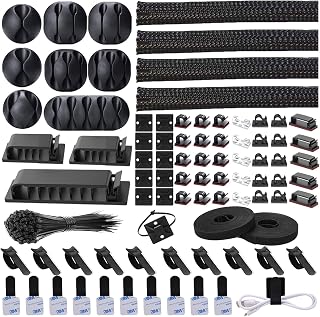
This 192-piece cable management kit centers around four 20-inch wire organizer sleeves made from polycarbonate, delivering a comprehensive solution for desk cable chaos. The modern black design keeps wires bundled along desk edges, monitor stands, and under work surfaces without creating visual distraction. Polycarbonate construction provides durability and structure while remaining flexible enough to route around obstacles. The kit approach means you receive not just the sleeves but a full set of accessories to secure, route, and organize cables at every point along your desk setup. Four separate sleeves give you the flexibility to manage cables in zones rather than forcing everything into one long run, which works well for L-shaped desks or setups where cables emerge from multiple locations. Each 20-inch sleeve handles a section of your workspace, and the 0.4-inch width accommodates typical USB cables, HDMI connections, and power cords in small to moderate bundles. The polycarbonate material holds its shape better than fabric sleeves, preventing sagging when mounted horizontally along desk edges. The black finish integrates cleanly with most office furniture and electronics without clashing with different wood tones or metal accents.
This kit contains 192 pieces total: 4 braided cable sleeves (20 inches long), 20 reusable wire ties, 35 cable clips in 6 different styles, 11 cord holders, 2 self-adhesive tie rolls (118 inches each), 20 cable zip tie mounts, and 100 cable fastening ties. Available in black and transparent colors to blend with your setup.

Pros
- Versatile mounting system adapts to various desk thicknesses without drilling
- Flame-retardant fabric adds genuine safety benefit over standard plastic trays
- Generous interior space accommodates realistic cable volumes from modern offices
- Complete kit includes all hardware and cable management accessories needed
- Eliminates visible cable clutter for cleaner, more professional workspace aesthetics
Cons
- No customer reviews available to validate real-world durability or cable capacity claims
- Fabric construction may require occasional cleaning to maintain appearance compared to solid trays
- 28.6 inch length may not suit desks wider than 36 inches without additional units
The Cotohim under-desk cable tray addresses a persistent pain point in modern workspaces: messy, tangled cables that clutter desks and create safety hazards. This product is ideal for home offices, standing desk setups, and professional environments where cable management impacts both aesthetics and functionality.
The standout feature is its flame-retardant Oxford fabric construction, which genuinely differentiates it from typical plastic cable organizers. Beyond safety benefits, the thickened material feels substantial and durable. The 28.6 x 5.6 inch tray offers genuine capacity for power strips, extension cords, adapters, and multiple cable runs without overcrowding, making it practical for reality rather than simplified desk setups.
Installation flexibility is another strength. The dual clamp and screw-mount system works on desks ranging from 0.4 to 2.4 inches thick, eliminating the need to drill holes or permanently modify furniture. The included hardware, 12 cable ties, and fiber tubes make setup a true plug-and-play experience without hidden costs or additional purchases.
The main limitation is the lack of customer feedback to validate long-term durability and maximum safe cable capacity. The fabric may require occasional cleaning to maintain appearance, and the 28.6 inch length works best for standard desk widths, though multiple units can be combined for wider surfaces.
For anyone tired of visible cable mess and concerned about workspace safety, this is a straightforward, well-designed solution backed by solid construction and practical thinking about how cables actually exist in modern offices.
Dimensions: 28.6 inches L x 5.6 inches W
Material: Flame-retardant Oxford fabric
Mounting: Clamp-on or screw-in brackets for desks 0.4 to 2.4 inches thick
Compatibility: Works with standard office desks, standing desks, and adjustable surfaces
Included Accessories: 1 cable tray, 2 hardware brackets, 2 fiber tubes, 12 cable ties
Warranty: 2-year manufacturer warranty
Color: Black
Installation: No drilling required for clamp mounting option

Pros
- Dramatically improves desk aesthetics by completely concealing cable clutter from view
- Flexible fabric construction adapts to bulky cables and power supplies unlike rigid metal trays
- Quick access with pull tab design lets you modify your setup without full disassembly
- No-drill clamp option makes installation fast and leaves furniture damage-free
- Works on wood, glass, metal, and mixed material desktops
Cons
- Requires minimum 5.3 inches of clearance along table edges and cannot be used on desks with built-in drawers or back rods
- Large power outlets or unusually wide adapters may hang partially outside the tray due to limited width
- Installation clips take up space on top of the desktop, so complete invisibility is not possible
The Univivi Under Desk Cable Management Tray is a premium organizational solution designed for office workers, remote professionals, and anyone frustrated with tangled cables and messy power strips cluttering their workspace. This 36-inch fabric tray sits beneath your desk to consolidate all your cables, adapters, and power supplies into one hidden, accessible location.
The standout feature is the innovative fabric construction combined with dual installation options. Unlike mesh baskets or metal cable boxes, the premium 600D Oxford fabric completely conceals everything inside while remaining flexible enough to accommodate oversized power bricks and unusual adapter shapes. The clamp-on installation requires no drilling, making it ideal for renters or those protecting expensive furniture. When you do need to modify your cable setup, the unfold design and built-in velcro straps make changes quick and painless compared to permanent cable management solutions.
Build quality is excellent throughout. The thick Oxford fabric is flame-retardant for safety, the clamps are heavy-duty for reliable weight capacity, and the reinforced bottom support maintains shape even when loaded with multiple power strips. At 36 inches long and 5.5 inches wide, it accommodates full-size power strips and iMac power adapters that smaller cable organizers simply cannot handle. The high-contrast pull tab is thoughtfully designed for quick access.
Two practical limitations warrant mentioning. First, this product requires at least 5.3 inches of clearance along your table edges and cannot work on desks with built-in drawers or back supports. Second, the installation clips occupy space on your desktop surface and cannot be completely hidden, so the setup is nearly invisible rather than invisible. Some bulky power outlets may hang partially outside the tray due to the 5.5-inch width.
For anyone tired of cable clutter, this is the most effective under-desk solution available. It transforms desk appearance while keeping everything functional and easily accessible. At this price point, the premium fabric and installation flexibility make it worth the investment over cheaper mesh alternatives that still look messy.
Dimensions: 36 inches long x 5.5 inches wide x 5.5 inches high
Material: 600D Oxford fabric, flame-retardant
Installation: No-drill clamp mount or traditional screw fixing
Weight Capacity: Designed for power strips, adapters, and multiple cables with reinforced bottom support
Compatibility: Wood tables, glass tables, metal tables, and mixed materials
Warranty: 1 year manufacturer warranty
Model: UN1174 (ASIN: B0DK13ZHNJ)
Package Contents: 1 cable management tray with mounting hardware and built-in velcro straps
Before You Start: Measure your desk and ensure at least 5.3 inches of clearance along the edges. Verify your desk has no built-in drawers or back rods that would interfere with the tray placement.
No-Drill Installation: Attach the heavy-duty clamps to your desk underside without tools or drilling. This method works on any table material and is completely reversible, making it perfect for renters or anyone hesitant about permanent installation.
Screw Fixing Installation: Use traditional screws to permanently secure the tray for maximum stability. This method is ideal for dedicated workspaces where you won't be moving the tray.
Cable Organization: Unfold the tray for easy access. Use the built-in velcro straps to secure heavier power supplies and bricks. Route cables through the tray and use the included ties to bundle and organize them. Close the tray when complete. The setup takes approximately 30 minutes on average.
Maintenance: The fabric is durable and easy to clean. Check periodically to ensure clamps remain tight and velcro straps are still functional.

Pros
- Generously sized at 32x32 inches, easily accommodates dual surge protectors plus numerous cables
- Dual mounting options with C-clamps allow damage-free installation on any desk surface
- Ventilated structure with good airflow keeps power strips cool and extends equipment lifespan
- Solid steel construction feels premium and resists wobbling even when fully loaded
- Simple assembly and easy cable routing with oversized holes make setup quick
Cons
- Limited to under-desk installation, not suitable for wall or vertical mounting scenarios
- Requires ongoing cable organization with velcro straps, won't automatically manage messy wiring
- Heavy at 2.45 kg, so installation with C-clamps requires proper support brackets for stability
The Univivi Under Desk Cable Management Tray is a 32x32 inch steel organizer designed for anyone tired of visible cable clutter. Whether you work from home, manage a corporate desk, or use multiple devices simultaneously, this tray creates order beneath your workspace while keeping wires out of sight.
What sets this tray apart is its practical versatility. The dual mounting system using either C-clamps or screws means you can install it without damaging your desk surface. Once mounted, the enlarged cable holes and front-and-back access let you route power cords, chargers, and data cables however works best for your setup. Users consistently praise its sturdy build and ability to hold multiple surge protectors without wobbling.
Build quality impresses across the board. The durable steel material feels substantial without being unwieldy, and the ventilated hollow structure allows airflow around your power strips to prevent overheating. At 32x32 inches, it provides ample space for the cables most people actually use daily, from power strips to USB chargers to peripherals.
The main limitation is that this tray only works as an under-desk solution. It's also not a complete cable management system on its own, you'll still need to organize individual cables with velcro straps or clips. Additionally, at 2.45 kg, the weight means C-clamp installation needs to be done carefully to ensure stability.
For anyone seeking a reliable way to eliminate cable chaos while protecting against tripping hazards, this tray delivers. The combination of smart design, solid construction, and practical installation options makes it a smart investment for organized workspaces.
Dimensions: 32 inches L x 32 inches W
Material: Durable steel with ventilated design
Weight: 2.45 kg
Color: Black
Installation Types: C-clamp (no-drill) or screw mount
Model Number: UN1450
Warranty: 1 year
Best Sellers Rank: Number 4 in Computer Racks and Cabinets category
Usage: Indoor home and office environments
Who Should Buy This: Home office workers, corporate employees, gamers with multiple peripherals, and anyone managing a desk with power strips and numerous cables. Perfect for creating a clean, safe workspace.
Installation Considerations: Choose C-clamps for damage-free mounting on desks you don't own or want to protect. Choose screws for maximum stability if you own your desk and want permanent installation.
Space Requirements: Ensure your desk has at least 32x32 inches of clearance underneath. The tray works best with desks that have open space below the surface.
Cable Management Tip: Pair with velcro cable straps or clips to organize individual cables within the tray for optimal neatness and easier future access.
What to Consider When Choosing Cable Management
Installation Method and Desk Compatibility
No-drill clamp systems work beautifully for renters or anyone who wants to avoid permanent modifications. The No Drill Under Desk Cable Management Tray and Cable Management, 25” Cable Management Under both use adjustable clamps that grip desk edges from 0.4 to 2 inches thick.
Check your desk thickness before purchasing. Glass desks, standing desks with adjustable frames, and conference tables all present different challenges. Some systems like the Under Desk Cable Management Tray offer dual installation options with both clamp and screw mounting for maximum versatility across desk types.
Load Capacity and Material Construction
Metal trays handle heavier loads than fabric alternatives. The No Drill Under Desk Cable Management Tray uses carbon steel construction and supports over 50 pounds, making it ideal for multiple power strips and large adapters.
If you’re managing a powerful gaming PC build or workstation with numerous peripherals, prioritize sturdy metal mesh designs. The open structure promotes airflow while preventing power strips from overheating. Fabric options like the Univivi No Drill Under Desk Cable Management Tray use flame-retardant Oxford cloth and work well for lighter setups with standard office equipment.
Size and Cable Routing Flexibility
Measure your desk width and count your devices before selecting a tray size. The No Drill Under Desk Cable Management Tray extends from 17 to 30.3 inches, accommodating narrow-edged desks and wall-facing setups. Larger desks benefit from the Univivi No Drill Under Desk Cable Management Tray at 36 inches long.
Look for designs with side access holes or open-end construction. These features let you route cables without removing the entire tray, saving time when you add new devices or rearrange your setup. The Cable Management, 25.3” Under Desk Cable includes two large access holes specifically designed for easy cord routing.
Specialized Solutions for Specific Needs
Not every workspace requires a full under-desk tray. The Alex Tech 10ft – 1/2 inch Cord Protector Wire Loom offers split-sleeve cable bundling that protects individual cords from wear and keeps pets from chewing. This approach works perfectly for managing cables that run along walls or behind furniture.
For minimalist setups or tight spaces where trays won’t fit, the Cable Management Under Desk provides 20 pairs of hook-and-loop holders that mount directly under your desk surface. The N NOROCME 192 PCS Cable Management Kit 4 Wire combines multiple solutions in one package with sleeves, clips, ties, and holders for comprehensive organization across your entire workspace. If you’re building a complete workstation with a high-performance graphics card, these modular systems adapt as your cable needs evolve.
Final Thoughts
Effective cable management improves both aesthetics and safety while making future upgrades simpler. For heavy-duty needs with multiple power strips and adapters, the GOENDR No Drill Under Desk Cable Management Tray delivers exceptional strength and adjustability. If you prefer a fabric solution with foldable convenience and dual installation options, the Univivi 36-inch Cable Management Tray provides excellent capacity and heat dissipation. Choose based on your desk size, device count, and whether you need the flexibility to frequently access or rearrange your cables.
Frequently Asked Questions
What is the best way to organize cables under a standing desk?
Standing desks require cable management that moves with the desk without creating tension or tangling. Clamp-mounted metal trays work best because they attach to the underside and adjust height with your desk. Look for designs with open sides that allow cables to route freely as the desk rises and lowers. Avoid solutions that attach to the floor or wall, as these create cable strain during height adjustments.
How do I keep power strips from overheating in cable trays?
Choose cable trays with mesh or ventilated designs rather than solid enclosures. Open-wire construction allows continuous airflow around power strips and adapters. Never stack power strips directly on top of each other inside the tray. Position them side by side with space between units, and use included cable ties to prevent cords from blocking ventilation holes. Metal trays dissipate heat better than fabric alternatives for high-wattage setups like gaming rigs with powerful GPUs.
Can cable management systems damage my desk?
Quality clamp-mounted systems include rubber or silicone pads that protect desk surfaces from scratches and pressure marks. Verify that clamps have protective padding before purchasing. Screw-mounted options create permanent holes, so reserve these for desks you own rather than rental furniture. If you have a glass desk, confirm the clamp pressure is adjustable to avoid cracking, and always distribute weight evenly across mounting points.
What cable management works best for small desks in 2026?
Small desks benefit from compact solutions that don’t consume valuable legroom. Hook-and-loop strips that mount flush against the underside take up minimal space while keeping cables organized. Short cable trays between 17 and 20 inches fit narrow desks without extending beyond the edges. For extremely limited spaces, consider vertical cable sleeves that bundle cords along desk legs instead of horizontal trays. Modular systems let you scale the solution to match your exact desk dimensions rather than forcing oversized equipment into tight quarters, similar to choosing the right motherboard size for compact builds.




Write Your Review
No reviews yet. Be the first to share your experience!