

Black Friday is the one time of year when you can finally justify upgrading your keyboard without second-guessing the decision. Whether you’re pushing for better reaction times in competitive shooters or just want a more satisfying daily driver, the right keyboard makes a real difference. If you’re building out your setup, it’s worth pairing your new keyboard with other great gear, like a strong pick from our guide to the best PC speakers for gaming.
This roundup covers six keyboards across a range of layouts, switch technologies, and use cases. From budget-friendly combos to performance-focused Hall Effect boards, there’s something here for every kind of player.
Quick answer
This guide compares 6 picks, with Corsair K55 CORE TKL RGB Gaming Keyboard - Compact ranked first. AULA F75 Pro 75% Hot Swappable Wireless Mechanical has the most customer reviews.
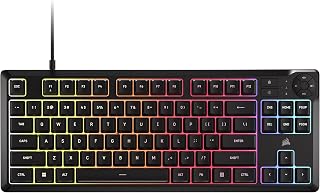
Budget-conscious deal hunters who still want a full gaming feature set will find the 8-zone RGB, dedicated media keys, and 1000Hz polling rate cover the essentials without overcomplicating things. The tenkeyless membrane design stays quiet for shared spaces, and spill resistance adds peace of mind for anyone gaming with a drink nearby, making it an easy entry point this Black Friday.
Pros
- Compact tenkeyless layout frees up mouse space
- Quiet membrane keys for shared spaces
- 300mL spill resistance protects your setup
- 1000Hz polling and 12-key rollover for fast input
Cons
- Membrane switches wear faster than mechanical ones
- 8-zone RGB is less precise than per-key lighting
If you are scanning Black Friday keyboard deals to free up desk space for your mouse arm, the K55 CORE TKL is built for exactly that. Dropping the number pad shrinks the footprint without cutting the keys gamers actually use, so competitive and FPS players get more room to swing without upgrading their whole setup. The quiet membrane switches mean late night sessions will not disturb roommates or family, and 300mL spill resistance is a nice bit of insurance for anyone gaming near a drink. A 1000Hz polling rate and 12 key rollover keep inputs registering fast when matches get chaotic. Build quality holds up well for a budget deal grab, with a durable plastic shell, tangle free 6 foot cable, and adjustable feet. The 8 zone RGB via iCUE lets you add some flair, even if it is not per key precise. For anyone treating this Black Friday as a chance to move to a smaller, cleaner gaming station, this is a low risk pick worth grabbing.
Good for FPS and esports focused gamers who want extra mouse space, plus students or anyone with a tight desk who still wants gaming features. Skip it if you rely on a number pad daily or want per key RGB customization. Also skip if you specifically want mechanical switch feel, since these are membrane keys that will wear faster than mechanical alternatives over heavy long term use.
Layout and Design: Tenkeyless form factor with 87 keys, compact dimensions of 14.56 inches wide by 5.56 inches deep.
Backlighting: 8-zone RGB with 16.8 million colors, per-zone programmable through iCUE software.
Performance: 1000Hz polling rate, 12-key selective rollover, responsive membrane switches.
Connectivity: USB 2.0 Type-A with 6-foot cable, compatible with Windows PC.
Controls: Four dedicated media hotkeys (play/pause, mute, volume up/down), brightness adjustment, Windows lock key, adjustable height.
Durability: 300mL spill resistance, 2-year manufacturer warranty.

Anyone hunting Black Friday keyboard deals wants versatility across setups, and this one delivers with 2.4GHz wireless, BT5.0, and USB-C connectivity plus compatibility across console, PC, laptop, and mobile. The hot-swappable design with pre-lubed linear switches means gamers can tune feel without soldering, while the 75% layout and knob keep desk space tight without sacrificing control.
Pros
- Tri-mode connectivity works across PC, console, and mobile devices
- Hot-swappable sockets allow switch changes without soldering
- Knob conveniently toggles between RGB brightness and volume control
- PBT keycaps resist wear and sweat better than typical ABS
Cons
- Advanced customization depends on driver software that varies by OS
- Water-repellent coating is not the same as full submersion protection
If you're comparing Black Friday keyboard deals and want one board that covers every setup you own, the AULA F75 Pro earns a spot on the shortlist. It runs on 2.4GHz wireless, Bluetooth 5.0, or USB-C, so it moves between PC, console, laptop, tablet, and phone without a second thought. The 75% layout keeps a full function row while staying desk-friendly, and pre-lubed Reaper linear switches feel smooth out of the box. Hot-swap sockets mean any switch upgrades you pick up later drop right in, no soldering required. The knob doubles as an RGB brightness dial in gaming mode and a volume control in office mode, cutting down on menu digging. Side-printed PBT keycaps resist shine and sweat better than standard ABS. With a rechargeable battery for wireless stretches and a water-repellent build for peace of mind, it's a well-rounded deal pick for anyone wanting one keyboard to replace several.
The hot-swappable design is a major strength for users wanting to personalize their typing experience. The keyboard supports both 3-pin and 5-pin switches, accommodating most mechanical switch types on the market. The included LEOBOG Reaper switches are pre-lubricated and tuned for a linear, creamy response that appeals to both typists and gamers. Two spare Reaper switches come in the box, letting you experiment or prepare for future replacements.
The programmable key functionality and macro support open creative possibilities for gamers and professionals alike. Through the driver software, you can remap keys, create key combinations, and set up context-specific macros. The N-key rollover ensures simultaneous key presses register accurately, critical for competitive gaming. Windows lock prevents accidental touches during intense gaming sessions, protecting your in-game focus.
Tri-mode connectivity is exceptionally practical in today's multi-device world. Pair the F75 Pro with your PC, laptop, tablet, and smartphone simultaneously, then switch between them using convenient shortcut keys or the side button. The 2.4GHz wireless mode delivers millisecond responsiveness suitable for gaming, while Bluetooth 5.0 handles everyday mobile needs with lower power consumption. USB-C wired connection provides a reliable fallback with zero latency.
The 4000mAh rechargeable battery balances capacity and charging speed for real-world use. Battery life depends on usage patterns and lighting settings, but the large capacity supports several days of typical use between charges. The included USB-C cable handles both charging and wired connectivity, eliminating cable clutter.

Shoppers looking to upgrade to a trusted gaming brand during Black Friday will appreciate the linear and silent yellow switches paired with sound dampening and stabilizers, delivering fast actuation without the usual mechanical clatter. Doubleshot ABS keycaps resist shine over years of use, and Chroma RGB lets buyers match an existing battlestation aesthetic without compromising on typing feel.
Pros
- Yellow linear switches offer fast, quiet actuation with sound dampening
- Six dedicated macro keys plus media roller for quick control
- Doubleshot ABS keycaps resist legend wear over time
- Per-key Chroma RGB with broad game integration
Cons
- No water resistance, so spills pose a real risk
- Wired only, which some players may find limiting
Among Black Friday gaming keyboard deals, the Razer BlackWidow V4 X stands out for buyers who want a recognizable, proven brand without paying for extras they won't use. Yellow linear switches use a 1.2mm actuation distance and 45g actuation force, giving quick, consistent response for competitive titles, while built-in sound dampeners keep the clatter down compared to typical mechanical boards. Six dedicated macro keys and a media roller let you handle complex inputs and quick volume or brightness adjustments without leaving the keyboard. Doubleshot ABS keycaps are molded so legends won't fade with heavy use, and lubricated stabilizers plus internal foam cut down on rattle. Per-key Chroma RGB lighting adds visual flair and syncs with a wide range of games. At 2.5 pounds with a full 104-key layout, it feels substantial on the desk. For gamers who want a trusted name at deal pricing without chasing niche features, this is a solid stop.
Switch Type: Razer Yellow Mechanical Linear, 1.2mm actuation distance, 45g actuation force, silent with sound dampeners
Backlighting: Per-key RGB, 16.8 million colors, Chroma integration
Keys and Controls: 104-key QWERTY layout, 6 dedicated macro keys, multi-function roller, secondary media keys
Keycaps: Doubleshot ABS with extra-thick walls, doubleshot molding for durability
Connectivity: Wired USB (Corded Electric)
Compatibility: Windows 11, macOS 14 Sonoma, Linux, Android
Dimensions: 20.5 inches L x 8 inches W x 2 inches H
Weight: 2.5 pounds
Materials: ABS plastic enclosure, lubricated stabilizers, foam sound dampening layer
Warranty: 2-year manufacturer warranty
Model: RZ03-04701900-R3U1

Pros
- Affordable all-in-one combo saves money versus buying keyboard and mouse separately
- Excellent ergonomic design with scientific key layout minimizes wrist and hand strain
- Vibrant RGB lighting with multiple customization options enhances gaming atmosphere and workspace aesthetics
- Cross-platform compatibility works seamlessly with all major operating systems without software installation
- High-quality construction using ABS plastic and double-shot molding ensures long-term durability
Cons
- Wired connection limits desk flexibility compared to wireless alternatives
- Budget-tier components may not match mechanical keyboard enthusiasts' expectations for tactile feedback
- Limited information on switch type and actuation force specifications from product data
The MageGee K1 is a full-size gaming keyboard paired with an optical mouse, designed for gamers and office workers seeking an affordable, all-in-one input solution. The combo delivers a complete package with plug-and-play setup that requires no drivers or software, making it instantly accessible across Windows, Mac, and Linux systems.
The keyboard excels with its ergonomic design featuring scientifically arranged high-and-low keycaps that naturally align with hand contours, reducing fatigue during extended use. The RGB backlighting offers 8 colors and 5 different modes with adjustable brightness and speed, letting users customize their setup to match their gaming style or workspace atmosphere. The included optical mouse features 6 adjustable DPI levels (600 to 3200) with 7-color breathing LED effects, providing responsive performance for both competitive gaming and everyday tasks.
Build quality is solid for the price range, with ABS engineering plastic construction, waterproof USB cabling, gold-plated connectors, and an anti-interference magnet ring ensuring stable data transmission. The keyboard features non-slip pads on the bottom and double-shot injection molded keycaps that resist fading and maintain clear letter visibility even in low-light conditions. The floating keycap design allows for easy cleaning and customization.
The main limitation is the wired connection, which restricts desk mobility compared to wireless alternatives. Additionally, as a budget-tier product, it may not satisfy mechanical keyboard enthusiasts seeking specific switch types or deeper customization. However, for the price point, the K1 delivers impressive value with reliable components and thoughtful ergonomic design.
The MageGee K1 is an excellent choice for budget-conscious gamers, office workers, and anyone needing a dependable combo input device. It balances affordability with practical features like ergonomic comfort, customizable RGB lighting, and cross-platform compatibility, making it a smart value purchase in the gaming peripherals market.
Keyboard Specifications: 104-key full-size QWERTY layout, USB wired connection, RGB backlighting with 8 colors and 5 modes, adjustable brightness and speed settings, double-shot injection molded keycaps, non-slip base pads, compatible with Windows XP/Vista/7/8/10, Mac, and Linux.
Mouse Specifications: Optical movement detection, 6 adjustable DPI levels (600/800/1200/1600/2400/3200), 7-color breathing LED backlight with lockable color selection, high-speed USB transmission technology, ambidextrous design.
Connectivity: USB 2.0 wired, gold-plated connectors, waterproof cable, anti-interference magnet ring. Build: ABS engineering plastic, floating keycaps, transparent base. Weight: 2 pounds. Model: MageGee K1.
Who Should Buy: The MageGee K1 is ideal for budget-conscious gamers, students, office workers, and anyone needing a reliable wired keyboard-mouse combo. It works well for casual to moderate gaming, programming, content creation, and general computing tasks where wired connectivity is acceptable.
Who Should Reconsider: Mechanical keyboard enthusiasts seeking tactile feedback and specific switch types may want to explore premium options. Users requiring wireless convenience or ultra-low latency for professional esports competition should consider alternatives, though this combo performs well for casual competitive gaming.
Setup and Features: Simply plug in the USB connector and start typing or gaming, no installation required. Customize RGB lighting and mouse DPI using onboard controls. The combo works across all major operating systems, making it versatile for multi-OS households or dual-boot setups.

Competitive gamers scanning holiday deals for a serious upgrade will notice the Hall Effect magnetic switches with adjustable actuation and 8000Hz polling rate, specs that translate directly into faster, more precise inputs for ranked play. The compact 60% layout and hot-swappable sockets add flexibility, making this a strong pick for anyone chasing performance gains over a stock keyboard this Black Friday.
Pros
- Hall Effect switches allow adjustable actuation for tuned responsiveness
- 8000Hz polling rate supports minimal input lag
- Compact 60% layout frees up desk space for mouse movement
- Hot-swappable sockets allow future switch experimentation
Cons
- 60% layout omits numpad, arrow keys, and function row
- Wired only, with no wireless connectivity option
For shoppers hunting Black Friday keyboard deals with an eye on raw responsiveness, the AULA WIN68 HE brings Hall Effect magnetic switches to a compact 60% frame, a feature usually reserved for pricier boards. Magnetic switches allow adjustable actuation points, so you can tune trigger sensitivity to match your reflexes or the game you're playing, and the 8000Hz polling rate keeps input lag to a minimum for competitive play. The hot-swappable design leaves room to experiment with different switches down the line without extra tools. RGB backlighting and programmable keys round out the customization options, while the tiny footprint frees up desk space for mouse movement, a real advantage in fast-paced shooters. It connects over USB-C for a stable wired link. If you're comparing deals purely on performance features per dollar, this is one of the more feature-dense options in the 60% category this Black Friday.
Technical Specs: 68-key 60% layout, Hall Effect magnetic switches with 0.02mm-3.44mm adjustable actuation, 8000Hz polling rate, 0.3ms response latency, USB-C wired connection.
Lighting: 16.8 million RGB colors, 14 preset effects, south-facing LEDs, adjustable brightness via driver or FN combinations.
Physical: Dimensions 14"L x 6"W x 1.7"H, weight 686g, plastic enclosure, contemporary black styling.
Compatibility: Windows PC and laptops, USB-C connectivity, includes 2 extra magnetic switches, keycap puller, portable ribbon cable, and standard USB cable.
Support: 6-month manufacturer warranty, web-based driver customization (Windows only, no macOS support).
Best suited to competitive gamers who want adjustable actuation and fast polling on a minimal desk footprint. Also works for anyone curious about Hall Effect switches without committing to a full-size board. Skip it if you rely on a numpad, dedicated arrow cluster, or function row for productivity work, since the 60% layout drops those keys entirely, or if you need wireless freedom, as this model is wired only.

Pros
- Keyboard and mouse bundled together, covering a full setup in one deal
- Compact 65% layout saves desk space while keeping arrow keys
- 7200 DPI mouse with adjustable presets for different game genres
- Durable braided cables on both devices
Cons
- Membrane switches lack the response hardcore gamers expect from mechanical boards
- Wired-only design limits movement compared to wireless combos
If you're hunting Black Friday keyboard deals mainly to upgrade from a cramped laptop setup or a worn-out office board without spending big, this combo is worth a look. The GEODMAER skips the usual Black Friday trap of a flashy keyboard with no supporting gear by bundling in a 7200 DPI mouse too, so you're not shopping for a second item afterward. The 68-key 65% layout saves desk space while keeping arrow keys accessible through key mapping, which matters if your gaming area doubles as a work desk. RGB backlighting with two-color molded keycaps gives it the lit-up look people expect from a gaming deal, even at this end of the price range. Membrane switches won't satisfy anyone chasing mechanical-level feedback, but for a seasonal upgrade aimed at casual or new PC gamers, the tactile response holds up fine. Braided 1.8m cables on both pieces add durability that budget bundles sometimes skip. For shoppers who want a complete, functional setup rather than a single splashy component, this earns its spot on a Black Friday shortlist.
Keyboard: 65% compact layout, 68 keys, QWERTY, RGB backlighting with 16.8 million colors, USB wired connection, 1.8m braided cable, quiet membrane switches, compatible with Windows.
Mouse: 7200 DPI maximum, preset DPI settings at 400/800/1200/1600/2400/3200, ergonomic design, USB wired connection, 1.8m braided cable, customizable key functions via driver software.
General: Color: Black and Gray, Total weight: 1.4 pounds, Connectivity: USB (wired), Operating System: Windows compatible, Warranty: 3-year manufacturer coverage, Includes both keyboard and mouse in one pack.
Good for budget-conscious shoppers, students, or newcomers to PC gaming who want a complete keyboard and mouse upgrade in one purchase, especially in tight spaces like dorms or small desks. Skip it if you're a competitive or hardcore gamer wanting true mechanical switches or wireless freedom, or if you already own a mouse and only need a keyboard, since the bundled pricing logic won't apply.
Gaming Keyboard Buying Guide
Layout: Full Size, 75%, or 60%?
Your desk space and play style should drive this decision. A full-size board like the Gaming Keyboard and Mouse Combo gives you a number pad and all function keys within reach, which is great for productivity alongside gaming. If you want more room for wide mouse movements, a compact option like the Corsair K55 CORE TKL RGB Gaming Keyboard cuts the numpad without sacrificing the core layout.
Going even smaller with a 60% or 65% layout saves maximum desk space and is a popular choice for players who rely on muscle memory. The AULA WIN68 HE Mechanical Gaming Keyboard 60% and the GEODMAER 65% board both deliver that compact footprint while keeping arrow keys accessible.
Switch Type: Membrane, Mechanical, or Hall Effect?
Membrane keyboards are quieter and generally more affordable, making them ideal for shared spaces or casual gaming. The Corsair K55 CORE TKL uses whisper-quiet membrane keys that are easy on the ears during long sessions.
Mechanical switches offer tactile feedback and durability that serious gamers prefer. The AULA F75 Pro Wireless Mechanical Keyboard,75% Hot goes further with hot-swappable sockets, so you can swap in your preferred switches without soldering. Hall Effect magnetic switches, found on the AULA WIN68 HE, are a step above standard mechanical: they use magnets instead of physical contacts, delivering adjustable actuation and virtually unlimited lifespan. If competitive precision is your priority, Hall Effect is the technology to look for in 2026.
Wired vs. Wireless Connectivity
Wired keyboards offer zero latency and no battery concerns, which is why most competitive players still reach for a cable. The AULA WIN68 HE and the GEODMAER 65% Gaming Keyboard and Mouse Combo both use reliable wired USB connections with no setup required.
Wireless options have closed the gap significantly. The AULA F75 Pro supports Bluetooth 5.0, 2.4GHz wireless, and USB-C wired all at once, letting you connect up to five devices simultaneously. Its large-capacity battery means you won’t be hunting for a cable mid-session. For a multi-device household or a clean desk aesthetic, a tri-mode board is worth considering. You can build out a complete wireless setup by also checking our picks for the best portable SSD for gaming.
RGB Lighting and Software Customization
RGB lighting has moved well beyond aesthetics. Per-key lighting with software control, like what the Razer BlackWidow V4 X Mechanical Gaming Keyboard offers through Chroma RGB, lets you set up game-reactive effects and color-coded key zones for different in-game actions.
Even budget-friendly options now include solid RGB. The GEODMAER 65% Gaming Keyboard uses 16.8 million color backlighting through two-color injection-molded keycaps, so the legends stay clear in the dark. If software customization matters to you, look for keyboards with dedicated drivers that support macro programming, remapping, and lighting profiles, as seen on both the AULA F75 Pro and the AULA WIN68 HE. For anyone building a full home office rig, pairing a great keyboard with other smart upgrades, like a fast drive from our best PCIe 4.0 SSD roundup, keeps your whole system responsive.
Final Thoughts
Black Friday gaming keyboard deals cover a wide spectrum this year, and the right choice comes down to how you play. If you want a reliable, feature-packed wireless board for multi-device flexibility, the AULA F75 Pro Wireless Mechanical Keyboard,75% Hot delivers impressive value with its hot-swap support and tri-mode connectivity. For competitive players who want cutting-edge precision in a compact form, the AULA WIN68 HE Mechanical Gaming Keyboard 60% stands out with its Hall Effect switches and 8000Hz polling rate. Both are strong picks heading into 2026.
Frequently Asked Questions
Are gaming keyboard Black Friday deals actually worth it?
Yes, Black Friday consistently surfaces real discounts on gaming peripherals, including keyboards from well-known brands like Corsair, Razer, and AULA. The deals in 2026 span entry-level membrane boards all the way to advanced Hall Effect mechanical keyboards. Shopping during this window is one of the best times to upgrade without overspending.
What is a Hall Effect keyboard and do I need one?
A Hall Effect keyboard uses magnetic sensors instead of physical switch contacts to register keystrokes. This allows adjustable actuation points down to fractions of a millimeter and a much longer lifespan than traditional mechanical switches. If you play fast-paced competitive games where rapid re-triggers matter, a Hall Effect board like the AULA WIN68 HE is worth the upgrade. Casual gamers and typists will do just fine with a standard mechanical or membrane option.
Is a keyboard and mouse combo a good Black Friday buy?
Combos are a smart pick for first-time PC builders or anyone who needs to replace both peripherals at once. The MageGee Gaming Keyboard and Mouse Combo and the GEODMAER 65% Gaming Keyboard and Mouse Combo both offer matched RGB aesthetics and solid performance right out of the box. You can always upgrade individual components later as your preferences evolve. For more ways to complete your gaming station, browse our full electronics category for deals on monitors, headsets, and more.
What keyboard layout is best for gaming in 2026?
There is no single best layout, it depends on how much desk space you have and whether you need a number pad for work. The 75% layout, as seen on the AULA F75 Pro, is widely regarded as the sweet spot because it keeps arrow keys and some function row keys while staying compact. If you game exclusively and want maximum mouse room, a 60% or 65% layout is the go-to choice for most competitive players.




Write Your Review
No reviews yet. Be the first to share your experience!