

Black Friday 2026 delivers some of the most competitive pricing on gaming monitors all year. Whether you’re building a new rig around the latest GPU or upgrading from a dated 1080p panel, now is the time to invest in a display that can keep pace with modern titles. This guide covers six carefully selected monitors ranging from budget-friendly 27-inch QHD panels to immersive ultrawide curved displays, all offering high refresh rates and adaptive sync for tear-free gameplay.
We’ve focused on models that balance performance, image quality, and value. If you’re pairing your new monitor with a high-end graphics card, check out our guide to the best GPU under $500 to ensure your system can drive these displays at their full potential.
Quick answer
This guide compares 6 picks, with Samsung 27 Odyssey G5 QHD 1440P 180Hz Gaming Monitor ranked first. Sceptre 34in Curved Ultrawide Gaming Monitor 3440x1440 has the most customer reviews.
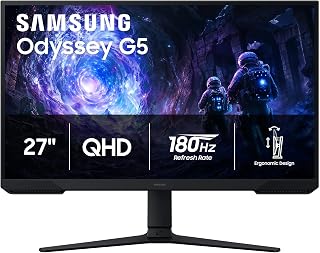
The Odyssey G5 delivers smooth gameplay with its 180Hz refresh rate, eliminating motion blur during fast-paced action sequences that define modern gaming. The VA panel's 3000:1 contrast ratio produces deeper blacks and more vivid colors than typical gaming monitors, enhancing immersion in dark scenes and atmospheric titles. Its QHD resolution at 27 inches strikes an ideal balance between visual clarity and performance demands, allowing most graphics cards to maintain high frame rates without sacrificing detail.
Pros
- 180Hz refresh rate with 1ms response time suits fast-paced competitive titles
- 3000:1 VA contrast ratio produces deep blacks that IPS panels cannot match
- Black Equalizer brightens shadowy areas for a practical competitive edge
- Fully adjustable stand with tilt, pivot, and height for flexible desk setups
Cons
- Full 180Hz benefit requires a mid-range or better GPU
- On-screen menu navigation is less intuitive than competing monitors
Black Friday is the right moment to pick up the Samsung Odyssey G5 G51F if you have been waiting for a 27-inch QHD monitor that holds its own in competitive gaming without flagship pricing. The 180Hz refresh rate and 1ms response time are a genuinely capable combination for reaction-heavy shooters like Valorant and Apex Legends, where frame timing matters. VA panel technology delivers a 3000:1 contrast ratio that makes dark environments look dramatically deeper than typical IPS alternatives, and HDR10 support adds further punch to highlights and shadows. The QHD 1440p resolution provides 1.7x more pixels than 1080p, so HUDs, text, and fine in-game detail all sharpen noticeably. AMD FreeSync keeps frame delivery tear-free across the refresh range. Practical touches round the package out: a matte finish cuts glare during long sessions, the stand supports tilt, pivot, and height adjustment, and the Black Equalizer lets you brighten shadowy areas to spot opponents more easily. Dual HDMI and DisplayPort inputs cover virtually every modern gaming setup.
Display: 27-inch QHD VA panel, 2560 x 1440 resolution, 16:9 aspect ratio, 178-degree viewing angles
Performance: 180Hz refresh rate, 1ms response time (MPRT), 300 cd/m brightness, 3000:1 contrast ratio
Features: HDR10, AMD FreeSync, Black Equalizer, matte screen finish
Connectivity: 2x HDMI, 1x DisplayPort, 1x power connector
Design: Adjustable stand with tilt, pivot, and height settings, desk mount, flat panel shape
Dimensions: 24.34 inches wide, 9.22 inches deep, 20.5 inches tall, 10.1 pounds
Power: 35 watts consumption, 240 volts
Warranty: 1-year manufacturer coverage

This AOC display pushes competitive gaming forward with a 240Hz refresh rate that can be overclocked to 260Hz, delivering ultra-responsive performance for esports titles where every millisecond matters. The IPS panel ensures accurate color reproduction and wide viewing angles, making it suitable for both intense gaming sessions and content creation. NVIDIA G-SYNC eliminates screen tearing, synchronizing the display with your GPU to maintain fluid visuals even when frame rates fluctuate during demanding gameplay.
Pros
- 240Hz overclocked refresh rate with 0.3ms MPRT delivers best-in-class motion clarity
- IPS panel provides accurate colors and wide viewing angles at QHD resolution
- G-Sync and Adaptive-Sync compatibility covers both major GPU ecosystems
- Three-sided frameless design with DisplayPort 1.4 and dual HDMI 2.0 connectivity
Cons
- No built-in speakers; requires headphones or external audio
- Stand offers tilt only, lacking height and pivot adjustment
For Black Friday shoppers targeting a monitor that excels at competitive speed without sacrificing image quality, the AOC Q27G41ZE is a strong contender. Its 1440p IPS panel running at 240Hz overclocked is a rare pairing at this segment, delivering both the pixel sharpness that QHD provides and the ultra-smooth motion that esports play demands. The 0.3ms MPRT response time keeps ghosting minimal even in the fastest sequences, and G-Sync compatibility alongside Adaptive-Sync means frame pacing stays clean regardless of whether you are on an NVIDIA or AMD system. IPS technology ensures wide 178-degree viewing angles and consistent color across the screen, which benefits creative work between gaming sessions. The three-sided frameless design gives a clean, premium look on any desk. Connectivity covers DisplayPort 1.4 and dual HDMI 2.0, accommodating consoles and PCs together. Shadow Control and Game Mode presets let you dial in settings per genre quickly. At 27 inches the 2560x1440 resolution hits a sweet spot for pixel density without demanding 4K-class GPU horsepower.
Display: 27-inch IPS, 2560x1440 QHD, 16:9 aspect ratio, 300-nit brightness, 1000:1 contrast ratio, glossy finish
Performance: 240Hz refresh rate (via DisplayPort), 0.3ms MPRT response time, Adaptive-Sync, G-Sync compatible
Connectivity: 1x DisplayPort 1.4, 2x HDMI 2.0, audio output jack
Design: Three-sided frameless, tilt adjustment from minus 3 to plus 21 degrees, textured black and red finish
Dimensions: 24.17 inches wide, 7.46 inches deep, 17.7 inches tall, 6.15kg weight
Features: Blue Light Filter, Flicker-Free, Shadow Control, Game Mode presets, graphical OSD menu
Warranty: 3-year manufacturer coverage
This monitor suits competitive PC gamers who want the fastest IPS refresh rate available at 1440p and already run a capable graphics card. It is a particularly smart Black Friday grab for players who alternate between esports titles and visually rich single-player games. Skip it if you need built-in speakers, rely on a basic stand with full ergonomic range, or are working with a budget GPU that cannot push 240Hz at 1440p.

The AW2725DM combines Fast IPS technology with 180Hz performance, offering rapid response times that reduce ghosting in motion-heavy games. Its WQHD resolution provides sharper visuals than standard 1080p while remaining easier to drive than 4K, making it practical for gamers seeking enhanced detail without extreme hardware requirements. G-SYNC compatibility ensures tear-free gameplay, while the matte screen surface minimizes distracting reflections during extended gaming marathons.
Pros
- Fast IPS panel balances 1ms response times with accurate color and wide viewing angles
- 95% DCI-P3 and DisplayHDR 400 make it useful beyond pure gaming
- NVIDIA G-SYNC support ensures smooth, tear-free output
- Matte finish reduces glare during extended gaming sessions
Cons
- Consistent 180Hz in demanding titles requires a mid-to-high-end graphics card
- Some users sensitive to pixel density may notice the grid at 1440p on a 27-inch panel
The Alienware AW2725DM earns its place on a Black Friday gaming monitor list by combining specs that are hard to fault at its tier. A fast IPS panel running at 180Hz with a 1ms gray-to-gray response time gives it the responsiveness competitive players want, while NVIDIA G-SYNC support ensures frame delivery stays tear-free regardless of what the GPU is rendering. Where it stands out against comparable deals is color fidelity: 95% DCI-P3 coverage and DisplayHDR 400 certification make it genuinely versatile for both gaming and content work, not just a spec-sheet checkbox. QHD 1440p at 27 inches hits a practical balance, sharpening detail over 1080p while keeping GPU demands achievable for mid-range cards such as an RTX 4070. The matte finish handles ambient light well for daytime gaming. Alienware's build quality is consistent, and the design language is distinctive without being garish. For shoppers using Black Friday to upgrade from a 1080p or 60Hz panel, this monitor covers multiple bases in one purchase.
Display: 27-inch QHD (2560 x 1440) IPS panel, 16:9 aspect ratio, matte finish
Refresh Rate: 180Hz
Response Time: 1ms gray-to-gray
Color Gamut: 95% DCI-P3
HDR: DisplayHDR 400 certified
Sync Technology: NVIDIA G-SYNC
Additional Features: Console mode, hardware blue light filter, VESA mountable
Brand: Alienware (Dell)
Gamers ready to step up from 1080p who want a single monitor that handles competitive multiplayer, AAA single-player titles, and light content creation will find this a well-rounded Black Friday pick. It pairs best with a mid-to-high-end GPU. Skip it if you need 240Hz for top-tier esports, or if wide color coverage and HDR are not priorities and you simply want the fastest refresh rate per dollar.
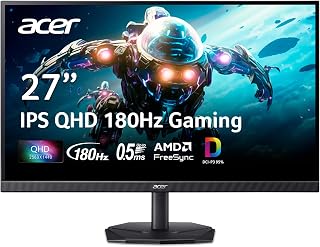
The Nitro series offers 180Hz refresh rates that bring noticeable smoothness to both competitive shooters and immersive single-player adventures. Its IPS technology delivers consistent colors and viewing angles superior to VA panels, beneficial when gaming from different seating positions or sharing gameplay with others. The QHD 2560x1440 resolution at 27 inches provides crisp text and detailed textures, enhancing visibility of distant enemies and environmental details crucial for strategic gameplay.
Pros
- 180Hz refresh rate with AMD FreeSync eliminates tearing in fast-paced games
- QHD 2560x1440 IPS panel with 178-degree viewing angles and consistent colors
- DCI-P3 95% and HDR 10 support extend usefulness to creative work
- Zero-frame bezel suits multi-monitor setups
Cons
- HDMI connectivity caps at 120Hz; DisplayPort required for full 180Hz
- Included stand is functional but less rigid than premium alternatives
Black Friday is the right moment to pick up a capable QHD monitor without overspending, and the Acer Nitro KG271U makes a strong case for the 27-inch sweet spot. The 2560x1440 IPS panel is a meaningful step up from 1080p, delivering noticeably sharper textures and UI detail in both competitive shooters and open-world titles. At 180Hz with AMD FreeSync, screen tearing disappears and motion stays clean during fast action. The 0.5ms gray-to-gray response time keeps up with even the quickest inputs. A 178-degree viewing angle means the image holds up whether you are sitting centered or off to one side, and the matte finish cuts down on reflections during long sessions. DCI-P3 95% coverage and HDR 10 support push it beyond pure gaming duty into photo and video work as well. The zero-frame bezel is a plus if you are planning a dual-monitor setup around the deal. One practical note: HDMI tops out at 120Hz, so pairing with a DisplayPort cable is necessary to reach the full 180Hz.
Display: 27 inches, IPS LCD, 2560x1440 (QHD), 16:9 aspect ratio, matte finish
Performance: 180Hz refresh rate, 0.5ms response time (GTG), 1000:1 contrast ratio, 250 nits brightness
Color: DCI-P3 95%, HDR 10 support, 178-degree viewing angles
Connectivity: DisplayPort (1), HDMI (2), built-in speakers
Physical: 24.2" W x 18.14" H x 8.28" D, 5.5 kg, tilt adjustment, wall mount compatible
Power & Warranty: 26W power consumption, 3-year parts and labor warranty
Included: Display, DisplayPort cable, power cord, stand
Competitive gamers upgrading from a 1080p display will feel the jump immediately, and the 27-inch QHD format suits anyone who wants sharper detail without moving to a larger or more expensive panel. The wide color gamut also makes this worthwhile for part-time creative work. Buyers who need a stable, heavy-duty stand out of the box may want to budget for a third-party arm, and those running older GPUs without DisplayPort should note the 120Hz HDMI ceiling.

This curved ultrawide transforms gaming immersion with its 21:9 aspect ratio and 1500R curvature, wrapping visuals around your peripheral vision for unprecedented field-of-view advantages. The 240Hz refresh rate ensures silky-smooth motion even in fast-paced scenarios, while the 3440x1440 resolution delivers substantial screen real estate for multitasking between games and streaming software. Complete sRGB coverage guarantees accurate colors, making it versatile for both gaming and content creation workflows.
Pros
- 34-inch 3440x1440 ultrawide with 1500R curve for wide-field immersion
- 240Hz refresh rate and 1ms response time keep competitive play sharp
- Dual DisplayPort and dual HDMI with full 240Hz over DisplayPort
- 100% sRGB and Blue-Light Shift support both gaming and extended work sessions
Cons
- Brightness levels may need adjustment in well-lit rooms
- Built-in speaker output is modest and suits casual use only
For gamers hunting a Black Friday deal on an ultrawide, the Sceptre C345B-QU240T packs a lot into a single purchase. The 34-inch 3440x1440 canvas gives you genuine peripheral vision in racing, flight, and open-world games without requiring a multi-monitor arrangement, and the 1500R curve helps that wide panel wrap naturally into your line of sight. At 240Hz with a 1ms response time, it competes on pure speed with smaller gaming monitors while delivering far more screen real estate. Adaptive Sync keeps frame delivery smooth across compatible GPUs. The 100% sRGB color gamut produces accurate, punchy colors across the entire ultrawide frame, which also benefits content creators who edit video or work in design tools. Dual DisplayPort and dual HDMI connections cover multiple sources, and both DisplayPort outputs support the full 240Hz. Built-in speakers handle casual background audio so your desk stays tidier. Owners report consistent, reliable performance over extended use, which matters when you are buying a display you plan to keep for years.
Display: 34-inch curved ultrawide LED panel with 21:9 aspect ratio and matte finish
Resolution: 3440 x 1440 pixels (QHD wide) native resolution
Refresh Rate: Up to 240Hz via DisplayPort
Response Time: 1 millisecond with blur reduction
Color Performance: 100% sRGB color gamut with Blue-Light Shift technology
Curvature: 1500R immersive curved design
Connectivity: 2x DisplayPort, 2x HDMI, audio out jack
Audio: Integrated stereo speakers
Mounting: VESA wall mount compatible, adjustable stand included
Physical: 31.8 inches wide, 18 inches tall, 8.5 inches deep, 14 pounds
Warranty: 1 year limited manufacturer warranty
Sim racing fans, strategy players, and anyone who has wanted a single-screen immersive setup will find the 34-inch ultrawide format genuinely transformative. The 240Hz ceiling also satisfies competitive players who refuse to give up speed for size. Skip it if your room is very bright, as the panel leans toward modest brightness levels. Serious audio enthusiasts will also want to pair it with dedicated speakers or headphones rather than relying on the built-in ones.
Pros
- 165Hz refresh with 1ms response for competitive gaming
- 1500R curve creates immersive wraparound experience
- 99% sRGB color accuracy doubles for creative work
- Multiple input options for flexible system connections
Cons
- Not all games scale properly to 21:9 aspect ratio
- Demands more GPU power than standard resolutions
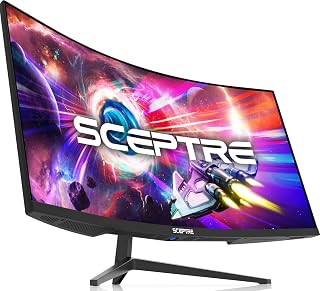
Black Friday shoppers hunting for a competitive edge will find serious gaming firepower in this 34-inch curved ultrawide from Sceptre. The 165Hz refresh rate paired with 1ms MPRT response time delivers the speed needed for fast-paced shooters and racing games, while AMD FreeSync Premium eliminates screen tearing during intense action sequences. The 3440x1440 WQHD resolution across 21:9 ultrawide format wraps around your peripheral vision with its aggressive 1500R curve, pulling you deeper into game worlds. The VA panel's 1,000,000:1 contrast ratio produces inky blacks that enhance atmospheric titles and dark scenes. Dual DisplayPort and dual HDMI inputs let you connect multiple systems without swapping cables. The 99% sRGB coverage means accurate colors for streaming setups or side content work. Built-in speakers handle basic audio needs. The matte finish cuts down on reflections during marathon sessions. At this screen size and refresh rate, you're getting ultrawide gaming performance that typically commands premium pricing, making it a smart target when holiday discounts hit.
Gamers ready to upgrade from standard 16:9 displays will appreciate the immersive advantage and high refresh performance, especially those with GPUs capable of driving 3440x1440 at high frame rates. Content creators who game on the side benefit from both the sRGB accuracy and extra screen real estate. Skip this if your graphics card struggles with 1440p ultrawide gaming, if you play competitive esports titles that don't support 21:9 properly, or if desk space is limited for a 31.8-inch wide footprint.
Display: 34-inch curved VA panel with 3440x1440 WQHD native resolution and 21:9 aspect ratio. 1500R curvature optimizes viewing angles across the expanded width.
Performance: 165Hz refresh rate, 1ms MPRT response time, 1,000,000:1 contrast ratio, 280 cd/m brightness, and 178-degree viewing angles. AMD FreeSync Premium adaptive sync eliminates screen tearing.
Color Accuracy: 99% sRGB gamut with matte finish, ideal for photo and video editing. Blue light filter reduces eye strain during extended sessions.
Connectivity: 2x DisplayPort 1.4, 2x HDMI 2.0, and 1x audio output. Supports Windows, Android, and iPhone devices. Wall-mount compatible with VESA mounting option.
Physical: 31.8in wide x 17.96in tall x 8.6in deep. Weighs 15.3 pounds. Power consumption 42 watts. Includes tilt adjustment for ergonomic positioning.
What to Look for in a Gaming Monitor This Black Friday
Resolution and Screen Size
QHD resolution (2560 × 1440) has become the sweet spot for gaming in 2026. It offers 1.7 times the pixel density of Full HD, delivering sharper textures and more detailed environments without the GPU demands of 4K. For competitive shooters and fast-paced action games, a 27-inch QHD panel provides excellent clarity while keeping everything within your field of view.
Ultrawide monitors (3440 × 1440) extend your peripheral vision, which is particularly valuable in racing sims, flight games, and open-world RPGs. The 21:9 aspect ratio adds 30% more horizontal screen space compared to standard 16:9 displays, letting you see more of the battlefield or cockpit without moving your head. If you’re building a high-performance system, consider pairing your monitor with one of the best CPUs for RTX 5080 to drive these higher resolutions smoothly.
Refresh Rate and Response Time
Higher refresh rates translate directly to smoother motion and lower input lag. A 180Hz panel refreshes the image 180 times per second, making camera pans, explosions, and fast character movements appear fluid rather than choppy. Competitive players often prefer 240Hz displays for the absolute minimum latency, though the difference becomes harder to perceive beyond 180Hz for most users.
Response time measures how quickly pixels can change from one color to another. Look for monitors with 1ms gray-to-gray or MPRT ratings to eliminate ghosting and motion blur during rapid sequences. IPS panels historically lagged behind VA and TN in response times, but modern fast IPS technology closes that gap while preserving superior color accuracy and viewing angles.
Adaptive Sync Technology
Adaptive sync synchronizes your monitor’s refresh rate with your GPU’s frame output, eliminating screen tearing and stuttering. AMD FreeSync and NVIDIA G-SYNC both accomplish this goal, and most modern monitors support one or both standards. FreeSync Premium adds low framerate compensation and guarantees at least 120Hz at 1080p, while G-SYNC Compatible certification means NVIDIA has validated the display’s variable refresh range.
This feature matters most when your frame rate fluctuates, which happens frequently in demanding titles even with powerful hardware. If you’re running AMD graphics, you might want to review our best CPU for RX 9070 XT recommendations to build a balanced system that maintains high frame rates.
Panel Type and Color Accuracy
IPS panels deliver the most accurate colors and widest viewing angles, making them ideal for gamers who also do content creation or photo editing. Look for models with DCI-P3 95% or sRGB 100% coverage to ensure vibrant, true-to-life imagery. VA panels offer deeper blacks and higher contrast ratios but may suffer from color shifting at extreme viewing angles.
HDR support adds another dimension to visual quality. DisplayHDR 400 certification means the panel can reach 400 nits of peak brightness and display a wider range of luminance values, though true HDR impact requires DisplayHDR 600 or higher. Features like Black Equalizer help you spot enemies hiding in shadows without washing out bright areas, a practical advantage in competitive shooters.
Final Thoughts
Black Friday gaming monitor deals in 2026 offer exceptional value across every price bracket and feature set. For competitive gamers who prioritize speed and responsiveness, the AOC 27″ Gaming Monitor QHD 260Hz Overclocked IPS delivers tournament-grade performance with its 240Hz refresh rate and 0.3ms response time. If you need maximum immersion for single-player adventures and productivity work, the New! Sceptre Curved 34-inch Prime Gaming Monitor provides an expansive ultrawide canvas with smooth 240Hz performance and rich color reproduction.
Frequently Asked Questions
Is QHD worth it over Full HD for gaming in 2026?
QHD resolution offers 1.7 times more pixels than Full HD, resulting in noticeably sharper textures, clearer text, and more detailed game environments. Modern mid-range and high-end GPUs handle QHD well at high refresh rates, making it the current sweet spot for gaming. You’ll appreciate the extra clarity in open-world games, strategy titles, and any scenario where you need to spot distant objects or read small UI elements.
What refresh rate should I target for different game genres?
Competitive shooters and fighting games benefit most from 240Hz or higher, where every millisecond of input lag matters. For action RPGs, racing games, and most single-player titles, 165Hz to 180Hz provides excellent fluidity without demanding the absolute top-tier GPU performance needed to consistently hit 240fps. Strategy games and turn-based titles remain perfectly playable at 120Hz or even 60Hz, though higher refresh rates still improve the overall experience when panning the camera or scrolling through menus.
Do I need G-SYNC if I have an NVIDIA GPU?
NVIDIA GPUs work with both G-SYNC and FreeSync monitors through the G-SYNC Compatible program. You don’t strictly need a dedicated G-SYNC module, which typically adds significant cost to the monitor. Most FreeSync displays on the market today will sync properly with NVIDIA cards, though NVIDIA has only officially validated certain models. Adaptive sync technology eliminates screen tearing and stuttering regardless of whether it’s branded G-SYNC or FreeSync, so focus on the monitor’s overall specs rather than the sync branding. For those building a complete gaming setup, our best PC case for RTX 5080 guide can help you choose appropriate cooling and layout for your hardware.
Should I choose a curved or flat monitor?
Curved monitors with 1500R or 1800R curvature wrap around your field of view, creating a more immersive experience especially on ultrawide 34-inch and larger panels. The curve keeps all parts of the screen equidistant from your eyes, reducing distortion at the edges and minimizing the need to turn your head. Flat monitors work better for color-critical work and multi-monitor setups where bezels need to align. For gaming specifically, curved ultrawides enhance immersion in racing sims and flight games, while flat 27-inch panels remain the standard choice for competitive shooters where you need a consistent viewing plane.





Write Your Review
No reviews yet. Be the first to share your experience!