

You just found an extra stick of RAM in a drawer, and your motherboard has an open slot. It’s tempting to drop it in alongside your existing module and call it a day. But mixing RAM brands, speeds, or kits is one of the most common causes of boot failures and system instability, and understanding why can save you a lot of frustration.
This guide explains exactly what happens when you mix RAM brands, which specs actually matter for compatibility, and which kits are worth buying as matched sets. Whether you’re building a new rig or upgrading an existing one, you’ll find the right answer here. For a deeper dive into current-generation memory options, check out the Memory category for more reviewed kits.
Quick answer
This guide compares 8 picks, with CORSAIR Vengeance LPX DDR4 16GB 3200MHz Gaming RAM ranked first.

CORSAIR Vengeance LPX DDR4 16GB 3200MHz Gaming RAM
When mixing brands goes wrong, it's usually a voltage or CAS latency mismatch, and this kit's 1.35V and CL16 rating give you a known baseline to compare against before adding a second set. At 3200MHz, it's common enough that readers troubleshooting a mixed-brand build can use it as a reference point for compatible specs.
Pros
- Sold as a matched kit, eliminating mix-and-match uncertainty
- XMP 2.0 enables rated speed without manual tuning
- Low-profile heatspreader clears tall coolers
- Strong track record of stability on Intel and AMD
Cons
- 3200MHz requires a compatible motherboard and CPU
- Not a solution if you're trying to add to existing mismatched RAM
Mixing RAM brands is risky mainly because kits ship with chips that are hand sorted and binned together, so a single stick from a different line rarely matches timings or overclocking headroom. The CORSAIR Vengeance LPX sidesteps that whole problem by being sold as a matched 2x8GB kit rather than loose sticks. Both modules come from the same production batch, run the same 3200MHz speed, and share identical CL16-20-20-38 timings at 1.35V, so you are not gambling on whether two separately purchased sticks will play nicely together. XMP 2.0 support means the matched pair activates its rated speed with one BIOS toggle instead of manual tuning to find common ground between mismatched parts. The 34mm low-profile heatspreader keeps cooler clearance simple, which matters if you are rebuilding rather than adding to an existing setup. For anyone reading about RAM compatibility headaches, the real takeaway here is that buying a kit avoids the issue entirely instead of trying to troubleshoot it after the fact.
Memory Configuration: 16GB kit (2x8GB sticks), DDR4 DIMM form factor
Speed: 3200MHz (PC4-25600), CAS Latency 16, requires XMP 2.0 enabled or manual BIOS settings to achieve rated speed
Voltage: 1.35V, standard for DDR4 compatibility
Physical Specs: 34mm low-profile height, 288-pin DIMM, approximately 20g per module
Compatibility: Intel DDR4 and AMD DDR4 socket platforms. Requires motherboard XMP 2.0 support for automatic speed configuration
Warranty: Limited Lifetime coverage from Corsair

Pros
- XMP 3.0 profiles deliver plug-and-play performance without manual BIOS tweaking
- Exceptional stability confirmed by real users across demanding workloads and gaming
- RGB lighting is customizable and bright enough to see from multiple angles in any PC case
- Excellent value for high-capacity, high-speed DDR5 memory in a premium package
- Proven track record with thousands of positive reviews from enthusiast and professional users
Cons
- Requires compatible Z790 or newer Intel DDR5 motherboard, not backward compatible
- 6000MHz speed requires BIOS adjustments and may not be achievable on all systems or CPUs
- Premium pricing reflects the performance tier, higher cost than entry-level DDR5 alternatives
The CORSAIR Vengeance RGB DDR5 32GB kit represents the sweet spot for Intel DDR5 builds targeting high performance without extreme overclocking complexity. This is the memory choice for gamers, content creators, and system builders who want speed, reliability, and visual impact in one package.
Performance is the headline here. Running at 6000MHz with CL36 timings, this kit delivers measurable speed gains in gaming frame rates, video rendering, and multitasking responsiveness. XMP 3.0 support means enabling peak performance takes seconds, not hours of experimentation. Real users report flawless stability out of the box on i7 and i9 systems with compatible ASUS and other Z790 motherboards.
The design combines substance and style. Ten individually addressable RGB LEDs per module shine through a panoramic light bar visible from any angle, and CORSAIR iCUE software puts full customization at your fingertips. Beyond looks, the custom PCB layout prioritizes signal quality and electrical stability for rock-solid performance at high frequencies.
The main limitation is system compatibility. You must have an Intel DDR5 motherboard (Z790 or newer) and an 8th-gen Core processor or better. Achieving the full 6000MHz speed may require BIOS tweaks on some systems, and very old or budget boards may top out lower.
Verdict: The CORSAIR Vengeance RGB DDR5 32GB is a complete package that justifies its premium cost through performance, stability, and longevity. Highly recommended for anyone building or upgrading a modern Intel gaming or workstation PC.
Memory Technology: DDR5
Capacity: 32GB (2x16GB dual-channel kit)
Speed: 6000MHz
CAS Latency: CL36
Voltage: 1.35V nominal (1.4V listed in specs)
Form Factor: 288-pin DIMM
XMP Support: Intel XMP 3.0
Features: Ten-zone RGB lighting, onboard voltage regulation, custom PCB
Warranty: Limited Lifetime
Compatibility: Intel DDR5 motherboards (Z790 and newer recommended)
Who Should Buy This: Gaming enthusiasts, content creators, professional streamers, and system builders working with high-end Intel platforms who value both performance and aesthetics. This kit shines in builds paired with i7-14700K, i9-14900K, or comparable processors.
Compatibility Check: Confirm your motherboard supports DDR5 and preferably Intel XMP 3.0. Most ASUS TUF, ROG, MSI MPG, and newer Gigabit Z790 boards are compatible. Update your motherboard BIOS to the latest version before installation.
Installation Tips: Installing DDR5 is straightforward. Power down completely, open the side panel, locate the DDR5 slots (usually blue on the motherboard), align the notch on the DIMM with the key on the slot, and press firmly until both clips click. Enter BIOS and enable XMP 3.0 with one toggle.
RGB Customization: Download CORSAIR iCUE software to customize lighting colors, sync effects across your PC components, and monitor real-time memory frequencies and temperatures. Even without RGB, performance is unaffected.

This module's 2666MHz CL19 1.2V profile sits noticeably below the 3200MHz CL16 1.35V class common elsewhere on this list, making it a good real-world example of why mixing modules with different speeds and voltages can force a whole system down to the slowest common setting.
Pros
- Clear, standard specs make speed mismatches easy to spot before buying
- Crucial compatibility tools help confirm system fit
- Simple unbuffered, non-ECC design for typical desktops
- Lightweight, straightforward installation
Cons
- 2666MHz and 1.2V profile is slower than most current kits, limiting mixing options
- Single 8GB capacity may be too little on its own for demanding use
This module is a good example of why brand mixing questions get complicated fast. At 2666 MHz, CL19, and 1.2 volts, the Crucial CT8G4DFRA266 runs a noticeably different profile than most current 3200MHz, 1.35V kits on the market, so adding it alongside a different-brand module rated for higher speed means the whole system likely settles to this stick's slower 2666 MHz ceiling rather than averaging out. That is the core lesson for anyone mixing brands: the system matches itself to the weaker or slower module, it does not blend specs. As a standalone upgrade for an older or entry-level desktop, though, this is a straightforward unbuffered, non-ECC module that improves responsiveness in everyday tasks like browsing and app switching, with Crucial's compatibility tools helping confirm it suits your specific board before buying. It is a sensible single-module purchase on its own terms, just not one to casually combine with a faster, higher-voltage stick from another brand.

This single 8GB module is useful for readers specifically testing what happens when you add one odd stick to a system, since its 3200MHz CL16 1.35V spec is common enough to either match or clash with existing RAM, illustrating exactly the kind of mismatch the article warns about.
Pros
- 3200MHz CL16 specs are easy to cross-check against existing RAM
- XMP 2.0 and Ryzen support ease configuration
- Low-profile heat spreader design
- Reputable manufacturer with clear spec labeling
Cons
- Single module means no guaranteed dual-channel match if mixing brands
- Older Intel platforms may need a BIOS update first
If you're researching whether mixing RAM brands works, this single 8GB module is actually a useful case study in what you're risking. Buying one FURY Beast stick to pair with an existing different-brand module means hoping both share compatible timings, since this one runs 3200MHz at CL16 and 1.35V, values that must roughly match whatever is already installed or the system will default to the slower or less stable module. Kingston's Plug N Play and XMP 2.0 support help the system recognize supported settings automatically, but that only smooths configuration, it does not guarantee two different brands will run stably together at full speed. The low-profile heat spreader and standard 288-pin DIMM design are non-issues for compatibility, those are physical traits, not electrical ones. This module makes the most sense either as the start of a fresh single-stick build or as a calculated single addition when you've already confirmed the specs align, rather than a blind mix-and-match purchase.

For anyone trying to add capacity to an existing RipjawsV setup without buying a brand-new kit, this 16GB module shares the same 3200MT/s CL16 1.35V profile as its larger sibling, making it one of the safer additions when the goal is expanding rather than replacing matched memory.
Pros
- 3200MT/s with CL16 timings at a mid-range price point
- XMP 2.0 simplifies reaching rated speed
- Low 1.35V operation for stable thermals
- Same spec profile as G.SKILL's larger Ripjaws V kits
Cons
- No guarantee of compatibility with other kits even in the same series
- CAS 16 timings trail tighter premium kits
This 16GB (2x8GB) Ripjaws V kit is a useful reference point if you're wondering whether you can just add a second identical-looking kit to hit 32GB instead of mixing brands. Because it runs at 3200MT/s with CL16-18-18-38 timings at 1.35V, the same specs as G.SKILL's larger 32GB Ripjaws V kit, it illustrates the one scenario where RAM mixing has a real chance of working: same series, same speed, same timings, same voltage. Even then, G.SKILL and most manufacturers don't guarantee cross-kit compatibility, since chip batches can differ between production runs. For anyone reading this article because they have one 8GB or 16GB stick already and want to expand, this kit shows what to look for on a spec sheet before attempting it. XMP 2.0 support means both kits would need XMP enabled together, and JEDEC defaults remain the fallback if the combined set won't hold the rated speed.
Worth considering if you're building fresh on a DDR4 platform and want dual-channel 16GB without premium pricing. If your goal is specifically to mix this with an already-installed different-brand kit, treat it as a reference for matching specs rather than a guaranteed-compatible add-on.
If you're trying to match an existing kit instead of mixing brands, matching this exact 3200MT/s CL16 1.35V profile is your best shot at stable dual-channel operation. Since mixing often fails when timings or voltage differ, pairing two of this same 32GB kit sidesteps the guesswork entirely and keeps XMP 2.0 behavior predictable across both modules.
Pros
- Factory-matched pair avoids mixing-compatibility guesswork
- XMP 2.0 enables 3200MT/s with one BIOS setting
- 1.35V keeps thermals and power draw low
- JEDEC fallback ensures stability if paired with other memory
Cons
- Not intended to be mixed with unmatched modules
- Older motherboards may not support XMP speeds
When you're mixing RAM brands, a matched factory kit like this is actually the safer baseline to compare against. This G.SKILL Ripjaws V 32GB kit (2x16GB) ships as two identical modules built on the same PCB and chip batch, running at 3200MT/s with CL16-18-18-38 timings at 1.35V. That matters for this topic because it shows what guaranteed compatibility looks like versus the gamble of pairing sticks from different brands or production runs. If you're reading about RAM mixing because you're trying to decide whether to add capacity to an existing system, this kit is also a reminder of the alternative: replacing your whole set with a matched pair instead of hunting for a compatible single module. Intel XMP 2.0 gets you to rated speed with one BIOS toggle, and JEDEC defaults keep things stable if you ever do end up combining it with other memory later. The lifetime warranty adds peace of mind either way.
Capacity: 32GB (2x16GB DIMM)
Technology: DDR4 SDRAM
Speed: 3200MT/s (with XMP), JEDEC default speed with standard BIOS
Timing: CAS Latency 16, 18, 18, 38
Voltage: 1.35V
Form Factor: U-DIMM, 288-pin
Compatibility: Intel and AMD desktop systems supporting DDR4
Features: Intel XMP 2.0, Non-ECC
Warranty: Limited Lifetime
Buy this if you want to avoid the RAM-mixing question entirely by starting fresh with a matched 32GB kit on a DDR4 Intel or AMD desktop. Skip it if you already own one 16GB Ripjaws V module and were hoping to find this exact kit to mix in, since even same-series kits from different batches aren't guaranteed to match perfectly.
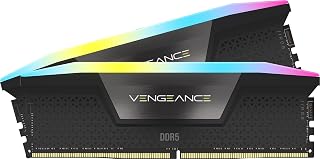
DDR5 mixing is riskier than DDR4 because XMP and EXPO profiles are tighter, so sticking with this 6000MHz CL30 1.4V kit as a matched pair avoids the instability that comes from blending different EXPO-certified sticks. Readers upgrading a DDR5 system will find dual AMD EXPO and Intel XMP support useful for staying in spec.
Pros
- High 6000MHz speed with tight CL30 timings
- EXPO and XMP profiles both supported
- Ten-zone RGB per module with iCUE control
- Ships as a complete matched kit
Cons
- DDR5 kits are less forgiving to mix than DDR4
- Full functionality depends on iCUE software
RAM mixing questions usually come up when someone wants more capacity or speed without replacing everything, and the Vengeance RGB DDR5 kit is a good case study for why that's riskier with DDR5 than DDR4. This 32GB (2x16GB) kit runs at 6000MHz CL30 timings and 1.40V, which is a much tighter and more aggressive profile than entry-level DDR5. Mixing a module like this with a different DDR5 kit is far more likely to force both down to a lower shared speed, or prevent EXPO or XMP from applying at all, since DDR5 kits vary more in on-die ECC and training behavior than DDR4 did. If you're reading this article because you're tempted to add a second kit to your existing Vengeance RGB setup, the safer path is buying the identical part number rather than a similar-looking kit. The ten-zone RGB lighting and iCUE software control are nice extras, but they're not relevant to the mixing decision itself.
Memory Type: DDR5 SDRAM
Capacity: 32GB (2x16GB modules)
Speed: 6000MHz
Timings: CL30-36-36-76
Voltage: 1.40V
Form Factor: DIMM (288-pin)
Compatibility: AMD EXPO, Intel XMP 3.0
Features: Dynamic Ten-Zone RGB Lighting, Onboard Voltage Regulation, Custom PCB
Warranty: Limited Lifetime
Good for buyers starting a new DDR5 build who want a complete matched 32GB kit rather than combining modules later. Not a good fit if you already have a different brand's DDR5 kit installed and are hoping to mix it in, since DDR5 kits generally need to match exactly to hit rated speeds together.

Mixing DDR5 kits from different brands often hits snags at higher speeds, so this 6000MHz CL30 1.4V pair gives readers a same-brand baseline to measure compatibility against before attempting to combine it with other modules. Its RGB Vengeance lineup consistency also helps if you're trying to match an existing Corsair build.
Pros
- Sold as a matched 32GB kit, avoiding mixed-brand pairing issues
- Works across both AMD and Intel platforms
- CL30 timings at 6000MHz for high throughput
- Solid aluminum heatspreader for thermal control
Cons
- Rated speed needs BIOS overclocking and a supporting motherboard
- Does not help if you need to add to an existing non-CORSAIR kit
When mixing RAM brands, matched kits like this one are exactly what you're trying to avoid needing to pair with something else. Buying both 16GB modules together as a single 32GB kit means CORSAIR has already binned and validated these two sticks to run together at 6000MHz with CL30 timings, sidestepping the mismatched SPD profiles, timings, and voltage behavior that cause instability when combining different brands or batches. If you're reading this article because a mixed-brand setup gave you boot loops or random crashes, the straightforward fix is replacing the whole set with a single validated kit rather than hunting for a compatible add-on stick. This kit also works across both AMD and Intel platforms, so it's a safe full replacement regardless of which system caused the problem. The tradeoff for going this route is that hitting the rated 6000MHz still depends on your motherboard supporting that speed via BIOS overclocking, and the aluminum heatspreaders need enough case clearance for larger coolers. But as a clean, non-mixed foundation, it removes brand-compatibility guesswork entirely.
Capacity and Speed
Density: 32GB (2x16GB)
Speed: DDR5-6000MHz
Latency: CL30-36-36-76
Voltage: 1.4V
Technology and Compatibility
Profiles: AMD EXPO and Intel XMP 3.0
Compatible Platforms: AMD 600 Series, Intel 600/700 Series
PMIC: Onboard Overclock PMIC
Software: CORSAIR iCUE
Physical Specifications
Form Factor: DIMM (288-pin)
Heatspreader: Aluminum
LED: RGB (10 zones per module)
Warranty: Limited Lifetime
Model: CMH32GX5M2B6000Z30W
Buying Guide: What to Know Before Mixing or Matching RAM
Speed and Timings Must Align
When you mix RAM modules with different speeds, your system defaults to the slower speed to maintain stability. A 3200MHz stick paired with a 2666MHz stick will both run at 2666MHz, which defeats the purpose of the faster module.
Timings matter just as much. The best matched DDR5 kits are validated to run together with tight, consistent latency. Mismatched timings can cause random crashes even when both modules technically share the same rated speed.
XMP and EXPO Profiles Are Kit-Specific
XMP (Intel) and EXPO (AMD) profiles are calibrated for a specific set of modules. The G.SKILL RipjawsV Series DDR4 RAM (XMP) explicitly warns against mixing kits, because the XMP profile was validated for those exact two sticks running as a pair.
If you mix two different kits and enable XMP, the motherboard will apply one kit’s voltage and timing profile to modules that were never validated under those conditions. The result is often instability or a failure to post. This applies equally to DDR5 kits like the CORSAIR Vengeance RGB DDR5 RAM 32GB (2x16GB), where the onboard voltage regulation is tuned for matched pairs.
Generation and Form Factor Are Non-Negotiable
DDR4 and DDR5 are physically incompatible. You cannot install a DDR4 module like the CORSAIR Vengeance LPX DDR4 RAM 16GB (2x8GB) in a DDR5 slot, and vice versa. The notch positions are different, and the voltage requirements are completely different generations of technology.
Always confirm your motherboard’s supported generation before purchasing. If you’re on a current AMD platform, our guide to the best DDR5 RAM for AM5 covers validated kits that are confirmed compatible with Ryzen processors. For Intel builds, the CORSAIR Vengeance RGB DDR5 32GB (2 x 16GB) offers both AMD EXPO and Intel XMP 3.0 profiles in a single kit.
Dual-Channel Requires Matched Pairs
Running two identical modules in the correct slots activates dual-channel mode, which roughly doubles your memory bandwidth. This matters for gaming, video editing, and any workload that stresses memory throughput.
If you mix brands or capacities, your system may fall back to single-channel operation, cutting bandwidth in half. The Kingston FURY Beast 8GB 3200MHz DDR4 CL16 Desktop is sold as a single module specifically for pairing with an identical second stick. Buying two separate singles of the same SKU is generally safer than mixing two different kits, but a purpose-built kit like the Crucial RAM 8GB DDR4 2666 MHz CL19 Desktop Memory is still a more reliable baseline. For a broader look at how DDR5 speed grades stack up, the comparison of DDR5 6000 vs 6400 for gaming is worth reading before you commit to a kit.
Final Thoughts
If you want stability and peak performance, buy a matched kit designed to run together. For a reliable DDR4 build on a budget, the G.SKILL RipjawsV Series DDR4 RAM (XMP) is a proven, widely compatible choice that avoids the pitfalls of mixing entirely. If you’re on a modern platform and want the best DDR5 experience with AMD EXPO and Intel XMP 3.0 support in one box, the CORSAIR Vengeance RGB DDR5 32GB (2 x 16GB) is the kind of kit that just works out of the box without needing to second-guess compatibility.
Frequently Asked Questions
Can you mix RAM brands without issues?
Technically yes, but it comes with real risks. Mismatched brands often use different ICs, PCBs, and timing configurations that make stable XMP operation unreliable. Your system may boot, but you’re more likely to encounter crashes, reduced speeds, or failure to enable dual-channel mode.
Does mixing RAM brands affect gaming performance in 2026?
Yes, it can. If mixed modules drop your system from dual-channel to single-channel, you lose a significant portion of memory bandwidth. In memory-sensitive games and tasks like streaming or rendering, that difference is measurable. Buying a matched kit is the straightforward way to avoid this entirely. Our roundup of the best RAM for Ryzen 9 9950X shows how much validated kits outperform ad-hoc mixed setups on high-end AMD platforms.
What happens if you mix DDR4 and DDR5 RAM?
Nothing will work. DDR4 and DDR5 modules have different physical keying, different voltages, and different pin configurations. A motherboard supports one generation or the other, never both at the same time. Attempting to install the wrong generation is physically prevented by the slot design on virtually all modern boards.
Is it safe to add a second RAM stick of the same brand but different speed?
It’s safer than mixing entirely different brands, but still not ideal. Both sticks will run at the slower speed, and XMP profiles may not apply cleanly across mismatched speeds. If you’re adding memory to an existing system, your best move in 2026 is to identify your current kit’s exact model number and buy an identical second kit, rather than guessing at cross-kit compatibility.
Common questions
Is it better to buy matched kits versus singles when adding RAM?
Matched kits are better than mixing singles, because kits like the CORSAIR Vengeance LPX 16GB (2x8GB) or the G.SKILL RipjawsV 32GB (2x16GB) are factory binned to run together at the same speed and timings. Buying individual sticks separately, even with identical listed specs, risks subtle differences in the memory chips that can cause instability or force the whole set down to slower, looser settings.
What are the dual channel requirements for running RAM properly?
Dual channel requires two sticks of RAM installed in the matching colored slots on the motherboard, ideally from the same kit, such as the G.SKILL RipjawsV 16GB (2x8GB) set. Both sticks should share the same capacity, speed, and timings, like the 3200MHz CL16 specs on these kits, so the board can address them as one wider channel instead of defaulting to slower single channel operation.
How do you go about stability testing after mixing RAM sticks?
Stability testing starts by running a memory stress tool for several hours and watching for errors or crashes. This matters most when mixing brands, since combining something like a Crucial 8GB single with a CORSAIR Vengeance LPX stick can expose mismatched timings or voltage, such as 1.2V versus 1.35V. If errors appear, lowering the shared speed or loosening the CAS latency closer to the slower stick's rating usually resolves it.


Write Your Review
No reviews yet. Be the first to share your experience!