

You sit down at your desk with a single USB-C cable connecting your laptop to everything: two 4K monitors, a wired keyboard, fast external storage, and a stable Ethernet connection. That seamless one-cable setup is exactly what a great Thunderbolt 4 dock delivers. Whether you are a creative professional, a remote worker, or an IT manager outfitting a fleet of machines, the right dock makes a real difference in how your day flows.
This guide breaks down the top Thunderbolt 4 docks on the market right now in 2026, covering key specs, real-world strengths, and who each one suits best. If you are also optimizing your desk setup, our guide to the best vertical laptop stand options for a cleaner desk pairs well with any of these picks.
Quick Comparison
Ratings reflect the most recent data pull. Check each listing for current price and availability.
Quick answer
This guide compares 10 picks, with UGREEN 13-in-1 Thunderbolt 4 Docking Station with Dual ranked first. Plugable Thunderbolt 4 Dock: 100W Charging, Dual 4K has the most customer reviews.

Pros
- Outstanding port density eliminates need for multiple adapters and hubs, consolidating all peripherals into one connection
- Rock-solid stability with zero reported random disconnects or display dropouts during extended 8-hour workdays
- Exceptional value for a professional Thunderbolt 4 dock compared to competitors at this price point
- Works flawlessly with both macOS and Windows systems, verified in user tests with ultra-wide and dual-monitor setups
- High-refresh gaming monitor support at 240Hz via DisplayPort adds versatility beyond typical productivity use
Cons
- DisplayPort does not support DP++ passthrough, requiring active DP-to-HDMI adapters to connect HDMI monitors instead of passive cables
- Only one USB-C port includes power delivery, limiting simultaneous charging of multiple USB-C devices
- Lacks native HDMI output, which may require adapter purchase for users with existing HDMI-only monitors
The UGREEN 13-in-1 Thunderbolt 4 Docking Station is built for creative professionals and knowledge workers who demand serious connectivity without compromise. Whether you're a MacBook Pro user handling 4K video, a developer managing multiple monitors and peripherals, or a Windows laptop user needing enterprise-grade networking, this dock delivers the I/O density and performance modern workflows require.
What sets this dock apart is the combination of sheer port count and real-world performance. The three Thunderbolt 4 ports and 40Gbps bandwidth enable genuine high-speed file transfers, while dual 4K@60Hz display support handles professional color-critical work and complex development environments. Users consistently report zero random disconnects during full eight-hour workdays, and the plug-and-play driverless setup gets you productive immediately without firmware downloads or configuration headaches.
Build quality is solid throughout. The aluminum front bezel and anti-slip pads give the dock a premium feel, while the fanless passive cooling design means you won't hear a peep even during intensive rendering or virtualization tasks. The compact footprint at 3.7 inches wide fits naturally on most desks, and the dual placement orientation options provide flexibility for tight spaces or standing desk setups.
The main limitation is the DisplayPort implementation, which lacks DP++ support for HDMI passthrough. If you have HDMI monitors, you'll need an active adapter. Additionally, only one of the two USB-C ports includes power delivery, so users juggling multiple USB-C peripherals may find themselves daisy-chaining adapters. These aren't dealbreakers for the target user, but they're worth factoring into your setup planning.
At its price point, this dock represents exceptional value for professionals who need Thunderbolt 4 performance without premium pricing. The rock-solid stability, verified compatibility with both macOS and Windows, and versatile port selection make it a practical centerpiece for any serious productivity or creative workspace.
MacBook Pro/Air Owners: Single Thunderbolt connection provides charging, display output, and full peripheral support simultaneously. Ideal for remote work, travel, and home office setups.
Video and Photo Professionals: Dual 4K@60Hz support enables color-accurate monitor setups for editing and design work without expensive specialized equipment.
Software Developers: Multiple USB ports plus high-speed Thunderbolt connectivity support complex development rigs with external drives, test devices, and network equipment.
Content Creators: 8K@30Hz single display mode and fanless operation support intensive rendering workflows in studios where acoustic considerations matter.
Connectivity: 3x Thunderbolt 4 (40Gbps), 3x USB-A 5Gbps, 2x USB-C 10Gbps, 1x DisplayPort 1.4, Gigabit Ethernet, 3.5mm audio, SD/TF card reader (200MB/s)
Power Delivery: 180W total power adapter, up to 96W PD charging for host laptop
Display Support: Dual 4K@60Hz (via TB4 and DP1.4) or single 8K@30Hz
Compatibility: macOS M1-M6, Windows with Thunderbolt 4/3/USB4, backward compatible with Thunderbolt 3
Dimensions: 3.7 inches L x 1.96 inches W x 5.78 inches H
Warranty: 1-year limited warranty

Pros
- Compact and slim design hides easily behind or under a desk, maintaining clean aesthetics
- Rock-solid reliability, customers report zero disconnection issues even with demanding multi-device setups
- No bloated extras like low-quality audio or ethernet ports keeps the design clean and focused
- Works immediately out of the box with no drivers or complex setup required
- Daisy-chaining capability allows stacking multiple hubs for even greater expansion
Cons
- No built-in gigabit ethernet port limits networking flexibility for some professional users
- Occasional disconnection issues reported with some M3 Max models, though reconnection is automatic
The Satechi Thunderbolt 4 Slim Hub Pro is a premium docking station built for creative professionals and power users who demand both performance and simplicity. Designed specifically for MacBook Air, MacBook Pro, iPad Pro, and compatible Windows laptops, this hub transforms a single Thunderbolt 4 port into a fully-featured workstation hub that handles display output, data transfer, and device charging simultaneously.
The standout strength of this dock lies in its raw performance and versatility. With three Thunderbolt 4 ports operating at 40Gbps, you get lightning-fast data transfers for video editing, photography workflows, and large file management. The dual 4K/60Hz display support or single 8K/30Hz option caters to demanding creative professionals, while the 100W host charging power keeps your MacBook Pro or other devices fully powered even during intensive work. Real-world testing confirms users successfully daisy-chain multiple devices without performance degradation.
Build quality is evident in the premium aluminum construction with passive cooling design. The slim, compact footprint (5.31 inches long, 0.67 inches wide) tucks neatly behind monitors or fits in tight desk spaces without sacrificing connectivity. The included 150W GaN power supply and 0.8M Thunderbolt 4 cable provide everything needed for immediate setup, with no driver installation or complex configuration required.
The main trade-off is what Satechi intentionally left out. There is no built-in gigabit ethernet port or audio jack, which keeps the hub streamlined and clean but may require separate adapters for users requiring these connections. A small percentage of users report occasional disconnection issues with certain M3 MacBook Pro models, though the connection automatically re-establishes without manual intervention.
For professionals who value performance, reliability, and minimal desktop clutter over maximum port count, the Satechi Thunderbolt 4 Slim Hub Pro delivers exceptional value. The combination of premium construction, daisy-chaining support, and proven real-world performance justifies the investment for demanding workflows.
Connectivity: 3x Thunderbolt 4 ports, 40Gbps data transfer, USB 3.2 Gen 2, UHS-II SD card reader (312MB/s), USB-A ports (10Gbps), Gigabit Ethernet, daisy-chaining support for up to 6 devices
Power Delivery: 100W host charging, 150W GaN power supply included, supports simultaneous charging and display output
Display Support: Dual 4K/60Hz displays with HDR and variable refresh rate, or single 8K/30Hz output
Dimensions: 5.31 inches L x 0.67 inches W x 2.91 inches H, Weight 8.75 ounces
Compatibility: MacBook Pro 14/16 inch (M1-M5), MacBook Air 13/15 inch (M1-M5), iPad Pro, iPad Air, iPad Mini, iPad, Mac Mini, iMac, Mac Studio, Lenovo ThinkPad, Microsoft Surface, and other Thunderbolt 4 and USB4 devices
Color: Space Gray, Model: ST-HT4SHM-US, Warranty: 2-year limited warranty
Ideal For: Creative professionals using MacBook Pro or Air, video editors and content creators needing multi-display support, photographers managing large photo libraries, streamers requiring multiple peripheral connectivity, remote workers seeking desktop consolidation, professionals prioritizing reliability and build quality over maximum port count
Consider Alternatives If: You require budget-friendly docking under $100, need integrated ethernet networking for server connections, use older Intel-based Mac models, require audio input/output connectivity, want maximum USB port density for many peripheral devices
Best Value For: Users who already own Thunderbolt 4 compatible devices and want a single, reliable cable solution that eliminates multiple adapters and desk clutter while delivering professional-grade performance for creative workflows

Pros
- Premium build quality with recycled materials shows attention to design and sustainability
- Single Thunderbolt 4 connection simplifies setup and reduces cable clutter
- Dual 4K monitor support at this price point outperforms many third-party alternatives
- Compact footprint takes up minimal desk space compared to bulky competitors
- Consistent reliability reported by users across multiple Surface models
Cons
- Older monitors may require USB-C to HDMI or DisplayPort adapters, adding extra cost
- Feature set is straightforward rather than premium, lacking advanced options some power users expect
- Requires Thunderbolt 4 equipped device, limiting compatibility to recent Surface models
The Microsoft Surface Thunderbolt 4 Docking Station is purpose-built for Surface laptop owners who need a reliable, efficient hub for their workspace. Whether you're a professional managing multiple displays or someone who frequently moves between home and office setups, this dock bridges the gap between portability and productivity without the bulk of traditional docking solutions.
Performance is where this dock truly shines. Thunderbolt 4 connectivity delivers exceptional data transfer speeds, and the rapid charging capability gets your Surface laptop fully powered in just 2.5 hours. The ability to connect two 4K monitors simultaneously makes it excellent for multitasking, content creation, or financial analysis work. With 6 USB ports total, 2.5G Ethernet, and an audio jack, you'll have plenty of options to connect keyboards, mice, external drives, and headphones without investing in hubs or splitters.
The physical design deserves praise. At 11 inches long and weighing just 14.4 ounces, it won't dominate your desk, and the compact form factor proved it's a world apart from the bulky, multi-piece docks users often endure. Microsoft's engineering is evident in every detail, from the solid construction to the raised tactile indicators on each port that make blind connections effortless. The use of 20% recycled ocean-bound plastic shows environmental commitment without sacrificing durability.
The main limitation is practical rather than fundamental: modern USB-C display connections mean most standard monitors require an adapter. This isn't a design flaw but rather an industry transition point. Once you account for adapter costs, the total investment climbs, though most reviewers agree the reliability and build quality justify the expense over cheaper third-party alternatives.
For Surface users seeking a single-cable solution that just works, this dock delivers. It trades trendy features for rock-solid reliability, elegant design, and genuine compatibility. It's a tool that gets out of your way and lets you focus on your work.
This docking station is ideal for Surface Laptop and Surface Pro users who want a premium, officially supported dock. If you work with dual monitors, charge frequently on the go, or value build quality over feature abundance, this is your match. Professionals in creative fields, finance, software development, and any knowledge work where screen real estate matters will appreciate the dual 4K support and fast charging.
Skip this if you're already invested in a non-Surface ecosystem or don't need multi-monitor support. Budget-conscious buyers should know cheaper third-party alternatives exist, though they may not offer the same reliability or build quality based on user feedback comparing this dock to off-brand options.
Connectivity
Thunderbolt 4 ports (high-speed data and charging), 3x USB-C ports, 3x USB-A ports, 1x 3.5mm audio jack, 2.5G Ethernet, Kensington security lock slot
Display Support
Up to two 4K monitors via USB-C connections
Charging
Rapid charging technology, 2.5-hour full charge time
Physical
Dimensions: 11 inches L x 4.4 inches W x 3.2 inches H
Weight: 14.4 ounces
Color: Black
Material: 20% recycled ocean-bound plastic
Model: T8H-00001
Compatibility
Microsoft Surface devices with Thunderbolt 4 support
Warranty
1 year manufacturer warranty

Pros
- Supports up to four 4K 60Hz displays on compatible Windows systems.
- Provides dual extended 4K display support for qualifying MacBook models.
- Stable real-world performance, including reliable monitor connections, charging, and wake-from-sleep operation.
- Driverless cross-platform compatibility is useful for home offices and business laptop fleets.
- Well-spaced ports make it easy to connect multiple peripherals without excessive crowding.
Cons
- Quad-display Windows support depends on Intel 12th Gen or newer hardware with DisplayPort 1.4 and DSC.
- Apple laptops with a base M-series processor support only one external display, and M3 dual-display use requires clamshell mode.
- The plastic enclosure may feel less premium than metal alternatives, and it is not intended as a multi-touchscreen monitor hub.
The StarTech Thunderbolt 4 Dock is designed for professionals who need one connection point for multiple monitors, accessories, storage devices, and laptop charging. Its driverless support for Windows and macOS makes it practical for home offices, business fleets, and users who switch between platforms.
Its standout capability is multi-monitor expansion. Compatible Windows laptops can drive up to four 4K 60Hz displays, while supported MacBook Air and MacBook Pro models can run two extended 4K 60Hz displays. Customer feedback also highlights stable daily performance, dependable charging, and reliable wake-from-sleep behavior.
The dock combines Thunderbolt 4 and USB4 connectivity with HDMI, USB, USB 2.0, and microSD connections. Its port layout is considered convenient for populating, although the enclosure is plastic rather than the more premium metal construction found on some competing docks.
Compatibility requires careful checking. Quad-display Windows operation depends on newer Intel hardware with DisplayPort 1.4 and DSC, while base M-series Macs are limited to one external display. One customer also reported that the dock did not meet their needs as a multi-touchscreen monitor hub.
Overall, this is a capable, flexible docking station for users who prioritize high-resolution multi-monitor support, strong charging, and broad platform compatibility. It is best suited to standard displays and professional peripherals rather than specialized touchscreen setups.

Pros
- Multiple display outputs (dual 4K or single 8K) significantly boost productivity for creative professionals
- Fast 85W charging means no need for separate laptop power adapter at your desk
- Universal compatibility with Thunderbolt 4, Thunderbolt 3, USB4, and USB-C devices including MacBooks, Windows laptops, and iPads
- Solid aluminum build quality with reliable performance confirmed by customer reviews
- All ports functional immediately on macOS without requiring driver installation
Cons
- Audio interference reported by some users when using external audio through the dock, potentially linked to AC adapter grounding
- Higher price point compared to basic USB-C hubs, though justified for heavy users requiring multiple displays and simultaneous charging
- Limited to single 4K@60Hz display on MacBooks with base M-Chip models rather than dual displays
The UGREEN 8-in-1 Thunderbolt 4 Docking Station is a premium connectivity hub designed for professionals who demand high-performance expansion. It's built specifically for MacBook Pro and Max users, Windows laptop owners with Thunderbolt ports, and anyone who works with large files, multiple displays, or bandwidth-heavy peripherals.
The standout feature is dual 4K@60Hz display support (or single 8K on compatible systems), which immediately sets it apart from standard USB-C docks. Combined with 40Gbps Thunderbolt 4 data transfer and 85W charging capability, this dock transforms a laptop into a true desktop workstation. Customer feedback confirms speeds exceed 300 MBps for file transfers and displays appear instantly upon connection without driver hassles.
Build quality is notably solid. The aluminum chassis feels substantial and stays firmly in place on your desk, with proper weight distribution. The compact 9.5" x 9.5" footprint means it won't dominate your workspace, and the cable consolidation alone simplifies desk organization by eliminating multiple adapters and power supplies.
One legitimate drawback exists: audio interference has been reported by some users when outputting audio through the dock while it's powered. This appears linked to AC adapter grounding and affects a small percentage of users, though those running standard monitor audio and USB peripherals report zero issues.
For professionals needing serious productivity, this dock delivers reliability and performance that justifies the investment. It's not a budget option, but it's a purchase most power users only make once.
Connectivity Specs: 3x Thunderbolt 4 ports (40Gbps, 15W each), 3x USB-A 3.2 (10Gbps), 1x Gigabit Ethernet, 1x 140W DC power input. Display support: dual 4K@60Hz or single 8K@30Hz on Windows, dual 4K@60Hz on MacBook Pro/Max, single 4K@60Hz on base M-Chip MacBooks.
Power Delivery: 85W maximum laptop charging output when connected to included 140W GaN power adapter. The dock requires power connection to operate all features.
Compatibility: Works with Thunderbolt 4, Thunderbolt 3, USB4, or USB-C devices including MacBooks (macOS 11.4+), Windows laptops (Windows 10+), iPads, and tablets. Not compatible with Mac mini 2018 Intel models.
Physical: Dimensions 9.5" L x 9.5" W x 2.5" H. Weight 1.4 kg. Dark gray aluminum construction. Includes 140W GaN power adapter. 2-year manufacturer warranty.
Best For: MacBook Pro/Max users, Windows professionals with Thunderbolt ports, video editors, software developers, and anyone requiring dual 4K displays or simultaneous high-speed data transfer and charging.
Consider This If: You currently use multiple USB-C hubs and adapters, need reliable display expansion without performance bottlenecks, work with large video or design files requiring fast transfer speeds, or want to eliminate desk clutter from separate charging cables.
Skip If: You only use basic peripherals, need audio output without interference concerns, or work on older Mac mini Intel models. Basic USB-C hubs may suffice for light users.
Warranty and Support: 2-year manufacturer warranty covers hardware defects. Check compatibility with your specific device model before purchase, especially if using base M-Chip MacBooks or older systems.

Pros
- Exceptional port density consolidates monitors, storage, networking, and charging through one cable
- Powerful 96W charging keeps demanding laptops powered during intensive workflows
- Advanced 2.5G Ethernet enables faster NAS access, 4K streaming, and competitive gaming
- Premium all-metal design with heat-dissipating vents ensures durability under heavy use
- True 40 Gbps Thunderbolt 4 connection prevents bottlenecks with high-speed peripherals
Cons
- Mac users with base M1/M2/M3 models only support single display output, limiting multi-monitor setups
- Requires Thunderbolt 4 or USB4 ports; incompatible with standard USB-C connections on older devices
- Aluminum chassis can develop minor surface scratches and generates noticeable heat during extended use
The WAVLINK Thunderbolt 4 Dock is a powerhouse docking solution designed for professionals, content creators, and remote workers who demand a unified workstation experience. Whether you're using a MacBook Pro, Dell XPS, or high-end Windows laptop, this dock transforms a single Thunderbolt port into a complete connectivity hub.
What sets this dock apart is its aggressive feature set. You get dual 4K@60Hz HDMI outputs or single 8K support on Windows machines, 96W power delivery to keep your laptop fully charged, lightning-fast 2.5G Ethernet for serious data work, and a comprehensive port array including USB 3.2, SD/MicroSD card reader, and audio output. The true 40 Gbps Thunderbolt 4 bandwidth ensures zero bottlenecks when transferring large files or connecting multiple peripherals simultaneously.
Build quality is solid. The all-metal construction with visible heat-dissipating vents feels premium on a desktop and demonstrates thoughtful engineering for thermal management. The included power adapter is hefty and reliable. One practical touch: the physical power button on top makes waking connected devices intuitive. The minimalist design integrates cleanly into professional setups, though the aluminum finish will show light scratches with regular use.
Compatibility requires attention. Mac users with base M1, M2, or M3 models are limited to single-display output, though M3+ Pro and Max variants unlock dual-monitor capability. Windows users enjoy broader flexibility with Thunderbolt 4, Thunderbolt 5, and USB4 systems. Standard USB-C ports won't work, so verify your device has a dedicated Thunderbolt port before purchasing.
For professionals balancing multiple monitors, fast networking, and device charging in one solution, this dock delivers exceptional value. It's not perfect for casual users with basic connectivity needs, but for power users building clean, consolidated workstations, the WAVLINK Thunderbolt 4 Dock is a worthy investment.
Connectivity: Thunderbolt 4 (40 Gbps upstream/downstream), 2x HDMI 2.1, 6x USB ports (USB 3.2 Gen 2), 2.5G Ethernet, SD/MicroSD V4.0 card reader, 3.5mm audio jack
Video Output: Dual 4K@60Hz via HDMI or single 8K@60Hz on Windows; up to 8K@60Hz or 4K@120Hz via downstream Thunderbolt 4 display port
Power Delivery: 96W charging to host device via 160W external power adapter
Compatibility: Windows 10/11 with Thunderbolt 4/5 or USB4; macOS Thunderbolt 3/4 with M1 Pro/Max and newer (M2/M3/M4/M5 variants)
Physical: All-metal housing with heat dissipation vents, silver color, includes USB-C cable and 160W power adapter, 2-year manufacturer warranty
Best For: This dock excels for MacBook Pro M4/M5 Pro/Max owners and Windows professionals using Dell XPS, HP Spectre, or Lenovo ThinkPad systems. If you need dual 4K monitors, fast Ethernet, and substantial charging power in one package, this is an excellent choice.
Important Compatibility Check: Verify your device has a native Thunderbolt port (not just USB-C). Mac users should confirm their model supports dual displays. M1/M2 base MacBooks and M3 base models without clamshell mode are limited to single-monitor output.
Use Cases Where It Shines: Video editing and 4K content creation, remote work with multiple monitor setups, software development requiring fast external storage access, online gaming with wired connectivity, NAS access for creative professionals.
When To Skip: If your laptop only has USB-C (not Thunderbolt), you need more than two HDMI displays, or you're looking for an affordable basic hub. Budget-conscious users should consider entry-level USB-C docks instead.
Pros
- Exceptional multidisplay capability handles demanding creative and analytical workflows
- Fast 130W charging eliminates need for separate power adapters on compatible devices
- Business-grade security and remote management features justify the professional price point
- Compact, sustainable design reduces desk clutter while supporting environmental goals
- Comprehensive connectivity includes DisplayPort 1.4, HDMI 2.1, and multiple USB protocols
Cons
- Premium pricing at $199 puts it above basic docking solutions for budget-conscious buyers
- Limited to single HDMI port may require adapters for some display configurations
- Remote management features require compatible Dell or Intel hardware to fully utilize
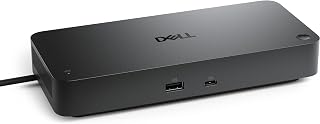
The Dell Pro Thunderbolt 4 Smart Dock SD25TB4 is a high-end docking station engineered for professionals who need serious connectivity without compromise. It's designed for creative professionals, data analysts, software developers, and business users running resource-intensive applications who benefit from expanded screen real estate and streamlined desk setups.
The standout feature is its multidisplay support, delivering four simultaneous 4K streams through a combination of DisplayPort 1.4, HDMI 2.1, USB-C, and Thunderbolt 4 ports. Paired with 130W power delivery and dual Thunderbolt 4 connectivity at 40Gbps, this dock handles complex workflows without bottlenecks. The dual Thunderbolt ports allow daisy-chaining up to six additional devices, making it a genuine hub for demanding setups.
Build quality reflects its enterprise positioning, with an ambidextrous design that works equally well on either side of your desk. The compact 8.07-inch height and use of 65% recycled plastic demonstrate thoughtful engineering for modern workspaces. Remote Wi-Fi management through Dell Console and Intel AMT adds a business-class feature for IT environments and remote workers who need hands-off dock control.
The main limitation is its $199 price tag, which exceeds basic docking solutions, though the feature set justifies the investment for professional users. The single HDMI 2.1 port may require adapters in certain display configurations, and remote management capabilities depend on compatible hardware.
The Dell Pro Thunderbolt 4 Smart Dock SD25TB4 delivers premium performance, security, and connectivity for professionals who can't afford productivity compromises. If you need multidisplay support, fast charging, and enterprise security on a well-built, compact dock, this is a solid investment that pays dividends in workflow efficiency.
Connectivity: 2x Thunderbolt 4, 2x DisplayPort 1.4, 1x HDMI 2.1, 2.5GbE Ethernet, Wi-Fi management
Power Delivery: Up to 130W for Dell devices, 96W for other USB-C devices. 180W total wattage input.
Display Support: Up to 4 simultaneous 4K displays via mixed DP 1.4, HDMI 2.1, USB-C, and Thunderbolt 4 connections
USB Ports: 6 total USB ports across all protocols. 12 total ports including display and data connections.
Physical: 1.39 inches long, 3.54 inches wide, 8.07 inches high. Weight 580g. Black/White color options.
Compatibility: Works with laptops, tablets, and smartphones featuring USB-C, Thunderbolt 4, HDMI, or DisplayPort 1.4. Minimum Windows 10 OS. Model number SD25TB4.
Ideal For: Creative professionals using Adobe Creative Suite, video editors, data analysts, software developers, CAD designers, financial traders, and business users who regularly work with multiple 4K monitors and need fast, reliable device charging.
Best If You: Already own multiple 4K displays or plan to add them, work with large files or data sets that benefit from expanded screen space, use Thunderbolt 4 laptops from Dell or other manufacturers, need Wi-Fi-accessible dock management for remote work scenarios, or value sustainable technology design.
Skip If You: Only need a basic single-display docking solution, have a limited budget under $100, primarily use older laptops without Thunderbolt 4 support, or don't require advanced security features like DMA protection and MAC filtering.

Pros
- True dual monitor support finally delivers independent extended displays instead of mirroring, dramatically boosting productivity
- Exceptional build quality and premium materials justify the investment for professional workflows and content creation
- Outstanding customer support and 2-year warranty provide peace of mind with responsive replacement policy
- Compact footprint and sleek design integrate cleanly into any desk setup without dominating workspace real estate
- Impressive cross-platform compatibility spans Mac, Windows, and emerging devices like Framework laptops
Cons
- Dual monitor support limited to higher-end Macs (M1 Pro/Max and newer), single display only on base M1/M2 models and Thunderbolt 3 systems
- Early reliability issues reported by a small number of users, though Plugable's responsive support mitigates concern
The Plugable Thunderbolt 4 Dock (TBT4-UD5) is a premium docking solution designed for professionals, creative workers, and power users who demand true multi-monitor performance from a single cable connection. Whether you're running a MacBook Pro with demanding video editing tasks, managing a hybrid home office with multiple laptops, or building a standardized Windows deployment across teams, this dock delivers the connectivity and power that modern knowledge workers need.
What truly sets this dock apart is its genuine dual 4K 60Hz monitor support on compatible devices, solving a major frustration that plagues many competing docks that can only mirror displays. The 100W power delivery keeps your laptop fully charged during heavy creative work, from video editing to 3D rendering, without requiring a separate power brick cluttering your desk. With 40Gbps Thunderbolt 4 speeds and 13 total ports spanning HDMI, USB-A, USB-C, SD card slot, and Gigabit Ethernet, it provides everything needed for a complete workstation expansion.
Build quality feels substantially above its price point, with a compact footprint that doesn't dominate desk space and thoughtful port placement on both front and back surfaces. The driverless design means instant plug-and-play operation without hunting for software downloads or wrestling with driver installation. Recognition as Wirecutter's Best Thunderbolt Dock 2025 and Intel Evo certification reflects its standing among industry experts.
Some users have reported occasional reliability issues in the first few months, though Plugable's responsive support and 2-year warranty mitigate this concern significantly. Dual monitor support is limited to higher-end Mac models (M1 Pro and newer), with base M1 and M2 MacBooks supporting only single displays. Thunderbolt 3 and USB-C only systems also drop to single monitor support, which may disappoint those with older equipment.
For professionals and power users prioritizing multi-monitor productivity, charging convenience, and build reliability, the Plugable Thunderbolt 4 Dock is a justified investment that transforms your workspace into a cable-free creative hub.
Connectivity & Performance: Thunderbolt 4 (40Gbps), 13 total ports, 2x HDMI 2.0, 1x Thunderbolt 4 downstream (15W charging), 4x USB (10Gbps and 5Gbps), 1x USB-C (10Gbps), SD/microSD, audio combo jack, Gigabit Ethernet, K-lock slot.
Power & Dimensions: 100W power delivery (96W certified), 134 watt power adapter, 8.9 inches L x 3.3 inches W x 0.9 inches H, 2.4 pounds, black finish.
Display Support: Dual 4K 60Hz HDMI or single 8K Thunderbolt 4 display. M5, M4, M3 Pro/Max, M2 Pro/Max, M1 Pro/Max MacBooks support dual displays. Base M1, M2, M3 models limited to single display (dual only in clamshell mode on M3). Windows Thunderbolt systems support dual 4K, TB3 and USB-C systems support single display.
Compatibility: Windows 10 and up with Thunderbolt 4, Thunderbolt 5, or USB4. macOS 11 and newer on compatible Mac models. Leading brand support includes HP, Dell, Lenovo, Microsoft Surface Pro, ASUS, Framework, and others.
Warranty: 2-year limited parts and labor warranty.
Who Should Buy This Dock: Professionals running dual external monitors on M1 Pro and newer MacBook Pro models, Windows users with Thunderbolt 4 laptops prioritizing creative workflows, and home office setups where multiple team members share the same desk throughout the day. Video editors, designers, developers, and knowledge workers benefit most from true dual monitor support and high-speed connectivity.
Who Might Want to Look Elsewhere: Users with base M1 or M2 MacBooks requiring dual monitors should verify compatibility first. Budget-conscious buyers seeking basic USB-C docking functionality may find more affordable alternatives. Thunderbolt 3 and USB-C only systems are limited to single monitor support, so check your device's specifications before purchasing.
Important Compatibility Notes: Dual display support varies significantly by Mac model generation. Base M1 and M2 models support only single external display, while M1 Pro/Max and M3 Pro/Max support dual displays natively. Intel-based MacBook Pro models and Windows Thunderbolt 4 devices generally support dual displays, but verify your specific device model on Plugable's compatibility matrix. USB-C devices without Thunderbolt 4 are limited to single monitor and lower charging power.
Value Proposition: While premium in price, the 100W charging capability alone eliminates the need for carrying multiple power adapters, saving desk space and laptop bag weight. For professionals spending 8+ hours daily at a desk with multiple displays and creative software, the productivity gains justify the investment through faster rendering, better multitasking, and reduced cable management frustration.

Pros
- Thunderbolt 4 interface supports fast, centralized connectivity
- Up to four-display support is valuable for advanced multitasking
- Eight USB ports offer generous peripheral expansion
- Works with both notebooks and desktop PCs
- Charging capability helps simplify workstation cable management
Cons
- The large listed dimensions may require noticeable desk space
- The single HDMI port could limit setups that rely specifically on HDMI connections
- Full performance and display support depend on compatible host devices, cables, and monitors
The HP Thunderbolt 4 Ultra 280W G6 Dock is a wired docking station designed for notebook and desktop PC users who need more ports and a more organized workstation. With 12 total ports, charging capability, and support for up to four displays, it is aimed at professionals, home office users, and multitaskers.
Its Thunderbolt 4 interface provides a central connection point for compatible computers, while eight USB ports make it easier to attach peripherals, external storage, and accessories. Multi-display support is the standout feature for users who want a broader workspace for documents, creative applications, or business dashboards.
The silver enclosure gives the dock a professional appearance, and its 1.7-pound weight makes it manageable to reposition when needed. A 3.20-foot cable adds flexibility when arranging the dock and host computer, although the listed dimensions mean it should be allocated adequate desk space.
There are a few practical limitations to consider. The dock includes one HDMI port, and getting the advertised display and charging results depends on the capabilities of the connected computer, monitors, and cables.
Overall, the HP Thunderbolt 4 Ultra 280W G6 Dock is a strong choice for users who value extensive USB expansion, multi-monitor support, and one-cable workstation connectivity. It is most appealing for demanding desk setups rather than minimal portable use.

Pros
- True plug-and-play operation on macOS and Windows with zero driver installation required
- Dual 4K HDMI outputs enable seamless multitasking for creative professionals without dongle adapters
- Robust 13-port layout covers nearly every connectivity need, from USB-A legacy devices to Thunderbolt passthrough
- Space-efficient, compact footprint designed for hot-desks, home studios, and travel setups
- Lifetime technical support from North American team removes long-term ownership risk
Cons
- Base M1 and M2 MacBooks limited to single external display, requiring M3 or newer for dual 4K output
- Limited to Thunderbolt 4 or USB4 connectivity, incompatible with older USB-C only laptops
The Plugable TBT-UDM is a purpose-built docking station for professionals who demand seamless multi-display workflows without software overhead. Designed primarily for M-series MacBooks but compatible with Windows Thunderbolt 4 systems, it bridges the gap between portable computing and desktop productivity by consolidating 13 separate connections into a single elegant hub.
Performance shines where it matters most. The dual 4K HDMI outputs run at 60Hz on M4, M5, and M-series Pro/Max machines, eliminating the need for dongles or display adapters. For video editors, designers, and developers, this means true multi-monitor flexibility out of the box. The 100W charging ensures your MacBook stays powered through heavy workloads, while the 40Gbps Thunderbolt 4 downstream port transfers large video files or media libraries in seconds. The addition of SD/microSD UHS-II card readers directly addresses the workflow needs of photographers and filmmakers.
Build quality reflects professional expectations. The space gray aluminum chassis feels premium and durable, with dimensions of 3.3 by 8.9 inches keeping desk real estate minimal. The thoughtful port layout balances four USB-A ports for legacy peripherals, USB-C connectivity, and a standard 3.5mm audio jack alongside Ethernet for stable network connections. This is clearly engineered for reliability rather than marketing appeal.
One limitation to note: base M1 and M2 MacBooks support only a single external display, and base M3 Macs require clamshell mode for dual displays. Additionally, this docking station requires Thunderbolt 4 or USB4 connectivity, so older USB-C only laptops cannot use it. The $199.95 price positions it as a premium investment rather than a budget option.
The Plugable TBT-UDM delivers genuine value for professionals who need reliable, clutter-free workspace expansion. Lifetime support and a 2-year warranty underscore Plugable's confidence in longevity. If your workflow involves multiple displays, frequent media transfers, and daily docking cycles, this dock justifies its cost through time saved and frustration avoided.
Connectivity: Thunderbolt 4 (40Gbps), 1x USB-C, 4x USB-A, SD/microSD UHS-II, Ethernet, 3.5mm audio jack, 1x downstream Thunderbolt 4
Display Output: Dual 4K HDMI at 60Hz (M4/M5 and M-series Pro/Max), single 4K on base M3 (clamshell mode for dual)
Power Delivery: 100W charging for MacBook and host devices
Physical Dimensions: 3.3 inches L x 8.9 inches W x 0.9 inches H, weighing 1.3 kg
Compatibility: M5, M4, M3 Pro/Max, M1/M2 Pro/Max MacBooks, Windows Thunderbolt 4 systems including HP, Dell, Lenovo, ASUS, Microsoft Surface models
Warranty: 2-year limited parts and labor with lifetime North American technical support
Best For: Video editors, motion designers, developers, and creative professionals who work with dual monitors and require fast external storage connectivity. Also ideal for MacBook users with hot-desking setups who want a single cable solution.
Consider This If: You own an M3 or newer MacBook, Windows Thunderbolt 4 laptop, or use media-heavy workflows where fast data transfer matters. You have desk space constraints and want to eliminate cable clutter without sacrificing connectivity.
Skip If: You own a base M1 or M2 MacBook and need dual external displays (single display only on these models). Your laptop lacks Thunderbolt 4 or USB4 ports. You need budget-friendly docking under $100.
Comparison Tip: This dock competes with Apple's overpriced ecosystem solutions but offers superior port count and multi-platform compatibility. Compared to generic USB-C docks, you pay more for Thunderbolt 4 speed and guaranteed Mac compatibility without driver headaches.
What to Look For in a Thunderbolt 4 Dock
Display Support and Resolution
Not all docks handle multiple monitors the same way. The display you connect matters as much as the dock itself, so confirm the dock supports your target resolution and refresh rate before buying. Most of the options here handle dual 4K at 60Hz, but some go further.
The StarTech Thunderbolt 4 Dock, Quad 4K Win stands out by enabling up to four 4K 60Hz displays on Windows laptops with Intel 12th Gen or newer CPUs. The UGREEN 13-in-1 Thunderbolt 4 Docking Station and the Plugable Thunderbolt 4 Dock with 100W Charging both support a single 8K display as an alternative to dual 4K, giving you flexibility depending on your monitor setup.
Power Delivery to Your Laptop
A dock that cannot charge your laptop adequately defeats part of its purpose. Look for at least 85W of host charging if you use a power-hungry machine. Higher wattage means you can run demanding workloads without the battery draining under load.
The HP Thunderbolt 4 Ultra 280W G6 Dock leads this category at a massive 280W total system power, making it the go-to for high-performance workstations. The Dell Pro Thunderbolt 4 Smart Dock SD25TB4 delivers up to 130W for Dell systems and 96W for others. More focused options like the Satechi Thunderbolt 4 Slim Hub Pro and the Plugable Thunderbolt 4 Dock for M4/M5 MacBook Air both offer a solid 100W, which covers most MacBook Pro models comfortably.
Port Selection and Everyday Usability
The total port count shapes how well a dock fits into your actual workflow. A dock with three Thunderbolt 4 downstream ports lets you daisy-chain high-speed peripherals or connect additional displays directly. Card readers, audio jacks, and fast USB-A ports also matter if you regularly move files or use legacy accessories.
The UGREEN 13-in-1 Thunderbolt 4 Docking Station covers nearly every scenario with three TBT4 ports, three USB-A ports, dual card slots reading at 200MB/s, Gigabit Ethernet, and a 3.5mm audio jack. The Plugable Thunderbolt 4 Dock with 100W Charging includes a K-lock security slot alongside its 13 ports, which is a practical touch for shared office environments. If you value a slim profile over raw port count, the Satechi Thunderbolt 4 Slim Hub Pro keeps things clean without sacrificing core connectivity.
Mac vs. Windows Compatibility
Thunderbolt 4 is cross-platform by spec, but dual-display support on Apple Silicon Macs is more restricted than on Windows. Base M1 and M2 MacBooks only support a single external display regardless of the dock. M3 base models can run dual displays, but only in clamshell mode.
The Plugable Thunderbolt 4 Dock for M4/M5 MacBook Air is purpose-built for newer Apple Silicon, with full dual 4K support on all M4 and M5 systems out of the box. The WAVLINK Thunderbolt 4 Dock with 4K HDMI Dual is upfront about its Mac display limitations in the product details, which helps you avoid surprises. Windows users who need maximum display flexibility should take a close look at the StarTech Thunderbolt 4 Dock, Quad 4K Win, which supports quad 4K on qualifying Intel-based laptops. For setting up a productive workspace on any platform, pairing your dock with a quality display is key, and our roundup of the best 240Hz 1080p monitors is worth a look if you are also upgrading your screen.
Final Thoughts
For most users who want a versatile, well-rounded dock, the UGREEN 13-in-1 Thunderbolt 4 Docking Station delivers an impressive mix of ports, charging power, and dual 4K support in a fanless design. If you are on an M4 or M5 Mac and want something optimized specifically for Apple Silicon with a clean aluminum build, the Plugable Thunderbolt 4 Dock for M4/M5 MacBook Air is a strong, purpose-built choice that covers all the bases without compromise.
Frequently Asked Questions
What is the difference between a Thunderbolt 4 dock and a USB-C hub?
A Thunderbolt 4 dock uses Intel-certified TB4 technology, which guarantees 40Gbps bandwidth, dual 4K display support, and at least 15W downstream charging from every port. A USB-C hub shares bandwidth across its ports and typically caps out at much lower speeds. If you rely on external displays, fast storage, and laptop charging simultaneously, a Thunderbolt 4 dock is a significantly better investment.
Will a Thunderbolt 4 dock work with my MacBook Air?
Yes, but display support depends on which chip your MacBook Air uses. Base M1 and M2 models are limited to one external display no matter which dock you connect. M3 MacBook Air can drive two displays, but only when the laptop lid is closed (clamshell mode). M4 and M5 MacBook Air models support dual external displays freely, making them the most dock-friendly generation Apple has released.
Do I need a special cable to connect a Thunderbolt 4 dock?
You need a Thunderbolt 4 cable to unlock the full 40Gbps bandwidth and display output. Most docks reviewed here include a Thunderbolt 4 cable in the box, but it is worth confirming before purchase. A standard USB-C cable will often work for basic charging and data, but you will likely lose display support and top-tier transfer speeds.
Are Thunderbolt 4 docks worth it in 2026?
Absolutely. With more laptops shipping with just one or two ports, a Thunderbolt 4 dock is one of the most practical upgrades you can make to a home or office setup. The single-cable connection to your entire workspace reduces clutter, speeds up your workflow, and keeps your laptop charged throughout the day. If you are building out a full productivity setup, also consider our guide to the best vertical laptop stands to keep your desk organized alongside your new dock.


Write Your Review
No reviews yet. Be the first to share your experience!