

Shopping for a reliable monitor can feel overwhelming when every brand claims superior image quality. ViewSonic has built a strong reputation by delivering consistent color accuracy, eye-friendly technology, and practical connectivity across a wide range of screen sizes and budgets. Whether you are setting up a home office, a multi-monitor workstation, or a professional color-grading suite, there is a ViewSonic display built for that purpose.
This guide breaks down eight of the best ViewSonic monitors available right now, covering everything from compact 22-inch 1080p panels to expansive 32-inch 4K displays. If you are also building out your setup and need the right cables to go with your new screen, check out our picks for the best DisplayPort cables for gaming GPUs to complete the connection.
Quick Comparison
Ratings reflect the most recent data pull. Check each listing for current price and availability.
Quick answer
This guide compares 8 picks, with ViewSonic VA2256-MHD 22-Inch Full HD IPS Monitor ranked first. ViewSonic VA2756A-MHD 27 Inch 1080p IPS 120Hz Monitor holds the highest customer rating among them. ViewSonic VS2247-MH 22 Inch 1080p Monitor, 100Hz, HDMI has the most customer reviews.

Pros
- IPS panel provides vivid colors and broad 178-degree viewing angles
- Three-sided frameless design works well in multi-monitor setups
- Flicker-Free technology and Blue Light Filter support extended viewing comfort
- Useful mix of modern and legacy connectivity, including DisplayPort, HDMI, and VGA
- Positive owner feedback highlights easy setup, reliable value, and suitability for office use
Cons
- The 60Hz refresh rate and 15ms response time are not ideal for competitive or fast-paced gaming
- The 22-inch screen offers less workspace than larger monitors for intensive multitasking
- The compact Full HD format may feel limited for users who want higher resolution or more screen real estate
The ViewSonic VA2256-MHD is a compact 22-inch Full HD IPS monitor designed for home offices, classrooms, business workstations, and everyday entertainment. Its 1920 x 1080 resolution provides a practical balance of sharpness and desktop space for documents, browsing, video, and general productivity.
Its SuperClear IPS panel delivers consistent colors and wide 178-degree viewing angles, while AMD FreeSync helps reduce tearing in compatible content. Flicker-Free technology, a Blue Light Filter, and the anti-glare finish make extended work or study sessions more comfortable, and ViewMode presets simplify adjustments for text, movies, games, and web use.
The three-sided frameless design gives the monitor a modern appearance and makes it a natural fit for side-by-side displays. HDMI, DisplayPort, and VGA support a broad range of computers, while DisplayPort-out daisy chaining can help create a more organized multi-monitor setup.
There are practical limits for demanding gamers and heavy multitaskers. The 60Hz refresh rate and 15ms response time are adequate for everyday use but behind gaming-focused displays, and the 22-inch size provides less room than a 24-inch or larger monitor.
Overall, the VA2256-MHD is a sensible, versatile monitor for users who value dependable Full HD IPS image quality, flexible connectivity, and viewing comfort. Its compact frameless design and three-year limited warranty add appeal for office, student, and multi-monitor applications.

Pros
- Exceptional value at under $130 with professional-grade IPS panel and 120Hz performance
- Multiple connectivity options including DisplayPort, HDMI, and VGA accommodate both modern and legacy devices
- Eye-care features and ViewMode presets make this monitor suitable for diverse work and creative tasks
- Compact 27-inch size with frameless design maximizes screen real estate while fitting in tight spaces
- Highly rated by users for durability, color accuracy, and long-term reliability
Cons
- 1920x1080 resolution on a 27-inch screen results in lower pixel density compared to 1440p or 4K displays at this size
- 4ms response time may not satisfy competitive gamers seeking sub-1ms performance
- Wall mount required for space-saving setup, not included in the box
The ViewSonic VA2756A-MHD is a 27-inch Full HD monitor designed for professionals, remote workers, students, and casual gamers who prioritize color accuracy and viewing comfort over cutting-edge specs. With its SuperClear IPS panel, 120Hz refresh rate, and comprehensive connectivity options, this display strikes an impressive balance between performance and affordability, making it one of the best value monitors in its class.
The standout features deliver real-world benefits. The 120Hz refresh rate ensures smooth scrolling through spreadsheets and buttery motion in casual gaming, while the IPS panel with 178-degree viewing angles means your colors remain accurate whether you're viewing straight-on or from the side, crucial for collaborative work environments. Flicker-Free technology and Blue Light Filter actively reduce eye fatigue during long workdays, and the five ViewMode presets optimize contrast, brightness, and gamma for specific tasks without requiring manual adjustment.
Build quality reflects ViewSonic's reputation for durability. The frameless design on three sides creates a clean aesthetic in multi-monitor setups, while the matte finish minimizes glare. At 8.8 pounds with a compact footprint of 24.1 inches wide, this monitor fits easily on desks or in network racks. The inclusion of HDMI, DisplayPort, and legacy VGA connectivity ensures compatibility across generations of equipment, and DisplayPort daisy-chaining lets you connect multiple monitors with a single cable.
Limitations exist for specific use cases. The 1920x1080 resolution on a 27-inch panel produces lower pixel density than 1440p displays, potentially noticeable in detailed photo or video editing work. The 4ms response time is competent but not suited for competitive gaming. Some users may want a height-adjustable stand or integrated speakers, neither of which this monitor provides.
Final verdict: The VA2756A-MHD is a genuinely compelling purchase for anyone building a home office, upgrading a legacy setup, or adding a secondary display without breaking the budget. Its combination of eye-care features, accurate colors, smooth 120Hz performance, and proven reliability makes it worthy of the strong customer reviews it has earned.
This monitor excels for remote workers and students spending 8+ hours per day at a desk. The Flicker-Free and Blue Light Filter features meaningfully reduce eye fatigue in these scenarios, while the accurate IPS colors benefit anyone doing basic photo or design work.
Multi-monitor setups benefit from the DisplayPort daisy-chain capability and frameless design. Network administrators and IT professionals appreciate the compact form factor, multiple connectivity options, and proven track record for reliability in server room environments.
Casual gamers and content consumers find excellent value here. The 120Hz refresh rate noticeably improves the feel of everyday computing, and the color accuracy surpasses budget TN panels. Competitive gamers requiring sub-3ms response times should look elsewhere.
Display Specs: 27-inch Full HD IPS panel, 1920 x 1080 resolution, 120Hz refresh rate, 4ms response time, 1500:1 contrast ratio, 178-degree viewing angles, 250 nits brightness, 0.83 color gamut.
Connectivity: DisplayPort with daisy-chain support, HDMI, VGA, 3.5mm audio jack. Supports AMD FreeSync for variable refresh rate gaming on compatible graphics cards.
Design: Frameless on three sides, matte anti-glare screen, 24.1 inches wide by 17 inches tall by 8.3 inches deep, weighs 8.8 pounds. Wall mount compatible. Available in black.
Power and Warranty: 28-watt power consumption. Includes HDMI cable, LCD display, and quick start guide. Backed by ViewSonic's 3-year limited warranty covering parts, labor, and backlight.

Pros
- Exceptional value at under $100 with premium IPS panel technology and 120Hz performance
- Bright, vibrant image quality with excellent color accuracy and minimal distortion
- Built-in speakers and integrated eye comfort features make this ideal for extended use
- Lightweight and frameless design simplifies setup and enables multi-screen configurations
- Trusted brand with solid warranty coverage and responsive customer support
Cons
- No user manual included in the box, requiring online lookup for advanced features and ViewMode settings
- Limited to 1 HDMI port and VGA connectivity, less flexibility than newer DisplayPort-equipped monitors
- 1ms response time is adequate but slower than specialized gaming monitors
The ViewSonic VA2448-MH is a 24-inch 1080p IPS monitor designed for home office workers, students, and everyday computer users who want reliable performance without breaking the bank. It combines practical features with eye-conscious design, making it equally suitable for productivity tasks, content consumption, and casual gaming.
The monitor's standout feature is its combination of 1080p IPS technology with 120Hz refresh rate. Real-world users report crystal-clear visuals with excellent color consistency thanks to the IPS panel, while the 120Hz refresh eliminates the screen tearing common on standard 60Hz displays. The 178-degree viewing angle means colors remain accurate whether you're sitting directly in front or off to the side, a significant advantage for shared workspaces or multi-monitor setups.
Design quality is solid throughout. The frameless aesthetic maximizes usable screen space and enables nearly seamless multi-monitor configurations. At 6.8 pounds with an included stand supporting tilt adjustment, the monitor is lightweight and easy to position. The matte screen finish and integrated Flicker-Free technology plus Blue Light Filter provide genuine relief during extended work sessions, as confirmed by customer feedback.
The main limitations worth noting are the single HDMI port and lack of included documentation. While VGA and HDMI inputs provide backward compatibility, users with multiple peripherals may find the port selection restrictive. A printed manual would have helped users discover the five ViewMode presets more easily, though these can be accessed through the on-screen menu.
Overall, the VA2448-MH delivers impressive value for office and study environments. With its combination of bright, accurate visuals, eye care features, and flexible connectivity, it punches well above its price point and earns recommendation for anyone upgrading from an older monitor or building an affordable multi-screen setup.
Display: 24-inch 1920x1080 (1080p) IPS LED, 16:9 aspect ratio, 1500:1 contrast ratio, 300 nits brightness
Performance: 120Hz refresh rate, 1ms response time, FreeSync adaptive sync, 178-degree viewing angles
Connectivity: 1x HDMI, 1x VGA, 3.5mm audio jack
Design: Frameless design, matte finish, tilt adjustment, 100x100mm VESA mounting, weighs 6.8 lbs, dimensions 21.26W x 16.95H x 7.6D inches
Features: Flicker-Free technology, Blue Light Filter, 5 ViewMode presets (Game, Movie, Web, Text, Mono), built-in speakers
Power: 21 watts consumption
Warranty: 3-year manufacturer warranty covering parts, labor, and backlight
Included: HDMI cable, power cable, quick start guide
Best For: Home office professionals, students, general computing users, and anyone seeking an affordable upgrade from older 1080p monitors. Suitable for productivity, web browsing, video streaming, and light gaming.
Consider If You Need: A reliable, bright display with color accuracy and minimal eye strain. The combination of IPS technology, 120Hz refresh, and eye care features makes this ideal for all-day use.
May Not Be Best If You Need: Professional color grading (consider a monitor with factory calibration), competitive gaming performance (1ms response is adequate but slower than gaming-specific monitors), or extensive port connectivity. Modern DisplayPort connectivity is not available.
Setup Tips: Use the included HDMI cable and power adapter for immediate operation. Spend a few minutes exploring the ViewMode presets via the on-screen menu to optimize brightness and contrast for your specific use case. Tilt the monitor to reduce glare from overhead lighting.
Value Proposition: This monitor competes against basic 60Hz 1080p displays by offering 120Hz performance, IPS color accuracy, and eye-care features at a competitive price point. For the cost, you gain tangible benefits in responsiveness and comfort that justify the investment.

Pros
- Smooth 100Hz refresh rate improves scrolling and general motion clarity.
- Eye care features help make extended work and study sessions more comfortable.
- Flexible HDMI and VGA connectivity supports current and older computers.
- Thin bezels and a matte finish suit clean desk setups and multi-monitor arrangements.
- Adjustable stand, Adaptive Sync, and a 3-year limited warranty add practical value.
Cons
- The 22-inch display provides less workspace than larger monitors.
- One HDMI port and one VGA input offer basic connectivity rather than a broad selection of ports.
- The 250 cd/m2 brightness is better suited to typical indoor rooms than very bright environments.
The ViewSonic VS2247-MH is a compact 22-inch 1080p monitor designed for home offices, education, personal computing, and everyday entertainment. Its Full HD resolution gives documents, websites, and video a clear presentation without requiring a powerful computer.
The 100Hz refresh rate makes scrolling and general motion feel smoother than standard 60Hz displays, while the 4ms response time and AMD FreeSync support help maintain a fluid experience with compatible content. Flicker-Free technology, a Blue Light Filter, and the matte anti-glare finish are useful additions for long work or study sessions.
Thin bezels give the monitor a clean, modern appearance and make it suitable for a simple multi-screen setup. HDMI and VGA inputs support both newer and older devices, and the included HDMI cable helps simplify installation; the adjustable stand also allows users to fine-tune their viewing position.
There are a few practical limitations to consider. The 22-inch panel offers less workspace than larger alternatives, connectivity is limited to one HDMI and one VGA input, and the 250 cd/m2 brightness is intended for normal indoor lighting rather than especially bright rooms.
Overall, the VS2247-MH is a well-rounded choice for buyers who prioritize smooth everyday performance, comfortable viewing, and straightforward device compatibility. Its ergonomic flexibility, eye care tools, Adaptive Sync, and 3-year limited warranty make it especially suitable for home office and student setups.
Pros
- Large QHD screen provides plenty of room for multitasking, documents, and entertainment
- IPS panel delivers wide viewing angles and consistent on-screen color
- FreeSync, 75Hz refresh rate, and 4ms response time support smoother casual gaming and video
- Frameless design and DisplayPort daisy chaining suit expanded multi-monitor workspaces
- Three-year limited warranty adds long-term purchase support
Cons
- The 75Hz refresh rate is less suitable for competitive gaming than faster gaming monitors
- The 250-nit brightness rating may feel modest in very bright rooms
- The 32-inch panel has a substantial footprint that may be challenging for compact desks
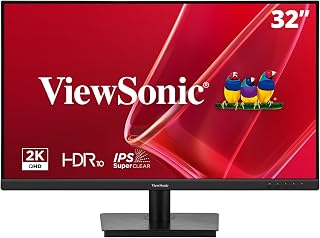
The ViewSonic VS3225-2K is a 32-inch QHD IPS desktop monitor for home offices, study areas, general productivity, streaming, and casual gaming. Its 2560 x 1440 resolution gives users more workspace and sharper detail than a typical 1080p display.
Its 75Hz refresh rate, 4ms response time, and AMD FreeSync support make scrolling, video, and everyday motion feel smoother than a basic 60Hz setup. The IPS panel, 178-degree viewing angle, and matte finish help maintain a consistent image while reducing distracting reflections.
The frameless design keeps bezels slim for a clean desk setup and nearly continuous multi-monitor arrangements. HDMI and DisplayPort support PCs, laptops, and Macs, while DisplayPort-out allows compatible daisy chaining to expand the workspace with less cable clutter.
The 75Hz refresh rate is suitable for casual gaming but falls short of the speed favored by competitive players. Brightness is rated at 250 nits, and the 32-inch panel occupies considerable desk width, so users with bright rooms or compact desks should plan their setup carefully.
Flicker-Free technology, a Blue Light Filter, and ViewMode presets add practical comfort for long work or study sessions. With a three-year limited warranty, flexible connectivity, and a spacious QHD IPS display, the VS3225-2K is a sensible choice for productivity and entertainment rather than demanding gaming.

Pros
- Excellent pixel density and color accuracy from the IPS panel delivers crisp visuals for content creation and everyday work
- Frameless design maximizes screen real estate and creates seamless transitions in multi-monitor configurations
- 100Hz refresh rate smooths gameplay and animations without requiring high-end graphics hardware
- Comprehensive connectivity with dual HDMI and DisplayPort outputs accommodates multiple devices and daisy-chaining
- Thoughtful ergonomic features like Flicker-Free and Blue Light Filter support comfortable extended viewing sessions
Cons
- 100Hz refresh rate limits appeal to competitive gamers who prefer 144Hz or higher for fast-paced titles
- Response time spec of 1ms may represent gray-to-gray measurement rather than black-to-white, affecting actual gaming smoothness perception
The ViewSonic VS2725-2K is a 27-inch QHD monitor designed for professionals, content creators, and remote workers who demand sharp visuals and reliable performance without premium pricing. Its 2560x1440 resolution delivers the extra screen real estate and pixel density that makes multitasking and detailed work significantly easier than standard 1080p displays.
The standout features include a 100Hz IPS panel with frameless design that supports fluid visuals and seamless multi-monitor setups. VESA Adaptive Sync technology reduces screen tearing during gaming and video playback, while the five ViewMode presets let you quickly optimize the display for different tasks like gaming, movies, or document editing. The dual HDMI ports and DisplayPort connection (with daisy-chain support) provide flexibility for connecting multiple devices and extending your workspace with minimal cable clutter.
Build quality is solid with a matte finish that resists glare and maintains excellent color consistency across the 178-degree viewing angles. The monitor feels sturdy, and the ultra-thin bezels enhance the aesthetic while making the display feel larger than it is. At just under 8 pounds, it is lightweight enough to reposition easily yet stable on most desk setups.
The main limitation is the 100Hz refresh rate, which falls short for competitive gaming compared to 144Hz or 240Hz alternatives. The pixel response time of 1ms is competitive, though the actual perceived responsiveness depends on the measurement standard used. Additionally, while the 250 nits brightness is adequate for office lighting, users in very bright environments may find it slightly dim.
Overall, the VS2725-2K delivers exceptional value for professionals and general users who prioritize sharp image quality, accurate colors, and a large productive workspace. The 3-year warranty and US-based support further justify the investment for anyone building a reliable home office or multi-monitor productivity setup.
Display: 27-inch IPS LCD panel, 2560x1440 QHD resolution, 16:9 aspect ratio, 100Hz refresh rate, 250 nits brightness, 4000:1 contrast ratio, 178-degree viewing angles
Performance: 1ms response time, VESA Adaptive Sync (FreeSync), Flicker-Free technology, Blue Light Filter
Connectivity: 2x HDMI ports, DisplayPort with daisy-chain support, AC/DC adapter
Design: Frameless matte finish, ultra-thin bezels, 24.1 inches wide, 18 inches tall, 8.1 inches deep, 7.9 pounds
Warranty: 3-year limited warranty covering parts, labor, and backlight with US-based customer service
Ideal for professionals: Remote workers, accountants, designers, and developers who need extra screen space and color accuracy without breaking the bank. The 1440p resolution and large 27-inch size significantly improve productivity compared to smaller 1080p displays.
Great for multi-monitor setups: The frameless design and daisy-chain capability make this monitor perfect for building a seamless multi-display workspace. Connect multiple VS2725-2K monitors with a single cable for a clean, clutter-free desk.
Content creators: Photographers, video editors, and graphic designers benefit from the accurate IPS panel colors and high pixel density for detailed work and color-critical tasks.
Casual gamers and streamers: The 100Hz refresh rate and VESA Adaptive Sync provide smooth gameplay for most titles without requiring flagship hardware. Good choice for streamers who prioritize a spacious editing canvas over extreme frame rates.
Not ideal for: Competitive esports players needing 144Hz or higher, or users requiring extreme brightness for outdoor or very bright office environments.

Colour-critical work demands accuracy over flash, and this 32 inch ColorPro display delivers with factory sRGB calibration and HDR10 support on an IPS panel for consistent tone and wide viewing angles. The matte finish cuts glare during long editing sessions, while 65W USB C handles power, video, and data through a single cable, keeping desks tidy for creative professionals.
Pros
- 32 inch 4K UHD resolution for detailed, spacious workspaces
- 100% sRGB color gamut for accurate, reliable color
- 65W USB-C for single-cable video and laptop charging
- HDR10 support and 178 degree viewing angle
Cons
- 60Hz refresh rate, not built for gaming setups
- Matte finish and color focus add little value for casual viewing
If your setup revolves around getting colors right, the VP3256-4K earns its place among ViewSonic's best. It's a 32 inch 4K UHD ColorPro display with 100% sRGB coverage, built for photographers, video editors, and designers who need their screen to match reality. The matte IPS panel holds a 178 degree viewing angle, so color stays consistent whether you're reviewing work alone or showing a client across the desk. At this size, 4K resolution gives you enough real estate to run full editing timelines, inspector panels, and reference images side by side without constant window juggling. The 65W USB-C input is a quiet but meaningful feature for this setup guide: a single cable can carry video and charge a connected laptop, which cuts down on cable clutter for anyone building a clean, professional workstation. HDR10 support adds extra range when reviewing HDR footage. For a monitor-buying guide focused on matching the right ViewSonic to the right job, this is the pick for color-first, creative-first setups.
Best for anyone setting up a dedicated creative workstation: photo editors, video editors, and designers who need accurate, consistent color and appreciate the single-cable USB-C setup for a laptop. Also a good fit if you want a large, high-resolution canvas for detailed work. Skip it if your setup is built around gaming, since the 60Hz refresh rate won't satisfy fast-paced play, or if you just need a straightforward everyday display without color demands.

Pros
- Excellent value for a 32-inch 4K monitor at this price point
- Strong HDR10 performance makes movies and streaming content look vibrant and detailed
- Comprehensive eye care features help reduce fatigue during all-day use
- ViewMode presets save time switching between different work and entertainment tasks
- Versatile connectivity supports both older and newer device types
Cons
- 32-inch size may feel large for desktop productivity work if viewing distance is close
- No built-in speakers limits entertainment convenience for some users
- Limited information on brightness levels and color gamut coverage in available specs
The ViewSonic VX3276-4K-MHD is a 32-inch 4K UHD monitor designed for users who want a large, high-resolution display for home entertainment, streaming, and general computing. It's an excellent fit for movie enthusiasts, content creators, and anyone who values screen real estate without wanting to step up to premium pricing.
The standout feature is its HDR10 support, which noticeably enhances contrast, color depth, and detail in streaming movies and 4K content. Combined with the MVA panel and ultra-slim design, this monitor creates an engaging viewing experience. The five ViewMode presets are thoughtfully designed and make it easy to optimize the display for gaming, movie watching, or productivity work without manual adjustments.
Build quality appears solid with a matte screen surface that reduces glare and reflections. The inclusion of Flicker-Free technology and Blue Light Filter demonstrates ViewSonic's attention to user comfort during long viewing sessions. Connectivity is comprehensive, offering HDMI, DisplayPort, and Mini DisplayPort inputs that work with modern laptops, PCs, and streaming devices.
The main limitation is that the 32-inch screen size works best at a distance. Users sitting very close may find the resolution less immersive. Additionally, the lack of built-in audio means you'll need external speakers or headphones for full entertainment setup.
Overall, this monitor delivers strong value for buyers seeking a large-screen 4K display with HDR support and user-friendly features. It's a practical choice for home entertainment and everyday computing, though it's not positioned as a premium prosumer or gaming monitor.
This monitor works best for viewers who sit at least 2-3 feet away from the screen. It's ideal for living room entertainment setups, dual-monitor productivity workstations, and content viewing on a larger scale. If you're primarily working in close-quarters office settings, you may want to consider a smaller 24 or 27-inch model instead.
Make sure your device has at least one of the three supported connection types: HDMI, DisplayPort, or Mini DisplayPort. Most modern laptops, PCs, and streaming devices have compatible ports, but older hardware may need adapters. For the best HDR experience, verify that your content sources and playback devices support HDR10 output.
Consider your typical use case when choosing between ViewModes. The Movie mode is optimized for streaming content, while Game mode offers faster response times. Text mode suits productivity work, and Web mode balances color and brightness for general browsing. Testing these presets during your first week will help you find your preferred settings.
How to Choose the Right ViewSonic Monitor
Resolution and Screen Size
The combination of resolution and screen size determines how sharp and spacious your workspace feels. A 1080p panel works well on screens up to 24 inches, where pixel density stays high enough for crisp text. Step up to 27 or 32 inches and you will want at least 1440p, like the QHD options in the Monitors category, to keep images looking clean at normal viewing distances.
For professional creative work involving photo or video editing, a 4K panel gives you the resolution to see fine detail clearly. The ViewSonic VP3256-4K 32 Inch 4K UHD ColorPro is factory calibrated and Pantone Validated, making it a strong choice for color-critical workflows that demand accuracy.
Refresh Rate and Panel Technology
Refresh rate affects how smooth motion appears on screen. For everyday productivity and media consumption, a 75Hz to 100Hz display delivers a noticeably smoother experience compared to a standard 60Hz panel. The ViewSonic VA2756A-MHD 27 Inch Full HD Computer and the ViewSonic VA2448-MH 24 Inch 1080p Computer both push 120Hz, which is exceptional at their respective price points.
IPS panels dominate this lineup for good reason. They offer wider viewing angles and more consistent color reproduction compared to TN alternatives. If you are pairing your monitor with a mid-range GPU, our guide to the best monitors for the RX 9070 covers how refresh rate and panel type work together with your graphics card.
Connectivity and Multi-Monitor Flexibility
The ports on a monitor matter more than many buyers realize. DisplayPort daisy-chaining, available on several models in this lineup, lets you connect multiple displays using a single cable run from your PC, reducing desk clutter significantly. The ViewSonic VA2256-MHD 22 Inch Frameless 1080p IPS includes both HDMI and DisplayPort with daisy-chain support, making it a practical anchor for a compact multi-monitor setup.
If you work with a laptop and want to simplify your desk, USB-C connectivity is worth prioritizing. The ViewSonic VP3256-4K 32 Inch 4K UHD ColorPro handles data, video, and 60W laptop charging through a single USB-C cable, which keeps your workspace clean and efficient.
Eye Care Features for Long Sessions
Every ViewSonic monitor in this roundup includes Flicker-Free technology and a Blue Light Filter. These features matter if you spend six or more hours per day in front of a screen, whether for work, studying, or content creation. The difference in eye fatigue over a full workweek is real and worth factoring into your decision.
ViewSonic also includes its exclusive ViewMode presets on most models, letting you switch between optimized profiles for games, movies, web browsing, and text. This kind of one-click adjustment is a small but practical feature that changes the feel of a display without diving into complex OSD menus. For those pairing a monitor with a high-end GPU, our best monitor for RTX 5060 guide explores how these settings interact with modern rendering pipelines.
Final Thoughts
ViewSonic offers a well-rounded lineup that covers most needs without unnecessary compromise. For a compact, budget-friendly workstation display, the ViewSonic VS2247-MH 22 Inch 1080p Monitor delivers solid everyday performance with broad compatibility, while the ViewSonic VP3256-4K 32 Inch 4K UHD ColorPro stands apart for professionals who require verified color accuracy and a feature-rich connectivity suite in a single premium display.
Frequently Asked Questions
Are ViewSonic monitors good for home office use?
ViewSonic monitors are a strong choice for home office setups. Models like the ViewSonic VA2756A-MHD 27 Inch Full HD Computer pair IPS color accuracy with Flicker-Free and Blue Light Filter technology, keeping you comfortable through long workdays. The frameless designs also make multi-monitor arrangements easy to arrange side by side.
What is the difference between ViewSonic VA and VP series monitors?
The VA series is built for everyday productivity and general use, offering dependable image quality at an accessible point. The VP series, by contrast, targets professional creators who need factory-calibrated color, Pantone Validation, and advanced ergonomic stands. If precise color reproduction is a core requirement for your workflow in 2026, the VP series is the more appropriate choice.
Is a 1440p ViewSonic monitor worth it over 1080p?
On screens 27 inches and larger, the jump from 1080p to 1440p is clearly visible in everyday use. Text appears sharper, images have more fine detail, and you gain extra screen real estate for multitasking. The ViewSonic VS2725-2K 27 Inch 1440p Computer is a well-balanced example of this upgrade. For GPU pairing guidance, see our best monitors for the RX 9070 XT for context on how resolution scales with GPU capability.
Do ViewSonic monitors work well for casual gaming?
Several ViewSonic models in this lineup include AMD FreeSync or VESA Adaptive Sync, which reduces screen tearing during gameplay without requiring a high-end GPU. The 120Hz refresh rate on select models adds extra smoothness for faster-paced titles. For more demanding setups, our roundup of the best monitors for the RTX 5090 puts high-refresh-rate displays in a broader gaming context for 2026.
Common questions
What is the difference between IPS and other panel types on these monitors?
IPS panels, like those in the VA2756A-MHD and VA2256-MHD, deliver wider 178 degree viewing angles and more consistent color from off center positions. The VS2247-MH and VX3276-4K-MHD use standard LCD/LED panels with a narrower 170 degree viewing angle on the VS2247-MH. IPS suits design and color sensitive work, while standard LCD panels are fine for everyday browsing, office tasks, and casual viewing where you sit straight on.
Is a 100Hz or 120Hz refresh rate worth it for the price?
Yes, it's worth it if you want smoother motion without paying for a high end gaming monitor. The VS2247-MH offers 100Hz and the VA2756A-MHD IPS model offers 120Hz, both noticeably smoother than the 60Hz VA2256-MHD. For everyday scrolling, office work, and light gaming, these higher refresh rates give a more fluid feel at a budget friendly cost rather than a premium gaming price tag.
Do these ViewSonic monitors support VESA mounting on an arm or stand?
ViewSonic's monitor lineup generally supports VESA mounting, letting you attach the display to an arm, wall mount, or multi monitor stand instead of the included base. The exact VESA pattern can vary by model, so check the specific listing or manual for the VS2247-MH, VX3276-4K-MHD, VA2756A-MHD, or VA2256-MHD before buying hardware. Mounting frees up desk space and makes it easier to adjust height and angle for your setup.







Write Your Review
No reviews yet. Be the first to share your experience!