

You want a monitor that keeps up with your reflexes without draining your wallet. KTC has quietly become one of the more compelling choices in the gaming display space, offering high refresh rates, sharp resolutions, and solid build quality across a surprisingly varied lineup. Whether you game competitively, work creatively, or just want a smoother everyday experience, there’s likely a KTC display built for your setup.
This guide covers eight of the best KTC monitor options available in 2026, from budget-friendly 1080p speedsters to a premium 4K panel. If you’re also evaluating what GPU to pair with a new display, our roundup of the best monitors for the RTX 5060 is a solid companion read.
Quick Comparison
Ratings reflect the most recent data pull. Check each listing for current price and availability.
Quick answer
This guide compares 8 picks, with KTC 24.5" 240Hz Gaming Monitor FHD IPS 1ms Response Time ranked first. KTC H27S5C 27 inch Curved Gaming Monitor 1440P QHD holds the highest customer rating among them. KTC H25X7 24.5 Inch 400Hz Gaming Monitor, 1ms IPS leads this list on refresh rate.

Budget-focused gamers who still want serious speed should note the 240Hz refresh rate on this FHD panel, a tier usually reserved for pricier displays. Fast IPS panel technology keeps viewing angles and color consistent, which matters for gamers who lean side to side during intense matches without losing visual accuracy.
Pros
- 240Hz refresh with 1ms MPRT for esports titles
- FHD resolution keeps frame rates high on modest GPUs
- FreeSync and G-Sync compatible for either platform
- Dual HDMI 2.0 plus DisplayPort for console flexibility
Cons
- FHD resolution looks less detailed than 1440p options
- 350 nits brightness is only moderate
For a gamer picking a monitor with esports performance as the top priority, the H25T7-A is built around that exact brief. At 24.5 inches with a 240Hz refresh rate, it's sized and tuned for titles like CS:GO, Valorant, and Overwatch, where quick target acquisition matters more than screen real estate. The FHD resolution keeps GPU demands low, so even a mid-range graphics card can sustain high frame rates, which matters if you're building a competitive setup on a budget. HDR 10 support and a 114% color gamut add more visual punch than you'd expect from a panel this focused on speed. Adaptive sync covers both FreeSync and G-Sync, so it fits AMD or NVIDIA builds without compatibility worries. Connectivity is generous too, with dual HDMI 2.0 and DisplayPort 1.4, meaning it also works for consoles like Switch or PlayStation if gaming duty gets shared. In a lineup of KTC monitors for every gamer, this is the one aimed squarely at competitive players who want frame rate over pixel count.
Display: 24.5-inch FHD LCD, 1920x1080 resolution, 16:9 aspect ratio, matte finish
Performance: 240Hz refresh rate, 1ms MPRT response time, 1000:1 contrast ratio, 350 nits brightness
Color & Imaging: 114% sRGB color gamut, HDR 10, 178-degree viewing angles, flicker-free, low blue light filter
Connectivity: 2x HDMI 2.0, 1x DisplayPort 1.4, 1x USB 2.0, Adaptive Sync (FreeSync and G-Sync compatible)
Design: Tilt range -5 to +15 degrees, VESA 100x100mm mounting, matte black finish
Dimensions: 21.96"W x 16.49"H x 7.24"D, 3.2kg weight
Warranty: 3-year manufacturer warranty with customer support
Buy this if competitive shooters are your main use case and you want maximum frame rate on hardware that isn't top-tier. Skip it if you want sharper detail for single-player or productivity work, since FHD on a 24.5-inch screen looks noticeably softer than 1440p alternatives, and 350 nits brightness may feel modest in very bright rooms.

KTC H27S5C 27 inch Curved Gaming Monitor 1440P QHD
Gamers who want immersive visuals without sacrificing smoothness will appreciate the curved QHD panel paired with HDR 400 support. The 4000:1 contrast ratio delivers deeper blacks and richer highlights than typical flat IPS panels, making shadowy corners in RPGs or atmospheric titles easier to read while the 144Hz refresh keeps fast-paced action fluid and tear-free.
Pros
- 1500R curve adds immersion and reduces eye strain
- 1440P QHD resolution with 144Hz refresh rate
- HDR400 with 129% sRGB and 110% DCI-P3 coverage
- Low Blue Light and Flicker-Free eye care features
Cons
- Some users report power-on issues after sleep mode
- Limited LED backlight controls and narrow tilt range
For gamers who want a KTC monitor that still feels comfortable during long marathon sessions, the H27S5C brings a curved 1500R screen into the mix, which is a different kind of upgrade than raw speed. At 1440P QHD with a 144Hz refresh rate, it covers the sweet spot many gamers land on when 1080p feels too soft but 4K asks too much of their GPU. HDR400 support combined with a 129% sRGB gamut keeps visuals punchy across genres, and the curve helps keep action within your natural field of view during extended play. Eye care extras like Low Blue Light and Flicker-Free technology are a nice fit for gamers who also spend hours on the same screen for other tasks. Adaptive-Sync works across both NVIDIA and AMD setups, so compatibility isn't a concern. It is not the fastest or sharpest option in a gamer-focused lineup, but it earns its place as the comfortable, well-rounded curved pick.
Display: 27-inch curved LCD, 1500R curvature, 1440P QHD (2560x1440), 16:9 aspect ratio, matte finish
Performance: 144Hz refresh rate, 5ms response time, 4000:1 contrast ratio, 400 nits brightness, 178-degree viewing angle
Color & HDR: 16.7 million colors, 129% sRGB, 110% DCI-P3 gamut, HDR400 support
Connectivity: 2x HDMI 2.0, 1x DisplayPort 1.4, 1x 3.5mm audio jack, 1x USB 2.0
Features: Adaptive-Sync (G-Sync and FreeSync compatible), Low Blue Light, Flicker-Free, tilt adjustment (-5 to +20 degrees), 100mm x 100mm VESA mount
Dimensions: 24.05 inches W x 18.58 inches H x 6.14 inches D. Includes curved monitor, adapter, base, HDMI cable, and power cord. 3-year manufacturer warranty.

Gamers who want QHD clarity plus built-in audio convenience will appreciate that this model includes speakers, cutting out extra desk clutter from external setups. The 210Hz refresh rate still comfortably outpaces standard 144Hz monitors, giving fast-paced gameplay a noticeably smoother feel right out of the box.
Pros
- 1440p resolution adds sharpness over FHD rivals
- 131% color gamut suits gaming and creative use
- 210Hz refresh with 1ms response for fast action
- FreeSync and G-Sync compatible across GPU brands
Cons
- Full 210Hz only available via DisplayPort 1.4
- 1000:1 contrast trails VA panel alternatives
Gamers shopping a best-of-2026 roundup usually want one monitor that handles everything, and the H27T22C-3 makes a strong case as the all-rounder pick. 27 inches of 1440p QHD gives you noticeably more screen real estate and sharpness than the FHD options on this list, while 210Hz refresh and 1ms response keep fast-paced titles fluid. What sets it apart here is color performance: a 131% color gamut rating means this isn't just a gaming panel, it also handles media and creative work well, so it suits anyone who splits time between matches and other screen work. FreeSync and G-Sync compatibility mean it plays nicely whether you're running AMD or NVIDIA. The matte finish and 178 degree viewing angles round out a panel built for long sessions in a shared room or multi-monitor desk. Built-in speakers are a nice bonus for quick setups, even if dedicated audio gear will outperform them. For this list, it earns its spot as the pick for gamers who want resolution and color alongside speed, not just raw Hz.
Display Quality: 27-inch 1440p IPS panel with 2560 x 1440 native resolution, 178-degree viewing angles, and HDR 400 support for excellent color depth and brightness.
Refresh & Response: Up to 220Hz via DisplayPort 1.4 (200Hz native, boosted to 220Hz), 144Hz via HDMI 2.0. Industry-leading 1ms response time minimizes motion blur and ghosting during fast action.
Color & Contrast: 131% sRGB color gamut covering vibrant color reproduction, 1.07 billion colors, 450 cd/m2 peak brightness, and 1000:1 static contrast ratio for balanced visual performance.
Connectivity: DisplayPort 1.4, dual HDMI 2.0 ports, single USB 2.0 port, and 100mm VESA wall mount compatibility for flexible setup across gaming PCs, consoles, and laptops.
Features: AMD FreeSync and G-Sync compatible for tear-free adaptive refresh, flicker-free technology, blue light filter, built-in stereo speakers, and fully adjustable stand with tilt support.
Buy this if you want a step up in resolution and color accuracy without leaving high refresh gaming behind, especially if you also use the monitor for creative work. Skip it if your GPU can't comfortably push 1440p at high frame rates, or if you only have HDMI 2.0 available, since that caps you at 144Hz instead of the full 210Hz over DisplayPort.
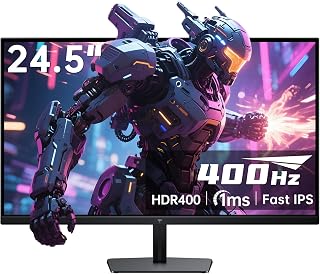
Competitive players chasing every frame advantage will find the 400Hz refresh rate hard to beat for fast-paced shooters and esports titles. Paired with Fast IPS technology, motion stays sharp during quick flicks and tracking, giving twitch-reflex gamers the responsiveness needed to spot enemies a frame before their opponents do.
Pros
- 400Hz refresh rate on a Fast IPS panel
- Wide 178 degree viewing angles with accurate color
- HDR 400 support with 128% sRGB gamut
- FreeSync Premium Pro for tear-free play
Cons
- 1080p resolution limits pixel density on a larger screen
- Hitting 400Hz needs a high-end GPU and DisplayPort connection
When the goal is picking the best KTC monitor for gaming in 2026, speed is usually the deciding factor, and the H25X7 is built almost entirely around that one metric. A 400Hz refresh rate on a 24.5 inch Fast IPS panel puts this near the top of any list sorted by pure motion clarity, which matters for anyone chasing frames in CS:GO, Valorant, or Apex Legends. It avoids the usual tradeoff of TN speed versus IPS color, so you still get 178 degree viewing angles and a 128% sRGB gamut with HDR 400 for some visual punch alongside the speed. FreeSync Premium Pro keeps things tear free, and the ergonomic stand plus dual HDMI 2.0 and dual DisplayPort 1.4 round out a setup that feels purpose built rather than generic. For a gamer-focused roundup, it earns its slot as the pick for players who treat refresh rate as the top priority over resolution.
Display: 24.5 inch Fast IPS, 1920x1080 resolution, 16:9 aspect ratio, 400Hz refresh rate, 1ms response time
Color & Image: HDR 400, 128% sRGB color gamut, 1000:1 contrast ratio, 400 cd brightness, 178 degree viewing angle
Connectivity: 2x HDMI 2.0 (240Hz), 2x DisplayPort 1.4 (400Hz), supports FreeSync Premium Pro
Design: Fully adjustable tilt stand, matte finish, silver-gray color, wall mount compatible
Physical: 21 inch depth, 5 inch width, 16 inch height, 9 pounds weight, 60 watts power consumption
Warranty: 3-year manufacturer warranty
Included: Monitor, stand, DisplayPort cable, HDMI adapter, quick start guide, user guide, screwdriver
Buy this if competitive, fast-paced gaming is your main use and you have a GPU capable of pushing high frame rates at 1080p through DisplayPort. Skip it if you want 1440p or 4K sharpness for single-player games, media, or creative work, since the resolution will feel limiting on a 24.5 inch panel. Also skip it if your PC can't realistically approach 400Hz, since you won't see the benefit.
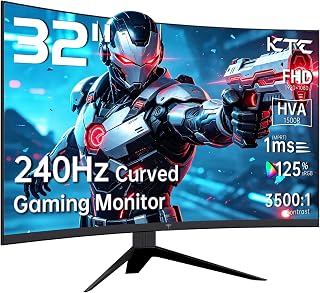
Anyone craving a more cinematic, wraparound feel at their desk will like the 32 inch curved format combined with a 3500:1 contrast ratio. That higher contrast helps dark scenes in horror or open-world games retain detail, while the curve pulls peripheral vision into the action for a more enveloping gaming session.
Pros
- 32-inch curved screen adds strong immersion
- 240Hz refresh with 1ms response for fast genres
- 3500:1 contrast ratio outperforms typical IPS panels
- Adjustable tilt stand and VESA mount support
Cons
- 1080p resolution on a 32-inch screen lowers pixel density
- Brightness tops out at a moderate 350 nits
If this best-of list needs an immersive, large-screen option, the H32S17F covers that angle without giving up competitive speed. The 32-inch curved panel wraps the action around you in a way the smaller monitors on this list can't match, and the curve pairs with a 240Hz refresh rate and 1ms response time so fast shooters and fighting games still feel sharp and responsive. A 3500:1 contrast ratio stands out among this group, delivering deeper blacks and more punch than the typical 1000:1 IPS panels, which makes visuals feel more vibrant even at 1080p. DisplayPort 1.4 ensures the GPU can actually push the full refresh rate, and the 125% color gamut keeps colors looking lively rather than washed out. An adjustable stand with 5 to 15 degrees of tilt and VESA mounting support add setup flexibility. For gamers in this roundup who want size and immersion to go along with high refresh gaming, this is the pick that trades pixel density for scale and contrast.
Display: 32 inches, 1920x1080 FHD, 16:9 aspect ratio, curved LCD panel
Refresh Rate: 240Hz
Response Time: 1ms
Color & Contrast: 125% sRGB gamut, 16.7 million colors, 3500:1 contrast ratio
Brightness: 350 cd/m2
Viewing Angle: 178 degrees
Connectivity: 2x HDMI 2.0, 1x DisplayPort 1.4, 1x USB 2.0
Sync Technology: FreeSync, G-Sync compatible
Special Features: Anti-blue light, anti-glare, anti-flicker, curved design
Adjustability: 5-15 degree tilt, VESA mount compatible (4 holes, M4x8mm)
Dimensions: 27.99 inches wide, 9.88 inches deep, 20.7 inches tall
Weight: 18 pounds
Power: 36 watts at 19V DC
Warranty: 3 years manufacturer coverage
Buy this if you want a big, immersive curved screen for console or PC gaming and value contrast and size over pixel-perfect sharpness. Skip it if you do detail-heavy work like text editing or photo editing, since 1080p stretched across 32 inches gives lower pixel density than smaller 1080p screens or higher-resolution alternatives.

Gamers wanting sharper detail without giving up speed should consider this QHD panel's 275Hz refresh rate, which pushes well past standard 240Hz options. Fast IPS tech keeps colors consistent at wide angles, so squad-based or co-op sessions where friends are watching from the side still look accurate and smooth.
Pros
- 240Hz native, overclockable to 275Hz, on Fast IPS
- 2560x1440 resolution with 123% sRGB and HDR 400
- Highly adjustable stand with full pivot for portrait mode
- Four video inputs plus built-in speakers
Cons
- 275Hz overclock needs manual tuning and a capable GPU
- Only one USB 2.0 port, no full hub functionality
The H27E6S lands in a strong middle ground for this list, offering a step up in both speed and screen real estate for gamers who don't want to choose between the two. Its 240Hz native refresh rate, overclockable to 275Hz, pairs with a 2560x1440 Fast IPS panel, so you get genuine motion smoothness without giving up the color accuracy or 123% sRGB gamut that a TN panel would sacrifice. HDR 400 support adds further visual depth, and 1ms MPRT response with Adaptive Sync keeps fast-paced titles clean. The stand stands out here too, with height, tilt, swivel, and full 90-degree pivot adjustment, plus four video inputs and built-in speakers for a clutter-free desk. For a gamer-focused roundup, this model fits readers who want 2K sharpness and high refresh rate in the same package rather than picking one over the other.
Display: 27-inch Fast IPS, 2560x1440 (2K), 16:9 aspect ratio, matte finish
Refresh Rate: 240Hz native, 275Hz overclocked
Response Time: 1ms MPRT
Color: 123% sRGB gamut, 1000:1 contrast, 400 cd/m² brightness, HDR400
Connectivity: 2x HDMI 2.0, 2x DisplayPort 1.4, 1x USB 2.0, 1x 3.5mm audio
Stand: 130mm height adjustment, -5 to 20 degree tilt, 45-degree swivel, 90-degree pivot, VESA 100x100mm
Additional: Built-in stereo speakers, low blue light filter, flicker-free technology
Dimensions: 24.3W x 14.3H x 2.4D inches, weight 5.95 kg
Warranty: 3-year manufacturer warranty
Buy this if you want 1440P resolution with genuinely high refresh rates and don't mind tuning your system to reach the 275Hz overclock. It also suits anyone who splits time between gaming and photo or design work thanks to the color accuracy. Skip it if you need a hub-style USB setup, since there's only a single USB 2.0 port, or if you'd rather avoid the extra upkeep of a white matte finish.

Pros
- Buttery smooth 240Hz gameplay with zero noticeable input delay
- Stunning picture quality at 1440p with vibrant colors and excellent contrast
- Comfortable curved design reduces neck strain during marathon gaming sessions
- Works seamlessly with both gaming consoles and PCs via multiple connectivity options
- 3-year manufacturer warranty provides solid peace of mind
Cons
- Occasional light bleeding reported in bottom corners on some units
- Monitor takes 3-5 seconds to wake from sleep mode
- Plastic build quality feels budget-oriented despite strong performance
The KTC H32S25E is a 32-inch curved gaming monitor built for players and professionals seeking 1440p clarity with 240Hz smoothness at an accessible price point. This monitor targets competitive gamers who want responsive gameplay without flagship pricing, as well as content creators who need color accuracy for editing work alongside gaming capability.
The standout feature is the 240Hz refresh rate paired with 1440p resolution, a combination that delivers exceptional value for mid-range gaming rigs. Real-world testing from verified purchasers confirms buttery smooth motion, zero ghosting issues, and no input lag, making this ideal for FPS and fast-action titles. The 1000R curve feels genuinely comfortable during long sessions, and the 99% sRGB color coverage produces vibrant, accurate visuals that rival monitors costing significantly more.
Build quality leans toward budget plastic construction, which is expected at this price, but the overall design feels solid and the frameless bezel design works well for multi-monitor setups. The included DisplayPort cable and accessories are functional if not premium. Connectivity includes dual DP1.4 ports for 240Hz operation, dual HDMI 2.0 ports, and USB for future firmware updates.
Minor drawbacks include occasional light bleeding in the bottom corners on some units, slower-than-ideal wake times from sleep mode, and a base that takes substantial desk depth. These are minor compromises for the performance delivered. Occasional reports of firmware quirks appear in user feedback but remain uncommon.
Verdict: The KTC H32S25E offers genuine value for competitive gamers and creative professionals seeking 1440p gaming at 240Hz without premium pricing. The curved screen, adaptive sync support, and color accuracy make this a legitimate contender against significantly more expensive alternatives, assuming you accept modest build quality trade-offs.
This monitor excels at competitive gaming, where the 240Hz refresh rate and 3ms response time create silky smooth motion that translates to faster reaction times. Users report significant improvements in FPS titles like Valorant, CS2, and Apex Legends, where frame clarity matters for target tracking. The FreeSync and G-Sync compatibility means performance scales smoothly across NVIDIA RTX and AMD Radeon GPUs without screen tearing.
For single-player and open-world games, the 1440p resolution provides noticeable visual improvement over 1080p while the 240Hz capability ensures consistent frame delivery on high-end systems. The 1000R curve enhances immersion in story-driven titles, drawing your eyes naturally into the center of the screen. Console gamers using Xbox Series X/S benefit from HDMI 2.0 support at 144Hz, delivering superior performance compared to older displays.
The 122% DCI-P3 color gamut and 99% sRGB coverage deliver accurate, vibrant colors suitable for photo editing, video work, and content creation alongside gaming. Pre-calibrated sRGB mode ensures colors appear true-to-life without requiring manual adjustment. The 178-degree viewing angle maintains color accuracy when viewing from angles, beneficial for collaborative work or streaming setups.
HDR and MPRT technology enhance perceived contrast and motion clarity, though the 350 nits peak brightness limits HDR impact compared to professional-grade displays. Matte finish eliminates glare without sacrificing image clarity, making this suitable for brightly lit spaces. The 2560x1440 native resolution at 32 inches produces visible pixels if sitting extremely close, but standard 24-30 inch viewing distance eliminates this concern entirely.
Display: 32-inch, 1000R curved VA panel, 2560x1440 resolution, 16:9 aspect ratio, matte finish
Refresh Rate: 240Hz via DisplayPort 1.4, 144Hz via HDMI 2.0
Response Time: 3ms
Color: 122% DCI-P3, 99% sRGB coverage, 4000:1 contrast ratio
Brightness: 350 nits typical
Viewing Angle: 178 degrees horizontal and vertical
Connectivity: 2x DisplayPort 1.4, 2x HDMI 2.0, 1x headphone jack, 1x USB 2.0
Power: 65 watts typical, 19V DC adapter included
Dimensions: 50 inches depth, 40 inches width, 30 inches height with included base
Weight: 5.9 kg
Features: FreeSync, G-Sync compatible, flicker-free, anti-blue light, HDR, MPRT
Warranty: 3-year manufacturer warranty

Pros
- Exceptional pixel density at 32 inches delivers crisp 4K gaming without needing multiple monitors
- Dual adaptive sync support (FreeSync and G-Sync) eliminates screen tearing across AMD and Nvidia GPUs
- Fast 1ms response time and 165Hz refresh rate provide competitive advantage in fast-paced games
- Wide color gamut and high contrast ratio make this equally suitable for content creation and design work
- Comprehensive connectivity and included DP cable simplify PC and console setup
Cons
- 32-inch size requires significant desk space and viewing distance for comfortable use
- 165Hz at 4K may require high-end GPU to achieve maximum performance in demanding titles
- Matte panel finish, while reducing glare, may soften image sharpness compared to glossy alternatives
The KTC H32P22P is a premium 32-inch 4K gaming monitor designed for players and professionals who demand both visual fidelity and smooth performance. It combines a 4K UHD resolution with a 165Hz refresh rate, a rare pairing that appeals to competitive gamers unwilling to compromise on image quality.
The standout feature is its 1ms response time paired with dual adaptive sync technology (FreeSync and G-Sync), which virtually eliminates screen tearing and stuttering. The fast IPS panel delivers a 121% sRGB color gamut and 3000:1 contrast ratio, producing vibrant, accurate colors ideal for both gaming and creative work like video editing or design. The 89-degree viewing angles ensure consistent color and brightness even when viewing from the side.
Build quality is solid with a matte screen finish that reduces glare, a sturdy base, and flexible mounting options including 100mm x 100mm VESA wall mount support. The monitor ships with all necessary cables, including a DisplayPort 1.4 cable, plus a screwdriver and instruction guide. Connectivity is excellent with two HDMI 2.1 ports and one DisplayPort 1.4, supporting next-gen consoles and high-performance PCs without any adapter hassle.
The main drawback is the 32-inch size, which requires substantial desk space and viewing distance. While immersive, it may feel overwhelming in smaller setups or at typical desk distances, potentially causing neck strain. Additionally, achieving the full 165Hz at 4K resolution demands a high-end graphics card, limiting accessibility to players with flagship GPUs.
Overall, this is an excellent choice for gamers with premium rigs and ample desk space who want one screen to handle both competitive gaming and content creation. The three-year warranty and responsive customer support add peace of mind to the investment.
Display: 32-inch 4K UHD (3840 x 2160), 165Hz refresh rate, 1ms response time, 3000:1 contrast ratio, 300 cd/m brightness, 121% sRGB color gamut, IPS panel with 89-degree viewing angles.
Connectivity: 2x HDMI 2.1, 1x DisplayPort 1.4, FreeSync and G-Sync adaptive sync support. Compatible with desktop, gaming console, and laptop.
Build: 28.2" W x 11.49" D x 21.57" H, weighs 7.6 kg, matte screen finish, flat design, 100mm x 100mm VESA wall mount support, includes base.
Warranty: 3-year manufacturer warranty with 12-hour response customer support.
Best for: Competitive gamers with high-end gaming PCs or next-gen consoles, content creators needing color-accurate displays, and professionals working in video production or graphic design who also game.
Consider alternatives if: You have limited desk space, a mid-range GPU, or prioritize portability. Smaller 27-inch 4K monitors or higher refresh rate 1440p displays may suit those constraints better.
How to Choose the Right KTC Monitor
Refresh Rate and Response Time
Refresh rate is the single biggest performance differentiator in this lineup. KTC offers panels ranging from 165Hz on the 4K model all the way up to 400Hz on the KTC 24.5 Inch 400Hz Gaming Monitor. For casual and mid-level competitive play, 144Hz to 240Hz is a sweet spot that most systems can actually drive.
Pair that with a 1ms response time and you have virtually no ghosting or motion blur. If you play fast-paced titles like CS2, Valorant, or Apex, the 400Hz option is worth serious consideration. For everything else, 240Hz hits the mark without requiring a top-tier GPU.
Resolution: 1080p vs. 1440p vs. 4K
Resolution shapes the entire character of a monitor. The KTC 24.5 Inch 240Hz Gaming Monitor and the KTC 32 inch 240Hz Curved Gaming Monitor both run at 1080p, which keeps GPU load low and frame rates high. That’s ideal for competitive gaming where raw speed matters more than pixel density.
If you want sharper visuals for creative work or immersive single-player games, the 1440p options like the KTC H27S5C 27 Inch Curved Gaming Monitor or the KTC 27 Inch 240Hz Gaming Monitor 2K deliver a meaningful upgrade in clarity. The KTC 32 Inch 4K Gaming Monitor, 165Hz UHD Monitor sits at the top with 3840×2160 and is best paired with a high-end GPU. For more on matching resolution to your graphics card, see our guide to the best monitors for the RX 9070.
Flat vs. Curved Panel
KTC offers both flat IPS and curved VA-style panels, and the right choice depends on your use case. The curved options, including the KTC 32 inch 240Hz Curved Gaming Monitor with its aggressive 1000R curvature, wrap the image around your field of view. That reduces distortion at the edges and creates a more immersive experience for larger screens.
Flat Fast IPS panels like those in the KTC 27 Inch Gaming Monitor 220Hz and the KTC 27 Inch 240Hz Gaming Monitor 2K tend to offer better color accuracy and wider viewing angles. If you do photo or video work alongside gaming, a flat IPS is usually the more versatile choice. Connecting everything properly matters too, so make sure you have the right cable for your refresh rate target with our picks for the best DisplayPort cables for gaming GPUs.
Connectivity and Ergonomics
Every KTC monitor in this lineup includes at least two HDMI 2.0 ports and one DisplayPort 1.4, so connecting a PC and a console simultaneously is straightforward. The KTC 27 Inch 240Hz Gaming Monitor 2K goes a step further with built-in dual speakers and a fully adjustable stand offering height, tilt, swivel, and pivot.
Ergonomics matter more than people expect during long sessions. Look for VESA mount compatibility if you plan to use an arm, and check that the tilt range fits your desk setup. Most KTC models support VESA 100x100mm, which is the standard size for third-party monitor arms. If you’re building out a full gaming station, also check our guide to the best GPUs for competitive gaming to complete your rig.
Final Thoughts
KTC delivers a genuinely strong lineup in 2026, and two options stand out across different needs. If you want maximum speed for competitive play without the bulk of a large screen, the KTC 24.5 Inch 400Hz Gaming Monitor is hard to beat with its 400Hz refresh rate and 1ms response. For a more well-rounded daily driver that blends sharp 2K visuals with fast-IPS performance and solid ergonomics, the KTC 27 Inch 240Hz Gaming Monitor 2K covers nearly every use case in one clean package.
Frequently Asked Questions
Is KTC a reliable monitor brand?
KTC has built a solid reputation for delivering gaming-focused displays with competitive specs at accessible price points. Their monitors consistently earn strong ratings from verified buyers, and the brand backs most models with a three-year warranty and responsive customer support. We evaluated each model carefully and found the build quality and panel performance consistent across the lineup.
Which KTC monitor is best for competitive gaming in 2026?
For pure competitive performance, the KTC 24.5 Inch 400Hz Gaming Monitor leads the pack with its 400Hz refresh rate, 1ms response time, and FreeSync Premium Pro support. That combination minimizes every frame of input lag between your mouse movement and what appears on screen. For players who want a slightly larger footprint without sacrificing speed, the 240Hz curved 32-inch models are compelling alternatives.
Do KTC monitors work with PS5 and Xbox?
Yes, all the KTC monitors in this guide include HDMI 2.0 ports, which are compatible with PS5 and Xbox Series X/S. The KTC 32 Inch 4K Gaming Monitor, 165Hz UHD Monitor also features HDMI 2.1 support, making it the best fit for next-gen consoles that output 4K signals. Keep in mind that console frame rates at 4K are typically capped lower than what a gaming PC can achieve, so pair your console with the right resolution panel for the best results. You can also explore the best HDMI 2.1 cables for gaming to get full bandwidth out of your connection.
What is the difference between the KTC 1000R and 1500R curved monitors?
The curvature radius describes how tightly the screen bends. A 1000R curve, like the one on the KTC 32 inch 240Hz Curved Gaming Monitor, is tighter and more immersive, closely matching the natural curve of human vision. A 1500R curve, as found on the KTC H27S5C 27 Inch Curved Gaming Monitor, is subtler and more comfortable for users who split time between gaming and productivity work. If you primarily game, go tighter; if you balance tasks, the 1500R is easier on the eyes across different content types.
Common questions
How does KTC panel quality compare to other gaming monitor brands?
KTC panel quality is solid for the price, using a mix of VA and Fast IPS panels depending on the model. The H32S25E uses a VA panel with a 4000:1 contrast ratio for deep blacks, while the H25T7-A uses Fast IPS for quicker pixel response and wider color consistency at sharp viewing angles. Build quality and color accuracy land well above budget no-name brands, though they sit a notch below premium panels from larger display makers.
What refresh rate options are available across the KTC monitor lineup?
Refresh rate options in the KTC lineup top out at 240 hertz on models like the H32S17F, H32S25E, and H25T7-A, with the H27S5C offering 144 hertz instead. This gives shoppers a choice between a sharper, higher resolution 1440P panel at 144Hz or a faster 240Hz panel in 1080P or 1440P depending on whether smooth motion or extra detail matters more for the games being played.







Write Your Review
No reviews yet. Be the first to share your experience!