

You’ve just upgraded to the RTX 5060, and now your old 1080p display feels like a bottleneck. The GPU pushes smooth frame rates at 1440p, but your monitor can’t display the detail or speed you’re paying for. Finding the right display means balancing resolution, refresh rate, and panel technology without overspending on features the 5060 can’t fully utilize.
This guide covers eight monitors specifically matched to the RTX 5060’s performance profile. You’ll find options from budget-friendly QHD panels to premium OLED displays, each evaluated for real-world gaming scenarios. Whether you prioritize competitive shooters or immersive single-player experiences, one of these displays will maximize your GPU investment. If you’re also considering higher-tier GPUs like the RTX 5070 Ti, the requirements shift significantly toward 4K and higher refresh rates.
Quick Comparison
Ratings reflect the most recent data pull. Check each listing for current price and availability.
Quick answer
This guide compares 8 picks, with LG 27G64NA-B 27-inch QHD 300Hz IPS Gaming Monitor ranked first. Samsung 27 Odyssey G5 QHD 1440P 180Hz Gaming Monitor holds the highest customer rating among them. Samsung 32" Odyssey G55C QHD 165Hz Curved Gaming has the most customer reviews.
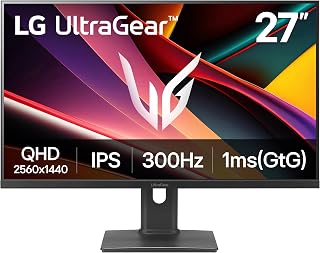
The 27-inch panel's 300Hz refresh rate ensures the RTX 5060 can deliver every frame it renders in fast-paced competitive titles where reaction time matters. QHD resolution at 1440p strikes an ideal balance for this GPU tier, demanding enough horsepower to justify the card without overwhelming it. The IPS panel provides consistent color accuracy across viewing angles, making it suitable for gaming and content work alike.
Pros
- 300Hz refresh rate captures every frame the RTX 5060 can produce at 1440p
- G-Sync Compatible and FreeSync Premium keep gameplay tear-free
- DisplayHDR 400 delivers noticeable HDR impact without a premium panel price
- Fully adjustable stand with height, tilt, and pivot for ergonomic flexibility
Cons
- 93% sRGB coverage leaves color-critical creative work underserved
- Dual HDMI 2.1 ports with no built-in USB hub may require an external hub for busy desks
The RTX 5060 is a mid-to-high-end card that thrives at 1440p, and the LG 27G64NA-B is practically built around that sweet spot. Its 27-inch QHD IPS panel pairs with a 300Hz refresh rate and 1ms response time, meaning the GPU has room to push frame rates that actually saturate the display in competitive titles. G-Sync Compatible and AMD FreeSync Premium support mean the card and panel stay in lockstep, eliminating tearing without the overhead of a dedicated G-Sync module. DisplayHDR 400 certification and 93% sRGB coverage give RTX 5060 owners a reason to turn HDR on without the washed-out results common on budget panels. The Black Stabilizer brightens shadow areas, complementing the GPU's raw performance in visibility-dependent games. A fully adjustable stand, matte finish to cut glare, and dual HDMI 2.1 ports round out a package that lets the RTX 5060 show what it can do at a resolution it handles comfortably.
Display Specs: 27-inch IPS panel, QHD resolution (2560x1440), 16:9 aspect ratio, matte finish, 1000:1 contrast ratio, 400 nits peak brightness, 0.23mm pixel pitch.
Performance: 300Hz refresh rate, 1ms response time (GtG), VESA DisplayHDR 400 and HDR10 support, 93% sRGB color coverage.
Connectivity: DisplayPort, 2x HDMI 2.1, 1x USB port. Includes DisplayPort cable and power cable.
Adaptive Sync: NVIDIA G-Sync Compatible (GTX 10 series and higher on DisplayPort, RTX 30 series and higher on HDMI 2.1), AMD FreeSync Premium.
Design: Adjustable stand with height, tilt, and pivot adjustments. Dimensions: 24.1" W x 20.6" H x 8.4" D. Weight: 10.1 lbs. Color: Black. Warranty: 1 Year Parts and Labor.
Competitive FPS and fast-action players who want the RTX 5060 to drive triple-digit frame rates they can actually see will get the most from this monitor. The ergonomic stand and matte panel suit long sessions. Creators needing wide color coverage beyond sRGB should look elsewhere, and anyone chasing a larger canvas will find 27 inches limiting.
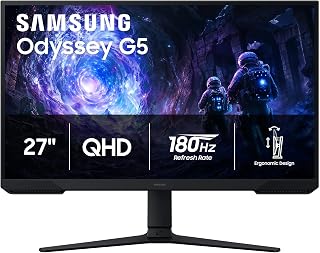
With a 3000:1 contrast ratio courtesy of VA technology, this display produces deeper blacks and more vivid shadows than typical IPS competitors, enhancing immersion in single-player adventures. The 180Hz refresh rate pairs naturally with what the RTX 5060 can sustain at 1440p in most AAA titles. Its 27-inch size keeps pixel density sharp without requiring the aggressive upscaling that larger QHD screens might demand.
Pros
- 3000:1 contrast ratio delivers deep blacks that flatter the RTX 5060 in dark-scene games
- 180Hz refresh rate is well within the RTX 5060's 1440p output range
- AMD FreeSync eliminates tearing without requiring a G-Sync premium
- Matte finish and adjustable stand support long, comfortable gaming sessions
Cons
- 180Hz ceiling leaves headroom unused if the RTX 5060 pushes significantly higher frames in lighter titles
- On-screen menu navigation is less intuitive than competing monitors
Pairing the RTX 5060 with the Samsung Odyssey G5 27-inch makes sense on several levels. The card handles 1440p comfortably, and this VA panel's 3000:1 contrast ratio gives that resolution genuine visual depth that IPS alternatives at the same tier rarely match. The 180Hz refresh rate is well within reach for the RTX 5060 across a wide range of titles, and AMD FreeSync support ensures smooth delivery without screen tearing. The 1ms response time keeps motion crisp in reaction-heavy games like Valorant and Apex Legends, where the GPU's performance translates directly into competitive advantage. HDR10 support adds contrast punch in supported titles, and the matte screen finish keeps reflections from undermining dark scenes where that 3000:1 ratio does its best work. Black Equalizer allows shadow brightening for competitive visibility. The 178-degree viewing angle means the panel stays usable from most seating positions, and the adjustable stand accommodates varied desk configurations for longer sessions.
Display: 27-inch QHD VA panel, 2560 x 1440 resolution, 16:9 aspect ratio, 178-degree viewing angles
Performance: 180Hz refresh rate, 1ms response time (MPRT), 300 cd/m brightness, 3000:1 contrast ratio
Features: HDR10, AMD FreeSync, Black Equalizer, matte screen finish
Connectivity: 2x HDMI, 1x DisplayPort, 1x power connector
Design: Adjustable stand with tilt, pivot, and height settings, desk mount, flat panel shape
Dimensions: 24.34 inches wide, 9.22 inches deep, 20.5 inches tall, 10.1 pounds
Power: 35 watts consumption, 240 volts
Warranty: 1-year manufacturer coverage

The 260Hz overclocked capability future-proofs your setup for competitive esports where the RTX 5060 can easily push triple-digit frame rates at 1440p. NVIDIA G-SYNC eliminates screen tearing by synchronizing refresh timing directly with the GPU output, crucial for maintaining visual fluidity. The IPS panel maintains accurate colors during rapid motion, preventing the ghosting that can plague fast-paced shooters and racing games.
Pros
- 260Hz overclocked refresh rate pairs well with the 5060's high-framerate 1440p output
- G-Sync and Adaptive-Sync eliminate tearing across the GPU's variable frame range
- 0.3ms MPRT response time keeps motion sharp in fast-paced competitive titles
- Three-sided frameless IPS panel with wide viewing angles and accurate color
Cons
- No built-in speakers; requires headphones or external audio
- Basic stand with tilt only, lacking height or pivot adjustment
The RTX 5060 sits in a performance tier where 1440p at high refresh rates is the natural target, and the AOC Q27G41ZE is calibrated precisely for that workload. Its 2560x1440 IPS panel on a 27-inch screen keeps pixel density high enough that the sharper detail the 5060 can render at QHD is clearly visible, while the 260Hz overclocked ceiling gives the GPU room to run well above the 240Hz base spec in lighter titles. G-Sync compatibility and Adaptive-Sync mean the 5060's variable output stays tear-free across the entire frame-rate range, which matters more than a hard refresh cap when GPU load shifts between scenes. The 0.3ms MPRT response time keeps motion sharp during fast directional changes in shooters. Shadow Control and Game Mode presets let you tune visibility in dark game environments without manual calibration. Wide IPS viewing angles and accurate color reproduction make the display equally usable for content outside gaming. Connectivity covers DisplayPort 1.4 and two HDMI 2.0 ports, giving flexibility for multi-device setups.
Display: 27-inch IPS, 2560x1440 QHD, 16:9 aspect ratio, 300-nit brightness, 1000:1 contrast ratio, glossy finish
Performance: 240Hz refresh rate (via DisplayPort), 0.3ms MPRT response time, Adaptive-Sync, G-Sync compatible
Connectivity: 1x DisplayPort 1.4, 2x HDMI 2.0, audio output jack
Design: Three-sided frameless, tilt adjustment from minus 3 to plus 21 degrees, textured black and red finish
Dimensions: 24.17 inches wide, 7.46 inches deep, 17.7 inches tall, 6.15kg weight
Features: Blue Light Filter, Flicker-Free, Shadow Control, Game Mode presets, graphical OSD menu
Warranty: 3-year manufacturer coverage
This monitor suits RTX 5060 owners who favor competitive multiplayer games and want the smoothest possible motion clarity at 1440p. The high refresh ceiling and G-Sync support extract consistent, tear-free output as the 5060's framerate varies under load. Skip it if you want a curved panel, need built-in speakers, or prioritize contrast depth over refresh speed.

The Fast IPS technology reduces response times compared to traditional IPS panels, minimizing motion blur in action-heavy sequences where the RTX 5060 maintains high frame rates. WQHD resolution at 180Hz creates a sweet spot for this GPU tier, avoiding the performance penalties of 4K while delivering sharper visuals than 1080p. G-SYNC compatibility ensures smooth frame delivery even when performance dips below the maximum refresh window.
Pros
- 180Hz G-SYNC keeps output tear-free at framerates the RTX 5060 can sustain
- Fast IPS panel delivers 1ms response time alongside accurate 95% DCI-P3 color
- Matte finish controls glare without sacrificing the panel's color output
- DisplayHDR 400 and QHD resolution make AAA titles visually rewarding
Cons
- 180Hz ceiling leaves headroom unused in lighter titles where the 5060 runs higher framerates
- Visible pixel grid at 1440p on 27 inches may bother users accustomed to denser panels
Pairing an RTX 5060 with a 4K panel risks leaving framerate on the table; pairing it with a basic 1080p display wastes the GPU's rendering quality. The Alienware AW2725DM lands in the productive middle ground. Its QHD 1440p Fast IPS panel at 180Hz is a target the 5060 can hit consistently across a wide range of titles, and NVIDIA G-SYNC keeps output tear-free as framerates fluctuate under varying GPU loads. The 1ms gray-to-gray response time on the Fast IPS panel matches near-TN speed without sacrificing the color accuracy that makes visually detailed games worth playing on capable hardware. At 95% DCI-P3 coverage and DisplayHDR 400 certification, the panel renders the color range the 5060 can push through modern titles. The matte finish handles ambient light well, reducing the need to manage room lighting around the monitor. For players who split time between story-driven AAA games and competitive multiplayer, the 180Hz ceiling is smooth enough for both without demanding framerates the 5060 cannot reliably sustain in demanding titles.
Display: 27-inch QHD (2560 x 1440) IPS panel, 16:9 aspect ratio, matte finish
Refresh Rate: 180Hz
Response Time: 1ms gray-to-gray
Color Gamut: 95% DCI-P3
HDR: DisplayHDR 400 certified
Sync Technology: NVIDIA G-SYNC
Additional Features: Console mode, hardware blue light filter, VESA mountable
Brand: Alienware (Dell)
RTX 5060 owners who split time between visually rich single-player games and competitive multiplayer will find the AW2725DM a well-matched display. The 180Hz G-SYNC pairing extracts consistent, smooth output without pushing the GPU beyond its comfortable 1440p range. Skip it if you need ultra-high refresh rates above 180Hz or prefer a curved panel for immersive play.

The ultrawide 21:9 aspect ratio at 3440x1440 offers expanded peripheral vision in simulation and open-world games where the RTX 5060 can maintain playable frame rates. At 240Hz, competitive titles run buttery smooth when settings are optimized for this GPU. The 1500R curve enhances immersion across the 34-inch span, wrapping the extended field of view naturally around your sitting position during lengthy sessions.
Pros
- 240Hz refresh rate with 1ms response time suits competitive gaming
- 3440x1440 ultrawide resolution pairs well with RTX 5060 performance headroom
- 1500R curve enhances peripheral immersion
- Dual DisplayPort and dual HDMI offer flexible multi-device connectivity
Cons
- Modest brightness may appear dim in well-lit environments
- Integrated speakers deliver limited volume, better suited to casual than competitive use
The RTX 5060 is a capable mid-range GPU, and pairing it with a 34-inch 3440x1440 ultrawide at 240Hz is a genuinely compelling match. The Sceptre C345B-QU240T delivers exactly that combination without forcing you to choose between resolution and speed. At 3440x1440, the RTX 5060 can push high frame rates in competitive titles while the 240Hz panel and 1ms response time keep the experience feeling razor sharp. The 1500R curve wraps your peripheral vision into the action, which pairs well with the wider frame the ultrawide format provides. Adaptive Sync support keeps things tear-free as frame rates fluctuate. The 100% sRGB coverage means games render with accurate, punchy color across the full ultrawide canvas. Dual DisplayPort and dual HDMI connections give you flexibility for multiple devices or future upgrades. Blue-Light Shift is a practical bonus for long sessions. The main caveats are modest brightness that can look washed out in bright rooms and integrated speakers that serve casual use at best.
Display: 34-inch curved ultrawide LED panel with 21:9 aspect ratio and matte finish
Resolution: 3440 x 1440 pixels (QHD wide) native resolution
Refresh Rate: Up to 240Hz via DisplayPort
Response Time: 1 millisecond with blur reduction
Color Performance: 100% sRGB color gamut with Blue-Light Shift technology
Curvature: 1500R immersive curved design
Connectivity: 2x DisplayPort, 2x HDMI, audio out jack
Audio: Integrated stereo speakers
Mounting: VESA wall mount compatible, adjustable stand included
Physical: 31.8 inches wide, 18 inches tall, 8.5 inches deep, 14 pounds
Warranty: 1 year limited manufacturer warranty
Gamers who want to extract the most immersive experience from an RTX 5060 without stepping up to a premium-tier budget will find this monitor a strong fit. Sim racing and open-world players especially benefit from the 1500R curve and ultrawide field of view. Those in brightly lit rooms or anyone who relies on monitor speakers for competitive audio should look elsewhere.
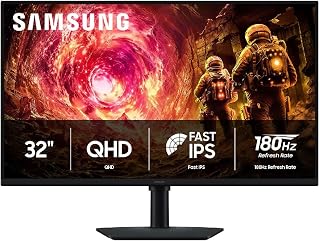
The 32-inch screen size provides more immersive viewing real estate while maintaining QHD's manageable performance footprint for the RTX 5060. At 180Hz, it captures high frame rates in esports titles and smoother gameplay in story-driven games where this GPU excels. The IPS technology ensures color consistency across the larger panel, critical for both competitive accuracy and cinematic visuals in demanding single-player experiences.
Pros
- 32-inch IPS panel gives the RTX 5060's 1440p output more room to breathe
- G-Sync compatible adaptive sync keeps gameplay smooth at the card's frame rates
- 178-degree viewing angle maintains color accuracy across the wide screen
- Versatile ergonomic stand with height, tilt, and swivel adjustments
Cons
- 109 PPI is noticeably lower in sharpness than a 27-inch 1440p panel at close viewing distances
- 180Hz cap is modest compared to 300Hz alternatives available at the same resolution tier
For RTX 5060 owners who want their games to fill their desk rather than sit in a corner of it, the 32-inch Samsung Odyssey G5 makes a strong case. QHD at 32 inches lands at roughly 109 pixels per inch, a density that keeps games sharp while the larger canvas makes open-world environments and strategy titles more immersive. The 180Hz refresh rate and 1ms response time stay well within what the RTX 5060 delivers at 1440p, and G-Sync compatibility ensures the GPU and panel cooperate to eliminate tearing. The IPS panel brings a 178-degree viewing angle, so colors stay accurate whether the monitor is centered or slightly off-axis, which matters on a 32-inch display where eye travel is greater. HDR10 support and the Black Equalizer add visibility advantages the RTX 5060 can actually leverage. The ergonomic stand covers height adjustment, tilt, and 90-degree swivel, and DisplayPort plus HDMI connectivity covers the card's outputs without an adapter.
Display: 32 inches, QHD (2560 x 1440), IPS panel, 16:9 aspect ratio, matte finish
Performance: 180Hz refresh rate, 1ms response time (GtG), 300 cd/m² brightness, 1000:1 contrast ratio
Color: 99% color gamut, HDR10 support, 178-degree viewing angle
Adaptive Sync: G-Sync compatible, FreeSync support
Connections: 1x DisplayPort, 1x HDMI
Adjustments: Height, tilt, and swivel ergonomic stand
Dimensions: 28.1" W x 24.6" H x 9.9" D
Weight: 10.8 lbs
Warranty: 1-year manufacturer coverage
RTX 5060 users who play single-player, open-world, or strategy games where screen real estate enhances the experience will benefit most from this monitor. It also suits those doing everyday desktop work alongside gaming. Purely competitive players who prioritize pixel density and maximum refresh rate over screen size should consider a 27-inch option instead.

The 1000R curve wraps the 32-inch display around your field of view, reducing eye travel distance during extended gaming sessions. Its 2500:1 contrast ratio delivers richer dark scenes than flat IPS alternatives, enhancing atmospheric titles where the RTX 5060 can push high settings. The 165Hz refresh rate aligns perfectly with the frame rates this GPU achieves in graphically demanding games at 1440p resolution.
Pros
- 32-inch QHD panel fully utilizes the 5060's 1440p rendering capability
- 165Hz refresh rate and 1ms response time handle fast-paced gameplay cleanly
- 1000R curve and 2500:1 contrast ratio deepen immersion in single-player titles
- HDR10 support and 0.99 color gamut deliver vivid, saturated visuals
Cons
- Plastic stand lacks tilt adjustment and feels basic for the panel's quality
- Glossy screen finish can produce distracting reflections in bright environments
The RTX 5060 outputs enough GPU headroom to push 1440p at high framerates, and the Samsung Odyssey G55C is built to receive exactly that. Its QHD panel renders 1.7 times the pixel count of a 1080p display, so the extra detail the 5060 can render actually shows up on screen rather than disappearing into a low-resolution buffer. The 165Hz refresh rate is a natural ceiling for mid-range 1440p gaming, and the 1ms response time keeps fast scenes clean during the quick camera sweeps common in competitive titles. The 1000R curve on the 32-inch panel widens your perceived field of view, which pairs well with the broader color volume the 5060 can drive through HDR10. A 2500:1 contrast ratio and 0.99 color gamut coverage give scenes genuine depth and saturation. The glossy finish rewards that color accuracy with vivid output, though it works best in a controlled-light environment. Setup requires manually enabling 165Hz through the OSD rather than relying on Windows auto-detection, a quick but necessary step to unlock the full refresh rate the GPU can sustain.
Display: 32-inch QHD (2560 x 1440), 16:9 aspect ratio, 1000R curvature, glossy finish, 178-degree viewing angle
Performance: 165Hz refresh rate, 1ms MPRT response time, 2500:1 contrast ratio, 300 cd/m2 brightness
Features: HDR10, AMD FreeSync adaptive sync, Eye Saver Mode (blue light reduction), flicker-free technology
Connectivity: 1x DisplayPort, 1x HDMI, 2x component outputs
Physical: 28" wide, 21.01" tall, 10.7" deep, 11.5 lbs. Includes DP cable, power cable, and stand. Wall mount compatible. 1-year manufacturer warranty.
Gamers pairing an RTX 5060 with a large curved screen for immersive single-player titles or mid-paced competitive play will get strong value here. The 32-inch QHD canvas makes the most of 1440p output without demanding more GPU than the 5060 comfortably delivers. Skip it if you need height or tilt adjustment from your stand, want built-in speakers, or prefer a matte panel for a bright room.

The OLED panel's 1000000:1 contrast ratio delivers true blacks and exceptional HDR performance that transforms visually rich titles into stunning showcases for the RTX 5060. QD-OLED technology provides wider color gamut coverage than traditional displays, revealing subtle gradations in shadows and highlights. At 180Hz with near-instantaneous pixel response, motion clarity reaches levels that LCD panels simply cannot match regardless of overdrive settings.
Pros
- QD-OLED panel produces true blacks with a 1,000,000:1 contrast ratio
- 180Hz refresh rate is well within RTX 5060 capabilities at QHD
- G-Sync Compatible and FreeSync support for smooth frame delivery
- Matte finish controls glare without significantly dulling the OLED image
Cons
- 280 nit brightness is modest and may limit HDR impact
- 16:9 format offers less screen real estate than ultrawide alternatives at the same size
The Samsung Odyssey OLED G5 brings a QD-OLED panel to a 27-inch 16:9 format, which is a natural complement to an RTX 5060 build. At 27 inches and QHD resolution, the GPU can comfortably reach the monitor's 180Hz ceiling across a wide range of titles, keeping the OLED's strengths fully in play. That 1,000,000:1 contrast ratio is the headline: blacks are genuinely black, and the distinction between shadow and light in games is dramatic in a way no LCD panel can replicate. G-Sync Compatible and FreeSync support keep frame delivery smooth as the RTX 5060 scales through demanding scenes. The 280 nit brightness is modest for HDR use but adequate in controlled lighting. A matte screen finish reduces glare without introducing the haze some matte coatings carry. For an RTX 5060 owner who prioritizes visual fidelity and cinematic image quality over the widest possible frame rates, this OLED panel delivers a fundamentally different and more vivid picture than any equivalently sized LCD.
Display: 27-inch QD-OLED flat panel, matte finish
Resolution: QHD 1440p (2560 x 1440 pixels)
Refresh Rate: 180Hz
Response Time: 0.03ms (GtG)
Brightness: 280 cd/m2
Contrast Ratio: 1000000:1
Color Accuracy: Pantone Validated, 2,100+ color reproduction
HDR: HDR10 supported
Connectivity: 1x DisplayPort, 1x HDMI, 1x USB
Adaptive Sync: G-Sync Compatible, AMD FreeSync
Dimensions: 24.01"W x 18.26"H x 9.23"D
Weight: 7.3 lbs
Power Consumption: 78 watts
Warranty: 3-year manufacturer warranty
This monitor suits RTX 5060 owners who care most about image depth, contrast, and color richness rather than chasing maximum frame rates. Single-player, story-driven, and visually detailed games benefit enormously from the OLED panel. Users in very bright rooms or those expecting strong HDR highlights from 280 nits of peak brightness may find the display limiting.
Buying Guide
Resolution Sweet Spot for the RTX 5060
The RTX 5060 performs optimally at 2560×1440 resolution, where it delivers consistent 60-144 FPS in most modern titles at high settings. QHD provides 77% more pixels than 1080p, creating sharper textures and clearer UI elements without the performance penalty of 4K. Every monitor in this roundup features native QHD resolution except the ultrawide option, which stretches horizontal workspace while maintaining manageable GPU load.
Going beyond QHD starts to strain the 5060’s capabilities. While the GPU can handle 4K in older or esports titles, newer AAA games force you into medium settings or upscaling technologies. Sticking with 1440p lets you maintain visual quality settings where the RTX 5060 truly shines. For gamers who demand more headroom at 1440p, stepping up to the RTX 5070 makes sense.
Refresh Rate Considerations
The RTX 5060 consistently pushes 100-180 FPS in competitive titles like Valorant, CS2, and Overwatch 2 at 1440p. A 180Hz or 240Hz refresh rate ensures your monitor doesn’t waste those frames. Displays in this range cost only marginally more than 144Hz models but provide noticeable smoothness improvements in fast-paced scenarios where every millisecond matters.
For single-player or strategy games, 165-180Hz delivers plenty of headroom. The RTX 5060 averages 70-120 FPS in demanding titles like Cyberpunk 2077 or Starfield at high settings, making refresh rates above 180Hz unnecessary unless you primarily play esports titles. Adaptive sync technologies like G-SYNC Compatible and FreeSync Premium eliminate screen tearing across the entire refresh range, which matters more than raw Hz numbers for most gaming sessions.
Panel Technology Trade-offs
IPS panels dominate this category because they balance color accuracy, viewing angles, and response times effectively. Fast IPS variants now achieve 1ms GtG response times while maintaining the 178-degree viewing angles and color reproduction IPS is known for. These panels suit mixed-use scenarios where you game, edit photos, and watch movies on the same display.
OLED technology entered the gaming monitor space recently, offering perfect blacks and instantaneous pixel response. The Samsung Odyssey OLED G5 represents this category with 0.03ms response time and infinite contrast ratio. OLED excels in HDR content and dark scenes but costs roughly double compared to equivalent IPS models. Curved VA panels provide deeper blacks than IPS at lower prices but sacrifice viewing angles and sometimes introduce ghosting in fast motion. Your choice depends on whether you prioritize competitive responsiveness, color work, or cinematic immersion.
Essential Features for RTX 5060 Pairing
G-SYNC Compatible certification ensures smooth operation with NVIDIA GPUs, syncing the monitor’s refresh rate to actual GPU output. Every display here supports either G-SYNC Compatible or native G-SYNC, preventing screen tearing when frame rates fluctuate below your monitor’s maximum refresh rate. This matters significantly for the RTX 5060 since even well-optimized games occasionally dip during intense scenes.
HDR support varies widely in this category. VESA DisplayHDR 400 certification indicates basic HDR capability with 400 nits peak brightness, which improves highlight detail but doesn’t transform SDR content dramatically. True HDR impact requires DisplayHDR 600 or higher, typically found only in premium models. Response time specifications matter less than manufacturers suggest since modern IPS panels universally achieve adequate speed for gaming. Focus instead on input lag, which should stay under 10ms for competitive play. Features like ergonomic stands with height and tilt adjustment improve long-term comfort more than millisecond response time differences you won’t notice during actual gameplay.
Final Thoughts
The RTX 5060 performs best when paired with a QHD display offering 165-240Hz refresh rates and adaptive sync technology. Budget-conscious gamers should consider the AOC 27″ Gaming Monitor QHD 260Hz Overclocked IPS for its exceptional value and verified performance across competitive titles, while those seeking premium visual fidelity will appreciate the Samsung 27″ Odyssey OLED G5 for its perfect blacks and instantaneous response times in cinematic gaming experiences.
Frequently Asked Questions
Can the RTX 5060 handle 1440p at high refresh rates?
Yes, the RTX 5060 consistently delivers 100-180 FPS at 1440p in competitive titles like Valorant, Apex Legends, and Rainbow Six Siege with high settings enabled. In demanding AAA games, expect 70-120 FPS, which still benefits from adaptive sync technology on high refresh rate displays. The GPU’s architecture optimizes 1440p performance specifically, making it the ideal resolution target rather than pushing 4K.
Is G-SYNC Compatible necessary for NVIDIA GPUs?
G-SYNC Compatible certification ensures the monitor has passed NVIDIA’s validation for variable refresh rate synchronization with GeForce GPUs. While technically any FreeSync display can work with modern NVIDIA cards, certified monitors guarantee consistent performance without flickering or range limitations. For the RTX 5060, adaptive sync eliminates tearing during frame rate fluctuations common in graphically intense scenes. Many users also wonder about pairing higher-end GPUs with 4K displays for maximum visual fidelity.
What’s the practical difference between IPS and OLED gaming monitors in 2026?
OLED panels provide perfect blacks, infinite contrast ratios, and sub-millisecond response times, creating superior HDR experiences and eliminating motion blur entirely. IPS displays offer excellent color accuracy and viewing angles at roughly half the cost, with response times now reaching 1ms GtG in fast variants. OLED introduces potential burn-in risk with static UI elements over thousands of hours, while IPS has no such concern. For mixed gaming and productivity use, IPS remains the safer choice unless you prioritize cinematic single-player experiences.
Should I choose 27-inch or 32-inch for 1440p gaming?
At 1440p resolution, 27 inches provides 109 pixels per inch while 32 inches drops to 92 PPI, creating slightly softer image quality at typical viewing distances. Competitive gamers prefer 27 inches because less eye movement covers the entire screen during fast-paced action. Immersive single-player enthusiasts often choose 32 inches for the larger field of view despite minimal sharpness reduction. Your desk depth matters too since 32-inch displays require roughly 30 inches of viewing distance for comfortable extended use compared to 24 inches for 27-inch screens.





Write Your Review
No reviews yet. Be the first to share your experience!