

You’re staring at two monitors side by side: one is a 32-inch panel running 1080p, the other is a 27-inch display with a crisp 1440p image. They’re priced similarly, but they feel completely different. Which one is actually the better pick for you? The answer depends on how you use your screen, how far you sit from it, and what you’re asking your GPU to do.
This guide is for anyone shopping for a gaming or productivity monitor who wants a clear, honest breakdown of when screen size takes priority and when pixel density matters more. We evaluated eight monitors across a range of sizes and resolutions to show you exactly what the tradeoffs look like in practice.
Quick Comparison
Ratings reflect the most recent data pull. Check each listing for current price and availability.
Quick answer
This guide compares 8 picks, with cocopar 15.6" Touchscreen Portable Monitor 1080P FHD ranked first. SANSUI 27" WQHD Curved Gaming Monitor 200Hz 1ms has the most customer reviews. SANSUI 24.5 inch 300Hz FHD Gaming Monitor with 1ms leads this list on refresh rate.

For readers weighing portability over raw size or resolution, a 15.6 inch panel with 90% sRGB coverage shows that smaller screens still hold color accuracy. Its touchscreen and USB-C connectivity make the compact footprint a deliberate choice for travel and secondary-screen use, not a compromise forced by resolution limits.
Pros
- Touchscreen with gesture support on Windows and macOS
- 90% sRGB for reasonably accurate color on a small panel
- Single USB-C cable for power, video, and touch on compatible devices
- Includes kickstand, sleeve, and adapters for immediate use
Cons
- Single-cable operation needs Thunderbolt or USB-C DP Alt Mode support
- 60Hz refresh rate and glossy finish limit gaming and bright-room use
When the question is size versus resolution, the cocopar 15.6-inch portable monitor makes a case for a third factor entirely: flexibility. Rather than choosing between a bigger panel or sharper pixels on your main display, this travel monitor adds a dedicated second screen that you carry anywhere, turning any laptop into a true multi-monitor setup. Its 1080P resolution across 15.6 inches lands in a comfortable middle ground, dense enough for sharp text and images without the scaling headaches larger 4K panels can introduce on small frames. The 90% sRGB coverage keeps colors trustworthy for photo or video work on the go. Since it's sized for portability rather than desk permanence, it answers a different question than a typical desktop monitor debate: do you need more screen real estate right now, wherever you are, more than you need a single larger or higher-res panel at a fixed desk. For frequent travelers, the touchscreen and glass build add a layer of interactivity that fixed monitors in this size class rarely offer.
Display: 15.6-inch FHD IPS LCD with 1920x1080 native resolution, 16:9 aspect ratio, 60Hz refresh rate, 270 nits brightness, 1000:1 contrast ratio, 178-degree viewing angles, and 90% sRGB color gamut.
Touchscreen: Capacitive touchscreen with native gesture support for macOS and Windows, including pinch-to-zoom, drag-and-drop, and multi-finger navigation.
Connectivity: 2x USB-C ports (3.0 and 3.1), 1x HDMI port, 3.5mm audio jack, and FreeSync support. Single USB-C cable mode requires Thunderbolt 3/4/5 or USB-C DP Alt Mode.
Physical: Metal frame with integrated adjustable kickstand, tempered glass touchscreen surface, dimensions 13.95" W x 8.8" H x 0.23" D, weight 2 pounds.
Features: Blue light filter, built-in speakers, glossy screen, VESA mountable, portable design. Includes protective sleeve, power adapter, HDMI cable, USB-C to USB-C cable, and 2x USB-A to USB-C cables.
Warranty: 2-year manufacturer warranty covering hardware defects and performance issues.
Good for remote workers, students, and creators who need extra screen space while traveling or moving between locations, where a compact, lower-resolution panel is more practical than a large, heavy one. Also suits anyone wanting touchscreen interaction alongside a laptop. Skip it if you want a primary monitor for a fixed desk setup, need higher resolution for detailed photo or video editing, or your laptop lacks USB-C with video output support.

The 1500R curve on a 27 inch VA panel demonstrates how curvature and size interact independently of resolution, since this model sticks with 1080P. At 180 hertz, it suits readers who care more about screen immersion and smoothness than squeezing extra detail out of a higher pixel count.
Pros
- 180Hz refresh rate for smooth, responsive motion
- 1500R curve adds immersion at 27 inches
- 99% sRGB and 3000:1 contrast for punchy color and deep blacks
- Adaptive Sync reduces screen tearing
Cons
- 1080p resolution means lower pixel density than 1440p panels of the same size
- No built-in speakers and only a 1-year display warranty
This monitor is a useful case study in the size-versus-resolution tradeoff: a 27-inch curved screen running at 1080p rather than 1440p or 4K. At that panel size, pixel density is lower than higher-resolution alternatives, which can show up in fine text or detailed non-gaming work. But the KOORUI 27E6CA makes the argument that for certain uses, bigger and faster beats sharper. The 180Hz refresh rate and 1500R curve are built for motion and immersion rather than pixel-level detail, and the 99% sRGB coverage with 3000:1 contrast keeps colors looking rich despite the modest resolution. If your priority is a larger field of view and fluid visuals over maximum sharpness, this is exactly the kind of panel that illustrates when size and speed should outrank resolution. It's a clear pick for anyone deciding that screen size and refresh rate matter more to their experience than squeezing in extra pixels.
Display: 27 inches, curved (1500R), 16:9 aspect ratio, matte finish
Resolution: 1920x1080 (FHD), native
Panel Technology: VA LCD
Refresh Rate: 180Hz
Response Time: 1ms
Color Gamut: 99% sRGB
Contrast Ratio: 3000:1
Brightness: 250 lm
Viewing Angle: 178 degrees
Adaptive Sync: FreeSync, G-Sync compatible
Connectivity: 2x HDMI 2.0, 1x DisplayPort 1.2, 1x audio out
Mounting: Standard desk mount (VESA compatible)
Dimensions: 24"W x 18"D x 9"H
Weight: 5.44kg
Color: Black
Warranty: 3 years manufacturer warranty (display: 1 year, accessories: 3 years)
Included: Monitor, HDMI cable, power cord, user manual
Fits competitive and casual gamers who want a bigger, curved screen and smooth motion more than sharp detail, and who are comfortable with 1080p on a 27-inch panel. Skip it if pixel density matters for your work, such as detailed photo editing or spreadsheet-heavy tasks, or if you want built-in speakers and a longer warranty.

At 27 inches with a 2560x1440 panel, this model sits right at the point the article explores, where resolution catches up to screen size without stretching pixels thin. The 5000:1 contrast ratio adds depth to that extra detail, making it a solid example of balancing dimensions and sharpness rather than choosing one over the other.
Pros
- WQHD resolution gives sharper detail than 1080P at similar size
- 200Hz refresh rate with 1ms MPRT for smooth motion
- 5000:1 contrast ratio and HDR for better visual depth
- 178-degree viewing angles and matte finish reduce glare
Cons
- Full 200Hz requires DisplayPort, HDMI maxes at 144Hz
- No built-in speakers
This 27-inch SANSUI is a useful reference point for the size-versus-resolution question because it doesn't force you to choose. At 27 inches, the 2560x1440 WQHD resolution lands in a sweet spot where pixel density stays sharp without the GPU demands of 4K, while the screen is still large enough to feel immersive thanks to its 1500R curve. A 200Hz refresh rate means you're not sacrificing motion smoothness to get that extra resolution either, so this model illustrates how moderate size paired with higher resolution can outperform a larger, lower-resolution screen for overall clarity and detail. The 5000:1 contrast ratio and HDR support add visual depth, and 178-degree viewing angles keep colors consistent across the screen. One real limitation is that HDMI connections cap out at 144Hz, so reaching the full 200Hz requires DisplayPort. There are no built-in speakers either. But if you're trying to decide whether a bigger low-res screen or a mid-size higher-res one serves you better, this monitor makes the case for prioritizing resolution and density over sheer size.
Display Specs: 27-inch curved VA panel, 2560x1440 WQHD resolution, 16:9 aspect ratio, 1500R curvature, 5000:1 contrast ratio, 300 nits brightness, 178-degree viewing angle.
Performance: 200Hz refresh rate (via DisplayPort), 1ms MPRT response time, FreeSync adaptive sync, HDR support, 90% DCI-P3 and 120% sRGB color gamut.
Connectivity: 2x DisplayPort 1.4 (up to 200Hz), 2x HDMI 2.0 (up to 144Hz), 3.5mm audio jack (no speakers).
Physical: 24.11" width x 17.81" height x 7.64" depth, 7.7 lbs, matte screen finish, tilt adjustment (-5° to +15°), VESA compatible (100x100mm), Kensington lock slot.
Warranty: 30-day money-back guarantee, 1-year quality warranty, lifetime technical support.
Buy this if you want sharper detail and better pixel density than a 1080P monitor offers, without giving up a large curved field of view or high refresh rate. It suits gamers who also do some photo or video work. Skip it if you specifically want the biggest screen possible, or if you don't have a DisplayPort connection to unlock the full 200Hz.

Pros
- 160Hz refresh rate with 1ms response time
- 110% sRGB and 4000:1 contrast for vivid, deep visuals
- 1500R curve plus Game Assistant tools like crosshair overlays
- HDMI 2.0 and DisplayPort 1.4 both support full 160Hz
Cons
- 1080p resolution on a 27-inch screen gives lower pixel density than 1440p options
- No built-in speakers, and some users reported occasional hardware issues
The SANSUI ES-G27C1L puts the size-versus-resolution question in practical terms: a large 27-inch curved panel at 1080p, prioritizing screen real estate and speed over pixel density. For anyone weighing whether a bigger screen or a sharper one matters more, this monitor leans toward size and performance, backed by a 160Hz refresh rate, 1500R curve, and a notably wide 110% sRGB color gamut with 4000:1 contrast. Those numbers suggest that even without higher resolution, image quality can still feel rich and vibrant. The curved shape also helps offset some of the softness that comes with lower pixel density at this size, since the immersive field of view draws attention away from individual pixels. Game Assistant tools and multiple preset modes add versatility beyond pure resolution debates, making this a practical pick for anyone who's decided that a bigger, faster, more immersive screen outweighs the benefits of extra sharpness for their everyday use.
Display: 27-inch curved (1500R), 1920x1080 FHD, 16:9 aspect ratio, 178-degree viewing angles
Performance: 160Hz refresh rate, 1ms (MPRT) response time, FreeSync adaptive sync
Color: 110% sRGB gamut, 4000:1 contrast ratio, 300 nits brightness, anti-flicker, anti-glare, low blue light filter, HDR mode
Connectivity: HDMI 2.0 (160Hz), DisplayPort 1.4 (160Hz), 3.5mm audio jack
Adjustments: Tilt (-5 to +15 degrees), VESA 100x100mm mount compatible
Power: 48 watts consumption
Dimensions: 24.13in W x 17.84in H x 7.66in D, 7.7 lbs
Warranty: 30-day money-back guarantee, 1-year manufacturer warranty, lifetime technical support
Good for budget-focused gamers and everyday users who want a large, fast, immersive curved screen and can accept 1080p's lower pixel density at 27 inches. Also suits those who value color vibrancy and contrast over resolution. Skip it if you need sharp detail for close-up work, want built-in speakers, or have had concerns about long-term hardware reliability.

A smaller 24.5 inch IPS panel paired with a 300 hertz refresh rate makes the case that for fast-paced gaming, refresh speed and screen size matter more than chasing higher resolution. Readers comparing tradeoffs will see how staying at 1080P keeps frame rates high without taxing the GPU.
Pros
- Excellent refresh rate-to-price ratio delivers competitive-grade performance affordably
- 1ms response time paired with 300Hz refresh rate minimizes motion blur and input lag
- IPS panel maintains color accuracy and detail across wide 178-degree viewing angles
- Built-in game modes and crosshair overlays provide immediate competitive advantages
- Extensive port options support both current and legacy gaming systems
Cons
- 1080p resolution on 24.5-inch screen may show visible pixels to users sitting very close
- Maximum 300Hz only achievable via DisplayPort; HDMI limited to 240Hz refresh rates
- No built-in speakers require separate audio solution for complete gaming setup
The SANSUI ES-G25X1 Pro is a dedicated gaming monitor designed for competitive FPS and esports players who prioritize frame rate and response time over resolution. Its 24.5-inch 1080p IPS display pairs fast refresh rates with practical gaming features, making it ideal for budget-conscious gamers upgrading from standard 60Hz displays.
The headline specs are genuinely impressive for the price. A 300Hz refresh rate via DisplayPort and 1ms MPRT response time deliver the responsiveness competitive gamers demand. FreeSync Premium adaptive sync eliminates screen tearing, while dedicated FPS, RTS, and racing crosshair overlays provide immediate tactical advantages. The fast IPS panel adds unexpected value, offering 120% sRGB color accuracy and 300 nits brightness alongside performance credentials usually found on TN panels.
Build quality reflects its price point. The 7.52-inch depth keeps the monitor compact on desk space, while tilt adjustment, VESA 75mm mounting, and a matte finish reduce glare and reflections. Dual DisplayPort 1.4 and HDMI 2.0 ports provide flexible connectivity, though only DisplayPort achieves the full 300Hz refresh rate. The included DP cable and straightforward setup process get you gaming quickly without additional purchases.
Real limitations exist. The 1920x1080 resolution on a 24.5-inch display produces visible pixels compared to 1440p alternatives, though this is typical for esports-focused monitors. The lack of built-in speakers requires external audio. Most critically, you must use DisplayPort to reach 300Hz; HDMI tops out at 240Hz, which matters if your gaming console or older GPU only has HDMI output.
The SANSUI ES-G25X1 Pro delivers exceptional value for competitive gamers. Its combination of high refresh rates, fast response times, practical overlays, and reliable IPS color makes it an excellent entry point into esports-grade gaming monitors or a solid secondary display for console gamers.
Display: 24.5-inch IPS, 1920x1080 (FHD), 16:9 aspect ratio, 178-degree viewing angle, 1000:1 contrast ratio
Refresh Rate: 300Hz via DisplayPort 1.4, 240Hz via HDMI 2.0
Response Time: 1ms MPRT
Color and Brightness: 120% sRGB gamut, 300 nits brightness, HDR support, 16.7 million colors (8-bit)
Features: FreeSync Premium, flicker-free, low blue light filter, game mode crosshairs (FPS/RTS/Racing)
Connectivity: 2x DisplayPort 1.4, 2x HDMI 2.0, 3.5mm audio jack, 1x DP cable included
Mounting: Desk stand with tilt adjustment (-5 to +15 degrees), VESA 75mm x 75mm wall mount compatible
Dimensions: 21.93W x 16.5H x 7.52D inches
Power: 42 watts, 240V
Warranty: 30-day money-back guarantee, free replacement, lifetime technical support
Ideal For: Competitive FPS gamers (CS:GO, Valorant, Overwatch), esports enthusiasts, budget-conscious upgrades from 60Hz monitors, console gamers seeking fast performance, streamers seeking affordable dual-monitor setups.
Less Ideal For: Console-only gamers without DisplayPort access (limited to 240Hz via HDMI), users prioritizing 1440p or 4K resolution, professionals requiring factory color calibration, gamers wanting integrated speakers.

This one makes the size-versus-resolution tradeoff explicit: a large 32 inch curved panel paired with 1080P rather than 4K. For readers prioritizing screen real estate and the 240 hertz refresh rate for fast motion, the lower pixel density is a reasonable tradeoff, since pixel sharpness matters less than smoothness in competitive play at this size.
Pros
- 240Hz refresh rate for smooth competitive gameplay
- Large 32-inch curved screen for immersive field of view
- 178-degree viewing angles keep color consistent off-axis
- FreeSync support reduces screen tearing
Cons
- 1080P resolution means lower pixel density at this size
- 125% color gamut limits use for color-critical work
When you're weighing size against resolution, this 32-inch SANSUI is a clear case for picking size and speed over pixel density. The screen gives you a big, curved 1080P canvas, but the resolution stays capped at Full HD, meaning pixel density on a panel this large is noticeably lower than what you'd get from a 27-inch 1440P or 4K alternative. What you gain in exchange is a 240Hz refresh rate that's easier to sustain because the GPU isn't pushing extra pixels. For anyone deciding whether bigger screens or sharper images matter more, this monitor answers that question definitively: it's built for players who want size and motion smoothness, and it asks you to accept softer detail and text clarity as the tradeoff. The 1500R curve and 178-degree viewing angles help the size feel immersive rather than overwhelming, and FreeSync keeps motion tear-free. If your priority is frame rate and screen real estate for competitive titles rather than sharpness for detail work, this is a straightforward example of that choice.
Display: 32-inch curved LCD, 1500R curvature, 16:9 aspect ratio, matte finish
Resolution: Full HD 1920x1080 pixels
Refresh Rate: 240Hz native
Response Time: 1ms MPRT
Color: 125% sRGB gamut, 16.7 million colors, 300 nits brightness, 3500:1 contrast ratio
Connectivity: 1x HDMI 2.1 (240Hz), 1x DisplayPort 1.4 (240Hz), 3.5mm audio jack
Features: FreeSync, flicker-free, low blue light filter, HDR technology, 178-degree wide viewing angle
Ergonomics: Tilt adjustment (negative 5 to positive 15 degrees), VESA mount compatible (100x100mm), desk and wall mount support
Physical: 28.16 inches wide, 16.62 inches tall, 4.26 inches deep, weighs 5.4kg
Warranty: 1-year manufacturer warranty with 30-day money-back guarantee and lifetime technical support
Included: Monitor, DP cable, metal stand, power adapter, user manual
Buy this if you want a large, immersive screen and high refresh rate for competitive gaming, and you're fine with 1080P sharpness at 32 inches. Skip it if resolution and pixel density matter more to you than size, since text and fine detail will look softer than on a smaller or higher-resolution panel. Also skip it if you need accurate color for photo or video editing.
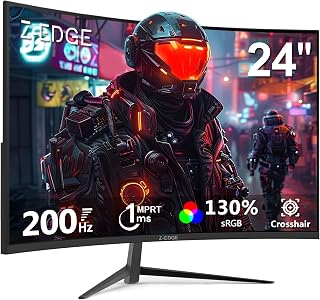
A 24 inch curved screen running up to 200 hertz illustrates how a smaller panel can still deliver high refresh performance without needing 4K resolution to justify its size. For readers focused on responsiveness over pixel count, the curved format also helps fill the field of view at this more compact dimension.
Pros
- 200Hz refresh rate and 1ms response time for fast motion
- Compact 24-inch size keeps 1080P pixel density reasonable
- 1650R curve adds immersion despite smaller screen size
- Flicker-free and blue light filter support longer sessions
Cons
- Less immersive curve effect than larger curved monitors
- Color accuracy and HDR are basic, not suited for professional work
The Z-Edge UG24 approaches the size-versus-resolution debate from the opposite end: a smaller 24-inch screen paired with 1080P resolution, which actually keeps pixel density reasonable since the panel is more compact than the 27 or 32-inch options in this category. That makes it a good example of why resolution needs to be considered alongside screen size rather than on its own. The tradeoff here is that the curved design's immersive effect is less pronounced at 24 inches than on larger curved monitors, so you're getting sharper pixel density but a smaller field of view. The 200Hz refresh rate and 1ms response time keep motion smooth, and the 1650R curve still adds some depth to the viewing experience. Flicker-free and blue light filtering support longer sessions. For readers trying to figure out whether a bigger screen or a sharper one suits them better, this monitor shows that a smaller panel can actually deliver better pixel density at 1080P than a larger one, at the cost of screen presence and immersion.
Display: 24-inch curved LCD, 1920x1080 FHD, 16:9 aspect ratio, 1650R curvature
Performance: 200Hz refresh rate, 1ms response time, 3000:1 contrast ratio, 300 cd/m2 brightness
Technology: LED backlight, FreeSync Adaptive Sync, flicker-free, blue light filter
Connectivity: 1x HDMI, 1x DisplayPort, 3.5mm audio jack
Mounting: VESA 75x75mm compatible, wall-mountable
Dimensions: 21.3 inches wide, 15.6 inches tall, 5.7 inches deep
Weight: 3.6 kg
Power: 23 watts at 12 volts
Warranty: 1 year manufacturer coverage

Pros
- 27 inch size paired with sharp 1440p resolution
- 165Hz refresh rate for smooth motion
- 1500R curve adds immersion as screen size grows
- Strong 3000:1 contrast ratio from the VA panel
Cons
- Brightness capped at 300 cd for darker rooms
- Full 165Hz requires DisplayPort, not HDMI
When the question is size versus resolution, the Z-Edge 27 inch answers with both rather than forcing a tradeoff. At 27 inches you get a noticeably larger canvas than the 24 inch monitors many people upgrade from, and QHD 1440p keeps that larger surface looking sharp instead of stretched and soft the way a 1080p panel would at this size. The 1500R curve adds a dimension resolution alone can't: it uses the extra screen real estate to wrap your peripheral vision into the experience, which is exactly the payoff of going bigger. Refresh rate rounds out the picture at 165Hz over DisplayPort, so motion stays fluid even as you're taking in more pixels and more screen. For anyone trying to decide if a bigger panel is worth it over just chasing higher resolution on a smaller one, this monitor shows the two working together rather than competing. VA panel technology also helps contrast hold up at this larger viewing size, with a 3000:1 ratio keeping dark scenes from washing out.
Display: 27-inch curved VA panel, 1500R curvature, 2560x1440 QHD resolution, 16:9 aspect ratio, 178-degree viewing angles
Performance: 165Hz refresh rate (DisplayPort), 144Hz (HDMI), 1ms response time, 3000:1 contrast ratio, 300 cd brightness, FreeSync adaptive sync
Connectivity: 1x DisplayPort, 2x HDMI, standard 100x100mm VESA mount, frameless design with edge-to-edge display
Features: Flicker-free technology, blue light filter, FPS and RTS game modes, matte finish, frameless bezels, adjustable stand
Physical: 24 inches wide, 7 inches deep, 17.1 inches tall, 4.5 kg weight, black color
Power: 40 watts consumption, 12V DC voltage input
Warranty: 2-year manufacturer coverage
Buy this if you're upgrading from a small 1080p monitor and want both a bigger screen and a sharper image without overspending. It suits gamers who sit close enough to appreciate the curve and the added immersion. Skip it if your priority is color-critical work or a flat desktop layout, since brightness tops out at 300 cd and the curve isn't ideal for spreadsheet or design grids.
How to Choose the Right Monitor for Your Needs
Pixel Density: The Number That Ties Size and Resolution Together
Pixel density, measured in pixels per inch (PPI), is the real metric behind the size-versus-resolution debate. A 27-inch screen at 1080p gives you roughly 82 PPI, which starts to look noticeably soft at close range. That same 27-inch panel at 1440p jumps to about 109 PPI, and the difference is visible the moment you open a browser or fire up a game.
The SANSUI 27 Inch WQHD 2560X1440 Curved is a strong example of this balance done right. At 27 inches with a native 2560×1440 resolution, it delivers a noticeably sharper image than any 1080p display at the same size. If you sit within two feet of your screen, 1440p on a 27-inch panel is the sweet spot most people land on.
Screen Size and Immersion for Gaming
For competitive gaming, a smaller screen often wins because your eyes can cover the entire display without moving. The SANSUI 24.5 Inch 300hz 240hz runs at 1080p but hits up to 300Hz, which means frames land on your screen faster than almost anything else in this category. When you’re playing fast-paced shooters, that refresh rate advantage matters far more than extra pixels.
For immersive single-player games or cinematic experiences, bigger wins. The SANSUI 32 Inch Curved 240Hz Gaming Monitor gives you a wide, enveloping field of view with its 1500R curvature. Yes, 1080p on 32 inches is a lower pixel density, but the sheer scale of the image creates a sense of presence that a smaller, sharper screen simply can’t replicate from a normal viewing distance.
Resolution and GPU Demand
Higher resolution doesn’t just improve image quality, it also asks more from your graphics card. Running 1440p at high framerates requires a meaningfully more powerful GPU than running 1080p at the same settings. If your rig is mid-range, pairing it with a 1080p display like the KOORUI 27 Inch Curved Gaming Monitor 180Hz FHD lets you push higher framerates without upgrading hardware.
The Z-Edge 27 inch Curved Gaming Monitor takes the opposite approach, offering QHD 1440p at 165Hz for systems that can handle the load. It’s a compelling option for users with a capable GPU who want both sharpness and smooth motion, without jumping to a 4K display that would demand even more horsepower.
Portability and Use Case Flexibility
Not every monitor lives on a desk. If you travel or work across multiple locations, screen size takes on a different meaning entirely. The cocopar Portable Monitor Touchscreen 15.6 Inch packages a 1920×1080 IPS panel with native touch support into a slim, metal-framed chassis that sets up via a single USB-C cable. At 15.6 inches, 1080p is perfectly sharp, and the tempered glass surface makes touch feel responsive rather than mushy.
For a stationary dual-monitor setup or a compact gaming station, the Z-Edge 24 inch Curved Gaming Monitor, 200Hz 165Hz offers 200Hz performance in a 24-inch footprint. The 1650R curvature is tighter than the 1500R used on larger panels, which actually helps at this screen size by keeping the edges from feeling too far away.
Refresh Rate vs. Resolution: The Gaming-Specific Tradeoff
In competitive gaming, refresh rate consistently outperforms resolution as the factor that improves your experience. A 240Hz 1080p monitor will feel dramatically smoother than a 60Hz 1440p display, even if the latter looks sharper when standing still. The SANSUI 27 Inch Curved 160Hz Gaming Monitor 144Hz is a practical middle ground: 1080p keeps GPU requirements manageable while 160Hz delivers real smoothness you can feel during gameplay.
If you want the clearest possible still image for content creation or productivity work, resolution takes priority over refresh rate. But if your primary use is gaming, particularly fast-paced titles, prioritizing refresh rate over resolution is a well-validated approach backed by competitive players at every level.
Final Thoughts
Whether monitor size matters more than resolution ultimately comes down to your use case and viewing distance. For most desktop gamers, the SANSUI 27 Inch WQHD 2560X1440 Curved hits a satisfying balance of sharpness and screen real estate, while on-the-go users or those building a compact second-screen setup will find the cocopar Portable Monitor Touchscreen 15.6 Inch delivers a surprisingly capable and versatile solution in a slim, travel-ready package.
Frequently Asked Questions
Does monitor size affect gaming performance?
Monitor size doesn’t directly affect GPU performance, but it does influence how demanding the display is on your system when paired with a higher resolution. A larger screen running 1080p puts no extra strain on your GPU compared to a smaller 1080p display. Where size matters most for gaming is immersion and field of view, particularly with curved panels designed to wrap the image around your peripheral vision.
Is 1080p good enough on a 27-inch monitor in 2026?
It depends on how close you sit and what you’re doing. For fast-paced gaming where high refresh rates are the priority, 1080p on a 27-inch panel remains a widely used and well-regarded choice in 2026. For productivity tasks, photo editing, or content where text sharpness matters, the lower pixel density at that size becomes more noticeable, and stepping up to 1440p is worth considering.
What is the best monitor size for a desk setup?
For most desk setups with a viewing distance of about two feet, 24 to 27 inches is the practical range that balances screen coverage with comfortable eye movement. Going larger than 32 inches at typical desk distances can mean turning your head to cover the full display, which adds fatigue over longer sessions. Matching your chosen size with an appropriate resolution, typically 1440p at 27 inches or 1080p at 24 inches, keeps the image looking clean without pushing your hardware unnecessarily hard.
Is a curved monitor better than a flat one for everyday use?
Curved monitors are genuinely more comfortable for extended use at larger sizes because the curvature keeps the screen edges roughly equidistant from your eyes, reducing the need to refocus. At 24 to 27 inches the difference is subtle but still noticeable during long sessions. For multi-monitor setups or tasks involving precise straight-line editing, some users prefer flat displays, but curved panels have become the mainstream choice for both gaming and general productivity in 2026.
Common questions
How many pixels per inch by size should a gaming monitor have?
It depends on panel size paired with resolution, not a fixed number. A 27 inch WQHD panel like the SANSUI 27 Inch WQHD 2560X1440 packs pixels tighter than a 32 inch FHD panel like the SANSUI 32 Inch Curved 240Hz, which spreads the same pixel count over more screen area. The result is softer text and visible pixel structure on the larger FHD panel, while the smaller WQHD screen looks noticeably sharper up close.
What is the ideal viewing distance rule for a gaming monitor?
The rule is to sit far enough that individual pixels disappear but close enough to use the screen comfortably, roughly an arm's length for desktop monitors. A 27 inch 1080P panel like the KOORUI 27 Inch Curved Gaming Monitor needs more distance to hide pixels than a 27 inch WQHD screen, since the higher pixel density of the WQHD panel stays sharp even when seated closer.
Should I prioritize text clarity versus immersion when choosing a monitor?
Prioritize text clarity if you do heavy desktop work, and immersion if gaming or media is the main use. The SANSUI 27 Inch WQHD 2560X1440 balances both with sharper text than a same-size 1080P screen. The SANSUI 32 Inch Curved 240Hz leans toward immersion with its larger curved surface, though its 1080P resolution means text looks softer up close compared to the WQHD option.






