

You just bought a 240Hz monitor, but your GPU is only pushing 60 frames per second in demanding titles. Now you’re wondering whether that high refresh rate is doing anything at all, or if you wasted your money. It’s one of the most common questions in PC gaming, and the answer is more nuanced than a simple yes or no.
This guide explains exactly how refresh rate and FPS interact, when a high refresh rate still helps at low frame counts, and which monitors give you the best experience regardless of where your GPU stands right now. Whether you’re on a mid-range rig or planning a future upgrade, these picks have you covered.
Quick Comparison
Ratings reflect the most recent data pull. Check each listing for current price and availability.
Quick answer
This guide compares 8 picks, with SANSUI 27 inch Curved Monitor 120Hz USB Type-C ranked first. SANSUI 34-inch Curved Ultrawide Gaming Monitor holds the highest customer rating among them. Z-Edge 27" 180Hz FHD Gaming Monitor, 1ms Response, IPS has the most customer reviews. SANSUI 27" 1440p 260Hz Gaming Monitor - Fast IPS 1ms leads this list on refresh rate.

For budget systems that can't consistently hit triple digit frame rates, a 120Hz ceiling is realistic rather than wasted. The 4000:1 contrast ratio keeps image depth strong at lower FPS, and USB Type-C connectivity simplifies cable management for laptops that may already be straining to push frames.
Pros
- 120Hz paired with Adaptive Sync suits inconsistent frame rates
- Curved 27-inch screen with USB Type-C and built-in speakers
- 110% sRGB color gamut for decent visual quality
- HDR and anti-flicker features ease eye strain in long sessions
Cons
- 120Hz refresh rate trails 144Hz and 165Hz competitors
- No DisplayPort limits future connectivity options
If your FPS is inconsistent, a moderate refresh rate like 120Hz can still be the more sensible match than chasing 144Hz or 165Hz on hardware that can't keep up. The SANSUI ES-27C1 pairs that 120Hz rate with Adaptive Sync, so when your frame rate dips, you get less tearing and stutter rather than a jarring mismatch between a high-refresh panel and a low, uneven FPS. Because the panel tops out at 120Hz rather than higher, it's also more forgiving for systems that hover in the 60 to 100 FPS range, since you're closer to the display's actual capability. The curved 27-inch design and USB Type-C connectivity make it a practical all-in-one setup, and the 110% sRGB color gamut means you're not giving up visual quality for the sake of smoothness. HDR support and anti-flicker features help during longer sessions where low or fluctuating FPS can already strain your eyes.
Display: 27-inch curved LED, 1920x1080 (FHD), 16:9 aspect ratio, 110% sRGB, 4000:1 contrast ratio, 300 nits brightness, 16.7 million colors
Performance: 120Hz refresh rate, 1ms MPRT response time, Adaptive Sync, HDR, anti-glare, anti-flicker, low blue light
Connectivity: 1x USB Type-C, 1x HDMI 1.4, 2x 2W built-in speakers, 3.5mm audio, hard coating (3H)
Physical: 24.1 inches wide, 17.85 inches tall, 8.31 inches deep, 4.54 kg, curved shape with ultra-thin bezel, 178-degree viewing angle, adjustable tilt (minus 5 to plus 15 degrees), 100x100mm VESA mount compatible
Power: 35 watts, 110 volts
Warranty: 30-day money-back guarantee, free replacement warranty, lifetime technical support
Suited to buyers whose FPS is often inconsistent and who want a refresh rate that matches realistic performance rather than an unused high ceiling, especially those who also do general work or light creative editing. Skip it if you specifically need 144Hz or higher for twitch-reaction competitive games, or if you require DisplayPort for future GPU upgrades.

Pros
- FreeSync Premium smooths out inconsistent or lower frame rates
- 1ms response time keeps motion clear even below max refresh
- Strong color accuracy with DCI-P3 98% and sRGB 130%
- Dual DisplayPort 1.4 inputs support higher Hz connections
Cons
- HDMI 2.0 ports cap out at 144Hz, not the full 260Hz
- 320 nits brightness is modest for HDR content
Here's the real question this article asks: if your GPU can't push huge frame rates, does a high refresh monitor still matter? With the SANSUI 27-inch, the answer leans yes, and the reason is the 1ms IPS panel plus FreeSync Premium. Even when FPS dips below the 260Hz ceiling, FreeSync Premium keeps frame delivery smooth and tear-free, so inconsistent frame rates from a mid-range GPU don't translate into stutter or visible artifacts on screen. The low 1ms response time also means motion stays crisp at lower frame rates, rather than smearing the way slower panels do. That matters more for players without a top-tier graphics card, since they're less likely to hit 260 FPS consistently and more likely to live in that 80 to 150 FPS range where panel responsiveness and adaptive sync do the heavy lifting. You still get IPS color accuracy with DCI-P3 98% coverage for non-gaming use, and dual DisplayPort 1.4 inputs to actually drive higher Hz when your hardware allows it. It's a monitor that stays useful whether your FPS is capped by the panel or by your rig.
Display: 27-inch IPS panel, 2560 x 1440 resolution (1440p), 16:9 aspect ratio, 0.23mm pixel pitch
Refresh Rate and Response: 260Hz native refresh rate, 1ms MPRT response time, FreeSync Premium support
Color Performance: HDR10, 10-bit color depth, DCI-P3 98% gamut, sRGB 130%, 178-degree viewing angles, anti-flicker
Brightness and Contrast: 320 nits brightness, 1000:1 contrast ratio, matte anti-glare finish
Connectivity: 2x DisplayPort 1.4 (supports 260Hz), 2x HDMI 2.0 (supports up to 144Hz), 3.5mm audio jack
Physical: 24.1" W x 18.4" H x 7.6" D, 11.2 lbs, tilt adjustment (-5 to +20 degrees), 100x100mm VESA mount
Power: 48 watts typical consumption, 240V input
Warranty: 30-day money-back guarantee, lifetime technical support
Buy this if your GPU can't reliably hit high frame rates but you still want a monitor that handles variable, lower FPS cleanly through FreeSync Premium and fast response time. It also suits anyone who splits time between gaming and color-sensitive work. Skip it if you already have a GPU capable of sustained 260 FPS, since you'd be better served focusing purely on maximum refresh rate performance rather than this balanced approach.

When frame rates dip below 100fps, a high refresh rate alone won't help if the panel can't render detail well. This ultrawide's VA LED panel delivers a 3000:1 contrast ratio, so dark scenes stay rich even when FPS isn't maxing out the 200Hz ceiling, making the immersive 21:9 view worthwhile regardless of GPU limitations.
Pros
- FreeSync smooths motion when FPS falls short of 200Hz
- VA panel keeps contrast and HDR strong at any frame rate
- 1500R curve adds immersion beyond raw speed
- AI picture tools and anti-flicker reduce eye strain
Cons
- Needs a strong GPU to approach native 200Hz at this resolution
- No built-in speakers
If your graphics card can't push triple digit frame rates at high resolution, a high refresh rate panel alone won't fix choppy gameplay, and this is exactly where the SANSUI ES-G34C5 earns its place on this list. A 200Hz refresh rate only pays off when frame rates climb to match it, so this monitor pairs that ceiling with FreeSync to keep motion smooth even when FPS dips below the panel's max. The VA panel's 3000:1 contrast ratio and HDR support mean that even at lower frame rates, image quality stays rich rather than washed out. The 1500R curve and 34-inch 21:9 ultrawide format also add immersion that compensates somewhat when raw speed isn't maxed out. AI picture optimization and anti-flicker tech round out a display built to look good and play smoothly across a range of real-world frame rates, not just benchmark numbers.
This monitor excels in competitive and immersive gaming scenarios. The 200Hz refresh rate ensures smooth motion in esports titles, while the 1ms response time eliminates ghosting during fast camera pans or quick reflexes. FreeSync adaptive sync removes screen tearing for seamless visuals across compatible AMD graphics cards.
The ultrawide 21:9 format provides significant competitive advantage in tactical shooters like Valorant or Rainbow Six Siege, offering extended peripheral vision without requiring head movement. The AI-powered sniper scope and crosshair features enhance visibility in challenging lighting conditions. VA technology's superior contrast makes spotting enemies at distance more practical than on standard IPS panels.
Content creators benefit enormously from the 3440x1440 ultrawide workspace. Video editors gain expanded timeline visibility, color graders appreciate the 130% sRGB and 96% DCI-P3 color gamut coverage for professional work, and photographers enjoy side-by-side reference while editing. The 178-degree wide viewing angle ensures consistent color representation across the massive canvas.
Picture-in-Picture and Picture-by-Picture modes allow simultaneous display of different sources, ideal for monitoring multiple applications. The curved design reduces the need for extreme head movement across the extended display area, reducing neck fatigue during long creative sessions.

Low FPS scenarios benefit more from motion clarity than raw Hz, and MPRT 1ms response time addresses exactly that by minimizing blur even when frame rates can't fill the 180Hz capacity. The anti-glare IPS panel also keeps colors consistent, which matters more than headline refresh numbers when FPS is inconsistent.
Pros
- FreeSync keeps motion smooth when FPS varies
- 1080p resolution is easier for modest GPUs to drive
- IPS panel adds accurate color and wide viewing angles
- Flicker-free tech reduces eye strain in long sessions
Cons
- 1080p pixel density is lower than 1440p alternatives
- 1000:1 contrast ratio is modest compared to VA panels
A high refresh rate number means little if your frame rate can't keep up, and the Z-Edge UG27F addresses that gap directly with FreeSync adaptive sync alongside its 180Hz refresh rate. Rather than relying purely on hitting 180 FPS, this pairing synchronizes the monitor's refresh with whatever your graphics card is actually outputting, which eliminates tearing and stutter even when frame rates are inconsistent. The 1ms MPRT response time keeps fast motion looking clean regardless of FPS fluctuations, which matters more for perceived smoothness than the refresh rate ceiling alone. The IPS panel adds accurate color and wide 178-degree viewing angles, useful since this monitor earns its keep on both gaming and everyday tasks. At 1080p, it also asks less of your GPU to begin with, making higher sustained frame rates more attainable on modest hardware.
Display and Panel: 27-inch IPS LCD with 1920x1080 FHD resolution, 16:9 aspect ratio, 300 cd/m2 brightness, 1000:1 contrast ratio, and 120% color gamut. The anti-glare screen finish provides 178-degree horizontal and vertical viewing angles.
Performance: 180Hz refresh rate with 1ms MPRT response time, FreeSync adaptive sync support, Flicker-Free technology, and multiple game mode presets optimized for different genres. Native resolution is 1920x1080 pixels with 0.16mm pixel pitch.
Connectivity and Mounting: Single HDMI input, VESA 100x100mm mounting compatible with monitor arms and wall mounts. Desk mount stand included. Dimensions: 24.2 inches deep, 6.9 inches wide, 14.2 inches high.
Warranty and Support: 1-year limited warranty from Z-Edge, Model UG27F, UPC 815895027250. Compatible with desktop computers featuring HDMI video output.
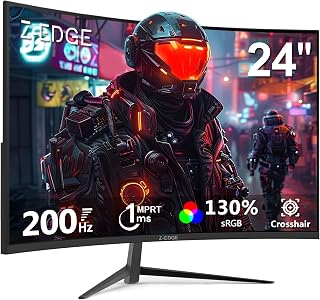
A curved 24 inch screen paired with 3000:1 contrast gives this monitor punchy visuals that compensate when frame rates can't exploit the full 200Hz range. Gamers with mid-tier GPUs who hover below 100fps still get a visually engaging picture, since the curved format enhances perceived depth independent of actual frame output.
Pros
- 1080p resolution makes high frame rates realistic on modest GPUs
- 1ms response time keeps motion sharp even at lower FPS
- 1650R curve adds immersion independent of raw speed
- Flicker-free and blue light filter ease long sessions
Cons
- 1080p resolution looks less sharp than 1440p at similar sizes
- Color accuracy and HDR are basic rather than standout
When FPS can't keep pace with a monitor's top refresh rate, response time and resolution become the bigger factors in how smooth gameplay actually feels, and the Z-Edge UG24 is built around that reality. Its 1920x1080 resolution demands far less from your GPU than higher resolution panels, making it realistic to sustain frame rates closer to its 200Hz ceiling even on modest hardware. The 1ms response time also helps motion stay crisp even if your FPS isn't maxing out the refresh rate, since fast pixel transitions reduce blur independent of frame rate. The 1650R curve adds a layer of immersion that doesn't depend on raw speed, and flicker-free tech with a blue light filter keeps longer sessions comfortable. For budget builds where hitting 200 FPS everywhere isn't realistic, this monitor's lower resolution makes high refresh rates genuinely attainable rather than theoretical.
Display: 24-inch curved LCD, 1920x1080 FHD, 16:9 aspect ratio, 1650R curvature
Performance: 200Hz refresh rate, 1ms response time, 3000:1 contrast ratio, 300 cd/m2 brightness
Technology: LED backlight, FreeSync Adaptive Sync, flicker-free, blue light filter
Connectivity: 1x HDMI, 1x DisplayPort, 3.5mm audio jack
Mounting: VESA 75x75mm compatible, wall-mountable
Dimensions: 21.3 inches wide, 15.6 inches tall, 5.7 inches deep
Weight: 3.6 kg
Power: 23 watts at 12 volts
Warranty: 1 year manufacturer coverage

MPRT 1ms response time is the key spec here, since fast pixel transitions reduce ghosting even when actual FPS falls well short of the 240Hz maximum. The matte finish cuts reflections for longer sessions, making this a practical pick for gamers whose systems can't consistently reach high frame rates.
Pros
- Exceptional refresh rate and response time for competitive gaming at an affordable price point
- Easy setup with versatile connectivity supporting PC, PS5, Xbox, and Nintendo Switch at full 240Hz
- Clean frameless design with minimal bezels enhances dual-monitor setups and modern aesthetics
- Flicker-free and low blue light technology reduces eye strain during long gaming marathons
- Wall-mount ready with standard VESA compatibility for flexible positioning
Cons
- 1080p resolution may feel less sharp on a 24.5-inch screen compared to higher-resolution competitors
- Limited HDR implementation with 350 nits brightness keeps this solidly in budget territory
- Best optimized for console gaming and esports titles rather than single-player AAA games that benefit from higher resolution
The Z-Edge UG25I is a 24.5-inch gaming monitor purpose-built for players who prioritize high refresh rates and quick response times over resolution. It targets competitive gamers playing esports titles like Counter-Strike and Valorant, as well as console gamers on PlayStation 5 and Xbox Series X who want to maximize frame rates and fluidity without premium pricing.
The standout feature is its 240Hz refresh rate paired with a 1ms response time. In real-world gaming, this combination delivers noticeably smoother motion, faster pixel transitions, and responsiveness that matters in competitive scenarios. FreeSync sync support eliminates screen tearing, creating a seamless visual experience. The dual HDMI 2.0 and DisplayPort 1.4 inputs support 240Hz refresh on all ports, allowing you to connect multiple devices simultaneously without sacrificing performance.
Design-wise, the monitor uses a clean frameless approach with a matte display finish that reduces glare. At just 2.6 inches deep with 75x75mm VESA mounting, it's designed to sit flush to walls or mounting arms, making it ideal for compact gaming setups or expanding to dual-monitor configurations. The ergonomic stand offers tilt and height adjustment for comfortable viewing angles during extended sessions.
The 1080p resolution is the primary trade-off. On a 24.5-inch panel, text and fine details remain sharp for gaming, but this monitor won't impress those accustomed to 1440p displays. Similarly, the 350-nit brightness and 1000:1 contrast ratio place it in budget territory, so HDR content won't showcase dramatic dynamic range. However, for fast-paced gaming where input lag and smoothness matter more than visual detail, these compromises make sense.
The Z-Edge UG25I excels as a performance-focused gaming monitor for competitive players and console gamers on a budget. It delivers on the fundamentals that matter in gaming: refresh rate, response time, and consistency. If you play esports titles, competitive multiplayer games, or want to maximize frame rates on console, this monitor offers excellent value. If you're seeking premium visuals or high-resolution gaming, you'll want to step up to a higher-end option.
Display: 24.5-inch LCD, 16:9 aspect ratio, 1920x1080 native resolution, 1000:1 contrast ratio, 350 nits brightness
Performance: 240Hz refresh rate, 1ms MPRT response time, 170-degree viewing angles, FreeSync adaptive sync technology
Connectivity: 2x HDMI 2.0, 1x DisplayPort 1.4, 1x 3.5mm audio jack, all ports support 240Hz
Design: Frameless bezel design, matte screen finish, VESA 75x75mm wall-mount compatible, dimensions 22"D x 16.3"W x 2.6"H, flicker-free and low blue light technology
Power: 32 watts at 12 volts, 1-year manufacturer warranty
Best For: Competitive esports gamers, console players seeking high refresh rates, budget-conscious gamers who value performance over resolution, multi-device setups requiring wall mounting.
Consider Alternatives If: You need 1440p or 4K resolution for immersive single-player games, you want premium HDR performance, or you're primarily using the monitor for productivity or color-critical work.
Setup Tip: After connecting your device, access the monitor's OSD menu to select the appropriate game mode (FPS or RTS) and enable FreeSync in your graphics driver settings. This ensures you get the full benefit of the 240Hz refresh rate and adaptive sync technology. The monitor supports all refresh rates down to lower refresh rates, so it works well even if your graphics card can't consistently hit 240 frames per second.
Gaming Performance: This monitor shines with graphics cards that can output 144fps or higher. On PlayStation 5 and Xbox Series X, it maximizes the consoles' performance capabilities. On PC, pair it with an RTX 4070 or better for consistent 240fps in esports titles, or an RTX 4060 for solid 144fps+ in competitive shooters.

IPS technology here prioritizes color accuracy and viewing angles, which matter most when FPS is capped below what the 240Hz refresh rate could otherwise support. Anti-glare coating keeps the image readable in varied lighting, giving players a dependable picture even when their hardware can't push frame rates anywhere near that ceiling.
Pros
- 240Hz ceiling gives headroom when FPS fluctuates
- 1080p resolution is easier for weaker GPUs to drive at higher frame rates
- IPS panel with 99% sRGB and 178-degree viewing angles
- FreeSync reduces tearing and ghosting during frame rate dips
Cons
- Lower pixel density than 1440p alternatives
- 24-inch size feels small for non-competitive or multitasking use
When your GPU can't push high frame rates, a high refresh rate panel alone will not fix choppy gameplay, but the Z-Edge UG24PJ is still a smart pick for this exact tension. Its 240Hz refresh rate gives you headroom: even if your system only hits 100 to 150 FPS in demanding titles, you're nowhere near the panel's ceiling, so motion stays smooth without the monitor itself becoming a bottleneck. The 1080p resolution is actually an advantage here, since it's far easier for a mid-range or older GPU to sustain higher FPS at 1080p than at 1440p or 4K, which keeps you closer to that 240Hz target. The IPS panel adds 99% sRGB color accuracy and wide 178-degree viewing angles, so you're not sacrificing image quality for speed. Built-in crosshair overlays and FPS/RTS modes are useful extras for competitive play. If your FPS is capped by hardware rather than the display, this monitor ensures the screen won't be the limiting factor.
Display Specs: 24-inch FHD 1080p (1920x1080), 16:9 aspect ratio, IPS panel, 240Hz refresh rate, 1ms response time, 178-degree viewing angle, 1000:1 contrast ratio, 350cd brightness, 99% sRGB color gamut, anti-glare screen finish.
Connectivity: 1x HDMI (supports 240Hz), 1x DisplayPort (supports 240Hz), 3.5mm audio jack. Adaptive sync via FreeSync.
Design: 21.4 inches deep, 5.7 inches wide, 15.6 inches tall. Weighs 3.88kg. Includes desk mount stand with VESA 75x75mm mounting standard for wall mount and monitor arm compatibility. Three-sided narrow bezel design.
Additional Features: Crosshair overlay, FPS game mode, RTS game mode, anti-glare coating, 1-year manufacturer warranty. Model UG24PJ by Z-Edge.

QHD 1440P resolution on a curved VA panel means detail and immersion don't depend on hitting the full 165Hz refresh rate. The 3000:1 contrast ratio helps shadows and highlights stay distinct at lower frame rates, so players with FPS-limiting hardware still get a visually satisfying result on this curved screen.
Pros
- 165Hz with FreeSync smooths over inconsistent frame rates
- 1440p balances sharpness with GPU demand
- 1500R curve and 3000:1 contrast add immersion at any FPS
- FPS and RTS game modes let you tune the image per genre
Cons
- HDMI input limited to 144Hz, DisplayPort needed for full 165Hz
- 300 cd brightness may be insufficient in bright rooms
Low or inconsistent FPS matters most when a monitor's refresh rate outpaces what your system can realistically deliver, and the Z-Edge UG27Q is built to handle that gap gracefully. Its 165Hz refresh rate is achievable through DisplayPort, but even when frame rates fall short of that number, FreeSync keeps motion free of tearing so dips in FPS don't translate into visible stutter. The 1440p resolution strikes a middle ground: sharper than 1080p, but not as demanding on your GPU as 4K, which helps more systems maintain higher, steadier frame rates. The 1500R curve and strong 3000:1 contrast ratio add visual depth regardless of frame rate, so the experience still feels immersive even when FPS isn't maxed out. Just note that HDMI caps at 144Hz, so DisplayPort is necessary to access the full refresh rate and get the most benefit when your FPS does climb.
Display: 27-inch curved VA panel, 1500R curvature, 2560x1440 QHD resolution, 16:9 aspect ratio, 178-degree viewing angles
Performance: 165Hz refresh rate (DisplayPort), 144Hz (HDMI), 1ms response time, 3000:1 contrast ratio, 300 cd brightness, FreeSync adaptive sync
Connectivity: 1x DisplayPort, 2x HDMI, standard 100x100mm VESA mount, frameless design with edge-to-edge display
Features: Flicker-free technology, blue light filter, FPS and RTS game modes, matte finish, frameless bezels, adjustable stand
Physical: 24 inches wide, 7 inches deep, 17.1 inches tall, 4.5 kg weight, black color
Power: 40 watts consumption, 12V DC voltage input
Warranty: 2-year manufacturer coverage
Best for gamers with mid-tier GPUs who get variable FPS in 1440p titles and want adaptive sync and a curved screen to smooth over the inconsistency. Skip it if you only have HDMI available, since you'll lose access to the full 165Hz, or if your system can't maintain at least moderate frame rates in 1440p, where dropping to 1080p might be more effective.
Buying Guide: What to Look for When Refresh Rate and FPS Don’t Match
Adaptive Sync Technology Is the Real Answer
When your FPS dips below your monitor’s maximum refresh rate, adaptive sync technologies like FreeSync and G-Sync step in to close the gap. Instead of the monitor refreshing at a fixed interval, it syncs dynamically to whatever frame rate your GPU is actually delivering. This eliminates screen tearing and stuttering even when your frame output is inconsistent.
Every monitor in this roundup supports some form of variable refresh rate. The SANSUI 34-Inch Curved Gaming Monitor UWQHD 3440 x supports VRR over HDMI 2.1, while the SANSUI Gaming Monitor 27″ 1440p 260hz/240hz WQHD uses FreeSync Premium for low-latency variable frame delivery. Prioritizing adaptive sync means your experience stays smooth even when your FPS fluctuates.
Panel Type Affects How Low-FPS Content Looks
At lower frame rates, motion clarity depends heavily on how fast your panel can transition between pixels. Fast IPS panels, like the one found in the Z-Edge 27 inch 180Hz 165Hz Gaming Monitor, maintain color accuracy and reduce ghosting better than slower VA counterparts at sub-60 FPS. IPS also avoids the dark smearing that VA panels can show during fast motion at low frame counts.
That said, VA panels offer superior contrast ratios, which can make darker scenes more detailed even when frames drop. The Z-Edge 27 inch Curved Gaming Monitor uses a VA-style curved panel with a 3000:1 contrast ratio, making it a strong choice for atmospheric or story-driven games where deep blacks matter more than peak motion clarity.
Resolution vs. Frame Rate: Finding the Right Balance
Higher resolution demands more from your GPU, which directly reduces your average FPS. If your hardware is already struggling at 1080p, stepping up to 1440p or ultrawide will push frame rates even lower. The SANSUI Curved Monitor 27 inch 120Hz USB Type-C pairs a modest 120Hz refresh rate with 1080p-equivalent clarity, making it a practical match for systems that hover around 80 to 120 FPS consistently.
For those with stronger hardware or planning an upgrade, the SANSUI 34-Inch Curved Gaming Monitor UWQHD 3440 x at 3440×1440 with 200Hz gives you room to grow. When your GPU eventually catches up, you’ll already have the display ready to take advantage of every extra frame.
Refresh Rate Still Matters for Input Lag, Even at Low FPS
Here’s something most guides skip: a higher refresh rate monitor reduces input lag independently of your frame rate. The display is polling and rendering more frequently, so even if your game is only outputting 60 frames, the monitor’s internal processing is faster and more responsive. Competitive players often notice this as a snappier, more connected feel to mouse movements.
The Z-Edge 24 inch 240Hz 144Hz Gaming Monitor and the Z-Edge 24.5 inch 240Hz 165Hz 144Hz Gaming Monitor both combine 240Hz panels with 1ms response times, keeping input latency as low as possible even when in-game frame rates don’t fully saturate the display. For shooters and fighting games, this distinction is meaningful.
Final Thoughts
If you’re working with a modest GPU today but want a display that grows with your setup, the Z-Edge 27 inch 180Hz 165Hz Gaming Monitor delivers smooth adaptive sync performance at an accessible entry point, while the SANSUI 34-Inch Curved Gaming Monitor UWQHD 3440 x is the long-term investment for anyone who wants ultrawide resolution and headroom for future frame rate gains. Both prove that a thoughtfully chosen monitor makes a real difference at any frame rate, not just at the ceiling.
Frequently Asked Questions
Does a 144Hz or 240Hz monitor help if my FPS is only 60?
Yes, in a few meaningful ways. Adaptive sync keeps the image tear-free even at 60 FPS, and the monitor’s lower input latency makes interactions feel more responsive. You won’t see 144 distinct frames per second, but the overall experience is noticeably cleaner than a fixed 60Hz display at the same frame rate.
Is it worth buying a high refresh rate monitor in 2026 if I can’t always hit the max FPS?
Absolutely. Most people upgrade their GPU more often than their monitor, so buying a display with headroom makes sense as a longer-term investment. Monitors like the SANSUI Gaming Monitor 27″ 1440p 260hz/240hz WQHD will continue to deliver benefits as your hardware improves over time. Buying for where your rig will be, not just where it is today, is a solid strategy.
What is the minimum FPS where a high refresh rate still makes a visible difference?
Most people can perceive the smoothness benefits of adaptive sync and reduced input latency starting around 45 to 50 FPS on a high refresh rate monitor. Below that threshold, the frame pacing becomes irregular enough that the advantages shrink considerably. Keeping your in-game settings tuned to maintain at least 60 FPS will let you get the most out of any monitor above 120Hz.
Does the Z-Edge 24 inch Curved Gaming Monitor, 200Hz 165Hz still perform well at lower frame rates?
Yes. Its 1650R curved panel with flicker-free technology and a 3000:1 contrast ratio means the image stays detailed and comfortable even when frames drop during graphically intense scenes. The curved design also helps with perceived immersion, which can make lower frame rates feel less jarring compared to a flat panel at the same resolution. For FHD gaming on a mid-range GPU, it’s a well-rounded pick.
Common questions
Does variable refresh rate help smooth out frame rate gaps?
Yes, variable refresh rate smooths gaps between frames when your GPU output is inconsistent, which matters more than the panel's peak number alone. A 240Hz panel like the Z-Edge 24 inch or 24.5 inch models still benefits from VRR when frame delivery dips below max refresh, since it syncs the display to whatever rate the GPU is actually producing instead of forcing a fixed interval that causes stutter or tearing.
Is input lag a separate issue from refresh rate specs?
Yes, input lag is separate from refresh rate and depends on panel response, scaler processing, and connection type rather than the Hz number alone. A 165Hz monitor with a fast IPS panel, like the Z-Edge 27 inch 180Hz 165Hz model, can feel more responsive than a higher Hz display with slower processing. Refresh rate sets how often the image updates, but lag is about how quickly your input reaches the screen.
Where should you spend money instead of chasing refresh rate?
Spend money on GPU and panel quality instead if your frame rate can't keep up with a high refresh monitor anyway. A 165Hz QHD panel like the Z-Edge 27 inch curved model pairs well with midrange cards such as the RX 9070 at its $549 launch MSRP or RTX 5070 at $549 launch MSRP. Check current listing prices directly, since actual prices shift around sales like Black Friday on November 27.






