

You’ve settled on a GPU chip, say an RTX 4060 or an RTX 3060, and then you hit a wall: a dozen different cards from ASUS, MSI, EVGA, and others, all running the same chip but at different prices. It’s a genuinely confusing situation, and the question of whether graphics card brand matters is one of the most common things new builders ask.
The short answer is yes, brand does matter, but probably not in the way you think. The GPU chip sets the performance ceiling, while the brand determines cooling quality, build durability, software features, and long-term reliability. This guide helps you understand those differences so you can pick the right card for your build.
Quick Comparison
| Model | Link | Rating | Graphics Ram Size | Graphics Ram Type |
|---|---|---|---|---|
| 1 MSI RTX 4060 8GB GDDR6 Gaming Graphics Card - 1440p...Highest rated | Check price | 4.8 of 51,172 ratings | 8 GB | GDDR6 |
| 2 ASUS ROG Strix RTX 3060 V2 OC 12GB GDDR6 Gaming Graphics... | Check price | 4.8 of 5940 ratings | 12 GB | GDDR6 |
| 3 ASUS TUF Gaming RTX 5070 Ti 16GB GDDR7 OC Graphics Card -... | Check price | 4.8 of 51,152 ratings | 16 GB | GDDR7 |
| 4 ASUS Dual GeForce RTX 3050 6GB OC Edition - Compact... | Check price | 4.7 of 51,114 ratings | 6 GB | GDDR6 |
| 5 MSI GeForce GTX 1660 Ti Gaming X 6GB GDDR6 Dual Fan... | Check price | 4.7 of 5916 ratings | 6 GB | GDDR6 |
| 6 MSI RTX 3060 Ventus 3X 12GB OC Gaming Graphics Card,...Most reviewed | Check price | 4.7 of 51,342 ratings | 12 GB | GDDR6 |
| 7 ASUS TUF Gaming GTX 1660 Super 6GB Overclocked GPU -... | Check price | 4.6 of 51,082 ratings | 6 GB | GDDR6 |
| 8 EVGA GeForce RTX 3090 FTW3 Ultra 24GB GDDR6X Gaming...Most VRAM | Check price | 4.6 of 5987 ratings | 24 GB | GDDR6 |
Ratings reflect the most recent data pull. Check each listing for current price and availability.
Quick answer
This guide compares 8 picks, with MSI RTX 4060 8GB GDDR6 Gaming Graphics Card - 1440p ranked first. MSI RTX 3060 Ventus 3X 12GB OC Gaming Graphics Card has the most customer reviews. EVGA GeForce RTX 3090 FTW3 Ultra 24GB GDDR6X Gaming leads this list on VRAM.

When comparing how different brands handle the same GPU generation, this card's 2505 megahertz extreme clock and TORX Fan 4.0 cooling show what a manufacturer's engineering adds beyond the chip itself. With 8GB of GDDR6 and dual DisplayPort and HDMI outputs, it's useful for readers evaluating whether a particular brand's thermal design translates into real clock speed gains.
Pros
- Compact 2-slot design fits more cases than typical dual or triple-fan boards
- TORX Fan 4.0 cooling keeps temps controlled during long sessions
- Strong 1440p and 1080p performance for the card class
- DLSS 3 and ray tracing support add brand-relevant software value
Cons
- Single HDMI port limits multi-monitor flexibility
- Not built for 4K or extreme high-refresh gaming
When brand comparisons come up, MSI consistently gets credit for cooling engineering and build quality, and the Ventus 2X is a clear example why. This RTX 4060 pairs NVIDIA's Ada Lovelace chip with MSI's own TORX Fan 4.0 system and a compact 2-slot design, showing how a brand's cooling and engineering choices shape the same GPU differently than a reference card would. For anyone weighing whether brand matters here, the dual-fan setup and slim form factor are the tangible payoff. It keeps a 2505 MHz clocked RTX 4060 running cool and quiet, and small enough to fit builds where bulkier triple-fan cards from other brands simply won't. The 8GB GDDR6 memory and DisplayPort/HDMI outputs are standard for the tier, so the real differentiator is MSI's execution: a well-cooled, compact board rather than a generic blower card. If your brand research is about which company builds a tighter, cooler mid-range card without inflating the footprint, this is a solid data point.
GPU: NVIDIA GeForce RTX 4060 (Ada Lovelace Architecture)
Memory: 8GB GDDR6 on 128-bit interface
Clock Speed: 2505 MHz base / 2505 MHz memory
Display Outputs: 3x DisplayPort 1.4a, 1x HDMI 2.1
Max Resolution: 7680 x 4320
Cooling: Dual TORX Fan 4.0 system
Power: Efficient 140W TDP
Physical: 7.83 inches long, 4.72 inches wide, 1kg weight
Interface: PCI Express
Warranty: 3 Years
Good for builders comparing brands on cooling and size rather than raw specs, especially those working with smaller cases or upgrading older 1080p/1440p systems. Fits anyone who wants MSI's engineering reputation at a mid-range price point. Skip it if your brand comparison is really about chasing 4K or 240+ fps performance, since those needs exceed what any RTX 4060 variant, regardless of brand, can deliver.

Pros
- Outstanding cooling performance, keeping temperatures manageable even during extended gaming sessions
- Delivers smooth high-settings gameplay at 1440p and excellent frame rates at 1080p across modern titles
- Power-efficient design that doesn't require an excessive PSU upgrade compared to previous-gen cards
- Beautiful, premium build quality with RGB customization that enhances any gaming PC aesthetic
- Strong driver support and DLSS compatibility maximize gaming potential and longevity
Cons
- Large 2.7-slot form factor requires adequate case space and may not fit all smaller builds
- Performance ceiling makes it less ideal for 4K gaming without significant graphics compromises compared to higher-tier models
The ASUS ROG Strix RTX 3060 V2 OC Edition is a premium mid-range graphics card designed for 1440p gaming enthusiasts and content creators who demand both performance and reliability. Built on NVIDIA's proven Ampere architecture, this card strikes an excellent balance between capability and practicality for builders who want a GPU that won't bottleneck modern gaming systems.
What truly sets this card apart is its engineering excellence. The redesigned Axial-Tech cooling system with three fans and a reversed center rotation keeps temperatures impressively low, even during demanding gaming sessions. The premium Super Alloy Power II power delivery and robust heatsink design ensure stability at the higher 1912 MHz OC boost clock. Real-world users consistently report smooth, stutter-free performance at high settings across popular titles, with frame rates ranging from 60 to 120 fps depending on the game and resolution.
The 12GB GDDR6 memory is notably generous for this performance tier, providing headroom for both gaming and creative workloads like video editing and 3D rendering. Support for DLSS and advanced ray tracing via 2nd-gen RT cores and 3rd-gen Tensor cores means you get modern gaming features without sacrificing frame rates. The card's PCIe 4.0 support adds future-proofing value for your next system upgrade.
The industrial design is impressive, with metal construction and customizable RGB lighting that elevates any build's aesthetics. However, the substantial 2.7-slot form factor demands adequate case space, and you'll want a quality 750W or better PSU to ensure stability. Additionally, while this card excels at 1440p, 4K gaming will require more graphics compromises than higher-tier models.
Overall, the ASUS ROG Strix RTX 3060 V2 OC is an excellent choice for gamers and creators seeking a well-engineered, reliable GPU with premium cooling, solid performance, and long-term value through its 3-year warranty. It's a card that delivers on its promises without unnecessary compromise.
GPU Specifications: NVIDIA GeForce RTX 3060, Ampere Architecture, 3,584 NVIDIA CUDA Cores
Memory: 12GB GDDR6, 192-bit memory bus, up to 1912 MHz memory clock (OC mode)
Boost Clock: 1912 MHz (OC mode) / 1882 MHz (Gaming mode)
Outputs: HDMI 2.1, DisplayPort 1.4a, supports up to 7680x4320 resolution
Cooling: Triple Axial-Tech fans, advanced aluminum heatsink, 2.7-slot design
Power: PCIe 4.0 x16, requires 8+6-pin external power connectors
Physical: 11.81 inches length, 5.26 inches width, 2.5 pounds weight
Warranty: 3-year ASUS ROG warranty

For readers deciding whether premium brand engineering justifies itself on flagship silicon, this TUF build pairs 16GB of GDDR7 with a 2610 megahertz clock speed and triple DisplayPort 2.1a outputs. It's a clear example of how a manufacturer's cooling and power delivery choices let a high-end chip run faster and cooler than a reference design, which matters for sustained heavy workloads.
Pros
- 16GB GDDR7 memory suited to 4K and ultrawide gaming
- Triple-fan cooling with phase-change thermal pad keeps temps stable
- Military-grade components and auto-extreme manufacturing
- Factory OC to 2610 MHz with no manual tweaking needed
Cons
- Requires an 850W minimum PSU with native 16-pin 12VHPWR support
- 3.125-slot size demands a case with adequate clearance
When people ask whether graphics card brand matters, ASUS TUF Gaming is a case study in what premium branding actually buys you. This RTX 5070 Ti OC Edition carries 16GB of GDDR7 memory and a factory clock of 2610 MHz, built around NVIDIA's Blackwell architecture for 4K gaming and high refresh ultrawide setups. The brand distinction shows up in the engineering details: military-grade components, auto-extreme precision manufacturing, and a triple Axial-tech fan system paired with a phase-change thermal pad. Those choices translate into stable temperatures under sustained load and quieter operation than you would expect from a card this powerful. The protective PCB coating guards against moisture and debris, a detail that matters for long-term reliability rather than headline specs. Triple DisplayPort 2.1a and dual HDMI 2.1b outputs round out a feature set aimed at serious builds. This is the kind of card that makes the brand conversation concrete: you are paying for cooling engineering and build durability, not just the GPU chip underneath.
The RTX 5070 Ti OC leverages NVIDIA Blackwell architecture to deliver next-generation gaming performance. With 16GB of GDDR7 memory, a 2610MHz boost clock, and support for DLSS 4, this card handles extreme gaming scenarios: 4K at high refresh rates, ultrawide gaming at ultra settings, and 1440p competitive gaming with maximum frame rates and no bottlenecks.
Specifications include native DisplayPort 2.1a (3x) and HDMI 2.1b (2x) outputs for multi-monitor setups and high-refresh displays. The PCIe 5.0 interface ensures maximum bandwidth utilization. Maximum display resolution reaches 7680x4320 pixels, supporting dual 4K displays or single ultrawide configurations. Power delivery is robust with proper PSU support, enabling sustained high-performance operation.
Thermal specifications benefit from advanced engineering. The phase-change thermal pad outlasts traditional thermal paste during extended heavy loads, and the Axial-tech fan design provides superior cooling efficiency compared to traditional blower designs. GPU Tweak III software enables real-time performance monitoring, temperature control, and safe overclocking adjustments for users seeking additional performance margins.
Buy this if you want a 4K or high-refresh ultrawide card and care about build quality, cooling engineering, and brand reliability as much as raw specs. Skip it if your PSU is under 850W or lacks a native 16-pin 12VHPWR cable, since the included adapter is not meant for permanent use. Also skip it if you are comparing brands purely on price, since this sits in premium territory by design.

Since brand differences often come down to cooling and clock tuning rather than the chip itself, this OC Edition shows how a vendor can push an entry-level RTX 3050 past reference speeds. With 6GB of GDDR6 at 1500 megahertz, it illustrates why picking a reputable board partner matters even on budget-tier silicon, where cooler design and factory overclocks separate otherwise identical GPUs.
Pros
- Compact 20cm, 2-slot design fits small-form-factor cases
- Dual Axial-tech fans with barrier ring design stay quiet under load
- Stainless steel bracket and IP5X dust resistance aid longevity
- DLSS 3 support helps performance in supported titles
Cons
- 6GB VRAM limits 4K and the heaviest modern AAA titles
- Only HDMI output, no DisplayPort listed
Brand matters differently depending on the question you're asking, and for budget or small-form-factor builds, the question is usually about engineering within constraints rather than flagship bragging rights. ASUS answers that here with the Dual RTX 3050 6GB OC Edition. At 20cm and a 2-slot design, it fits into compact cases and pre-built systems where power and physical space are the real limits, not performance ambition. The dual Axial-tech fan setup uses a barrier ring design for better downward air pressure and a smaller fan hub that allows longer blades, which keeps the card controlled and quiet under load despite its small footprint. A stainless steel bracket resists corrosion and IP5X dust resistance protects internals over time, both signs of ASUS applying its build quality standards even to an entry-level card. The 6GB GDDR6 memory and 1500 MHz clock are modest by design, not accident. If your brand question is really about which manufacturer builds reliable small cards without cutting corners on cooling or materials, this is a relevant answer.
Buy this if you are upgrading from integrated graphics in a small-form-factor or pre-built system and want 1080p performance with dependable cooling and build quality. Skip it if you want any form of 4K gaming or headroom for demanding modern AAA titles, since 6GB of VRAM will limit you. Also skip it if you specifically need multiple video outputs, since this card only offers HDMI.
GPU Architecture: NVIDIA GeForce RTX 3050 with Ampere SM, 2nd Gen RT Cores, and 3rd Gen Tensor Cores for DLSS 3 support.
Memory: 6GB GDDR6 with 1500 MHz memory clock speed, delivering adequate bandwidth for 1080p and light 1440p workloads.
Clock Speeds: OC Mode: 1500 MHz boost clock, Default Mode: 1470 MHz boost clock for flexible performance tuning.
Thermal Design: Dual Axial-tech fans, 2-slot form factor (20cm length, 7.9in x 4.7in), IP5X dust resistance, and stainless steel bracket.
Power: No external power connector required. PCIe x16 slot power delivery only, making it ideal for systems with limited PSU capacity.
Connectivity: HDMI 2.1, DisplayPort 1.4a, and DVI-D for multi-monitor setups and modern display standards.

Comparing brands matters most when the underlying chip is the same across vendors, and this dual-fan build demonstrates that with its GDDR6 memory and PCI Express interface. Shoppers weighing manufacturer differences will notice how cooling design and VR-ready tuning distinguish this card from reference versions, showing that brand choice shapes thermals and noise more than raw specs alone.
Pros
- Dual fans only activate under load, near-silent otherwise
- Compact 5-inch length and 1.8 pound weight avoid space conflicts
- 6GB GDDR6 memory with 8000 MHz clock handles 1080p and 1440p well
- Sturdy MSI build quality with clean aesthetics
Cons
- No ray tracing or DLSS support, raster architecture only
- Mystic Light RGB software has documented usability issues
If the brand question for this article is really about who builds dependable mid-range cards without flashy overengineering, MSI's GTX 1660 Ti Gaming X is worth including as a contrast point. It is a straightforward raster-only card with 6GB of GDDR6 memory and an 8000 MHz memory clock, aimed at 1080p and 1440p gaming rather than anything higher. What stands out from a brand-behavior standpoint is the cooling logic: the dual-fan system only spins up when temperatures actually require it, so idle and light-use scenarios stay near silent instead of running fans constantly like some competitors. At 5 inches long and 1.8 pounds, it is a small, unobtrusive card that avoids space conflicts in most builds, and MSI's build quality shows in the sturdy construction and clean aesthetics. The tradeoff is that this generation skips ray tracing and DLSS entirely, so it is a card for people who want reliable rasterized performance from a brand known for quieter, more conservative engineering choices rather than cutting-edge features.
Core Architecture: 1536 CUDA Cores with 1750 MHz base clock and 1875 MHz boost clock for responsive performance scaling.
Memory Configuration: 6GB GDDR6 on a 192-bit memory bus running at 8000 MHz, delivering bandwidth for demanding gaming workloads at 1440p and below.
Connectivity: One HDMI 2.0b port and three DisplayPort 1.4 connectors support multi-monitor configurations and modern displays with high refresh rates.
Power and Interface: PCI Express 3.0 x16 interface with low power draw compatible with standard PSUs. Maximum display resolution output rated to 7680x4320, though optimal gaming performance targets 1440p.
Buy this if you game at 1080p or 1440p, want quiet idle behavior, and do not care about ray tracing or DLSS. It suits upgraders coming from older cards like a GTX 1070 or RX 480. Skip it if you want any ray tracing, DLSS, or future-facing graphical features in newer AAA titles, since this is raster-only architecture without that support.

Readers researching brand impact on mid-range cards will find this triple-fan model instructive, since its 12GB of GDDR6 and 1807 MHz boost clock sit on PCIe 4 while MSI's Torx fan design handles cooling. It highlights how two cards with the same GPU can differ in memory capacity and thermal performance depending on which manufacturer builds them.
Pros
- Triple Torx fan cooling keeps temperatures predictable under load
- 12GB GDDR6 memory is generous for this tier
- 192-bit interface delivers stable frame delivery in most titles
- Compact form factor fits standard tower cases easily
Cons
- 1440p ultra settings on demanding titles exceed its comfortable range
- Occasional driver quirks reported with simultaneous GPU-accelerated features
MSI's RTX 3060 Ventus 3X is worth a look for anyone comparing how brands handle the same NVIDIA chip differently, since the Ampere-based RTX 3060 shows up across many manufacturers but MSI's version leans on its triple Torx fan cooling and 12GB memory configuration to stand apart. That memory capacity, paired with the 192-bit interface and 1807 MHz overclocked boost clock, reflects MSI's own binning and cooling choices rather than a baseline NVIDIA reference design. For buyers trying to figure out if brand matters, this card is a good example of how triple-fan cooling and a brushed metal shroud translate into predictable temperatures during long sessions, something a cheaper reference-style card from another brand might not match. Performance lands solidly at 1080p with consistent 60+ FPS in AAA titles, and reasonable 1440p results on medium settings. It's not a card built to prove a brand's high-end credentials, but it does show how MSI applies consistent cooling design language across its lineup, from budget to flagship tiers.
Core Specs: NVIDIA GeForce RTX 3060, 12GB GDDR6 memory, 192-bit memory interface, 1807MHz boost clock. PCIe 4.0 interface with three DisplayPort 1.4a outputs and one HDMI 2.1 output. Supports DirectX 12, OpenGL 4.6, and HDCP.
Performance: Maximum resolution 7680 x 4320, triple cooling fans, compact dimensions 12.01"L x 4.72"W, weight 753g. Designed for desktop systems with adequate power supply capacity.
Warranty & Support: 3-year manufacturer warranty included. Quick setup guide provided. Compatible with standard desktop builds.
A good pick for anyone comparing mid-range brand options for 1080p gaming or light 1440p work, including those upgrading from integrated graphics. The triple-fan cooling and 12GB memory suit buyers who value MSI's thermal consistency across its product range. Skip it if you're researching brands specifically for high-end 1440p ultra or 4K performance, where this card's mid-range ceiling will show regardless of the cooling design.

For anyone comparing warranty and build quality across brands, this overclocked card pairs 6GB of GDDR6 with DVI, DisplayPort, and HDMI outputs plus a 3 year warranty backing it. It's a useful example of how brand support policies, not just the chip, factor into a purchase decision, especially for buyers wanting assurance beyond the GPU's raw performance numbers.
Pros
- 3-year warranty backs brand reliability claims
- Dual-ball bearing fans built for long-term durability
- Compact 2.7-slot design fits small cases
- GPU Tweak II software adds brand-specific monitoring tools
Cons
- 6GB VRAM may limit longevity as games grow more demanding
- Performance ceiling is 1080p, not a brand issue but a chipset one
When brand comparisons come up, ASUS TUF Gaming is usually cited as the mid-tier option between bargain-bin boards and premium flagships, and this GTX 1660 Super shows why. ASUS backs it with a 3-year warranty and TUF-specific engineering: dual-ball bearing fans rated for long-term durability, and compatibility testing against other TUF Gaming components if you're building an all-TUF rig. That brand consistency matters more than raw specs when you're deciding whether paying more for a known name is worth it. On the numbers alone, you get 6GB of overclocked GDDR6, a 1845 MHz memory clock, and dual fans in a 2.7-slot design that fits compact cases. ASUS's GPU Tweak II software adds brand-specific value too, letting you monitor and tune performance without third-party tools. For this article's purposes, the card is a good case study in what a trusted brand actually delivers beyond the chip itself: warranty length, build testing, and software ecosystem, rather than just the GTX 1660 Super's underlying performance.
GPU Specifications: NVIDIA GeForce GTX 1660 Super, 1408 CUDA cores, 1845 MHz boost clock, Turing architecture
Memory: 6GB GDDR6, 192-bit memory bus
Outputs: HDMI, DisplayPort, DVI
Power: Low TDP, 60W typical consumption
Form Factor: 2.7 slots, 8.1 inches length, 4.9 inches width, 1.1 kg weight
Interface: PCI-Express x16
Max Resolution: 7680 x 4320
Cooling: Dual-ball bearing fans with space-grade lubricant
Software: GPU Tweak II, Game Booster, XSplit Gamecaster, WTFast, QuantumCloud
Warranty: 3 years
Buy this if brand reliability and warranty coverage factor into your decision as much as raw specs, especially for an HTPC or small-form-factor build where the compact 2.7-slot size and quiet dual-ball bearing fans matter. Skip it if you're chasing 1440p or higher performance, since the 6GB VRAM and GTX 1660 Super chipset cap out at solid 1080p gaming regardless of which brand built the card.
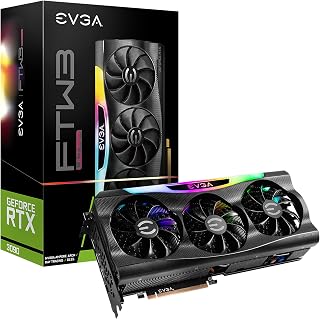
This card is a good reference point for readers asking whether brand build quality matters at the high end, given its 24GB of GDDR6X memory and EVGA's iCX3 cooling and sensor system. The metal backplate and ARGB lighting reflect choices a manufacturer makes beyond the core chip, showing how brand-specific engineering affects durability and thermal monitoring on demanding workloads.
Pros
- Triple-fan iCX3 cooling with 9 thermal sensors shows brand-specific engineering
- All-metal backplate and ARGB lighting reflect premium build choices
- Dual BIOS and Precision X1 software add brand-exclusive flexibility
- 24GB GDDR6X supports demanding 4K and professional workloads
Cons
- Memory can run hot without extra cooling like water blocks
- Three-slot size and triple 8-pin power needs limit case compatibility
If you're trying to decide whether brand matters, EVGA's RTX 3090 FTW3 Ultra is a case study in how far a manufacturer can push a flagship chip with its own engineering. Beyond the NVIDIA GeForce RTX 3090 silicon itself, EVGA adds a triple-fan cooler with 9 iCX3 thermal sensors, an all-metal backplate, ARGB lighting, and dual BIOS support, features that are entirely brand-dependent rather than tied to the chip. For buyers researching brand differences, this card shows how cooling design, build materials, and bundled software like Precision X1 can separate one RTX 3090 from another. The 24GB GDDR6X memory and 4320p display support are NVIDIA-spec, but EVGA's thermal and overclocking tools are what you're really paying a brand premium for. The tradeoff is that EVGA's aggressive cooling still needs help: memory chips can run hot without supplemental cooling, and the card draws heavily on PSU and case space. That's a useful brand lesson too, since not every manufacturer's solution for taming a hot chip is equally sufficient.
GPU: NVIDIA GeForce RTX 3090, NVIDIA RTX 30 Series
Memory: 24GB GDDR6X at 19,500 MHz
Real Boost Clock: 1800 MHz
Max Display Resolution: 7680 x 4320
Texture Fill Rate: 590.4 GT/s
Interface: PCI Express x16
Output: DisplayPort
Cooling: Triple HDB fans, 9 iCX3 thermal sensors
Power Connectors: 3x 8-pin PCIe
Dimensions: 11.81 inches (L) x 5.38 inches (W), triple-slot design
Weight: 4.7 pounds
Warranty: 3-year limited
Features: Dual BIOS, ARGB LED, all-metal backplate, EVGA Precision X1 software
How to Choose the Right Graphics Card Brand
Cooling Design and Thermal Performance
Cooling is the single biggest differentiator between brands. A well-cooled card runs quieter, sustains higher boost clocks for longer, and generally lasts years beyond a poorly cooled alternative. The ASUS TUF Gaming GeForce RTX 5070 Ti 16GB GDDR7 OC, for example, uses a three-fan Axial-tech setup with a phase-change GPU thermal pad, which holds up far better under prolonged loads than basic thermal paste solutions.
On the more compact end, the ASUS Dual GeForce RTX 3050 6GB GDDR6 OC Edition proves that a two-slot design with dual Axial-tech fans can still deliver solid thermal control in a small chassis. Size and fan count both matter when you’re evaluating cooling capacity.
Build Quality and Component Longevity
Premium brands invest in higher-grade capacitors, reinforced PCBs, and more robust VRM designs. The EVGA GeForce RTX 3090 FTW3 Ultra is a strong example, featuring iCX3 thermal sensor technology across nine points, an all-metal backplate, and triple HDB fans, all of which contribute to long-term stability under demanding workloads.
ASUS’s TUF lineup specifically references military-grade components and a protective PCB coating that resists moisture, dust, and debris. That kind of build quality shows up in real-world longevity, especially if your case airflow isn’t perfect or your environment runs warm.
Factory Overclocks and Boost Clock Speeds
Most AIB (add-in board) partners ship their cards with a factory overclock, meaning slightly higher boost clocks than NVIDIA’s reference spec. The msi Gaming GeForce RTX 4060 8GB GDRR6 Extreme pushes an extreme clock of 2505 MHz, while the ASUS ROG Strix NVIDIA GeForce RTX 3060 V2 OC runs at 1912 MHz in OC mode versus the standard gaming mode spec.
These gains are real but usually modest in day-to-day gaming. Where factory overclocks matter more is in content creation and sustained compute workloads, where even a few extra MHz compounds over hours of rendering time.
Software, Warranty, and Brand Support
Brand software is often overlooked but genuinely useful. ASUS’s GPU Tweak III gives you performance tuning, thermal controls, and system monitoring in one dashboard. MSI Afterburner remains one of the most widely used GPU utilities in PC gaming, and both tools work reliably without third-party risk.
Warranty coverage also varies by brand and region. ASUS includes a three-year warranty on cards like the ASUS TUF Gaming GeForce GTX 1660 Super Overclocked, which is a meaningful advantage when you’re committing to a card for a long-term build. EVGA historically offered excellent customer service, which contributed to its loyal following among enthusiasts.
Final Thoughts
If you want the best all-around value with proven thermal performance and solid build quality, the ASUS ROG Strix NVIDIA GeForce RTX 3060 V2 OC is a reliable pick for 1080p to 1440p gaming with room to grow. For those who need flagship-level power and aren’t willing to compromise on cooling or longevity, the ASUS TUF Gaming GeForce RTX 5070 Ti 16GB GDDR7 OC delivers NVIDIA’s latest Blackwell architecture wrapped in one of the most durable AIB designs on the market.
Frequently Asked Questions
Does the graphics card brand affect gaming performance?
The GPU chip, such as an RTX 4060 or GTX 1660 Ti, determines the baseline performance level regardless of brand. The brand influences cooling efficiency, sustained boost clocks, and factory overclock headroom. In practice, a well-cooled card from a premium brand like ASUS or MSI can outperform a poorly cooled card running the same chip over extended gaming sessions.
Is EVGA still a good graphics card brand in 2026?
EVGA exited the GPU market after its partnership with NVIDIA ended, which means new EVGA cards are no longer being produced. However, existing cards like the EVGA GeForce RTX 3090 FTW3 Ultra remain well-regarded for their build quality and iCX3 thermal design. If you find one at a fair price in 2026, it’s still a capable card, though warranty support may be limited.
What is the difference between ASUS ROG Strix and ASUS TUF Gaming cards?
ROG Strix is ASUS’s premium enthusiast tier, featuring more aggressive cooling, higher factory overclocks, and RGB-forward aesthetics. TUF Gaming targets the durability-focused segment, using military-grade components, protective PCB coatings, and a more subdued design. Both are high-quality lines, but ROG Strix generally sits at the top of ASUS’s performance hierarchy.
Should I choose a two-fan or three-fan graphics card?
Three-fan designs, like those on the MSI Gaming GeForce RTX 3060 12GB 15 Gbps GDRR6, generally offer better thermal headroom and quieter operation under load, making them well-suited for mid-range to high-end GPUs. Two-fan cards like the ASUS Dual GeForce RTX 3050 6GB GDDR6 OC Edition are a smart choice for smaller cases or lower-TDP chips where a triple-slot cooler would be overkill. Match the cooler size to the chip’s thermal demands and your case clearance.
Common questions
Why do two cards with the same chip use a different cooler?
Brands change the cooler to manage heat and noise differently while the underlying GPU stays identical. An ASUS TUF RTX 5070 Ti and a competing RTX 5070 Ti both run the same NVIDIA silicon, but fan count, heatsink size, and shroud design vary by maker. That affects temperatures, fan noise, and card length, which is why otherwise similar cards can perform differently in a case. Check listed dimensions and fan count before buying, since the chip alone does not tell the full story. Live pricing is on each listing.
How do warranty and RMA policies differ between graphics card brands?
Warranty length and RMA handling vary by brand, not by the chip inside the card. Some manufacturers offer longer coverage with registration, while others process returns faster or have more accessible regional support centers. These differences affect how painless a replacement is if a card fails down the road. Reviewing a brand's warranty terms and support reputation is worth doing before purchase, since two cards built around the same GPU can have very different ownership experiences afterward. Confirm current terms directly with the manufacturer.
Does a small factory overclock actually make a difference?
Not much, since a small factory overclock typically adds only a modest boost clock increase over reference speeds. For example, the ASUS TUF RTX 5070 Ti OC Edition runs a 2610 MHz GPU clock, a minor bump that is unlikely to be noticeable in everyday gaming. The real-world impact is small enough that cooler quality, build fit, and price often matter more than chasing the highest factory clock number. Compare full specs and listing prices rather than focusing on clock speed alone.





