

Competitive gaming demands precision, and your display can make or break your performance. Whether you’re climbing ranked ladders or exploring open worlds, a 144Hz refresh rate transforms choppy motion into fluid action, giving you the split-second advantage to react faster and spot enemies sooner.
This guide covers five carefully evaluated monitors that deliver smooth 144Hz performance across different budgets, screen sizes, and resolutions. From compact Full HD panels to expansive curved QHD displays, each option balances performance, image quality, and ergonomics for gamers who refuse to compromise.
Quick Comparison
| Model | Link | Rating | Screen Size | Resolution | Refresh Rate |
|---|---|---|---|---|---|
| 1 Samsung 27 Odyssey G5 QHD 1440P 180Hz Gaming Monitor with...Highest ratedFastest refresh | Check price | 4.7 of 5589 ratings | 27 inches | QHD 1440p | 180 |
| 2 Dell 27 Plus QHD Monitor S2725DSM 144Hz 2560x1440 USB-C... | Check price | 4.6 of 5235 ratings | 27 inches | QHD Wide 1440p | 144 hertz |
| 3 KTC H27S5C 27 inch Curved Gaming Monitor 1440P QHD 144Hz...Most reviewed | Check price | 4.5 of 52,516 ratings | 27 inches | QHD Wide 1440p | 144 hertz |
| 4 Sceptre 22-Inch FHD Gaming Monitor 144Hz, FreeSync,... | Check price | 4.4 of 51,445 ratings | 22 inches | FHD 1080p | 144 hertz |
| 5 Samsung 32" Odyssey G55C QHD 165Hz Curved Gaming Monitor,... | Check price | 4.4 of 52,087 ratings | 32 inches | QHD Wide 1440p | 165 hertz |
Ratings reflect the most recent data pull. Check each listing for current price and availability.
Quick answer
This guide compares 5 picks, with Samsung 27 Odyssey G5 QHD 1440P 180Hz Gaming Monitor ranked first. KTC H27S5C 27 inch Curved Gaming Monitor 1440P QHD has the most customer reviews.
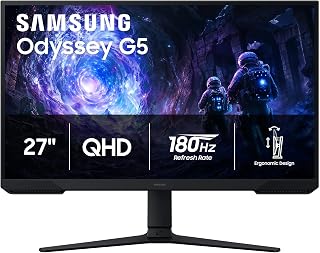
The Odyssey G5 delivers smooth 180Hz refresh rates that exceed the 144Hz standard, giving competitive gamers extra headroom for fast-paced titles. Its VA panel produces a 3000:1 contrast ratio, rendering deeper blacks and richer colors in dark game scenes compared to typical IPS displays. The 27-inch QHD resolution hits the sweet spot for clarity without demanding excessive GPU power, while the matte finish reduces glare during extended sessions.
Pros
- 180Hz refresh rate exceeds the 144Hz baseline
- 3000:1 contrast ratio delivers deep blacks
- 1ms response time minimizes motion blur
- Black Equalizer brightens shadows for competitive advantage
Cons
- Requires capable GPU to fully utilize 180Hz at QHD
- On-screen menu navigation could be more intuitive
At 180Hz, the Samsung Odyssey G5 pushes well past the 144Hz baseline this roundup targets, giving competitive players extra headroom for smooth motion clarity. The 27-inch QHD panel pairs that refresh rate with 1ms response time and AMD FreeSync, creating a responsive foundation for fast shooters and MOBAs. VA panel technology delivers a 3000:1 contrast ratio that brings depth to dark scenes without the washed-out blacks common in budget IPS alternatives. The matte finish keeps glare at bay during marathon sessions, and the fully adjustable stand accommodates any seating position or desk height. Black Equalizer brightens shadowy corners where enemies hide, a practical edge in competitive play. HDR10 support adds punch to color and highlights. Setup is straightforward with dual HDMI and DisplayPort options. The 1440p resolution hits the sweet spot between detail and GPU demand, though you will need a capable graphics card to push the full 180Hz consistently. This monitor earns its place by exceeding the 144Hz standard while maintaining QHD sharpness and strong contrast performance.
Display: 27-inch QHD VA panel, 2560 x 1440 resolution, 16:9 aspect ratio, 178-degree viewing angles
Performance: 180Hz refresh rate, 1ms response time (MPRT), 300 cd/m brightness, 3000:1 contrast ratio
Features: HDR10, AMD FreeSync, Black Equalizer, matte screen finish
Connectivity: 2x HDMI, 1x DisplayPort, 1x power connector
Design: Adjustable stand with tilt, pivot, and height settings, desk mount, flat panel shape
Dimensions: 24.34 inches wide, 9.22 inches deep, 20.5 inches tall, 10.1 pounds
Power: 35 watts consumption, 240 volts
Warranty: 1-year manufacturer coverage
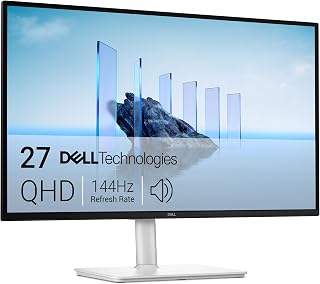
The S2725DSM combines native 144Hz refresh with 1ms response time, eliminating motion blur in fast shooters and racing games. Its IPS panel maintains accurate colors across wide viewing angles, useful for content creators who game. Full height, tilt, pivot, and swivel adjustability lets you dial in ergonomic comfort for marathon gaming sessions. AMD FreeSync prevents screen tearing without the cost premium of G-Sync hardware.
Pros
- TUV 4-star eye comfort certification reduces fatigue
- Dual 3W speakers eliminate need for external audio
- Full ergonomic adjustability with height, tilt, pivot, swivel
- IPS panel delivers consistent color at 178-degree angles
Cons
- Limited connectivity with single HDMI and DisplayPort
- 144Hz ceiling offers no overhead beyond the baseline
The Dell S2725DSM hits the 144Hz target with a 27-inch IPS panel that balances smooth gaming with workspace versatility. QHD resolution at 2560x1440 provides sharp detail without the GPU demands of 4K, while 1ms MPRT response time and AMD FreeSync keep motion crisp and tear-free. The IPS panel brings 178-degree viewing angles and a 1500:1 contrast ratio that remains consistent from any seating position. What separates this monitor is the TUV 4-star eye comfort certification, achieved through flicker-free backlighting and blue light reduction that reduce fatigue during extended sessions. Dual 3W speakers deliver surprisingly capable built-in audio that eliminates the need for external speakers in many setups. The fully adjustable stand supports height, tilt, pivot, and swivel movements, and the matte finish cuts glare effectively. At 350 nits brightness, the display remains visible in well-lit rooms. Connectivity includes HDMI 2.1 and DisplayPort 1.4, though users with multiple devices may need adapters. The ash white aesthetic fits professional environments as cleanly as gaming spaces.
Buy this if you split time between gaming and productivity work, or if eye comfort matters during long sessions. The TUV certification and built-in speakers appeal to users who want a clean desk setup without external peripherals. IPS viewing angles suit multi-user environments. Skip it if you need extensive connectivity for legacy devices, or if you are chasing the absolute fastest response times for esports competition. The 144Hz ceiling is right on target but offers no overhead for future upgrades.

Pros
- Exceptional value, delivering premium specs at a budget-friendly price point compared to competitors
- Sharp 1440P QHD resolution and 144Hz refresh rate ideal for both competitive gaming and detailed creative work
- Curved 1500R design with eye care technology reduces fatigue during extended use
- Quick setup with included components and responsive 5ms response time for seamless gameplay
- Strong color performance and HDR400 support enhance immersion in modern games and films
Cons
- Some users report wake-up delays or occasional power-on issues after sleep mode
- LED backlighting lacks user controls beyond simple on/off toggle
- Limited to 5mm tilt adjustment range, which may restrict optimal positioning for some users
The KTC H27S5C is a 27-inch curved gaming monitor designed for budget-conscious gamers, content creators, and office workers who demand sharp visuals and smooth performance without breaking the bank. Its 1500R curvature creates an immersive workspace that naturally draws your eye inward, reducing strain during long sessions whether you are gaming or working on documents and spreadsheets.
The standout features include a vibrant 1440P QHD resolution (2560x1440) paired with a responsive 144Hz refresh rate, making games feel buttery smooth and details crisp. HDR400 support with 129% sRGB and 110% DCI-P3 color gamut coverage ensures rich, accurate colors for everything from competitive shooters to photo editing. The curved screen keeps content within your natural field of view, enhancing focus and reducing the eye fatigue that comes with traditional flat displays.
Build quality is solid, featuring a lightweight plastic construction with minimal bezels and a V-shaped metal base that assembles quickly. The monitor supports dual HDMI 2.0 and DisplayPort 1.4 connectivity, making it compatible with gaming PCs, laptops, and consoles. Eye care features including Low Blue Light filtering and Flicker-Free technology provide additional protection during extended use, while Adaptive-Sync compatibility ensures tear-free gaming across NVIDIA and AMD platforms.
Drawbacks include occasional power-on issues after sleep mode that may require manual intervention, limited LED backlight controls, and a relatively narrow tilt adjustment range. Some users have also noted that the backlighting cannot be customized, which may disappoint users seeking aesthetic control.
Verdict: The KTC H27S5C offers exceptional value for budget gamers and professionals seeking a curved 1440P gaming monitor. Its combination of smooth 144Hz performance, vibrant visuals, and immersive curved design makes it a smart choice for anyone upgrading from 1080P or older displays, despite minor power management quirks.
Display: 27-inch curved LCD, 1500R curvature, 1440P QHD (2560x1440), 16:9 aspect ratio, matte finish
Performance: 144Hz refresh rate, 5ms response time, 4000:1 contrast ratio, 400 nits brightness, 178-degree viewing angle
Color & HDR: 16.7 million colors, 129% sRGB, 110% DCI-P3 gamut, HDR400 support
Connectivity: 2x HDMI 2.0, 1x DisplayPort 1.4, 1x 3.5mm audio jack, 1x USB 2.0
Features: Adaptive-Sync (G-Sync and FreeSync compatible), Low Blue Light, Flicker-Free, tilt adjustment (-5 to +20 degrees), 100mm x 100mm VESA mount
Dimensions: 24.05 inches W x 18.58 inches H x 6.14 inches D. Includes curved monitor, adapter, base, HDMI cable, and power cord. 3-year manufacturer warranty.

The E225W-FW144 hits the 144Hz target at an accessible 22-inch form factor, ideal for compact desk setups or secondary displays. Its 1080p resolution pairs well with mid-range GPUs, letting you maintain high frame rates without expensive hardware. Built-in speakers eliminate the need for separate audio gear in space-limited environments. The 2000:1 contrast ratio provides decent visual depth for a budget-conscious panel.
Pros
- 144Hz refresh with 1ms response eliminates motion blur
- FreeSync prevents tearing during variable frame rates
- Compact 22-inch size fits smaller desks easily
- Minimal bezels support clean multi-monitor gaming setups
Cons
- 1080p resolution limits visual detail in modern AAA games
- No premium features like HDR or USB-C
For gamers wanting to break into high refresh gaming without spending heavily, the Sceptre E225W-FW144 delivers 144Hz performance in a compact 22-inch package. The 1ms response time pairs with FreeSync adaptive sync to eliminate screen tearing and motion blur during competitive sessions, giving you the responsiveness needed for fast shooters and racing titles. The matte finish reduces glare during long gaming sessions, while Blue Light Shift helps prevent eye strain when you lose track of time. Built-in speakers handle game audio adequately, letting you skip external speakers if desk space is tight. The minimal bezel design works well for dual-monitor setups, popular among gamers who stream or multitask. At 1920x1080, the pixel density stays sharp on this smaller screen size. FHD resolution keeps frame rates high on mid-range graphics cards, an important consideration when you're chasing that 144Hz ceiling. The LED panel offers 2000:1 contrast and 170-degree viewing angles, producing decent color for gaming and media. This monitor focuses on core gaming performance rather than premium features, which keeps it accessible for first-time high refresh buyers.
Display: 22-inch FHD LED with 1920x1080 native resolution, 16:9 aspect ratio, matte screen finish
Performance: 144Hz refresh rate, 1ms response time, 2000:1 contrast ratio, 170-degree viewing angles, 100 color gamut
Connectivity: 1x HDMI, DisplayPort, FreeSync adaptive sync
Features: Built-in speakers, Blue Light Shift eye care technology, minimal bezel design, wall mount compatible
Physical: 19.9in W x 15.5in H x 7in D, 7 pounds, machine black color
Warranty: 1-year limited manufacturer warranty
This monitor suits gamers on tight budgets, students building their first gaming setup, or anyone upgrading from a 60Hz display who wants immediate improvement in motion clarity. It works well for competitive gaming where response time matters more than screen size. Skip this if you need more screen real estate for immersive AAA titles, want higher resolutions for sharper detail, or require advanced features like HDR or USB-C connectivity for a premium experience.

This 32-inch curved display wraps around your field of view with a tight 1000R curvature, creating immersive sightlines in open-world and simulation games. The 165Hz refresh rate provides smooth motion beyond the base 144Hz requirement. QHD resolution at this screen size delivers crisp detail without the performance hit of 4K. The 2500:1 contrast ratio enhances depth perception in atmospheric titles with varied lighting.
Pros
- 32-inch curved panel maximizes screen real estate
- 165Hz refresh rate exceeds 144Hz baseline
- 2500:1 contrast ratio delivers deep blacks
- 1000R curve wraps field of view for immersion
Cons
- Plastic stand lacks tilt adjustment
- Glossy finish requires careful lighting to avoid reflections
The Samsung Odyssey G55C brings a 32-inch curved screen to the 144Hz category, pushing past the threshold with a 165Hz refresh rate that adds a small performance buffer. The 1000R curve wraps around your field of view, pulling you into the action in a way flat panels cannot match. QHD resolution at this size maintains sharp detail without spreading pixels too thin, and the 1ms response time keeps motion blur minimal during fast transitions. The VA panel delivers a 2500:1 contrast ratio that brings depth to dark scenes, and HDR10 support enhances color vibrancy and highlight detail. The glossy finish makes colors pop but requires attention to room lighting to avoid reflections. At 32 inches, you gain significant screen real estate for immersive single-player experiences and strategy games where peripheral vision matters. The 165Hz ceiling gives you a slight edge over baseline 144Hz monitors, though the difference is subtle. Setup requires configuring the refresh rate through the on-screen menu rather than relying on Windows detection. The included stand is functional but constructed from plastic and lacks tilt adjustment, which limits positioning flexibility.
Display: 32-inch QHD (2560 x 1440), 16:9 aspect ratio, 1000R curvature, glossy finish, 178-degree viewing angle
Performance: 165Hz refresh rate, 1ms MPRT response time, 2500:1 contrast ratio, 300 cd/m2 brightness
Features: HDR10, AMD FreeSync adaptive sync, Eye Saver Mode (blue light reduction), flicker-free technology
Connectivity: 1x DisplayPort, 1x HDMI, 2x component outputs
Physical: 28" wide, 21.01" tall, 10.7" deep, 11.5 lbs. Includes DP cable, power cable, and stand. Wall mount compatible. 1-year manufacturer warranty.
Buy this if you want maximum screen size at the 144Hz tier and value the immersive pull of an aggressive curve. The 32-inch footprint suits players who sit farther from their desk or prioritize peripheral vision in open-world and strategy titles. The high contrast ratio appeals to gamers who play in darker rooms. Skip it if desk space is limited, if you need premium stand adjustability, or if glossy screen reflections will be an issue in your lighting setup. No onboard audio requires external speakers.
Buying Guide: Choosing Your Perfect 144Hz Gaming Monitor
Resolution and Screen Size Balance
QHD resolution (2560×1440) delivers 1.7 times the pixel density of Full HD, transforming game worlds with sharper textures and crisper details. The Samsung 27″ Odyssey G5 (G51F) Series QHD (1440P) and Dell 27 Plus QHD Monitor – S2725DSM both pair this resolution with 27-inch panels, creating an ideal pixel pitch that eliminates the need for scaling while maintaining desktop usability.
Full HD remains viable for smaller displays and budget-conscious setups. The Sceptre New 22-Inch Gaming Monitor, FHD 1080p proves that 1920×1080 still delivers clean visuals at 22 inches, especially when your GPU prioritizes frame rates over resolution. Larger 32-inch panels like the Samsung 32″ Odyssey (G55C) benefit significantly from QHD, as Full HD would appear noticeably softer at that screen size.
Curved vs Flat Panel Design
Curved displays wrap your peripheral vision, creating an immersive cockpit effect that pulls you deeper into first-person and racing games. The KTC H27S5C 27 Inch Curved Gaming Monitor features a 1500R curvature that matches the natural arc of human vision at 1.5 meters, while the Samsung 32″ Odyssey (G55C) employs an even tighter 1000R curve for maximum immersion on its larger panel.
Flat panels excel in multi-monitor configurations and productivity scenarios where geometric accuracy matters. If you frequently switch between gaming and professional work with adjustable monitor arms, flat screens eliminate the edge distortion that curved panels can introduce when viewed off-axis.
Refresh Rate and Response Time Synergy
Higher refresh rates reduce motion blur and input lag, but they must pair with fast response times to eliminate ghosting. The Samsung 27″ Odyssey G5 (G51F) Series QHD (1440P) pushes to 180Hz with a 1ms response time, while the Samsung 32″ Odyssey (G55C) reaches 165Hz with matching 1ms MPRT for blur-free motion in fast-paced shooters.
AMD FreeSync technology synchronizes your GPU’s frame output with the display’s refresh cycle, eliminating screen tearing without the performance penalty of traditional V-Sync. Every monitor in this roundup supports adaptive sync, ensuring smooth frame pacing whether you’re running an RTX 5070 at 1440p or an older GPU pushing variable frame rates.
Color Accuracy and HDR Support
Wide color gamuts bring game environments to life with saturated skies, vibrant foliage, and nuanced lighting. The KTC H27S5C 27 Inch Curved Gaming Monitor covers 129% sRGB and 110% DCI-P3, exceeding standard displays for content creation alongside gaming. HDR10 support in models like the Samsung 27″ Odyssey G5 (G51F) Series QHD (1440P) and KTC H27S5C 27 Inch Curved Gaming Monitor expands contrast ratios, revealing shadow details and highlight intensity that SDR panels compress.
Eye comfort features matter during marathon sessions. Blue light filters and flicker-free backlights reduce strain without sacrificing color accuracy. The Dell 27 Plus QHD Monitor – S2725DSM earned a 4-star TÜV certification for eye comfort, validating its low blue light emissions through independent evaluation.
Ergonomic Adjustability and Connectivity
Full ergonomic stands with height, tilt, pivot, and swivel adjustments eliminate neck strain and optimize viewing angles. The Dell 27 Plus QHD Monitor – S2725DSM and Samsung 27″ Odyssey G5 (G51F) Series QHD (1440P) both offer complete flexibility, allowing portrait orientation for coding or vertical game layouts. If your desk setup requires premium positioning for high-performance GPUs, verify VESA mount compatibility for aftermarket arms.
Modern connectivity demands both HDMI 2.0 and DisplayPort 1.4 to support 144Hz at QHD from consoles, PCs, and laptops. The KTC H27S5C 27 Inch Curved Gaming Monitor provides two HDMI ports plus DisplayPort, enabling simultaneous connections for console and PC without cable swapping. Built-in speakers, like those in the Dell 27 Plus QHD Monitor – S2725DSM and Sceptre New 22-Inch Gaming Monitor, FHD 1080p, handle quick audio needs without demanding desk space for external speakers.
Final Thoughts
Your ideal 144Hz gaming monitor depends on your GPU capabilities, desk space, and whether you prioritize immersive curves or pixel-perfect clarity. For competitive gamers seeking the fastest response times and highest refresh rates at QHD, the Samsung 27″ Odyssey G5 (G51F) Series delivers 180Hz performance with HDR10 enhancement. Budget-conscious players building a compact setup will appreciate how the Sceptre 22-Inch Gaming Monitor combines Full HD clarity with essential 144Hz smoothness in a space-saving form factor.
Frequently Asked Questions
What GPU do I need to run games at 144Hz on a QHD monitor?
An NVIDIA RTX 4060 Ti or AMD RX 7700 XT handles most competitive titles at 144fps on QHD with medium-high settings. Demanding single-player games may require an RTX 4070 or RX 7800 XT to maintain consistent frame rates above 100fps. Older GPUs like the RTX 3060 Ti can still drive 144Hz displays by lowering settings or enabling DLSS upscaling.
Does a curved monitor cause distortion for productivity work?
Curves between 1500R and 1000R introduce minimal distortion for text and spreadsheets when viewed head-on. Professionals who frequently reference printed documents or work with CAD drawings may prefer flat panels for geometric accuracy. For mixed gaming and productivity use, 27-inch 1500R curves like the options paired with modern GPUs offer a practical middle ground that enhances gaming without compromising office tasks.
Can I use a 144Hz monitor with a console like PlayStation 5 or Xbox Series X?
Current-generation consoles output 120Hz maximum, which 144Hz monitors support seamlessly via HDMI 2.1 or HDMI 2.0 connections. You’ll experience smoother motion than 60Hz displays, though not the full 144fps that high-end PCs deliver. Verify your monitor includes HDMI 2.0 or newer for proper 120Hz console compatibility.
How important is HDR400 certification for gaming monitors in 2026?
HDR400 represents the entry tier of HDR support, requiring 400 nits peak brightness without local dimming zones. It provides noticeable improvements in highlight intensity and shadow detail compared to SDR, especially in games with strong lighting contrasts. True HDR enthusiasts prefer HDR600 or higher with full-array local dimming, but HDR400 delivers meaningful visual upgrades over non-HDR panels at similar prices.






Write Your Review
No reviews yet. Be the first to share your experience!