

Your phone may show a strong signal near the router, yet the bedroom office drops video calls, the upstairs TV buffers, and smart devices lose connection at the far end of the house. Those symptoms create a practical mesh vs router extender decision: do you need to patch one weak spot, or rebuild coverage across the entire home?
A mesh system is usually built for broad, seamless coverage, while an extender is a smaller add-on that repeats your current router’s signal. This guide explains the meaningful differences, highlights six relevant options, and helps you choose confidently alongside our guide to WiFi 6E routers for wider home coverage.
Quick answer
This guide compares 6 picks, with NETGEAR Orbi 970 WiFi 7 Mesh System: 27 Gbps, 10,000 sq ranked first. TP-Link AC1200 WiFi Extender RE315: Dual Band Range has the most customer reviews.
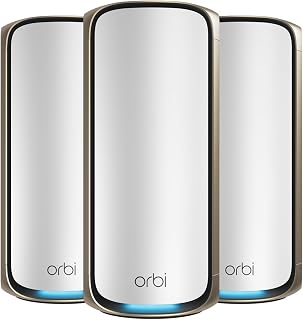
When dead zones persist even after trying extenders, the issue is usually backhaul congestion, and a dedicated backhaul channel separates the data mesh nodes use to talk to each other from the bandwidth your devices actually use. Quad-band WiFi 7 architecture across three units means every room gets full speed instead of a weaker secondhand signal relayed node to node.
Pros
- Dedicated backhaul band keeps satellite links stable under load
- Up to 10,000 sq ft coverage across the 3-unit kit
- Supports 200 simultaneous devices
- 10 Gig WAN plus multi-gig LAN ports for wired low-latency connections
Cons
- Requires a separate modem to get online
- Full benefits need WiFi 7 client devices and multi-gig internet
For dead zones in large homes where even a good mesh system still struggles, the Orbi 970 is built for the hardest version of that problem. Its quad-band design dedicates an entire WiFi band exclusively to backhaul communication between the router and satellites, so the connection between units stays strong even under heavy load instead of degrading the way extenders typically do at range. With up to 27 Gbps combined throughput and support for 200 simultaneous devices, this system is aimed at large, device-heavy households rather than a simple weak-spot fix. The three-unit kit covers up to 10,000 sq ft, more than enough to eliminate dead zones across sprawling or multi-story homes where a single router or extender never reached. A 10 Gig WAN port plus a mix of 10 Gig and 2.5 Gig LAN ports let you wire gaming PCs or NAS devices directly for minimal latency. App-based setup and remote management keep it manageable despite the advanced hardware. This is the option for anyone treating WiFi dead zones as an infrastructure upgrade, not a patch.
Network Performance: WiFi 7, up to 27 Gbps total throughput, 2.4x faster than WiFi 6. Quad-band with dedicated backhaul. Supports up to 200 simultaneous device connections.
Coverage: 10,000 sq ft with router and 2 satellites. Each additional satellite adds 3,300 sq ft. Backwards compatible with WiFi 6, WiFi 5, and older WiFi devices.
Connectivity Ports: 10 Gig internet port, 10 Gig LAN ports, 2.5 Gig LAN ports across router and satellites. Supports internet plans up to 10 Gbps. Compatible with any cable or fiber ISP.
Package Contents: 1 Orbi WiFi 7 Router (RBE971), 2 Orbi WiFi 7 Satellites (RBE970), 1 ethernet cable, 3 power adapters, quick start guide. Dimensions: 11.58 x 5.68 x 5.15 inches per unit.
Security: Advanced Router Protection enabled out of box, automatic firmware updates, NETGEAR Armor 30-day free trial. Warranty: 1 year limited. Model: RBE973-200NAS. Made for US use only.
Consider this if you have a large home, heavy device load, or need WiFi 7 class performance and multi-gig wired ports to match a fast internet plan. It's overkill for anyone just trying to fix a weak spot in a bedroom or basement with a modest setup. Skip it if you don't have WiFi 7 client devices or multi-gig internet to take advantage of, and skip it if a separate modem purchase is a dealbreaker.

For anyone trying to stretch coverage across a sprawling floor plan, claimed coverage up to 10000 square feet and support for 80 devices targets exactly the kind of dead zone caused by too many smart home gadgets fighting for signal at the edge of range. The included Ethernet port also lets you hardwire a device in that far corner rather than relying on WiFi alone.
Pros
- Supports up to 80 devices, strong for smart home heavy rooms
- One touch WPS setup in under 8 seconds, no app needed
- Dual high gain antennas aid directional signal reach
- Built in Ethernet port for wired stationary devices
Cons
- Long term reliability data is limited
- Coverage quality depends heavily on outlet placement relative to the dead zone
If your dead zones are less about total square footage and more about a few stubborn rooms a router can't reach, this extender takes a brute force approach: dual band 802.11ax coverage rated up to 10,000 sq ft and support for 80 simultaneous devices. That device capacity matters for homes with a lot of smart plugs, cameras, and sensors spread across far corners, where a basic extender would choke under the load. Setup is one touch WPS, done in under 8 seconds, with no app required, which suits anyone who wants a dead zone fixed today rather than configured over a weekend. Two external antennas give it directional reach toward the problem area, and the built in Ethernet port lets you hardwire a stationary device like a camera or console once the signal arrives. It plugs directly into an outlet in a compact 3x3x2.5 inch body. The tradeoff is that long term reliability data is still thin, and like any extender, final performance depends heavily on where you place it relative to the dead zone.
Wireless Standard: 802.11ax
Data Transfer Rate: 1200 Mbps
Frequency Bands: Dual-band (2.4 GHz and 5 GHz)
Coverage Area: Up to 10,000 square feet
Device Support: Up to 80 simultaneous connections
Antennas: 2 external high-gain antennas
Connections: WiFi and Ethernet port
Dimensions: 3.0 inches W x 2.5 inches D x 3.0 inches H
Compatible Devices: Smartphones, laptops, tablets, smart TVs, routers, and IoT devices
Warranty: 1 year manufacturer coverage
Color: Black
WPS Button Method (Recommended): Plug the extender into an outlet within range of your router. Press the WPS button on your primary router, then immediately press the WPS button on the extender. Connection completes within 8 seconds. Move the extender to the desired location once paired.
Smartphone App Setup: Download the configuration app and follow on-screen prompts to connect to your router credentials. Use the signal indicator lights to verify proper placement for optimal coverage.
Ethernet Connection: Connect devices like security cameras or smart TVs directly to the Ethernet port for wired connectivity without relying on WiFi bandwidth.

Dead zones often come from one router straining to cover too much square footage, and a three-pack mesh system solves that by placing access points where coverage actually drops off instead of boosting signal from a single spot. The Access Point Mode gives flexibility if you already have a modem router, and dual-band AC1900 performance is plenty for streaming and browsing in rooms that previously had nothing.
Pros
- Eliminates extender reconnection lag with seamless mesh roaming
- Covers up to 5,500 sq ft across the 3-pack
- Six gigabit ports total for optional wired backhaul
- Simple app setup with useful parental controls
Cons
- Dual-band AC1900 trails WiFi 6 systems on throughput
- Not ideal for homes with many bandwidth-heavy connected devices
Dead zones usually happen because a single router or a daisy-chained extender can't push a clean signal to every corner of the house. The Deco S4 solves this by replacing that setup with three units that form one unified network, so devices roam between them without the drop-and-reconnect lag that extenders are known for. For a 2026 dead-zone fix, this is the low-friction option: AC1900 speeds, coverage rated to 5,500 sq ft, and support for up to 100 devices cover most homes without any technical tinkering. Six gigabit ethernet ports across the pack allow wired backhaul if you want a more stable mesh link between units instead of relying purely on wireless. App-based setup, per-person parental controls, and Alexa integration for guest WiFi round it out. It won't deliver WiFi 6 speeds, but if the goal is simply eliminating weak spots and extender hassles rather than chasing maximum throughput, it's built exactly for that job.
Coverage and Performance: Up to 5,500 sq ft coverage, AC1900 WiFi speeds (1200 Mbps), 3x3 6-stream wireless, maximum upstream 950 Mbps.
Connectivity: WiFi 5 (802.11ac), dual-band, 6 total gigabit ethernet ports (2 per unit), WAN/LAN auto-sensing, supports wired ethernet backhaul.
Device Support: Connects up to 100 WiFi-enabled devices, works with all major ISPs including AT&T, Verizon, Xfinity, Spectrum, and others.
Features: Single unified network with automatic roaming, robust parental controls, guest WiFi management, Alexa voice control, intuitive mobile app setup.
Package Contents: 3 Deco S4 units, 1 ethernet cable, 3 power adapters, quick installation guide. 2-year manufacturer warranty included.
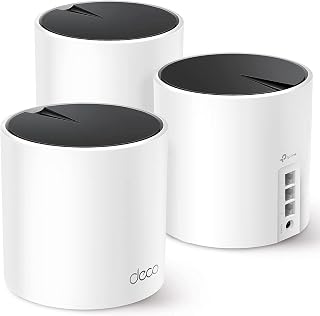
A larger home with mixed devices benefits from WiFi 6 handling many connections at once without choking, and this three-unit mesh kit supports everything from smart TVs to security cameras and gaming consoles on the same network. Guest Mode keeps visitors off your main network while the dual-band design still reaches those far corners that extenders struggle with.
Pros
- WiFi 6 AX3000 with 6,500 sq ft coverage
- Supports up to 150 connected devices
- Three gigabit ports per unit for wired devices
- AI mesh optimization adapts to home layout and interference
Cons
- AX3000 tier is behind AX6000 and WiFi 6E competitors
- Best performance often requires running ethernet backhaul cables
If dead zones in your home are tied to a growing number of connected devices rather than just square footage, the problem isn't only coverage, it's capacity. The Deco X55 addresses both sides at once. Its WiFi 6 (AX3000) foundation supports up to 150 devices and 6,500 sq ft of coverage, which handles the kind of multi-device household (smart TVs, cameras, consoles, tablets) that overwhelms older routers or single extenders long before the signal actually weakens. Three gigabit ethernet ports per unit let you hardwire the devices that need the most stability, and ethernet backhaul support means you can wire the mesh units together for a steadier connection than wireless-only extenders provide. AI-driven mesh optimization adjusts to your home's layout automatically, which matters for fixing dead zones caused by walls and interference rather than just distance. Setup takes under five minutes through the app, and any unit can act as the main router. This is the pick for 2026 households that outgrew their old router not because of distance, but because of device count.
Good fit if your dead zones come with a crowded network, lots of smart devices, consoles, or cameras competing for bandwidth. Also solid for anyone replacing an aging router-and-extender combo. Skip it if you want the absolute fastest WiFi 6 tier available, since AX3000 trails AX6000 and WiFi 6E systems, and skip it if you don't want to deal with running ethernet cables for best performance.
Coverage and Performance: Up to 6500 square feet, AX3000 WiFi 6, 2402 Mbps (5GHz) plus 574 Mbps (2.4GHz), supports 802.11ax, 802.11ac, 802.11n, 802.11g, 802.11b. Three internal antennas per unit.
Connectivity and Ports: Three gigabit ethernet ports per unit (nine total in 3-pack), supports wired and wireless backhaul, compatible with all major ISPs. Works with smartphones, computers, tablets, printers, gaming consoles, smart TVs, and security cameras.
Security and Control: WPA3-Personal, WPA2-Personal, WPA-Personal encryption, High-level firewall, HomeShield service included, parental controls, guest mode, app-based control and remote management. Operates on TP-Link's Omada system.
Specifications: 12-volt power adapters included, 2-year manufacturer warranty, 24/7 technical support. Package includes three Deco X55 units, three power adapters, one ethernet cable, and quick installation guide.

Simple dead zones in a single room, like a garage or back bedroom, often just need a basic signal boost rather than a full mesh overhaul, and this dual band extender with Access Point Mode fills that gap cheaply. Compatibility with gaming consoles, tablets, and smartphones covers the common devices people are trying to reach in that one weak spot.
Pros
- Simple one touch setup through the Tether app
- Dual adjustable antennas for aiming signal at a specific dead zone
- Dual band support covers both streaming and older devices
- EasyMesh compatible for routers that support it
Cons
- 1,500 sq ft range limits it to smaller spaces or single rooms
- Extends existing signal rather than adding new bandwidth
Not every dead zone problem calls for a full mesh overhaul, and the TP-Link RE315 is built for the simpler version of that problem: one or two rooms your router just can't reach. Rated for 1,500 sq ft and running AC1200 dual band WiFi, it is sized for apartments, rentals, or single problem rooms rather than whole house coverage. Setup goes through the Tether app with a one touch connection, and two adjustable antennas let you aim the signal toward the dead zone directly. The dual band split handles 5 GHz for streaming and gaming alongside 2.4 GHz for older devices, and support for 32 connected devices covers a typical household without congestion. A 100 Mbps Ethernet port is useful if you want to wire in a smart TV or console in that same room for reliability. The core tradeoff with any extender applies here too: it extends your existing signal rather than adding bandwidth, so expect somewhat reduced speed at the far edge of its range compared to standing next to the router itself.
Right choice for renters or small to mid sized homes with one or two specific dead zones who want a quick, low commitment fix. EasyMesh compatibility is a nice bonus if your router supports it. Skip it if your dead zones span multiple rooms or floors, or if you have a large or dense device count household, since its 1,500 sq ft range and simpler single band repeating will struggle to keep up.
Wireless Performance: AC1200 total bandwidth, 867 Mbps (5 GHz) and 300 Mbps (2.4 GHz). Compatible with 802.11a, b, g, n, and ac standards.
Coverage: Up to 1,600 square feet. Supports up to 32 connected devices simultaneously.
Connectivity: Two adjustable external antennas with adaptive path selection. One 100 Mbps Ethernet port for wired connections. EasyMesh-compatible for mesh network expansion.
Physical: 3.5 inches deep, 1.4 inches wide, 4.9 inches tall. Weighs 6.1 ounces. White finish. Operating temperature range 32°F to 104°F.
Software: TP-Link Tether app (iOS and Android) includes cloud management, LED control, and access control features. Access point mode supported.
Warranty: 2-year manufacturer warranty. CE and RoHS certified for safety and environmental standards.

Covering up to 8000 square feet makes this a fit for larger houses where dead zones show up in detached rooms or multiple floors, and tri-band WiFi 7 keeps gaming consoles and smart TVs from competing for the same channel. Built in VPN, parental controls, and WPA3 add network level protection that a basic extender setup never offers.
Pros
- Dedicated backhaul keeps satellite traffic off your main bandwidth
- Tri band WiFi 7 built for large, multi dead zone homes
- 2.5 Gbps LAN port supports future fiber upgrades
- WPA3 and Advanced Router Protection included out of the box
Cons
- Coverage can fall short of 8,000 sq ft in homes with dense walls
- Overkill for fixing just one or two isolated dead zones
Dead zones are usually a sign that a single router simply cannot push signal through your whole floor plan, and that is exactly the gap the Orbi 770 is built to close. This 3 pack combines a router with two satellites on a tri band WiFi 7 setup, with a dedicated backhaul band so satellite to router traffic never competes with your actual devices. For a home with persistent weak spots across 8,000 sq ft, that dedicated backhaul is the difference between a mesh system that just adds range and one that keeps speed consistent in every room. Setup runs through the NETGEAR app in a few guided steps, and the 2.5 Gbps LAN port means it can handle a fiber upgrade later. WPA3 encryption, Advanced Router Protection, and a NETGEAR Armor trial are included out of the box. If your dead zones come from thick walls or an unusual layout, actual coverage may fall short of the rated 8,000 sq ft, so plan satellite placement with that in mind.
Coverage and Performance: Up to 8,000 sq ft, supports 100 devices, 11 Gbps data rates, tri-band WiFi 7 with 6 GHz support.
Connectivity: 802.11be standard, 2.5 Gbps LAN port, 7 total ports, compatible with cable and fiber ISP equipment up to 2.5 Gbps plans.
Security: WPA3 encryption, Advanced Router Protection, automatic firmware updates, 30-day NETGEAR Armor trial included.
Box Contents: 1 router (RBE771), 2 satellites (RBE770), 3 power adapters, 2m Ethernet cable, quick start guide.
Warranty: 1 year limited. Model number RBE773-100NAS.
Buying Guide: Choosing Mesh or an Extender
Start with the location and scale of the problem, not the coverage figure on a box. Wall materials, floors, appliance interference, router placement, and the quality of your incoming service all influence the result, so match the hardware to how you actually use your network.
Choose a unified network or a targeted coverage patch
An extender receives the existing wireless signal and rebroadcasts it farther away. It can be an efficient answer when one room, hallway, garage, or patio edge has a weak connection, but performance depends heavily on how healthy the original signal is at the extender’s outlet.
Mesh uses a main router and satellite nodes that operate as one coordinated system, usually with one network name and automatic handoffs as you move. The TP-Link Deco S4 Mesh AC1900 WiFi System is a straightforward whole-home option, while the TP-Link Deco X55 AX3000 WiFi 6 Mesh System adds WiFi 6 capability and additional wired connections per node.
Place an extender where it can still hear the router
Do not put an extender inside the dead zone itself. Place it roughly between the router and the weak area, where the original WiFi remains reliable, then use its indicator light or app guidance to fine-tune the outlet. A poor source signal simply creates a larger poor-signal area.
The TP-Link AC1200 WiFi Extender Dual Band 5GHz/2.4GHz is designed for this focused role, with adjustable antennas, dual-band service, and an Ethernet port for a nearby wired device. The FRWRJQ repeater also offers simple WPS setup and external antennas, but treat broad coverage claims as a starting point rather than a guarantee for every floor plan.
Evaluate device load and the link between nodes
More connected devices do not automatically require mesh, but busy homes benefit from it. Streaming displays, work laptops, gaming systems, cameras, speakers, and phones create overlapping demand, and a mesh system can distribute devices among closer nodes instead of forcing everything to compete with one distant router.
For demanding households, the NETGEAR Orbi 770 Series WiFi 7 Mesh System uses tri-band connectivity and enhanced backhaul to keep traffic moving between its router and satellites. If you already have Ethernet in the walls, wired backhaul can make nearly any compatible mesh kit more consistent. Plan that wiring with suitable Cat 7 Ethernet cable options for clean, fast connections.
Check router roles, ports, and expansion plans
Most mesh kits can replace your present router after connecting to the modem or gateway, though some homes need the provider gateway set to bridge mode first. Look for enough Ethernet ports for a desktop, console, switch, or media device, especially if wireless congestion is already part of the problem.
Think beyond today’s rooms as well. A large yard, detached workspace, or multi-story layout may benefit from a dedicated outdoor device, such as the options in our outdoor access point guide for yard WiFi, rather than stretching an indoor extender past its practical limits. For more hardware planning ideas, browse our home networking guides.
Final Thoughts
Choose mesh when your priority is smooth roaming, several weak rooms, and dependable coverage for a busy household, making the TP-Link Deco X55 AX3000 WiFi 6 Mesh System a sensible whole-home direction. If you have one isolated dead zone and a solid router elsewhere, the TP-Link AC1200 WiFi Extender Dual Band 5GHz/2.4GHz offers a simpler way to extend the signal.
Frequently Asked Questions
Is mesh better than a router extender?
Mesh is usually the stronger choice for large homes, multiple floors, and families that move between rooms while streaming, working, or gaming. Its nodes share one network name and are designed to hand devices to the strongest connection. An extender is often enough when the issue is limited to one area. Neither option can overcome a slow incoming internet plan, so separate provider speed concerns from local WiFi coverage concerns.
Where should I place a WiFi extender?
Put the extender between the router and the dead zone, not at the farthest possible point from the router. It needs a usable connection before it can extend anything. Avoid outlets behind large furniture, near dense metal objects, or beside appliances that may cause interference. If the extender has a signal indicator, use it to identify a more favorable outlet before committing to the placement.
Can a mesh system replace my existing router?
In many homes, yes. Connect the primary mesh unit to your modem or provider gateway, then configure the network through the manufacturer’s app. If your provider gateway also handles routing, you may need bridge mode or access-point mode to avoid two routing layers. Wired backhaul is especially worthwhile for file transfers to a home server, and our 4-bay NAS guide can help you plan that part of the network.
Should I choose WiFi 6 or WiFi 7 mesh in 2026?
WiFi 6 mesh remains a capable fit for many homes, particularly when your devices and internet service do not demand the newest wireless standard. WiFi 7 mesh makes more sense when you want greater headroom for newer devices, high-bandwidth activity, and long-term expansion. Your client devices, home layout, and wired backhaul matter as much as the standard on the product label. Compare the broader ecosystem with our WiFi 7 access point picks before deciding.



Write Your Review
No reviews yet. Be the first to share your experience!