

Your phone backups, raw camera folders, and household documents can easily end up split between aging external drives and scattered cloud accounts. A four-bay NAS brings them into one private location, lets you assign separate user access, and gives your storage plan breathing room as the archive grows. It is especially useful when a family, creative partnership, or small office needs shared files without passing drives back and forth.
This guide narrows the best 4 bay nas choices for people who want dependable backups, media streaming, photo organization, or a compact team file server. We evaluated processor class, networking, drive flexibility, software tools, and recovery options, while flagging the direct-attached enclosures that are not standalone network servers. Before enabling remote access, make sure your network is ready with a router built for broad home coverage.
Quick answer
This guide compares 10 picks, with UGREEN DXP4800 GT 4-Bay NAS: Dual 10GbE, AMD Ryzen ranked first. Synology DS425+ 4-Bay NAS - 2.5GbE Media Server & holds the highest customer rating among them. QNAP TR-004 4-Bay USB Type-C Hardware RAID Enclosure has the most customer reviews.

The DXP4800 GT is aimed at creators, technical users, and office teams whose work benefits from exceptionally fast shared storage. Dual 10GbE ports can serve high-bandwidth editing and simultaneous client transfers, while the Ryzen R2514 and 8GB DDR4 provide a capable platform. Two M.2 NVMe slots let users add fast cache or project storage for responsive direct NAS editing.
Pros
- Dual 10GbE ports with link aggregation
- Four SATA bays plus two M.2 NVMe slots
- 8GB DDR4 RAM expandable to 64GB
- Supports Docker, virtual machines, and Surveillance Center
Cons
- Drives are not included
- Setup may require technical confidence
The UGREEN DXP4800 GT is geared toward the creator and team side of a 4-bay NAS, where several people may need to work from one local system. Its two 10GbE ports support link aggregation and up to 2.5GB/s theoretical throughput, providing a foundation for direct 4K and 8K editing alongside concurrent transfers. The AMD Ryzen Embedded R2514 processor, 8GB DDR4 RAM, and four SATA bays give a studio or office a capable starting point for shared media, backups, and multi-user access. Storage can be tailored to the workload instead of relying only on hard drives. Four bays support drives up to 32TB each, while two M.2 NVMe slots and U.2 compatibility provide options for SSD caching or additional performance. RAM is expandable to 64GB. It also supports Docker, virtual machines, and self-hosted services including Plex, Jellyfin, Home Assistant, and web hosting platforms. Surveillance Center adds camera management alongside storage. For a capable household, it can work as a central data hub, but its advanced expansion options best suit users prepared to configure their own drives. Disks are not included, and initial setup requires some technical confidence despite guided setup and available documentation.
Processor and Memory: AMD Ryzen Embedded R2514 with 4 cores, 8 threads, and up to 3.70GHz. 8GB DDR4 RAM stock, expandable to 64GB. Supports ECC RAM for memory error detection during intensive long-term operation.
Networking: Dual 10GbE ports support up to 10Gbps each (1.25GB/s per port), or 2.5GB/s aggregate throughput with link aggregation on compatible equipment. Additional USB-A 10Gbps, USB-C 10Gbps, and USB 2.0 ports for rapid external transfers.
Storage Capacity: 4 SATA bays compatible with drives up to 32TB each, 2 M.2 NVMe slots with thermal pads, and 2 U.2 NVMe bays with heatsinks. Total maximum capacity: 144TB. RAID support for data redundancy and recovery.
Media and Connectivity: HDMI 4K output, SD card slot for direct camera imports, and USB ports for instant backup workflows. Compatible with desktop, laptop, smartphone, tablet, and television devices.
Buy the DXP4800 GT for a creator studio, technology-focused household, or office team that needs dual 10GbE networking, direct high-resolution editing, and room to scale storage and memory. It is particularly suitable for people planning to run containers, virtual machines, or camera management alongside file storage. Skip it if you want included drives, prefer minimal configuration, or have no use for its networking and expansion options.

Pros
- Exceptional network performance with 2.5GbE connectivity and consistent 278 MB/s throughput
- Versatile functionality handles media streaming, backup, file sharing, and surveillance simultaneously
- Robust security features including RAID redundancy, snapshots, and comprehensive audit logging
- Professional-grade surveillance capabilities rival dedicated security systems at a fraction of the cost
Cons
- Diskless design requires separate hard drive purchases, adding to initial setup cost
- 4-bay configuration may feel limiting for enterprises managing massive datasets
- Requires technical knowledge to fully leverage advanced DSM features and surveillance setup
The Synology DS425+ is a compact 4-bay network attached storage device designed for small to medium businesses and home offices seeking a centralized data hub. It's ideal for teams that need reliable file sharing, media streaming, and backup capabilities without dedicating significant physical space to IT infrastructure.
The standout feature is its 2.5GbE networking combined with Synology's powerful DSM operating system, which enables simultaneous media streaming to 10+ users at impressive speeds alongside backup operations. The device also supports up to 30 IP cameras, making it a cost-effective alternative to dedicated surveillance systems while maintaining professional-grade security and remote access capabilities.
Built with metal and plastic construction in a compact form factor (8.78 inches deep), the DS425+ feels solidly constructed and professional despite its modest desktop footprint. The diskless design means you'll need to source your own hard drives, which adds flexibility in choosing storage capacity and types but requires upfront purchasing decisions.
One limitation is the 4-bay capacity, which may feel constraining for organizations with rapidly growing storage needs. Additionally, fully leveraging features like surveillance integration and advanced backup policies requires some technical setup knowledge beyond basic plug-and-play operation.
Overall, the DS425+ delivers enterprise functionality in an accessible package backed by a 3-year warranty and professional support options. It's an excellent choice for small teams and home users wanting reliable, multi-purpose data management without complexity.
Team collaboration: Serve as a centralized document repository with role-based access controls, perfect for design teams, marketing departments, and creative agencies managing large media files.
Surveillance and security: Deploy across retail locations, offices, or homes to monitor activity via 30 connected IP cameras with motion detection and secure remote viewing capabilities.
Media streaming: Stream 4K content to multiple televisions, laptops, and mobile devices simultaneously throughout your office or home without performance degradation.
Data protection: Combine automated backups, RAID redundancy, and snapshot technology to safeguard critical business documents and client files from accidental deletion or hardware failure.
Physical: Dimensions 8.78 inches (D) x 7.83 inches (W) x 6.54 inches (H), weighs 4.8 lbs, available in black with metal and plastic construction.
Networking: 2.5GbE connectivity, supports 278 MB/s throughput, handles concurrent connections from 10+ users.
Storage: 4-bay diskless configuration, supports up to 80 TB total capacity, compatible with standard hard drives.
Compatibility: Works with Android, iOS, Windows, Mac, and Linux devices as well as servers and enterprise systems.
Support: 3-year warranty included, professional technical support available for business-critical environments.

The DXP4800 Plus fits homes, creators, and small teams that need one shared box for files, backups, and media. Its four SATA bays support up to 144 TB of stated capacity, while the Intel five-core CPU, 8GB DDR5 memory, and 10GbE port help handle concurrent transfers. SD 3.0 and 4K HDMI also suit camera ingest and local viewing.
Pros
- 10GbE and 2.5GbE Ethernet ports
- Listed 1250 MB/s read speed
- Intel 5-Core CPU with 8GB DDR5 RAM
- 128GB SSD cache, 4K HDMI, and SD 3.0
Cons
- Hard drives are not included
- Requires wired Ethernet and speeds vary by setup
One box that can serve a household, a creator’s workspace, and a small team needs more than four drive bays. It needs quick shared access and an uncomplicated way to keep files organized. The UGREEN DXP4800 Plus pairs an Intel 5-Core CPU and 8GB DDR5 RAM with both 10GbE and 2.5GbE networking. Its listed read speed is 1250 MB/s, while the 128GB SSD cache can accelerate operations. That makes centralized backups, shared projects, remote access, and streaming a suitable combination for a home or office outgrowing scattered external drives. It connects with desktops, laptops, smartphones, and tablets, and adds 4K HDMI plus an SD 3.0 slot. For media-focused homes, its photo album can organize images by faces, scenes, and locations while removing duplicates. Docker support extends its role beyond storage, while the guided management interface handles storage, permissions, and services. The four bays support up to 144TB of capacity, but drives are not included. Actual speeds depend on the network, installed drives, and file sizes, and the NAS requires wired Ethernet placement.
Hardware: Intel 5-Core CPU, 8GB DDR5 RAM, 128GB SSD cache, 4K HDMI output, SD 3.0 reader
Storage: 4-Bay 3.5-inch HDD slots, up to 144TB total capacity (drives not included), supports RAID 0, 1, 5, 6, 10, and JBOD configurations
Connectivity: 1x 10GbE Ethernet port, 1x 2.5GbE Ethernet port, 6x USB 3.0 ports, 10Gbps USB connectivity
Performance: 1250 MB/s read/write speeds, 2x M.2 drive slots for caching, supports Docker and virtual machines
Compatibility: Windows, macOS, Linux, iOS, Android, compatible with Western Digital, Seagate, Toshiba drives
Warranty: 2-year manufacturer warranty with 24/7 specialist support and 30-day free returns
Choose the DXP4800 Plus if your home, creative setup, or small office needs one shared location for backups, media, and files across several device types, especially if you can use 10GbE or 2.5GbE Ethernet. It suits first-time NAS buyers who value a guided interface, as well as users who want Docker or photo organization. Skip it if you need included hard drives, rely on wireless-only placement, or expect maximum stated speeds without compatible networking and drives.

The Zero1 Pro suits enthusiasts, home users, and small offices that want NAS storage with room to customize services. Its Intel N100 processor and 8GB RAM support Docker and different operating systems, useful for running self-hosted apps alongside file sharing. Dual 2.5GbE connections improve network throughput, and two M.2 NVMe slots can accelerate frequently used data. 4K HDMI and AI Album further support home-media organization.
Pros
- Dual 2.5GbE ports with link aggregation
- 4K HDMI output
- AI photo album with duplicate detection
- Docker and alternative operating system support
Cons
- Hard drives must be purchased separately
- Alternative operating system installs require technical familiarity
Home users do not always want to choose between an approachable family storage system and a flexible platform for creator or office projects. The diskless Yxk Zero1 Pro brings both directions together in a 4-bay design. An Intel N100 processor and 8GB RAM provide the core hardware, while dual 2.5GbE ports can use link aggregation for added bandwidth when several users stream 4K media or access files. A 4K HDMI output also lets it work without a separate media player. For a household, its AI photo album can categorize images by faces and scenes, then identify duplicates for one-click removal. With support for up to 144TB, it has room for a growing media library and broad backup collection. Docker enables custom applications, and users with more technical goals can install another operating system, including TrueNAS or Unraid. That flexibility distinguishes it from a simpler home NAS. Its aluminum body acts as a passive heatsink, while dual-fan cooling is intended for quiet sustained operation in a living room or home office. Buyers must supply their own drives. The pre-installed OS is user-friendly, but changing operating systems requires technical familiarity.
Processor and Memory: Intel N100, 8GB DDR4 RAM
Storage Bays: 4 x SATA 3.0 drive bays, 2 x M.2 NVMe slots. Maximum capacity 144TB with 4x32TB HDDs and 2x8TB SSDs (RAID 0 configuration).
Networking: Dual 2.5GbE ports with link aggregation support
Video Output: 4K HDMI port for direct television connection
Cooling: Aluminum alloy heatsink with dual-fan cooling system (system fan and drive bay fan)
Software: Full Docker support, compatible with third-party operating systems including TrueNAS, Unraid, and OpenMediaVault
Compatibility: iPhone, Android, macOS, Windows PC, Android TV
Physical: Tabletop mounting, black aluminum enclosure, 7.8 pounds
Warranty: 2-year manufacturer warranty
Included Accessories: Ethernet cable, power adapter, power cable, user manual
Choose the Zero1 Pro for a home or small office that wants a shared media library, backups, 4K playback, and the option to run Docker applications. It fits enthusiasts who value dual 2.5GbE, HDMI, photo sorting, and alternative operating system support. Skip it if you need hard drives in the box, do not want to manage a diskless NAS, or expect to install TrueNAS or Unraid without technical knowledge.

Pros
- Highly rated 4.4 out of 5 stars with strong customer satisfaction and real-world usage validation
- All-in-one solution for backup, file sharing, photo storage, and surveillance reduces need for multiple services
- Advanced ransomware protection through immutable snapshots and multi-destination backups provides peace of mind
- Scalable video surveillance supports up to 30 cameras, suitable for growing security needs
- Diskless design keeps initial costs low while allowing custom drive selection based on budget
Cons
- Requires purchasing separate IP camera licenses to enable full video surveillance functionality
- Setup and ongoing management require basic technical knowledge, may not suit users seeking fully managed solutions
- Initial drive purchase necessary, adding to total cost beyond the NAS unit itself
The Synology DS423 is a compact yet capable 4-bay network attached storage device designed for families, small businesses, and remote teams seeking a private cloud alternative to subscription-based storage services. Its diskless design keeps upfront costs manageable while supporting a range of drive capacities to match individual storage needs.
The standout feature is its ransomware-resistant backup engine, which combines immutable snapshots, versioned files, and multi-destination strategies to protect against malware and accidental deletions. The built-in file server replaces expensive SharePoint deployments with team folders, granular permissions, and collaborative access. Video surveillance support for up to 30 IP cameras adds another dimension for home and business security monitoring without relying on cloud recording services.
Build quality reflects Synology's reputation: the metal enclosure feels solid, dimensions of 9" x 6.6" x 7.24" fit easily on a desk or shelf, and the 2-year warranty demonstrates confidence in hardware reliability. DSM software is intuitive and updated regularly, making system administration straightforward even for non-technical users.
The main drawback is that video surveillance requires purchasing separate IP camera licenses, which increases the total investment. Additionally, users without networking experience may find initial configuration and ongoing management moderately challenging compared to simpler consumer NAS options.
Overall, the DS423 represents strong value for anyone wanting to consolidate backup, file sharing, and surveillance into one reliable device. It delivers professional-grade features at a consumer price point and consistently earns high marks from users prioritizing data privacy and control over their information.
Model: DS423
Capacity: 4-bay diskless configuration
Dimensions: 9" (D) x 6.6" (W) x 7.24" (H)
Weight: 2210 g (4.87 lbs)
Build: Metal enclosure, tabletop mounting
Compatibility: Server, Desktop, Laptop
Video Surveillance: Supports up to 30 IP cameras (camera licenses sold separately)
Warranty: 2 years with ongoing software updates
Who Should Buy: The DS423 suits families wanting a central photo vault, small teams needing secure file collaboration, remote workers backing up critical documents, and business owners adding video surveillance without recurring cloud fees.
Setup Considerations: Budget for compatible SATA drives (2.5" or 3.5"), allocate 30 minutes for initial network configuration, and plan for a dedicated power outlet. Ensure your router provides stable network connectivity for best performance.
Getting the Most From It: Pair drives strategically using RAID configurations for redundancy, set up automated backup schedules to minimize manual intervention, and enable immutable snapshots for ransomware protection. Start with one or two surveillance cameras to test your network capacity before scaling to the full 30-camera limit.

Pros
- Fast networking with dual 2.5GbE ports accelerates file sharing and reduces transfer times for creative professionals
- Expandable to 16GB RAM and includes M.2 NVMe slots for performance tuning as needs grow
- Metal enclosure and hot-swappable design ensure durability and easy maintenance
- Built-in AES-NI hardware encryption provides security without performance degradation
- Strong 4.4-star rating reflects proven reliability and user satisfaction
Cons
- Intel N5105 processor is entry-level, so demanding workloads or heavy transcoding may require patience
- Only 4 bays limits capacity expansion compared to larger NAS units, requiring larger individual drives
- No 10GbE connectivity means top speeds are capped at 2.5Gbps, which may feel limiting for very high-bandwidth workflows
The QNAP TS-464 is a 4-bay desktop network-attached storage solution designed for small teams, creative professionals, and home offices that need reliable centralized storage without the complexity of enterprise NAS systems. It strikes a practical balance between performance, capacity, and affordability, making it ideal for managing photos, video projects, backups, and collaborative file sharing.
The dual 2.5GbE ports are the standout feature here, providing significantly faster connectivity than standard gigabit Ethernet. This means real-world file transfers are noticeably quicker, especially when multiple users are accessing the NAS simultaneously. The Intel Celeron N5105 quad-core processor is entry-level but handles typical NAS workloads smoothly. The dual M.2 NVMe slots deserve attention, too, they can serve as cache to speed up frequently accessed files or act as dedicated SSD storage pools for performance-critical projects.
Build quality is solid with a metal enclosure that feels sturdy and professional. The hot-swappable drive bays are a practical feature that lets you swap drives for maintenance or upgrades without shutting down the entire system. The integrated Intel AES-NI encryption engine adds a valuable layer of security for protecting sensitive data, and it operates without noticeable performance impact.
The main limitations are capacity and processing power. With only four bays, you are more dependent on using larger individual drives to meet storage needs compared to larger NAS units. The quad-core processor is fine for standard workloads but will show strain if you push heavy video transcoding or handle dozens of simultaneous connections. The 2.5GbE ceiling may also feel limiting if your workflow involves extremely large file transfers daily.
Overall, the TS-464 is a well-rounded NAS for professionals and teams seeking fast, secure, centralized storage without overcomplicating their infrastructure. Its strong user ratings and practical feature set make it a reliable choice for growing small businesses, creative studios, and home office setups.
Processor: Intel Celeron N5105 or N5095, quad-core, up to 2.9 GHz burst
Memory: 8GB DDR4 RAM (expandable to 16GB)
Storage Bays: 4x 3.5-inch SATA 6Gb/s hot-swappable drives (7200 RPM)
Cache: 2x M.2 PCIe Gen3x2 NVMe SSD slots for cache acceleration or storage pools
Network: Dual 2.5GbE (2.5G/1G/100M) Ethernet ports
Ports: Multiple USB 3.2 Gen 2 Type-A ports (10Gb/s transfer speeds)
Security: Intel AES-NI hardware encryption engine
Form Factor: Desktop metal enclosure
Warranty: 3 years
Compatibility: Mac and PC

Pros
- Exceptional performance for virtualization and Docker workloads compared to traditional NAS devices
- Blazing-fast network speeds and storage throughput eliminate bottlenecks for large file transfers
- Flexible storage architecture with SSD caching options optimizes performance for mixed workloads
- Comprehensive security features and privacy certifications provide enterprise-grade data protection
- Active community support and intuitive UGOS Pro OS make setup and management straightforward
Cons
- Steeper learning curve than consumer NAS devices for users unfamiliar with Linux-based systems and Docker
- Higher power consumption and cooling requirements compared to entry-level NAS alternatives
- Base configuration requires purchasing separate hard drives and SSDs, adding to initial investment
The UGREEN DXP4800 Pro is a professional-grade NAS designed for developers, IT professionals, and power users who need far more than simple file storage. Unlike traditional NAS devices, this 4-bay system functions as a fully capable computing workstation, capable of running virtual machines, Docker containers, media servers, and development environments all simultaneously. It's ideal for small offices, development teams, and anyone serious about running production workloads on premises.
The standout feature is raw performance. With Intel's 13th generation Core i3-1315U processor, 8GB DDR5 RAM, and dual high-speed network ports (10GbE + 2.5GbE), this device delivers actual desktop-class performance rather than the mobile-class processors found in consumer NAS devices. Real-world users report night and day differences when migrating from older Synology systems, with one reviewer noting it's overkill for their current needs but would easily handle 5x the workload. The 1.25GB/s transfer speeds and optional SSD caching eliminate traditional HDD bottlenecks entirely.
Build quality reflects its professional positioning. The unibody aluminum chassis, multi-zone cooling system with dedicated drive bay fans, and tool-free slide-out drive trays demonstrate thoughtful engineering for 24/7 operation. The magnetic dust filter, redundant cooling paths, and industrial-grade components suggest this was built to last, not to be replaced annually. The 2-year warranty and active support community provide genuine peace of mind for deployment scenarios.
The main drawback is complexity. This is not a plug-and-play device for casual users. Setup requires understanding storage pooling, RAID configurations, and potentially Docker or VM concepts. The UGOS Pro operating system is intuitive once configured, but the initial learning curve is steeper than consumer NAS options. However, the active community and comprehensive documentation ease this transition substantially.
For developers, small businesses, or IT professionals needing private infrastructure for production workloads, the DXP4800 Pro delivers exceptional value. It costs significantly less than Synology's professional line while delivering equal or superior performance. If you're running media servers, development environments, or containerized applications, this device justifies its investment many times over through reliability and capability.
Processor: Intel Core i3-1315U (6 Cores, 8 Threads, up to 4.5GHz Turbo, 13th Gen UHD Graphics)
Memory: 8GB DDR5 RAM, expandable to 96GB maximum
Storage: 4x 3.5 inch SATA bays + 2x M.2 PCIe 4.0 slots, maximum 144TB capacity
Connectivity: 10GbE port + 2.5GbE port, HDMI, multiple USB ports, Thunderbolt support
Performance: Up to 1.25GB/s transfer speed, supports RAID 0, 1, 5, 10
Operating System: UGOS Pro (Linux-based)
Security: Data Vault encryption, 2048 user accounts, TV SD certified, ETSI EN 303 645 compliant
Physical: 3.98 kg, aluminum chassis, multi-zone cooling system
Warranty: 2 years manufacturer warranty with 24-hour specialist support
Ideal For: Developers needing Docker container hosting, video editors requiring fast storage and compute, IT professionals building on-premises infrastructure, small businesses deploying private cloud services, or power users running multiple virtual machines.
Not Recommended For: Casual users seeking simple photo backup (consumer NAS is better), environments without technical support staff, or budgets extremely constrained by drive costs (you must purchase drives separately).
Storage Planning: Budget additional funds for hard drives and SSDs. A fully populated system with quality enterprise drives can double the total investment. Consider your actual capacity needs carefully before purchasing; this device supports massive storage but you can start smaller and expand later.
Network Considerations: The 10GbE port justifies a compatible switch for maximum performance. Without 10GbE infrastructure, you'll still benefit from the 2.5GbE port, but performance gains will be limited by your existing network hardware.
Power Requirements: This device is designed for 24/7 operation but consumes more power than entry-level NAS units. Calculate ongoing electricity costs and ensure your UPS can handle the load during outages.
Pros
- Hassle-free setup with pre-tested drives and RAID pre-configured for immediate use
- Flexible RAID modes let you prioritize redundancy, speed, or capacity based on your needs
- Competitive pricing for 16TB of professional storage with comprehensive warranty coverage
- Native 2.5GbE connectivity delivers significantly faster transfers than standard 1GbE
- Cloud sync capabilities create cost-effective hybrid storage without vendor lock-in
Cons
- 4-bay design limits expansion compared to larger systems, making future capacity upgrades more expensive
- RAID 5 configuration reduces usable capacity to 12TB, trading 4TB for redundancy protection
- Limited customization options compared to open-source NAS alternatives for advanced users
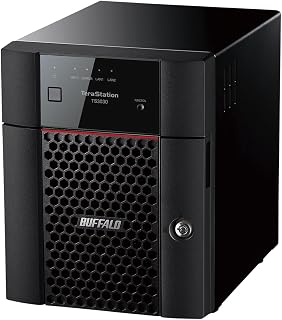
The BUFFALO TeraStation Essentials is a purpose-built network attached storage solution designed for small businesses, home offices, and users who need centralized data management without technical expertise. It combines affordability with professional-grade features, making it an accessible entry point into NAS ownership for teams that outgrew external drives or cloud-only storage.
The standout features center on security and speed. The 256-bit drive encryption ensures your files remain protected at rest, while the native 2.5GbE port significantly accelerates file transfers compared to standard 1GbE networks. Cloud integration with major platforms like Amazon S3, Dropbox, Azure, and OneDrive enables flexible hybrid backup strategies. The RAID 5 pre-configuration provides automatic data redundancy out of the box, protecting against single drive failure while requiring minimal setup.
Build quality reflects Buffalo's reputation for Japanese manufacturing. The system ships with pre-tested hard drives and arrives configured for immediate deployment, a practical design choice that eliminates common setup errors. The 3-year warranty covering hard drives and 24/7 US-based support provide genuine peace of mind, differentiating this from budget competitors relying on overseas support channels.
The primary tradeoff involves capacity versus redundancy. The RAID 5 configuration reduces 16TB to 12TB usable capacity, dedicating one drive to parity checks. Users prioritizing maximum capacity can switch to RAID 0, though this eliminates redundancy protection. The 4-bay design also limits future expansion, making scale-up scenarios require external storage rather than internal upgrades.
Verdict: The BUFFALO TeraStation Essentials delivers practical, secure network storage for organizations and households needing reliable file centralization without complexity. The combination of included drives, smart RAID defaults, strong encryption, and responsive support justifies its pricing. Best suited for teams moving beyond cloud storage limitations or users seeking affordable business-class data protection.
Storage and Performance: 16TB total capacity (4x4TB drives), 2.5GbE Ethernet connectivity, Serial ATA-600 interface, 3.5-inch mechanical hard drives. RAID 5 configuration ships with 12TB usable capacity, supports RAID 0 (16TB), RAID 6, and other flexible modes.
Security and Protection: 256-bit drive encryption, closed system architecture, flexible replication and backup features. Cloud sync with Amazon S3, Dropbox, Azure, and OneDrive for hybrid cloud storage strategies.
Compatibility and Compliance: Works with desktop and laptop devices over Ethernet networks (2.5GbE and 1.0GbE compatible). Fully TAA compliant for government and enterprise procurement. Made in Japan with 3-year warranty including hard drive coverage and 24/7 US-based support with data recovery services.
Who Should Buy: Small business teams needing centralized file storage and backup, remote workers requiring secure file sharing, home offices with collaborative projects, and users transitioning from cloud-only storage seeking more control and redundancy options.
Best Use Cases: Department-level file repositories, backup and disaster recovery for critical data, media library centralization for video or photography projects, team collaboration with access controls, and hybrid backup strategies combining local and cloud storage.
Consider Alternatives If: You need expansion beyond 16TB without replacing the system (consider larger 8-bay models), require advanced customization and scripting capabilities (open-source NAS may suit you better), or prioritize maximum capacity over redundancy protection (RAID 0 mode available but not recommended for critical data).

Pros
- Exceptional speed for a DAS solution, nearly matching internal SATA performance
- Genuine plug-and-play simplicity with cross-platform compatibility out of the box
- Hot-swappable bays enable non-disruptive drive replacement and flexible storage expansion
- Thoughtful industrial design with tool-free trays and vibration damping for quiet operation
Cons
- No RAID support means you lose redundancy and mirroring features available on NAS systems
- Requires individual drive management without automatic failover or data protection
- Diskless unit means you must purchase drives separately, adding to total cost
The TerraMaster D4-320 is a direct-attached storage (DAS) enclosure designed for users who need raw speed and simplicity without the complexity of a NAS system. It's built for creative professionals, video editors, photographers, and data professionals who demand fast, flexible external storage they can connect to any computer with a USB Type-C port.
Where this enclosure shines is performance. With four SATA drives installed, you'll see combined read/write speeds up to 1,016 MB/s thanks to USB 3.2 Gen2's 10 Gbps bandwidth. Even with a single SSD, you're looking at 510 MB/s reads. That's genuinely fast for external storage. Setup takes seconds: plug it in, your OS recognizes it immediately on Windows, Mac, or Linux, and you're transferring files. No drivers, no configuration, no waiting.
The physical design shows TerraMaster paid attention to real-world use. Drive trays install tool-free with an intuitive Push-lock mechanism that prevents trays from accidentally disconnecting. The enclosure itself is quiet, with intelligent temperature-controlled fans and sound-absorbing panels keeping noise below 21 dB(A) in standby mode. You can swap drives without powering down, which means no workflow interruption when you need to upgrade or rotate storage. The aluminum construction and compact footprint make it desktop-friendly.
The main trade-off is that this is not a NAS. You get four independent bays with no RAID, meaning no automatic redundancy or data mirroring. Each drive is essentially a separate external drive. This simplicity is intentional and keeps costs down, but it means you're responsible for your own backup strategy. Also, you need to buy drives separately, which can add significant cost depending on capacity.
For professionals who need speed, simplicity, and flexibility without sacrificing performance, the D4-320 delivers solid value. It excels as a primary external drive setup or secondary storage solution for creative workflows where speed matters and setup complexity doesn't.
Connectivity: USB 3.2 Gen2 Type-C (10 Gbps), compatible with USB 3.0, 3.1, 3.2, Thunderbolt 3, and Thunderbolt 4
Drive Capacity: Up to 120TB total (four 30TB drives), or single drive up to 30TB. Supports 3.5-inch SATA HDDs, 2.5-inch SATA HDDs, and 2.5-inch SATA SSDs
Performance: Up to 1,016 MB/s combined read/write with four 8TB SATA drives, or 510 MB/s read with single 1TB SATA SSD
Compatibility: Windows, Mac, and Linux. Plug-and-play, no drivers required
Physical: 8.74L x 7.05W x 6.06H inches, weighs 1.3 pounds. Black plastic enclosure with intelligent temperature control and sound dampening
Warranty: 2 years. Includes power adapter, USB cable, and installation guide

Pros
- Easy setup and intuitive RAID Manager software make hardware RAID accessible to non-technical users
- Versatile RAID options allow you to prioritize either redundancy or performance based on your needs
- Compact form factor with physical power switch integrates well into home or office server setups
- Cross-platform compatibility eliminates vendor lock-in and works with existing systems
- Excellent value proposition at this price point compared to larger NAS solutions
Cons
- Plastic drive caddies feel fragile despite working reliably, raising durability concerns over time
- USB 3.0 limitation (5 Gbps max) compared to faster USB 3.1 Gen 2 options on competing models
- Performance issues reported on some Apple Silicon Macs requiring system extension configuration
The QNAP TR-004 is a direct-attached storage (DAS) enclosure designed for users who need expandable, flexible storage without the complexity of a full network-attached storage system. It's ideal for creative professionals, home server enthusiasts, Mac Mini users, and IT professionals seeking cost-effective RAID capabilities for backup, archival, or expanded capacity.
The standout feature is its hardware RAID implementation, which supports five different configurations including RAID 0 for maximum speed, RAID 1 for mirroring, RAID 5 for balanced performance and redundancy, plus JBOD and individual disk modes. Real-world users report excellent read/write performance with data transfer rates reaching 375 MB/s. Setup is remarkably simple, with most users reporting full installation in under 30 minutes, and the included RAID Manager software provides straightforward monitoring and control.
Build quality reflects the mid-range pricing: the metal enclosure feels solid, but the plastic drive trays are noticeably lightweight and feel less durable than expected. However, reviewers consistently report these trays perform reliably despite their appearance. The compact form factor and physical power switch make it suitable for home servers or office setups, particularly appealing to Mac Mini users running services like Home Assistant or Jellyfill.
Notable considerations include USB 3.0 connectivity limited to 5 Gbps (competitors offer USB 3.1 Gen 2 at 10 Gbps), and Apple Silicon Mac users may need to enable system extensions for full RAID Manager functionality. Some reports indicate performance issues on M-series Macs with individual drive access, though recent native Apple Silicon support has improved compatibility. RAID is not a backup solution, so critical data requires independent backups on separate devices.
The TR-004 represents solid value for users needing reliable, configurable external storage. While not premium build quality, it delivers proven performance, cross-platform compatibility, and flexible RAID options that justify its competitive price for both personal and professional applications.
Physical Specifications: 4-bay enclosure supporting 3.5-inch SATA drives, metal construction with lockable trays, compact form factor, weight 4.1 lbs. Material: Metal with plastic drive caddies.
Connectivity and Performance: USB 3.0 Type-C interface with data transfer rate of 5 Gbps (375 MB/s typical), supports 6 Gb/s SATA drives. Compatible with Windows, macOS, and Linux systems. Includes USB Type-C to Type-A cable and all necessary mounting hardware.
RAID and Storage: Hardware RAID support for RAID 0, 1, 5, JBOD, and individual disk modes. Diskless unit (drives sold separately). Storage pool or volume operates independently from connected NAS. Each drive tray accommodates 3.5-inch SATA drives with tool-free installation.
Power and Warranty: Multiple voltage compatible (100-240V AC), includes power adapter and cable. Comes with quick start guide, two drive tray keys, USB cable clip, and mounting screws for both 2.5-inch and 3.5-inch drives. 2-year limited manufacturer warranty. Model TR-004-US, UPC 885022016358.
Who Should Buy: The TR-004 is best suited for Mac Mini users, home server operators, creative professionals needing expandable storage, and IT professionals seeking affordable RAID capabilities. It works well for backup destinations, archival storage, or expanding capacity without managing a full NAS system. Windows and Linux users with USB 3.0 ports also benefit from its cross-platform flexibility.
Who Should Skip: If you require maximum performance, USB 3.1 Gen 2 connectivity offers significantly faster speeds. If you need NAS applications or integrated network services beyond storage, a traditional NAS like QNAP's TS-series would be more appropriate. Users with exclusively Apple Silicon Macs experiencing performance issues should test compatibility before purchasing.
Drive Compatibility: Verify that your planned SATA drives appear on QNAP's official compatibility list, as not all 3.5-inch drives perform identically. Note that drives cannot be migrated between TR-004 and NAS systems, nor can data move between different storage configurations and be recognized. Each TR-004 acts as an independent storage pool.
Setup Considerations: Plan your RAID configuration before populating bays (RAID 1 for redundancy, RAID 5 for balanced performance, individual disks for maximum flexibility). Connect to a UPS battery backup if your system requires continuity during power events, as the unit has a physical power switch that allows auto-restart after outages. Apple Silicon Mac users should verify driver availability before purchase.
4-Bay NAS Buying Guide
Match Processor Power to Your Workload
Four bays offer a practical balance: enough disks for RAID 5 capacity and single-drive fault tolerance, or RAID 10 speed and mirrored protection, without the footprint of a rack unit. Redundancy uses capacity and helps with a drive failure, but it cannot protect against deletion or disasters. Buy disks that suit your workload, and leave headroom instead of filling every bay immediately.
Performance needs separate attention. The UGREEN NAS DXP4800 GT 4-Bay for Creators combines an AMD Ryzen Embedded processor, expandable memory, two 10GbE ports, M.2 slots, and 144TB stated maximum capacity for demanding projects. For virtual machines and large container workloads, the UGREEN NAS DXP4800 Pro 4-Bay for IT Professionals adds an Intel Core i3 processor, DDR5 expansion, and 10GbE plus 2.5GbE connectivity. The UGREEN DXP4800 Plus 4-Bay NAS for Families is a more approachable middle path with a 10GbE port, app-based sharing, and local photo organization.
Plan the Entire Network, Not Just the NAS Port
Network speed determines whether a NAS feels responsive when you move video, edit from shared folders, or have multiple people streaming. Gigabit Ethernet suits routine documents and overnight backups, while 2.5GbE better handles active households and modest collaboration. A 10GbE port pays off only when your computer, cabling, switch, and storage workload can use it, so plan the whole wired path rather than one device in isolation.
The Synology DS425+ Private Cloud Media Server has built-in 2.5GbE, and the QNAP TS-464-8G-US 4 Bay Desktop NAS offers dual 2.5GbE ports and M.2 cache options. Those are sensible choices for fast household sharing, whereas the DXP4800 GT targets heavier 10GbE workflows. If you also plan camera coverage, a managed PoE switch for a NAS and cameras can simplify network power, and quality Ethernet cables for a wired network help avoid an overlooked connection bottleneck.
Prioritize Software, Security, and Recovery Tools
A capable enclosure matters, but the daily experience comes from its operating system. Look for guided setup, device synchronization, granular permissions, snapshots, remote access controls, and mobile photo tools before chasing raw specifications. Synology DSM is especially appealing to users who prefer a polished private-cloud workflow, while UGOS Pro supports broader self-hosted projects with Docker, virtual machines, media apps, and flexible local access.
The Synology DS423 Family & Business Backup concentrates on uncomplicated file sharing, photo management, snapshots, and multi-destination backups. Its surveillance tools can support camera systems, although extra camera licensing may be necessary. The Synology DS425+ Private Cloud Media Server raises the ceiling for collaborative access and lists support for up to 30 IP cameras. In either case, use separate backup destinations and versioning, so a ransomware event or mistaken sync does not become a single point of failure.
Choose Between a True NAS and Direct-Attached Storage
Most four-bay NAS units are diskless, so the final experience depends heavily on the drives you select and the RAID mode you create. The Buffalo TeraStation Essentials four-bay model is the exception in this group: it includes four preconfigured drives and ships with RAID 5, making initial deployment simpler. Verify usable capacity after parity or mirroring, review compatible drive lists, and account for the noise and heat of disks that will run all day.
Form factor also separates true NAS hardware from direct-attached storage. The Yxk Zero1 Pro 4-Bay NAS for Enthusiasts combines an Intel N100, dual 2.5GbE, HDMI, M.2 slots, Docker support, and third-party OS potential for people who like customization. By contrast, the QNAP TR-004 4 Bay USB Type-C Direct Attached and TERRAMASTER D4-320 External Hard Drive Enclosure connect to a computer by USB. The QNAP has hardware RAID, while the TerraMaster uses individual disks only; neither is a standalone network server. A Thunderbolt 5 dock for a creator workstation can complement direct-attached storage, but it cannot turn a DAS into a NAS.
Final Thoughts
Choose the Synology DS423 Family & Business Backup if you want an approachable, software-first private cloud for household files, backups, and surveillance. Choose the UGREEN NAS DXP4800 GT 4-Bay for Creators if your work depends on high-bandwidth transfers, expandable memory, and Docker or virtual-machine flexibility. Either way, size your drives for future growth and keep a separate backup copy of what you cannot replace.
Frequently Asked Questions
Is a 4-bay NAS enough for a home media server in 2026?
For many homes, yes. Four disks give you room for a media library, device backups, and a RAID layout that can tolerate one failed drive, although raw 4K archives can grow quickly. Check whether your preferred media app needs hardware transcoding or whether your playback devices can direct play files. Give the enclosure open airflow and a stable surface; these laptop stands for a desk setup can help free workspace when the NAS shares an office area.
Do I need 10GbE on a 4-bay NAS?
Not for simple document storage or one-device backups. It becomes worthwhile for direct editing of large projects, rapid transfers, or several active users, assuming the rest of your wired network supports it. A 2.5GbE NAS such as the Synology DS425+ or QNAP TS-464 can still feel very quick for shared family files. Choose the port based on your entire network path, not the port label alone.
Does RAID replace a backup on a 4-bay NAS?
No. RAID maintains access after a drive problem, but it cannot automatically recover data affected by deletion, ransomware, theft, fire, or a failed configuration change. Keep versioned backups on another device or a trusted cloud destination, and enable snapshots where your NAS supports them. Periodically confirm that you can locate older files and understand your recovery steps before an emergency happens.
Can a four-bay DAS work like a NAS?
Only with a computer serving as the host, and that computer must remain on for network sharing. A DAS is a solid choice for fast local capacity, especially for a desktop editing setup, but it lacks the self-contained accounts, apps, and remote services of a NAS. The QNAP TR-004 includes hardware RAID options, while the TERRAMASTER D4-320 works with individual disks. Choose DAS for direct USB storage and NAS for always-available shared storage.



Write Your Review
No reviews yet. Be the first to share your experience!