

Dead zones in a large home are frustrating. You move from the living room to the upstairs bedroom and your video call drops, your smart thermostat loses connection, or your kids’ streaming session buffers in the back of the house. A single router simply cannot keep up with the square footage and the sheer number of devices that modern households demand. That is exactly where a mesh WiFi system changes the game.
This guide covers eight of the strongest mesh WiFi systems available right now, from budget-friendly options to premium tri-band and Wi-Fi 6E hardware. Whether you are outfitting a sprawling ranch-style home or a multi-story house with thick walls, you will find a solid recommendation here. If you are also thinking about upgrading your wired infrastructure, our roundup of the best 2.5GbE network cards is worth a look alongside this guide.
Quick answer
This guide compares 8 picks, with TP-Link Deco M5 Mesh WiFi 3-Pack: Whole-Home Coverage ranked first. TP-Link Deco S4 Mesh WiFi System 3-Pack AC1900 Whole has the most customer reviews.

For a sprawling floor plan, this dual-band 3-pack lets you drop units across far-flung rooms while leaning on Access Point Mode if you already have a router you trust. Running 802.11a/b/g/n/ac keeps older tablets and smart home gadgets connected alongside newer phones, and the Ethernet backhaul option helps stabilize signal between nodes placed far apart in a large home.
Pros
- Covers up to 5,500 sq ft with 3 units
- Seamless roaming between nodes under one network name
- Supports 100+ simultaneous devices
- Lifetime free HomeCare with parental controls and antivirus
Cons
- AC1300 speeds lag behind newer WiFi 6 mesh systems
- No mounting hardware included for wall placement
Large houses punish weak WiFi systems, and this is where the Deco M5 earns its place on a large-home shortlist. Rather than relying on one router to blast signal through multiple floors and walls, the 3-pack spreads three access points across the property, covering up to 5,500 square feet. Each unit automatically hands devices off to whichever node has the strongest signal, so walking from a home office to a far bedroom does not mean reconnecting to a new network name. For big households running many phones, laptops, smart TVs, and smart home gadgets at once, the support for over 100 simultaneous devices and dual Gigabit ports per unit keeps things from bogging down. Setup stays simple despite the larger footprint, with app-based guidance and Alexa compatibility. The free lifetime HomeCare subscription adds parental controls and basic security without recurring fees. The tradeoff for a large house is that AC1300 speeds are modest by current standards, so bandwidth-heavy tasks at long range may feel the limits of older wireless hardware.
Coverage and Performance: Up to 5,500 square feet coverage, 1300 Mbps maximum data transfer rate, dual-band (2.4 GHz and 5 GHz), supports 100+ connected devices simultaneously.
Connectivity: Dual Gigabit Ethernet ports per unit (6 total), wired Ethernet backhaul support, 802.11ac wireless standard, works with Android 4.4+ and iOS 9.0+.
Security and Control: WPA2-PSK encryption, lifetime TP-Link HomeCare subscription with antivirus and parental controls, Quality of Service management, Alexa voice control compatible.
Physical Specs: 4.7 x 4.7 x 1.5 inches per unit, 600g total weight, internal antenna configuration, power supply for each unit included, 2-year limited warranty.
Good for large households that need wall-to-wall coverage and simple setup more than top-tier speed, especially families wanting built-in parental controls and antivirus at no extra cost. Skip it if your house has many bandwidth-heavy users who need the fastest possible speeds, or if you want WiFi 6 performance, since this system tops out at older AC1300 wireless standards.

Pros
- 3-pack gives large-home coverage out of the box
- Tri-band design spreads load across three frequencies
- MU-MIMO and beamforming support stable multi-device use
- Automatic monthly updates keep the system current
Cons
- Predates WiFi 6, so speeds trail newer systems
- Requires a compatible iOS or Android device for setup
For a genuinely large house, a single router rarely cuts it, which is why the eero Pro ships as a 3-pack designed to blanket a bigger footprint from the start. Three mesh nodes work together under TrueMesh technology, spreading tri-band coverage across 2.4GHz, 5.2GHz, and 5.8GHz so that far corners of a sprawling floor plan stay connected without the signal drop-off you'd get from a single extender setup. MU-MIMO and beamforming keep multiple devices streaming steadily even as you move between rooms, and each compact node includes dual Gigabit ports for wiring in things like a media server or office desktop. Monthly automatic updates keep the whole system current without manual work, a real convenience when you're managing a larger network. The main compromise for big-house buyers is that this is a 2017-era design, so it predates WiFi 6, but for homeowners who prioritize having pre-built multi-node coverage out of the box over the newest speed standard, the Pro 3-pack is a straightforward way to eliminate dead zones across a large home.
Coverage and Performance: Covers 5+ bedroom homes; 2x faster than original eero; Tri-band WiFi with simultaneous 2.4GHz, 5.2GHz, and 5.8GHz radios; 2x2 MU-MIMO with beamforming; IEEE 802.11a/b/g/n/ac compliant.
Connectivity and Ports: Dual auto-sensing Gigabit ports per unit for WAN/LAN; Thread 1.1 Border Router; Bluetooth LE 4.2; VPN Passthrough; UPnP; Port Forwarding; Static IP support.
Hardware: 700 MHz quad-core processor; 512MB RAM; 4GB flash storage; Dimensions: 4.76 x 4.76 x 1.26 inches per unit.
Security: WPA2 encryption; Family Profiles for parental controls; Automatic monthly security updates; IPv6 and NAT support.
Power and Environment: 100-240V AC, 50-60Hz; Operating temperature: 0-35C; Storage temperature: -25-60C; Operating humidity: 20-90% non-condensing.
Good for homeowners with a large or multi-story house who want three coordinated nodes out of the box rather than buying units separately. Also fits tech-comfortable buyers who value simplicity and automatic updates over chasing the latest standard. Skip it if you want WiFi 6 speeds or 6 GHz band access, or if you'd rather size your mesh system incrementally starting with one unit.
Pros
- Scales easily by adding more points for large floor plans
- Setup takes minutes via the Google Home app
- Parental controls and guest mode included
- WPA3 security protocol for safer connections
Cons
- Wi-Fi 5 (802.11ac) only, no Wi-Fi 6 support
- Single Gigabit Ethernet port limits wired device speeds
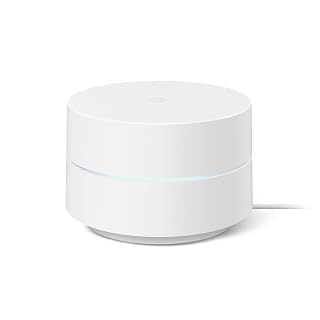
If you're outfitting a large house, a single Google Wifi unit won't get you there alone, but it's worth including on this list because of how it scales. Rated for 1500 square feet per unit, you simply add more Google Wifi points to blanket a sprawling floor plan, and the units mesh together automatically without separate configuration for each one. For large homes specifically, that modular approach matters more than raw single-unit power, since dead zones in far bedrooms or basements get solved by dropping in another point rather than troubleshooting antenna placement. Setup stays simple through the Google Home app no matter how many points you add, and parental controls and guest mode carry across the whole mesh. The dual-band 802.11ac connection and WPA3 security are adequate for everyday streaming and browsing across multiple rooms. It won't deliver Wi-Fi 6 speeds or handle a house full of bandwidth-heavy gamers and smart home devices gracefully, but for straightforward whole-home coverage in a large layout, it's a dependable, low-friction option.
Network Specs: Wi-Fi 5 (802.11ac), Dual-Band (2.4 GHz), AC1200 speed class, Mesh network topology, 1500 square feet coverage per unit.
Connectivity: 1 Gigabit Ethernet LAN port, 500 Mbps maximum upstream data transfer rate, supports 802.11ac wireless compatibility.
Hardware: 2 internal antennas, compact cube design (5.04 x 4.94 x 4.92 inches), 340g weight, runs Google proprietary firmware.
Security: WPA3 protocol, guest mode, parental controls with content filtering and device-specific scheduling.
Compatibility: Works with Google Assistant and Nest controllers, compatible with PCs, tablets, printers, and any 802.11ac device.
Warranty and Support: 1-year limited warranty when purchased from Amazon or with Google Seal for Online Marketplace, minimum OS requirements at g.co/googlewifi/req.

Pros
- Exceptional value for Wi-Fi 6 performance at under 70 dollars
- Easy setup and management through dedicated mobile app with clear guidance
- Dual gigabit ports enable flexible router or mesh extender configuration
- Strong security features including WPA3, built-in firewall, and free HomeShield basics
- Solid 4.5-star rating from over 15,000 verified customer reviews
Cons
- Single unit covers 2,200 sq ft, so larger homes may require additional units
- AX1800 speeds are entry-level for Wi-Fi 6 compared to higher-end mesh systems
- Internal antenna design offers less customization for advanced users
The TP-Link Deco X20 is a single-unit Wi-Fi 6 mesh router designed for homeowners seeking affordable whole-home coverage without breaking the bank. It's ideal for small to medium-sized homes, apartment dwellers, and anyone upgrading from older wireless routers or extenders who wants a modern, reliable mesh system.
The standout feature is its Wi-Fi 6 (AX1800) performance at an accessible price point. OFDMA and MU-MIMO technology allows simultaneous data transmission to multiple devices, reducing congestion and buffering. The dual gigabit ethernet ports add flexibility, enabling the unit to function as either a primary router or additional mesh node depending on your network layout.
Build quality is solid and compact. At 4.33 x 4.33 x 4.49 inches, the Deco X20 is unobtrusive and blends into most home environments. Setup is straightforward through the TP-Link app, and parental controls, guest networks, and basic security features are accessible to all users at no extra cost.
The main limitation is speed tier. At AX1800, this system delivers entry-level Wi-Fi 6 performance. Users with gigabit internet plans or high-bandwidth activities like 4K streaming and online gaming may notice this unit doesn't maximize available speeds compared to premium mesh systems. Larger homes may also need additional units for optimal coverage.
Overall, the Deco X20 offers strong value for budget-conscious buyers wanting reliable mesh networking. It delivers on coverage, app control, and Wi-Fi 6 basics, backed by solid customer satisfaction and a 2-year warranty.
Wireless: Wi-Fi 6 (802.11ax), dual-band, AX1800 speed (1775 Mbps total), supports 802.11ac, 802.11b/g/n for backward compatibility
Coverage: Up to 2,200 square feet per unit
Connectivity: 2 gigabit ethernet ports (10/100/1000 Mbps), WAN/LAN auto-sensing, built-in WPS
Security: WPA, WPA2, WPA3 encryption, maximum-level firewall, free HomeShield basic features
Control: TP-Link app-based management, Alexa voice control integration
Physical: 4.33 x 4.33 x 4.49 inches, 1.3 pounds, internal antennas, 12V power adapter
Warranty: 2-year manufacturer warranty
Who Should Buy: First-time mesh system users, apartment and small home owners, budget-conscious upgraders from traditional routers or extenders, and users with internet plans up to 1 Gbps.
Who Should Consider Alternatives: Users needing coverage beyond 2,200 sq ft, those with gigabit-plus internet speeds seeking maximum performance, and advanced users wanting external antenna customization.
Setup Considerations: A compatible modem is required. The unit works with all major ISPs including AT&T, Verizon, Xfinity, Spectrum, Cox, and others. Multiple Deco X20 units can be combined to extend coverage across larger spaces.
Getting the Most Value: Use the TP-Link app immediately after setup to enable parental controls, set up guest networks, and configure quality of service settings. Enable HomeShield for added protection. Consider purchasing additional units if your home exceeds 2,200 square feet or has significant obstacles.

Covering a big house usually means working around dead zones, and having three AC1900 units gives you enough nodes to blanket distant bedrooms and basements. Support for all WiFi enabled devices means you won't run into compatibility gaps with older laptops or smart plugs tucked in far corners, and the choice of Ethernet or Wi-Fi backhaul helps keep far nodes stable.
Pros
- 5,500 sq ft coverage suited to large homes
- Seamless node switching with no manual reconnecting
- Six total Ethernet ports for wired backhaul
- Individual parental control profiles for family devices
Cons
- AC1900 speeds behind current WiFi 6 systems
- Security protocol relies on WPS rather than newer standards
A large house needs a mesh system that can actually stretch signal across every room without forcing you to babysit the network, and the Deco S4 is built for that kind of distance. The 3-pack covers 5,500 square feet, giving it the reach to handle sprawling floor plans and multiple levels. Instead of separate extender networks, all three units share one WiFi name, so devices switch nodes automatically as people move through the house. AC1900 speeds and support for up to 100 devices make it workable for larger families, and the six total Ethernet ports across the units allow wired backhaul for steadier performance in bigger spaces. Setup through the iOS or Android app is straightforward, and the parental controls let you set individual profiles with time limits and content filtering, useful in a house with multiple kids and devices. Alexa integration adds convenience for guest network toggling. The main caveat for a large home chasing maximum speed is that this is an AC-class system, so power users may eventually want to look at WiFi 6 alternatives.
Coverage and Performance: Up to 5,500 sq ft coverage, AC1900 WiFi speeds (1200 Mbps), 3x3 6-stream wireless, maximum upstream 950 Mbps.
Connectivity: WiFi 5 (802.11ac), dual-band, 6 total gigabit ethernet ports (2 per unit), WAN/LAN auto-sensing, supports wired ethernet backhaul.
Device Support: Connects up to 100 WiFi-enabled devices, works with all major ISPs including AT&T, Verizon, Xfinity, Spectrum, and others.
Features: Single unified network with automatic roaming, robust parental controls, guest WiFi management, Alexa voice control, intuitive mobile app setup.
Package Contents: 3 Deco S4 units, 1 ethernet cable, 3 power adapters, quick installation guide. 2-year manufacturer warranty included.

If your large house already has eero nodes placed elsewhere, this single unit adds another 1,500 square feet of coverage to patch a weak spot like a detached garage or upstairs wing. Its Wi-Fi 6 radios and gigabit-ready Ethernet ports mean the added node won't become the weak link in an otherwise fast network.
Pros
- Affordable building block for expanding a large-house mesh setup
- WiFi 6 with 160 MHz channel support for better throughput
- TrueMesh reduces dead zones as you add nodes
- Built-in Zigbee and Thread radios for smart home expansion
Cons
- Only 1,500 sq ft per unit, so large homes need multiple
- Mixing with older eero generations can reduce performance
A large house usually means dead zones, and the eero 6+ is built to fight exactly that with TrueMesh technology that routes traffic intelligently around trouble spots. On its own, one unit only covers 1,500 sq ft, so in a true large-house scenario it works best as the entry point into a multi-unit eero system rather than a standalone solution. What it brings to that system is solid WiFi 6 fundamentals: 160 MHz channel support for better throughput, dual-band 2x2 connectivity, and enough horsepower to handle 75+ devices without choking. Two gigabit Ethernet ports let you wire up a few key devices, and the Zigbee and Thread radios mean it doubles as a smart home hub as you expand coverage room by room. For a big home, think of this as the budget-friendly building block you multiply rather than the single answer, which keeps overall system cost down while still delivering gigabit-capable, WPA3-ready performance across the square footage you add units to cover.
Coverage and Connectivity: Covers up to 1,500 sq ft with dual-band WiFi 6 (802.11ax) at AX3000 speeds. Supports 75+ connected devices with two gigabit Ethernet ports.
Performance: 1 GHz dual-core processor, 512MB RAM, 4GB storage. Supports ISP plans up to gigabit speeds with 160 MHz channel bandwidth for enhanced throughput.
Smart Home and Security: Built-in smart home hub with Thread and Zigbee support for Alexa compatible devices. WPA3 and WPA2 security, IPv6 support, VPN passthrough, and automatic security updates.
Power and Environment: 100-240V AC input, operating temperature 0-40°C, storage temperature -25-60°C, humidity 0-90% non-condensing, operating altitude under 3,000m.
Dimensions and Warranty: 3.9 x 3.8 x 2.6 inches. Includes 1-year limited warranty and free 24/7 customer support.
Buy this if you're assembling a large-house mesh system piece by piece and want an affordable WiFi 6 entry point, or if you're starting with one zone and plan to expand. Skip it if you want a single box to cover a sprawling home alone, since 1,500 sq ft per unit means you'll need several. Also skip it if you already own older eero hardware, since mixing generations can hurt performance.

With coverage rated up to 4,500 square feet, this three-pack is built for exactly the kind of square footage a large house demands, and support for 75 plus connected devices matters once you count every phone, TV, and smart sensor spread across multiple floors. Wi-Fi 6 dual-band performance keeps gigabit ISP plans from bottlenecking as that device count climbs.
Pros
- WiFi 6 with 160 MHz bandwidth for less congestion
- Covers up to 4,500 sq ft, supports 75+ devices
- Built-in Zigbee and Thread smart home hub
- Dual Gigabit Ethernet ports per unit for wired backhaul
Cons
- Performance drops when mixed with older eero hardware
- WPA3 and some security features require eero Labs or subscription
For a large house, WiFi 6 makes a real difference, and the eero 6+ 3-pack brings that newer standard to a whole-home setup covering up to 4,500 square feet. TrueMesh technology manages traffic between nodes to cut down on dead zones, which matters more as square footage grows and signal has to travel further through walls and floors. With support for over 75 devices and 160 MHz bandwidth support, it holds up well when a large household has many people streaming, gaming, and video calling across different rooms at once. Dual Gigabit Ethernet ports on each unit allow wired backhaul, which can help stabilize performance across a bigger footprint. Setup through the eero app is quick, and the built-in Zigbee and Thread radio means smart home devices scattered through a large house can connect without a separate hub. The tradeoff is that mixing 6+ units with older eero hardware can hurt performance, so a large home upgrading piecemeal should plan for a full swap, and advanced security features like WPA3 remain in eero Labs or require a paid subscription.
Coverage and Performance: Supports up to 4,500 sq ft, AX3000 speed rating, WiFi 6 dual-band concurrent, supports ISP plans up to 1 gigabit.
Connectivity: Two auto-sensing gigabit Ethernet ports per unit, WiFi 6 (802.11ax), compatible with older WiFi standards, Bluetooth 5.0, 802.15.4 radio for Zigbee and Thread.
Smart Home: Built-in smart home hub for Thread and Zigbee devices, works with Alexa, Amazon Frustration Free Setup.
Security: WPA3 support (eero Labs), WPA2, TLS v1.2+, VPN passthrough, IPv6, NAT, UPnU, port forwarding, automatic security updates.
Hardware: 1 GHz dual-core processor, 512MB RAM, 4GB flash storage per unit, dimensions 3.9 x 3.8 x 2.6 inches, 1-year limited warranty, operates 0-40 degrees Celsius.
A good fit for large households wanting modern WiFi 6 speeds, built-in smart home hub support, and ISP plans up to a gigabit. Best for those replacing an entire network rather than mixing with older eero gear. Skip it if your home exceeds 4,500 sq ft without additional units, or if you need full WPA3 security without opting into eero Labs or a subscription.

Pros
- Scales from 2,000 to 8,000 sq ft across pack sizes
- WiFi 6E support with 6 GHz band for less congestion
- Handles 100+ devices with 2.3 Gbps combined speeds
- 2.5 Gb Ethernet port suits gigabit-plus internet plans
Cons
- 6 GHz benefits require WiFi 6E compatible devices
- Mixing with older eero generations can reduce performance
Large houses with fast internet plans and a lot of connected devices are where the eero Pro 6E is meant to operate, since it's built to scale with you: a single unit covers 2,000 sq ft, but the same hardware is sold in 2, 3, and 4-packs that stretch coverage up to 8,000 sq ft, which maps directly onto what a big home actually needs. It's the first eero to support WiFi 6E, opening up the less-congested 6 GHz band for compatible devices, which matters in a large household running 100+ gadgets at once. Combined wired and wireless speeds up to 2.3 Gbps and a 2.5 Gb Ethernet port make it suited to gigabit-plus internet plans, while TrueMesh keeps traffic routed efficiently across that expanded square footage. The compact, understated design means multiple units won't clutter a large home's shelves or hallways, and setup stays guided through the eero app despite the added capability. The tradeoff is that 6 GHz benefits only show up with WiFi 6E compatible devices, and mixing these with older eero units can hold back performance, so a large house system works best built entirely from this generation.
Connectivity: Wi-Fi 6E (802.11ax) with 6 GHz band, 2.4 GHz, and 5 GHz. Speed rating AX5400. Network speeds up to 2.3 Gbps combined (1.6 Gbps wireless, 1 Gbps wired). Supports 100+ connected devices.
Ports: One 2.5 Gb auto-sensing Ethernet port, one 1 Gb auto-sensing Ethernet port per unit. Ideal for gigabit+ internet plans up to 2.5 Gbps.
Coverage: Single unit covers up to 2,000 sq ft (25 foot radius). Expandable with additional eero units for larger homes. 2-pack covers 4,000 sq ft, 3-pack covers 6,000 sq ft, 4-pack covers 8,000 sq ft.
Hardware: 1 GHz dual-core processor, 1024 MB RAM, 4 GB flash storage. Dimensions: 5.6 x 5.4 x 2.0 inches (142 x 138 x 51 mm). Operating temperature 32 to 104 degrees Fahrenheit.
Security: WPA3 and WPA2 encryption, TLS v1.2+, firewall with port forwarding, VPN passthrough, IPv6, NAT, UPnP, DHCP, and static IP support. Automatic software security updates.
Smart Home: Compatible with Alexa, Amazon Frustration Free Setup, 802.15.4 (Zigbee, Thread), and Bluetooth Low Energy 5.0.
Mesh WiFi Buying Guide for Large Homes
Coverage Area and Node Count
The most important number to nail down is total square footage. A single node like the TP-Link Deco WiFi 6 Mesh WiFi System Deco covers around 2,200 square feet, which works well as a starting point or an add-on to an existing system. For homes in the 5,000 square foot range, a three-pack such as the TP-Link Deco M5 Mesh WiFi System Deco M5 3-Pack is the more practical choice right out of the box.
Most mesh systems are designed to scale. You can start with one or two nodes and add more as needed, so you are not locked into a fixed setup from day one. Always check that additional nodes are sold separately and are compatible with your existing units before committing to a brand.
WiFi Generation: AC vs. Wi-Fi 6 vs. Wi-Fi 6E
Older AC-standard systems like the TP-Link Deco S4 Mesh AC1900 WiFi System still deliver strong whole-home coverage and handle typical household workloads well. They are a smart pick if your internet plan is not pushing gigabit speeds and your devices are not yet Wi-Fi 6 capable.
Wi-Fi 6 hardware, like the Amazon eero 6+ line, brings wider bandwidth channels, better efficiency in crowded device environments, and support for gigabit internet plans. If you have a lot of smart home devices, multiple 4K streams running simultaneously, or a work-from-home setup with heavy video conferencing, Wi-Fi 6 is worth the step up. The Amazon eero Pro 6E mesh wifi router goes even further with access to the 6 GHz band for the lowest possible latency on compatible devices. For more on wireless performance in high-demand scenarios, see our guide to the best WiFi cards for gaming PCs.
Backhaul: Wired vs. Wireless
Backhaul refers to how your mesh nodes communicate with each other. Wireless backhaul is the default and works fine in most homes, but it does share bandwidth with your connected devices. Wired Ethernet backhaul, supported by systems like the TP-Link Deco M5 3-Pack and Deco S4, keeps node-to-node traffic off your wireless spectrum entirely.
If you can run an Ethernet cable between nodes, even just to the most distant one, you will see a noticeable improvement in consistency. It is the single biggest performance upgrade you can make to any mesh system without buying new hardware. This pairs naturally with a solid router built for streaming if you have a dedicated media room or home theater.
App Management and Smart Home Integration
Every system on this list offers a companion mobile app for setup and ongoing management. The eero app and TP-Link Deco app are both well-regarded for their clarity and feature depth, including parental controls, device prioritization, guest network management, and network speed checks. Ease of setup matters especially in large homes where you may be physically placing nodes in hard-to-reach spots.
Smart home integration is increasingly built in rather than bolted on. The Amazon eero 6+ systems include a built-in Zigbee and Thread hub, so you can connect compatible smart home devices without a separate hub. TP-Link Deco units support Alexa voice commands for guest network toggling, which is a small but genuinely useful convenience. If you are building out a full smart home network, it is worth considering how your mesh system fits into that broader networking ecosystem.
Final Thoughts
For most large homes, the TP-Link Deco M5 Mesh WiFi System Deco M5 3-Pack delivers reliable whole-home coverage at a practical entry point, while households with faster internet plans, more devices, or a need for the latest wireless technology will find the Amazon eero 6+ mesh wifi system worth every bit of the investment. Both systems are straightforward to set up, scale well as your needs grow, and have earned strong ratings from a large number of real-world users across a wide range of home sizes.
Frequently Asked Questions
How many mesh nodes do I need for a large house?
A general rule of thumb is one node per 1,500 to 2,000 square feet, though wall construction, floor count, and interference sources all affect real-world range. Most large homes in the 4,000 to 6,000 square foot range will perform well with a three-pack system. Starting with a three-pack and adding a node if a dead zone persists is a reliable approach.
Is Wi-Fi 6 worth it for a mesh system in 2026?
Yes, particularly if you have more than 20 connected devices or a gigabit internet plan. Wi-Fi 6 handles simultaneous connections more efficiently than older standards, which translates to less congestion in busy households. As more devices ship with Wi-Fi 6 support built in, the practical benefits of upgrading your mesh system will only grow.
Can I mix mesh nodes from different brands?
Generally, no. Mesh systems use proprietary protocols to coordinate between nodes, so a TP-Link Deco unit will not mesh natively with an eero node. You can connect different brand routers in bridge or access point mode, but you lose the seamless roaming and centralized app management that makes mesh systems worth using in the first place. Stick to one ecosystem for the best experience.
What is the difference between a mesh system and a WiFi extender?
A WiFi extender rebroadcasts your existing signal under a separate network name, which means your devices do not switch automatically and you often see a significant speed drop. A mesh system creates a single unified network where all nodes share one name and password, and your devices hand off seamlessly as you move through your home. For large homes, a mesh system is almost always the better solution. Our breakdown of the best VPN routers also covers how to layer security on top of a mesh setup if privacy is a priority for you.
Common questions
How many nodes do I need for a large house mesh system?
Most large homes need a 3-node mesh system to cover the whole floor plan without dead zones. A single router or one access point struggles to reach far corners, upper floors, or detached areas like garages. Three-packs, like the Deco S4 or Deco M5 bundles, are built for this reason, spreading nodes across central, far, and upper-level spots. Add a fourth node only if the house is unusually large or oddly shaped.
Is wired backhaul better than wireless for a mesh network?
Yes, wired backhaul is better when the goal is consistent speed and stability across every node. It uses a dedicated Ethernet connection between nodes instead of sharing WiFi bandwidth for both backhaul and client traffic. This matters most in large houses with thick walls or multiple floors, where wireless-only mesh can slow down as it hops between nodes. If Ethernet wiring already exists in the walls, use it for the backhaul connection.
Should I choose a mesh system or a single router?
A mesh system is the better choice for most large houses, while a single router works fine for smaller, open layouts. Single routers rely on one broadcast point, so signal weakens significantly over distance and through walls. Mesh systems like the Deco X20 or Google Wifi spread multiple access points through the home, keeping coverage even in far rooms. Choose mesh whenever the home spans multiple floors or exceeds a typical router's range.



Write Your Review
No reviews yet. Be the first to share your experience!