

If your desktop PC has no built-in WiFi, or your current wireless connection keeps dropping, a USB WiFi adapter is one of the quickest fixes available. You simply plug it in, install a driver, and you are connected. No PCIe slots, no opening your case, no hassle.
This guide covers six of the best USB WiFi adapters on the market right now, ranging from ultra-compact nano adapters ideal for everyday browsing to high-performance WiFi 7 models built for 8K streaming and competitive gaming. Whether you are upgrading an older machine or adding wireless capability from scratch, there is a solid option here for you. If you are also looking to extend your signal further around the home, check out our picks for the best WiFi extender for gaming.
Quick answer
This guide compares 6 picks, with TP-Link Archer T2U Nano AC600 USB WiFi Adapter - Dual ranked first. TP-Link Archer T2U Plus AC600 USB WiFi Adapter for PC has the most customer reviews.

For anyone just wanting a basic desktop upgrade without fuss, this nano-sized dongle keeps things simple. Its travel size means it won't stick out awkwardly from a rear USB port, and dual band 2.4G/5G support covers most home networks. Broad OS compatibility from XP through Windows 11 and older Mac builds makes it a safe pick for aging machines that need a no-drama connection.
Pros
- Nano form factor stays invisible and won't block adjacent ports
- Automatic dual-band switching between 5GHz and 2.4GHz
- Consistent performance across typical home distances
- Lightweight at 1.76g, safe to leave inserted during transport
Cons
- Driver installation requires manual downloads for current OS versions
- AC600 represents entry-level speeds by modern WiFi standards
The TP-Link Archer T2U Nano addresses the core need for desktop WiFi without sacrificing desk space or aesthetics. At 1.76 grams and barely visible once inserted, this nano adapter transforms wired desktops into wireless workstations while staying out of sight. AC600 dual-band capability automatically switches between 5GHz (433Mbps) and 2.4GHz (200Mbps) frequencies, letting you stream 4K content or game without lag on the faster band while maintaining solid range on the slower one. The adapter handles typical home and office distances reliably in real-world conditions. Solid plastic construction stays cool during operation and feels durable despite the minimal weight. The 2-year warranty and round-the-clock support add peace of mind. Driver installation requires manual downloads from TP-Link for current operating systems, and Mac OS X 10.14 or newer won't work. AC600 specs now sit at the entry tier compared to modern WiFi standards, but for basic desktop connectivity needs this adapter delivers consistent performance without the bulk or expense of premium alternatives.
Connectivity: AC600 dual-band wireless (433Mbps 5GHz, 200Mbps 2.4GHz)
Interface: USB 2.0 Type A connector
Compatibility: Windows 11, 10, 8.1, 8, 7, XP (32/64-bit), Mac OS X 10.9 through 10.14
Dimensions: 0.73L x 0.59W x 0.28H inches
Weight: 1.76 grams
Warranty: 2-year manufacturer coverage with free 24/7 technical support
Model: Archer T2U Nano (ASIN: B07PB1X4CN)
Desktop users upgrading legacy PCs or adding wireless to ethernet-only systems will appreciate the invisible footprint and reliable performance. Travelers wanting a backup connection that won't break off in a laptop bag benefit from the nano size. Skip this if you run newer Macs (OS X 10.14+), need cutting-edge WiFi speeds beyond AC600, or want plug-and-play installation without downloading drivers from the manufacturer's site.

Desktop users fighting weak signal from a router in another room will appreciate the high gain 5dBi antenna on this dual band adapter. It's built specifically for PC setups, not just laptops, and the dual 2.4GHz/5GHz support lets you switch to the less congested band when neighbors crowd your WiFi. Wide OS support from XP to Windows 11 rounds out the compatibility story.
Pros
- 5dBi external antenna adjusts and rotates for optimal signal direction
- Dual-band switching between speed-focused 5GHz and range-focused 2.4GHz
- Quick Windows setup with straightforward driver installation
- Compact body despite external antenna design
Cons
- Windows-only support excludes Mac and Linux users
- External antenna adds bulk to the port area
The TP-Link Archer T2U Plus brings external antenna design to desktop WiFi upgrades, letting you aim signal reception toward your router for optimized connectivity. This matters for desktop setups where fixed PC placement creates signal challenges. The 5dBi high-gain antenna rotates and adjusts to find the strongest connection path through walls and obstacles. Dual-band operation splits duty between 5GHz at 433Mbps for gaming and streaming where speed matters, and 2.4GHz for extended range when you're farther from the router. Real-world performance holds up across bandwidth-heavy tasks, though proximity to your router and physical barriers will affect results. Compact body design keeps the USB port area reasonably tidy despite the external antenna. Setup on Windows systems takes minutes with drivers from TP-Link's site. Build quality matches the budget category with solid construction that doesn't feel premium but gets the job done. The antenna's external presence is the tradeoff for better signal acquisition compared to internal designs. Windows-only compatibility limits the audience, ruling out Mac and Linux users entirely.
Model: Archer T2U Plus
Interface: USB 2.0 / 3.0 compatible
Standards: 802.11ac (WiFi 5), 802.11n, 802.11g, 802.11b
Frequency Bands: 2.4GHz and 5GHz dual-band
Maximum Data Rate: 600 Mbps (433 Mbps on 5GHz + 200 Mbps on 2.4GHz)
Antenna: 5dBi external high-gain antenna, adjustable multi-directional
Security: WEP, WPA/WPA2, WPA-PSK/WPA2-PSK
Compatibility: Windows 11, 10, 8.1, 8, 7, XP
Operating System Requirements: Windows 7 or later
Dimensions: 2.28 inches L x 0.71 inches W x 6.83 inches H
Weight: 18.14 grams
Color: Black
Warranty: 2-year manufacturer warranty
Windows desktop users dealing with weak signals or router distance issues gain the most from the adjustable external antenna. Gamers and streamers on Windows who need reliable speeds for online play or video will find the dual-band performance sufficient. Skip this if you use Mac or Linux, want a truly compact footprint without external components, or need guaranteed maximum speeds regardless of environmental factors like walls and router placement.
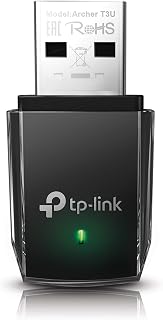
Anyone building a gaming or media rig wants throughput, and the AC1300 rating paired with USB 3.0 gives this adapter real headroom over older USB 2.0 dongles. MU-MIMO support helps when multiple devices share the network, so streaming and downloads don't bottleneck each other. Dual band 2.4/5G flexibility and support through Windows 11 make it a solid desktop-first choice.
Pros
- AC1300 dual-band with simultaneous 2.4GHz and 5GHz operation
- MU-MIMO and Beamforming maintain responsiveness under load
- Compact 0.78 x 1.59 inch footprint fits most setups without blocking ports
- USB 3.0 connection with speeds reaching 90-300+ Mbps in real conditions
Cons
- Driver stability concerns mentioned in some reviews
- Linux compatibility may present challenges during setup
The TP-Link Archer T3U brings AC1300 performance to desktop setups through a USB 3.0 connection, targeting users who need more bandwidth than entry-level adapters provide. This compact adapter operates both 2.4GHz and 5GHz bands simultaneously, letting your system choose the frequency that delivers better speed and stability based on current conditions. MU-MIMO technology and Beamforming keep connections responsive when multiple devices share network bandwidth, critical for desktop environments where family members or coworkers compete for throughput. Real-world speeds range from 90Mbps to over 300Mbps depending on internet plans and router proximity, with the adapter consistently meeting its AC1300 rating. At 0.78 by 1.59 inches and just over 9 grams, the adapter fits in laptop bags for portable use or stays permanently attached without blocking neighboring USB ports on most desktop towers. The indicator light shows connection status at a glance. Installation runs under 10 minutes using the included driver CD. Some stability concerns appear in reviews regarding drivers, and Linux compatibility may present challenges. Environmental factors like router distance and interference still affect wireless performance regardless of adapter capability.
Connectivity and Performance
Wireless Standard: 802.11ac (AC1300)
Data Transfer Rate: 1300 Mbps
Frequency Bands: 2.4GHz and 5GHz dual band
Interface: USB 3.0 Type B Micro
Advanced Features: MU-MIMO, Beamforming technology
Compatibility and System Requirements
Operating Systems: Windows 11, 10, 8.1, 8, 7, XP and Mac OS X 10.9 to 10.14
Minimum OS Version: Windows 11
Supported Devices: Desktop computers, laptops
Model Name: Archer T3U
Physical Specifications
Dimensions: 0.78 inches length by 0.41 inches width by 1.59 inches height
Weight: 9.07 grams
Color: Black
Build: Compact and portable
Warranty and Support
Manufacturer Warranty: 2 years
Manufacturer: TP-Link
Package Contents: 1 adapter unit, driver CD, documentation
Desktop users needing AC1300 bandwidth for demanding tasks beyond basic browsing benefit from the simultaneous dual-band operation and MU-MIMO technology. Those wanting a portable adapter that won't block adjacent USB ports while delivering mid-tier WiFi speeds will appreciate the compact dimensions. Skip this if you run Linux (compatibility issues reported), need guaranteed driver stability without troubleshooting, or require performance immune to environmental interference and router distance.
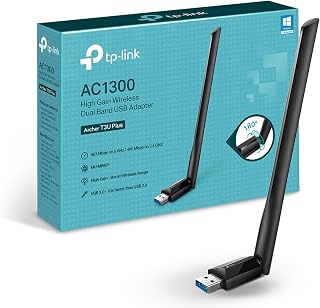
For a desktop setup where range matters, the high gain antenna on this AC1300 adapter helps pull in a usable signal from farther away or through walls. USB 3.0 avoids throttling the connection speed, and MU-MIMO keeps performance steady when several devices are active. It also covers Mac OS up through 10.15, useful for mixed-OS households.
Pros
- Adjustable high-gain antenna improves signal reception in challenging layouts
- MU-MIMO reduces lag when multiple devices share the network
- USB 3.0 prevents speed bottlenecks on fast connections
- Works across Windows XP through 11 and macOS 10.9 to 10.15
Cons
- Full speeds require an AC-compatible router
- USB port location may require an extension cable for best antenna placement
The TP-Link Archer T3U Plus brings AC1300 dual-band WiFi to desktops that lack wireless connectivity or suffer from outdated internal cards. Its strength lies in balancing speed and reach across both bands: 867 Mbps on 5 GHz handles HD streaming and online gaming with minimal buffering, while the 2.4 GHz band at 400 Mbps covers general web use and email. The adjustable 5 dBi high-gain antenna gives you control over signal direction, letting you aim it toward your router to overcome weak reception caused by distance or walls. MU-MIMO support keeps performance stable when other devices compete for bandwidth, reducing the lag spikes that frustrate gamers and video callers. USB 3.0 ensures the adapter won't bottleneck your connection speeds. Broad OS compatibility spanning Windows 11 down to XP and macOS 10.9 through 10.15 makes it a safe pick for mixed or older environments. The main catch is that your router needs to support AC speeds to unlock the adapter's full capabilities, and awkward USB port placement may require an extension cable for optimal antenna positioning.
Wireless Standards: IEEE 802.11b/g/n on 2.4 GHz, IEEE 802.11a/n/ac on 5 GHz
Data Transfer Rate: 867 Mbps (5 GHz) or 400 Mbps (2.4 GHz)
Antenna: External high-gain, adjustable, multi-directional with 5 dBi gain
Interface: USB 3.0
Compatibility: Windows XP, Vista, 7, 8, 8.1, 10, 11 and macOS 10.9 through 10.15
Dimensions: 2.28 inches L x 0.71 inches W x 6.83 inches H
Weight: 18.14 grams
Warranty: 2-year manufacturer warranty
In the Box: AC1300 USB adapter, Quick Installation Guide, Resource CD
Buy this if you're adding WiFi to a desktop that never had it, upgrading from a sluggish single-band adapter, or dealing with dropped connections in a room far from your router. Gamers and remote workers who need stable 5 GHz performance without spending heavily will appreciate the antenna adjustability. Skip it if your router is an older N-standard model that can't deliver AC speeds, or if you need the absolute fastest WiFi 6 or 7 performance for ultra-high-bandwidth tasks.

For setups chasing the fastest possible wireless standard, this adapter's WiFi 7 tri-band support across 6GHz, 5GHz, and 2.4GHz is built for exactly that. Four 5dBi antennas and MLO let it maintain stronger, more consistent links, while 4K-QAM and OFDMA push more data through each connection. It's a forward-looking pick for a modern Windows 11 desktop rather than an older or mixed-OS machine.
Pros
- Tri-band WiFi 7 with 6.4 Gbps combined throughput for extreme speed
- Four foldable high-gain antennas optimize signal and store compactly
- MLO and Multi-RU keep connections stable in dense networks
- Two-year warranty and automatic driver installation on Windows 10/11
Cons
- Requires WiFi 7 router and Windows 11 for full 6 GHz performance
- High power draw may challenge older motherboards
The WAVLINK BE6500 delivers WiFi 7 tri-band performance for desktops and laptops that need cutting-edge wireless speeds. Combined throughput reaches 6.4 Gbps across three bands: 688 Mbps on 2.4 GHz, 2,882 Mbps on 5 GHz, and 2,882 Mbps on the newer 6 GHz band. Users report real-world speed improvements of 2x or more compared to older adapters, making this a strong choice for heavy workloads like 4K video editing, large file transfers, and competitive gaming. WiFi 7 technologies including MLO and Multi-RU maintain stability even in crowded network environments with many active devices. The four foldable 5 dBi high-gain antennas optimize signal strength and can collapse flat for portability, while ventilation slots prevent thermal throttling during extended sessions. A multicolor LED provides clear status feedback. Installation is plug-and-play on Windows 10 and 11 with automatic driver detection. The adapter is limited to Windows only, and full 6 GHz support requires Windows 11 version 21H2 or newer. Peak performance depends on pairing with a WiFi 7 router, so legacy WiFi 6 networks won't unlock its capabilities. Older motherboards may struggle to supply sufficient power.
Best for users with modern Windows 11 systems and WiFi 7 routers who need maximum wireless speed for gaming, streaming, or content creation. Content creators moving 4K or 8K video files and competitive gamers seeking low-latency, high-bandwidth connections will see the biggest gains. Skip this if you're running older hardware, using a WiFi 6 or earlier router, need macOS or Linux support, or want a budget-friendly upgrade rather than cutting-edge performance.
Connectivity: WiFi 7 tri-band (2.4GHz, 5GHz, 6GHz) with MLO and Multi-RU support. USB 3.0 interface delivers up to 10x faster throughput than USB 2.0. Performance: 688Mbps on 2.4GHz, 2,882Mbps on 5GHz, 2,882Mbps on 6GHz, total 6.4Gbps combined.
Hardware: 4 high-gain 5dBi foldable antennas. Multicolor status LED with touch control. 550g total weight. Includes quick-start guide, USB 3.0 cable, and adapter.
Compatibility: Windows 10/11 (6GHz requires Windows 11 build 21H2+). USB 3.0 port required for optimal performance. 2-year manufacturer warranty included.
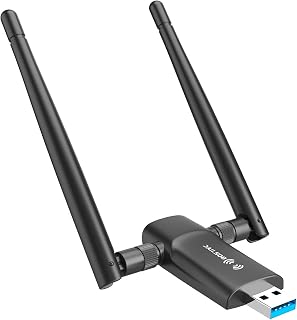
Budget-minded desktop or laptop users who just need dependable dual band coverage will find the 1300Mbps rating and dual 5dBi antennas enough for everyday browsing and streaming. It supports Windows 11, 10, and 7, so it fits machines that haven't been fully updated. Included CD driver and manual make setup straightforward for less tech-savvy users.
Pros
- Dual 5 dBi antennas improve signal strength in multi-room layouts
- AC1300 dual-band handles gaming and 4K streaming effectively
- Compact 2.6-inch design won't block neighboring USB ports
- USB 3.0 prevents bottlenecks on fast internet connections
Cons
- Windows-only support excludes Mac and Linux users
- Windows 7 requires manual driver installation
The Nineplus AC1300 adapter solves weak WiFi and dead zone problems for Windows desktop and laptop users at an approachable price. Dual-band operation splits traffic intelligently: 867 Mbps on 5 GHz supports gaming and 4K streaming with low latency, while 400 Mbps on 2.4 GHz offers better range through walls and across multiple rooms. Dual 5 dBi antennas are the key differentiator here, capturing and transmitting signals more effectively than single-antenna designs and making the adapter viable even when your router sits several rooms away or behind obstacles. USB 3.0 connectivity ensures the interface won't limit modern broadband speeds. The adapter measures just 2.6 inches and weighs 12 grams, so it stays unobtrusive on your desk and won't block adjacent USB ports. Real-world performance falls below theoretical maximums but still delivers smooth video calls, buffer-free streaming, and responsive online gaming on typical home networks. Windows 10 and 11 users benefit from straightforward setup, though Windows 7 requires manual driver installation. The biggest limitation is Windows-only compatibility, leaving Mac and Linux users without support. For Windows desktops needing reliable dual-band WiFi without a steep investment, this adapter hits the mark.
Wireless Standards: 802.11ac, 802.11n, 802.11g, 802.11b
Speed: AC1300 total (867Mbps on 5GHz, 400Mbps on 2.4GHz)
Antennas: Dual 5dBi external antennas
Interface: USB 3.0 (backward compatible with USB 2.0)
Dimensions: 2.6 inches L x 0.82 inches W x 0.39 inches H
Weight: 12 grams
Color: Black
Operating Systems: Windows 7, Windows 8, Windows 8.1, Windows 10, Windows 11
Warranty: 2 years with online technical support
Ideal for Windows users dealing with WiFi dead zones, desktops that never had wireless built in, or anyone upgrading from an aging single-band adapter on a tight budget. Gamers who want 5 GHz performance and remote workers battling signal drop-offs will find the dual antennas particularly helpful. Skip it if you use Mac or Linux, need the absolute fastest WiFi 6 or 7 speeds, or prefer adapters with tool-free driver installation on Windows 7.
USB WiFi Adapter Buying Guide
WiFi Standard and Speed Class
The WiFi standard determines the maximum throughput and compatibility with your router. AC600 adapters like the TP-Link Nano AC600 USB WiFi Adapter for Desktop handle browsing and light streaming well, while AC1300 models deliver noticeably faster speeds for gaming and HD video. For the absolute cutting edge, a WiFi 7 adapter like the WAVLINK BE6500 unlocks tri-band connectivity and dramatically lower latency.
Match the adapter to both your router and your actual usage. Running a WiFi 7 adapter on an older WiFi 5 router will cap your speeds at the router’s limit, so upgrading both together gets you the full benefit.
Antenna Design: Nano vs. External
Nano-sized adapters like the TP-Link Nano AC600 are practically invisible once plugged in, making them great for tight spaces or setups where you want a clean look. The tradeoff is range. External high-gain antennas, such as the dual 5dBi antennas on the Nineplus Wireless USB WiFi Adapter for PC or the TP-Link T3U Plus, capture significantly stronger signals, especially through walls.
If your router is in another room or on a different floor, go with an adjustable external antenna. You can rotate it toward the router to dial in the best possible reception. For more on building a strong home network around a central access point, see our best access point for home guide.
USB Version: 2.0 vs. 3.0
USB 3.0 delivers up to ten times the transfer bandwidth of USB 2.0, which matters when you are running an AC1300 or faster adapter at full capacity. The TP-Link AC1300 models and the Nineplus adapter all use USB 3.0, ensuring the connection between the adapter and your PC is never the bottleneck.
USB 3.0 adapters are backward compatible with USB 2.0 ports, so you can still use them in older machines. You just will not reach peak speeds in that configuration. Check your PC’s port version before buying if raw throughput is a priority.
Operating System Compatibility
Most adapters in this roundup support Windows 11, 10, 8.1, 8, 7, and XP. Several TP-Link models also extend support to Mac OS X, giving them broader appeal. The Nineplus adapter, however, is Windows-only and does not support macOS, Chromebook, or Linux.
Driver installation is often required, particularly on older Windows versions and macOS. The WAVLINK BE6500 stands out by including a built-in driver for Windows 10 and 11, so it installs automatically in most cases. Always confirm compatibility with your specific OS version before purchasing, especially if you are running a less common setup. You can browse more networking gear sorted by use case in our Networking category.
Final Thoughts
For most users, the TP-Link Nano AC600 USB WiFi Adapter for Desktop is the smartest starting point, offering a compact plug-and-leave design with dependable dual-band performance at an accessible entry point. If you need serious range and higher throughput for gaming or streaming, the WAVLINK BE6500 USB WiFi 7 Adapter for Desktop PC is the most future-proof choice here, with tri-band speeds and built-in driver support that make setup refreshingly straightforward.
Frequently Asked Questions
Do USB WiFi adapters work with any router?
Yes, USB WiFi adapters are universally compatible with standard home routers using WPA2 or WPA3 security. The adapter will connect to whichever bands your router broadcasts, such as 2.4GHz or 5GHz. Keep in mind that the adapter’s maximum speed will always be capped by your router’s capabilities, so pairing a WiFi 7 adapter with a WiFi 5 router means you will not unlock the adapter’s full potential.
Is a USB WiFi adapter good enough for gaming in 2026?
For casual and mid-level gaming, an AC1300 dual-band adapter running on the 5GHz band is more than sufficient. Adapters like the TP-Link AC1300 USB WiFi Adapter for Desktop PC and the Nineplus Wireless USB WiFi Adapter for PC both deliver speeds competitive enough for online gaming. If you experience interference or want the lowest possible latency, pairing a strong adapter with a quality router is the better long-term move. Our best WiFi extender for gaming guide also covers ways to push signal quality even further.
What is the difference between a nano USB adapter and one with external antennas?
Nano adapters are tiny enough to leave plugged in permanently without getting in the way, but their small internal antennas limit signal range. External antenna adapters, like the TP-Link USB WiFi Adapter for Desktop PC with its dual 5dBi high-gain antennas, offer substantially better reception through obstacles like walls and floors. If your router is nearby and in line-of-sight, nano is fine. For longer distances or obstructed paths, external antennas make a real difference.
Do I need to install drivers for a USB WiFi adapter?
It depends on the adapter and your operating system. Many modern adapters work plug-and-play on Windows 10 and 11 because the OS already includes compatible drivers. The WAVLINK BE6500 even bundles its own driver that loads automatically after you plug it in. For older operating systems like Windows 7, or for macOS, you will typically need to download and install the driver manually from the manufacturer’s website. Always check the product page for your specific OS version before buying.



Write Your Review
No reviews yet. Be the first to share your experience!