

Dead zones in the corner of the living room, a dropped video call halfway up the stairs, a smart TV that keeps buffering even though your router sits just one floor below. These are the real-world frustrations that a dedicated wireless access point solves far more effectively than yet another range extender. Unlike mesh nodes or repeaters that cut your bandwidth in half, a true access point connects to your network via Ethernet and rebroadcasts a clean, full-speed signal exactly where you need it.
This guide is for homeowners, renters, and home-office users who want enterprise-grade Wi-Fi without the enterprise-grade complexity. Whether you are upgrading from a single router setup or building a multi-room network from scratch, the ten picks below cover every use case. If you are also shopping for complementary gear, our Black Friday router deals roundup is worth a look alongside this guide.
Quick answer
This guide compares 10 picks, with Ubiquiti UniFi nanoHD Compact 802.11ac Wave2 Access ranked first. Ubiquiti UniFi nanoHD WiFi 5 Access Point, 1733Mbps holds the highest customer rating among them. TP-Link EAP225 AC1350 WiFi 5 Mesh Access Point has the most customer reviews.
Pros
- Exceptional user capacity of 200+ concurrent connections ideal for offices, hotels, and public venues
- Ultra-compact design enables discreet installation without sacrificing performance or coverage
- 802.3af PoE compatibility reduces installation costs and cable clutter
- Wave2 MU-MIMO technology ensures smooth performance even under heavy network load
- Compatible with Ubiquiti UniFi ecosystem for centralized management across multiple access points
Cons
- Requires separate Ubiquiti UniFi controller or cloud management for full feature access
- Limited to 100 Mbps LAN port bandwidth, which may bottleneck gigabit network environments
- No built-in PoE power source; requires external PoE switch or adapter (sold separately)
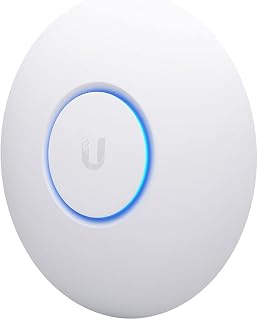
The Ubiquiti UniFi nanoHD is an enterprise-class access point engineered specifically for deployments requiring high user density in minimal space. This compact device is ideal for businesses, educational institutions, hospitality venues, and corporate offices where reliable wireless coverage serves dozens or hundreds of simultaneous users.
What sets this access point apart is its powerful 4x4 MU-MIMO dual-band technology paired with the ability to support 200+ concurrent connections without degradation. The four-stream 802.11ac Wave2 architecture delivers 1733 Mbps throughput, ensuring even bandwidth-heavy tasks remain responsive. MU-MIMO allows multiple devices to transmit and receive simultaneously rather than taking turns, dramatically improving real-world performance in crowded networks.
The nanoHD measures just 6.3 inches square and 1.3 inches thick, making it one of the most unobtrusive access points available. It mounts to ceilings or walls using the included kit, and optional covers let it blend seamlessly into office or hospitality settings. The 802.3af PoE compatibility means you can power it from any standard PoE switch, simplifying installation and reducing cable runs throughout your space.
One practical limitation is the 100 Mbps LAN port bandwidth, which may create a bottleneck in gigabit network environments. Additionally, the device requires a separate Ubiquiti UniFi controller for management and configuration, adding to total deployment cost. You'll also need an external PoE switch or 48V power adapter, both sold separately.
For high-density wireless environments where space and performance matter equally, the nanoHD delivers exceptional value. Its user capacity, compact form factor, and Wave2 technology make it a smart choice for any organization scaling wireless infrastructure beyond basic coverage needs.
Wireless Performance: 802.11ac Wave2, dual-band (2.4GHz and 5GHz), 4x4 MU-MIMO, 1733 Mbps maximum data rate, supports 200+ concurrent users
Physical: 6.3"L x 6.3"W x 1.3"H, weighs 18.14g, white finish, internal antennas (4 total), includes ceiling/wall mount kit
Connectivity: 2 ethernet ports, 100 Mbps LAN port bandwidth, 802.3af PoE compatible, 48V operation
Security: WPA and WPA2 protocols, enterprise-grade encryption
Management: Requires Ubiquiti UniFi controller, compatible with all UniFi PoE switches, Linux-based operating system
Warranty: 1 year manufacturer warranty
Ideal For: Business offices with 50+ employees, hotels and hospitality venues, educational institutions, retail locations, corporate campuses, and any high-traffic space where multiple devices connect simultaneously.
Consider This If: You need reliable Wi-Fi 5 performance in a compact form, your network serves many concurrent users, you're already invested in Ubiquiti UniFi infrastructure, or you require centralized management across multiple access points.
Skip This If: You need standalone operation without a UniFi controller, your network infrastructure only supports gigabit wired connections, or you require the absolute latest Wi-Fi 6 standard for maximum future-proofing.

Pros
- Extremely compact design (6.29 x 6.29 x 1.29 inches) blends into virtually any room with decorative skin options
- PoE support eliminates need for separate power outlet, reducing clutter and installation costs
- 4x4 MU-MIMO handles multiple devices simultaneously without performance degradation
- WiFi 5 delivers real-world speeds suitable for 4K streaming, gaming, and video conferencing
- Simple app-based management requires no technical expertise for setup and ongoing monitoring
Cons
- Single Gigabit Ethernet port limits direct wired connection options for devices requiring high-speed wired access
- WiFi 5 standard means it lacks WiFi 6 and WiFi 6E enhancements for future-proofing
- Requires UniFi controller setup, adding initial configuration complexity compared to plug-and-play consumer routers
The Ubiquiti UniFi nanoHD is a professional-grade WiFi 5 access point engineered for environments where space is limited and performance cannot be compromised. Whether deploying in small offices, retail locations, apartment buildings, or homes with stubborn dead zones, this compact device delivers enterprise-level reliability in a form factor 30% smaller than traditional options.
What sets the nanoHD apart is its 4x4 MU-MIMO technology and support for 200+ concurrent users without speed degradation. Real-world performance reaches the advertised 1733 Mbps on WiFi 5, making it capable of handling 4K video streaming, online gaming, and video conferencing simultaneously across multiple devices. The Wave-2 802.11ac implementation ensures stable connections even in congested wireless environments.
The industrial design balances aesthetics with functionality. Its small footprint accepts optional skins in camouflage, concrete, marble, wood, black, and fabric finishes, allowing the access point to vanish into its surroundings rather than dominate the room. Wall or ceiling mounting with included kits gives installers complete flexibility. Power over Ethernet (PoE) eliminates the need for nearby outlets, further reducing visible cable clutter.
One limitation is the single Gigabit Ethernet port, which constrains options for connecting high-bandwidth wired devices. Additionally, this is WiFi 5 technology, so it lacks the latest WiFi 6 and WiFi 6E features found in newer products. Setup requires familiarity with the UniFi OS controller, which is more complex than consumer plug-and-play alternatives but offers superior management and monitoring capabilities once configured.
The UniFi nanoHD excels when reliability, coverage, and discretion matter more than simplicity. It represents excellent value for professional deployments, small businesses, and technically-minded users seeking predictable, high-performance wireless coverage in compact spaces.
Wireless Performance: WiFi 5 (802.11ac Wave-2) with 4x4 MU-MIMO delivers 1733 Mbps maximum throughput across dual-band frequencies. The 5 GHz band provides the high-speed capability while extensive coverage minimizes dead zones in medium-sized spaces.
Connectivity: Single Gigabit Ethernet port (1000 Mbps) supports IEEE 802.3af Power over Ethernet, eliminating the need for separate power supplies. Wireless compatibility extends to all modern smartphones and devices supporting WiFi 5 standards.
Security: WPA3, WPA2, and WPS protocols protect network traffic and simplify device pairing. UniFi OS app control provides secure remote management and real-time monitoring of all connected devices.
Installation: Compact dimensions (6.29 x 6.29 x 1.29 inches) and 320g weight make mounting effortless. Included hardware supports both wall and ceiling installation in virtually any environment.

Pros
- Exceptional 3km range solves connectivity gaps in rural and mountainous terrain
- High-gain antennas and dual-band support provide stable connections in challenging environments
- Weatherproof construction rated IP65 ensures reliable year-round outdoor operation
- PoE injector eliminates need for separate power sources, reducing installation complexity
- Affordable solution for extending Starlink without expensive infrastructure upgrades
Cons
- Real-world throughput of 200Mbps is reduced from theoretical gigabit speeds due to bridge distance
- Limited to 5GHz band, which may have shorter effective range in some outdoor conditions
- Requires line-of-sight positioning for optimal 3km range performance
The Burbifro Point-to-Point Starlink Extender is a wireless bridge designed for users with Starlink satellite internet who need to extend connectivity across large rural properties, farms, or remote locations. This product targets property owners frustrated by limited router range who want a practical solution to blanket their land with reliable internet without running cables.
The standout feature is its impressive 3-kilometer outdoor range paired with 18dBi high-gain antennas that capture weak signals effectively. Real-world performance delivers approximately 200Mbps throughput, which is more than sufficient for HD streaming, online gaming, and file transfers. Plug-and-play setup means most users can deploy it without technical expertise, while the included 24V PoE injector simplifies power delivery by combining electricity and data over a single Ethernet cable.
Build quality reflects outdoor durability with IP65 weatherproofing that handles extreme heat, cold, and heavy rain. The white exterior blends unobtrusively into most environments. Two RJ45 LAN ports provide flexibility for connecting multiple devices or network equipment at the bridge location, making it adaptable to various deployment scenarios.
The main limitation is that effective 3km range requires clear line-of-sight positioning between the transmitter and receiver. Dense vegetation or obstacles can reduce actual coverage. Additionally, while advertised speeds reach gigabit levels, real throughput settles around 200Mbps due to bridge distance factors, though this remains adequate for most internet activities.
This extender represents strong value for rural Starlink users needing reliable extended coverage without expensive infrastructure. The combination of long-range capability, weatherproof design, and straightforward installation makes it a practical choice for properties where standard router range falls short.
Connectivity and Performance: Wireless standard 802.11ac, dual-band 5GHz operation, 200Mbps data transfer rate, 3km outdoor range with 18dBi high-gain antennas.
Compatibility: Works with Starlink Gen 3 Router, Starlink Standard 4 Router, Starlink Standard 4X Router, and Starlink Mini Router. Two RJ45 LAN ports for device connections.
Power and Deployment: 24V PoE injector for combined power and data delivery. IP65 weatherproof outdoor rating. Dimensions and weight: 8 ounces, compact design suitable for mounting on poles or structures.
Product Details: Model CPE450 by Burbifro. Sold as a 2-unit kit. White color. Includes all necessary cables and PoE injector for installation.

Pros
- Flexible power options make installation easier in spaces without nearby power outlets
- Cloud-based Omada management simplifies setup and monitoring for multiple access points
- Excellent value for business-grade features at under 60 dollars
- Dual-band performance handles both bandwidth-hungry devices and IoT connections effectively
- Compact ceiling-mount design blends into professional environments
Cons
- Requires compatible client devices to fully leverage MU-MIMO and seamless roaming features
- Real-world performance varies based on environment, building materials, and network interference
- Single Gigabit port limits wired connection options compared to multi-port models
The TP-Link EAP225 is a purpose-built WiFi 5 access point designed for businesses seeking reliable wireless coverage without the premium price tag. It's an excellent choice for small offices, retail locations, and professionals who need enterprise-grade management tools alongside solid performance.
The standout feature is the flexible power delivery, supporting both standard 802.3af PoE and the included passive PoE adapter. This means you can deploy the EAP225 wherever you need coverage, whether your infrastructure includes PoE switches or not. The AC1350 dual-band performance delivers strong throughput, with MU-MIMO technology allowing simultaneous connections to multiple devices without performance drops on compatible equipment.
Build quality is straightforward and professional. The compact ceiling-mount design measures just 1.47 inches thick and fits cleanly into office environments. With 128MB of RAM and dual-band support, it handles real-world business traffic reliably. The addition of Omada SDN cloud management is genuinely useful for anyone managing more than one access point, offering centralized control and monitoring from a mobile app.
The main limitation is that real-world range and coverage depend heavily on building materials, interference, and the number of connected devices. Seamless roaming and MU-MIMO capabilities also require compatible client devices to function. The single Gigabit Ethernet port is adequate for most deployments but limits options if you need multiple wired connections.
The EAP225 delivers solid business-class performance backed by a 5-year warranty and strong security protocols. It's a smart choice for organizations needing manageable, scalable WiFi without overspending on access points.
Wireless Performance: AC1350 WiFi 5, 867 Mbps (5GHz) + 450 Mbps (2.4GHz), Dual-band, 802.11ac/a/n/g/b compatible
Technology: MU-MIMO, mesh networking support, 802.11K and 802.11V roaming protocols, WPA-Enterprise and WPA2-Enterprise security
Power: 12V DC, supports 802.3af PoE and passive PoE, includes PoE injector adapter
Connectivity: 1x Gigabit Ethernet port, dual internal antennas, hybrid network topology
Memory: 128MB RAM
Physical: 8.09in x 7.15in x 1.47in, 1.1 lbs, ceiling-mount design
Management: Omada SDN platform with cloud access and mobile app control
Warranty: Limited lifetime warranty, 5-year spare parts availability
Ideal For: Small to medium businesses, offices needing WiFi expansion, retail locations, co-working spaces, and professionals managing multiple wireless networks. Best suited for environments where centralized cloud management and flexible power options provide real value.
Not Ideal For: Large enterprises with complex requirements should consider higher-end models with more Ethernet ports. Homes with a single access point may find consumer routers more convenient. Users needing gigabit wireless speeds should look at WiFi 6 alternatives.
Key Consideration: This access point shines when deployed as part of an Omada-managed system with multiple units. Single-unit deployments benefit less from the cloud management advantage.

Pros
- Intuitive setup process with Omada app makes configuration quick for both beginners and experienced users
- Exceptional range and signal strength handles numerous connected devices without performance degradation
- Multiple power delivery options maximize placement flexibility without infrastructure modifications
- Mesh and roaming features create seamless coverage across larger spaces when using multiple units
- Outstanding value with professional-grade capabilities at a consumer-friendly price point
Cons
- Ceiling or wall mounting is required due to heat dissipation design, limiting placement options compared to traditional desktop units
- Initial setup requires connecting to existing network before using cloud management features
- Full mesh and roaming capabilities require Omada SDN controllers, not available in standalone mode
The TP-Link EAP610 is a WiFi 6 access point purpose-built for businesses, schools, hospitality venues, and power users seeking robust wireless coverage beyond their primary router. It's particularly valuable for environments requiring seamless connectivity across multiple zones or for adding dedicated networks in homes with dead zones and bandwidth congestion.
Performance is genuinely impressive. The AX1800 standard delivers 1800 Mbps across dual bands with four spatial streams, meaning real-world throughput remains strong even when dozens of devices connect simultaneously. Customer reviews consistently praise fast, stable connections across smart home devices, streaming services, and work applications. The advanced wireless technologies like band steering and airtime fairness intelligently optimize traffic, preventing slowdowns that plague standard routers.
Design and deployment flexibility stand out as major strengths. The ultra-slim profile measures just 1.32 inches and the compact 6.3-inch footprint mean this unit virtually disappears once mounted on a ceiling or wall. Multiple power options amplify its appeal: PoE+, passive PoE, or the included 12V DC adapter let you place the unit where coverage matters most without running new electrical circuits. The Omada cloud management system eliminates the need for expensive hardware controllers, allowing centralized management of multiple sites through a single app interface.
The primary limitation stems from its mounting requirement. This isn't a desktop unit, so placement is restricted to ceiling or wall installation. Additionally, while standalone mode works, the mesh and seamless roaming features that make multiple units shine require Omada SDN controllers. Initial setup also requires network connectivity before cloud management activates, though the mobile app simplifies this process considerably.
The EAP610 represents exceptional value for organizations and individuals serious about wireless infrastructure. The combination of WiFi 6 performance, intelligent management, enterprise-class security, and flexible deployment options makes it a standout choice, backed by an industry-leading five-year warranty. If you need reliable, manageable coverage beyond standard router capabilities, this access point delivers on all fronts.
Wireless Performance: WiFi 6 (802.11ax), AX1800 (1201 Mbps 5GHz + 574 Mbps 2.4GHz), dual-band, 4 spatial streams, 1024-QAM modulation
Security: WPA3, WPS button, supports enterprise and personal authentication methods
Connectivity: 1 Gigabit uplink port, 3 additional Gigabit Ethernet ports for wired devices, 802.3at PoE+, 48V passive PoE, or 12V/1.5A DC power
Memory and Processing: 256MB RAM, OpenWrt OS-compatible processor for advanced configurations
Physical: 6.3L x 6.3W x 1.32H inches, 0.39 kg, white finish, includes mounting kits and DC power adapter
Management: Omada Essentials cloud platform, mobile app, web interface, SNMP support, hardware or software controller compatible
Coverage: Extensive range suitable for business and residential environments, mesh-capable when using Omada SDN

Pros
- Next-generation Wi-Fi 7 delivers exceptional speed and capacity with Multi-Link Operation and 4K-QAM technology
- Handles demanding environments with 250+ concurrent devices without performance degradation or lag
- 2.5G port future-proofs your network for emerging broadband standards without needing hardware upgrades
- Comprehensive Omada SDN management platform with cloud, app, and local controller options for flexibility
- Excellent value for business-grade performance at $99.99 with comprehensive 5-year warranty coverage
Cons
- Single access point covers only 1500 square feet, requiring multiple units for larger office spaces or venues
- Fixed antenna design may have limited optimization compared to adjustable antenna systems in some scenarios
- Requires Omada platform integration for advanced features, limiting standalone capability for basic deployments
The TP-Link Omada EAP720 is a Wi-Fi 7 ceiling-mount access point engineered for businesses and growing networks that demand reliable, high-performance connectivity. This device combines cutting-edge wireless technology with enterprise management features, making it suitable for offices, retail spaces, hospitality venues, and public WiFi deployments where concurrent user counts run high.
The standout feature is its Wi-Fi 7 performance delivering 5.0 Gbps across dual bands with support for 250+ concurrent devices. Real-world benefits include smooth video conferencing for dozens of simultaneous users, seamless roaming between access points, and consistent performance during peak usage times. The 4K-QAM modulation and 240MHz bandwidth effectively boost data capacity and reliability, while Multi-Link Operation ensures devices maintain optimal connections even as they move through coverage areas.
The 2.5G Ethernet port represents forward-thinking design, allowing your network to leverage emerging multi-gigabit broadband without replacing hardware. Deployment flexibility shines through dual power options, PoE support for simplified ceiling installation, and mesh networking capability within the Omada ecosystem. The included mounting kit makes installation straightforward in most ceiling or wall configurations.
Potential drawbacks include limited coverage of 1500 square feet per unit, meaning larger facilities need multiple access points. The fixed antenna design lacks directional adjustment, though it suits most standard installations. Additionally, accessing advanced features like network monitoring and AI capabilities requires integration with the Omada cloud platform rather than standalone operation.
The EAP720 delivers strong value for organizations scaling wireless networks. Its combination of next-generation speed, business-class capacity, enterprise management tools, and 5-year warranty support confident deployment in demanding environments. Best for IT teams seeking reliable, centrally managed access points without premium pricing.
Wireless Performance: Wi-Fi 7 dual-band, 5.0 Gbps total (4324 Mbps @ 5GHz, 688 Mbps @ 2.4GHz), supports 802.11be, 802.11ax, 802.11ac, 802.11n, 802.11g standards.
Ports and Connectivity: Single 2.5G Ethernet port, supports both 802.3at PoE and 12V DC power adapter (17.83W consumption). Covers up to 1500 square feet.
Hardware: Fixed antenna design, 512MB RAM, ceiling and wall mounting kits included. Dimensions and weight optimized for overhead installation.
Management: Omada SDN platform with cloud, mobile app, and local controller support. Features network monitoring, VLAN segmentation, bandwidth management, QoS, and WPA3 security.
Support: 5-year manufacturer warranty with free technical support Monday-Friday, 6am-6pm PST.
Ideal For: Small to medium businesses, retail locations, cafes, hotels, and offices needing enterprise-grade wireless for multiple users. IT managers deploying scalable, centrally managed networks. Organizations planning to upgrade broadband to multi-gig speeds.
Perfect Match If You: Run a business with 50+ WiFi users during peak hours, need reliable mesh networking across multiple zones, want cloud-based network management and monitoring, require WPA3 security and guest network isolation, or plan network growth without hardware replacement.
Consider Alternatives If: You need standalone access point simplicity without cloud management platforms, require adjustable directional antennas for specialized coverage, or have a single small office with under 20 concurrent users where consumer-grade equipment suffices.

Pros
- Exceptional stability and reliability with minimal reboots or connectivity issues
- Simple plug-and-play setup through UniFi app, even for non-technical users
- Cost-effective way to expand coverage by daisy-chaining multiple units
- Clean, professional build quality with proven Ubiquiti ecosystem support
- Superior performance compared to consumer mesh systems at the same price
Cons
- Requires Ubiquiti router or UniFi controller for setup and management, not standalone compatible
- Needs PoE+ injector (sold separately) if power outlet is unavailable
- Limited appeal for users already committed to other WiFi brands or ecosystems
The Ubiquiti U6+ is a WiFi 6 access point designed for users seeking enterprise-grade reliability without enterprise-grade pricing. It's ideal for homeowners upgrading from consumer routers, small business owners expanding coverage, or Ubiquiti ecosystem enthusiasts adding to existing networks.
Performance is the standout here. Real-world testing shows solid, stable connections across 1,500 sq ft with dual-band coverage reaching both near and far zones. The 3 Gbps throughput and MIMO technology ensure minimal lag and fast handoffs between bands, even with multiple devices connected simultaneously.
Build quality reflects Ubiquiti's professional pedigree. The U6+ feels solid, mounts cleanly to walls or ceilings, and draws just 9W of power. PoE+ delivery means clean installations without extra outlets, though you'll need a separate injector if your router doesn't support it.
The main limitation is ecosystem lock-in. You need a Ubiquiti router or UniFi controller to adopt and manage this unit, which isn't ideal if you're platform-agnostic. Setup through the UniFi app is straightforward, but standalone operation isn't possible.
Verdict: The U6+ delivers exceptional value for WiFi 6 coverage expansion. If you're already in the Ubiquiti ecosystem or willing to commit to it, this access point outperforms consumer alternatives at similar prices. For standalone use or multi-brand networks, look elsewhere.
The U6+ supports 802.11ax (WiFi 6), the latest wireless standard offering significant improvements over older generations. WiFi 6 delivers faster data rates, better handling of congested networks, and improved power efficiency for connected devices.
Dual-band operation lets the U6+ transmit on both 2.4 GHz (longer range, older device compatibility) and 5 GHz (faster speeds, shorter range) simultaneously. MIMO antenna technology amplifies signal strength and allows the access point to communicate with multiple devices at once without performance degradation.
Real-world benefit: Streaming, gaming, and video calls remain smooth even with a dozen devices connected. Network congestion becomes less of an issue compared to older WiFi standards.
The U6+ is best for: Ubiquiti ecosystem users expanding coverage, users replacing aging consumer routers with professional-grade equipment, and small business owners needing reliable WiFi in multiple zones.
Skip this if: You need standalone operation without a Ubiquiti controller, you're committed to other WiFi brands, or you require built-in router functionality rather than access point only.
Budget considerations: Plan for additional costs including a PoE+ injector (if needed) and a Ubiquiti router or UniFi Dream Machine if you don't already own one. Multiple U6+ units are cost-effective for whole-home coverage compared to traditional mesh systems.
Installation tip: Optimal placement is central and elevated. Ceilings work better than walls for 360-degree coverage. Test signal strength after installation and adjust placement if needed.

Pros
- Exceptional versatility with four distinct operating modes covers nearly every WiFi expansion scenario
- Setup process is straightforward with helpful configuration wizards and clear documentation
- Strong real-world performance in challenging layouts with concrete walls and multi-floor homes
- MU-MIMO and beamforming ensure consistent speeds even with many connected devices
- Compact, lightweight design fits easily in tight spaces or wall mounting locations
Cons
- Stock firmware can be unstable on 5GHz band, though OpenWRT custom firmware resolves this for advanced users
- Fixed antenna design limits optimization for specific coverage patterns compared to adjustable antennas
- Best suited for medium-sized spaces or supplemental coverage rather than primary network for large homes
The TP-Link TL-WA1201 is an AC1200 wireless access point designed for users who need flexible network expansion beyond their primary router. It's ideal for extending coverage to dead zones, converting wired-only devices to WiFi clients, or creating guest networks without replacing your entire system.
The standout feature is its four operational modes that transform how you use a single device. Access Point mode turns any wired connection into a wireless hotspot, while Client mode converts the relationship by accepting a wireless signal and sharing it via Ethernet cable. Range Extender mode amplifies your existing WiFi, and Multi-SSID mode creates separate networks for guests or different device types. Real-world performance delivers over 300 Mbps when operating in Client mode, with MU-MIMO and beamforming ensuring smooth performance across multiple connected devices.
Build quality reflects TP-Link's networking heritage. The device is compact and lightweight at just 0.3 kg with dimensions that fit discreetly on shelves or walls. Four external fixed antennas provide consistent coverage, though the antenna placement cannot be adjusted. Installation uses passive Power over Ethernet, eliminating the need for a nearby power outlet and enabling ceiling or wall mounting.
One limitation involves the stock firmware, which users report can be unstable on the 5GHz band. This affects performance for some users out of the box, though advanced users can install OpenWRT custom firmware to resolve stability issues entirely. Additionally, the fixed antenna design offers less optimization flexibility than models with adjustable or rotatable antennas.
The TP-Link TL-WA1201 delivers exceptional value for network expansion needs. Its four-in-one functionality, straightforward setup, and reliable performance make it a practical choice for anyone expanding WiFi coverage or connecting devices that lack wireless capability. While the 5GHz firmware issue exists, the overall capability and affordability position this as a serious alternative to expensive mesh systems for supplemental coverage.
Client Bridge Mode: Connect an old desktop computer or network printer to WiFi without running Ethernet cables through your home. This device accepts the wireless signal from your router and sends it out via Ethernet.
Range Extension: Eliminate WiFi dead zones in basements, garages, or upper floors by placing this access point midway between your router and the coverage gap. MU-MIMO ensures your main devices maintain speed while the extended zone remains responsive.
Guest Network Separation: Use Multi-SSID mode to create a separate guest WiFi network with different security settings and bandwidth limits, keeping visitors off your personal devices and file shares.
PoE Installation: Deploy in challenging locations like attics or exterior walls by powering via Ethernet cable, eliminating the need to run power lines to the installation site.
Wireless Performance: 802.11ac Wave 2, 1200 Mbps total (600 Mbps 5GHz + 600 Mbps 2.4GHz), dual-band with MU-MIMO, beamforming technology.
Connectivity: One Gigabit Ethernet port, four external fixed antennas, passive Power over Ethernet support, WPS button for easy pairing.
Security: WPA, WPA2, WPA-PSK, WPA2-PSK encryption protocols, firewall with moderate to high security rating.
Physical: Compact white design, 8.86 x 5.73 x 1.46 inches, 0.3 kg weight, 12V DC power adapter included.
Warranty and Support: 2-year manufacturer warranty, compatible with Windows and Mac systems, LED status indicators for connection and signal monitoring.

Pros
- Setup is remarkably fast, typically 20-30 minutes from unboxing to full operation without timeout issues
- Exceptional range and signal strength that penetrates obstacles like metal barn walls and dense environments
- Multiple power delivery options make installation flexible for different network setups and environments
- Responsive chat support team available to troubleshoot and optimize configurations
- Omada app provides intuitive centralized management for multi-site networks from a single dashboard
Cons
- Setup and configuration require basic networking knowledge, not ideal for complete beginners without IT support
- Single Gigabit Ethernet port limits direct wired connections compared to some competitor models
- Heat management may require attention in extremely hot environments like Florida garages
The TP-Link EAP650 is a Wi-Fi 6 ceiling-mounted access point designed for businesses, hospitality venues, and tech-savvy home users who need reliable, managed wireless coverage. It's particularly well-suited for multi-site deployments where centralized management matters, and for anyone tired of complicated installation processes.
The standout feature is genuinely fast setup paired with legitimate performance. Real users report covering entire 1,300+ sq ft homes with a single unit, and the device proves capable of penetrating thick metal structures while maintaining strong signal strength. Speeds hit the advertised 2976 Mbps across dual bands, and advanced technologies like mesh networking and seamless roaming work when integrated into the broader Omada ecosystem.
Build quality is solid with a compact, slim profile that mounts cleanly on ceilings or walls without drawing attention. The included DC adapter works reliably, though the device also supports PoE and passive PoE for flexible deployment. The industrial 5-year warranty and free support during business hours provides real peace of mind, especially in commercial settings.
The main limitation is that optimal features require buying into TP-Link's Omada ecosystem or controllers. Standalone mode exists but lacks some capabilities. Additionally, the single Ethernet port and need for basic networking knowledge mean this isn't plug-and-play for non-technical users.
This is a genuinely competent access point that delivers on performance, covers impressive distances, and simplifies management. For small businesses, hotels, or home networks where reliability matters, the EAP650 represents solid value at under 80 dollars.
Wireless Performance: Wi-Fi 6 (802.11ax) dual-band with speeds up to 2976 Mbps. Features 1024-QAM modulation, HE60 and Long OFDM Symbol technology for optimized throughput.
Coverage and Connectivity: Wide extended range coverage with 1 internal antenna. Supports mesh networking, seamless roaming, WPA3 and WPA2 security protocols, band steering, load balancing, airtime fairness, and beamforming.
Power and Ports: Multiple power options including 802.3at PoE+, 48V passive PoE, and 12V/1.5A DC adapter included. Single Gigabit Ethernet port (10/100/1000 Mbps). 256 MB RAM.
Management: Cloud-based Omada management with hardware and software controller compatibility. Supports standalone mode. Control via mobile app. Compatible with Windows and Linux systems.
Best For: Small to mid-size offices, hotel guest networks, restaurants, classrooms, and home networks requiring reliable extended coverage. Also ideal for users comfortable with basic networking who want enterprise-class management at consumer pricing.
Consider This If: You need seamless integration with TP-Link networking infrastructure, want cloud-based centralized management across multiple locations, or need strong signal penetration in challenging environments. The 5-year warranty makes it suitable for business-critical deployments.
Skip If: You want a plug-and-play access point with zero configuration, require extensive local support for troubleshooting, or need multiple Ethernet ports for direct wired connections. Also not ideal if you're locked into a different vendor's ecosystem.
Pro Tip: Pair with TP-Link's Omada ecosystem for full feature access, but the device works as a standalone unit if needed. Use passive PoE with compatible TP-Link switches to eliminate cable clutter.

Pros
- Exceptional range and signal strength compared to standard routers, with faster 5GHz speeds than many competitors
- PoE powered option eliminates the need for separate power outlets, enabling flexible ceiling or wall placement
- Full WiFi 6 capabilities with OFDMA and MU-MIMO reduce congestion for smooth performance in busy networks
- Easy setup process with included injector and mounting hardware, suitable for both home and business use
- Three-year warranty and lifetime support demonstrate manufacturer confidence in product reliability
Cons
- Included power adapter is large and cumbersome if PoE power is not available in your installation location
- Basic firewall features may not satisfy advanced users requiring granular security controls
- Requires existing network infrastructure to extend coverage, not a standalone networking solution
The Tenda I27 is a WiFi 6 access point designed to extend wireless coverage in homes and offices where signal strength from the primary router is insufficient. It delivers up to 2976 Mbps across dual bands and supports the latest wireless standards, making it suitable for modern devices like smart TVs, gaming consoles, and multiple connected devices.
Performance is the standout feature here. The 5 GHz band delivers up to 2402 Mbps speeds ideal for bandwidth-heavy tasks, while the 2.4 GHz band offers better wall penetration for harder-to-reach areas. Five high-gain antennas and independent signal boosters provide reliable coverage across 1,615 square feet. OFDMA and MU-MIMO technologies enable the device to handle 60+ simultaneous connections without congestion, a feature reviewers specifically praised for smooth operation in busy networks.
The design balances functionality with practicality. The device is ceiling-mountable, and Tenda includes all necessary brackets and installation materials. The option to power via PoE eliminates the need for a wall outlet, though the included power adapter is notably bulky if standard power is your only option. Management is flexible with cloud app, local web interface, and remote control options available.
Weaknesses are minor. The firewall protection is described as basic, so advanced users may want additional security measures. The device requires existing PoE infrastructure or the included adapter for power, making it an extension tool rather than a standalone solution.
Overall, the Tenda I27 offers genuine WiFi 6 performance and reliable coverage expansion at a competitive price. It suits homeowners wanting to eliminate dead zones and small businesses needing cost-effective network extension without sacrificing speed or device capacity.
Wireless Performance: WiFi 6 (802.11ax), 2976 Mbps combined speeds, 2402 Mbps on 5GHz + 574 Mbps on 2.4GHz, 160MHz bandwidth support.
Coverage and Capacity: Coverage area 1,615 sq ft, supports 60+ simultaneous devices, OFDMA and MU-MIMO technology, five 4dBi high-gain antennas.
Connectivity: One 1 Gigabit Ethernet LAN port, 802.3at PoE powered or standard AC power, supports fast roaming with 802.11k/v/r protocols.
Security and Management: WPA3 encryption, multi-SSID capability, cloud management via CloudFi app, local web interface, or remote management.
Physical: Model I27, includes power adapter and PoE injector, ceiling and wall mounting brackets, quick installation guide, Tenda OS operating system.
What to Look for When Buying a Home Access Point
Wi-Fi Generation: AC vs. Wi-Fi 6 vs. Wi-Fi 7
The Wi-Fi generation determines your ceiling speed and how efficiently the access point handles multiple devices at once. AC (Wi-Fi 5) units like the Omada AC1350 Wireless Access Point and the TP-Link TL-WA1201, AC1200 Dual Band remain solid, affordable choices for everyday browsing and streaming on a moderate number of devices.
Wi-Fi 6 brings OFDMA and 1024-QAM into the picture, which translates to noticeably better performance in device-dense homes with smart TVs, tablets, phones, and IoT gear all competing for airtime. If your household runs more than a dozen connected devices regularly, stepping up to a Wi-Fi 6 model is worth it. Wi-Fi 7, represented here by the Omada 7, BE5000 Wireless Access Point, 2.5G Port, pushes speeds even further and future-proofs your setup for multi-gig internet plans.
Power Delivery: PoE vs. DC Adapter
Power over Ethernet (PoE) lets you run a single cable from a PoE-capable switch to the access point, carrying both data and power. This is the cleanest installation method, especially for ceiling mounts where running a separate power cable would mean cutting into drywall. Most of the picks here support at least 802.3af or 802.3at PoE, including the Ubiquiti Networks UniFi nanoHD Internal 1733Mbit/s and the Ubiquiti U6+ Dual Band IEEE 802.11 a/b/g/n/ac/ax 3.
If you do not have a PoE switch, several options here include a passive PoE injector or a DC power adapter in the box, so you are not forced to buy additional hardware right away. The Omada AX1800 Wireless Access Point, w/DC Adapter and the Omada AX3000 Wireless Access Point, w/DC Adapter both ship with a 12V DC adapter, keeping the setup simple for anyone without a managed switch.
Management Software and Scalability
A standalone access point works fine for single-unit deployments, but if you plan to add a second or third unit down the road, a unified management platform saves enormous time. TP-Link’s Omada SDN platform, which covers the EAP225, EAP610, EAP650, and EAP720, lets you manage every access point from one app or cloud dashboard at no extra cost. Ubiquiti’s UniFi controller performs similarly for the nanoHD and U6+ units, though it requires a bit more initial configuration.
For readers who are also outfitting a home office with peripherals and want a holistic tech setup, our guide to the best gifts for tech lovers covers complementary gear worth considering alongside a network upgrade.
Coverage Area and Antenna Design
Coverage claims from manufacturers should be read as best-case figures in open, unobstructed space. In a real home with walls, floors, and appliances, expect roughly 60 to 70 percent of the advertised range. Internal antenna designs like those in the Ubiquiti nanoHD units offer a cleaner look and perform well in typical residential layouts. External antenna designs, such as the four beamforming antennas on the TP-Link TL-WA1201, AC1200 Dual Band, can push signal further into large, irregularly shaped rooms.
The Tenda WiFi 6 AX3000 Wireless Access Point pairs five 4dBi high-gain antennas with independent signal boosters (FEM) to cover up to roughly 1,600 square feet, which is a strong option for single-story homes with an open floor plan. For outdoor linking across longer distances, the Point to Point Starlink Internet Long Range bridge takes a completely different approach, extending connectivity up to 3 kilometers with IP65 weatherproofing built in. You can read more about networking upgrades in our router deals guide for context on how access points and routers work together.
Final Thoughts
For most homes, the sweet spot between performance, ease of setup, and long-term value lands with a Wi-Fi 6 ceiling-mount unit managed through a free cloud app. If you want a plug-and-play Wi-Fi 6 upgrade with free cloud management and flexible power options, the Omada AX1800 Wireless Access Point, w/DC Adapter is a reliable starting point. For those who prefer the UniFi ecosystem or need to support a high density of concurrent users in a compact form factor, the Ubiquiti Networks UniFi nanoHD Internal 1733Mbit/s remains one of the most capable and discreet options available at its tier.
Frequently Asked Questions
What is the difference between a wireless access point and a Wi-Fi extender?
A wireless access point connects to your router or switch via a physical Ethernet cable and creates a new, full-speed wireless coverage zone. A Wi-Fi extender or repeater rebroadcasts an existing wireless signal, which typically cuts available bandwidth by half. For reliable whole-home coverage, a wired access point is the superior choice whenever running an Ethernet cable is feasible.
Do I need a special router or switch to use a home access point?
You need a router with at least one open Ethernet port, and ideally a PoE-capable switch if you want the cleanest cable run. That said, many access points on this list include a passive PoE injector or DC power adapter in the box, so you can connect directly to any standard router without buying extra hardware. As your network grows and you add more units, a managed PoE switch becomes a worthwhile investment.
How many access points do I need for a typical home in 2026?
A single well-placed access point covers most homes up to around 1,500 to 2,000 square feet, depending on construction materials and layout. Homes with concrete or brick walls, multiple floors, or detached garages will benefit from two or more units managed through a unified platform like Omada SDN or UniFi. Starting with one and adding a second only if coverage gaps remain is a practical approach. If you are building out a broader smart home or office setup, our tech lover gift guide highlights other networking and productivity gear worth pairing with your access point.
Is Wi-Fi 6 worth it over Wi-Fi 5 (AC) for a home network in 2026?
Wi-Fi 6 delivers meaningful real-world improvements if your home has more than ten to fifteen connected devices, since OFDMA technology allows the access point to serve multiple devices simultaneously rather than sequentially. For a household with just a handful of devices and a mid-speed internet plan, a quality Wi-Fi 5 unit like the Omada AC1350 Wireless Access Point still performs admirably. Future-proofing your hardware does have genuine value, though, especially as more Wi-Fi 6 client devices become standard.



Write Your Review
No reviews yet. Be the first to share your experience!