

You plug in your laptop, launch a few apps, and suddenly you are juggling a tangle of cables just to connect your monitors, drives, and peripherals. A single Thunderbolt 5 dock solves all of that with one cable, delivering massive bandwidth, high-wattage charging, and enough ports to run a full workstation. Whether you are a video editor, a software developer, or a hybrid worker who needs reliability every day, this guide breaks down the best Thunderbolt 5 docks available right now. If you are also shopping for peripherals to pair with your new setup, check out our picks for the best keyboard and mouse deals worth grabbing this year.
Quick answer
This guide compares 8 picks, with Sonnet Echo 21 Thunderbolt 5 SuperDock: 21 Ports ranked first. UGREEN Thunderbolt 5 Docking Station, Triple 4K@144Hz holds the highest customer rating among them. OWC Thunderbolt 5 Dock 11-Port: Fast Connectivity & has the most customer reviews.

Pros
- Massive port selection eliminates cable clutter and the need for multiple hubs
- Built-in SSD slot is a rare feature that replaces external storage enclosures
- Thunderbolt 5 technology provides future-proof performance and longevity
- 10Gb Ethernet outperforms standard 1Gb docks for professional workflows
- Excellent build quality with consistent 5-star user satisfaction
Cons
- Premium pricing reflects its advanced features, making it an investment for serious professionals
- Runs warm during extended use, though not problematic for typical desk environments
- No audio line input (only mono mic), limiting some recording scenarios
The Sonnet Echo 21 Thunderbolt 5 SuperDock is engineered for creative professionals, content producers, and power users who demand maximum connectivity and performance. With 21 integrated ports in a compact form factor, this dock eliminates the cable management nightmare that plagues most workstations.
What sets this dock apart is the combination of cutting-edge technology and practical design choices. The Thunderbolt 5 interface delivers 80 Gbps bidirectional bandwidth, double that of Thunderbolt 4, while the built-in M.2 NVMe slot eliminates the need for external storage drives. The 10Gb Ethernet connection is particularly valuable for professionals working with network-attached storage or large file transfers, a feature rarely found in competing docks.
The dock supports multiple high-resolution displays up to 8K HDMI or 4K DisplayPort, making it suitable for demanding creative workflows. The 140W Power Delivery charges even power-hungry laptops while simultaneously running all connected peripherals through a single cable connection. Build quality is solid, with users reporting excellent reliability and performance across Mac and Windows platforms.
The primary drawback is the premium price point, which reflects the advanced feature set and Thunderbolt 5 technology. Additionally, the dock runs warm under load, though this is normal for high-performance docking stations. The absence of stereo audio line inputs may limit certain recording or audio editing scenarios.
For professionals seeking a comprehensive, future-proof docking solution, the Sonnet Echo 21 justifies its investment through superior performance, exceptional port diversity, and proven reliability. It transforms a single cable connection into a complete professional workstation.
Connectivity: 3x Thunderbolt 5 ports, 9x USB 10Gbps ports (mix of USB-A and USB-C), 1x HDMI, 1x DisplayPort, 10Gb Ethernet, SD and microSD card readers, audio I/O
Storage: Internal M.2 NVMe SSD slot supporting up to 8TB (user-installed)
Power: 140W Power Delivery for laptop charging and peripheral power
Display Support: Up to two 8K displays via HDMI/DisplayPort, or multiple 4K/5K/6K displays through Thunderbolt connections
Dimensions: 9.63 inches L x 4.5 inches W x 1.38 inches H, weighing 2.9 pounds
Compatibility: Mac (MacBook Air, MacBook Pro), Windows (Dell Latitude 7370), Chromebook, iPad Pro with Thunderbolt or USB4
Warranty: 2-year limited warranty
Who Should Buy: This dock is ideal for creative professionals, video editors, software developers, photographers, and anyone with multiple high-bandwidth peripherals. It excels for those who prioritize a clean desk setup and future-proof technology investment.
Alternative Consideration: If you primarily need basic connectivity and don't require 10Gb Ethernet or internal storage expansion, entry-level Thunderbolt 4 docks may provide sufficient functionality at a lower price point.
Installation Note: The M.2 NVMe SSD slot requires user installation. Compatible drives include most modern NVMe SSDs, though Sonnet provides a recommended list for optimal compatibility.
Performance Expectations: This dock is designed for professional workflows. Expect exceptional reliability, consistent performance under load, and seamless management of multiple high-bandwidth devices simultaneously.

Pros
- Zero-driver installation saves IT teams deployment time and reduces help desk tickets
- Exceptional multi-monitor support unlocks the full display capability of both Apple Silicon and Windows systems
- High-wattage power delivery and dual charging ports handle demanding professional workflows
- Enterprise-grade security features make it ideal for hot-desking and shared work environments
- Comprehensive software tools for MAC address pass-through, Wi-Fi auto-switch, and device monitoring
Cons
- Requires Thunderbolt 5, Thunderbolt 4, or USB4 compatibility, limiting use with older laptop models
- No reviews available yet, so real-world user feedback and long-term durability data remain limited
The StarTech Thunderbolt 5 Universal Docking Station is engineered for professionals who demand high-performance connectivity without software friction. This dock serves creative professionals, remote workers, IT teams deploying fleet devices, and anyone managing multiple displays and peripherals across Windows and Mac ecosystems. Its universal compatibility makes it an attractive solution for organizations running mixed-platform environments.
The standout feature is its aggressive multi-monitor support: Windows users can run four 4K displays simultaneously, while Mac users with M5 Max chips can achieve quad 4K through daisy-chaining Thunderbolt monitors, or triple 4K 120Hz on M5 Pro models. Paired with 140W laptop charging, 2.5G Ethernet, and downstream Thunderbolt bandwidth up to 80-120 Gbps, this dock eliminates the need for separate power adapters and networking cables. Real-world performance is bolstered by rigorous testing across 100+ monitor models and major laptop brands.
Build quality and security reflect enterprise-grade thinking. The aluminum construction feels solid, while dual security slots (K-Slot and Nano) physically secure the dock against theft in open offices or meeting rooms. The dedicated 45W USB-C port allows simultaneous phone charging without draining the laptop's power budget. Audio jack connectivity and StarTech.com's software tools for device management round out a feature-rich package designed for IT environments.
The main drawback is price and ecosystem lock-in. At $320, this dock targets businesses and well-resourced professionals rather than casual users. Additionally, Thunderbolt 5, 4, or USB4 is mandatory, excluding older laptop generations. True user reviews are not yet available, making long-term reliability claims difficult to verify independently.
Verdict: A premium, enterprise-focused docking solution that justifies its cost through cross-platform reliability, extensive display support, and IT-friendly management features. Recommended for organizations seeking hassle-free multi-monitor deployments and professionals unwilling to compromise on connectivity or power delivery.
Connectivity Hardware interface: Thunderbolt. Total USB ports: 5. Downstream Thunderbolt bandwidth: 80Gbps/120Gbps. Ethernet: 2.5G RJ45.
Power Input adapter: 180W. Maximum laptop charging: 140W Power Delivery. Dedicated USB-C charging port: 45W Power Delivery.
Display Support Windows: Four extended 4K 60Hz displays via HDMI and DisplayPort. Mac: Dual 6K on MacBook Pro/Max, triple 4K 120Hz on M5 Pro, quad 4K with daisy-chained monitors on M5 Max.
Compatibility Operating systems: macOS Sequoia 15.0, macOS Tahoe 26.0, Windows 11, Windows 11 ARM. Device requirement: Thunderbolt 5, Thunderbolt 4, or USB4 laptop.
Physical Weight: 1.6 pounds. Color: Black and Space Gray. Dimensions available upon request. Warranty: 3-year manufacturer coverage with lifetime 24/5 support.
Who Should Buy IT departments managing multi-platform fleets in corporate environments. Creative professionals using 4K video, photo editing, or design software. Remote workers seeking a single-cable workspace consolidation solution. Mac users with M5 Pro/Max chips who want to unlock maximum display potential.
Who Should Skip Users with older laptops lacking Thunderbolt 5/4 or USB4 ports. Budget-conscious individuals unwilling to spend over $300. Those requiring USB 3.0/2.0 legacy peripherals without adapters. Casual users who don't need multi-monitor support.
Key Considerations Verify your laptop model supports Thunderbolt 5, 4, or USB4 before purchasing. Confirm your display setup matches supported resolution and refresh rate combinations. Check that your workspace has adequate desk real estate for four monitors if planning a maximum deployment. Budget for compatible Thunderbolt cables and monitor adapters if needed.
Pros
- Blazing fast Thunderbolt 5 speeds make file transfers and video editing responsive and efficient
- Exceptional multi-display capability supports demanding creative workflows with clarity and refresh rates
- Robust 140W power delivery keeps high-performance laptops charged during intensive work
- Comprehensive port selection eliminates need for multiple adapters and dongles
- Premium aluminum construction and passive cooling ensure reliability for professional use
Cons
- DisplayPort does not support DP++ passthrough, requiring active DP-to-HDMI adapters for HDMI monitors
- Premium pricing reflects professional capabilities, making it less accessible for casual users
- Requires macOS 15+ on Mac systems, limiting compatibility with older operating systems
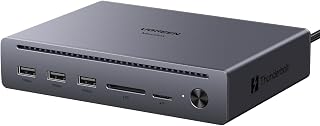
The UGREEN Maxidok Thunderbolt 5 Docking Station is a premium connectivity hub designed for professionals who demand both speed and versatility. This 10-in-1 dock targets content creators, video editors, software developers, and power users who routinely work with multiple high-bandwidth peripherals and require seamless multitasking across several displays.
The standout feature is Intel-certified Thunderbolt 5 technology delivering 120Gbps uni-directional speeds, enabling a 6GB 4K video file to transfer in approximately one second. The dock supports triple 4K displays at 144Hz refresh rates or dual 8K displays at 60Hz through DisplayPort 2.1 and dual Thunderbolt 5 downstream ports. For daily workflows, you get three 10Gbps USB-A ports, a dual SD/TF 3.0 card reader operating at 170MB/s, Gigabit Ethernet, and 140W total power delivery that charges even the 16-inch MacBook Pro at full load.
Build quality reflects the professional positioning, with aluminum alloy construction and integrated thermal management creating a fanless, silent operation suitable for any workspace. The compact footprint and security lock add practical appeal for those managing expensive equipment. Backward compatibility with Thunderbolt 4, Thunderbolt 3, and USB4 ensures this investment works across multiple generations of devices.
One limitation worth noting: the DisplayPort does not support DP++ passthrough, so connecting HDMI monitors requires an active DP-to-HDMI adapter rather than a passive cable. Additionally, Mac users need macOS 15 or later for full compatibility. The premium price reflects the professional-grade capabilities, making it less suitable for casual users seeking basic connectivity.
This dock represents an excellent choice for creative professionals and power users willing to invest in reliable, future-proof connectivity that significantly accelerates high-bandwidth workflows and supports expansive multi-display setups.
Connectivity: 3x USB-A 10Gbps, 2x Thunderbolt 5 downstream, 1x DisplayPort 2.1, 1x Gigabit Ethernet, 1x SD card slot, 1x microSD card slot, 1x 3.5mm audio jack
Performance: Thunderbolt 5 at 120Gbps uni-directional or 80Gbps bi-directional. Supports dual 8K@60Hz or triple 4K@144Hz displays. Card reader at 170MB/s transfer speed
Power Delivery: 140W total power, with up to 100W PD charging for laptops
Design: Aluminum alloy construction, fanless operation, 1.6kg weight, includes security lock
Compatibility: MacBook M1/M2/M3/M4/M5 Pro/Max, Mac Mini M4/M5/M6 Pro, Thunderbolt 5/4 Windows laptops. Backward compatible with Thunderbolt 4, Thunderbolt 3, and USB4
Warranty: 2 years
Who Should Buy: Content creators working with 4K or 8K video, photographers managing large RAW files, software developers needing multiple peripherals, and MacBook Pro users seeking comprehensive connectivity and fast charging in one device.
When to Consider Alternatives: If you primarily use HDMI displays and want to avoid adapter purchases, or if your budget is under $150, consider less expensive docking stations with fewer ports and slower Thunderbolt 4 speeds.
Setup Tips: Verify macOS 15+ compatibility before purchase if using older Macs. For HDMI monitor connections, budget for an active DP-to-HDMI adapter as passive cables will not work. Position the dock with adequate airflow despite its passive cooling design for optimal thermal performance during intensive workflows.
Value Assessment: The Thunderbolt 5 speeds and robust multi-display capability justify the premium price for professionals working with high-bandwidth video or photography files daily. Casual users or those with simpler connectivity needs may find less expensive alternatives adequate.

Pros
- Exceptional Thunderbolt Share feature enables seamless file transfer between computers without network latency
- Integrated M.2 SSD slot provides convenient high-speed storage expansion for creative professionals
- True single-cable solution reduces desk clutter while powering laptops and supporting multiple 4K displays
- Generous port selection with 2.5Gbps Ethernet and USB-A connectivity covers most professional workflows
- Robust build quality and reliable power delivery for handling demanding creative workloads
Cons
- Steep learning curve for those unfamiliar with Thunderbolt ecosystem and advanced docking features
- Premium price point makes it less accessible for casual users or budget-conscious buyers
- Requires compatible Thunderbolt 5 device, limiting compatibility with older laptops and desktops
The HyperDrive Next Thunderbolt 5 Dock represents a significant leap forward for professionals seeking a genuinely consolidated workspace solution. This dock targets creative professionals, engineers, and hybrid workers who regularly transfer large files, work with multiple displays, and demand reliable connectivity without the visual and physical clutter of traditional multi-adapter setups.
The standout features that separate this dock from competitors are its 120Gbps Thunderbolt 5 bandwidth, innovative Thunderbolt Share capability for computer-to-computer file sharing, and integrated M.2 SSD slot. Real-world performance according to user feedback is exceptional, particularly for video editing workflows and large photo library management where the low-latency Thunderbolt Share eliminates traditional bottlenecks. Multiple reviewers praise the ability to use a single keyboard and mouse across two computers, fundamentally changing how multi-system workflows operate.
Build quality is solid and purposeful, with a compact 6.89 x 3.03 x 1.97 inch footprint that feels premium despite its weight. The power supply is robust enough to charge laptops while simultaneously supporting multiple 4K displays and peripheral devices. Port selection is generous with dual Thunderbolt 5 downstream, triple USB-A 10Gbps, integrated 2.5Gbps Ethernet, audio jack, and security lock slots. The industrial design prioritizes functionality over aesthetics, with dark gray coloring that blends into professional environments.
The primary drawback is accessibility. This dock assumes users understand the Thunderbolt ecosystem and professional workflow requirements. It is not beginner-friendly and represents a significant investment. Additionally, full compatibility requires Thunderbolt 5 capable devices, which currently limits its audience to recent premium laptops and desktops. Display support varies by operating system, with Windows PCs supporting three 4K 60Hz displays while macOS is limited to two extended displays plus the built-in display.
The HyperDrive Next Thunderbolt 5 Dock delivers on its promise of eliminating cable clutter and performance compromise for professionals willing to invest in quality infrastructure. Its Thunderbolt Share feature alone justifies consideration for anyone juggling multiple computers, while the SSD slot and port density provide genuine workflow improvements over standard docks. This is a smart investment for creative professionals, not a necessity for casual users.
Connectivity: Thunderbolt 5 host interface with 120Gbps bandwidth, dual Thunderbolt 5 downstream ports, triple USB-A 10Gbps, 2.5Gbps Ethernet (RJ-45), 3.5mm audio jack
Storage Expansion: M.2 PCIe Gen 4 x4 and Gen 3 slot supporting NVMe SSDs and compatible PCIe modules including AI accelerators
Display Support: Up to three 4K 60Hz displays (Windows), up to two extended displays plus built-in (macOS and Chrome OS), or one 8K 144Hz display
Physical: Dimensions 6.89L x 3.03W x 1.97H inches, dark gray color, compact desktop form factor
Power: 140-watt power supply with 20V DC input, capable of charging multiple connected devices simultaneously
Security: Nano and standard security lock slots for cable and dock theft prevention
Compatibility: Windows PC and MacBook Pro M5 Pro/Max, requires Thunderbolt 5 capable device
Who Should Buy: Creative professionals including video editors, photographers, and motion graphics artists who regularly transfer large files between systems. Hybrid workers with multiple computers seeking minimal-cable desk setups. Engineers and technical professionals requiring high-bandwidth peripheral support. Anyone currently using multiple hubs and adapters and ready to consolidate.
Who Should Not Buy: Budget-conscious buyers or those with Thunderbolt 3 and earlier devices should look for more affordable alternatives. Casual users with basic connectivity needs will overpay for unused features. Those unfamiliar with Thunderbolt technology should start with simpler docks and upgrade once they understand their workflow requirements.
Key Considerations: Verify your device has Thunderbolt 5 connectivity before purchasing. Plan for additional M.2 NVMe SSD purchase if you want to use the built-in storage slot. Consider whether Thunderbolt Share adds value to your multi-computer workflow or remains unused. Account for the 140-watt power supply when evaluating desk space. Test compatibility with your specific display models before committing, as performance varies by display capability.

Pros
- Exceptional build quality with premium aluminum chassis and meticulous packaging that feels enterprise-grade
- True 120Gbps Thunderbolt 5 performance enables rapid file transfers and stable multi-display setups
- Integrated M.2 SSD slot eliminates clutter and eliminates need for separate external drives
- Comprehensive port selection covers audio, video, networking, and charging needs in one device
- Works seamlessly with latest MacBooks and Thunderbolt 5 Windows laptops with minimal compatibility friction
Cons
- Limited SSD compatibility, some popular heatsink models like WD BLACK SN850X OEM and Samsung 9100 PRO are incompatible
- Requires active DisplayPort-to-HDMI adapter for legacy HDMI monitors, passive adapters will not work
The UGREEN Maxidok Thunderbolt 5 Docking Station is engineered for creative professionals, developers, and Mac power users who demand extensive connectivity without desk clutter. This 17-in-1 hub consolidates multiple peripherals through a single Thunderbolt 5 cable, making it an ideal centerpiece for modern hybrid workstations.
Performance is where the Maxidok truly excels. Intel-certified Thunderbolt 5 delivers legitimate 120Gbps bandwidth that enables dual 8K@60Hz displays on Windows systems, while the integrated M.2 PCIe Gen4x4 slot accepts up to 8TB NVMe storage. Real-world file transfers feel noticeably faster than traditional docks, and creative professionals report smooth performance handling video editing, 3D rendering, and music production workflows simultaneously.
Design and build quality justify the premium positioning. The aluminum unibody chassis feels substantial and professional, while the AI-smart 60mm cooling fan maintains thermal stability under heavy loads without excessive noise. Packaging mirrors Apple's attention to detail, suggesting genuine care for first-unboxing experience.
Two limitations deserve consideration. SSD compatibility is restrictive, blocking popular heatsink variants like WD BLACK SN850X OEM editions. Additionally, connecting legacy HDMI monitors requires an active DisplayPort adapter, which adds unexpected cost for some users.
The Maxidok is a worthwhile investment for professionals whose workflows justify premium docking station investment. For budget-conscious users with older devices, more affordable alternatives exist. For power users with current-generation hardware and demanding connectivity needs, this dock delivers tangible performance and convenience benefits that justify its price point.
Connectivity: 3 Thunderbolt 5 downstream ports, 3 USB-A 10Gbps, 3 USB-C 10Gbps (2 share 60W charging), 1 DisplayPort 1.4, 2.5GbE Ethernet, SD/TF 4.0 card reader, 3x 3.5mm audio jacks.
Storage: Built-in M.2 NVMe PCIe Gen4x4 slot supports 2230-2280 SSDs up to 8TB. Heatsink compatibility: height maximum 12mm, width maximum 24mm.
Display Output: Windows supports triple independent displays (dual 8K@60Hz via 2x TB5 + DP), Mac supports dual displays. Note: DP port does not support DP++.
Power: 240W total system power, up to 60W Power Delivery output on USB-C ports. Supports region-specific power cables included.
Design: Premium aluminum unibody chassis with AI-smart cooling fan, security lock, bronze color finish. Dimensions optimized for compact desk footprint.
Compatibility: MacBook M5/M4/M1/M2/M3, Mac Mini M6/M5/M4 Pro, Windows 10+ with Thunderbolt 5/4 ports. macOS 15+ required for Mac compatibility.
Best For: Video editors, 3D animators, software developers, musicians with audio interfaces, content creators running dual-4K or single-8K workflows, and Mac professionals requiring extensive Thunderbolt peripheral support.
SSD Compatibility Check: Before purchase, verify your M.2 NVMe SSD dimensions fit within 24mm width and 12mm heatsink height limits. Confirm compatibility list excludes your specific model to avoid compatibility issues.
Monitor Setup Considerations: Plan display connections carefully. Windows users can achieve impressive dual 8K or triple independent display setups. Mac users get dual display support. HDMI monitor connections require active DP-to-HDMI adapters.
Alternatives to Consider: If your SSD sits on the compatibility blocklist or your budget is constrained under $200, research Thunderbolt 4 docking stations or evaluate whether your workflow genuinely demands integrated NVMe storage versus external USB-C SSDs.
Long-term Value: The 2-year warranty and professional build quality suggest longevity. This dock likely outlasts multiple laptop generations, making it a one-time investment for power users who upgrade computing devices every 3-5 years.

Pros
- Exceptional port density eliminates cable clutter and hub sprawl on your desk
- Thunderbolt 5 speeds make it future-proof for the latest high-bandwidth creative tools and external storage
- High power delivery capacity supports demanding workflows without battery drain
- Multi-display support transforms single-monitor setups into professional creative stations
- Two-year warranty and solid build quality provide long-term peace of mind
Cons
- Requires compatible Thunderbolt 5/4/3 or USB4 port, limiting compatibility with older Windows laptops and some non-Apple devices
- Weight and aluminum construction make it less portable than smaller portable hubs
The OWC Thunderbolt 5 Dock is a comprehensive connectivity solution designed for creative professionals, remote workers, and power users who rely on laptops as their primary workstation. This dock transforms any port-limited computer into a fully equipped workspace by delivering 11 total ports through a single Thunderbolt cable connection.
The standout feature is its three Thunderbolt 5 ports operating at 80-120Gb/s, which excel at high-speed data transfers and support for multiple 8K displays simultaneously. Beyond raw speed, the dock includes practical ports for everyday use: dual USB-A 10Gb/s ports, one USB-A 5Gb/s port, 2.5GbE networking for faster uploads and cloud work, and integrated SD/microSD card readers that eliminate the need for separate card adapters. The 140W power delivery keeps MacBooks and laptops fully charged during heavy workloads.
Build quality is excellent with a fanless aluminum enclosure that runs silently and cool even during sustained use. The industrial design feels premium and professional, blending seamlessly into creative workspaces. The included Thunderbolt cable and two-year OWC warranty add confidence to the investment.
The main limitation is its premium pricing and requirement for Thunderbolt 5/4/3 or USB4 ports, which excludes many Windows devices and older laptops. Additionally, while the aluminum construction ensures durability, it makes the dock less portable than smaller USB-C alternatives designed for travel.
The OWC Thunderbolt 5 Dock represents genuine value for creative professionals and power users who need reliable high-speed connectivity, multiple displays, and comprehensive port expansion. It strikes an excellent balance between performance, features, and build quality.
Connectivity: Four Thunderbolt 5 ports (80/120Gb/s), two USB-A 10Gb/s ports, one USB-A 5Gb/s port, 2.5GbE Ethernet, SD 4.0 UHS-II and microSD card readers, 3.5mm audio in/out
Power: 140W USB Power Delivery supports charging most modern laptops simultaneously with connected peripherals
Display Support: Up to three 8K displays or equivalent high-resolution configurations
Compatibility: Thunderbolt 5, Thunderbolt 4, Thunderbolt 3, USB4, and USB-C devices running Chrome OS 134+, macOS 14 Sonoma+, or Windows 11+
Physical: Fanless aluminum enclosure, weighs 530g, includes Thunderbolt cable, two-year OWC Limited Warranty

Pros
- Exceptional data transfer speeds eliminate bottlenecks for creative professionals and developers
- Single-cable setup simplifies desk organization and reduces cable clutter
- Exceptional reliability: customers report no disconnections, display issues, or driver problems
- High wattage delivery future-proofs your charging needs across multiple device generations
- Plug-and-play compatibility with MacBooks and Windows Thunderbolt laptops
Cons
- Only one HDMI/DisplayPort output requires adapters if you need triple display setup
- Substantial weight and desktop form factor make it less portable than compact USB-C hubs
The Anker Prime TB5 is a professional-grade docking station designed for creative professionals, software developers, and power users who refuse to compromise on connectivity or performance. This 14-in-1 hub transforms your laptop into a true desktop workstation by consolidating monitors, peripherals, storage, networking, and charging through a single Thunderbolt 5 connection.
Performance is where this dock genuinely excels. Thunderbolt 5's 120Gbps bandwidth handles massive file transfers with ease, moving a 150GB file in just 25 seconds. The dual 8K display capability at 60Hz means seamless multitasking across ultra-high-resolution monitors, while the 140W upstream charging ensures your laptop stays powered even under full load. Real-world testing from users confirms everything works exactly as advertised with zero lag, display glitches, or connection drops.
Build quality reflects the premium price tag. The aluminum chassis feels robust and professional, with substantial weight that keeps everything anchored to your desk. The compact cubic footprint fits most workspace setups, and the active cooling system prevents thermal throttling when all ports are in use. The included 3.3-foot Thunderbolt 5 cable reaches most desk arrangements without strain.
The main limitation is the single HDMI/DisplayPort output, which requires USB-C to DisplayPort adapters if you need more than two displays beyond the Thunderbolt connections. Additionally, the $399.99 price point positions this as an investment rather than an impulse purchase, though the 24-month warranty and reliable performance justify the cost for professionals.
This dock is recommended for anyone with a modern MacBook Pro/Max or Thunderbolt 5/4 Windows laptop who needs maximum connectivity and reliability. If you're looking for a budget option or primarily use older laptops, consider entry-level alternatives. For power users, the Anker Prime TB5 is a legitimate desktop centerpiece that pays dividends through its reliability and capability.
Connectivity and Ports: 14-in-1 configuration with 1 Thunderbolt 5 upstream, 2 Thunderbolt 5 downstream, 2 USB-C, 3 USB-A, SD card reader, TF card reader, 2.5Gbps Ethernet, 3.5mm audio jack, and HDMI 2.1/DisplayPort 2.1 output.
Video Output: Supports dual 8K@60Hz on Thunderbolt 5 Windows laptops, or single 8K@60Hz plus one HDMI/DisplayPort output. Delivers high-bandwidth video without compromise.
Power Delivery: 140W maximum through Thunderbolt 5 upstream port supporting USB Power Delivery 3.1 protocol. Front-facing dual USB-C ports share 45W total for additional device charging.
Physical Dimensions: 4.56 inches length, 4.56 inches width, 2.95 inches height. Weight is 2.4 pounds with a durable gray finish. Compact footprint designed for desk mounting.
Compatibility: Works with MacBook M1, M2, M3, M4 (Standard/Pro/Max), and Thunderbolt 4/5 Windows laptops. Requires Mac OS 15 Sequoia minimum. Includes 3.3-foot Thunderbolt 5 cable, 6-foot AC power cable, and 24-month manufacturer warranty.
Perfect For: Creative professionals using video editing, 3D rendering, or graphic design software who need massive file transfers. Software developers managing multiple displays and peripherals. MacBook Pro/Max owners building a stationary workstation. Windows laptop users with Thunderbolt 4/5 ports requiring enterprise-grade docking capability.
Great Choice If You: Work with large media files and value speed. Need reliable, zero-fiddling connectivity without driver issues. Demand future-proofed technology that grows with your needs. Want a single-cable desk setup that eliminates cable clutter.
Not Recommended For: Budget-conscious buyers or casual users who don't need all 14 ports. Anyone using older laptops without Thunderbolt 5/4 support. Users prioritizing portability over desktop-anchored setups. Those needing triple independent display outputs without adapters.

Pros
- Exceptional multi-display support enables serious multitasking and professional workflows
- Industry-leading 120Gbps data transfer speeds reduce file transfer times dramatically
- 180W power delivery handles large workstations without requiring separate chargers
- Cloud-based management console simplifies IT deployment across enterprise environments
- Compact 9.25" form factor doesn't consume excessive desk real estate
Cons
- Requires Thunderbolt 5 compatible devices to unlock full performance potential
- Complex feature set may feel overkill for users with simple single-monitor setups
The ThinkPad Thunderbolt 5 Smart Dock 7500 is Lenovo's flagship docking solution designed for power users, creative professionals, and enterprise environments. This dock targets anyone running multiple displays, handling large file transfers, or managing bandwidth-intensive applications who demands reliability and cutting-edge connectivity.
Performance stands out immediately with Thunderbolt 5's 120Gbps data speeds, which are transformative for video editors, 3D designers, and data analysts working with massive files. The display flexibility is genuinely impressive: connect three 8K monitors at 60Hz, or configure high-refresh setups with 4K monitors running at 240Hz and 120Hz. The 180W Power Delivery 3.1 eliminates the clutter of separate power adapters, keeping your workspace clean and organized.
Build quality reflects its professional positioning. The compact 9.25-inch form factor fits most desks, while the Eclipse Black finish and solid construction feel premium. The 11-port configuration provides comprehensive connectivity options including dual Thunderbolt 5, HDMI 2.1, DisplayPort 2.1, USB-A/C, and 2.5Gbps Ethernet for seamless networking. The inclusion of AWS-powered cloud management makes this particularly valuable for IT teams handling multiple devices.
The main drawback is cost: $368 is a significant investment, making this dock best suited for professionals rather than casual users. Additionally, you'll need Thunderbolt 5 compatible devices to fully leverage its capabilities, which limits compatibility with older hardware. The extensive feature set may also overwhelm users with simpler setup requirements.
The ThinkPad Thunderbolt 5 Smart Dock 7500 represents the pinnacle of docking station technology. For enterprises, content creators, and power users, the combination of Thunderbolt 5 speeds, multi-display support, intelligent management, and eco-friendly design justifies the investment. This dock transforms mobile workstations into complete power stations.
Connectivity: Thunderbolt 5, HDMI 2.1, DisplayPort 2.1, USB-A/C ports, 2.5Gbps Ethernet (RJ45), Combo Audio
Performance: 120Gbps data transfer speed, 180W Power Delivery 3.1, Supports up to three 8K 60Hz displays or four monitors in various configurations
Ports: 11 total ports including 4 USB ports and 1 HDMI port
Physical: 9.25"L x 3.15"W x 1.18"H, 1.3 pounds, Eclipse Black color
Management: Lenovo Accessories Fleet Manager cloud console powered by AWS, Intel vPro technology support
Warranty: 3-Year Manufacturer Warranty
Perfect For: Professionals in video production, 3D design, data science, software development, and content creation who need ultra-fast connectivity and multiple high-resolution displays. IT managers overseeing fleets of enterprise devices benefit from cloud-based management capabilities.
Great For: Remote workers and mobile professionals who want a complete docking solution that eliminates cable clutter and powers their entire workstation from a single connection.
Consider Alternatives If: You're a casual user with simple needs, work with older laptops lacking Thunderbolt 5, or operate on a tight budget. More basic docking stations can meet simpler requirements at lower price points.
Thunderbolt 5 Dock Buying Guide
Bandwidth and Display Support
Thunderbolt 5 offers up to 80 Gbps bi-directional bandwidth, jumping to 120 Gbps in one direction when display data demands it. That headroom is what separates TB5 from every earlier standard, and it is the reason you can run triple 4K displays or even an 8K monitor from a single connection.
Pay close attention to how many displays each dock supports on your specific operating system. The latest MacBook Pro models have different display limits than Windows machines, and some docks handle quad 4K on Windows while capping at dual displays on macOS. The StarTech Thunderbolt 5 Universal Docking Station, for instance, supports dual 6K on MacBook Pro Max and quad 4K on Windows, so platform matters here.
Power Delivery
Not all docks charge at the same rate, and for a 16-inch MacBook Pro or a power-hungry Windows laptop, that gap is real. Look for docks that deliver at least 140W over the upstream Thunderbolt port. The Lenovo ThinkPad Thunderbolt 5 Smart Dock 7500 pushes things further with 180W output, making it one of the strongest charging options in the category.
Also consider how secondary ports are powered. Some docks allocate a shared pool across front-facing USB-C ports, which can matter if you regularly charge phones, tablets, or other accessories at the same time as your laptop.
Built-In Storage Expansion
Several docks in this roundup include an M.2 NVMe slot, which is a genuinely useful feature for anyone who works with large media files. The Sonnet Echo 21 Thunderbolt 5 SuperDock 10GbE NVMe supports user-installed SSDs up to 8TB, effectively turning the dock into a fast external drive without any extra cables or enclosures.
The UGREEN Maxidok Thunderbolt 5 Docking Station with NVMe support and the HyperDrive Next Thunderbolt 5 Dock with SSD also offer M.2 PCIe Gen 4 slots. The HyperDrive model goes a step further by supporting PCIe-based AI accelerator modules, which is a forward-looking detail for anyone building out a local AI workflow.
Port Count and Networking
A higher port count is only valuable if the ports are the right ones for your gear. The Sonnet Echo 21 leads the pack with 21 interfaces, including 10Gb Ethernet, which is a major advantage for NAS users and anyone moving large files over a local network. Most other docks in this list include 2.5Gb Ethernet, which is still a significant upgrade over standard Gigabit connections.
Think about what you actually plug in daily: card readers, audio interfaces, USB hubs, external drives. The OWC Thunderbolt 5 Dock 11-Port Connectivity supports three independent daisy chains of devices, which gives you more flexibility when swapping peripherals without disrupting the rest of your setup. If you are shopping for drives to go with your dock, our Black Friday external hard drive deals roundup is worth a look. For a complete desk refresh, check out our guide to the best gifts for tech lovers that pair well with a high-performance workstation.
Final Thoughts
The right Thunderbolt 5 dock depends entirely on what your workflow demands. For the most comprehensive feature set with integrated NVMe storage and 10Gb Ethernet, the Sonnet Echo 21 Thunderbolt 5 SuperDock 10GbE NVMe is the standout choice for power users who want everything in one device. If you want broad platform compatibility, quad display support, and rock-solid reliability with enterprise-grade management features, the Lenovo ThinkPad Thunderbolt 5 Smart Dock 7500 is a compelling pick, especially in shared or managed IT environments.
Frequently Asked Questions
Is a Thunderbolt 5 dock backward compatible with Thunderbolt 4 and USB4 laptops?
Yes, Thunderbolt 5 docks are backward compatible with Thunderbolt 4, Thunderbolt 3, USB4, and USB-C devices. You will not get the full TB5 bandwidth on older hardware, but the dock will still function and provide charging, display output, and USB connectivity. The StarTech Thunderbolt 5 Universal Docking Station is a good example of a dock specifically designed to work smoothly across all those standards.
How many monitors can a Thunderbolt 5 dock support?
It depends on the dock and your computer. On Windows, many TB5 docks support three or four displays, including configurations like quad 4K or triple 8K. On macOS, Apple Silicon limits most setups to two extended displays unless you use a Mac with M5 Max or daisy-chain Thunderbolt monitors. Always verify the display specs for your specific laptop model before purchasing.
Do I need a Thunderbolt 5 cable to get full performance from a TB5 dock?
Yes, you need a certified Thunderbolt 5 cable to access the full 80 Gbps or 120 Gbps bandwidth. Using a Thunderbolt 4 or standard USB-C cable will reduce throughput significantly. Most docks in 2026 include a TB5 cable in the box, but it is worth confirming before you buy. The Anker Prime TB5 Docking Station, for example, ships with a 3.3 ft Thunderbolt 5 cable included.
Are Thunderbolt 5 docks worth it for everyday office work or just for creative professionals?
TB5 docks add clear value for anyone who regularly connects multiple monitors, external drives, or wired Ethernet to a laptop. For hybrid workers and office setups, the single-cable simplicity and high-wattage charging alone justify the upgrade. If you are also thinking about peripherals for a home office or a gift for someone building a new desk setup, our guide to best gifts for tech lovers has some great complementary picks. In 2026, the TB5 standard is mature enough that even non-creative users benefit from the headroom it provides.






Write Your Review
No reviews yet. Be the first to share your experience!