

Prime Big Deal Days is one of the best windows of the year to grab a wireless keyboard and mouse combo without overpaying. Whether your current setup is worn out, you are outfitting a home office, or you just want a cleaner desk with fewer cables, the deals that surface during this event cover everything from budget-friendly basics to feature-packed RGB options. If you are building or upgrading your workstation, you might also want to check out our guide to the best PC speakers for gaming to round out your setup.
This guide rounds up ten wireless keyboard and mouse combos that are worth your attention during the sale. We evaluated each one on connection reliability, comfort, compatibility, and overall value for daily use. Whether you type all day for work or just need a dependable setup for browsing and media, there is a strong option here for you.
Quick answer
This guide compares 10 picks, with OMOTON Purple Wireless Keyboard Mouse Combo with Phone ranked first. Logitech MK270 Wireless Keyboard and Mouse Combo - Full has the most customer reviews.

Pros
- Exceptionally quiet typing experience perfect for shared workspaces and remote meetings
- Comfortable, full-size keyboard with numpad and useful quick-access keys like calculator and lock
- Responsive 2.4GHz wireless connection with smooth cursor movement and zero lag
- Great value at an affordable price point with solid 4.6-star rating from real users
- Long battery life with automatic sleep mode reduces ongoing maintenance
Cons
- Requires AA battery for mouse and AAA battery for keyboard, adding to initial setup costs
- Adjustable kickstand may not provide enough height for all user preferences
- Windows and PC only, not compatible with Mac or Linux systems
The OMOTON Purple Wireless Keyboard and Mouse Combo is a budget-friendly all-in-one solution designed for office workers, students, and anyone seeking a clutter-free, distraction-free typing experience. This setup brings together thoughtful ergonomic design and practical features that make daily computing more comfortable and organized.
The standout feature is the ultra-silent typing mechanism. Keys produce minimal sound, making this keyboard ideal for open offices, video calls, and late-night work without disturbing others. The included mouse features a soft anti-slip grip and adjustable DPI levels, giving you control over cursor sensitivity for different tasks like document editing or light gaming. Both devices connect via a single 2.4GHz USB receiver with reliable wireless performance up to 33 feet away.
Build quality reflects the affordable price point. The keyboard includes an adjustable kickstand with foldable feet to customize your typing angle, reducing wrist fatigue during long sessions. The mouse feels comfortable in hand with its ergonomic shape and soft-touch design. The innovative built-in phone holder on the keyboard keeps your phone visible and accessible without eating up desk space, a thoughtful addition at this price level.
A few considerations before purchasing: you'll need to provide AA and AAA batteries, which aren't included. The adjustable kickstand may not sit as high as some prefer. The combo is Windows-only, so Mac and Linux users should look elsewhere. The USB receiver is stored inside the mouse battery compartment, so you'll need to open it before first setup.
Overall, this is a solid, reliable keyboard and mouse combo that delivers excellent value for everyday use. It excels at what it promises: quiet operation, wireless convenience, and thoughtful design touches at a price that won't strain your budget.
Connectivity: 2.4GHz USB wireless, single receiver for both devices, 33-foot range
Keyboard: Full-size QWERTY layout with numpad, quiet mechanical keys, adjustable feet, quick-access function keys
Mouse: 3-level adjustable DPI, soft anti-slip grip, ergonomic design
Power: Keyboard uses 1x AAA battery, mouse uses 1x AA battery (not included). Smart auto-sleep after 15 minutes inactivity
Compatibility: Windows, PC, Laptop (no Mac or Linux support)
Color: Purple
Warranty: 12 months
Features: Built-in phone holder, silent typing technology, foldable keyboard stand
Best For: This combo works best for office professionals and students who need a quiet, reliable keyboard and mouse setup. Remote workers on video calls will appreciate the silent keys, while desk organization enthusiasts will love the integrated phone holder.
Great Value If You Want: A wireless combo that won't break the bank but still delivers comfort and style. The quiet operation alone makes it worth considering if you work in shared spaces or take frequent calls.
Skip If You: Need Mac or Linux compatibility, prefer mechanical gaming keyboards, or want a keyboard that sits higher without adjustment. Also skip if you can't easily provide your own AA and AAA batteries.
Pros
- Exceptional battery life means months between replacements and minimal maintenance
- Spill-resistant keyboard protects your investment from everyday accidents
- Full-size layout with number pad and F-keys provides professional typing comfort
- Plug-and-play setup requires no software installation or complex configuration
- Excellent value at an affordable price point for a feature-rich combo package
Cons
- Plastic construction may feel less premium compared to higher-end alternatives
- Wireless range can vary in environments with heavy electronic interference
- Compact mouse may feel cramped for users with larger hands during extended use
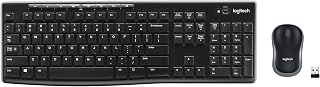
The Logitech MK270 is a wireless keyboard and mouse combo designed for users who prioritize reliability, comfort, and value. This full-size setup works perfectly for office workers, students, and home users who need a dependable input solution without breaking the bank.
The keyboard's full-size layout includes a standard number pad, F-keys, and arrow keys, making it ideal for spreadsheet work and data entry. Keys are low-profile and quiet, reducing noise in shared spaces while maintaining responsive feedback. The spill-resistant design is a practical feature that protects against accidental coffee spills and water damage, a common concern in busy work environments.
Build quality is solid with durable keys and sturdy tilt legs that offer adjustable height for ergonomic positioning. The included ambidextrous mouse provides smooth cursor control on most surfaces and suits both left and right-handed users equally well. The single USB Nano Receiver eliminates cable clutter and connects reliably up to 33 feet away, even in electronically congested spaces.
Battery life is exceptional: the keyboard lasts 36 months on one AA battery, and the mouse runs 12 months on two AAA batteries. On/off switches let you conserve power when equipment sits idle for extended periods. The combo includes pre-installed batteries and a user guide for immediate use.
The only notable limitations are plastic construction that may feel less premium than metal alternatives, potential wireless interference in some environments, and the mouse's compact size which might feel snug for users with larger hands. Overall, the MK270 delivers outstanding reliability and comfort at a price point that makes it an excellent choice for budget-conscious buyers and anyone seeking hassle-free wireless input.
Choose the Logitech MK270 if you work in an office or home setting where comfort and dependability matter more than premium aesthetics. This combo suits professionals who handle spreadsheets and data entry, students tackling coursework, and anyone frustrated by frequent battery replacements.
Skip this model if you need ergonomic features like a palm rest or mechanical switches, require a full-size mouse with advanced grip options, or work in RF-heavy environments where wireless range is critical. For added comfort features, consider the Logitech MK540 upgrade mentioned in the product details.
The included batteries and plug-and-play setup mean you can start working immediately after unboxing. Windows 10 or later compatibility ensures broad device support. The spill-resistant design makes this especially practical for kitchen desks or workspaces near beverages.

Pros
- Exceptional battery longevity reduces maintenance and cost over time
- Full-size keyboard layout with familiar QWERTY design and media key access
- Truly plug-and-play setup with no software installation required
- Quiet typing and clicking ideal for distraction-free work
- Affordable price point for a reliable, name-brand wireless combo
Cons
- Right-handed mouse design excludes left-handed users from comfortable use
- No keyboard backlighting limits usability in low-light environments
- Optical mouse may require mousepad for optimal tracking performance on certain surfaces
The Logitech MK345 is a wireless keyboard and mouse combo designed for everyday computing needs, whether at home, in an office, or at a co-working space. It's purpose-built for users who want a comfortable, reliable peripheral setup without the clutter of cables, at an accessible price point. The combo particularly appeals to professionals transitioning to remote work, students, and anyone seeking plug-and-play simplicity.
The standout feature is undoubtedly the battery longevity. With the keyboard lasting up to 3 years and the mouse up to 18 months on standard AA batteries, you'll spend far less time replacing power cells than with typical wireless combos. The 2.4 GHz wireless connection delivers a solid 10-meter range, providing flexibility to position your peripherals as needed. The quiet operation is genuinely appreciated in shared or quiet work settings, making this combo suitable for professional environments where noise matters.
Design and build quality are solid for the price tier. The full-size keyboard includes a palm rest and spill-resistant surface, protecting against minor accidents common in busy work areas. The right-handed mouse features a contoured ergonomic shape with optical tracking for smooth cursor movement and scrolling. Both devices feel durable without unnecessary bulk, and the single USB Nano Receiver eliminates port clutter compared to separate wireless adapters.
The primary drawback is the right-handed-only mouse design, which limits accessibility for left-handed users. Additionally, the lack of keyboard backlighting means this combo works best in well-lit environments. The optical mouse tracking, while reliable, may perform inconsistently on highly reflective or dark surfaces without a dedicated mousepad.
Verdict: The Logitech MK345 delivers genuine value for budget-conscious users who prioritize comfort, reliability, and hassle-free setup. Its exceptional battery life and quiet operation set it apart in the wireless combo category, making it a solid choice for offices, home offices, and general computing use.
Connectivity and Range: 2.4 GHz wireless with 10-meter operating range. Includes single USB-A Nano Receiver for plug-and-play compatibility.
Keyboard: Full-size 104-key QWERTY layout with palm rest, spill-resistant design, and integrated media keys. Battery life: up to 3 years on 2 AA batteries (included). Quiet key mechanism for distraction-free typing.
Mouse: Right-handed ergonomic design with optical tracking. Battery life: up to 18 months on 1 AA battery (included). Smooth scrolling and precise cursor control for navigation and productivity tasks.
Compatibility: Windows 10 and later, Chrome OS 134 and later, and macOS. Universal support across multiple operating systems ensures broad device compatibility.
Physical: Total weight 500g (41.6 ounces). Compact footprint suitable for various desk sizes and workspace configurations. Model: 920-006481. One-year limited hardware warranty included.

Pros
- Exceptional battery life eliminates frequent charging and replacements
- Quiet operation reduces distracting noise in shared or professional spaces
- Single receiver simplifies setup and saves USB ports on your computer
- Adjustable DPI settings provide precision control for creative and professional tasks
- Affordable price point for a full-featured, durable combo kit
Cons
- Wireless range limited to approximately 33 feet, requiring proximity to receiver
- Uses AAA batteries rather than rechargeable or built-in power, adding ongoing maintenance
- Keyboard shortcuts limited to 12 functions, which may not cover all user preferences
The HP 230 Wireless Keyboard and Mouse Combo is a practical, no-frills solution for anyone seeking to eliminate cable clutter from their desk. Whether you're working from a home office, managing a corporate workspace, or simply tired of tangled wires, this combo delivers the freedom of wireless connectivity at a price that won't strain your budget.
The keyboard features a full-sized layout with a numeric keypad, making it ideal for data entry, accounting tasks, and users who prefer a traditional typing experience. Its low-profile chiclet keys offer responsive feedback with minimal noise, while the durable mouse provides optical tracking and ambidextrous design. The adjustable DPI up to 1600 allows fine control for photo editing, design work, and precise pointer navigation without sacrificing speed.
Battery life stands out as a major strength. With up to 16 months of keyboard use and 12 months of mouse use from a single set of batteries, you'll enjoy extended periods without maintenance. This longevity makes the combo ideal for environments where frequent charging is impractical or unwanted interruptions are a concern.
The single 2.4GHz wireless receiver manages both devices, reducing USB port usage and simplifying your setup. Lag-free connectivity works within 33 feet, suitable for most home and office environments. Twelve dedicated keyboard shortcuts provide quick access to common functions, though power users may find this limiting compared to programmable macro options on premium keyboards.
For budget-conscious buyers and those prioritizing reliability and simplicity over advanced features, the HP 230 is a solid choice backed by HP's 2-year warranty and 24/7 customer support. It excels in quiet, distraction-free environments and delivers consistent performance without the complexity of gaming-focused or high-end office peripherals.
The HP 230 is best suited for home office workers, students, and corporate environments where affordability, reliability, and quiet operation matter most. If you work in shared spaces such as open offices or libraries, the low-noise design minimizes disruptions. Data entry professionals and accountants will appreciate the numeric keypad, while remote workers benefit from the exceptional battery life and clutter-free desk setup.
This combo is less ideal for gaming, graphic design professionals requiring advanced DPI controls, or users who need programmable macros and RGB customization. Those with wired keyboard preferences or requiring specialized ergonomic features should explore alternatives. However, for general computing, writing, web browsing, and office productivity, the HP 230 delivers reliable, quiet performance at an unbeatable price.
Connectivity: 2.4GHz wireless with single USB-A receiver, effective range up to 33 feet
Keyboard: Full-sized with numeric keypad, low-profile chiclet keys, 12 dedicated shortcuts
Mouse: Optical movement detection, ambidextrous design, adjustable DPI up to 1600
Battery: 4 AAA batteries included; up to 16 months keyboard life, 12 months mouse life
Compatibility: Windows 7 and later, Mac OS 10.12 Sierra and later
Warranty: HP 2-year limited warranty with 24/7 online support
Design: Black color, portable and soundless operation, weighs 2.88 ounces

Pros
- Exceptionally quiet operation ideal for shared office spaces and open-plan environments
- Thoughtful ergonomic design with curved keys and adjustable keyboard tilt reduces strain and improves comfort
- Space-efficient single receiver eliminates USB port clutter on laptops and desktops
- Ambidextrous mouse accommodates all users without compromise
- Solid 4.4-star rating backed by 275 customer reviews confirms real-world reliability
Cons
- Requires 2 AA batteries, adding ongoing maintenance and replacement costs
- Soft membrane keys may feel less responsive than mechanical alternatives for typing enthusiasts
- No customer reviews provided in data to assess real-world durability beyond star rating
The RECCAZR wireless keyboard and mouse combo is designed for office workers, remote professionals, and anyone seeking a quiet, comfortable typing experience without disturbing others. The package includes both devices, one shared nano USB receiver, and nine programmable shortcut keys for efficient workflow. It's an excellent choice for those transitioning to wireless setups without the complexity of managing multiple receivers.
The standout feature is the combination of silent operation and ergonomic design. The curved keyboard layout and soft membrane keys provide a quiet typing experience, while the symmetrical, contoured mouse delivers smooth tracking with three adjustable DPI settings. The adjustable tilt legs on the keyboard let you customize your typing angle for comfort, a feature often found only on premium models. The 33-foot wireless range ensures stable connectivity across typical office distances.
Build quality appears solid based on the 4.4-star customer rating. The keyboard features a scientific curved key design for natural finger positioning, and the mouse weighs just enough to feel responsive without fatigue. The avocado green color adds subtle character to your desk setup. The ambidextrous mouse design is genuinely useful for left-handed users, eliminating the need for a separate device.
The main drawback is battery dependency. Two AA batteries are required, meaning ongoing replacement costs and the possibility of unexpected power loss. Additionally, the soft membrane keys may feel less satisfying to typing purists accustomed to mechanical switches, though they excel for noise-conscious environments. Compatibility is broad across Windows, Mac, and Linux, but Mac users should verify driver support for full functionality.
For office and remote work environments where quiet operation and ergonomic comfort matter, the RECCAZR combo delivers real value. The single-receiver design, adjustable keyboard, and silent mouse make it a practical upgrade from budget alternatives, though battery maintenance is an ongoing consideration.
Connectivity: Wireless 2.4GHz RF with single nano USB receiver, up to 33 feet range
Keyboard: QWERTY layout, soft membrane keys, curved ergonomic design, adjustable tilt legs (front and back), 9 programmable shortcut keys
Mouse: Symmetrical ergonomic design, 3-level adjustable DPI (800/1200/1600), optical sensor, ambidextrous, quiet operation
Power: 2 AA batteries required
Compatibility: Windows 2000/XP/2003/Vista/Win7/8/10/11, Mac OS, Chrome OS, Linux. Works with laptops, desktops, and PCs
Color: Avocado Green
Warranty: 12-month worry-free warranty with after-sales support
Who Should Buy: Office workers, remote professionals, students, and anyone in shared workspaces who values quiet operation. Ideal for left-handed users due to the ambidextrous mouse design. Best suited for Windows and Linux users, though Mac compatibility is supported.
Key Decision Points: Consider this combo if you prioritize ergonomic comfort, silent typing, and space efficiency. The adjustable keyboard tilt and three DPI settings provide flexibility for different work styles. However, if you rely on mechanical switches for tactile feedback or prefer rechargeable peripherals over batteries, look elsewhere.
Setup and Use: Plug the nano receiver into any available USB port and power on both devices. No drivers or software installation needed. Store the receiver conveniently under the mouse for portability. Replace AA batteries as needed, typically every few months depending on usage.
Tips for Best Results: Position the USB receiver in a central location for optimal 33-foot range coverage. Adjust keyboard tilt legs based on your desk height and posture preferences. Experiment with the three DPI levels to find your optimal mouse sensitivity for typical tasks. Keep at least one spare pair of AA batteries on hand.

Pros
- Excellent value as a complete keyboard and mouse set with wireless convenience
- Full-size 104-key layout with responsive keys and customizable RGB lighting enhances productivity
- Rechargeable mouse with 3 DPI settings accommodates different work styles and preferences
- Stable 2.4G wireless connection provides reliable performance for office, school, and home use
- Cross-platform compatibility with Windows and Mac systems offers flexibility for diverse users
Cons
- Limited advanced gaming features despite RGB backlighting, more suited for productivity than competitive gaming
- Rechargeable battery duration depends on usage patterns and may require frequent charging with heavy use
- RGB customization limited to keyboard only, mouse features standard design without lighting effects
The MageGee Wireless Keyboard and Mouse Combo offers a practical solution for anyone seeking a cable-free desktop setup without breaking the bank. This combo is designed for office professionals, students, and casual computer users who prioritize productivity and clean workspace aesthetics over gaming performance or premium features.
The standout feature is the full 104-key layout paired with customizable RGB backlighting that allows users to adjust lighting modes, brightness, and speed through simple shortcut key combinations. The included rechargeable wireless mouse features 3 adjustable DPI levels (800/1200/1600) to accommodate different cursor sensitivity needs, while the 6-button design with forward/backward navigation buttons and optical tracking delivers smooth, responsive control for everyday tasks.
Build quality reflects the affordable price point, with a functional ergonomic design that supports both Windows and Mac systems. The 2.4G wireless connection provides stable performance for daily typing, email, spreadsheets, and web browsing, while multimedia shortcut functions simplify access to volume control, music, calculator, and homepage commands.
Potential drawbacks include limited gaming-specific features despite the RGB backlighting, and rechargeable battery life that may vary depending on usage intensity. The mouse lacks backlighting effects, keeping the design minimal and practical rather than visually coordinated with the keyboard.
For users seeking an affordable, reliable keyboard and mouse combo with solid construction and essential features, the MageGee delivers strong value. It excels as a productivity tool for office and school environments where wireless convenience and basic customization matter more than gaming performance.
Connectivity: 2.4G Wireless via USB receiver
Keyboard Layout: Full-size QWERTY with 104 keys, number pad, and function keys
Keyboard Features: RGB backlighting with customizable modes, brightness, and speed control. Win key lock and WASD/arrow key exchange functionality. Multimedia shortcuts for volume, music, email, calculator, and homepage.
Mouse Features: 6-button design with forward/backward navigation buttons. 3 adjustable DPI levels (800/1200/1600). Optical tracking, rubber scroll wheel, and auto-sleep mode for power conservation.
Power Source: Rechargeable batteries for both keyboard and mouse. 2 non-standard batteries required for keyboard, mouse features built-in rechargeable battery.
Compatibility: Windows and Mac operating systems
Color: Pink
Warranty: 1 year manufacturer warranty

Pros
- Excellent value at under $10 with professional-grade features and solid build quality
- Ultra-quiet performance ideal for open offices, libraries, and shared living spaces
- Remarkably long battery life eliminates constant battery swaps and downtime
- Ergonomic construction with adjustable keyboard tilt and contoured mouse reduces wrist strain during extended use
- Comprehensive OS support and equipment compatibility spans laptops, desktops, and multiple platforms
Cons
- Requires AAA and AA batteries separately, with potential for battery drainage if devices remain powered on
- USB receiver location in mouse battery compartment may be inconvenient for quick connection swaps
- Membrane keyboard may feel less responsive than mechanical alternatives for gaming or professional typing demands
This wireless keyboard and mouse combo from EDJO targets remote workers, office professionals, and students seeking a quiet, dependable input solution without breaking the bank. The avocado green color adds visual appeal to any desk setup while delivering practical functionality for daily computing tasks, from email and document editing to web browsing and multimedia use.
The standout feature is undoubtedly the 365-day battery life, which eliminates the frustration of frequent battery replacements and keeps your workspace cable-free for months. The 2.4GHz wireless connection maintains stable connectivity up to 33 feet, and the shared nano USB receiver uses a single port, preserving valuable USB connections on your device. The ergonomic design shines through adjustable keyboard tilt legs that promote proper wrist alignment, while the 12 multimedia shortcut keys streamline common tasks like volume control and email access.
Build quality feels solid for the price point, with soft membrane keys providing quiet, consistent typing feedback and a comfortable contoured mouse that suits extended use. The silent click technology and low-noise membrane keys make this combo exceptionally suitable for shared workspaces, libraries, or late-night work sessions where noise matters. The 1600 DPI optical mouse delivers smooth tracking precision adequate for everyday office work and general computing.
A few considerations worth noting: the keyboard and mouse each require different battery types (AAA and AA), and the USB receiver lives in the mouse battery compartment, requiring you to open it for initial setup or swaps. The membrane keyboard won't appeal to mechanical keyboard enthusiasts or power typists seeking maximum tactile feedback. Despite these minor points, the combo excels as an affordable, quiet, and battery-efficient choice for professional and home use.
Verdict: For under $10, this EDJO combo delivers exceptional value with genuine ergonomic benefits, whisper-quiet operation, and impressive battery longevity. Backed by a 24-month warranty and broad OS compatibility, it's a thoughtful upgrade for anyone seeking comfort and silence in their daily computing setup.
Connectivity: 2.4GHz wireless, USB nano receiver (shared), range up to 10 meters (33 feet)
Keyboard: Full-size QWERTY layout, membrane keys, 12 multimedia shortcut keys, adjustable tilt legs, requires one AAA battery
Mouse: Optical, contoured ergonomic shape, 1600 DPI, silent micro-motion technology, requires one AA battery
Battery Life: Up to 365 days, auto-sleep mode after 10 minutes of inactivity
Compatibility: Windows 7+, Mac OS, Chrome OS, Linux, compatible with laptops, desktops, PCs, tablets, Chromebooks, and MacBooks
Color: Avocado Green | Weight: 0.71 kg | Warranty: 24-month free service
Who Should Buy: This combo is perfect for remote workers, office professionals, students, and anyone working in quiet environments who values a distraction-free typing experience. It's also an excellent gift for desk upgrades, back-to-school setups, or anyone tired of tangled cables and frequent battery replacements.
Key Considerations: If you're a mechanical keyboard enthusiast or heavy gamer requiring ultra-responsive feedback, you may prefer a dedicated mechanical keyboard. For minimal desk clutter, the single shared receiver is a major advantage. If you frequently swap devices or work between multiple computers, consider the accessibility of the USB receiver in the mouse battery compartment.
Setup and Use: Setup requires no software installation. Simply insert batteries into both devices, open the mouse battery compartment to retrieve the USB receiver, plug it into your computer, and start using. The combo works immediately with Windows, Mac, Chrome, and Linux without drivers or configuration.
Long-term Value: With 365-day battery life per set and a 24-month warranty, this combo offers exceptional longevity and peace of mind. The auto-sleep feature after 10 minutes inactivity further extends battery performance. Budget-conscious buyers and environmentally conscious users alike will appreciate the minimal battery waste.

Pros
- Quiet typing and clicking experience ideal for distraction-sensitive environments like libraries and offices
- Full-size layout with ergonomic tilt legs supports all-day typing comfort and wrist health
- Adjustable DPI mouse offers precision control for varied tasks from detailed work to casual browsing
- Plug-and-play setup requires no drivers or software installation, immediate usability out of the box
- Long-range 33-foot wireless connection ensures reliable performance across typical workspace distances
Cons
- Membrane keyboard may lack the responsiveness and durability some users prefer compared to mechanical switches
- Battery life varies based on usage patterns, requiring monitoring to avoid unexpected device shutdown during work
- Purple color option limits aesthetic choices for users seeking neutral office-appropriate finishes
The RECCAZR wireless keyboard and mouse combo is a practical solution for professionals and home users seeking a quiet, functional input setup. With its full-size layout and ergonomic design, this combo caters to anyone spending extended hours at a desk while valuing noise reduction in shared or noise-sensitive environments.
The standout features include soft membrane keys that eliminate the clicking sound common to traditional keyboards, paired with an equally quiet optical mouse. The adjustable tilt legs on the keyboard promote proper wrist alignment during long work sessions, and the mouse's 3-level DPI settings accommodate different sensitivity preferences. The shared nano USB receiver keeps your setup clean and port-efficient, while the 33-foot range ensures reliable connectivity across any typical office or home workspace.
Build quality appears solid for the price point. The lightweight design reduces fatigue during transport, and the spillproof construction adds peace of mind. The auto-sleep mode intelligently manages battery drain, extending the lifespan of the included AAA batteries. Plug-and-play compatibility across Windows, Mac, Chrome OS, and Linux makes this setup genuinely versatile for mixed-device households.
The main drawback is the membrane keyboard construction, which prioritizes quiet operation and comfort over the tactile feedback and durability of mechanical alternatives. Additionally, battery life depends heavily on individual usage patterns, so users should establish a routine for battery checks. The purple color, while distinctive, may not suit everyone's desktop aesthetic preferences.
Overall, the RECCAZR combo delivers reliable, distraction-free performance at an accessible price. It excels for office workers, students, and anyone who values quiet operation without sacrificing full-size convenience and ergonomic comfort. The one-year warranty and responsive customer support provide additional confidence in this purchase.
Connectivity: 2.4G wireless USB nano receiver (shared between keyboard and mouse)
Keyboard: Full-size 104-key QWERTY layout with numeric keypad and 12 multimedia shortcut keys. Membrane construction with adjustable tilt legs for ergonomic support.
Mouse: Optical with 3 adjustable DPI levels (800, 1200, 1600). Ambidextrous, lightweight design with contoured shape.
Power: 2 AAA batteries required (not included). Auto-sleep mode for extended battery life.
Range: Up to 33 feet (10 meters) wireless connectivity.
Compatibility: Windows 2000 and later, Mac OS X 10.0 and later, Chrome OS, Linux. Works with desktops, laptops, and PCs.
Special Features: Silent operation, spillproof construction, lightweight design.
Weight: 0.62 kg. Warranty: 1-year manufacturer warranty with 12-month after-sales support.
Best For: This combo suits office workers, remote employees, students, and home users who share spaces with others or prefer a distraction-free environment. It's ideal if you value comfort during extended typing sessions and want a straightforward, reliable setup without complex software requirements.
Consider This If: You work in quiet environments (offices, libraries, shared apartments) where keyboard and mouse noise matters. You spend 6+ hours daily typing and benefit from ergonomic design. You need broad OS compatibility across multiple devices and operating systems.
Skip This If: You demand mechanical keyboard switches for their tactile feedback and durability. You need gaming-grade performance with ultrafast response times. You prefer neutral colors like black or gray over distinctive finishes.
Setup Tips: Store the nano USB receiver in the designated slot under the mouse when traveling. Keep AAA batteries on hand since replacements aren't included. Test DPI settings in your mouse software to find your preferred sensitivity before extended use.

Pros
- Exceptional value at under $20 for a full-featured wireless combo with proven reliability
- Genuinely quiet operation makes it perfect for shared offices, open workspaces, and early morning work sessions
- Easy plug-and-play setup requires no software installation or technical knowledge
- Lightweight and portable design works great across multiple devices without losing compatibility
- Strong customer satisfaction with consistently high ratings praising comfort and performance
Cons
- Membrane keyboard may not appeal to users who prefer mechanical switches for tactile feedback
- Slight wireless lag typical of 2.4G connections, though most users report it does not impact daily work
- Battery life varies by usage patterns and may require monitoring to avoid unexpected power loss
The RECCAZR wireless keyboard and mouse combo is a practical solution for professionals and home workers seeking a quiet, reliable input setup. Designed specifically for office environments and home offices where noise matters, this combo delivers professional performance without the distracting clatter of traditional keyboards. Whether you are juggling back-to-back video calls, working in a shared space, or simply prefer a peaceful work environment, this combo addresses a real productivity need.
What sets this combo apart is the engineering focus on silence and comfort. The membrane keyboard features soft keys that produce minimal sound, while the optical mouse is equally quiet. The adjustable tilt legs go beyond aesthetics, actually reducing wrist strain during long typing sessions. The full-size layout with numeric keypad and multimedia shortcuts means you get no compromises on functionality despite the compact packaging. Performance is solid, with a stable 10-meter wireless range and three adjustable DPI levels that adapt to different workflows.
The build quality reflects the price point without feeling cheap. The lightweight construction makes it genuinely portable across desks and devices, while the avocado green color brings a subtle aesthetic appeal to modern workspaces. The single USB nano receiver is elegantly designed, fitting discreetly under the mouse when not in use. Customers consistently praise the smooth key response and responsive mouse tracking, with many reporting months of use without battery changes.
The main trade-off is the membrane switch design rather than mechanical switches, which some power users prefer for tactile feedback. Additionally, while wireless lag is minimal for daily work, competitive gamers may notice the slight delay inherent to 2.4G connections. Battery life depends on usage intensity, though the auto-sleep feature helps extend time between replacements.
Overall, this is a smart purchase for anyone prioritizing a quiet, comfortable, and reliable wireless setup. The combination of genuine silence, ergonomic design, full functionality, and affordable pricing makes it one of the better values in wireless combos for office and home use. Backed by a one-year warranty and responsive customer service, it delivers professional-grade reliability without breaking the budget.
This combo is ideal for remote workers, office professionals, and students who spend hours typing in shared or noise-sensitive environments. If you regularly attend video calls, work in open offices, or share your workspace with others, the silent operation is genuinely valuable. Home office workers who prioritize peace and quiet will also appreciate the noise reduction.
It works well for anyone switching from wired to wireless and wanting an all-in-one solution without setup complexity. The compatibility across Windows, Mac, Chrome OS, and Linux means it suits virtually any computer setup. Business professionals, writers, data entry specialists, and general office workers will find the ergonomic design and full keyboard layout serve them well.
This is less ideal for users who specifically want mechanical keyboard switches, professional esports competitors, or those needing ultra-high precision gaming mice. However, for mainstream productivity and comfort-focused professionals, this combo delivers exactly what matters most.
Setup is genuinely straightforward. Simply insert two AA batteries into each device, connect the nano USB receiver to any available port, and both devices pair automatically. No software installation, driver downloads, or configuration needed. The keyboard is ready to type on and the mouse is ready to click within seconds.
Compatibility is comprehensive across Windows 2000 through Windows 11, Mac OS 12 Monterey and later, Chrome OS, and Linux systems. Works with desktops, laptops, MacBook Air, iMac, Chromebooks, and even TVs or tablets supporting USB input. The single receiver eliminates port clutter, and both devices can be used separately if needed, giving you flexibility in how you deploy them.
The included warranty provides one year of coverage with responsive customer support committed to solving any issues. The battery compartments are easily accessible, and the auto-sleep mode intelligently extends operating time between battery changes.

Pros
- Affordable all-in-one solution for wireless peripheral needs
- Silent operation ideal for shared workspaces and quiet offices
- Ergonomic features reduce wrist strain during extended typing sessions
- Multi-function keys streamline workflow and boost productivity
- Long wireless range and reliable 2.4GHz connection without lag
Cons
- Keyboard shortcuts not fully compatible with Mac OS systems
- USB receiver location inside mouse battery compartment may be inconvenient for initial setup
- Limited DPI range may not satisfy competitive gamers or professionals needing ultra-high precision
The EDJO wireless keyboard and mouse combo is a budget-friendly peripheral set designed for professionals, students, and office workers seeking a reliable full-size typing solution. At this price point, it competes well against mid-range combos from established brands while offering practical features that boost daily productivity.
The standout feature is the silent typing mechanism, making this combo ideal for shared workspaces, libraries, or open office environments where noise matters. The full 119-key layout includes 24 multi-function shortcuts that streamline common tasks like calculator, screen lock, and search functions. The 3-level adjustable DPI mouse accommodates different working styles without requiring expensive replacements.
Build quality feels solid for the price, with adjustable tilt legs on the keyboard promoting ergonomic positioning during long work sessions. The curved mouse design supports comfortable all-day use, and the auto-sleep feature intelligently extends battery life by putting idle peripherals into low-power mode. The 2.4GHz wireless connection proved reliable across distances up to 33 feet with no reported lag issues.
The main limitation is keyboard shortcut incompatibility with Mac OS, which may frustrate Apple users. Additionally, the USB receiver storage location inside the mouse battery compartment could be confusing during initial setup. These quirks are minor trade-offs given the affordable price tag.
The EDJO combo deserves consideration if you need a practical, quiet-typing wireless solution for everyday office and computing tasks. It offers excellent value for budget-conscious buyers and anyone prioritizing workplace noise reduction over gaming performance or advanced features.
Connectivity: 2.4GHz wireless USB receiver, 33-foot range, plug-and-play setup with no driver installation required.
Keyboard: Full-size 119-key QWERTY layout, 12 multimedia keys, 12 independent shortcut keys, adjustable tilt feet for ergonomic positioning, silent typing mechanism.
Mouse: Ergonomic curved design, 3-level adjustable DPI (800/1200/1600), silent clicking, 15-minute auto-sleep mode.
Compatibility: Windows (10 and later), Mac OS (10.12 Sierra and later), Linux (Ubuntu 22.04 and later), Chrome OS. Works with laptops, desktop computers, Chromebooks, and MacBooks. Note: Mac keyboard shortcuts have limited compatibility.
Power: Battery-powered with 6-minute keyboard auto-sleep and 15-minute mouse auto-sleep. Warranty: 12 months replacement coverage.
Ideal For: Office workers, students, telecommuters, and professionals working in shared spaces who value quiet operation and ergonomic comfort at an affordable price.
Best Use Cases: Replacing worn peripherals on a budget, equipping multiple workstations, setting up home office spaces, and reducing noise in open office environments.
May Disappoint: Competitive gamers requiring high DPI sensitivity, Mac power users who rely on keyboard shortcuts, and those needing premium build quality or advanced customization options.
What to Look for When Shopping Keyboard and Mouse Deals
A sale price is only a good deal if the product actually fits your needs. These are the four factors that matter most when narrowing down your choice during Prime Big Deal Days.
Wireless Connection Stability
Every combo on this list uses 2.4GHz wireless with a single USB nano receiver, which is the right call for everyday use. This technology delivers a lag-free connection up to 33 feet and requires no drivers or pairing steps beyond plugging in the receiver.
Look for a shared receiver design so you only occupy one USB port. Options like the OMOTON Purple Wireless Keyboard and Mouse Combo and the RECCAZR combos all store the receiver inside the mouse battery compartment, so you won’t lose it between uses.
Keyboard Layout and Comfort Features
A full-size layout with a numeric keypad is the most versatile choice for office work, data entry, and general computing. Most of the combos here offer 104 or more keys, multimedia shortcut keys, and adjustable tilt legs so you can dial in the typing angle that feels right for your wrists.
If you share a space or work late, silent keys make a real difference. The same logic that applies to quiet CPU coolers applies here: less noise means less distraction for everyone around you. RECCAZR’s ergonomic curved design and EDJO’s soft membrane keys both deliver noticeably quieter strokes than standard membrane boards.
Mouse DPI and Ergonomics
Three adjustable DPI levels at 800, 1200, and 1600 is a standard and practical range for office and home use. You can slow the cursor down for precise document editing or speed it up for quick navigation across a wide monitor. The HP 230 Wireless Mouse and Keyboard Combo goes a step further with 1600 DPI precision, which is useful for photo work or spreadsheet navigation.
Symmetrical mouse designs like the one on the RECCAZR ergonomic combo work equally well for left- and right-handed users. If you have a preference or a specific grip style, check the product descriptions before buying since some options, like the Logitech MK345, are shaped for right-handed use only.
Battery Life and Power Management
Long battery life is one of the biggest practical advantages of a wireless combo. The Logitech MK270 Full Size Wireless Keyboard sets the bar with up to 36 months on the keyboard and 12 months on the mouse. EDJO’s combo claims up to 365 days per charge cycle with smart auto-sleep after just 10 minutes of inactivity.
Auto-sleep mode is a feature worth paying attention to. All the combos here include it, but the sleep trigger time varies. Shorter inactivity windows mean longer battery life overall, which translates to fewer battery swaps over the course of a year. If you are building out a complete desk setup, pairing a long-battery combo with a fast storage solution like one of the best portable SSDs for gaming keeps your workspace running efficiently.
Final Thoughts
Prime Big Deal Days is a genuinely good time to upgrade your keyboard and mouse setup, and these ten combos cover the full range of what most people actually need. For a budget-friendly, no-fuss daily driver with a fun aesthetic, the Wireless Keyboard and Mouse Combo Silent from RECCAZR is hard to beat. If you want a more established brand with proven long-term battery performance and a massive track record of satisfied users, the Logitech MK345 Full Size Wireless Keyboard remains one of the most dependable options in this category.
Frequently Asked Questions
Are wireless keyboard and mouse combos reliable enough for daily office use?
Yes, modern 2.4GHz wireless combos are stable and responsive for everyday tasks like typing, spreadsheets, email, and web browsing. The technology has matured significantly, and plug-and-play designs mean there is no complicated setup involved. All ten combos reviewed here operate reliably within a 33-foot range.
Do these keyboard and mouse combos work with Mac and Chromebook?
Most of the combos on this list support Windows, Mac OS, Chrome OS, and Linux out of the box. The MAGEGEE Wireless Keyboard and Mouse Combo and EDJO combos explicitly confirm Mac and Chrome OS compatibility. One thing to note: some shortcut keys may not function identically on Mac as they do on Windows, so verify this in the product specs if Mac compatibility is a priority for you.
What is the best wireless keyboard and mouse combo for quiet typing in 2026?
If silence is your top priority, the RECCAZR combos and the EDJO options are your best bets. They use soft membrane keys and silent mouse micro-switches that produce minimal sound during both typing and clicking. This makes them ideal for shared offices, libraries, or late-night work sessions. You can browse our quiet CPU cooler roundup for more ideas on building a low-noise workstation overall.
Is it worth buying a keyboard and mouse combo during Prime Big Deal Days versus waiting?
Prime Big Deal Days typically offers some of the steepest discounts of the year on peripherals, often comparable to or better than Black Friday deals on the same items. If you have been putting off an upgrade, this event is a practical time to act since the deals on wireless combos tend to be genuine reductions rather than inflated pre-sale markups. Stocking up on a backup combo while prices are low is also a smart move for home offices and small businesses.




Write Your Review
No reviews yet. Be the first to share your experience!