

Whether you are heading back to school, setting up a home office, or simply need a reliable machine for browsing and streaming, finding a great laptop without breaking the bank is absolutely possible in 2026. The challenge is sorting through the noise and identifying which machines deliver real value versus which ones cut corners where it matters most.
This guide covers ten of the best budget laptops available right now, spanning a range of screen sizes, processors, and use cases. If you are also building out a full desk setup, our best silent mechanical keyboards guide is worth a look for a comfortable typing experience to pair with your new machine.
Quick answer
This guide compares 10 picks, with BLUEING 2026 14" FHD Laptop, Pentium Gold 6500Y, 8GB ranked first. HP Essential 14 Laptop Intel N150 128GB Windows 11 holds the highest customer rating among them. HP Chromebook 14 Intel Celeron, 4GB RAM, 64GB Storage has the most customer reviews.

Pros
- Exceptional value for the price with solid everyday performance suitable for students and light business use
- Bright, clear 1080p display with 100% sRGB color gamut and thin bezels for immersive viewing
- Lightweight construction and thin profile make it highly portable for travel and commuting
- Responsive keyboard and precise touchpad create a comfortable typing and navigation experience
- Quick setup and reliable performance based on consistent customer satisfaction ratings
Cons
- Limited processing power compared to mid-range laptops, not suitable for heavy video editing, gaming, or complex software development
- 128GB base storage fills quickly with modern applications and media files, though expandable via microSD
- 5-hour battery life requires charging during full workdays without power access
The BLUEING 2026 is a compact, budget-friendly laptop targeting students, remote workers, and professionals who prioritize portability and everyday productivity over raw processing power. With its Pentium Gold processor, 8GB RAM, and 128GB SSD, this 14-inch machine excels at web browsing, email, document editing, and streaming content without the weight of traditional laptops.
Performance is smooth and responsive for typical workloads. Users report quick boot times and effortless multitasking for daily applications. The 1920x1080 IPS display delivers clear, vibrant visuals with excellent color accuracy and a 93% screen-to-body ratio that maximizes usable screen space. The ergonomic keyboard and precise touchpad make extended work sessions comfortable, while the thin 0.8-inch profile and lightweight construction make this laptop genuinely portable without sacrificing build quality.
Connectivity options are comprehensive, featuring USB-C full-function charging, dual USB 3.2 ports, HDMI output, microSD expansion, and Bluetooth 5.2. The manual camera privacy slider adds practical security for video conferencing. Battery life reaches approximately 5 hours under typical use, sufficient for most school or office environments with periodic charging access.
The main limitations are processing power for demanding applications and the base 128GB storage, which fills quickly with modern software and media. The 5-hour battery life requires cable access during extended use away from power sources. However, these trade-offs are reasonable at this price point and use case.
The BLUEING 2026 delivers excellent value for students, light business users, and anyone needing a reliable, portable second machine. It excels at everyday computing tasks and proves that capable laptops don't require premium pricing. Recommended for practical users who prioritize value and portability over performance.
Processor: Intel Pentium Gold 6500Y, 4-Core, up to 3.4 GHz, 4MB Smart Cache
Memory: 8GB RAM SODIMM (upgradeable)
Storage: 128GB M.2 2280 SSD, expandable to 512GB via microSD card
Display: 14-inch FHD IPS LCD, 1920x1080 resolution, 100% sRGB color gamut, 16:9 aspect ratio, 93% screen-to-body ratio
Graphics: Intel Integrated Graphics (Pentium Gold processor integrated)
Battery: 38Wh (5000mAH) Lithium-Polymer, up to 5 hours battery life
Connectivity: Wi-Fi 5 (802.11a/b/g/n/ac), Bluetooth 5.2, USB-C (full-function), 2x USB 3.2, 1x USB 2.0, 1x HDMI, 1x microSD card slot, 3.5mm audio jack
Camera: HD front-facing with manual privacy slider
Audio: HD audio with headphone output
Operating System: Windows 11
Dimensions: 12.7"L x 8.3"W x 0.8"Th
Color: Space Gray
Warranty: 1-Year Manufacturer Protection, 30-Day Hassle-Free Support
Best For: Students, remote workers, light business users, and anyone seeking an affordable, portable laptop for web browsing, email, document editing, and casual media consumption. Also ideal as a secondary machine for travel or dedicated tasks.
Upgrade Considerations: If you need high-performance processing for video editing, 3D rendering, programming, or gaming, consider laptops with Intel Core or AMD Ryzen processors instead. If 128GB storage is insufficient, purchase a microSD card for expansion or choose a model with larger SSD capacity.
Value Analysis: At under $260, the BLUEING 2026 offers exceptional value compared to similarly-equipped competitors. The FHD IPS display, solid build quality, and comprehensive connectivity justify the price point for everyday computing tasks. The thin, lightweight design and battery life make it legitimately portable without premium cost.
Setup and Support: Initial setup is straightforward and quick. The 1-Year Manufacturer Protection Plan and 30-Day Hassle-Free Support provide peace of mind. USB-C charging and fast boot times minimize setup friction and get you productive immediately.

Pros
- Lightweight at 3.24 lbs with up to 11-hour battery life for all-day use
- 128GB SSD delivers fast boot and app launch times
- Anti-glare 1080p display reduces eye strain during extended sessions
- Versatile port selection including USB-C, USB-A, HDMI, and microSD
Cons
- 4GB RAM limits comfortable multitasking with multiple tabs or apps open
- 128GB storage can feel restrictive for users with photos, videos, or large app installs
The HP 14 makes a practical case for itself in the budget laptop category by keeping things simple and reliable. At 3.24 pounds it is one of the lighter options you will find at this price, and the 14-inch 1080p anti-glare display makes daily document work and web browsing comfortable without eye strain. The Intel N150 processor is efficient for the basics, and the 128GB SSD means boot times and app launches stay snappy even if the overall horsepower is modest. Connectivity is well thought out for a budget machine, with USB-C, USB-A, HDMI, and a microSD card slot covering most peripheral and storage expansion needs. Up to 11-hour battery life is a real-world advantage for students or professionals who move between locations. The Willow Green color is a welcome break from the sea of silver and black budget laptops. The honest constraint here is the 4GB DDR5 RAM, which will show its limits if you stack many browser tabs or run several apps side by side. That and the 128GB drive are the tradeoffs that keep this in budget territory.
Processor: Intel N150, 4-core, up to 4.6 GHz
Memory: 4GB DDR5 SDRAM
Storage: 128GB SSD (PCIe x4)
Display: 14-inch HD (1920x1080), anti-glare, 250 nits, LCD
Graphics: Intel Integrated Graphics
Battery: Up to 11 hours
Weight: 3.24 lbs
Dimensions: 12.76in (L) x 8.86in (W) x 0.71in (H)
Operating System: Windows 11
Connectivity: Wi-Fi 802.11 a/b/g/n/ac, Bluetooth, 1x USB-C, 2x USB-A, 1x HDMI, 1x headphone/mic combo jack
Camera: 720p HD webcam
Audio: Dual speakers with HD audio
Color: Willow Green
Included: One year Microsoft 365
Best for students, light business users, and casual users who prioritize portability and battery life over raw performance. The anti-glare display and all-day battery suit classroom or office use. Skip it if you regularly juggle many open applications, work with large files, or need anything beyond basic productivity and browsing, as 4GB RAM will become a bottleneck.

Pros
- Includes Microsoft 365 subscription, adding tangible value for everyday users
- Weighs just 3.24 pounds with up to 11 hours of battery life
- Wi-Fi 6 and a versatile port set including USB-C, HDMI, and SD card reader
- Full-size keyboard with numeric keypad suits extended typing and data entry
Cons
- 4GB RAM and 128GB storage are tight for multitasking or storing large files
- Windows 11 S mode limits app installs to the Microsoft Store
The HP Essential Laptop 2026 targets the most cost-conscious end of the budget market and makes a reasonable case for itself among users with modest daily needs. Running Windows 11 S on an Intel N150 processor with Turbo Boost, 4GB RAM, and 128GB storage, it handles web browsing, email, document editing, and video streaming without noticeable lag under typical workloads. One practical perk is the inclusion of Microsoft 365, which removes a recurring cost many budget buyers would otherwise face. The 14-inch HD display has a 250-nit brightness level, anti-glare coating, and a 79% screen-to-body ratio for a clean look. At 3.24 pounds and under an inch thick, it fits easily into a bag and holds up through a full day on a single charge, with roughly 11 hours during video playback. Wi-Fi 6, Bluetooth 5.4, a USB-C port with DisplayPort, dual USB-A, HDMI, and an SD card slot provide solid connectivity for the tier. The full-size keyboard and numeric keypad add comfort for longer typing sessions. It is a no-frills machine, but it covers the basics reliably at the low end of the budget range.
Processor: Intel N150, up to 3.6 GHz Turbo Boost, 6 MB L3 cache, 4 cores, 4 threads
Memory: 4GB LPDDR5 RAM
Storage: 128GB UFS storage
Display: 14-inch HD (1366 x 768) anti-glare, 250-nit brightness, 62.5% sRGB coverage, 79% screen-to-body ratio
Graphics: Integrated graphics
Operating System: Windows 11 S
Connectivity: Wi-Fi 6 (2x2), Bluetooth 5.4
Ports: 1 USB Type-C 10Gbps with DisplayPort 1.2, 2 USB Type-A 5Gbps, 1 HDMI 1.4b, 1 headphone/microphone combo jack, 1 multi-format SD card reader
Camera: HP True Vision 720p HD with noise reduction
Audio: Dual speakers, full-size keyboard with numeric keypad, HP Imagepad
Battery: Up to 11 hours video playback, 7.5 hours mixed usage, 7.5 hours wireless streaming
Design: Weighs 3.24 lb, measures 12.76" x 8.86" x 0.71", Willow Green top cover with matte finish, natural silver keyboard deck
Included Software: 1-year Microsoft 365 Personal subscription
Students, light home office users, and first-time laptop buyers who need something dependable for basic daily tasks will find this fits the bill. The included Microsoft 365 adds real value for school or home use. Skip it if you multitask heavily, run anything beyond standard web apps, or need more than 4GB RAM to keep things running smoothly.

Pros
- Excellent value at under $300 with solid specs for productivity tasks
- Fast SSD storage and 8GB RAM enable smooth multitasking between apps and browser tabs
- Lightweight and quiet operation makes it ideal for shared spaces like libraries and offices
- Good battery life and efficient low-power processor minimize heat and noise
- Wide array of ports reduces need for adapters and external docking solutions
Cons
- Pentium Gold processor cannot handle gaming, video editing, or intensive creative software
- 5-6 hour battery life is adequate but not exceptional for all-day mobile use
- Limited upgradability once purchased, with fixed RAM and integrated graphics
The KINOBUC 15.6-inch laptop is a practical, budget-conscious option designed primarily for students, remote workers, and anyone needing reliable everyday computing. With its Pentium Gold 6500Y processor, 8GB RAM, and 256GB SSD, this machine handles web browsing, email, document editing, and video conferencing without breaking a sweat. It is not built for gaming or professional video editing, but rather excels at the productivity tasks most people actually use daily.
Performance and real-world usage are where this laptop shines for its price point. The 256GB SSD ensures quick system boot times and snappy application launches, while 8GB of RAM provides enough headroom to juggle multiple browser tabs, spreadsheets, and office applications simultaneously. Battery life of approximately 5-6 hours during typical office or study use is respectable for a 15.6-inch model, and the efficient 7W processor keeps thermal output and noise levels minimal. The 1920x1080 FHD IPS display delivers crisp text and decent color accuracy, complemented by a four-speaker setup that makes video calls and streaming more enjoyable.
Design and connectivity are thoughtfully executed for a budget device. The lightweight chassis makes this laptop portable enough for moving between home, school, and office, while the quiet thermal design means you won't hear fan noise during class or in quiet spaces. Dual USB-C ports, multiple USB-A connectors, HDMI output, 3.5mm audio, and TF card support give you flexibility to add external displays, storage, and peripherals without dongle clutter. The physical privacy shutter on the webcam is a practical security feature for online classes.
The main drawback is the processor ceiling. If you need to run demanding software, edit video, or play modern games, this laptop will disappoint. The Pentium Gold processor simply cannot keep pace with those tasks, and there is no discrete GPU to help. Additionally, while 5-6 hours is decent, it may leave you scrambling for a charger during longer school or work days without access to an outlet.
Verdict: The KINOBUC 15.6-inch laptop is a solid, honest entry-level machine that delivers what it promises at a fair price. It excels as a student laptop, office workhorse, or secondary device for everyday tasks. If your needs are confined to productivity and light entertainment, you will find this to be reliable and practical. However, if you need performance headroom for creative work or gaming, look elsewhere.
Display: 15.6 inches, 1920x1080 FHD IPS, anti-glare coating
Processor: Intel Pentium Gold 6500Y, 4 threads, up to 3.4GHz
Memory: 8GB RAM
Storage: 256GB SSD, expandable via TF card
Graphics: Integrated
Battery: Approximately 5-6 hours typical office use
Ports: 2x USB-C, Multiple USB-A, HDMI, 3.5mm audio jack, TF card slot
Audio: Four-speaker system, HD audio
Webcam: Built-in with physical privacy shutter
Security: Kensington lock slot
Operating System: Windows
Color: Gray
Weight: Lightweight design
Keyboard: Numeric keypad included
Warranty: 1-year with dedicated customer support
Is this laptop right for you? This KINOBUC model is ideal if you are a student, work from home, or need a secondary laptop for travel and basic computing. It handles email, web browsing, Microsoft Office, Google Docs, video calls, and streaming without issues. It is not suitable if you do photo or video editing, coding with heavy IDEs, 3D modeling, gaming, or any resource-intensive work.
Best use cases: Online classes and video conferencing, writing essays and reports, spreadsheet work, general web browsing, streaming entertainment, lightweight creative tasks like note-taking and basic graphic design (not professional editing), remote work for office-based jobs.
Alternative considerations: If you need better battery life, look for models with larger batteries or more efficient processors. If you occasionally game or edit video, expect to spend significantly more for a machine with a discrete GPU and more powerful CPU. If you prefer macOS or premium build quality, consider entry-level MacBook Air or higher-end Windows ultrabooks at higher price points.

Pros
- Lightweight and thin design makes it easy to carry between classes, work, and home
- Wi-Fi 6 delivers faster wireless speeds than standard Wi-Fi, especially in crowded networks
- MIL-STD-810H tested for durability against everyday drops, bumps, and travel stress
- Excellent value with bundled Microsoft 365 and cloud storage included for one year
- Full HD display with anti-glare coating reduces eye fatigue during extended use
Cons
- 4GB RAM and 128GB storage are entry-level specs that may require cloud storage for large files
- Intel N100 processor handles everyday tasks well but isn't designed for gaming or heavy video editing
- Windows 11 S mode limits software installation to Microsoft Store apps, though users can switch out of S mode
The Lenovo IdeaPad Slim 3i is a budget-friendly 15.6-inch laptop designed specifically for students, families, and first-time computer buyers who need dependable everyday computing. With its slim 0.70-inch profile and 3.42 lb weight, it's built for portability without sacrificing screen real estate or essential features. This laptop tackles web browsing, document editing, video streaming, and online classes with ease.
The standout features include a responsive Intel N100 quad-core processor running up to 3.4GHz, Wi-Fi 6 for faster wireless connectivity, and a Full HD anti-glare display with TUV Rheinland Low Blue Light certification that protects your eyes during extended work sessions. The 128GB UFS 3.1 storage is significantly faster than traditional eMMC, providing snappier system performance. Built-in Microsoft 365 Personal gives you professional productivity tools and 1TB OneDrive cloud storage right out of the box, eliminating the need for separate purchases.
The design emphasizes durability and practical connectivity. MIL-STD-810H military-grade testing across 20 test items ensures this laptop withstands daily wear and travel. The port selection is comprehensive for everyday use, including USB-C with power delivery, HDMI, SD card reader for photo transfers, and a privacy-focused HD camera with physical shutter. Stereo speakers deliver clear audio for video calls and entertainment.
The main limitation is the entry-level 4GB RAM and 128GB storage, which work fine for essential tasks but may require regular cloud backup for large files or photo collections. The Windows 11 S mode restricts software to Microsoft Store apps, though you can switch out of S mode if needed. The Intel N100 processor isn't designed for gaming or heavy video editing, but it handles productivity and multimedia consumption smoothly.
This laptop delivers solid value for students, remote workers, and budget-conscious buyers who prioritize portability, reliability, and included software over raw processing power. The combination of lightweight design, durable construction, modern connectivity, and bundled Microsoft 365 makes it an excellent choice for everyday computing needs.
This laptop is ideal for high school and college students managing assignments, research, and online classes. Its lightweight design makes it easy to carry to libraries and coffee shops, while the Full HD display and comfortable keyboard provide a solid learning environment. Remote workers handling email, web applications, and video conferencing will find the Wi-Fi 6, privacy shutter camera, and clear audio features particularly valuable.
Families looking for an affordable shared computer will appreciate the reliable performance for streaming, video chatting, and household tasks. First-time computer buyers and seniors seeking simple, secure computing benefit from the user-friendly Windows 11 interface and enhanced security features. The included Microsoft 365 subscription adds immediate value without additional software purchases.
Processor: Intel N100 quad-core (4C/4T), up to 3.4GHz, 6MB Intel Smart Cache
Memory: 4GB LPDDR5-4800 RAM
Storage: 128GB UFS 3.1 (faster than eMMC)
Display: 15.6 inch Full HD (1920x1080), 250 nits, anti-glare, TUV Low Blue Light certified
Graphics: Integrated Intel UHD Graphics
Connectivity: Wi-Fi 6 (802.11ax 2x2), Bluetooth 5.2
Ports: 2x USB-A 3.2 Gen 1, 1x USB-C 3.2 Gen 1 with Power Delivery and DisplayPort 1.2, HDMI 1.4, SD card reader, 3.5mm audio jack
Camera: HD 720p with privacy shutter
Security: Firmware TPM 2.0, Windows 11 S mode
Audio: Stereo speakers (1.5W x2) with dual array microphones
Dimensions: 14.15 x 9.25 x 0.70 inches
Weight: 3.42 lbs (1.55 kg)
Battery: 65W USB-C charging
Durability: MIL-STD-810H tested (20 items)
Software: Windows 11 Home in S mode, Microsoft 365 Personal (1 year included)
Color: Arctic Grey

Pros
- 17.3-inch FHD IPS display with anti-glare coating is excellent for the price
- Battery life reaches over 14 hours with 45W fast charging support
- Fast 512GB PCIe NVMe SSD keeps Windows 11 responsive
- Comprehensive ports including dual USB-C with Power Delivery and HDMI 2.1
Cons
- No keyboard backlighting limits usability in low-light settings
- Ryzen 3 and integrated Radeon 610M are not suited for gaming or demanding workloads
For budget shoppers who want a big-screen experience without spending a lot, the HP OmniBook 3 17.3 delivers genuine value. The 17.3-inch FHD IPS panel runs at 1920x1080 with 300 nits brightness, 178-degree viewing angles, and anti-glare coating, making it comfortable for long reading or streaming sessions at home. Everyday tasks like web browsing, document editing, and video calls run smoothly on the AMD Ryzen 3 processor paired with 8GB LPDDR5-5500 RAM and a 512GB PCIe NVMe SSD that keeps boot times short. Battery life is a highlight for a budget laptop of this size, stretching to over 14 hours, and the 45W fast charger hits 50% in 45 minutes. At just 4.4 pounds, it is more portable than most 17-inch machines. Connectivity covers Wi-Fi 6, Bluetooth 5.4, two USB-C ports with Power Delivery and DisplayPort, dual USB-A, and HDMI 2.1. The AI noise-reduction camera handles video calls well even in noisy environments. For anyone who spends most of their time on common daily tasks and wants a large display on a budget, this is a well-rounded pick.
Display: 17.3-inch FHD IPS, 1920x1080, 300 nits, 62.5% sRGB, anti-glare, 178-degree viewing angles
Processor: AMD Ryzen 3 30, 4 cores, 8 threads, up to 4.1 GHz boost, 4MB L3 cache
Memory: 8GB LPDDR5-5500 MT/s onboard
Storage: 512GB PCIe NVMe M.2 SSD
Graphics: AMD Radeon 610M integrated
Connectivity: Wi-Fi 6 (802.11ax), Bluetooth 5.4, 2x USB-A 5Gbps, 2x USB-C 10Gbps (USB-PD 3.1, DisplayPort 1.4), 1x HDMI 2.1, 1x 3.5mm audio jack
Camera: 1080p FHD with HDR auto-switch, dual array microphones
Battery: Up to 14 hours 15 minutes, 45W USB-C GaN fast charger (0-50% in 45 minutes)
Weight: 4.4 pounds
Dimensions: 15.65" x 10.09" x 0.65"
Operating System: Windows 11 Home with Copilot Key
Sustainability: EPEAT Silver Climate+ registered, ENERGY STAR certified

Pros
- 15.6-inch FHD IPS display offers sharp visuals at a budget price
- 8GB DDR5 RAM handles routine multitasking without slowdown
- Wi-Fi 6 support for faster, more reliable wireless connections
- Lightweight at 3.8 lbs, easy to carry between locations
Cons
- 128GB UFS storage fills up quickly for media-heavy users
- Windows 11 S Mode limits app installs to the Microsoft Store by default
For shoppers hunting a capable everyday laptop without spending a lot, the Acer Aspire Go 15 covers the fundamentals well. Its 15.6-inch FHD IPS panel delivers crisp 1920x1080 visuals on a screen size that suits both study sessions and casual streaming. The Intel Core 3 N355 paired with 8GB DDR5 keeps web browsing, document work, and video playback running without noticeable lag. At 3.8 pounds the clamshell is genuinely portable between home, class, or a coffee shop. Wi-Fi 6 keeps connections fast and stable, and the silver finish looks clean without drawing attention. The 128GB UFS storage is enough to get started, though anyone with a large media library will want to plan for external storage. Windows 11 Home in S Mode keeps things secure and lean, but switching to full Windows 11 is straightforward if you need apps outside the Microsoft Store. For the core goal of this article, affordable daily-use computing, this machine delivers exactly what it promises.
Processor: Intel Core 3 processor N355 (8-core, 1.9 GHz)
Memory: 8GB DDR5
Storage: 128GB UFS
Display: 15.6-inch IPS LCD, 1920 x 1080 (Full HD), 60Hz refresh rate
Graphics: Intel integrated graphics with shared memory
Connectivity: Wi-Fi 6 (802.11ax), Bluetooth 5.1, dual USB Type-C 3.2 Gen 2 (10 Gbps), 2x USB 3.2 Gen 1, HDMI 2.1, headphone jack
Camera: 720p HD front-facing with TNR technology
Battery: 48 Wh lithium-ion, up to 12.5 hours
Weight: 3.8 lbs
Dimensions: 14.29in L x 9.35in H x 0.78in thickness
Operating System: Windows 11 Home in S Mode
Warranty: Limited
Special Features: Copilot in Windows, AcerSense device management, Acer BluelightShield, AI noise reduction
Students, casual browsers, and light remote workers who need a large-screen laptop for everyday tasks will find this a solid fit. It handles entertainment, personal productivity, and school assignments comfortably. Skip it if you run professional software outside the Microsoft Store, need more local storage out of the box, or do any work that demands dedicated graphics or heavy multitasking.
Pros
- Lightweight at 3.2 pounds with a thin, portable build
- Chrome OS delivers fast, low-maintenance performance on modest hardware
- 14-inch anti-glare micro-edge display is comfortable for daily use
- Intel UHD Graphics 600 supports 4K video output
Cons
- 64GB eMMC storage fills up quickly without cloud backup habits
- Chrome OS is incompatible with Windows or Mac-specific software
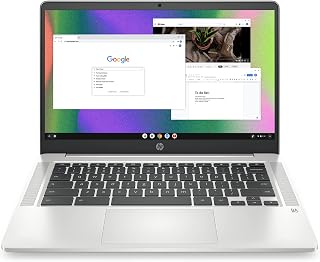
The HP Chromebook 14 is one of the lightest and most affordable ways to get a functional laptop for everyday tasks. Built around an Intel Celeron N4120 processor, 4GB RAM, and 64GB eMMC storage, it runs Chrome OS, which keeps the system fast and low-maintenance even on modest hardware. The 14-inch HD anti-glare display with a micro-edge design keeps bezels slim and cuts glare in bright rooms. Chrome OS is a natural fit for users who live in a browser and rely on Google Workspace apps, streaming services, and web-based tools, where the lightweight OS offsets the entry-level specs. At 3.2 pounds, it is genuinely easy to carry, and the thin build slips into most bags without adding bulk. The Intel UHD Graphics 600 handles 4K video output, a notable feature at this price point. For budget buyers who do not need Windows applications and are comfortable with cloud-based workflows, this Chromebook delivers reliable everyday performance at a low cost of ownership, with Chrome OS updates keeping security tight over time.
Students, casual home users, and anyone whose daily work happens entirely in a browser or Google Workspace will get good value here. It also suits families looking for a simple, low-maintenance secondary machine. Skip it if you rely on Windows-only software, need offline-heavy workflows, or require more than 64GB of local storage for files and downloads.
Display: 14.0-inch HD anti-glare micro-edge display, 1366 x 768 resolution
Processor: Intel Celeron N4120 quad-core
Graphics: Intel UHD Graphics 600
RAM: 4GB DDR4 SDRAM
Storage: 64GB eMMC flash storage
Operating System: Chrome OS
Battery: Up to 14 hours with HP Fast Charge to 50% in 45 minutes
Weight: 3.2 pounds
Dimensions: 12.82 inches L x 8.6 inches W x 0.7 inches H
Connectivity: 802.11a/b/g/n/ac Wi-Fi, Bluetooth, 3 USB ports including USB 3.0 Type-C
Keyboard: Full-size with multi-touch touchpad supporting four-finger gestures
Camera: Front-facing
Warranty: 1-year limited hardware warranty
Certifications: ENERGY STAR certified, EPEAT Silver registered
Pros
- FHD IPS display with narrow bezels suits both work and entertainment
- 8GB DDR5 RAM and Wi-Fi 6 are above-average specs for this price tier
- Windows Copilot integration brings AI productivity tools to a budget machine
- 3.8-pound build is easy to carry throughout a full day
Cons
- 128GB storage is tight for users with large app or media libraries
- S Mode restricts installs to the Microsoft Store until manually switched off
The Acer Aspire Go 15 earns its place on a best budget laptops list by packing a respectable feature set into a lightweight, affordable package. The 15.6-inch FHD IPS screen at 1920x1080 is genuinely good for the price, making it comfortable for long study sessions, streaming, or video calls. Under the hood, the Intel Core 3 N355 and 8GB DDR5 handle the everyday workload of a student or casual user without complaint. Wi-Fi 6 is a meaningful upgrade at this price tier, keeping connectivity quick whether you are on a crowded campus network or at home. Copilot integration adds a layer of AI-assisted productivity that more expensive machines have been charging a premium for. The 128GB UFS drive and integrated Intel graphics are honest budget-tier specs, suited for documents and media rather than editing or gaming. Weighing just 3.8 pounds, it travels easily. Windows 11 S Mode keeps the system stable but does require switching to full Windows 11 to install third-party apps.
Display: 15.6-inch FHD IPS LCD, 1920x1080 resolution, narrow bezels, Acer BluelightShield
Processor: Intel Core 3 N355, 8 cores, 1.9 GHz base, up to 3.9 GHz boost, 10th Gen
Memory: 8GB DDR5 RAM
Storage: 128GB UFS onboard storage
Graphics: Intel integrated graphics with shared VRAM
Connectivity: Wi-Fi 6 (802.11ax), Bluetooth 5.1, 4 USB ports (2x USB Type-C 10Gbps, 2x USB 3.2 Gen 1), 1x HDMI 2.1, 3.5mm audio jack
Camera: 720p HD front camera with TNR and AI noise reduction
Operating System: Windows 11 Home in S Mode
Battery: Extended life (duration not specified)
Weight: 3.8 pounds
Dimensions: 14.29"L x 9.44"H x 0.78"W
Color: Silver
Additional Features: Copilot in Windows, AcerSense device management, Energy Star certified, EPEAT Gold registered, 30% recycled plastic back cover
A strong pick for students, light remote workers, and everyday users who want a large-screen laptop with modern connectivity and AI features without a high price tag. It suits entertainment, personal use, and school tasks well. Skip it if you rely on non-Microsoft Store software out of the box, need substantial local storage, or require the processor headroom for demanding applications.

Pros
- Lightweight and slim design perfect for students, travelers, and remote workers
- Military-grade durability tested for ruggedness without compromising portability
- 15.6-inch FHD display provides ample screen real estate for productivity
- Responsive ErgoSense keyboard with precision touchpad for comfortable extended use
- Excellent value at the price point for everyday computing needs
Cons
- 128GB SSD storage fills quickly with modern software and files, limiting expandability
- AMD Ryzen 3 7320U processor handles basic tasks but struggles with demanding applications or multitasking
- 60Hz refresh rate and 250-nit brightness less impressive compared to premium competitors in similar price ranges
The ASUS Vivobook Go 15 is a budget-friendly ultraportable laptop designed for students, remote workers, and casual users who prioritize portability over raw power. At 3.59 lbs and 0.70 inches thin, it's engineered for the on-the-go lifestyle. The 15.6-inch FHD display gives you enough screen space without the heft of larger laptops.
Performance comes from the AMD Ryzen 3 7320U processor with integrated Radeon graphics, which handles everyday browsing, document editing, and video streaming smoothly. The 8GB DDR5 RAM and 128GB SSD provide responsive multitasking for typical office work. The standout feature is the 180-degree lay-flat hinge, enabling flexible positioning for presentations, video calls, and collaborative work. WiFi 5 and Bluetooth 5.1 ensure reliable connectivity, while the privacy-focused camera shutter addresses growing security concerns.
Build quality reflects its military-grade durability certification, meaning this laptop is tested to withstand drops, pressure, and environmental stress that would damage typical consumer models. The keyboard is well-designed with good key travel, and the SonicMaster speakers deliver crisp audio. The array microphone captures clear sound during calls. Connectivity includes USB-C with power and display output, two USB-A ports, HDMI, and a 3.5mm combo jack.
Limitations exist: the 128GB SSD fills quickly after installing Windows and essential software, leaving minimal room for large files or games. The Ryzen 3 processor, while capable, bottlenecks under heavy multitasking or resource-intensive applications. The 60Hz display and 250-nit brightness are adequate but not exceptional. Battery life is solid but not class-leading.
The ASUS Vivobook Go 15 is a smart buy for budget-conscious buyers who need a genuinely portable, durable laptop for everyday computing. It excels in its category as an ultraportable workhorse, though power users and content creators should look elsewhere.
Processor: AMD Ryzen 3 7320U Quad Core with Radeon Graphics
Display: 15.6-inch FHD NANOEDGE (1920 x 1080), 60Hz, 250 nits, 45% NTSC color gamut
Memory: 8GB DDR5 RAM
Storage: 128GB SSD
Graphics: AMD Radeon Integrated
Operating System: Windows 11 Home
Ports: 1x USB 3.2 Gen 1 Type-C (power and display), 1x USB 3.2 Gen 1 Type-A, 1x USB 2.0 Type-A, 1x HDMI 1.4, 1x 3.5mm combo audio jack, 1x DC-in
Camera: 720p HD with privacy shutter
Audio: SonicMaster stereo speakers with array microphone
Connectivity: WiFi 5, Bluetooth 5.1
Battery: 42Wh Lithium-Ion with fast charging
Dimensions: 14.19 x 9.15 x 0.70 inches
Weight: 3.59 lbs
Color: Black
Warranty: Limited Warranty
Who Should Buy: Students needing a lightweight laptop for classes and research, remote workers who travel frequently, digital nomads requiring portability without sacrifice, and casual users who stream video and browse the web.
Who Should Look Elsewhere: Video editors and 3D designers needing sustained GPU performance, gamers expecting high-frame gaming, content creators requiring large fast storage, and professionals running memory-intensive applications like database management or virtual machines.
Storage Consideration: The 128GB SSD is tight after Windows 11 installation. Plan to use cloud storage for files, or prepare to clean up frequently. Consider an external USB drive for media backups.
Performance Reality: This laptop excels at productivity, browsing, and media consumption. It struggles with video editing, programming with heavy IDEs, or opening 20+ browser tabs simultaneously. Manage expectations accordingly based on your actual workflow.
Durability Edge: The military-grade certification makes this laptop a smart choice if your lifestyle involves travel, outdoor use, or handling by multiple family members. It's built to survive what typical laptops cannot.
Best Use Cases: Pair with a portable external SSD for expanded storage, use cloud services like OneDrive or Google Drive for file sync, and connect an external monitor at home for extended desk work.
What to Look for When Buying a Budget Laptop
Processor Performance
The processor is the single biggest factor in how snappy a laptop feels day to day. In this price range, you will find Intel N-series chips, Pentium Gold processors, and AMD Ryzen 3 options, each suited to slightly different workloads.
For light tasks like web browsing, email, and document editing, an Intel N150 or Pentium Gold 6500Y handles things smoothly. If you want a bit more headroom for multitasking or light photo work, the AMD Ryzen 3 7320U found in the ASUS Vivobook Go 15.6″ FHD Slim Laptop or the Ryzen 3 30 in the HP OmniBook 3 steps up the experience noticeably.
RAM and Storage
At minimum, aim for 8GB of RAM if you plan to keep multiple browser tabs open alongside productivity apps. Most options in this guide, including the BLUEING 2026 Laptop Computer and the Laptop Computer 15.6 inch, hit that mark and feel much more capable than 4GB alternatives for everyday use.
For storage, a 128GB SSD is workable if you rely on cloud services, but 256GB or more gives you meaningful breathing room for local files and apps. The Laptop Computer 15.6 inch from KINOBUC stands out here with 256GB SSD and TF card expandability up to 1TB.
Display Quality
A full HD IPS display makes a real difference if you spend hours reading documents, attending video calls, or watching content. Models like the acer Aspire Go 15 AI Ready Laptop and the Acer Aspire Go 15 AI Ready Laptop both feature 1920×1080 IPS panels with blue light shielding, which reduces eye strain during long sessions.
If you are primarily doing light work and do not mind a step down in resolution, HD displays like the one on the HP Chromebook 14 Laptop, Intel Celeron N4120 are still sharp enough for everyday tasks and tend to come on the most portable and battery-efficient machines.
Operating System and Software Ecosystem
Most budget laptops in 2026 ship with Windows 11, often in S Mode, which limits app installs to the Microsoft Store unless you switch out of it. Both the HP Essential Laptop 2026, Intel CPU and the Lenovo V15 Business Laptop, Intel Processor include a one-year Microsoft 365 subscription, which is a genuinely useful bonus for students and professionals.
Chrome OS on the HP Chromebook 14 Laptop, Intel Celeron N4120 is a different proposition entirely, ideal for Google Workspace users who live in a browser. It is fast, secure, and low-maintenance, though it will not run traditional Windows software. For readers who also want a desktop to complement their laptop, our guide to the best PC build for an RTX 5060 Ti covers a strong mid-range desktop setup worth considering.
Battery Life and Portability
A laptop that dies halfway through the school day defeats the purpose. The HP OmniBook 3 17.3 inch Laptop PC, FHD Display claims up to 14 hours and 15 minutes of battery life with HP Fast Charge support, making it a strong pick for all-day use. The HP Essential Laptop 2026, Intel CPU also delivers up to 11 hours of video playback at just 3.24 lbs.
If you need to move between classrooms or meeting rooms frequently, lighter 14-inch models like the HP 14 Laptop, Intel N150 Processor, 4GB DDR5 RAM or the compact BLUEING 2026 Laptop Computer are easier to carry without sacrificing core functionality. You can also check out our roundup of the best open-back headphones for gaming if you want quality audio to go along with your new portable setup.
Final Thoughts
There is genuinely solid value across this lineup, and your best choice comes down to how you plan to use the machine. If you want a well-rounded Windows laptop with a big screen and strong all-day battery, the HP OmniBook 3 17.3 inch Laptop PC, FHD Display is hard to beat for everyday productivity and entertainment. For students or remote workers who prioritize portability and a capable, compact design, the HP Essential Laptop 2026, Intel CPU delivers a refined experience with thoughtful connectivity and included Microsoft 365 at a reasonable entry point.
Frequently Asked Questions
What is the best budget laptop for college students in 2026?
For most college students, a lightweight laptop with at least 8GB of RAM, a full HD display, and solid battery life covers all the bases. The HP Essential Laptop 2026, Intel CPU is a strong contender, offering up to 11 hours of battery life, Wi-Fi 6, and a bundled Microsoft 365 subscription for Word, Excel, and PowerPoint. The acer Aspire Go 15 AI Ready Laptop is another excellent option if you want an 8-core Intel Core 3 processor with built-in Copilot AI support.
Is 4GB of RAM enough for a budget laptop?
For very light use, like checking email or using a single web app, 4GB can get by. However, if you regularly switch between browser tabs, video calls, and office apps simultaneously, 4GB will feel limiting fairly quickly in 2026. Whenever possible, choosing a model with 8GB of RAM, such as the ASUS Vivobook Go 15.6″ FHD Slim Laptop or the Laptop Computer 15.6 inch, gives you noticeably smoother day-to-day performance.
Should I buy a Chromebook or a Windows laptop on a budget?
It depends entirely on your workflow. Chromebooks like the HP Chromebook 14 Laptop, Intel Celeron N4120 are fast, secure, and require minimal maintenance, making them ideal for users who live in Google Docs, Gmail, and streaming apps. Windows laptops give you access to a much wider range of software, which matters if you need specific desktop applications for school or work. If you are building out a full productivity setup, our guide on the best RAM for Blender is a useful resource for understanding memory needs across different computing tasks.
How much storage do I actually need on a budget laptop?
128GB SSD is the baseline you will find on most options in this category, and it is sufficient if you use cloud storage for photos and large files. If you prefer keeping things local or need space for larger project files and media, stepping up to 256GB or choosing a model with expandable storage is worth it. The Laptop Computer 15.6 inch from KINOBUC offers 256GB with TF card support for up to 1TB total, which provides real flexibility without needing to rely entirely on the cloud.
Common questions
What are the best affordable laptops?
The best affordable laptops include the Acer Aspire Go 15 with Intel Core 3 N355 and 8GB DDR5 RAM, the ASUS Vivobook Go 15.6" with AMD Ryzen 3 7320U and 128GB SSD, and the HP OmniBook 3 17.3" with AMD Ryzen 3 30 and 512GB storage. These models balance performance and price by offering modern processors, adequate memory for everyday tasks, and reliable build quality. The HP OmniBook 3 stands out with its larger display and generous storage, while the Acer and ASUS options provide solid portability at lower price points.
What are the best cheap laptops?
The best cheap laptops are the HP Chromebook 14 with Intel Celeron N4120 and Chrome OS, the Acer Aspire Go 15 with 8GB DDR5 RAM and 128GB storage, and the ASUS Vivobook Go with AMD Ryzen 3 7320U. The HP Chromebook offers the lowest entry point for web-based tasks and streaming, while the Acer and ASUS provide Windows capabilities with enough power for productivity work. All three deliver long battery life and lightweight designs suitable for students and remote workers on tight budgets.








Write Your Review
No reviews yet. Be the first to share your experience!