

You’re shopping for a new laptop and the spec sheet shows two very different options: one with integrated graphics and one with a dedicated GPU. If you’re not a hardcore gamer, you might wonder whether that extra graphics hardware is worth it at all. The answer depends almost entirely on what you plan to do with the machine.
This guide is for anyone trying to figure out whether a dedicated GPU makes sense for their lifestyle, from students and remote workers to casual gamers and content creators. We’ve evaluated eight laptops across the full performance spectrum so you can make a confident, informed choice.
Quick answer
This guide compares 8 picks, with 15.6" FHD Student Laptop with Office 365, AI Assistant ranked first. Lenovo 14" FHD Touchscreen Chromebook, MediaTek has the most customer reviews.
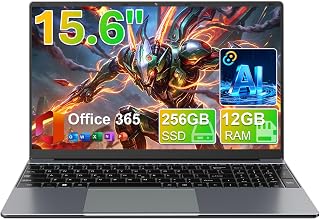
This laptop suits readers whose checklist leans toward basic productivity rather than graphics performance. With a Celeron CPU and a 15.6 inch FHD IPS display, it covers schoolwork, Office 365 documents, and everyday browsing. It is a good example of when skipping a dedicated GPU keeps a machine focused and uncomplicated.
Pros
- 12GB RAM handles everyday multitasking well
- 256GB SSD with expandable storage options
- Includes 1 year Office 365 and AI assistant
- 180 degree lay-flat hinge for presentations
Cons
- Battery life modest at 4 to 6 hours
- Celeron processor unsuited to demanding software
For readers trying to decide if a dedicated GPU is necessary, the drkako M156FH offers a useful case study in budget computing built entirely on integrated graphics. Its Celeron processor and integrated graphics card are matched to document editing, web browsing, and light streaming rather than any GPU-dependent workload, making it a straightforward 'no GPU needed' recommendation for students and remote workers. The 15.6-inch FHD display suits study sessions, and the 180-degree lay-flat hinge adds flexibility for presentations or group work, areas where graphics horsepower is irrelevant. With 12GB RAM and a 256GB SSD, it has enough memory and storage for coursework and productivity apps, plus a bundled 1-year Office 365 subscription and built-in AI assistant for writing and research tasks. Connectivity includes 5G Wi-Fi, USB 3.2, Type-C, and Mini HDMI. Battery life is modest, so it suits users near outlets more than all-day mobile use. This is a laptop for buyers who've already concluded integrated graphics are sufficient.
Display: 15.6" FHD IPS, 1920x1080 resolution, 16:9 aspect ratio, narrow bezels
Processor: Intel Celeron J4105 quad-core
RAM: 12GB
Storage: 256GB SSD, expandable to 2TB via SSD slot, up to 1TB via microSD
Graphics: Integrated Intel UHD Graphics 600
Operating System: Windows 11 Home
Battery: 7000mAh
Connectivity: 5G Wi-Fi, Bluetooth 4.2
Ports: USB 3.2, USB Type-C, Mini HDMI
Design: 180-degree flat-open hinge
Included Software: 1-year Office 365 subscription, built-in AI assistant
Color: Gray
Model: M156FH
Buy this if you need an affordable laptop purely for schoolwork, document editing, and light browsing, and have no plans for gaming or creative software. Skip it if you want strong battery life or any graphics-intensive capability. Best for students and budget-conscious remote workers prioritizing included software over performance.

For readers landing on the integrated graphics side of this decision, this model shows what you give up and gain. The Intel Graphics chip handles browsing, streaming, and office work fine, and Wi-Fi 6 keeps connections snappy. It is a practical pick for anyone whose workload never touches 3D rendering or GPU accelerated tasks.
Pros
- Integrated graphics handle everyday non-GPU tasks well
- Lightweight 3.8 lb design for portability
- 12.5 hour battery life for all-day use
- Copilot AI key for productivity assistance
Cons
- Windows 11 S Mode restricts app installation
- 128GB storage is tight for large files
If you're researching whether you actually need a dedicated GPU, the Aspire Go 15 is the clearest example of a laptop built for the 'no' side of that answer. It runs entirely on Intel's integrated graphics paired with an 8-core Core 3 N355 processor and 8GB of DDR5 memory, which is plenty for browsing, streaming, video calls, and document work but has no ambition toward gaming or GPU-accelerated tasks. That's exactly the profile of a buyer who should stop shopping for discrete graphics altogether. The 15.6-inch FHD IPS display with Acer BluelightShield is suited to long non-graphical sessions like writing or research, and Wi-Fi 6 plus dual USB-C ports cover everyday connectivity needs. Integrated Copilot adds AI assistance for everyday productivity rather than creative rendering. At 3.8 pounds it stays portable, and the 128GB UFS drive is enough for cloud-based workflows. For this article's audience, it's a practical reference point for just how far integrated graphics can go for non-GPU-dependent use.
Processor: Intel Core 3 processor N355 (8-core, 1.9 GHz)
Memory: 8GB DDR5
Storage: 128GB UFS
Display: 15.6-inch IPS LCD, 1920 x 1080 (Full HD), 60Hz refresh rate
Graphics: Intel integrated graphics with shared memory
Connectivity: Wi-Fi 6 (802.11ax), Bluetooth 5.1, dual USB Type-C 3.2 Gen 2 (10 Gbps), 2x USB 3.2 Gen 1, HDMI 2.1, headphone jack
Camera: 720p HD front-facing with TNR technology
Battery: 48 Wh lithium-ion, up to 12.5 hours
Weight: 3.8 lbs
Dimensions: 14.29in L x 9.35in H x 0.78in thickness
Operating System: Windows 11 Home in S Mode
Warranty: Limited
Special Features: Copilot in Windows, AcerSense device management, Acer BluelightShield, AI noise reduction
Buy this if you want a lightweight, affordable laptop for browsing, streaming, schoolwork, or office tasks and have already decided a dedicated GPU is unnecessary for your needs. Skip it if you edit video, do 3D work, or game, since integrated graphics and Windows 11 S Mode's app restrictions will hold you back. First-time buyers and casual users fit best here.

This is the clear answer for readers who decide they do need a dedicated GPU. The RTX 4060 handles ray tracing and AI upscaling for modern games, while the 165Hz display keeps fast motion fluid. Paired with a Core i7-13650HX and 16GB DDR5, it has the headroom for gaming, rendering, or GPU accelerated creative work that integrated graphics simply cannot touch.
Pros
- RTX 4060 dedicated GPU with DDR5 and PCIe Gen4 SSD avoids common bottlenecks
- 165Hz display actually benefits from having a dedicated GPU to drive it
- MUX Switch toggles between discrete and integrated graphics for battery savings
- Liquid metal and Tri-Fan cooling keep the dedicated GPU stable under load
Cons
- RTX 4060 limits future-proofing at 1440p and ultra settings
- 16GB DDR5 may become restrictive for heavier workloads in a few years
If the question is whether you actually need a dedicated GPU, the ROG Strix G16 is the clearest yes-case in this guide. It pairs an RTX 4060 with a 13th Gen Intel i7, DDR5 memory, and a PCIe Gen4 SSD, so the discrete graphics chip isn't just a spec sheet checkbox, it's backed by a platform that can feed it. The 165Hz FHD panel is the real tell: that refresh rate only matters once a dedicated GPU exists to push frames past what integrated graphics could ever sustain. A MUX Switch lets you drop to integrated graphics when you're just browsing or writing, which is the honest answer to the dedicated GPU question: you want the option, not constant use. Liquid metal cooling and a Tri-Fan system keep the RTX 4060 running stable under sustained load, which integrated graphics never needs to worry about. At 5.5 pounds, it's portable enough to justify owning a GPU-equipped laptop instead of a desktop. This is the pick for readers who've decided they need dedicated graphics and want a sensible, non-flagship entry point.
Processor: Intel Core i7-13650HX (13th Gen HX series)
Graphics: NVIDIA GeForce RTX 4060 (8GB GDDR6, 140W Max TGP)
Memory: 16GB DDR5-4800MHz
Storage: 1TB PCIe Gen4 SSD
Display: 16-inch FHD (1920x1200), 165Hz, 100% sRGB, Pantone validated, matte finish
Cooling: Liquid metal on CPU, Tri-Fan system, thermal management with MUX Switch
Connectivity: Wi-Fi 6E (802.11ax), Bluetooth 5.2, 4x USB ports, HDMI output
Battery: Supports advanced power optimization via Optimus
Weight: 5.5 lbs
Dimensions: 13.94 x 10.39 x 0.89 inches
Operating System: Windows 11 Home
Color: Eclipse Gray
Buy this if you play esports titles or modern AAA games at 1080p and want a MUX switch to save battery when gaming isn't the priority. It suits readers who've already concluded they need a dedicated GPU but don't want to overspend on one. Skip it if you want 1440p ultra settings, heavy multi-year future-proofing, or you don't actually run GPU-dependent software and could get by on integrated graphics.

This model illustrates why many users never need a discrete graphics card. Built around a Celeron N processor and ChromeOS, it targets students doing coursework, browser based apps, and video calls. For readers whose use case is document editing rather than 3D workloads, this is the kind of lightweight machine that makes a dedicated GPU irrelevant.
Pros
- Integrated graphics keep the machine lightweight and power-efficient
- 12-hour battery life benefits from not running a dedicated GPU
- Military-grade durability suits students who travel with it daily
- Upgraded Wi-Fi gives smooth streaming and video calls without GPU demands
Cons
- 4GB RAM and 64GB storage rule out any graphics-heavy or multitasking use
- No path to add dedicated graphics if needs change later
This Chromebook belongs in a dedicated GPU discussion mainly as the control case: it has none, and for its intended use that's fine. The Intel Celeron N4500 runs on integrated graphics, which is exactly the right call for a 14-inch machine built around Chrome OS, schoolwork, streaming, and everyday browsing rather than any graphics-intensive task. If you're trying to figure out whether you need a dedicated GPU, a device like this helps define the other end of the spectrum: no dedicated graphics, no gaming ambitions, and a 12-hour battery life that benefits directly from not powering a discrete GPU. Its military-grade durability and lightweight build make sense for students who need something to survive a backpack, not a benchmark. Faster Wi-Fi handles video calls and streaming smoothly without any graphics horsepower required. The 4GB RAM and 64GB storage reinforce that this machine is scoped for lightweight computing. For readers weighing GPU necessity, this is the clear answer when the workload never asks for one.
Buy this if your laptop needs are schoolwork, browsing, streaming, and video calls, where integrated graphics are genuinely sufficient and a dedicated GPU would be wasted. It's a good fit for students who value battery life and durability. Skip it if you have any gaming, editing, or graphics-dependent software in mind, since the Celeron processor and integrated graphics cannot handle those tasks at all.

Chromebooks represent the opposite end of the spectrum from dedicated GPU laptops, and this one makes that case well. Running Chrome OS with an integrated ARM Mali-G52 GPU, it is built for web apps and light multitasking, not rendering or gaming, making it a useful contrast point for readers who only need cloud based computing.
Pros
- Octa-core processor suited to cloud-based tasks
- Touchscreen FHD IPS display with good color
- Lightweight at 2.9 pounds
- Backlit keyboard and Wi-Fi 6 included
Cons
- 4GB RAM limits heavier multitasking
- Chrome OS restricts traditional desktop software
This Chromebook is a strong illustration of when a dedicated GPU isn't even part of the equation. Chrome OS and the MediaTek Kompanio 520 octa-core processor are built around lightweight, cloud-based computing, not local graphics rendering, so questions about discrete GPUs simply don't apply here. For readers trying to figure out whether they need dedicated graphics, this device represents the opposite end of the spectrum: a machine designed entirely around web apps, streaming, and video calls using integrated ARM Mali-G52 graphics. The 14-inch FHD touchscreen with IPS technology offers vibrant color for media consumption, and at 2.9 pounds with a backlit keyboard, it's built for portability over performance. With 4GB RAM and 64GB eMMC storage, it's clearly scoped for Chrome OS workflows rather than demanding local software. Wi-Fi 6 keeps streaming and conferencing smooth. If your use case never touches gaming, editing, or GPU-accelerated software, this laptop shows how little you may need to spend by skipping dedicated graphics entirely.
Display: 14-inch Full HD (1920x1080) IPS touchscreen, 300 nit brightness, LED backlight, capacitive touch technology
Processor: MediaTek Kompanio 520 octa-core (4x A73 @2.0GHz + 4x A53 @2.0GHz) with integrated ARM Mali-G52 2EE MC2 GPU
Memory: 4GB RAM, 64GB eMMC storage with microSD card reader support
Connectivity: WiFi 6 (802.11ax 2x2), Bluetooth 5.1, 1x USB-A 3.2, 1x USB-C 3.2, 3.5mm audio jack
Camera & Audio: 720p HD front webcam with privacy shutter, dual-array microphones
Build: 12.83 inches L x 8.73 inches W x 0.73 inches thick, 2.9 pounds, Abyss Blue color
Operating System: Chrome OS with automatic updates and cloud backup

This laptop fits readers who conclude a dedicated GPU is unnecessary for their daily tasks. Integrated graphics keep things simple for document work and web use, while the numeric keypad and memory card slot suit office or data entry roles. It is a sensible baseline for comparing against GPU equipped machines in this guide.
Pros
- Integrated graphics keep cost and weight down for non-gaming use
- Anti-glare FHD display suits long reading and document sessions
- Lightweight clamshell design with numeric keypad for everyday productivity
- 8GB DDR5 handles browsing, calls, and light multitasking smoothly
Cons
- Shared graphics RAM cannot support gaming or demanding visual tasks
- 128GB storage fills quickly with Windows 11 and everyday apps
The Lenovo Essential 15.6 answers the dedicated GPU question with a confident no, and it's worth including here precisely because it shows what you give up and gain by skipping discrete graphics. Its integrated, shared graphics setup is built for education and everyday use, not gaming or content creation, and the hardware around it, an Intel processor with 8GB DDR5 and 128GB storage, is sized to match that scope rather than overreach. The anti-glare FHD display is comfortable for document work and video streaming, tasks that never call on a dedicated GPU's extra horsepower. Skipping discrete graphics also keeps the chassis light and the design slim, with practical touches like a numeric keypad and memory card slot aimed at students and remote workers rather than gamers. For this guide, it's a useful reference point: if your daily tasks are browsing, writing, and video calls, the absence of a dedicated GPU isn't a compromise, it's the right match for the workload.
Buy this if you need a dependable laptop for classwork, office documents, or everyday browsing and have no interest in gaming or graphics-intensive software, since integrated graphics are enough. It suits budget-conscious students and remote workers. Skip it if you're reading this guide because you want to run games or GPU-accelerated applications, since shared graphics and 128GB storage won't support that.
Processor: Intel N150 Quad-Core, up to 3.6GHz with 6MB Smart Cache
Memory: 8GB LPDDR5-4800 RAM
Storage: 128GB UFS 3.1 SSD
Display: 15.6-inch FHD (1920x1080) IPS Anti-Glare, 250 nits, 88% screen-to-body ratio
Graphics: Integrated Intel Graphics
Connectivity: Wi-Fi 6 (802.11ax), Bluetooth 5.2, USB-C with Power Delivery and DisplayPort, 2x USB-A 5Gbps, HDMI 1.4, 3.5mm audio jack, SD card reader
Camera: HD 720p with physical privacy shutter
Keyboard: Full-size with dedicated AI Copilot hotkey
Weight: 3.42 lbs
Thickness: 0.70 inches
Operating System: Windows 11 Home in S mode with Microsoft 365 Personal
Security: Firmware TPM 2.0, privacy camera shutter
Certifications: ENERGY STAR 9.0, EPEAT Silver, MIL-STD-810H, TÜV Low Blue Light

For the budget conscious end of this comparison, this Chromebook shows how little graphics power many tasks actually require. Its Mediatek MT8173C processor and Chrome OS are built around lightweight web use, not 3D rendering, making it a reference point for readers confirming they do not need a discrete GPU for their routine.
Pros
- Exceptional value at this price point for a trusted brand
- Lightweight design ideal for students carrying between classes
- Fast boot times and seamless web browsing experience
- Durable construction suitable for educational environments
- Low maintenance with Chrome OS automatic updates
Cons
- Limited to 16GB storage, requiring cloud storage reliance
- Entry-level processor may struggle with demanding applications
- Renewed product may show cosmetic wear, though fully functional
The Lenovo 100E Chromebook 2nd Gen is a budget-friendly laptop built specifically for students, educators, and anyone who primarily works within a web browser. This renewed model delivers exceptional value for users who need reliable, simple computing without breaking the bank. If you're looking for a no-frills workhorse for email, Google Workspace, streaming, and web browsing, this Chromebook is a smart choice.
Performance is solid for its price tier, powered by the MediaTek MT8173C processor and 4GB of RAM. Web-based applications, document editing, and multitasking within Chrome OS run smoothly without noticeable lag. The 11.6-inch HD display produces crisp text and clear images, making it suitable for hours of comfortable viewing. The lightweight design and durable construction make this laptop ideal for frequent transport between classrooms or locations.
Build quality is respectable with a professional black finish and sturdy feel typical of Lenovo's educational line. The keyboard and trackpad are comfortable for extended use, and the overall design prioritizes practicality over flashiness. Chrome OS ensures minimal bloatware and security concerns, with automatic updates keeping your system current without user intervention.
The main limitation is the 16GB eMMC storage, which requires heavy reliance on cloud storage solutions like Google Drive. The MediaTek processor, while adequate for web browsing and productivity, won't handle resource-intensive applications or offline software. As a renewed product, it may show minor cosmetic wear, though it functions like new with full manufacturer support.
The Lenovo 100E Chromebook 2nd Gen is an outstanding choice for budget-conscious students, educators, and anyone seeking a dependable web-focused laptop. At this price point, it's hard to find a better combination of reliability, portability, and performance. Ideal for anyone prioritizing simplicity and affordability over processing power.
Display: 11.6-inch HD (1366 x 768) LED backlit
Processor: MediaTek MT8173C
Memory: 4GB DDR4 SDRAM
Storage: 16GB eMMC TLC SSD
Graphics: PowerVR GX6250 Integrated Graphics
Operating System: Chrome OS
Design: Lightweight, Black color, 11.6-inch form factor
Special Features: Lightweight construction, integrated graphics, automatic Chrome OS updates
Condition: Renewed, fully functional with minimal cosmetic wear
Students: Perfect for K-12 and college students who need an affordable, reliable laptop for schoolwork, research, and note-taking within web browsers and Google Workspace.
Educators: Teachers and instructors will appreciate the durability, portability, and easy management of Chrome OS in classroom settings.
Budget-Conscious Users: Anyone seeking dependable web-based computing without spending hundreds of dollars on premium hardware.
Cloud-First Workers: Ideal for users who work primarily with cloud-based applications and don't require traditional software or large local storage.
Travel and Portability: The lightweight design makes it excellent for users who travel frequently or move between multiple locations.

Readers who determine their needs stop at web browsing and writing will see why integrated graphics suffice here. The HD Graphics coprocessor and lightweight build favor portability over horsepower, and running on an Intel Dual Core N4500 keeps the machine simple. It is a solid contrast to the GPU heavy laptops this guide also covers.
Pros
- Lightweight at 3.5 pounds for daily carrying
- Integrated graphics suit non-visual workloads
- Windows 11 Home included
- SSD storage for faster boot and load times
Cons
- 4GB RAM limits multitasking
- 128GB storage is restrictive for files and apps
If you're asking whether you need a dedicated GPU, this laptop is the clearest answer of no. The Vivobook Go 15.6 runs on integrated Intel HD Graphics, built for people whose workload never touches 3D rendering, gaming, or video editing in the first place. It's aimed squarely at students and everyday users doing web browsing, note-taking, and document work, tasks where a discrete GPU would just add cost and weight with zero benefit. At 3.5 pounds with a slim profile, it's built for carrying between classes, not for pushing pixels. The Intel Dual Core N4500 and integrated graphics are matched in capability, so you're not paying for horsepower you can't use elsewhere. Just know that 4GB RAM and 128GB SSD storage cap what else you can run alongside basic tasks. For this title's core question, this machine represents the segment that should actively avoid spending on a dedicated GPU, since the rest of the hardware wouldn't keep up anyway.
Display: 15.6-inch FHD LED, 1920x1080, 60Hz, 220 nits brightness, matte anti-glare finish
Processor: Intel Celeron N4500 Dual Core
Memory: 4GB DDR4 RAM
Storage: 128GB eMMC SSD
Graphics: Intel HD Graphics integrated
Connectivity: Wi-Fi 5 (802.11ac), Bluetooth 5.1, USB-C, HDMI, DisplayPort
Battery: 42Wh with fast-charge to 60% in 49 minutes
Camera: 720p HD with privacy shutter
Audio: SonicMaster dual speakers, 2x louder
Dimensions: 14.18L x 9.31W x 0.71 inches
Weight: 3.5 pounds
Operating System: Windows 11 Home in S Mode
Warranty: Limited Warranty
Buy this if you want proof that integrated graphics are enough, specifically for browsing, typing, and video calls on a tight budget. Students needing a light, grab-and-go laptop fit well. Skip it if you're even considering light gaming, photo editing, or multitasking with many apps open, since 4GB RAM and integrated graphics will bottleneck you long before a GPU question becomes relevant.
How to Choose the Right Laptop Graphics for Your Needs
Understand What a Dedicated GPU Actually Does
A dedicated GPU is a separate graphics processor with its own video memory, designed to handle rendering-heavy tasks independently from the CPU. It makes a real difference when you’re gaming, editing video, working in 3D applications, or running GPU-accelerated machine learning workloads.
For everyday tasks like browsing, document editing, video calls, and streaming, integrated graphics handles everything just fine. Laptops like the acer Aspire Go 15 AI Ready Laptop and the Lenovo Essential 15.6″ FHD Laptop rely on Intel integrated graphics and perform those daily tasks without any issues.
Match GPU Power to Your Workload
If gaming is on your agenda, even light gaming benefits noticeably from discrete graphics. The ASUS ROG Strix G16 Gaming Laptop, 165Hz Display pairs an NVIDIA GeForce RTX 4060 with a 13th Gen Intel Core i7 and a 165Hz panel, making it a capable machine for demanding titles and GPU-intensive creative work.
If your workload is lighter, such as running spreadsheets, attending Zoom meetings, or writing papers, you genuinely do not need discrete graphics. Spending more for a GPU you won’t use is simply wasted budget that could go toward better RAM, storage, or battery life.
Consider Battery Life and Portability Trade-offs
Dedicated GPUs consume significantly more power, which directly impacts battery life. Laptops built around integrated or lightweight graphics, like the Lenovo Flagship Chromebook or the Samsung 14″ Galaxy Chromebook Go Laptop PC with its 12-hour battery, are designed for all-day portability without needing a charger nearby.
Gaming laptops with powerful GPUs often run hotter and heavier. If you’re commuting daily or traveling frequently, the physical weight and thermal output of a GPU-equipped machine is worth factoring in before you buy.
Think About Your Operating System and App Ecosystem
ChromeOS laptops like the Lenovo 100E Chromebook 2ND Gen 81QB000AUS Laptop and the Lenovo Flagship Chromebook run entirely in the cloud and through web apps. Since they don’t run native Windows software or GPU-accelerated desktop apps, a dedicated GPU would offer no practical benefit on these platforms.
Windows laptops, on the other hand, support the full range of software where a GPU can shine, from Adobe Premiere to Steam. If you’re on Windows and have any interest in gaming or creative work, it’s worth at least considering an entry-level discrete GPU. The ASUS 15.6″ Vivobook Go Slim Laptop with its Intel HD Graphics lands in the middle, handling light multimedia tasks and basic graphics without dedicated hardware.
Final Thoughts
For most students and everyday users, integrated graphics is more than enough, and options like the 15.6″ FHD IPS Student Laptop deliver solid productivity without any dedicated GPU at all. If you’re serious about gaming or GPU-accelerated creative work, the ASUS ROG Strix G16 Gaming Laptop, 165Hz Display is a well-rounded machine that justifies every bit of that discrete graphics power.
Frequently Asked Questions
Do I need a dedicated GPU for everyday laptop use?
No, for tasks like web browsing, video streaming, email, and document editing, integrated graphics is completely sufficient. Most modern processors include capable integrated graphics that handle these workloads without any slowdown. A dedicated GPU only becomes valuable when you move into gaming, video editing, or GPU-heavy software in 2026.
What is the difference between integrated and dedicated graphics in a laptop?
Integrated graphics share system RAM and are built directly into the CPU, which keeps power consumption and cost low. Dedicated graphics have their own video memory and a separate processor optimized entirely for rendering. The dedicated option delivers noticeably higher frame rates and handles more complex visual tasks, but draws more power and generates more heat.
Can a laptop without a dedicated GPU run games?
It depends on the game. Older titles, indie games, and casual browser-based games often run acceptably on integrated graphics. Modern AAA games, however, typically require a dedicated GPU to achieve playable frame rates at reasonable settings. If gaming is a priority, investing in a laptop with discrete graphics is the right call for 2026.
Is a dedicated GPU worth it for a student laptop?
For most academic work, including writing, research, coding, and video calls, it is not necessary. Students in fields like architecture, animation, data science, or game design are the exception, since their software genuinely benefits from GPU acceleration. Everyone else will get more practical value from prioritizing battery life, storage, and build quality over discrete graphics.
Common questions
Has integrated graphics caught up to a dedicated GPU in laptops?
No, not for real gaming workloads. Integrated graphics like the ARM Mali-G52 found in Chromebooks handle browser tabs, video playback, and office apps fine, but they are not built for 3D rendering. A dedicated GPU such as the NVIDIA GeForce RTX 4060 in the ASUS ROG Strix G16 has its own memory and processing cores, which is why it can run modern games at high settings while integrated chips cannot.
What is the battery life tradeoff with a dedicated GPU laptop?
The tradeoff is shorter battery life in exchange for far more graphics performance. A laptop with a dedicated GPU like the RTX 4060 draws more power under load than an integrated-graphics machine, so gaming laptops typically need to be plugged in for demanding tasks. Lightweight laptops with only integrated graphics, like Chromebooks, sip power and can last a full workday, but they sacrifice the ability to game or render seriously.
Does wattage decide real speed more than the GPU name?
Yes, wattage plays a huge role in real-world speed. The same GPU model can perform differently depending on how much power the laptop maker allows it to draw, so two laptops with the same chip name are not guaranteed to run equally fast. This matters most on dedicated GPUs like the RTX 4060, where thinner chassis often cap wattage lower than bulkier gaming laptops, reducing sustained performance.







