

You’re browsing gaming laptops and you keep seeing 16GB listed as the standard. But is that actually enough, or will you hit a wall six months from now when a new title demands more? It’s one of the most common questions buyers ask, and the answer depends on what you’re playing, how you multitask, and how future-proof you want your machine to be.
This guide cuts through the noise to answer whether 16GB RAM is enough for a gaming laptop in 2026, and it pairs that answer with a curated list of real machines across different budgets and performance tiers. Whether you’re a casual gamer or someone who streams while playing, there’s a pick here for you. If you’ve ever wondered why gaming laptops throttle under load, RAM capacity is only one piece of that puzzle.
Quick answer
This guide compares 8 picks, with Acer Nitro V 15 Gaming Laptop: i7-13620H, RTX 4050 ranked first. Acer Nitro V 15 Gaming Laptop i5-13420H RTX 4050 165Hz has the most customer reviews.

This configuration pairs 16GB of DDR5 with a 1TB Gen 4 SSD, giving the RTX 4050 enough headroom to run modern titles without the system leaning on slow swap storage. Anyone weighing whether 16GB holds up in 2026 will appreciate that the faster DDR5 standard helps offset capacity concerns better than older memory types in similar builds.
Pros
- 16GB DDR5 offers better bandwidth than DDR4 at the same capacity
- Fast 1TB Gen 4 SSD reduces the impact of RAM limitations
- 165Hz display takes advantage of frame rates 16GB can sustain
- RTX 4050 and i7-13620H balance well with 16GB for 1080p gaming
Cons
- 16GB may feel tight if you multitask heavily while gaming
- RTX 4050 is entry-level, so GPU can bottleneck before RAM does
When you're asking whether 16GB is enough for gaming in 2026, the Nitro V 15 is a good test case because it pairs that exact RAM amount with hardware that actually puts it to work. The i7-13620H and RTX 4050 combo means the 16GB DDR5 isn't propping up a weak system, it's supporting a legitimate 1080p gaming setup. Since this is DDR5 rather than DDR4, memory bandwidth is better, which matters when 16GB is your ceiling and you want every bit of speed possible. The 165Hz IPS panel benefits directly from that headroom, since esports and competitive titles can actually hit higher frame rates when RAM isn't bottlenecking the pipeline. The 1TB Gen 4 SSD also helps offset the fixed 16GB by keeping load times fast, so swapping and asset streaming feel less punishing than on a slower drive. For most 1080p gaming and modern titles at high settings, 16GB here is sufficient. It's really only the most demanding AAA games at max settings where you'll notice the ceiling, and that's a GPU limitation as much as a memory one.
Gaming performance on the Nitro V 15 scales well across competitive and modern titles. The RTX 4050 with 6GB VRAM handles esports titles like Valorant, Counter-Strike 2, and League of Legends at maximum settings and 165+ FPS with ease. In demanding AAA games like Cyberpunk 2077, Alan Wake 2, and Indiana Jones, expect 60-80 FPS at high settings with DLSS 3.5 enabled at 1080p.
The 165Hz display paired with the i7-13620H ensures minimal input lag and smooth frame delivery, giving you a competitive edge in fast-paced shooters. The matte screen reduces glare during extended gaming sessions. Wi-Fi 6 and Killer Ethernet keep your connection stable for online play, whether you're at home or gaming on the road.
Processor: Intel Core i7-13620H (10 cores, up to 4.9 GHz)
Graphics: NVIDIA GeForce RTX 4050 (6GB GDDR6) with DLSS 3.5
Memory: 16GB DDR5 (2 slots, upgradeable to 32GB)
Storage: 1TB PCIe Gen 4 SSD
Display: 15.6-inch FHD (1920x1080) IPS, 165Hz, 300 nits, 82.64% screen-to-body ratio
Connectivity: Wi-Fi 6 (802.11ax), Bluetooth 5.2, Killer Ethernet (Gigabit), Thunderbolt 4, 2x USB, HDMI 2.1
Battery: Up to 9 hours estimated runtime
Weight: 4.7 pounds
OS: Windows 11 Home
Warranty: Limited International Warranty

This variant pairs an RTX 4050 with just 8GB of DDR5, a combination that highlights exactly the tension the article explores. Gamers researching whether 16GB is the real minimum will want to note that this lower memory tier can bottleneck a capable GPU, especially in newer, more demanding titles.
Pros
- 165Hz FHD IPS display for smooth competitive play
- RTX 4050 with DLSS 3.5 support for upscaling
- RAM and storage are user-upgradeable
- i5-13420H handles multitasking well for streaming or recording
Cons
- Ships with only 8GB RAM, below the 16GB threshold
- 512GB SSD fills quickly with modern game libraries
This laptop lands right at the center of the 16GB debate, but with a twist: it ships with only 8GB DDR5 as configured. For 2026 gaming, that base amount is genuinely tight, and anyone drawn to this model for its 165Hz FHD display and RTX 4050 should budget for a RAM upgrade to reach 16GB or beyond. The good news is the memory is user-upgradeable, so the display and GPU pairing is not wasted by the stock configuration. The i5-13420H handles multitasking well, which actually increases the case for more RAM, since streaming or recording while gaming leans harder on available memory. At 1080p, competitive titles like Valorant and CS2 run smoothly even at the base spec, but single-player, memory-heavier titles benefit noticeably once RAM is increased. This is a laptop where the 16GB question is not hypothetical, it is the first upgrade most buyers will need to make.
Processor: Intel Core i5-13420H (up to 4.6 GHz, 8 cores)
Graphics: NVIDIA GeForce RTX 4050 with 6GB GDDR6
Display: 15.6-inch FHD (1920x1080) IPS, 165Hz, 300 nits, Matte finish
Memory: 8GB DDR5 (expandable to 32GB with 2 SODIMM slots)
Storage: 512GB PCIe Gen 4 SSD
Operating System: Windows 11 Home
Connectivity: Wi-Fi 6 (802.11ax), Bluetooth 5.2, Killer Ethernet E2600, 1x Thunderbolt 4, 1x HDMI, 4x USB
Weight: 4.7 pounds
Dimensions: 14.26" x 9.44" x 0.93"
Consider this if you are comfortable opening the laptop to add RAM yourself, or buying it already knowing 8GB is a starting point, not a destination. It fits budget-focused gamers who prioritize the 165Hz display and are willing to invest a bit more upfront. Skip it if you want 16GB working right out of the box without any extra steps or research.

For readers deciding if 16GB is really enough, this model sidesteps the question entirely with 32GB of DDR5 alongside an RTX 5060, leaving plenty of multitasking room for streaming, modding, or background apps while gaming. It's a solid pick for someone who wants to future proof rather than find out later that 16GB falls short.
Pros
- 32GB DDR5 goes well beyond the 16GB baseline for heavy multitasking
- RTX 5060 and Ryzen 7 260 combination suited to demanding workloads
- 180Hz display with 100% sRGB benefits from the extra RAM headroom
- Fast Gen 4 SSD complements the higher RAM capacity
Cons
- Only one open M.2 slot limits future storage expansion
- More RAM than needed if your use case truly fits within 16GB
If you're trying to decide whether 16GB RAM is enough for gaming in 2026, this laptop makes the opposite case clearly, since it comes with 32GB DDR5 instead, double the amount this article is questioning. That extra headroom matters for anyone leaning toward skipping 16GB altogether, especially for multitasking during gaming, like running Discord, browser tabs, and recording software simultaneously without memory becoming a bottleneck. The Ryzen 7 260 and RTX 5060 are powerful enough that 16GB could realistically become a limiting factor in some workflows, which is exactly why this configuration skips past it. The 180Hz WUXGA display with 100% sRGB coverage benefits from that extra memory when running demanding titles alongside background apps. For gamers and creators who do more than pure gaming, like video editing or AI-assisted workflows, 32GB shows what you gain by going beyond the 16GB baseline this article is evaluating. It's a useful reference point for readers deciding whether to future-proof with more RAM rather than stick with 16GB.
Processor: AMD Ryzen 7 260 with up to 38 AI TOPS
Graphics: NVIDIA GeForce RTX 5060 Laptop GPU with 572 AI TOPS, Blackwell architecture, 4th-gen RT Cores, 5th-gen Tensor Cores
Display: 16 inch WUXGA (1920 x 1200) IPS, 180Hz refresh rate, 100% sRGB color coverage
Memory: 32GB DDR5 5600MHz (2 DDR5 slots, maximum 32GB)
Storage: 1TB PCIe Gen 4 SSD (2 M.2 slots, 1 available)
Operating System: Windows 11 Home
Keyboard: Backlit with numeric keypad
Connectivity: Wi-Fi 6
Color: Black
Best for readers who've concluded 16GB isn't quite enough for their needs and want to see what doubling RAM looks like in practice. Ideal for gamers who also edit video or multitask heavily while playing. Skip it if your budget and use case genuinely only call for 16GB, since this is a higher-tier configuration than the article's baseline question requires.

This laptop runs 16GB of dual channel DDR4 with an RTX 2070 Super, an older pairing that gives context to how memory needs have shifted. Readers researching 2026 requirements can use this as a benchmark for how 16GB performed with previous generation GPUs compared to today's expectations.
Pros
- Dedicated RTX 2070 Super GPU means RAM isn't shared with graphics
- 16GB DDR4 is enough for smooth multitasking alongside demanding games
- 300Hz G-SYNC display takes advantage of high frame rates the hardware delivers
- Lightweight all-metal chassis at 4.63 lbs for a high-performance laptop
Cons
- 512GB storage fills quickly and pairs awkwardly with otherwise capable specs
- Battery life around 5.5 hours is modest for extended use away from power
For anyone deciding if 16GB is enough for gaming in 2026, the Predator Triton 500 shows what that RAM amount looks like when paired with a genuinely dedicated GPU rather than integrated graphics. The RTX 2070 Super has its own video memory, so the 16GB of DDR4 system RAM is handling game logic, OS, and background tasks rather than sharing duty with graphics rendering. That split is why this laptop holds 100+ fps at 1080p in demanding AAA titles, and why the 300Hz G-SYNC display can actually be fed enough frames to matter. The tradeoff for anyone weighing RAM against other specs is storage: 512GB fills fast with modern game sizes, so 16GB RAM paired with a small SSD means you will be managing installs more than managing memory. If your question is really about gaming headroom rather than multitasking headroom, the dedicated GPU here matters more than the RAM figure itself.
Processor: Intel Core i7-10750H (6-core, 2.6GHz base, up to 5.0GHz turbo)
Graphics: NVIDIA GeForce RTX 2070 Super with 8GB GDDR6 VRAM, Max-Q Design
Memory: 16GB DDR4 2933MHz
Storage: 512GB PCIe NVMe SSD (2 M.2 slots, 1 available)
Display: 15.6-inch 1920x1080 IPS LED, 300Hz, G-SYNC, 3ms response time, 300 nits brightness, 100% sRGB
Connectivity: Wi-Fi 6 (802.11ax), Gigabit Ethernet (up to 2.5 Gbps), Bluetooth, 1x Thunderbolt 3, 3x USB 3.2 Gen 2, HDMI 2.0, Mini DisplayPort 1.4
Audio: DTS X Ultra-Audio, dual stereo speakers
Webcam: HD 1280x720 with Super High Dynamic Range
Battery: Lithium Ion, up to 5.5 hours
Weight: 4.63 lbs (2.1 kg)
Dimensions: 14.11" x 10.04" x 0.7"
OS: Windows 10 Home

With only 8GB of RAM, this one actually illustrates the problem the article raises rather than solving it. Pairing an RTX 3050 with that little memory means modern games will compete for resources fast, making this a clear example of why shoppers in 2026 are right to question whether lower RAM configurations still make sense.
Pros
- Full HD IPS display with vibrant colors and wide viewing angles
- i5-12500H handles multitasking well for work and streaming
- Reasonably portable at 2.29kg
- Backlit keyboard and fingerprint reader included
Cons
- 8GB RAM is well below the 16GB benchmark for 2026 gaming
- Battery life is unspecified, worth checking separately
The HP Victus 15 is a useful reference point for exactly the question this article asks, because it ships with 8GB RAM, half of the 16GB mark many consider the current baseline for gaming. The RTX 3050 and 12th-gen i5-12500H can still deliver smooth 1080p performance in esports titles and moderately demanding games, but 8GB puts a ceiling on how well it multitasks or handles heavier, more modern titles without stutters. For anyone weighing whether 16GB is enough in 2026, this laptop makes the opposite case clear: 8GB is the tier where limitations start to show, especially as games and background software grow heavier year over year. It still has real strengths, including a Full HD IPS display and solid everyday build quality, but buyers specifically chasing adequate gaming memory should treat this configuration as a starting point that may need RAM expansion rather than a long-term, worry-free setup.
Processor: Intel Core i5-12500H (12th Generation)
Graphics: NVIDIA GeForce RTX 3050 with 8GB DDR4 SDRAM
RAM: 8GB DDR4 Memory
Storage: 512GB SSD
Display: 15.6-inch Full HD IPS (1920x1080), 178-degree viewing angles
Operating System: Windows 11 Home
Connectivity: Wi-Fi 5 (802.11ac), Bluetooth, 3x USB ports, 1x HDMI
Weight: 2.29kg
Dimensions: 14.09 inches length x 10.04 inches width x 0.93 inches depth
Security: Fingerprint recognition, Windows 11 security features
Battery: Integrated lithium battery power
What Games Will It Handle?
The RTX 3050 is optimized for competitive and indie gaming at 1080p resolution. You can expect smooth performance in esports titles like Valorant, Fortnite, and CS:GO at high or ultra settings. Demanding AAA titles like Cyberpunk 2077 or Starfield will run at medium settings at playable framerates, though you'll need to balance settings for consistently smooth 60+ fps.
Real-World Performance:
This laptop excels at gaming sessions of 2-4 hours, with the dedicated GPU handling thermal loads efficiently. The 12th-gen Intel processor pairs well with the RTX 3050, eliminating CPU bottlenecking for most 1080p gaming scenarios. For content creation like streaming or video editing while gaming, 8GB RAM is functional but may cause stuttering during demanding renders.
Productivity Beyond Gaming:
The combination of processor and SSD makes this laptop equally capable for office work, video conferencing, software development, and creative tasks. Multitasking across browsers, applications, and lightweight creative software runs smoothly, though heavy video editing or 3D rendering will benefit from future RAM upgrades.

With 16GB of DDR5 and a 1TB SSD, this model represents the baseline the article is questioning, though it relies on integrated Radeon 780M graphics rather than a discrete GPU. For readers comparing memory alone, it's a reminder that 16GB's adequacy depends heavily on what graphics hardware it's paired with.
Pros
- DDR5 4800MHz RAM is faster than typical DDR4 at the same capacity
- 1TB PCIe 4.0 SSD keeps load times quick despite shared memory use
- Radeon 780M integrated graphics are matched well to 1080p gaming
- Numeric keypad and fingerprint reader add practical daily-use value
Cons
- Integrated graphics share the 16GB pool, leaving less headroom than a dedicated GPU laptop
- FHD-only display limits how far the hardware balance can be pushed visually
If you are asking whether 16GB is enough in 2026, the NIMO is a useful case study because it pairs that RAM with DDR5 speed (4800MHz) rather than older DDR4, which matters more than capacity alone for how a system feels day to day. The dual-channel setup works alongside a 1TB PCIe 4.0 SSD, so swapping and load times stay quick even when the 16GB ceiling gets pushed by background apps, browser tabs, and a game running at once. For 1080p gaming specifically, the Radeon 780M integrated graphics are tuned to that resolution anyway, so you are unlikely to be GPU-bound before you are RAM-bound. The 17.3-inch FHD screen, backlit keyboard, and fingerprint reader round out a machine built for mixed gaming, student, and business use rather than pure high-end gaming. If you expect to run heavier creative workloads or many simultaneous apps, 16GB will show its limits sooner here than on a dedicated GPU rig.
Processor and Memory: AMD Ryzen 7 8745HS, 16GB DDR5 RAM at 4800MHz (upgradeable to 256GB), 2 RAM slots, 1TB PCIe 4.0 SSD (dual SSD support)
Graphics and Display: AMD Radeon 780M integrated graphics, 17.3-inch FHD display with 180-degree hinge, front-facing 2MP webcam
Connectivity: USB4, HDMI 2.1, three USB-A ports, SD card reader, fingerprint scanner in touchpad
Battery and Power: 58Wh lithium polymer battery with Modern Standby, 100W USB-C power adapter, 15.4V voltage
Physical: 15.66L x 9.99W x 0.74 inches, 4.6 pounds (2.1kg), black color, metal construction, backlit keyboard with numeric keypad
Operating System and Warranty: Windows 11, Limited warranty for 2 years, 90-day hassle-free returns, USA testing and assembly
Good fit for gamers and students who mostly play at 1080p and want DDR5 speed to stretch 16GB further, plus want a numeric keypad and fingerprint login for schoolwork or office tasks. Skip it if you plan to run demanding creative software alongside games, or if you want dedicated graphics memory instead of integrated, since the 780M shares system RAM rather than having its own pool.
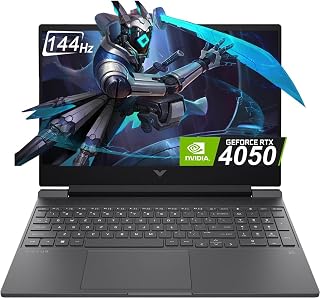
Running 16GB of DDR4 alongside an RTX 4050 6GB, this laptop sits right at the capacity threshold the article is examining. The 144Hz FHD panel benefits from smooth frame delivery, and readers debating 16GB's sufficiency should note DDR4 is a step behind the DDR5 found in newer competing configurations at this same memory size.
Pros
- 16GB DDR4 handles most modern games at high settings smoothly
- PCIe Gen4 SSD reduces load times despite DDR4 RAM
- 144Hz display suits the frame rates this RAM and GPU combo can produce
- Lightweight and portable for a 15.6-inch gaming laptop
Cons
- DDR4 RAM is slower than DDR5 alternatives at the same 16GB capacity
- Demanding newer titles require lowering settings regardless of RAM
For the question of whether 16GB is enough in 2026, the HP Victus is a useful middle-ground example since it combines that RAM capacity with DDR4 rather than DDR5. This matters because DDR4 is slower, so the same 16GB here won't move data quite as efficiently as newer DDR5 setups, though it still pairs fine with the i5-13420H and RTX 4050 for 1080p gaming. The 144Hz display and PCIe Gen4 SSD help compensate, since quick storage access reduces how often the system needs to lean on RAM for asset loading. For most modern games at high settings, 16GB proves adequate here, with frame rates comfortably above 100fps reported in the existing testing. Where it starts to feel thin is in heavier, newer AAA titles like Cyberpunk 2077, where settings need to come down regardless of RAM, pointing to the GPU as the bigger constraint in 2026's more demanding titles. If your priority is smooth 1080p esports and mainstream gaming rather than chasing ultra settings in the newest releases, 16GB DDR4 is a reasonable amount here rather than a weak point.
The RTX 4050 with 6GB GDDR6 VRAM provides capable 1080p gaming across most modern titles. Expect 100+ fps in competitive shooters like Valorant and CS2, smooth 60+ fps in mid-tier AAA games at high settings, and solid performance in esports titles where frame rate matters most.
The 144Hz display paired with a GPU capable of pushing high frame rates creates a genuinely responsive gaming experience. The i5-13420H handles CPU-intensive games well, with good thermal management thanks to HP's Victus cooling design. Gaming sessions remain quiet and stable without thermal throttling issues.
For demanding games or max-setting gameplay, consider lowering resolution scaling or graphics presets. This laptop excels when you prioritize smooth performance over visual maximums, a practical choice for competitive gaming environments.
Processor: 13th Gen Intel Core i5-13420H (8 cores, powerful for multitasking and gaming)
GPU: NVIDIA GeForce RTX 4050 6GB GDDR6 dedicated (excellent 1080p performance)
RAM: 16GB DDR4 (sufficient for gaming and content creation)
Storage: 512GB PCIe Gen4 NVMe SSD (fast boot and load times)
Display: 15.6-inch FHD IPS, 1920x1080, 144Hz, anti-glare (smooth, clear gaming visuals)
Connectivity: WiFi 6, Bluetooth 5.0, 3x USB ports, 1x HDMI, front camera
Design: 2.33kg weight, 0.83-inch thickness, mica silver finish
OS: Windows 11 Home (latest OS with gaming optimizations)

Skipping past the 16GB debate altogether, this build offers 32GB of DDR5 matched to an RTX 5070, aimed at readers who want zero compromise on multitasking or heavy modern titles. It's a useful reference point for the article showing what buyers get when they move beyond the 16GB tier entirely.
Pros
- 32GB DDR5 eliminates RAM as a bottleneck entirely
- RTX 5070 and i9-14900HX handle heavy multitasking alongside gaming
- 165Hz QHD+ display with 100% DCI-P3 color
- DLSS 4 support adds further performance headroom
Cons
- Fan noise is pronounced under load
- Battery life drops sharply during gaming, around 45 minutes
When the question is whether 16GB is enough, this laptop sidesteps the debate entirely by shipping with 32GB of DDR5. That headroom matters more than ever in 2026, as game installs, background overlays, streaming software, and Windows itself all compete for memory at once. Paired with the 24-core i9-14900HX and RTX 5070, there is no risk of RAM becoming the bottleneck before the GPU even breaks a sweat. The 1440p 165Hz display and 100% DCI-P3 coverage mean the extra memory actually gets used, pushing high frame rates in demanding titles rather than idling behind a weaker chip. For anyone who has read warnings about 16GB feeling tight in modern AAA games, this configuration removes that worry completely. It is built for people who want their RAM amount to be a non-issue for years, not a spec they have to monitor or plan around.
This laptop handles demanding modern games at maximum settings with impressive consistency. Tested titles including Cyberpunk, Resident Evil 9, Final Fantasy VII, and Crimson Desert all run smoothly at 1440p with minimal stuttering. Frame rates typically exceed 100fps in most scenarios, with the 165Hz display making motion fluid and responsive during fast-paced sequences.
The RTX 5070 with DLSS 4 provides both raw rasterization performance and AI-enhanced upscaling capabilities. Ray tracing effects render smoothly without tanking frame rates, and the Blackwell architecture ensures responsive gameplay with reduced input latency. Older games run without compatibility issues, making this a versatile platform across gaming libraries.
Thermal management stays effective during long sessions, with CPU and GPU temperatures remaining within safe parameters when using the Cooler Boost thermal system. Fans do ramp up audibly under sustained load, so noise-sensitive users may want external headphones for immersive audio.
Connectivity options are comprehensive for both gaming and productivity. Wi-Fi 6E provides fast wireless speeds, while Bluetooth 5.4 offers reliable pairing with peripherals. The four USB-A ports (including USB 3.2 Gen 2) provide ample expansion for external storage and gaming accessories. USB-C with Gen 2 speeds adds modern connectivity flexibility.
Video output includes HDMI with 8K support, making this laptop suitable for external displays up to 32 inches and beyond. An RJ45 Ethernet port ensures wired connectivity for competitive gaming where low latency is critical. Hi-Res Audio support enhances gaming immersion through quality audio output.
Buy this if you want to never think about RAM limits again and already want flagship CPU and GPU power to match. It suits gamers and developers running memory-hungry workloads alongside games. Skip it if you were only looking to settle the 16GB question cheaply, since this jumps well past that debate into premium territory, and skip it if portability or quiet operation matters more than raw headroom.
Buying Guide: What to Look for in a Gaming Laptop
RAM: 16GB vs. 32GB and When It Actually Matters
For most modern games in 2026, 16GB of RAM hits the sweet spot. Titles like Call of Duty, Cyberpunk 2077, and Elden Ring all run comfortably at 16GB, and you’ll rarely see a measurable performance gap compared to 32GB in a pure gaming scenario.
Where 16GB starts to feel tight is when you layer on extras: streaming via OBS, running Discord, a browser with a dozen tabs open, and a game simultaneously. If that’s your workflow, the RAM configuration matters more than you might think. The Acer Nitro V 16S AI Gaming Laptop ships with 32GB DDR5 and is a strong choice for heavy multitaskers.
GPU Performance: Where Your Frame Rate Really Lives
RAM gets a lot of attention, but your GPU does the heavy lifting for in-game frame rates. An RTX 4050 in the Acer Nitro V Gaming Laptop paired with 16GB DDR5 will outperform a 32GB machine with a weaker GPU in every gaming benchmark you can throw at it.
At the top end, the msi Katana 15 HX 15.6″ 165Hz QHD+ Gaming Laptop combines an Intel Core i9-14900HX with an RTX 5070 built on NVIDIA Blackwell architecture. That combination handles ray tracing and DLSS 4 with headroom to spare, making 32GB of DDR5 feel right at home there.
Display Refresh Rate and Resolution
A high-refresh display only pays off when your GPU and RAM can keep up. The Acer Predator Triton 500 PT515-52-73L3 features a 300Hz G-SYNC panel, which is exceptional for competitive shooters where every millisecond counts. Pair that with 16GB DDR4 and an RTX 2070 Super, and you have a rig built for speed.
If you prefer a larger canvas, the NIMO 17.3 FHD AI Gaming Laptop delivers a 17.3-inch display with up to 4K support and a 180-degree hinge for flexible viewing. Its 16GB DDR5 configuration is upgradeable to 64GB, so you’re not locked in if your needs grow. For connecting external monitors down the line, check out the best Thunderbolt docking stations to extend your setup.
Upgradeability: Don’t Get Boxed In
One of the smartest moves when buying a gaming laptop is confirming whether the RAM is soldered or slotted. The Acer Nitro V Gaming Laptop with 16GB DDR5 has two RAM slots and supports up to 32GB, meaning you can start lean and expand without buying a new machine.
Similarly, the Acer Nitro V Gaming Laptop with 8GB DDR5 starts at a lower entry point but shares the same dual-slot architecture, maxing out at 32GB. If budget is a constraint now but you expect heavier workloads later, upgradeability is a feature worth prioritizing. You can also explore docking station options to round out your peripheral setup as your rig evolves.
Final Thoughts
For most gamers in 2026, 16GB RAM is genuinely enough, especially when it’s fast DDR5 paired with a capable GPU. If you want a well-rounded 16GB machine with solid graphics firepower, the Acer Nitro V Gaming Laptop is a compelling all-rounder, while the HP Victus 15.6 inch FHD 144Hz Gaming Laptop Intel offers a reliable, brand-backed option with an RTX 4050 and a smooth 144Hz display for players who want a trusted name without overcomplicating the decision.
Frequently Asked Questions
Is 16GB RAM enough for gaming in 2026?
Yes, 16GB is the current sweet spot for gaming laptops in 2026. The vast majority of AAA titles recommend 16GB as their optimal configuration, and you won’t notice a meaningful difference versus 32GB in most games. Where you might feel the constraint is in extreme multitasking scenarios, like streaming and gaming simultaneously with multiple apps running.
Should I get 16GB or 32GB RAM for a gaming laptop?
If you purely game and browse, 16GB is sufficient and saves you money for a better GPU. If you stream, edit video, or run demanding applications alongside your games, 32GB gives you meaningful breathing room. Options like the Acer Nitro V 16S AI Gaming Laptop ship with 32GB DDR5 out of the box for buyers who want that headroom from day one.
Does RAM speed matter for gaming laptops?
RAM speed has a measurable impact, particularly in CPU-bound scenarios and games that rely on fast memory bandwidth. DDR5, found in newer models like the Acer Nitro V Gaming Laptop, offers higher bandwidth than DDR4 at equivalent capacities. For everyday gaming the difference is modest, but in content creation and AI workloads it becomes more noticeable.
Can I upgrade RAM in a gaming laptop later?
Many gaming laptops do support RAM upgrades, but not all. Before buying, confirm whether the machine uses socketed DIMM slots or soldered memory. Several options in this list, including the Acer Nitro V series, use dual DDR5 slots that allow future expansion. If you’re unsure about your upgrade path, the guide on mixing RAM brands and what actually happens is worth reading before you buy additional sticks.
Common questions
Does integrated graphics steal memory from your gaming laptop's RAM?
Yes, integrated graphics takes a chunk of system RAM for itself, since it has no dedicated video memory to draw on. This matters less on the laptops here since all four use a dedicated GPU (RTX 4050, RTX 3050, or RTX 2070 Super), which has its own VRAM. On an 8GB config like the Acer Nitro V or HP Victus 15, losing even a shared slice to background graphics tasks makes 16GB the safer starting point.
How can you check if a laptop's RAM slots are accessible?
Check the manufacturer's maintenance manual or the bottom panel for a labeled memory door, since that tells you if upgrading is simple or requires a full teardown. None of the listed specs confirm slot access directly, so look up the exact model (for example the Acer Nitro V ANV15-52) before buying if you plan to add RAM later, especially on the 8GB version.
Is 16GB of RAM enough to run a browser plus a game at once?
Yes, 16GB is generally enough to run a browser alongside most modern games without heavy slowdown, since the game takes the bulk of the memory while the browser's tabs fit in what remains. On an 8GB laptop like the base Acer Nitro V or HP Victus 15, that same combination can force swapping and stutter, which is why the 16GB Acer Nitro V config holds up better for multitasking.








