

A keyboard cover can save your laptop from crumbs, pet hair, coffee splashes, and the everyday grit that settles around low-profile keys. The catch is that a generic-looking cover can shift, block a key, or create unnecessary pressure when it does not match your keyboard precisely.
This guide helps MacBook, Dell, HP, Lenovo, and Surface owners choose a fitted keyboard skin with the right material, thickness, and layout. It is especially useful if you carry your machine between home, class, and work alongside accessories such as external SSDs for gaming.
Quick answer
This guide compares 10 picks, with MUBUY Keyboard Cover for Dell Latitude 3440 5440 7450 ranked first. Soonjet 0.11mm Keyboard Cover for MacBook Air 13/15 has the most customer reviews.

Pros
- Precise alignment across the keys and function rows on compatible models
- Thin, soft material preserves a natural typing feel with reduced key noise
- Stays in place without leaving adhesive residue and can be removed for cleaning
- Provides practical protection against dust, crumbs, and light spills
- Positive fit and comfort feedback from users of Latitude 3440, 5440, and 7420 models
Cons
- Compatibility depends on the exact keyboard layout, so the product image should be checked before ordering
- Not compatible with the 2024 Latitude 5455, 7455, 9440, or 9450 models
- The power button and, on some models, fingerprint reader areas may remain uncovered
The MUBUY keyboard cover is made for users of compatible Dell Latitude laptops who want everyday protection without adding bulk. It fits a broad range of 14-inch, 15.6-inch, and 16-inch Latitude models, but buyers should confirm the US keyboard layout and key arrangement before ordering.
Its main benefit is practical spill and debris protection. The silicone layer helps keep dust, crumbs, coffee, and light moisture away from the keyboard, while the washable surface makes cleanup easier after regular office or travel use.
At approximately 0.01 inches thick, the cover is designed to preserve a natural typing experience. User feedback highlights accurate key alignment, a soft feel, minimal movement, and quieter keystrokes, although the silicone texture may take a short time to feel familiar.
The close-fitting silicone construction is soft, flexible, and supported by an anti-fading coating on the printed legends. Some compatible configurations leave the power button or fingerprint reader uncovered, which helps maintain access but means those areas receive no direct cover protection.
Overall, this is a practical, low-profile keyboard protector for supported Dell Latitude US-layout keyboards. Confirm the exact layout first, especially because it does not fit the 2024 Latitude 5455, 7455, 9440, or 9450 models.

Pros
- Close fit with minimal movement during typing
- Thin, soft silicone retains a natural keystroke feel
- Washable and reusable for convenient maintenance
- Helps protect the keyboard from dust and everyday liquid spills
- Clear printed characters can improve visibility on faded keys
Cons
- Compatibility depends on the exact HP model and US keyboard layout, so the layout image should be checked before purchase
- The cover may not align perfectly with every special key, including some Copilot key configurations
- Black silicone may reduce visibility of certain keyboard indicator lights on some laptops
The MUBUY keyboard cover is made for select HP 15.6-inch laptops in the 15-fc, 15-fd, 15z-fc, and 15t-fd families. It is a useful upgrade for owners dealing with faded key lettering or anyone who wants an extra layer of protection for a frequently used laptop.
Its 0.01-inch silicone construction sits closely over the keys without adding much bulk. The soft material supports relatively quiet typing, while the molded key shapes help the cover stay in place during normal use.
In daily use, the cover helps shield the keyboard from dust, crumbs, moisture, and accidental splashes. The surface is washable, and the printed characters can make worn or difficult-to-read keys easier to see.
Buyers should confirm the exact keyboard layout before ordering. Some configurations may have a Copilot key mismatch, and the black cover can make power or Caps Lock indicator lights less visible on certain models.
Overall, this is a practical, low-cost keyboard protection layer for compatible HP laptops. It combines a close fit, washable silicone, and improved key visibility, provided the laptop model and key layout match the listing.

Pros
- Very thin design is less likely to interfere with typing or laptop closure
- Washable, reusable silicone is convenient for regular maintenance
- Helps shield keys from dust, stains, spills, and contaminants
- Broad compatibility across multiple Dell Latitude generations
- Distinctive ombre purple color adds visual personality
Cons
- Compatibility is limited to specific Dell Latitude models with a US keyboard layout and rectangular Enter key
- Not compatible with listed 2024 Dell Latitude, Dell Inspiron, or Latitude Rugged models
- Ombre purple may not suit buyers seeking a neutral or nearly invisible keyboard cover
The CaseBuy keyboard cover is designed for selected Dell Latitude 14-inch and 15.6-inch laptops, including the Latitude 7440, 7430, 7420, 7410, 5440, 5430, 5431, 5420, 9420, 9430, 9510, 9520, and 7520. It is intended for buyers who want everyday keyboard protection with a colorful ombre purple finish.
Its standout feature is the 0.12mm ultra-thin silicone construction, which is designed to minimize typing interference and avoid affecting normal laptop opening and closing. The snug fit helps keep dust, milk, stains, and other contaminants away from the keyboard during daily use.
Made from engineering-grade silicone, the cover offers a flexible, low-profile design with water-resistant and anti-dust benefits. When it needs cleaning, it can be washed with soapy water and reused after drying, making it practical for work, school, and shared environments.
The main limitation is compatibility, so buyers should compare their keyboard with the product reference image before ordering. It fits US keyboard layouts with a rectangular Enter key, but it does not fit the listed 2024 Dell Latitude models, Dell Inspiron models, or Dell Latitude Rugged laptops.
Overall, this CaseBuy cover is a practical choice for compatible Dell Latitude owners who want thin, washable protection without a bulky typing layer. Its broad model coverage and distinctive color are appealing, provided the laptop model and keyboard layout are verified first.

Pros
- Fits compatible Dell Latitude keyboards closely and stays in place during use
- Very thin design minimizes interference with typing and laptop closure
- Washable, reusable, and easy to install without adhesive
- Helps reduce greasy key buildup and protects against dust and minor spills
- Attractive ombre pink color adds personality to a work laptop
Cons
- Compatibility is limited to specific Dell Latitude models and the US keyboard layout with a rectangular Enter key
- Not compatible with several newer Dell Latitude 5455, 7455, 9440, and 9450 models, Rugged versions, or listed Inspiron models
- The thin silicone construction provides less rigid protection than a hard keyboard cover
The CaseBuy Ombre Pink keyboard cover is made for select Dell Latitude laptops, including compatible 14-inch, 15.6-inch, and 16-inch models. It is best suited to users who want everyday keyboard protection and a colorful upgrade without replacing the original keyboard.
Its 0.12 mm silicone construction is thin enough to preserve much of the laptop's original typing feel and avoid interfering with normal opening and closing. Reviews also indicate that the cover fits securely, stays in place during use, and helps prevent greasy keys, dust, stains, and minor spills from reaching the keyboard.
The silicone material feels practical for regular office or home use, while the ombre pink finish gives a work laptop a more personalized appearance. It applies without adhesive, can be removed for cleaning, and is designed to be washed with soapy water before being reused once dry.
Buyers should verify the exact laptop model and keyboard shape before ordering. This cover is for a US keyboard layout with a rectangular Enter key and does not fit several newer Latitude models, Latitude Rugged laptops, or the listed Dell Inspiron systems.
Overall, this is a useful low-profile keyboard skin for compatible Dell Latitude owners who value easy maintenance, spill and dust protection, and a bright design. Its main limitation is the narrow compatibility range, so checking the keyboard against the product images is essential.

Pros
- Very thin profile minimizes typing interference
- Washable silicone can be reused after cleaning
- Provides everyday protection against dust, stains, and spills
- Colorful design personalizes compatible Dell Latitude laptops
Cons
- Compatibility is limited to specific Dell Latitude models and the US keyboard layout
- Not compatible with several 2024 Dell Latitude and Inspiron models or Dell Latitude Rugged laptops
- Rainbow styling may not suit users who prefer a plain or professional-looking keyboard
The CaseBuy Rainbow Keyboard Cover is a thin silicone skin made for select Dell Latitude laptops. It is best suited to owners who want everyday keyboard protection without replacing the original keyboard or adding a bulky accessory.
Its 0.12 mm profile is designed to minimize typing interference and allow normal laptop opening and closing. The cover helps protect against dust, stains, milk, and minor spills during regular home, school, or office use.
Engineering-grade silicone gives the cover a flexible feel and helps it sit snugly over the low-profile keys. The clear silicone construction with colorful key detailing adds visual personality while keeping the keyboard surface covered.
Fit verification is important before purchase because this cover supports only specified Dell Latitude versions and US keyboard layouts with a rectangular Enter key. It does not fit several newer 2024 Latitude and Inspiron models, Dell Latitude Rugged laptops, or other layouts.
Overall, this is a practical, colorful keyboard protector for compatible Dell Latitude owners. Its washable construction, slim profile, and spill protection make it a useful low-cost accessory, provided the laptop model and keyboard shape are carefully matched first.

Pros
- Precise fit and alignment according to customer feedback
- Very thin construction with a tactile typing surface
- Reusable and easy to remove for cleaning
- Protects against common keyboard debris and minor spills
- Attractive ombre pink appearance with a decorative aesthetic
Cons
- Compatible only with the US ANSI keyboard layout and the specified MacBook Neo model
- One reviewer reported receiving a different color than ordered
- A reviewer noted that the surface can collect hair and may take time to dry after washing
The ProElife Keyboard Cover is made for the 2026 MacBook Neo 13-inch with the A18 Pro chip and A3404 model. It is intended for users with a US ANSI keyboard who want to protect their keys without adding much bulk.
Its 0.26 mm silicone construction keeps the cover flexible and low profile, while customer feedback highlights the comfortable tactile feel and accurate key alignment. The cover helps guard against crumbs, dust, cigarette ash, and liquid exposure during everyday use.
Each key is molded for a close fit, and the cover is designed to preserve access to Touch ID. Its removable, reusable construction also makes it practical to take off for cleaning and put back on when needed.
The ombre pink finish gives the keyboard a playful, aesthetic look, although one reviewer said the delivered color did not match the order and another noted that the material can collect hair. It may also need extra drying time after washing.
Overall, this is a good keyboard protection option for MacBook Neo owners who prioritize a precise fit, thin typing feel, and colorful styling. Confirm the US ANSI layout and exact A3404 compatibility before buying.

Pros
- Very low-profile design maintains a more natural typing experience than thicker keyboard covers.
- Close fit helps keep the cover stable during everyday and fast typing.
- Washable, reusable TPU provides convenient long-term protection.
- Backlight visibility and Touch ID functionality are preserved.
Cons
- Designed for US ANSI layouts only, so it is not suitable for other keyboard configurations.
- Buyers need to verify the exact MacBook model and A-number because fit is model-specific.
- The thin TPU construction prioritizes typing comfort and low bulk over rigid impact protection.
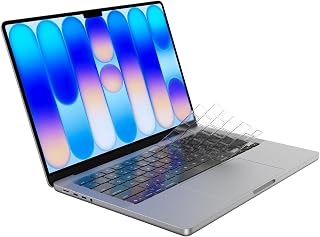
The Soonjet keyboard cover is made for owners of compatible US ANSI MacBook Air 13 and 15 inch and MacBook Pro 14 and 16 inch models. It suits students, professionals, and anyone who wants everyday protection from dust, crumbs, pet hair, and minor spills without adding much bulk.
Its standout feature is the 0.11mm profile, which keeps typing feeling close to the uncovered keyboard. The precision-molded shape stays flush during fast typing, while the transparent or tinted material allows the backlight to show through and keeps Touch ID accessible.
Engineering-grade TPU gives the cover flexibility for easy installation and enough durability for regular use. It requires no adhesive, can be fitted in under 30 seconds, and can be washed with soap and water before being reused.
There are a few limitations to consider. This cover is made specifically for US ANSI layouts, and shoppers should confirm their MacBook model and A-number before ordering. Its thin design is intended for keyboard protection and comfort, not rigid impact resistance.
Overall, the Soonjet cover is a practical low-profile choice for MacBook users who want washable protection with minimal impact on typing, backlighting, and Touch ID. Its model-specific fit and US ANSI limitation are important checks, but the thin TPU design offers a well-balanced everyday solution.
Pros
- Very thin 0.11mm profile is designed to minimize typing interference
- Clear material preserves keyboard visibility and allows backlight illumination
- Washable, reusable design offers convenient long-term maintenance
- Protects against common keyboard hazards including spills, dust, crumbs, and fingerprints
- Designed to maintain access to Touch ID on compatible MacBook models
Cons
- Only intended for US keyboard layouts, so it is unsuitable for international key configurations
- Compatibility is limited to the listed MacBook models and exact model numbers
- Even a thin keyboard cover may slightly change key feel compared with typing directly on the keyboard
The Soonjet Keyboard Cover is a clear TPU protector for selected MacBook Pro, MacBook Air, and MacBook Neo models. It is aimed at users who want everyday protection from dust, crumbs, fingerprints, and accidental spills without hiding the appearance of the built-in keyboard.
Its standout feature is the 0.11mm ultra-thin profile, which is designed to reduce typing interference. The transparent film allows keyboard backlighting to remain visible, while the precision-shaped construction covers the individual keys and is designed to preserve Touch ID access on compatible devices.
Made from soft, engineering-grade TPU, the cover offers a flexible fit and a smooth surface for regular use. The washable and reusable design is useful for cleaning away accumulated dust and residue, while the water-, scratch-, and fingerprint-resistant properties add practical protection for home, office, or school use.
There are important compatibility limits to check before buying. This version is for US keyboard layouts only, and buyers should match their MacBook model and model number against the listed 13-inch, 14-inch, 15-inch, 16-inch, and Neo configurations. Although the slim design minimizes the change in key feel, some users may still notice a difference from typing directly on uncovered keys.
Overall, the Soonjet cover is a sensible protective accessory for compatible Apple Silicon MacBooks. Its clear, low-profile, washable TPU construction balances keyboard protection with backlight visibility, making it a strong fit for users who prioritize cleanliness and spill resistance while using a US-layout keyboard.

Pros
- Waterproof and dustproof protection against common keyboard hazards
- Very thin profile minimizes typing interference
- Washable, flexible silicone is easy to maintain
- Broad compatibility across select Lenovo IdeaPad, Yoga, and ThinkBook models
- Soft material can reduce typing noise
Cons
- Only fits specific Lenovo models and US keyboard layouts, so buyers must verify the keyboard image and model number
- Not compatible with several newer 2025 and 2026 Lenovo models listed by the manufacturer
- A silicone cover may feel different from typing directly on the laptop keyboard
The MUBUY keyboard cover is designed for selected Lenovo IdeaPad, Yoga, and ThinkBook laptops with a US keyboard layout. It suits students, office users, and anyone who wants extra protection from spills, dust, crumbs, and daily keyboard wear.
Its 0.01-inch silicone profile is thin enough to minimize interference with key travel while adding a soft, quiet touch during typing. The close-fitting molded design helps keep the cover aligned, and the washable material makes cleanup practical after everyday use.
Build quality is supported by durable, non-toxic silicone and an anti-fading printed coating. The waterproof and dustproof construction provides useful protection, while the flexible material conforms closely to compatible keys without adding much bulk.
Compatibility is the main limitation. This cover is intended for specific Lenovo models and US layouts, and it does not fit several newer 2025 and 2026 IdeaPad and Yoga versions, so buyers should compare the keyboard layout and exact model number before ordering.
Overall, the MUBUY cover is a practical choice for protecting a compatible Lenovo laptop while preserving a relatively natural typing experience. It is especially worthwhile for users who value washable protection and quieter keystrokes, provided the laptop passes the compatibility check.

Pros
- Snug fit generally stays in place during normal typing on compatible Surface Laptop models
- Clear, low-profile design keeps the keyboard appearance and backlighting visible
- Helps protect expensive keyboard components from everyday dust, crumbs, stains, and spills
- Removable construction allows convenient cleaning without adhesive residue
- Thin TPU material provides protection without adding significant bulk
Cons
- US layout only, with a rectangular Enter key, so other keyboard layouts will not fit
- Some users may need to press the keys more firmly and adjust to a slightly harder typing feel
- Not compatible with the 2025 Surface Laptop, Snapdragon X Plus 13-inch model, or listed 2019 to 2023 Surface Laptop touchscreen models
The CaseBuy Premium Keyboard Cover is a clear, 0.12 mm TPU skin designed for Microsoft Surface Laptop 7 and 8 editions from 2024 to 2026, in 13.8-inch and 15-inch sizes. It is intended for US keyboards with a rectangular Enter key, making it useful for owners who want discreet protection.
Its main benefit is a snug barrier that helps keep dust, crumbs, stains, and light spills away from the keyboard. The transparent material lets the backlight remain visible, and customer feedback generally describes a secure fit with little disruption to normal typing.
Made from engineering-grade TPU, the glossy cover combines water and scratch resistance with a low-profile design. Its non-adhesive construction is removable for cleaning, while the clear finish preserves the look of the original Surface keyboard.
Typing can feel slightly firmer because the cover adds a layer over each key, so users who prioritize the lightest key feel may need an adjustment period. Compatibility also requires careful checking, since the cover does not fit the 2025 Surface Laptop, Snapdragon X Plus 13-inch model, or the listed 2019 to 2023 Surface Laptop touchscreen models.
Overall, this is a practical, low-visibility keyboard protector for a compatible Surface Laptop, especially in homes, offices, or classrooms where crumbs and spills are concerns. It is a good buy for users who want easy-to-clean protection and backlight visibility, as long as the model and US layout are verified first.
How to Choose a Laptop Keyboard Cover
We assessed these covers by their stated device compatibility, material, key-by-key molding, slim profile, and practical protection features. A good cover should feel like part of the keyboard, while a poor fit becomes distracting every time you type.
Confirm the exact laptop model and keyboard layout
Exact fit is the deciding factor. Match your laptop family, screen size, keyboard shape, and regional layout before choosing a cover, then compare the Enter key, function row, arrow keys, and speaker areas with the seller’s compatibility image.
The MUBUY and CaseBuy Dell options cover several Latitude layouts, but each listing also identifies models that do not fit. Likewise, the MUBUY HP and Lenovo covers suit specific series rather than every laptop carrying the same brand name. If your laptop is part of a desk setup with a larger display, see these 32-inch 4K monitor picks for complementary workspace ideas.
Choose silicone or TPU based on your typing priorities
Silicone covers are soft, flexible, and effective at catching debris and small spills before they reach the key gaps. The MUBUY models and the colorful CaseBuy Latitude options use this familiar approach, making them sensible for shared spaces, travel, or desks where snacks and drinks are common.
TPU usually offers a clearer, tighter-looking skin and can preserve more of the original key appearance. The Soonjet MacBook covers and CaseBuy Surface option use TPU for a slim, transparent presentation. For a gaming station, a removable cover also lets you prioritize raw key feel when playing alongside a monitor for competitive FPS gaming.
Look for an ultra-thin profile that stays put
Thickness matters because it affects feedback, backlight visibility, and how confidently the lid closes. The Soonjet Ultra Thin Keyboard Cover for MacBook Pro lists a notably slim 0.11 mm profile, while the CaseBuy covers list a 0.12 mm profile and several MUBUY options use a similarly low-profile design.
A thinner cover is not automatically the right one if its molded key pattern is wrong. Make sure the skin lies flat without raised corners, bunching, or key misalignment, and remove it if you notice pressure against the screen after closing the laptop. A cover protects the keyboard, while a 4K 240Hz monitor can address the visual side of a high-performance setup.
Balance visibility, color, and everyday upkeep
Clear covers work well when you want keyboard backlighting and factory legends to remain visible. Soonjet offers clear, tinted, and smoky MacBook styles, while the Surface-specific CaseBuy cover emphasizes transparency for preserving the laptop’s original appearance.
If you want easier visual key separation or a personal touch, the ombre and rainbow CaseBuy Latitude covers are more expressive choices. Most options here are washable and reusable, so you can gently clean them with soap and water, let them dry completely, and reinstall them. That small maintenance habit fits well with a practical workstation built around budget 1440p monitors and other long-lasting gear.
Final Thoughts
The right cover is the one that matches every key and supports how you use your laptop, whether that means a nearly invisible MacBook skin or a resilient work-device protector. The Soonjet Ultra Thin Keyboard Cover for MacBook Pro is a strong fit for slim Apple keyboards, while the Keyboard Cover Skin for Dell Latitude 3440 3450 serves compatible Latitude owners who want soft, washable spill defense.
Frequently Asked Questions
Are laptop keyboard covers safe to leave on?
A well-fitted, ultra-thin cover can be useful for routine dust and spill protection, but fit and lid clearance come first. Check the laptop maker’s guidance, keep the cover clean, and remove it if it shifts or appears to add pressure when the lid is closed. In 2026, buying a model-specific cover remains far safer than relying on a universal sheet.
How do I know which keyboard cover fits my laptop?
Start with your laptop’s full model identifier, then compare its keyboard against the product image. Pay close attention to the Enter key shape, numeric keypad arrangement, function keys, and regional layout. For example, a cover marked for a US ANSI layout may not suit an ISO keyboard with a tall, L-shaped Enter key.
Do ultra-thin keyboard covers affect typing or backlighting?
Any keyboard skin changes the surface feel slightly, though very slim TPU and silicone designs minimize that difference. Transparent covers can allow backlighting to shine through, while colored covers make the legends more visible in bright rooms. If you need the most direct key response for a focused task, choose a cover that is easy to lift off and replace.
Can a keyboard cover protect my laptop during gaming?
A cover can keep dust, crumbs, and incidental splashes away from the keyboard, but it does not improve frame rates, cooling, or connection stability. Remove it if it changes your preferred key feel during demanding sessions. For network-related issues in a gaming area, consider these WiFi extenders for gaming as a separate upgrade.






Write Your Review
No reviews yet. Be the first to share your experience!