

You’ve outgrown 1080p, your GPU can handle more, and you’re ready for a sharper display, but you don’t want to spend a fortune to get there. The good news is that the QHD monitor market has matured significantly, and you can now find a crisp 1440p panel with a fast refresh rate without emptying your wallet. Whether you’re a competitive shooter player who needs minimal input lag or a casual gamer who wants richer visuals during long sessions, there’s a solid option here for you.
This guide covers ten of the best budget 1440p monitors available right now, from flat IPS panels to curved VA displays and even QD-OLED options for those willing to stretch a little. If you’re building out a full gaming setup on a budget, check out our picks for the best gifts for gamers to complement your new display.
Quick Comparison
Ratings reflect the most recent data pull. Check each listing for current price and availability.
Quick answer
This guide compares 10 picks, with Samsung 27 Odyssey G5 QHD 1440P 180Hz Gaming Monitor ranked first. SANSUI 27" WQHD Curved Gaming Monitor 200Hz 1ms has the most customer reviews.
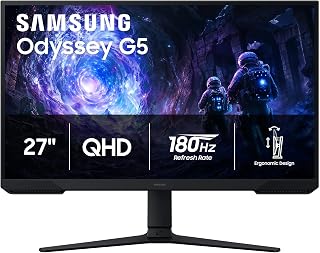
For gamers who want deep blacks without paying OLED prices, the VA panel here delivers a 3000:1 contrast ratio, well above typical IPS competitors. Paired with a 180Hz refresh rate, it handles fast-paced titles smoothly while still giving shadows and dark scenes more punch, making it a solid pick for budget-conscious shoppers who prioritize picture depth.
Pros
- 180Hz refresh rate at a budget-friendly price point
- Strong 3000:1 contrast ratio for deep blacks
- FreeSync eliminates tearing and stutter
- Fully adjustable stand with matte anti-glare finish
Cons
- VA panel viewing angles trail IPS alternatives
- On-screen menu navigation isn't very intuitive
Budget-focused gamers often assume they have to sacrifice speed for savings, but the Odyssey G5 pushes back on that. A 180Hz refresh rate on a QHD panel is still uncommon at accessible price points, and this monitor delivers that combination in a well-built 27-inch package. The VA panel's 3000:1 contrast ratio gives it an edge in darker scenes, punching up shadow depth in a way many budget IPS screens can't match, while FreeSync keeps fast-paced action free of tearing. For anyone building a budget rig around competitive titles like Valorant or Apex Legends, this is one of the more complete packages available without stepping into premium territory. The matte finish and adjustable stand round out a setup that feels considerately designed rather than stripped down to hit a price. It's not the flashiest monitor on the shelf, but for the money, the refresh rate alone makes it stand out among budget 1440p options, and the Black Equalizer tool adds real competitive value on top.
Display: 27-inch QHD VA panel, 2560 x 1440 resolution, 16:9 aspect ratio, 178-degree viewing angles
Performance: 180Hz refresh rate, 1ms response time (MPRT), 300 cd/m brightness, 3000:1 contrast ratio
Features: HDR10, AMD FreeSync, Black Equalizer, matte screen finish
Connectivity: 2x HDMI, 1x DisplayPort, 1x power connector
Design: Adjustable stand with tilt, pivot, and height settings, desk mount, flat panel shape
Dimensions: 24.34 inches wide, 9.22 inches deep, 20.5 inches tall, 10.1 pounds
Power: 35 watts consumption, 240 volts
Warranty: 1-year manufacturer coverage

Fast-twitch shooter fans on a budget get an outsized win with the 240Hz overclocked IPS panel, a refresh rate usually reserved for higher-tier displays. G-SYNC compatibility keeps frames synced during intense firefights, while the glossy finish adds extra color vibrancy for players who value visual punch alongside raw speed.
Pros
- 240Hz refresh rate at QHD resolution for the price point
- G-Sync compatible plus Adaptive-Sync for tear-free gameplay
- Frameless IPS panel with wide, accurate viewing angles
- Lightweight build with flexible tilt adjustment
Cons
- No built-in speakers, headphone or external audio only
- Basic stand compared to pricier alternatives
If you're hunting for the best budget 1440p monitor that still keeps pace with serious gaming, the AOC Q27G41ZE deserves a spot on your shortlist. It hits the sweet spot this list is built around: sharp QHD resolution on a 27-inch IPS panel, paired with a 240Hz refresh rate that most budget displays can't touch. G-Sync compatibility and Adaptive-Sync mean you get tear-free frames without needing a premium price tag to unlock them. The three-sided frameless design and adjustable tilt stand give it a look that doesn't scream budget, even though the value proposition clearly does. For gamers comparing specs sheet to specs sheet, the jump from 1080p to this panel's 2560x1440 resolution is an easy sell, especially with wide viewing angles and accurate color holding up across genres. Game Mode and Shadow Control presets add convenience without complexity. It's not the most feature-loaded monitor on the market, but for this list's purpose, being fast, sharp, and affordable, it checks every box that matters.
Display: 27-inch IPS, 2560x1440 QHD, 16:9 aspect ratio, 300-nit brightness, 1000:1 contrast ratio, glossy finish
Performance: 240Hz refresh rate (via DisplayPort), 0.3ms MPRT response time, Adaptive-Sync, G-Sync compatible
Connectivity: 1x DisplayPort 1.4, 2x HDMI 2.0, audio output jack
Design: Three-sided frameless, tilt adjustment from minus 3 to plus 21 degrees, textured black and red finish
Dimensions: 24.17 inches wide, 7.46 inches deep, 17.7 inches tall, 6.15kg weight
Features: Blue Light Filter, Flicker-Free, Shadow Control, Game Mode presets, graphical OSD menu
Warranty: 3-year manufacturer coverage
Best for gamers who prioritize speed and resolution over extras, particularly competitive and fast-paced game players who want a real refresh rate upgrade without overspending. Also a good fit for anyone building a first QHD setup on a budget. Skip it if you want built-in speakers or need a heavy-duty stand, since both are minimal here. Those wanting HDR or curved immersion should look elsewhere on this list.
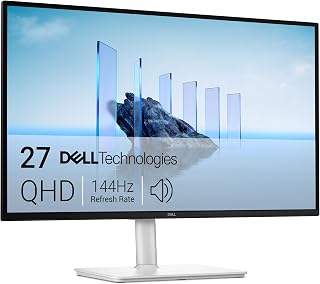
Anyone shopping on a tight budget who still wants a workstation-friendly monitor will appreciate the height, tilt, pivot, and swivel adjustability here, letting them dial in ergonomics without extra mounting hardware. The 144Hz IPS panel keeps competitive games responsive, and built-in 3W speakers mean one less peripheral to buy separately.
Pros
- 144Hz IPS panel with accurate 178-degree viewing angles
- TUV-certified flicker-free and blue light reduction
- Surprisingly capable built-in 3W speakers
- Full height, tilt, pivot, and swivel adjustability
Cons
- Only one HDMI port may require adapters
- 1ms response time is good but not top-tier for esports
Finding a budget 1440p monitor that doesn't feel like a compromise is tricky, and the Dell S2725DSM earns its spot here by covering the essentials well. The IPS panel and 178-degree viewing angles keep colors consistent whether you're gaming solo or sharing the screen, and 144Hz with FreeSync support is plenty for most budget-conscious gamers stepping up from 60Hz displays. What makes it worth a second look is the extra polish rarely found at this tier: TUV certification for flicker-free, blue-light-reduced comfort, plus built-in 3W speakers that actually hold their own. The fully adjustable stand, with height, tilt, pivot, and swivel, means it fits a variety of desk setups without needing a separate mount. At just over 14 pounds, it's easy to reposition, and the ash white finish gives it a cleaner look than the typical all-black gaming monitor. For gamers who also spend hours working or creating at the same desk, this dual-purpose design makes a strong budget case.
Ideal for budget gamers who split time between gaming and productivity work and want eye comfort features for long sessions. Also fits anyone who values decent built-in audio without buying separate speakers. Skip it if you need multiple simultaneous HDMI connections, since there's only one HDMI port, and skip it if you're chasing the fastest possible response times for competitive esports.
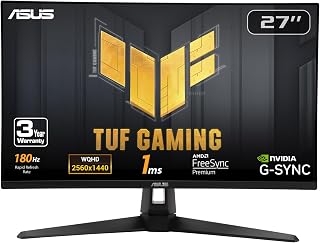
Budget gamers chasing smoothness over flashy extras will find the 180Hz Fast IPS panel matches faster, pricier monitors in responsiveness. G-SYNC support keeps tearing away during quick camera pans, and the matte finish cuts glare in bright rooms, a practical combo for anyone setting up a no-fuss competitive gaming station.
Pros
- Works with both G-SYNC and FreeSync Premium
- Fast IPS panel with 1ms response time
- 130% sRGB gamut for vibrant color
- 3-year warranty with accidental damage coverage
Cons
- Built-in 2W speakers are weak and lack bass
- Ships overly bright, needing manual adjustment
For gamers hunting a budget 1440p monitor that doesn't skimp on motion clarity, the ASUS TUF VG27AQ3A stands out for stacking three adaptive sync technologies, ELMB Sync, G-SYNC compatibility, and FreeSync Premium, into one panel. That flexibility matters at this price because it works cleanly with either AMD or Nvidia graphics cards, so you're not locked into one GPU ecosystem to get tear-free gameplay. The Fast IPS panel adds a 1ms response time that's rare for IPS technology, paired with a 130% sRGB gamut that keeps colors punchy for both gaming and casual content creation. A frameless design keeps things clean for anyone eyeing a multi-monitor setup down the line, and the GamePlus overlay adds handy extras like frame counters and crosshair overlays for competitive play. Backed by a 3-year warranty with accidental damage protection, it's a monitor that feels built to last, which matters when you're trying to stretch a budget purchase over several years of use.
Display: 27-inch Fast IPS, 2560 x 1440 (QHD), 16:9 aspect ratio, 178-degree viewing angles
Refresh Rate: 180Hz native. Supports G-SYNC compatible, FreeSync Premium, and AdaptiveSync with variable refresh rate
Response Time: 1ms (moving picture response time)
Color: 130% sRGB gamut, HDR-10 support, 856.5 lm brightness, 1000:1 contrast ratio
Connectivity: 2x HDMI 2.0, 1x DisplayPort 1.4, 3.5mm audio jack
Physical: 24.2" depth, 8.4" width, 17.9" height, 4.6 kg weight. VESA 100x100 mount compatible. Flat panel with matte screen finish
Features: Blue light filter, flicker-free technology, integrated 2W stereo speakers, frameless design, built-in GamePlus menu with FPS counter and crosshair overlay
Warranty: 3-year warranty with accidental damage replacement
Best for gamers upgrading from an older 60-144Hz monitor who want smooth, tear-free performance regardless of their GPU brand. Also good for anyone who wants IPS color accuracy without giving up fast response times. Skip it if audio quality matters, since the built-in speakers are weak, and skip it if you're sensitive to high default brightness, as it needs manual adjustment out of the box.

Pros
- Exceptional 200Hz refresh rate and 1ms response time deliver competitive gaming performance at a fraction of premium monitor costs
- 1500R curved screen design reduces eye fatigue during long work and gaming sessions while creating immersive depth
- Excellent color accuracy with 90% DCI-P3 coverage makes it suitable for content creation and professional work
- Smooth FreeSync support eliminates stuttering and tearing without requiring expensive G-Sync hardware
- Wide 178-degree viewing angles and ergonomic stand provide comfortable positioning for various desk setups
Cons
- Best viewed head-on rather than from extreme angles, typical of budget-tier curved displays
- No built-in speakers, requiring separate audio solution for complete setup
- Limited to 144Hz maximum on HDMI 2.0 connections, requiring DisplayPort for full 200Hz capability
The SANSUI ES-G27C1Q is a 27-inch curved gaming monitor built for gamers and creative professionals who need responsive, visually immersive performance without breaking the bank. Its 2560x1440 WQHD resolution combined with a 200Hz refresh rate positions it squarely in the gaming-focused category, though the color accuracy makes it equally capable for photo and video work.
Performance is the real standout here. The 200Hz refresh rate and 1ms MPRT response time deliver exceptionally smooth gameplay, while the 1500R curved display pulls you into the action and noticeably reduces eye strain compared to flat monitors. Real-world testing confirms users experience buttery smooth motion in fast-paced games, and the FreeSync support ensures tear-free visuals across compatible systems. The 5000:1 contrast ratio and HDR support add punch to colors and shadows.
Build quality and ergonomics are solid for the price point. The curved VA panel maintains strong color accuracy at 90% DCI-P3 coverage, the adjustable stand offers tilt flexibility, and dual DisplayPort 1.4 inputs maximize connectivity options. The matte screen finish reduces glare during extended sessions, and the 300-nit brightness handles both bright offices and darker gaming rooms adequately.
The main drawback is viewing angle performance. Like most budget curved displays, this monitor shows image compression and color shift when viewed from extreme angles, though direct head-on use is where this display excels. Additionally, there are no built-in speakers, so you'll need external audio. HDMI connections max out at 144Hz, so you must use DisplayPort for the full 200Hz experience.
Final verdict: The SANSUI ES-G27C1Q delivers competitive gaming and professional-grade performance at a price that makes 200Hz refresh rates accessible to budget-conscious buyers. With excellent response times, immersive curvature, and solid color accuracy, this is a genuinely capable monitor that punches well above its price class. Highly recommended for gamers upgrading from 60Hz displays and professionals who value smooth visuals and accurate colors.
Display Specs: 27-inch curved VA panel, 2560x1440 WQHD resolution, 16:9 aspect ratio, 1500R curvature, 5000:1 contrast ratio, 300 nits brightness, 178-degree viewing angle.
Performance: 200Hz refresh rate (via DisplayPort), 1ms MPRT response time, FreeSync adaptive sync, HDR support, 90% DCI-P3 and 120% sRGB color gamut.
Connectivity: 2x DisplayPort 1.4 (up to 200Hz), 2x HDMI 2.0 (up to 144Hz), 3.5mm audio jack (no speakers).
Physical: 24.11" width x 17.81" height x 7.64" depth, 7.7 lbs, matte screen finish, tilt adjustment (-5° to +15°), VESA compatible (100x100mm), Kensington lock slot.
Warranty: 30-day money-back guarantee, 1-year quality warranty, lifetime technical support.
Best for: Competitive gamers seeking high refresh rates on a budget, content creators needing accurate colors, home office professionals who value reduced eye strain, and anyone upgrading from older 60Hz displays.
Gaming Performance: The 200Hz refresh rate and 1ms response time excel in fast-paced titles like first-person shooters, fighting games, and action games. FreeSync removes stuttering when paired with compatible AMD or Intel processors. PlayStation 5 users should note the PS5 only supports up to 120Hz, so you'll experience the monitor's full potential with PC gaming.
Work and Productivity: The curved design and accurate color reproduction make this suitable for photo editing, video work, and programming. Users report significantly reduced eye strain during 8+ hour work sessions compared to flat displays, thanks to the immersive curve and matte finish reducing glare.
Setup Tips: Use DisplayPort connections to unlock the full 200Hz potential. Position the monitor at eye level with your viewing distance around 24-28 inches for optimal curvature benefits. Enable HDR in monitor settings after connecting to see the full color impact. Pair with a separate audio system since this monitor has no built-in speakers.
Alternatives to Consider: If you primarily game on PS5 or Nintendo Switch, you may not fully utilize 200Hz, making a 120-144Hz display sufficient. If you need superior viewing angles from multiple directions, flat IPS panels offer better performance but typically cost more and run at lower refresh rates.
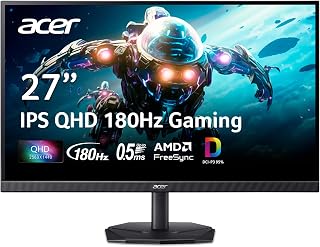
Gamers wanting reliable motion clarity without overspending will benefit from the 180Hz IPS panel, which keeps colors accurate at wide viewing angles during co-op sessions. The matte coating reduces reflections in glare-prone rooms, rounding out a dependable choice for anyone building a budget rig focused on everyday gaming performance.
Pros
- QHD resolution with 180Hz refresh rate and FreeSync
- DCI-P3 95% color and HDR 10 support for creative work
- Zero-frame bezel design suited to multi-monitor setups
- Built-in speakers and matte anti-glare finish
Cons
- HDMI ports max out at 120Hz, DisplayPort needed for full refresh rate
- Included stand feels less stable than premium options
For a budget 1440p pick that doesn't feel like a compromise, the Acer Nitro KG271U earns its place on this list by covering more bases than most gaming monitors in its class. The 180Hz refresh rate and QHD resolution deliver the smooth, sharp experience every gamer wants, while AMD FreeSync support keeps tearing out of the picture. What sets it apart for budget shoppers is the added versatility: DCI-P3 95% color coverage and HDR 10 support mean it doubles as a capable screen for photo or video work, so you're not just paying for gaming specs alone. The zero-frame bezel design is a nice touch for anyone considering a multi-monitor setup down the line, and the matte finish helps with glare in brighter rooms. Built-in speakers add convenience, even if you'll likely want better audio for serious gaming sessions. One thing to keep in mind: you'll need DisplayPort rather than HDMI to actually reach the full 180Hz, since HDMI caps out lower. Still, for the price bracket this list is built around, it's a well-rounded option.
Display: 27 inches, IPS LCD, 2560x1440 (QHD), 16:9 aspect ratio, matte finish
Performance: 180Hz refresh rate, 0.5ms response time (GTG), 1000:1 contrast ratio, 250 nits brightness
Color: DCI-P3 95%, HDR 10 support, 178-degree viewing angles
Connectivity: DisplayPort (1), HDMI (2), built-in speakers
Physical: 24.2" W x 18.14" H x 8.28" D, 5.5 kg, tilt adjustment, wall mount compatible
Power & Warranty: 26W power consumption, 3-year parts and labor warranty
Included: Display, DisplayPort cable, power cord, stand
Good for budget-conscious gamers who also dabble in photo editing or content work and want a monitor that flexes both ways. Also suits anyone planning a bezel-free multi-monitor setup. Skip it if you only care about maximum refresh rate, since 180Hz trails other options on this list, or if you won't use DisplayPort, since HDMI limits you to 120Hz.

Pros
- Exceptional value: High-end specs at mid-range pricing makes this competitive against monitors costing $100+ more
- Smooth gaming performance: 180Hz refresh rate and 1ms response time deliver responsive, fluid gameplay across all titles
- Vibrant IPS display: Wide 178-degree viewing angle and color accuracy outperform standard TN panels
- Versatile connectivity: DisplayPort and HDMI inputs support PC, Mac, and console configurations
- User-verified reliability: Multiple customer reports confirm zero issues after months of heavy use
Cons
- QHD resolution at 27 inches can show minor pixelation compared to 1440p on larger screens, though most users report excellent clarity
- Power consumption at 48W is moderate, adding to long-term electricity costs in extended gaming sessions
- Limited to 1-year manufacturer warranty, shorter than some competitors offering 2-3 year coverage
The Samsung Odyssey G5 is a 27-inch gaming monitor built for players and professionals who demand high refresh rates and sharp visuals without breaking the bank. With QHD resolution (2560 x 1440), this monitor sits perfectly between budget 1080p displays and expensive 4K setups, offering significantly more pixel density than Full HD while maintaining affordable pricing and accessible power requirements.
Gaming performance is where this monitor truly shines. The 180Hz refresh rate paired with a lightning-fast 1ms response time delivers butter-smooth gameplay, while G-Sync compatibility eliminates screen tearing and stuttering. The IPS panel technology ensures colors remain accurate and vibrant whether you are looking straight at the screen or viewing from an angle. HDR10 support brings darker shadows and brighter highlights to life, while the Black Equalizer feature helps spot enemies hiding in dark game environments, giving competitive gamers a real advantage.
Build quality and ergonomics feel premium for the price. The slim bezel design keeps the monitor looking modern on your desk, and the sturdy ergonomic stand offers full height adjustment, tilt, pivot, and swivel capabilities for finding your perfect viewing angle. Connectivity options include DisplayPort and HDMI, with Auto Source Switch+ enabling seamless switching between your gaming PC, MacBook, or console without manual input selection.
The only real consideration is that QHD on a 27-inch screen sits at the edge of where individual pixels become theoretically visible, though customer reviews consistently report the display looks crisp and detailed in practice. The 1-year warranty is standard but shorter than some premium competitors. However, real-world customer reports over extended use periods show excellent reliability with zero failures reported.
Verdict: The Samsung Odyssey G5 delivers flagship gaming monitor performance at mid-range pricing. Whether you are a competitive gamer seeking smooth gameplay, a creative professional needing accurate colors, or simply someone tired of blurry 1080p displays, this monitor offers outstanding value and proven reliability.
Display: 27-inch QHD IPS LCD with 16:9 aspect ratio, 2560 x 1440 native resolution, 300 cd/m brightness, 1000:1 contrast ratio, 0.99 color gamut, 178-degree viewing angle, Matte finish
Performance: 180Hz refresh rate, 1ms response time (GtG), G-Sync and FreeSync compatible
Features: HDR10, Black Equalizer, Virtual Aim Point, Auto Source Switch+, height-adjustable ergonomic stand with tilt and swivel
Connectivity: DisplayPort, HDMI (1x), power: 48W at 240V
Physical: 24.2 inches wide, 9.9 inches deep, 20.4 inches high, 9 pounds, desk mount
Warranty: 1 year manufacturer coverage
Best For: Competitive gamers prioritizing smooth framerates, esports players, content creators needing QHD resolution and color accuracy, professionals doing video editing or photo work, anyone upgrading from 1080p displays seeking noticeable visual improvement without extreme cost.
Consider Alternatives If: You need 4K resolution for detailed design work, prefer curved displays for immersion, require 3+ year warranties, or have a significantly higher budget for premium brands.
Not Ideal For: Console-only gamers on strict budgets (1080p 60Hz monitors are cheaper), users needing adaptive sync for AMD GPUs exclusively (though FreeSync is supported), or anyone requiring VESA mount compatibility without an adapter.

Gamers who want an immersive curve without paying flagship rates will like the 1500R curvature paired with a 4000:1 contrast ratio, giving scenes more depth than flatter budget panels typically offer. At 144Hz, it stays responsive enough for everyday gaming, making it a well-rounded pick for shoppers prioritizing immersion on a budget.
Pros
- 1500R curved screen for immersive, comfortable viewing
- 144Hz refresh rate with 1ms response and Adaptive Sync
- HDR400 support with 129% sRGB color gamut
- VESA mounting and tilt adjustment for flexible setup
Cons
- Some motion smearing reported with high-contrast text
- Built-in speakers are basic, better paired with external audio
The KTC H27S5C brings something different to a budget 1440p roundup: a curved screen that most competitors at this price skip entirely. Its 1500R curve wraps around your peripheral vision for a more immersive feel, which matters if you're gaming for long stretches and want to reduce eye strain from flat-panel distortion. Under the hood, it still delivers what this list demands: 144Hz refresh rate, 1ms response time, and Adaptive Sync compatibility with both FreeSync and G-Sync, so tearing isn't an issue regardless of your graphics card. HDR400 support and a 129% sRGB gamut push the color and contrast further than you'd expect at this price, making it a strong pick for gamers who also want their movies and everyday use to look good. The matte finish cuts glare during long sessions, and VESA mounting plus tilt adjustment give you setup flexibility. It won't out-refresh the fastest monitors on this list, but the combination of curve, HDR, and budget pricing makes it a genuinely different option for gamers who want immersion alongside performance.
Display and Resolution: 27-inch curved panel with 2560 x 1440 (1440P QHD) native resolution, 16:9 aspect ratio, 1500R curvature radius, 0.23mm pixel pitch, 178-degree viewing angle.
Refresh and Response: 144Hz refresh rate with 1ms response time. Compatible with FreeSync and G-Sync adaptive sync technologies for tear-free gaming.
Color and Brightness: 129% sRGB color gamut with 16.7 million colors, HDR400 support, 400 cd/m2 brightness, 4000:1 contrast ratio, matte screen finish.
Connectivity and Power: 2x HDMI 2.0 ports, 1x DisplayPort 1.4, 1x USB 2.0, VESA wall mounting compatible, -5 to +20 degree tilt adjustment. 48W power consumption at 12V DC. Includes 3-year manufacturer warranty.
Additional Features: Low blue light technology, flicker-free operation, complete with stand, power cord, adapter, HDMI cable, and quick start guide.
Best for gamers who want a more immersive, curved viewing experience without paying flagship prices, especially those who split time between gaming and watching content. Also suits anyone sensitive to eye strain from flat panels. Skip it if you want the highest refresh rate on this list, since 144Hz is on the lower end here, or if you rely heavily on built-in speakers, since they're described as merely functional.

For readers who want OLED-level visuals without the usual price jump, this panel's 1500000:1 contrast ratio delivers the inky blacks and vivid highlights QD OLED is known for. Combined with a 240Hz refresh rate and G-SYNC compatibility, it suits gamers chasing both cinematic image quality and competitive-grade responsiveness in one package.
Pros
- QD-OLED panel delivers rich contrast and color rarely seen at this budget level
- 240Hz refresh rate suits fast paced competitive gaming
- NVIDIA G-SYNC Compatible reduces screen tearing and stutter
- 1,500,000:1 contrast ratio and HDR True Black for deep, realistic shadows
Cons
- 200 nit brightness may feel dim in well lit rooms
- Glossy screen finish can pick up glare from windows or lights
If you're chasing a budget-friendly path into QHD gaming without giving up top-tier panel tech, the AOC Q27GAZDV is worth a hard look. It packs a 27 inch QD-OLED panel into a category where you'd normally expect a basic IPS or VA screen, and that's the kind of upgrade that actually changes how games look rather than just checking a spec sheet box. The 240Hz refresh rate keeps motion fluid for fast paced titles, while NVIDIA G-SYNC Compatible support helps keep tearing and stutter out of the picture during frantic sessions. QD-OLED brings a level of contrast and color that budget monitors rarely offer, backed by a 1,500,000:1 contrast ratio and HDR True Black for genuinely deep shadows. Wide 178 degree viewing angles mean the image holds up even if you're not dead center. For gamers trying to stretch a budget as far as possible while still landing a QHD display with real image quality, this is one of the more compelling options on the list.
Display Technology: QD-OLED with HDR True Black support
Screen Size: 27 inches with 16:9 aspect ratio
Resolution: QHD 1440p (2560 x 1440 pixels)
Refresh Rate: 240Hz with 0.03ms response time
Color Accuracy: 147% sRGB, 110% DCI-P3 with contrast ratio of 1500000:1
Connectivity: 2x HDMI 2.1 ports, 1x DisplayPort 1.4, USB 3.2 Gen 1 hub with 2 ports
Adaptive Sync: G-SYNC Compatible for AMD and NVIDIA graphics
Ergonomics: Height, tilt, swivel, and pivot adjustments, VESA mount compatible
Additional Features: Flicker-Free technology, Eye Care, frameless design
Dimensions: 23.99 inches (width) x 21.17 inches (height) x 9.45 inches (depth)
Warranty: 3-year manufacturer warranty
Best for budget minded gamers who want OLED level contrast and color at QHD resolution without stepping up to a premium tier. Competitive players benefit from the 240Hz refresh and G-SYNC Compatible support. Skip it if you need very high sustained brightness for bright room use, since this panel is rated at 200 nits, or if you're sensitive to glossy screen glare in sunlit rooms.

For a budget-minded gamer who still wants top-tier visuals, this panel's Quantum Dot OLED tech delivers a 1,500,000:1 contrast ratio, giving inky blacks and vivid color pop that LCD panels at this tier can't match. Paired with a 240Hz refresh rate, fast-paced titles stay fluid and blur-free, making it a strong pick for competitive play without stepping up to a pricier tier.
Pros
- 2560 x 1440 Quantum Dot OLED panel
- 240Hz refresh rate
- 0.03ms stated response time
- Adaptive-Sync, HDMI 2.1, and DisplayPort 1.4a
Cons
- Glossy screen finish
- 27-inch, 16:9 format
For a 1440p gaming shortlist, the MAG 274QP QD-OLED X24 puts motion clarity and panel technology ahead of general-purpose extras. Its 27-inch Quantum Dot OLED screen runs at 2560 x 1440 in a 16:9 format, combining the resolution targeted by this guide with a 240Hz refresh rate and a stated 0.03ms response time. Adaptive-Sync is included to support gaming at varying frame rates. The display's OLED specification is paired with a 1,500,000:1 contrast ratio, HDR, and Quantum Dot technology. MSI lists a 98 color gamut figure, 1370.4 brightness, and 178-degree viewing angles. These specifications make it a focused choice for gamers who want a fast WQHD OLED panel rather than a basic high-refresh LCD. HDMI 2.1 and DisplayPort 1.4a are the stated video connections, while the stand allows tilt and height adjustment. The black monitor uses a glossy screen finish, so room lighting is a consideration. For players narrowing a budget-oriented 1440p list, its appeal rests on the combination of WQHD resolution, OLED display technology, and high refresh rate.
Display Panel: 27-inch Quantum Dot OLED, 2560x1440 (WQHD), 16:9 aspect ratio, 178-degree viewing angles
Performance: 240Hz refresh rate, 0.03ms response time (Grey-to-Grey), VESA ClearMR 13000 rating, 1.07 billion colors (10-bit), 99% DCI-P3 color gamut
Brightness and Contrast: 400 nits peak brightness, 1.5M:1 native contrast ratio, HDR support
Connectivity: DisplayPort 1.4a, dual HDMI 2.1 with CEC, compatible with PC, Mac, and gaming consoles
Design: 4-way adjustable stand (height, tilt, swivel, pivot), VESA 100mm wall mount compatible, passive graphene heatsink, 20.7 lbs, glossy screen finish
Software: Gaming Intelligence with OLED Care 2.0 burn-in prevention, AI Crosshair, console modes, game assistance
Warranty: 3-year manufacturer coverage
Buy this if your budget-minded 1440p search still prioritizes OLED, a 240Hz refresh rate, and a 0.03ms response time in a 27-inch format. It is aimed at gamers who can use Adaptive-Sync and want both HDMI 2.1 and DisplayPort 1.4a available. Skip it if a glossy screen does not fit your room or if your setup calls for a display larger or smaller than 27 inches. It is also a less direct match for shoppers seeking something other than a 16:9 WQHD gaming monitor.
What to Look for in a Budget 1440p Monitor
Picking the right QHD display comes down to more than just resolution. The features below separate a genuinely useful monitor from one that looks good on a spec sheet but disappoints in daily use.
Panel Type: IPS vs. VA vs. OLED
IPS panels, like those found in the esports-favorite AOC 27″ Gaming Monitor QHD 260Hz Overclocked IPS and the Acer Nitro 27in QHD 2560×1440 IPS 180Hz, deliver accurate colors and wide viewing angles. They’re the go-to for competitive gaming and color-sensitive work.
VA panels, such as the SANSUI 27 Inch WQHD 2560X1440 Curved and the KTC 27 Inch Curved Gaming Monitor, offer deeper contrast ratios, making dark scenes in games look richer. QD-OLED, seen in the msi MAG 274QP QD-OLED X24 27-Inch WQHD and the AOC 27″ Gaming Monitor QHD 240Hz QD OLED NVIDIA, sits at the top of the quality ladder with near-infinite contrast and stunning color volume.
Refresh Rate and Response Time
A higher refresh rate means smoother motion. Most picks in this list hit 144Hz or faster, which is the sweet spot for budget 1440p gaming. The ASUS TUF Gaming VG27AQ3A 27 Inch 1440p 180Hz and the Samsung 27″ Odyssey G5 (G51F) Series QHD (1440P) both push 180Hz, while the AOC 27″ Gaming Monitor QHD 260Hz Overclocked IPS reaches an overclocked 260Hz via DisplayPort.
Response time matters for fast-paced games. Look for 1ms MPRT or sub-1ms GtG figures. The Acer Nitro 27in QHD 2560×1440 IPS 180Hz quotes 0.5ms GtG, while QD-OLED panels like the msi MAG 274QP QD-OLED X24 27-Inch WQHD drop to an astonishing 0.03ms.
Adaptive Sync Support
Screen tearing is one of the most distracting issues in gaming, and adaptive sync eliminates it. Every monitor on this list supports some form of variable refresh rate, whether AMD FreeSync, NVIDIA G-Sync Compatible, or both. The ASUS TUF Gaming VG27AQ3A 27 Inch 1440p 180Hz even bundles FreeSync Premium, G-Sync compatibility, and VESA AdaptiveSync in one package.
If you’re on an NVIDIA GPU, prioritize monitors labeled G-Sync Compatible. AMD users will find FreeSync coverage across virtually every option here, so you have plenty of flexibility. For a broader look at budget-friendly gaming gear, our picks for gamers under a tight budget are worth a browse too.
Ergonomics and Connectivity
A monitor you can’t position comfortably will cause fatigue fast. The Dell 27 Plus QHD Monitor – S2725DSM stands out here, offering height, tilt, pivot, and swivel adjustments alongside a TUV 4-star eye comfort certification. The Samsung 27″ Odyssey G5 (G50F) also includes a height-adjustable ergonomic stand with pivot and swivel.
On the connectivity side, confirm the monitor has at least one DisplayPort 1.4 if you want to hit peak refresh rates. The Dell 27 Plus QHD Monitor – S2725DSM and SANSUI 27 Inch WQHD 2560X1440 Curved both include dual DisplayPort inputs alongside HDMI 2.0 ports, giving you flexibility whether you’re connecting a PC, console, or laptop. If you’re assembling a streaming setup around your new display, our streamer gift guide has solid accessory ideas.
Final Thoughts
The best budget 1440p monitor for you depends on what you value most: if you want the most versatile all-rounder with a trusted brand and excellent ergonomics, the Dell 27 Plus QHD Monitor – S2725DSM is hard to beat for everyday gaming and productivity alike, while competitive players who prioritize raw speed and a blazing-fast panel will get a lot out of the AOC 27″ Gaming Monitor QHD 260Hz Overclocked IPS with its overclocked refresh rate and ultra-low response time.
Frequently Asked Questions
Is 1440p worth it for gaming in 2026?
Absolutely. QHD resolution delivers noticeably sharper visuals compared to 1080p, especially on 27-inch panels where pixel density makes a real difference. Most mid-range GPUs in 2026 can drive 1440p at 144Hz or higher in modern titles, making it a practical upgrade rather than a luxury. The visual improvement is immediately apparent in open-world games and any title with fine environmental detail.
What refresh rate should I look for in a budget 1440p monitor?
144Hz is the baseline worth targeting, and most options in this roundup meet or exceed that. If you play fast-paced shooters or battle royale games, pushing to 180Hz or above provides a tangible advantage in motion clarity and input responsiveness. For casual or single-player gaming, 144Hz with adaptive sync is more than sufficient and keeps costs lower.
Do I need G-Sync or is FreeSync enough?
If you’re on an AMD GPU, FreeSync works natively and delivers smooth, tear-free performance without any additional cost. NVIDIA GPU owners should look for G-Sync Compatible certification, which several monitors here carry, including the ASUS TUF Gaming VG27AQ3A 27 Inch 1440p 180Hz and the Samsung 27″ Odyssey G5 (G50F). G-Sync Compatible validation means NVIDIA has confirmed stable variable refresh rate operation on that panel.
Are curved monitors better for 1440p gaming?
Curved monitors can enhance immersion, particularly on 27-inch screens, by reducing edge distortion and drawing your peripheral vision into the scene. Options like the SANSUI 27 Inch WQHD 2560X1440 Curved and the KTC 27 Inch Curved Gaming Monitor use a 1500R curvature that works well at typical desktop viewing distances. That said, flat IPS panels are generally preferred for color accuracy work and competitive gaming where precise edge-to-edge clarity matters more. For more ideas on building out a complete gaming space, take a look at our top picks for tech lovers.






Write Your Review
No reviews yet. Be the first to share your experience!