

You sit at your desk for hours, and by midday your eyes feel the strain. A flat screen pushes the edges of the image slightly farther from your eyes than the center, creating a subtle but real focus difference across the display. That is exactly the problem a curved monitor is designed to solve, and it is why so many remote workers and office professionals are making the switch.
This guide answers whether a curved monitor is genuinely better for work, walks you through the key things to look for, and highlights eight strong options available right now. Whether you do spreadsheets, creative work, or long writing sessions, there is a curved screen here that fits your setup. For more display context, check out our breakdown of which monitor panel type is best for gaming, which also covers panel traits relevant to productivity.
Quick Comparison
Ratings reflect the most recent data pull. Check each listing for current price and availability.
Quick answer
This guide compares 8 picks, with Sceptre 27" Curved Gaming Monitor 1080p 75Hz, HDMI/VGA ranked first. SANSUI 32 Inch Curved 240Hz Gaming Monitor 1080P FHD leads this list on refresh rate.

Sceptre 27" Curved Gaming Monitor 1080p 75Hz
Anyone setting up a budget-friendly curved display for productivity will appreciate the dual HDMI plus VGA inputs, which make it easy to connect an older office desktop alongside a laptop. The matte screen finish reduces reflections from overhead lighting, and built-in speakers mean one less cable to manage on a cluttered desk.
Pros
- 1500R curve eases eye movement across wide spreadsheets and documents
- Matte anti-glare and blue light filter suited to long office hours
- 99% sRGB keeps colors accurate for design or document review
- Dual HDMI plus VGA covers common office connectivity needs
Cons
- 1080p resolution looks soft on a 27-inch curved panel up close
- 75Hz refresh rate is unnecessary overhead but also a non-factor for office work
Whether a curved monitor actually helps your workday depends on what you're asking it to do, and the Sceptre C275W-1920RN makes a reasonable case for light productivity use. The 1500R curve keeps a 27-inch screen within a natural field of view, so your eyes aren't darting corner to corner across spreadsheets or browser tabs the way they would on a flat panel of the same size. The matte anti-glare finish and blue light filter matter more for office use than gaming specs do, since they reduce the fatigue that comes from staring at a screen for eight hours under overhead lighting. 99% sRGB coverage means colors in documents, charts, and the occasional design review look accurate rather than washed out. Dual HDMI and VGA ports cover most office docking setups without extra adapters. It won't win points for crispness since 1080p on a 27-inch curve is soft up close, but for general work tasks, email, and multitasking across windows, the curve adds comfort without asking you to pay for gaming-grade specs you don't need at a desk.
Display Specifications
Screen Size: 27 inches
Resolution: 1920 x 1080 (Full HD)
Aspect Ratio: 16:9
Curvature: 1500R
Panel Type: LED
Refresh Rate: 75 Hz
Response Time: 8ms
Color Gamut: 99% sRGB
Brightness: 250 cd/m2
Contrast Ratio: 1,000,000:1
Viewing Angles: 178 degrees (H) x 178 degrees (V)
Connectivity and Features
HDMI Ports: 2
VGA Port: 1
Audio: Built-in speakers, headphone jack
Additional Features: Anti-glare, blue light filter, flicker-free, curved design, tilt adjustment, wall mount compatible
Physical Dimensions
With Stand: 24.27"W x 17.69"H x 9.01"D
Without Stand: 24.27"W x 14.43"H x 2.56"D
Weight: 5.5 lbs
Power Consumption: 36 watts
Warranty and Support
Warranty: 1-year limited manufacturer warranty
Good for office workers and remote employees who want the ergonomic benefit of a curved screen for everyday multitasking, document work, and video calls without paying for high refresh rates they won't use. Skip it if your work involves detailed image editing, CAD, or anything needing sharp text and fine detail, since 1080p stretched over 27 inches shows its limits up close. Also skip it if VGA and basic HDMI don't match your office dock.

Those weighing curve depth as part of their work setup should note the 1500R curvature, a tighter arc that keeps edges of the screen within easy eye movement during spreadsheet or document work. The matte VA panel with 3000:1 contrast also helps text stay crisp and readable under typical office lighting.
Pros
- 1500R curve still eases eye strain across wide windows during work
- Matte finish and flicker-free design help with long screen sessions
- 99% sRGB and strong contrast make text and UI look sharp
- Adaptive Sync and 180Hz are a bonus if you also game on this setup
Cons
- No mention of ergonomic stand features common on office-focused monitors
- 1080p resolution limits pixel density for detailed document work
If the question is whether a curved monitor helps you work better, the honest answer with the KOORUI 27E6CA is that it's built for a different job. Its 180Hz refresh rate, Adaptive Sync, and VA panel contrast are tuned for competitive gaming, not spreadsheet reading or document editing. That said, the 1500R curve still offers the same ergonomic logic that makes curved displays appealing for work: a 27-inch screen wrapped slightly inward reduces the head and eye travel needed to scan a wide browser window or side-by-side documents. The 99% sRGB coverage and strong 3000:1 contrast mean text and UI elements render with good depth, and the matte finish cuts glare in a bright office. Flicker-free backlighting and a blue light filter are genuinely useful for long work sessions, not just gaming marathons. Where it falls short for office use is the complete absence of productivity-oriented features like USB-C or a height-adjustable stand, and the 1080p resolution on a 27-inch screen won't give you the pixel density that detailed work benefits from.
Display: 27 inches, curved (1500R), 16:9 aspect ratio, matte finish
Resolution: 1920x1080 (FHD), native
Panel Technology: VA LCD
Refresh Rate: 180Hz
Response Time: 1ms
Color Gamut: 99% sRGB
Contrast Ratio: 3000:1
Brightness: 250 lm
Viewing Angle: 178 degrees
Adaptive Sync: FreeSync, G-Sync compatible
Connectivity: 2x HDMI 2.0, 1x DisplayPort 1.2, 1x audio out
Mounting: Standard desk mount (VESA compatible)
Dimensions: 24"W x 18"D x 9"H
Weight: 5.44kg
Color: Black
Warranty: 3 years manufacturer warranty (display: 1 year, accessories: 3 years)
Included: Monitor, HDMI cable, power cord, user manual
Worth considering if you split time between gaming and work and want one curved monitor that handles both without compromise on speed. Less suited to users whose job is the priority, since there's no USB-C, no ergonomic stand adjustability, and no built-in speakers mentioned, meaning you're paying for gaming performance that goes unused during the workday. Office-only buyers should look at monitors built specifically around productivity features instead.

For long work sessions, screen real estate and clarity matter most, and the WQHD 2560x1440 resolution here gives you sharper text and more usable desktop space than standard 1080p curved options. The matte finish cuts glare under office lighting, while a 5000:1 contrast ratio keeps dark text and light backgrounds distinct during extended reading or spreadsheet work.
Pros
- WQHD resolution gives sharper text and more usable screen space for work
- 1500R curve reduces eye strain during long work sessions
- Matte finish cuts glare in bright office environments
- Dual DisplayPort 1.4 inputs support flexible desk setups
Cons
- Off-axis viewing shows noticeable color shift, best for single-user desks
- No built-in speakers and HDMI limited to 144Hz
For anyone asking whether a curved monitor can genuinely upgrade a work setup, the SANSUI 27 Inch WQHD Curved Monitor makes a stronger case than most. The 2560x1440 resolution gives you sharper text and more screen real estate than a standard FHD curved display, which matters if you're reading documents, comparing spreadsheets, or multitasking across windows all day. The 1500R curve reduces eye strain compared to flat panels, a real benefit during long work sessions, and the matte finish cuts glare in bright office lighting. Dual DisplayPort 1.4 inputs give you flexible connectivity for docking stations or multi-source setups. The 200Hz refresh rate is a gaming-oriented extra that doesn't hurt productivity use. The tradeoff is viewing angle consistency. Off-axis color shift is more noticeable here than head-on, so this works best for a single person seated directly in front rather than shared viewing. There are no built-in speakers, and HDMI tops out at 144Hz, so you'll want DisplayPort for the full experience. Still, the resolution and curve combination make this one of the more work-friendly curved options in its lineup.
Display Specs: 27-inch curved VA panel, 2560x1440 WQHD resolution, 16:9 aspect ratio, 1500R curvature, 5000:1 contrast ratio, 300 nits brightness, 178-degree viewing angle.
Performance: 200Hz refresh rate (via DisplayPort), 1ms MPRT response time, FreeSync adaptive sync, HDR support, 90% DCI-P3 and 120% sRGB color gamut.
Connectivity: 2x DisplayPort 1.4 (up to 200Hz), 2x HDMI 2.0 (up to 144Hz), 3.5mm audio jack (no speakers).
Physical: 24.11" width x 17.81" height x 7.64" depth, 7.7 lbs, matte screen finish, tilt adjustment (-5° to +15°), VESA compatible (100x100mm), Kensington lock slot.
Warranty: 30-day money-back guarantee, 1-year quality warranty, lifetime technical support.
Good fit if you want a curved monitor that handles document-heavy or multitasking work during the day and still delivers strong gaming performance in the evening. The higher resolution makes it more suited to desk work than FHD curved alternatives. Skip it if multiple people regularly view the screen from the side, since off-axis color shift is noticeable, or if you need built-in audio.

Multitaskers comparing curved formats for work will find the 21:9 ultrawide aspect ratio especially useful, since it mimics a dual-monitor layout for side-by-side documents and spreadsheets without a bezel in the middle. The anti-glare hard coating also holds up well against fingerprints and scratches in a shared office setting.
Pros
- 21:9 ultrawide curve reduces need for a second monitor
- Curve lessens head movement across the wide screen during long work sessions
- Anti-glare hard coating suited to bright or shared office spaces
- Thin bezel keeps the screen feeling like one continuous workspace
Cons
- 1080p resolution across 30 inches limits text and detail sharpness
- 200Hz and FreeSync are gaming features with no benefit for office work
For the question of whether curved monitors help at work, the Sceptre C305B-200UN1 makes its strongest case through sheer screen real estate rather than ergonomics alone. The 21:9 ultrawide format at 30 inches effectively replaces a dual monitor setup for many tasks, letting you keep spreadsheets, reference material, and a document open side by side without constant window switching. The curve itself reduces the head-turning that a flat ultrawide this size would otherwise demand, which matters over a full workday. Anti-glare coating with 3H hard protection is a practical plus for shared or bright office environments, and the thin bezel helps the screen feel more like one continuous workspace than a bordered monitor. Built-in speakers are a minor convenience for calls or background audio. That said, this model's 200Hz and FreeSync capabilities are clearly gaming-first features that go unused in office work, and the 1080p-ultrawide resolution means text and detail won't be as crisp as a true 1440p ultrawide, something worth weighing if document clarity matters more than screen width.
Display
Screen Size: 30 inches
Resolution: 2560 x 1080 (FHD Ultra Wide)
Aspect Ratio: 21:9
Panel Type: Curved
Surface: Anti-glare with 3H hard coating
Brightness: 250 nits typical
Viewing Angles: 170 degrees horizontal and vertical
Performance
Response Time: 5ms GTG
Refresh Rate: 200Hz (DisplayPort), 120Hz (HDMI 2.0)
AMD FreeSync: Yes
Connectivity: DisplayPort, HDMI 2.0
Physical
Dimensions (without stand): 27.82 x 12.64 x 3.69 inches
VESA Mount: 100x100mm
Built-in Speakers: Yes
Thin Bezel Design: 0.80cm

A 27 inch curve with a 4000:1 contrast ratio gives deep blacks and clear text separation, helpful for reading dense documents or dark-mode interfaces without eye fatigue. The gentle curve at this size draws peripheral content like sidebars and notifications into view without the extreme bend of larger curved displays.
Pros
- Excellent performance for the price with smooth 160Hz gaming and minimal input lag
- Curved design and immersive features enhance gaming experience and reduce eye fatigue
- Easy setup with included stand and multiple connectivity options (HDMI 2.0 and DisplayPort 1.4)
- Generous warranty including 30-day money-back guarantee and lifetime technical support
- Positive user feedback praising visual quality, reliability, and customer service response
Cons
- 1080p FHD resolution may feel limiting for larger 27-inch screen compared to 1440p alternatives
- No built-in speakers, requiring separate audio solution for immersive gaming
- Limited brightness at 300 nits may require adjustment in very bright environments
The SANSUI ES-G27C1L is a 27-inch curved gaming monitor designed for budget-conscious gamers and everyday users who want smooth performance without breaking the bank. It strikes an impressive balance between gaming features and practical everyday functionality, making it suitable for competitive multiplayer titles, single-player adventures, and productivity work.
The standout feature is its 160Hz refresh rate paired with a 1ms response time, delivering fluid motion and responsiveness that competitive gamers will appreciate. The 1500R curved display creates an immersive viewing experience while reducing image distortion and eye strain during long sessions. Game Assistant tools like crosshair overlays, timers, and black level adjustment give players tactical advantages, while preset modes automatically optimize color and settings for specific game genres and productivity tasks.
Build quality feels solid with a matte finish that resists glare and a metal stand offering tilt adjustment. The monitor ships with all necessary cables and is straightforward to set up. Connectivity includes HDMI 2.0 and DisplayPort 1.4, both supporting the full 160Hz refresh rate, plus a 3.5mm audio jack for external speakers. The 110% sRGB color coverage, 4000:1 contrast ratio, and low blue light filter round out the feature set.
The main limitation is 1080p resolution on a 27-inch screen, which delivers lower pixel density than 1440p models. This matters less for gaming but may feel soft for detailed work. Additionally, there are no built-in speakers, so you'll need external audio if immersive sound matters to you. A handful of users reported rare hardware issues, but SANSUI's responsive customer service and replacement policy turned those experiences around.
For budget gamers seeking 160Hz smoothness and an immersive curved display, the SANSUI ES-G27C1L delivers excellent value. Its strong warranty coverage, proven reliability, and enthusiastic user reviews make it a solid choice for upgrading from older 60Hz monitors.
Display: 27-inch curved (1500R), 1920x1080 FHD, 16:9 aspect ratio, 178-degree viewing angles
Performance: 160Hz refresh rate, 1ms (MPRT) response time, FreeSync adaptive sync
Color: 110% sRGB gamut, 4000:1 contrast ratio, 300 nits brightness, anti-flicker, anti-glare, low blue light filter, HDR mode
Connectivity: HDMI 2.0 (160Hz), DisplayPort 1.4 (160Hz), 3.5mm audio jack
Adjustments: Tilt (-5 to +15 degrees), VESA 100x100mm mount compatible
Power: 48 watts consumption
Dimensions: 24.13in W x 17.84in H x 7.66in D, 7.7 lbs
Warranty: 30-day money-back guarantee, 1-year manufacturer warranty, lifetime technical support
Ideal For: Budget-conscious gamers upgrading from 60Hz monitors, casual competitive gamers (FPS, RTS, racing), content creators on a tight budget, dual-monitor setups, anyone seeking immersive gaming without premium pricing.
Not Ideal For: Professionals requiring high color accuracy for photo or video editing, users needing ultra-high pixel density at 27 inches, those prioritizing 1440p or higher resolutions, gamers wanting premium refresh rates above 160Hz.
Best Use Cases: Multiplayer shooters, racing games, productivity tasks, general browsing, movie watching, esports titles where 160Hz smoothness provides competitive advantage.

A 32 inch curved panel wraps spreadsheets and multi-window layouts into your natural field of view, cutting the head-turning that causes neck strain during long work sessions. The 3500:1 contrast ratio keeps dark text and UI elements crisp against light backgrounds, which matters when you're staring at documents for eight hours straight rather than gaming.
Pros
- 1500R curve adds immersion and may reduce eye strain over long sessions
- 178-degree viewing angle keeps color consistent off-axis
- Flicker-free and low blue light filtering support all-day comfort
- 240Hz refresh rate keeps motion smooth for mixed work and play use
Cons
- 1080P resolution on a 32-inch panel reduces text sharpness for office work
- 125% color gamut limits suitability for color-sensitive tasks
If you're weighing whether a curved monitor actually helps your work setup or just looks good, the SANSUI 32 Inch Curved 240Hz is worth considering for the hybrid worker who games after hours. The 1500R curve on a 32-inch panel genuinely wraps your peripheral vision, which matters for immersive tasks and can ease eye strain during long stretches at the desk, whether you're deep in spreadsheets or a match. The 178-degree viewing angle keeps colors consistent if you shift position throughout the day, and flicker-free tech with low blue light filtering supports comfort during back-to-back work and play sessions. Where this model struggles as a work monitor is resolution. At 1080P stretched across 32 inches, text and fine detail won't be as crisp as on a higher pixel density screen, which matters more for document-heavy or spreadsheet work than for gaming. The 125% color gamut is fine for everyday tasks but not built for color-critical work. Think of this as a curved monitor that leans gaming first, work second.
Display: 32-inch curved LCD, 1500R curvature, 16:9 aspect ratio, matte finish
Resolution: Full HD 1920x1080 pixels
Refresh Rate: 240Hz native
Response Time: 1ms MPRT
Color: 125% sRGB gamut, 16.7 million colors, 300 nits brightness, 3500:1 contrast ratio
Connectivity: 1x HDMI 2.1 (240Hz), 1x DisplayPort 1.4 (240Hz), 3.5mm audio jack
Features: FreeSync, flicker-free, low blue light filter, HDR technology, 178-degree wide viewing angle
Ergonomics: Tilt adjustment (negative 5 to positive 15 degrees), VESA mount compatible (100x100mm), desk and wall mount support
Physical: 28.16 inches wide, 16.62 inches tall, 4.26 inches deep, weighs 5.4kg
Warranty: 1-year manufacturer warranty with 30-day money-back guarantee and lifetime technical support
Included: Monitor, DP cable, metal stand, power adapter, user manual
Buy this if your workday is followed by gaming sessions and you want one curved screen that handles both without a big investment. It suits anyone prioritizing smooth motion and immersive field of view over sharp text. Skip it if your work involves detailed documents, spreadsheets, or design tasks where pixel density and color accuracy matter, since the 1080P resolution and basic color gamut will show their limits there.
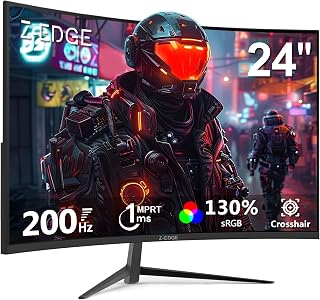
At 24 inches, this curved option fits tighter desks while still wrapping the edges inward so side panels and toolbars stay within easy eye reach. A 3000:1 contrast ratio helps text stand out clearly against window backgrounds, useful for anyone juggling multiple documents in a curved layout without going oversized.
Pros
- Compact 24-inch size fits tight desks and dual-monitor work setups
- Three-sided edge-to-edge bezel suits multi-screen arrangements
- Flicker-free and blue light filter support eye comfort during work
- VESA mount compatibility adds flexible positioning options
Cons
- 1080P resolution limits sharpness for text-heavy or detailed work
- Curve feels less immersive at 24 inches than larger curved models
The Z-Edge 24 inch Curved Monitor is a reasonable entry point if you're exploring whether a curved screen suits a compact work setup rather than a sprawling desk. At 24 inches, the 1650R curve is noticeable without overwhelming a smaller workspace, and the three-sided edge-to-edge bezel makes it a practical pick if you're planning a dual-monitor arrangement for work, something larger curved displays handle less gracefully. Flicker-free technology and a blue light filter help with eye comfort during long hours in front of the screen, a genuine plus for office use. VESA 75x75mm mounting and wall-mount compatibility give you more flexibility to fit it into a tight desk layout than fixed-stand monitors. Where it falls short for work is resolution and color performance. The 1080P panel shows its limits with fine text and detailed documents, and color accuracy and HDR are described as basic rather than professional-grade. The curve itself is also less immersive at this smaller size compared to 27 or 32-inch curved options. This is a budget curved monitor better suited to light work paired with gaming than to detail-heavy professional tasks.
Display: 24-inch curved LCD, 1920x1080 FHD, 16:9 aspect ratio, 1650R curvature
Performance: 200Hz refresh rate, 1ms response time, 3000:1 contrast ratio, 300 cd/m2 brightness
Technology: LED backlight, FreeSync Adaptive Sync, flicker-free, blue light filter
Connectivity: 1x HDMI, 1x DisplayPort, 3.5mm audio jack
Mounting: VESA 75x75mm compatible, wall-mountable
Dimensions: 21.3 inches wide, 15.6 inches tall, 5.7 inches deep
Weight: 3.6 kg
Power: 23 watts at 12 volts
Warranty: 1 year manufacturer coverage

QHD 1440P resolution on a curved 27 inch VA panel gives noticeably more screen real estate for side-by-side documents or spreadsheets than standard 1080p options, while the 3000:1 contrast ratio keeps text sharp. That extra pixel density is the main reason this one suits detail-heavy desk work over basic browsing.
Pros
- Excellent price-to-performance ratio for 1440p gaming
- Smooth 165Hz performance noticeably reduces screen tearing and stuttering
- Curved screen genuinely enhances immersion without feeling gimmicky
- Sharp, vibrant colors with strong 3000:1 contrast ratio
- Easy setup and flexible mounting options for any desk configuration
Cons
- Some reviews mention refresh rate limits at 144Hz via HDMI if you don't use DisplayPort
- Limited to 300 cd brightness which may struggle in very bright rooms
- Product data contains inconsistent specs (some reviews reference 240Hz model confusion)
The Z-Edge UG27Q is a 27-inch curved gaming monitor purpose-built for gamers seeking responsive, immersive gameplay without premium pricing. It combines 1440p clarity with 165Hz smoothness and a 1500R curve, making it ideal for competitive shooters, action games, and anyone wanting a better visual experience than standard 1080p displays.
Performance is the standout here. The 165Hz refresh rate via DisplayPort delivers noticeably smoother motion than standard 60Hz monitors, while the 1ms response time keeps inputs snappy. The 2560x1440 resolution provides sharp, detailed imagery with vibrant colors backed by a strong 3000:1 contrast ratio. FreeSync adaptive sync eliminates tearing without requiring expensive G-Sync licensing, and the built-in FPS and RTS game modes let you optimize the image for different genres.
The curved design is more than marketing fluff. The 1500R curve subtly expands your field of view and draws you into the action without feeling overwhelming. The frameless triple-edge design minimizes bezels and keeps focus on the display itself. Build quality feels solid, and setup is straightforward with included cables and a stable stand that also supports VESA wall mounting.
The main limitation is connectivity flexibility. The DisplayPort input unlocks the full 165Hz experience, while HDMI tops out at 144Hz, so you'll want DP if you own a newer graphics card. Brightness maxes at 300 cd, which is adequate for most rooms but may need adjustment in bright environments. Some earlier reviews mention confusion with different firmware or model variants, so verify you're getting the UG27Q specifically.
The Z-Edge UG27Q delivers compelling value for mid-range gaming. It bridges the gap between budget 1080p monitors and expensive high-end displays, offering genuine performance and immersion improvements. Recommended for casual to competitive gamers, esports enthusiasts, and productivity users who want a sharp, responsive screen and won't miss premium features.
Display: 27-inch curved VA panel, 1500R curvature, 2560x1440 QHD resolution, 16:9 aspect ratio, 178-degree viewing angles
Performance: 165Hz refresh rate (DisplayPort), 144Hz (HDMI), 1ms response time, 3000:1 contrast ratio, 300 cd brightness, FreeSync adaptive sync
Connectivity: 1x DisplayPort, 2x HDMI, standard 100x100mm VESA mount, frameless design with edge-to-edge display
Features: Flicker-free technology, blue light filter, FPS and RTS game modes, matte finish, frameless bezels, adjustable stand
Physical: 24 inches wide, 7 inches deep, 17.1 inches tall, 4.5 kg weight, black color
Power: 40 watts consumption, 12V DC voltage input
Warranty: 2-year manufacturer coverage
Ideal For: Casual gamers stepping up from 1080p who want noticeable smoothness and clarity improvements. Competitive esports players on a budget. Console gamers seeking better visuals and refresh rates. Productivity users and content creators wanting a larger, sharper display at reasonable cost. Anyone building a mid-range gaming or workstation PC.
Not Ideal For: Extreme competitive players needing 240Hz or higher refresh rates. Professional color graders requiring 99% Adobe RGB coverage. Users in very bright environments who need peak brightness. Those exclusively using HDMI who need full 165Hz refresh rates. Players seeking cutting-edge premium features and aesthetics.
What to Look for in a Curved Monitor for Work
Curvature Radius
The curvature radius tells you how aggressively the screen bends. A 1500R curve, used on monitors like the Sceptre Curved 27-inch Prime Monitor up to 100Hz and the KOORUI 27 Inch Curved Gaming Monitor 180Hz FHD, is tighter and more immersive. A 1650R curve, like the one on the Z-Edge 24 inch model, is slightly gentler and can feel more natural for desk distances beyond 24 inches.
For a single-monitor work setup, a 1500R radius tends to reduce the amount of head movement needed to scan across the screen. That matters when you are reading long documents or monitoring multiple application windows side by side.
Resolution and Screen Real Estate
Resolution directly affects how much content you can comfortably fit on screen without scaling. A 1080p panel at 27 inches works well for general tasks, while QHD panels like the SANSUI 27 Inch WQHD 2560X1440 Curved give you noticeably sharper text and more workspace without scrolling constantly.
If your work involves detailed visuals, color grading, or design, the SANSUI’s 90% DCI-P3 coverage makes colors more accurate and easier to evaluate on screen. For spreadsheet-heavy or coding workflows, the extra vertical resolution of a 1440p panel reduces how often you need to scroll.
Ultrawide vs Standard Aspect Ratio
The Sceptre 30-inch Curved Gaming Monitor 21:9 offers a 21:9 ultrawide aspect ratio at 2560×1080, which is a real productivity multiplier. You can run two full application windows side by side without any overlap, essentially replacing a dual-monitor setup with one screen.
Standard 16:9 monitors are more versatile for mixed use and tend to have better compatibility with video conferencing layouts. If you mostly work in one or two apps at a time, a standard ratio at 27 inches is often enough. If you regularly multitask across three or more windows, ultrawide is worth considering. You can explore more display options in our monitors category.
Eye Comfort Features
Long work sessions make eye comfort non-negotiable. Features like low blue light, anti-flicker, and anti-glare coatings appear across most of the monitors in this list. The Z-Edge 27 inch Curved Gaming Monitor specifically highlights its flicker-free and low blue light design as tools for extended productivity sessions, not just gaming.
The SANSUI 27 Inch Curved 160Hz Gaming Monitor 144Hz also includes preset modes for Office and Movie use alongside its gaming presets, which means you can dial in a color profile optimized for reading documents rather than running games. That kind of flexibility is useful if your work day involves a mix of tasks. If you are building out a full workstation, pairing the right monitor with a capable GPU makes a real difference, and our guide to the best monitor for RTX 5060 covers compatible pairings worth knowing about.
Final Thoughts
A curved monitor genuinely does reduce eye strain and improve screen coverage for most desk workers, making it a solid upgrade over a flat panel for daily use. If you want a compact, affordable entry point, the Sceptre Curved 27-inch Prime Monitor up to 100Hz delivers reliable 1080p performance with built-in speakers and a smooth 100Hz refresh rate. If you need more screen real estate and sharper text for demanding workflows, the SANSUI 27 Inch WQHD 2560X1440 Curved steps up with 2K resolution, wide color coverage, and a fast 200Hz panel that handles everything from creative work to after-hours gaming.
Frequently Asked Questions
Is a curved monitor actually better for work, or is it just a gaming feature?
Curved monitors were popularized by gaming, but their core benefit, reducing the viewing distance difference between the screen center and edges, applies directly to productivity work. For long reading, writing, or data tasks, the more uniform focal distance can reduce eye fatigue over a full workday. Many of the monitors here, including the SANSUI 27 Inch Curved 160Hz Gaming Monitor 144Hz, include dedicated Office preset modes that optimize the display for exactly that kind of use.
What size curved monitor works best for a work desk?
At a typical desk depth of 24 to 30 inches, a 27-inch curved monitor hits the sweet spot for most people. It gives you enough screen area to work comfortably across multiple windows without requiring you to turn your head to see the edges. If your desk is deeper or you want a wider view, the 30-inch ultrawide Sceptre model expands your horizontal workspace significantly without overwhelming a standard desk setup.
Does a curved monitor help with eye strain during long work sessions?
Yes, and this is one of the strongest arguments for curved monitors in 2026. The curve aligns the screen more closely with the natural shape of your field of vision, so your eyes do not have to constantly refocus as they scan across the display. Look for models with certified low blue light and anti-flicker technology, like the Z-Edge 27 inch Curved Gaming Monitor, to get the most eye-comfort benefit during extended hours. You can also look into other well-reviewed monitor options that prioritize eye-safe features.
Can a curved monitor replace a dual-monitor setup for productivity?
For many workflows, yes. An ultrawide curved monitor like the Sceptre 30-inch Curved Gaming Monitor 21:9 with its 21:9 aspect ratio provides enough horizontal space to run two application windows side by side at comfortable sizes. It also eliminates the bezel gap you get between two separate screens, which makes comparing documents or referencing content across windows much smoother. If your work is heavily multi-app, an ultrawide curved panel is often a cleaner solution than two monitors.
Common questions
What does the curve radius number like 1500R actually mean?
It describes how tightly the panel bends, measured as the radius of a circle the screen would form if curved all the way around, so a 1500R panel matches a circle with a 1,500mm radius. A smaller number means a tighter curve. The Sceptre C275W-1920RN uses a 1500R curve, which is common on 27-inch monitors and noticeable but not extreme. Tighter curves suit closer viewing distances.
Do straight lines look distorted on a curved monitor during design work?
Yes, straight horizontal and vertical lines can appear slightly bent near the edges of a curved screen, which matters for tasks like CAD, photo editing, or layout work where precise alignment is checked visually. Flat monitors avoid this issue entirely. If pixel-accurate straight edges are central to your work, a flat panel is the safer choice, while curved screens are better suited to immersive or entertainment-focused use.
Is an ultrawide monitor better than using two separate screens?
An ultrawide monitor gives one continuous workspace without a bezel gap splitting your view, which suits dragging windows across the full width or watching widescreen video, as seen on the Sceptre C305B-200UN1 with its 21:9 ultrawide layout. Two screens instead give you hard separation between apps and let you angle or swap one display independently. Choose ultrawide for fluid workflows, dual screens for strict task separation.






