

In competitive FPS titles like Valorant, CS2, or Apex Legends, the gap between a kill and a death often comes down to milliseconds. A monitor with a sluggish refresh rate or slow response time is a handicap you cannot afford at any skill level. Whether you are climbing ranked or grinding scrims, the right display gives you smoother motion, sharper target tracking, and a real edge over players running outdated hardware. If you are building or upgrading a competitive setup, you might also want to browse our picks for the best gifts for esports fans to round out your station.
This guide covers ten of the strongest monitors available right now for competitive FPS play. We evaluated each one based on refresh rate, response time, panel technology, and adaptive sync support, zeroing in on the specs that actually move the needle in fast-paced gameplay.
Quick Comparison
Ratings reflect the most recent data pull. Check each listing for current price and availability.
Quick answer
This guide compares 10 picks, with Dell SE2426HG 24 inch 240Hz Gaming Monitor - FHD IPS ranked first. Samsung 27 Odyssey G5 QHD 1440P 180Hz Gaming Monitor holds the highest customer rating among them. Samsung 32" Odyssey G55C QHD 165Hz Curved Gaming has the most customer reviews. ASUS TUF Gaming VG27AQM5A 27" 1440p 300Hz IPS Gaming leads this list on refresh rate.

Running at 240Hz on a 23.8 inch FHD panel, this monitor prioritizes raw speed over resolution, ideal for players who want the lowest possible input lag when clicking heads. AMD FreeSync Premium support smooths out frame delivery, and the compact size keeps the whole screen within quick eye-tracking range during firefights.
Pros
- 240Hz refresh with 0.5ms response time for minimal motion blur
- AMD FreeSync Premium reduces screen tearing
- 178-degree viewing angles keep colors consistent
- TÜV Rheinland eye comfort certification for long sessions
Cons
- 1080p resolution looks soft for non-gaming use
- Contrast ratio is average for the panel type
When every frame matters in Valorant, CS2, or Fortnite, the SE2426HG hits the exact spec profile competitive play demands: 240Hz refresh paired with a 0.5ms response time on an IPS panel, a combination that's tough to find without stepping up in cost. AMD FreeSync Premium keeps tearing out of the picture during fast-paced firefights, and the 178-degree viewing angles mean your color and contrast stay consistent even if you're not dead center on the screen. The 1920x1080 resolution is actually a feature here, not a limitation, since it's easier to push high frame rates at FHD than at 1440p or 4K, which matters more for esports titles than pixel density. Dual HDMI and DisplayPort 1.4 let you keep a console or secondary system connected without swapping cables mid-session. For a dedicated competitive setup where reaction time trumps visual fidelity, this monitor's strengths line up almost perfectly with what the title of this piece is asking for. It's a smoothness-first pick, not a resolution-first one.
Display: 24-inch FHD IPS, 1920x1080 native resolution, 16:9 aspect ratio, 93 pixel pitch, 1000:1 contrast ratio, 178-degree viewing angles, 300 nits brightness, 99% sRGB color gamut
Performance: 240Hz refresh rate, 0.5ms response time, AMD FreeSync Premium, HDMI VRR support, TÜV Rheinland 3-star blue light reduction
Connectivity: 2x HDMI 2.0, 1x DisplayPort 1.4, Power input
Physical: 21.21 inches wide, 16.23 inches tall, 7.04 inches deep, 7.4 pounds, black matte finish, desk mount with tilt adjustment
Power and Warranty: 14 watts typical consumption, 240V AC input, 1-year advanced exchange service, includes HDMI cable, stand, power cable, and documentation
Buy this if you play fast-paced competitive shooters and want the highest refresh rate and quickest response time you can get, and you're fine with FHD resolution. Skip it if you split time between competitive gaming and single-player or creative work, where 1080p on a 24-inch screen will look noticeably softer. Also skip it if you need Nvidia G-SYNC certification specifically, since this is built around FreeSync Premium.
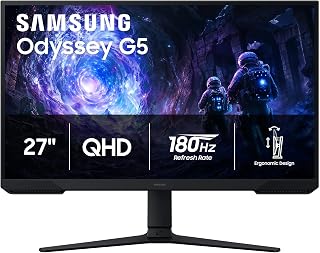
A 180Hz refresh rate gives this VA panel enough headroom to keep fast-paced firefights smooth, and the matte finish cuts glare during long ranked sessions. While VA won't match IPS pixel response, competitive players stepping up from 60Hz will immediately notice sharper motion tracking on enemies peeking around corners in QHD clarity.
Pros
- 180Hz refresh rate with 1ms response time for fast-paced shooters
- Black Equalizer helps spot enemies hiding in shadows
- FreeSync eliminates tearing and stuttering during quick aim movements
- QHD resolution sharpens HUDs and enemy details over 1080p
Cons
- VA panel and 178-degree viewing angle lag behind IPS for color accuracy
- 180Hz needs a mid-range or better GPU to fully utilize
Competitive FPS play comes down to spotting enemies first and reacting fast, and this 27-inch Odyssey G5 is built around exactly that. The 180Hz refresh rate combined with 1ms response time keeps fast movement and gunfights clear instead of blurry, which matters when tracking targets in Valorant, Apex Legends, or Call of Duty. The Black Equalizer feature is a genuinely useful competitive tool, brightening shadowed areas so players hiding in dark corners become visible. AMD FreeSync keeps frames synced with your GPU, removing tearing that can throw off aim during quick flicks. QHD resolution sharpens HUDs, minimaps, and enemy silhouettes compared to 1080p. The matte coating cuts glare during long ranked sessions, and the adjustable stand lets you dial in the exact height and angle for a consistent aiming posture. It is not the flashiest panel on paper, with a VA display and 3000:1 contrast rather than IPS, but for players focused on frame rate and clarity over color accuracy, it covers the fundamentals competitive gaming demands.
Display: 27-inch QHD VA panel, 2560 x 1440 resolution, 16:9 aspect ratio, 178-degree viewing angles
Performance: 180Hz refresh rate, 1ms response time (MPRT), 300 cd/m brightness, 3000:1 contrast ratio
Features: HDR10, AMD FreeSync, Black Equalizer, matte screen finish
Connectivity: 2x HDMI, 1x DisplayPort, 1x power connector
Design: Adjustable stand with tilt, pivot, and height settings, desk mount, flat panel shape
Dimensions: 24.34 inches wide, 9.22 inches deep, 20.5 inches tall, 10.1 pounds
Power: 35 watts consumption, 240 volts
Warranty: 1-year manufacturer coverage

With a 240Hz overclocked IPS panel, this monitor is built for players who need every frame to register instantly during close-quarters gunfights. IPS technology keeps colors accurate for spotting enemies against varied terrain, and G-SYNC compatibility eliminates screen tearing during the frantic aim flicks that decide competitive matches.
Pros
- 240Hz refresh rate with 0.3ms MPRT response time
- G-Sync compatibility and Adaptive-Sync eliminate tearing
- QHD IPS panel with wide, consistent viewing angles
- Adjustable tilt stand for ergonomic aiming position
Cons
- No built-in speakers
- Basic stand compared to premium competitors
For competitive FPS gaming, refresh rate and response time are the specs that decide gunfights, and the AOC Q27G41ZE leads with both. Its 240Hz refresh rate paired with 0.3ms MPRT response time gives fast-moving targets a level of clarity that lower-refresh panels can't match, a real edge when tracking enemies across a screen. G-Sync compatibility and Adaptive-Sync keep tearing out of the picture entirely, so nothing distracts from aim precision during firefights. The QHD IPS panel adds sharper detail for spotting enemies at distance while keeping wide, consistent viewing angles. At 27 inches, it hits a sweet spot for FPS players who want a display size that keeps the whole scene in central vision without excessive head movement. The frameless design and adjustable tilt stand make it easy to dial in the exact eye-level position competitive setups demand. Game Mode presets and Shadow Control give quick access to settings that matter in shooters, like brightening dark corners where enemies hide, without digging through menus mid-match.
Display: 27-inch IPS, 2560x1440 QHD, 16:9 aspect ratio, 300-nit brightness, 1000:1 contrast ratio, glossy finish
Performance: 240Hz refresh rate (via DisplayPort), 0.3ms MPRT response time, Adaptive-Sync, G-Sync compatible
Connectivity: 1x DisplayPort 1.4, 2x HDMI 2.0, audio output jack
Design: Three-sided frameless, tilt adjustment from minus 3 to plus 21 degrees, textured black and red finish
Dimensions: 24.17 inches wide, 7.46 inches deep, 17.7 inches tall, 6.15kg weight
Features: Blue Light Filter, Flicker-Free, Shadow Control, Game Mode presets, graphical OSD menu
Warranty: 3-year manufacturer coverage
Ideal for FPS players who want the highest refresh rate on this list paired with sharp QHD clarity, and who game primarily with headphones or external speakers. Skip it if you want built-in audio, need a stand with premium build quality, or plan to view the screen from steep side angles where IPS panels typically dim slightly at the edges.
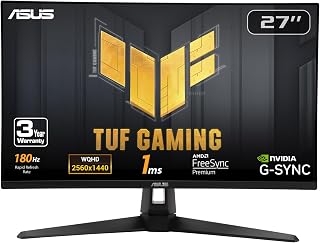
Fast IPS panel technology paired with G-SYNC support means this monitor delivers both quick pixel response and tear-free frames, which matters when tracking flick shots at 180Hz. Competitive shooters benefit from the matte coating too, keeping reflections off screen during intense late-game clutch moments where every visual cue counts.
Pros
- Fast IPS panel with 180Hz and 1ms response time for sharp motion
- Works with both G-SYNC and FreeSync Premium across GPU brands
- GamePlus overlay adds frame counters and crosshair tools for ranked play
- Matte, frameless design suited to focused competitive setups
Cons
- Built-in speakers are tinny and quiet, requiring a headset or external audio
- Brightness ships high and needs manual adjustment for comfortable long sessions
For competitive FPS gaming, motion clarity and input responsiveness matter more than anything else, and the VG27AQ3A is built specifically for that priority. It pairs a Fast IPS panel with 180Hz refresh and a 1ms response time, which is unusually quick for IPS technology and keeps fast strafes and flicks sharp instead of smeared. What sets it apart for ranked play is having ELMB Sync, G-SYNC compatibility, and FreeSync Premium together, so tearing and stuttering stay eliminated regardless of whether you run an Nvidia or AMD GPU. The GamePlus overlay adds frame rate counters and crosshair overlays, tools competitive players actually use to track performance and aim consistency mid-match. The matte anti-glare coating and frameless design keep focus on the action during long sessions or multi-monitor competitive setups. The main tradeoff for this use case is the built-in audio, which is weak, so serious players will want a headset anyway, which most competitive gamers already use for positional audio.
Display: 27-inch Fast IPS, 2560 x 1440 (QHD), 16:9 aspect ratio, 178-degree viewing angles
Refresh Rate: 180Hz native. Supports G-SYNC compatible, FreeSync Premium, and AdaptiveSync with variable refresh rate
Response Time: 1ms (moving picture response time)
Color: 130% sRGB gamut, HDR-10 support, 856.5 lm brightness, 1000:1 contrast ratio
Connectivity: 2x HDMI 2.0, 1x DisplayPort 1.4, 3.5mm audio jack
Physical: 24.2" depth, 8.4" width, 17.9" height, 4.6 kg weight. VESA 100x100 mount compatible. Flat panel with matte screen finish
Features: Blue light filter, flicker-free technology, integrated 2W stereo speakers, frameless design, built-in GamePlus menu with FPS counter and crosshair overlay
Warranty: 3-year warranty with accidental damage replacement
Best for competitive FPS players who want IPS color and wide viewing angles without giving up refresh rate, and who already use a headset or external speakers. Also strong for players switching between Nvidia and AMD GPUs thanks to dual sync compatibility. Skip it if you rely on the monitor's built-in speakers for game audio, since they are notably weak for immersive or competitive use.
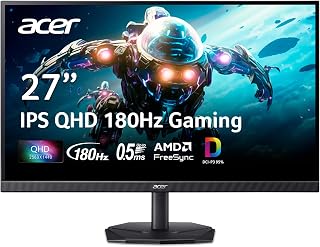
This QHD IPS monitor hits 180Hz, giving competitive players sharper resolution than 1080p rivals without losing the smoothness needed for tracking fast enemy movement. The matte finish keeps reflections at bay during marathon ranked sessions, making it a solid pick for anyone prioritizing visual clarity alongside quick refresh performance.
Pros
- 180Hz refresh rate with 0.5ms response time
- AMD FreeSync eliminates tearing and stuttering
- QHD IPS panel with 178-degree viewing angles
- Matte finish reduces glare during extended sessions
Cons
- HDMI limited to 120Hz, DisplayPort needed for full 180Hz
- Stand feels less stable than premium models
The Acer Nitro KG271U brings a strong balance of speed and clarity that suits competitive FPS gaming well. A 180Hz refresh rate combined with AMD FreeSync keeps fast gunfights free of tearing and stutter, while the 0.5ms response time preserves motion clarity when tracking quick, erratic movement. QHD resolution on a 27-inch IPS panel sharpens enemy detail at range, and the 178-degree viewing angles keep the image consistent even if your head shifts slightly during intense moments. The matte finish is a practical choice for FPS play, cutting glare during long sessions where consistent visibility matters more than glossy vibrancy. Built-in speakers and multiple connectivity options add convenience for players who want a simpler setup without extra peripherals. One detail worth flagging for this use case: HDMI connections cap at 120Hz, so DisplayPort is required to unlock the full 180Hz refresh rate that makes this monitor worth choosing for FPS play in the first place.
Display: 27 inches, IPS LCD, 2560x1440 (QHD), 16:9 aspect ratio, matte finish
Performance: 180Hz refresh rate, 0.5ms response time (GTG), 1000:1 contrast ratio, 250 nits brightness
Color: DCI-P3 95%, HDR 10 support, 178-degree viewing angles
Connectivity: DisplayPort (1), HDMI (2), built-in speakers
Physical: 24.2" W x 18.14" H x 8.28" D, 5.5 kg, tilt adjustment, wall mount compatible
Power & Warranty: 26W power consumption, 3-year parts and labor warranty
Included: Display, DisplayPort cable, power cord, stand
Suited to FPS players who want dependable refresh rate performance and sharp QHD visuals without needing a premium stand or aggressive curve. Skip it if you're chasing the highest refresh rate available, since 240Hz options exist elsewhere on this list, or if you plan to rely on HDMI, since you'll need DisplayPort to hit the full 180Hz.

Pros
- Outstanding 180Hz refresh rate delivers buttery smooth gameplay and responsiveness
- QHD 1440p resolution provides sharp detail and excellent visual clarity
- Fast 1ms response time minimizes ghosting and motion blur
- Full ergonomic adjustments make it easy to find your ideal viewing angle
- IPS panel offers superior color accuracy compared to TN alternatives
Cons
- Limited to 144Hz over HDMI, requiring DisplayPort for full 180Hz performance
- Built-in 2W speakers are minimal and better replaced with external audio
- 27-inch 1440p pixel density may feel slightly less sharp than smaller 1440p panels for some users
The Acer Nitro XV271U M3bmiiprx is a 27-inch QHD gaming monitor designed for competitive players and content creators who refuse to compromise on performance. At 2560x1440 resolution with a 180Hz refresh rate, this monitor bridges the gap between everyday productivity and high-refresh esports performance, making it versatile enough for both work and play.
The standout feature is the combination of 180Hz refresh rate and 1ms response time, powered by AMD FreeSync Premium technology. This eliminates screen tearing and variable refresh rate stuttering, giving you smooth, responsive gameplay that makes a tangible difference in competitive titles. The IPS display panel delivers accurate colors and wide viewing angles, a significant advantage over typical TN panels in gaming monitors.
Build quality is solid with a matte finish to reduce glare and an exceptionally flexible stand. The monitor offers height adjustment up to 4.7 inches, full 360-degree swivel, 90-degree pivot capability, and tilt ranging from -5 to 25 degrees. This flexibility lets you dial in the perfect viewing position and even stack multiple units for ultrawide setups. The inclusion of DisplayPort 1.2 and dual HDMI 2.0 ports provides good connectivity options for most systems.
The main drawback is that the 180Hz performance is limited to DisplayPort, with HDMI capped at 144Hz. Additionally, the built-in 2-watt speakers are adequate only for system alerts and should not be relied upon for actual audio. The pixel density at 27 inches is good but not exceptional compared to smaller 1440p panels.
Verdict: The Acer Nitro XV271U offers excellent value for gamers and professionals seeking a high-refresh, high-resolution monitor. Its combination of performance, color accuracy, and ergonomic design makes it a smart choice in a competitive market segment.
Display: 27-inch IPS, 2560x1440 (QHD), 16:9 aspect ratio, matte finish
Refresh Rate: 180Hz via DisplayPort, 144Hz via HDMI
Response Time: 1ms (G to G), up to 0.5ms with overdrive
Brightness: 250 nits
Contrast Ratio: 1000:1
Viewing Angle: 178 degrees
Pixel Pitch: 0.233mm
Connectivity: 1x DisplayPort 1.2, 2x HDMI 2.0, 1x Audio Out
Audio: 2x 2W built-in speakers
Stand Adjustments: Height (4.7 inches), Tilt (-5 to 25 degrees), Swivel (360 degrees), Pivot (90 degrees)
VESA Mount: 100x100mm compatible
Power Consumption: 2 watts typical
Physical: 24.2in (W) x 18in (H) x 9.2in (D), 12.1 lbs
Warranty: 3 years parts and labor
Included: DisplayPort cable, HDMI cable, power cord, monitor stand
Best For: Competitive gamers who play fast-paced titles like shooters and fighting games, content creators needing accurate colors, and anyone wanting high refresh rates at 1440p resolution.
GPU Requirements: You'll need a capable graphics card to hit 180Hz at 1440p. An RTX 4070 or RTX 4080 for NVIDIA, or RX 7800 XT or better for AMD is recommended for demanding AAA titles at high settings. For esports titles, a mid-range GPU suffices.
Connection Tips: Use the included DisplayPort cable to unlock the full 180Hz performance. HDMI 2.0 is limited to 144Hz at this resolution. Make sure your GPU supports AMD FreeSync for the adaptive refresh rate benefits.
Setup Recommendations: Utilize the ergonomic stand to position the monitor at eye level and slightly tilted back for comfortable viewing. The swivel and pivot features make it easy to adjust for different seating positions. Consider wall-mounting if desk space is limited using the 100x100mm VESA mount.
Pros
- 240Hz VESA AdaptiveSync Display certification
- G-SYNC Compatible and FreeSync Premium support
- Matte 27-inch Fast IPS panel
- TÜV Flicker-free and Low Blue Light certifications
Cons
- 1080p resolution only
- 27-inch format will not suit every setup
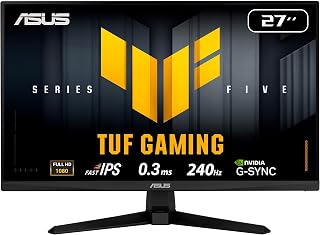
For a competitive FPS setup, the ASUS TUF VG279QM5A puts its emphasis on a 240Hz refresh rate and 1080p resolution. Its 27-inch, 16:9 Fast IPS LCD panel uses a matte screen finish and is specified at 300 cd/m² brightness, a 1000:1 contrast ratio, and 178-degree viewing angles. The monitor carries VESA AdaptiveSync Display 240Hz certification and supports G-SYNC Compatible alongside AMD FreeSync Premium, giving a competitive player adaptive-sync options around a high-refresh display. TÜV Flicker-free and TÜV Low Blue Light certifications are listed, while FSC MIX is included among its picture-quality enhancement technologies. These features keep the specification centered on a high-refresh gaming display rather than additional resolution. For someone selecting a monitor specifically for competitive FPS gaming, the combination of 240Hz, Fast IPS, adaptive-sync support, and a matte 27-inch panel gives this model a clear role. It is best considered by players who want those listed gaming features in a 1080p format.
Display: 27-inch Fast IPS LCD, 1920x1080 (16:9 aspect ratio), 240Hz refresh rate, 0.3ms response time (min). Brightness: 300 nits, Contrast: 1000:1, Viewing angles: 178 degrees.
Color and Visual Tech: 99% sRGB gamut coverage, matte anti-glare finish, TUV flicker-free, TUV low blue light, ASUS ELMB SYNC, Shadow Boost, GameVisual presets.
Adaptive Sync: AMD FreeSync Premium, NVIDIA G-SYNC compatible, VESA AdaptiveSync.
Connectivity: 1x DisplayPort 1.4, 1x HDMI 2.0, 1x 3.5mm audio jack. Built-in stereo speakers (2W+2W). Power consumption: 18 watts at 240V.
Physical Specs: Dimensions 24.21"W x 17.83"H x 7.6"D, weight 9.9 lbs. Includes DisplayPort cable, power cord, L-shaped screwdriver, quick start guide. 3-year manufacturer warranty with ARR.
Buy this if your competitive FPS monitor search prioritizes a 240Hz, 1080p display with a 27-inch matte Fast IPS panel. It suits users who value G-SYNC Compatible and AMD FreeSync Premium support, and who want TÜV Flicker-free and Low Blue Light features included. Skip it if your requirement is a resolution other than 1080p, a screen size other than 27 inches, or a display without a matte finish. It is also not the match for buyers whose stated priority lies outside its 240Hz, adaptive-sync-focused specification.
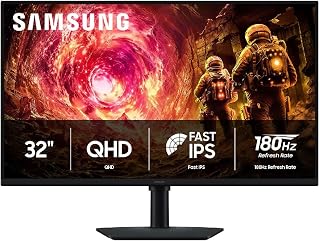
For players who want a larger 32 inch canvas without sacrificing responsiveness, this IPS panel runs at 180Hz so peripheral vision picks up flanking enemies faster. The matte screen finish also helps in bright rooms, letting competitive gamers stay locked on target callouts instead of fighting glare mid firefight.
Pros
- 180Hz refresh rate with 1ms response time for smooth competitive play
- Black Equalizer brightens shadows to help spot hidden enemies
- 178-degree IPS viewing angle keeps colors consistent off-center
- G-Sync compatibility reduces tearing during fast movement
Cons
- Lower pixel density at 32 inches compared to 27-inch QHD alternatives
- 180Hz refresh cap may limit players chasing higher frame rates
Competitive FPS gaming benefits from a fast panel, but this 32-inch Odyssey G5 also makes a case for extra screen real estate helping you track peripheral movement and enemy positions. The 180Hz refresh rate and 1ms response time keep gunfights smooth, while G-Sync compatibility locks frame delivery to your GPU to prevent tearing during quick turns. The Black Equalizer feature brightens dark areas of the map, a direct advantage for spotting enemies camping in shadows, and the 178-degree IPS viewing angle keeps colors accurate even if you are not perfectly centered, useful for players who sit slightly off-axis with multi-monitor setups. HDR10 adds contrast that helps highlights and shadows read more clearly during intense moments. The larger 32-inch size means more visible screen space for peripheral awareness, though pixel density drops to roughly 109 PPI compared to a 27-inch QHD panel, a reasonable tradeoff for players who value field of view over maximum sharpness. The sturdy stand with full height, tilt, and swivel adjustment supports a consistent competitive setup.
Display: 32 inches, QHD (2560 x 1440), IPS panel, 16:9 aspect ratio, matte finish
Performance: 180Hz refresh rate, 1ms response time (GtG), 300 cd/m² brightness, 1000:1 contrast ratio
Color: 99% color gamut, HDR10 support, 178-degree viewing angle
Adaptive Sync: G-Sync compatible, FreeSync support
Connections: 1x DisplayPort, 1x HDMI
Adjustments: Height, tilt, and swivel ergonomic stand
Dimensions: 28.1" W x 24.6" H x 9.9" D
Weight: 10.8 lbs
Warranty: 1-year manufacturer coverage
Suited to competitive FPS players who want a larger screen for peripheral visibility and don't mind slightly lower pixel density. Also a good fit for players who value IPS color consistency and G-Sync support over a smaller, sharper panel. Skip it if you want maximum pixel sharpness for tracking small details, since a 27-inch QHD panel will look crisper at this resolution.

The 1000R curve wraps the 32 inch screen around your peripheral vision, useful for spotting movement at the edges during team fights. Running at 165Hz keeps gameplay fluid, and while it sits slightly below top-tier refresh rates, the immersive curvature gives an edge in situational awareness that flat panels can't replicate.
Pros
- 165Hz refresh rate with 1ms response time for smooth fast-paced action
- QHD resolution sharpens target visibility at range
- Large 32-inch curved screen improves peripheral awareness
- HDR10 support adds contrast and depth to game visuals
Cons
- Plastic stand lacks tilt adjustment
- Glossy finish can reflect light in bright rooms
Competitive FPS gaming rewards fast reactions and clean target acquisition, and that is where the Odyssey G55C makes its case despite being a curved 32-inch panel. The 165Hz refresh rate and 1ms response time keep fast camera swings and flick shots free of smearing, which matters more in FPS titles than almost any other genre. QHD resolution sharpens enemy silhouettes at range without the GPU demands of 4K, a reasonable tradeoff for players prioritizing frame rate. The 1000R curve pulls peripheral action into view, useful for map awareness in titles with wide horizontal engagement. Where it earns a spot on this list is scale: if you want a bigger canvas for spotting movement without sacrificing refresh rate, this covers that niche. Just remember to set the 165Hz refresh rate manually through the OSD menu after setup, since Windows will not always default to it. For players who value screen real estate as part of their competitive setup, it delivers the core specs FPS gaming needs.
Display: 32-inch QHD (2560 x 1440), 16:9 aspect ratio, 1000R curvature, glossy finish, 178-degree viewing angle
Performance: 165Hz refresh rate, 1ms MPRT response time, 2500:1 contrast ratio, 300 cd/m2 brightness
Features: HDR10, AMD FreeSync adaptive sync, Eye Saver Mode (blue light reduction), flicker-free technology
Connectivity: 1x DisplayPort, 1x HDMI, 2x component outputs
Physical: 28" wide, 21.01" tall, 10.7" deep, 11.5 lbs. Includes DP cable, power cable, and stand. Wall mount compatible. 1-year manufacturer warranty.
Good for competitive FPS players who want a larger, immersive display without giving up 165Hz performance, and who don't mind a curved screen while aiming. Skip it if you prefer a flat panel for precise edge-to-edge tracking, need tilt adjustment on the stand, or game in a bright room where the glossy finish could add distracting reflections during critical moments.

At 300Hz, this monitor caters to players chasing every possible frame advantage in twitch-reflex shooters where split-second reactions decide rounds. G-SYNC keeps that blistering refresh rate free of tearing, and the 1300:1 contrast ratio helps enemy silhouettes stand out clearly against darker map environments during close engagements.
Pros
- 300Hz refresh rate for top-tier competitive responsiveness
- 1440p resolution offers sharper detail than FHD alternatives
- 1300:1 contrast ratio improves shadow and dark scene clarity
- 100% color gamut coverage for accurate visuals
Cons
- Requires a strong GPU to fully utilize 300Hz at 1440p
- 27-inch 1440p demands more graphics horsepower than smaller FHD panels
For players who want top-tier speed without giving up screen real estate, the VG27AQM5A pairs a 300Hz refresh rate with a 1440p resolution, a combination that pushes past FHD competitive monitors while still prioritizing frame rate over pixel count. The 27-inch size gives you a bigger target picture for tracking movement in fast games, and the 1300:1 contrast ratio is a step above typical IPS panels, so dark scenes and shadowed corners read more clearly. Brightness rated over 1000 lm means the panel can handle bright, glare-prone rooms without washing out. The matte finish cuts down on reflections during long sessions, and 100% color gamut coverage keeps visuals accurate if you also stream or record gameplay. For this article's focus on competitive FPS play, 300Hz is about as fast as consumer monitors currently get, making this a strong pick for players chasing every possible frame advantage at a slightly larger, sharper screen size than a 1080p 240Hz option.
Display: 27-inch Fast IPS panel, 2560x1440 (1440p QHD), 16:9 aspect ratio, 300Hz refresh rate, 0.3ms GTG response time (minimum)
Color: 95% DCI-P3 gamut, 1027.8 lm brightness, 1300:1 contrast ratio, 178-degree viewing angle, Blue Light Filter and Flicker-Free technology
Connectivity: DisplayPort, HDMI, USB, USB Type-C. Adaptive Sync compatible with FreeSync Premium and G-SYNC
Design: Flat matte finish, 100x100mm VESA mounting, adjustable stand with 8.4 inches depth, 24.2 inches width, 17.9 inches height, 10.1 pounds weight
Warranty: 3-year manufacturer warranty with Advanced Replacement Service. Includes DisplayPort cable, power adapter, quick start guide, and 3-month Adobe Creative Cloud subscription
Buy this if you want the fastest refresh rate available paired with a sharper 1440p image, and you have a GPU capable of pushing high frame rates at that resolution. Skip it if your system can't consistently hit high frame rates at 1440p, since you won't get the full benefit of 300Hz, or if you'd rather save on GPU demands with a 1080p panel instead.
Buying Guide: What to Look for in a Competitive FPS Monitor
Refresh Rate: The Single Most Important Spec
Refresh rate is the number of frames your monitor can display per second, and in competitive FPS, more is always better. At 240Hz, enemy movement looks noticeably smoother and easier to track than at 144Hz, and the latest options push even further. The AOC 27″ Gaming Monitor QHD 260Hz Overclocked IPS hits 240Hz via DisplayPort, while the ASUS TUF Gaming VG27AQM5A 27 Inch 1440p 300Hz reaches a blistering 300Hz for players who refuse to compromise.
If your GPU cannot consistently push triple-digit framerates at 1440p, a 1080p panel at 240Hz may actually serve you better in practice. Match your monitor’s refresh rate to what your rig can realistically deliver for the most consistent experience.
Response Time: Eliminating Ghosting on Fast Targets
Response time measures how quickly a pixel transitions from one color to another. For competitive FPS, you want 1ms or lower to avoid ghosting artifacts that blur fast-moving targets. The Dell 24 240Hz Gaming Monitor – SE2426HG delivers a 0.5ms response on its Fast IPS panel, and the ASUS TUF VG279QM5A 27 Inch 1080p 240Hz Fast IPS achieves 0.3ms minimum response, among the fastest on this list.
Pay attention to whether the spec is GTG (gray-to-gray) or MPRT (moving picture response time), as they measure different things. GTG is generally the more relevant number for everyday gaming clarity. Both matter, but GTG gives a truer picture of real-world blur reduction.
Resolution: 1080p vs. 1440p for FPS
This is one of the most debated choices in competitive gaming. QHD (2560×1440) delivers sharper, more detailed visuals that can make distant targets easier to spot, especially on 27-inch panels. The Samsung 27″ Odyssey G5 (G51F) Series QHD (1440P) and ASUS TUF Gaming VG27AQ3A 27 Inch 1440p 180Hz both offer QHD with fast refresh rates, balancing visual fidelity and competitive responsiveness. If you are into building out a complete esports battlestation, check out our roundup of the best gifts for gamers for more ideas.
Full HD (1920×1080) remains a valid choice if you prioritize maximum frame rates on a mid-range GPU. The Dell 24 240Hz Gaming Monitor – SE2426HG and ASUS TUF VG279QM5A 27 Inch 1080p 240Hz Fast IPS prove that 1080p at 240Hz is still a highly competitive setup in 2026.
Adaptive Sync: Keeping Frames Smooth Under Pressure
Even on a high-end rig, your GPU output can fluctuate during intense firefights. Adaptive sync technologies like AMD FreeSync Premium and NVIDIA G-Sync compatibility eliminate screen tearing and stutter by syncing your monitor’s refresh rate to your GPU’s output in real time. Most monitors on this list support both, including the ASUS TUF Gaming VG27AQ3A 27 Inch 1440p 180Hz with its G-Sync compatible and FreeSync Premium dual support.
If you game on a console in addition to PC, look for HDMI VRR support. The Dell 24 240Hz Gaming Monitor – SE2426HG includes HDMI VRR alongside FreeSync Premium, making it a solid dual-platform option. You can also find complementary peripheral recommendations in our guide to keyboard and mouse deals worth grabbing.
Final Thoughts
For most competitive FPS players, the Dell 24 240Hz Gaming Monitor – SE2426HG stands out as an outstanding entry point with its 240Hz refresh rate, 0.5ms Fast IPS panel, and FreeSync Premium support in a compact 24-inch form factor. If you want to step up to QHD without sacrificing speed, the ASUS TUF Gaming VG27AQM5A 27 Inch 1440p 300Hz delivers a remarkable combination of sharp resolution and a 300Hz refresh rate that puts you ahead of the competition. Either way, you are upgrading to a setup built for winning.
Frequently Asked Questions
What refresh rate is best for competitive FPS in 2026?
For competitive play in 2026, 240Hz is the sweet spot that most professional players and serious ranked grinders aim for. Monitors like the Dell 24 240Hz Gaming Monitor – SE2426HG hit that mark without requiring a flagship GPU. If your system can sustain very high frame rates consistently, going to 300Hz with the ASUS TUF Gaming VG27AQM5A 27 Inch 1440p 300Hz provides a perceptible advantage in motion clarity.
Is 1440p or 1080p better for FPS gaming?
It depends on your GPU and priorities. QHD at 1440p gives you sharper images and can make distant targets more defined, which is a genuine advantage in games with longer sightlines. However, 1080p allows your GPU to push higher frame rates more easily, which keeps your refresh rate advantage maximized. If your system can handle 1440p above 200Hz reliably, go for QHD. If not, a 1080p 240Hz monitor is still a highly competitive choice.
Does monitor size affect competitive FPS performance?
Most competitive FPS players prefer 24 to 27 inches because smaller screens keep targets and HUD elements within tighter focal ranges, reducing the eye and head movement needed to scan the full display. A 27-inch QHD panel like the Samsung 27″ Odyssey G5 (G51F) Series QHD (1440P) is popular because the higher pixel density keeps images sharp without the screen feeling oversized. Panels larger than 27 inches are generally better suited for immersive single-player experiences than tight competitive play. For more ways to upgrade your gaming space, browse our picks for streamers and content creators as well.
Do I need G-Sync or FreeSync for competitive FPS?
Adaptive sync is not strictly required, but it makes a meaningful difference during frame rate dips that can happen in GPU-intensive scenes. Without it, those dips introduce tearing that can obscure targets at the worst moments. Most monitors on this list support both FreeSync Premium and G-Sync compatibility, so you are covered regardless of whether you run an AMD or NVIDIA GPU. It is one of those features that you rarely notice when it is working and immediately miss when it is not.






Write Your Review
No reviews yet. Be the first to share your experience!