

Your Steam Deck can move easily from the couch to a backpack, hotel TV, or bright train ride, but the bare console has limits. A protected screen, steady power source, cooler operating setup, and useful ports can remove the small frustrations that interrupt a great session.
This guide covers the best Steam Deck accessories for players who want to protect an LCD or OLED model, play longer away from an outlet, or create a more capable desktop setup. If you also carry a computer on trips, these travel laptop cases for organized gear protection can help you plan a safer all-in-one bag.
Quick answer
This guide compares 6 picks, with JSAUX PC0104 Steam Deck Case with Detachable Shell ranked first. JSAUX Steam Deck Cooling Fan with Stand - 8-15°C holds the highest customer rating among them. JSAUX 6-in-1 Docking Station: 4K@120Hz HDMI, 100W PD has the most customer reviews.

The detachable front shell and metal bracket make this ModCase ideal for switching between portable and docked sessions. The adjustable stand props the Deck at a comfortable viewing angle when paired with a Bluetooth controller, while the body shell keeps it protected during transit. Compatibility with both LCD and OLED models means it works across Steam Deck generations without needing separate accessories.
Pros
- Fits Steam Deck LCD and OLED models
- Detachable front shell protects screen and thumbsticks
- Metal bracket supports tabletop play
- Anti-slip, scratch-resistant, shockproof design
Cons
- Not water resistant
- Multiple detachable pieces need to be managed
A Steam Deck accessory for TV play does not always need to add ports. The JSAUX ModCase helps protect the handheld before and after it reaches the dock, while its metal bracket adds a tabletop option when a full TV setup is not necessary. Built for both the Steam Deck LCD and Steam Deck OLED, this Basic Set includes a body protective shell, removable front shell, metal bracket, and strap rather than treating protection as one permanent, all-or-nothing layer. The front shell can cover the screen and thumbsticks, while the back shell provides day-to-day protection around the device. Its anti-slip, scratch-resistant, and shockproof design focuses on keeping a better hold during handheld play and reducing the risk from ordinary travel or storage. For TV-focused owners, the modular approach is the point: use the Deck at home with the body shell, then add the front cover when it is going into a bag. The included metal bracket can support the device for tabletop play, and the strap can attach accessories such as a power bank or cooling fan. It is not water resistant, and the separate pieces require more organization than a single-piece case.
Compatibility: Steam Deck OLED (2023/2024+), Steam Deck LCD
Materials: Eco-friendly PC-ABS hybrid shell with shock-absorbent TPU and silicone components
Components: Back protective shell, detachable hard front cover, zinc alloy metal kickstand, silicone accessory strap
Features: Adjustable stand, anti-slip grip, scratch resistant, shockproof, 100% button access
Dimensions: 13.78 x 5.91 x 1.57 inches
Water Resistance: Not water resistant
Warranty: 12 months with 24/7 customer support
Brand: JSAUX | Model: PC0104
Buy the ModCase if your Steam Deck alternates between handheld use, travel, a docked TV setup, and occasional tabletop play. It is best for owners who want protection that can be adjusted by situation, plus a metal stand and accessory strap. Skip it if you only need HDMI and charging for a television, since this is not a dock, or if you prefer a single-piece case with no detachable components to keep track of. Avoid it for water protection, as it is not water resistant.

This stand cooler tackles thermal throttling during extended TV sessions by combining active airflow with a stable tabletop mount. The dual-function design holds the Deck upright for better heat dissipation while you play wired or wirelessly, and USB power means no batteries to swap. The living room-focused build keeps the console cool during marathon couch gaming without blocking ports.
Pros
- Combined cooler and stand
- Three speed settings
- USB-powered operation
- Remote control
Cons
- Noticeable noise at high speeds
- Adds bulk to the Deck
Heat can become more noticeable during long, demanding Steam Deck sessions, especially when the console is left running in a living-room setup for TV play. JSAUX addresses that concern with a tabletop accessory combining a four-blade, 5-watt cooler and a stand instead of making cooling a separate piece of gear. That dual role earns it a place in an accessories guide covering handheld and television use: it can provide air circulation while holding the Deck in position when it is not in your hands. The fan runs at up to 6,000 rpm and has three speed settings, letting users choose gentler cooling or maximum airflow. JSAUX states it can lower temperatures by 8 to 15°C in four to eight minutes, while cited users have reported drops around 10°C. It runs from USB power, so cooling does not need to draw from the Steam Deck battery. Aluminum and ABS construction, plus remote control, round out the design. The tradeoffs are clear: it makes the Deck bulkier, and fan noise becomes noticeable at higher settings. It is best suited to sustained, demanding play, not every short handheld session.
Power and Performance: USB Type-C powered at 5 watts. 4 plastic blades spinning at 6000 RPM. 100 adjustable power levels with 3 preset speeds. Maximum runtime of 3+ hours at full speed, up to 5 hours at minimum. 39-volt motor for reliable operation.
Design and Build: Compact tabletop mount design measuring 5.46 inches deep, 2.09 inches wide, 1.98 inches tall. Material construction includes Acrylonitrile Butadiene Styrene, Aluminum, and Polycarbonate for durability. Matte black finish with modern gaming aesthetic. Includes rotary knob controller and detachable stand.
Compatibility and Certifications: Exclusively designed for Steam Deck and Steam Deck OLED. Meets CE specifications. Manufactured by Shenzhen Wuyishi Technology Co., Ltd. Model number GP0201, ASIN B0C2VG6MB3.
Buy this if long Steam Deck sessions, demanding games, or a tabletop TV arrangement make heat management a priority. The combined stand and cooler is particularly relevant for people who want a single accessory to support the console while circulating air, and who can power it over USB. Skip it if most of your play is brief and entirely handheld, if added bulk is a concern, or if noticeable fan noise at higher settings would distract from your game.

Matte anti-glare coating cuts reflections whether you're gaming outdoors or under living room lamps, and the 9H hardness guards the 7-inch screen from scratches in a travel bag. Touch sensitivity stays responsive for menu navigation, and water resistance adds a layer of protection against spills during handheld sessions. The two-pack covers both the original LCD and OLED variants.
Pros
- Matte finish reduces glare
- 9H tempered glass protection
- Touch-sensitive surface
- Includes two protectors and an alignment frame
Cons
- Can slightly soften the image
- Does not improve TV picture quality
An accessory list for both handheld and TV Steam Deck play should not treat every upgrade as equally important in each mode. The ivoler matte screen protector is squarely for the portable side of that equation: once the Deck leaves the TV, its 7-inch display is exposed to fingerprints, scratches, impact, and reflections from nearby light. Its tempered glass has a 9H hardness rating, and the matte finish is designed to diffuse glare, making it relevant for playing around windows or in brightly lit rooms. The protector remains touch sensitive and has an anti-fingerprint coating, so its safeguards are not meant to come at the expense of touchscreen use or a frequently smudged display. The package includes two protectors and an alignment frame intended to simplify fitting one to a Steam Deck OLED or LCD. A spare is useful if the installed layer ever needs replacing. Tempered glass is also water resistant. There is a visual compromise to consider. The matte surface can make the image look slightly softer than bare glass, an effect some LCD owners may notice more. It does nothing for picture quality on the TV, but it addresses the screen you rely on during handheld sessions.
Buy it if your Steam Deck regularly shifts from a TV setup to handheld use in bright rooms, near windows, or on the go, and you value a screen layer that resists fingerprints and scratches. It also suits anyone who appreciates having two protectors in the package. Skip it if TV play is overwhelmingly your priority, since it cannot enhance the television image, or if absolute screen sharpness matters more than reduced reflections.

The 4K 60Hz HDMI output delivers sharp visuals on modern TVs, and 100-watt power delivery keeps the Deck charged during long docked sessions. Three USB 3.0 ports let you connect controllers, external storage, and peripherals simultaneously, while Ethernet ensures stable online play without Wi-Fi lag. The six-port layout consolidates everything needed for a living room setup into one compact hub.
Pros
- 4K at 60Hz HDMI output
- Gigabit Ethernet connection
- Up to 100W Power Delivery
- Four USB ports for peripherals
Cons
- USB-C data port does not support display mirroring
- Full charging capability requires a sufficient power adapter
A useful Steam Deck TV setup needs more than an HDMI connection: it should keep the handheld charged, make room for controllers and other accessories, and offer a stable route online. Anker’s 6-in-1 dock covers those jobs in a compact 150 g aluminum unit. Its dedicated HDMI port supports up to 4K at 60Hz, while gigabit Ethernet provides a wired alternative to Wi-Fi for online play. Four USB ports give a TV or monitor station room for peripherals such as a keyboard, mouse, or wireless adapters. The dock also supports up to 100W Power Delivery, so the Deck can receive power while it is connected to a display, provided a sufficient power adapter is used. An attached 220 mm USB-C cable keeps the core connection in one piece, and the low-profile grey design suits a desk or entertainment setup. It works with the Steam Deck and Steam Deck OLED, alongside devices including the ROG Ally and Legion Go. One limitation is that the USB-C data port cannot mirror a display, so HDMI is required for video output.
Connectivity: 1x 4K@60Hz HDMI, 1x 1Gbps Ethernet, 1x USB-C (5Gbps data), 2x USB-A (5Gbps each), 1x USB-C Power Delivery (100W input)
Physical: Weight 150g, Built-in 220mm USB-C cable, Grey color, Model A83S1
Power: 100W USB Power Delivery, 240V input, 18-month warranty
Compatibility: Steam Deck, Steam Deck OLED, Asus ROG Ally, Lenovo Legion Go, and other USB-C devices (Note: Not compatible with ROG Ally X)
Buy this if your Steam Deck regularly moves from handheld sessions to a TV or monitor and you want one dock for HDMI, wired networking, charging, and USB peripherals. It also makes sense for households using compatible handhelds such as the Steam Deck OLED, ROG Ally, or Legion Go. Skip it if you specifically need video over USB-C rather than HDMI, or if you do not have a power adapter capable of supporting its full 100W charging capacity.
Pros
- Hands-free operation with magnetic attachment lets you game uninterrupted
- Optimized 45W charging specifically calibrated for Steam Deck performance
- Includes both short right-angle and longer 3.2ft USB-C cables for versatility
- Does not obstruct Steam Deck ventilation, critical for thermal management
- Universal USB-C compatibility extends usefulness beyond Steam Deck to phones, tablets, and laptops
Cons
- Not compatible with most protective cases, limiting case options
- Magnetic attachment design may not appeal to users preferring traditional handheld devices
- Limited real-world reviews available to verify long-term durability claims
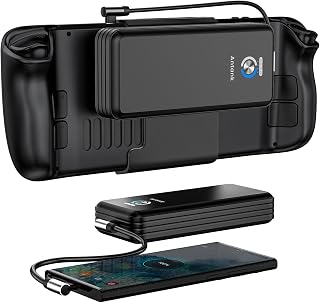
The Antank Magnetic Power Bank is engineered specifically for Steam Deck users seeking extended portable gaming sessions. This 20000mAh battery delivers 45W PD fast charging that matches the original Steam Deck charger, providing 1.5 full charges from a depleted state. If you're a commuter, traveler, or serious handheld gamer, this accessory directly addresses the Steam Deck's limited battery life.
The standout feature is the magnetic back mount system, which keeps the power bank securely attached during use without requiring you to hold it or manage cables. The design integrates with both Huaying and Delta fan models and avoids blocking critical ventilation ports on the device. Included dual USB-C cables, both a short right-angle model and a longer 3.2ft option, add practical flexibility for different charging scenarios.
Build quality centers on safety and reliability. The integrated smart chip system protects against overheating, overcurrent, overdischarge, overvoltage, and short circuits, giving users confidence during extended gaming marathons. The aluminum construction and high-quality magnets feel durable, though zero customer reviews make long-term performance claims difficult to independently verify.
The main limitation is case compatibility. The magnetic design requires direct contact with the Steam Deck back, making it incompatible with protective cases. This forces a choice between protection and charging convenience. Additionally, at 18.14g total weight with the battery attached, the device adds noticeable mass during handheld play, which may fatigate some users on extended sessions.
For Steam Deck owners prioritizing convenience and matching official charger power levels, this magnetic power bank delivers real value by enabling cable-free extended play. The universal USB-C support also benefits iPad, MacBook, and modern Android phone owners. Best for gamers who value simplicity and hands-free operation over case compatibility.
Capacity and Charging: 20000mAh lithium polymer battery, 45W USB Power Delivery 3.0 fast charging, supports up to 1.5 complete Steam Deck charges from empty.
Connectivity: Single USB Type-C port, dual USB-C cables included (short right-angle design and 3.2ft extended cable), universal compatibility with all USB-C devices.
Physical Design: Dimensions 2.55 inches L x 6.23 inches W x 0.98 inches thick, weighs 5g battery unit plus 18.14g total with attachment hardware, magnetic mount rated for vigorous movement without detachment.
Safety Features: Advanced multi-layer protection chip with overtemp, overcurrent, overdischarge, overvoltage, and short-circuit safeguards, does not obstruct Steam Deck cooling vents.
Compatibility: Steam Deck (all fan variants), Nintendo Switch, iPad models (Pro 12.9 inch, Pro 11 inch, mini 6, Air 4, 2018, 2020), MacBook models (Pro 14/16 inch, Air M1/2017, Pro 13/15/16 inch 2017+, 12 inch), Samsung Galaxy Z series and S series phones, all USB-C port devices, Chromebooks.
Warranty and Support: 1 year manufacturer limited warranty, Model SD06, made by Shenzhen Teliqi Electronic Technology Co. Ltd.
Who Should Buy: Steam Deck owners who play while traveling, commuting, or away from power outlets for extended periods. Also suitable for anyone with multiple USB-C devices (iPad Pro, MacBook Air, modern Android phones) seeking a single multipurpose charger. Best for users who prioritize convenience and hands-free operation.
Who Should Skip: Users who require protective cases with their Steam Deck and cannot compromise on durability. Those uncomfortable with magnetic attachment systems or preferring traditional handheld battery designs. People seeking extensive customer reviews before purchasing should wait for more user feedback.
Key Considerations: Verify your Steam Deck model and fan type compatibility before purchase. The magnetic design requires clear access to the back surface, eliminating case options. At 45W output, this matches official Steam Deck charging speed but cannot boost it further. Cable length and included right-angle connector address real-world gaming ergonomics.
Value Assessment: At $49.99, this product targets a specific use case with engineering tailored to Steam Deck specifications. Premium pricing compared to generic power banks reflects specialized design. Best value for frequent Steam Deck travelers who value hands-free convenience over other factors.

Gigabit Ethernet and 4K HDMI give you wired stability and crisp TV output, and the 100-watt USB-C passthrough handles charging while you play docked. Four USB ports accommodate multiple controllers and accessories for local multiplayer, and compatibility with Steam Deck LCD and OLED means it works across hardware revisions. The compact six-port design sits neatly beside a TV console.
Pros
- HDMI 2.1 supports up to 4K at 120Hz
- Gigabit Ethernet for wired networking
- Up to 100W Power Delivery
- Works with numerous handheld systems
Cons
- USB-C host cable is non-detachable
- Does not support Xbox-variant ROG Ally models
For a Steam Deck that doubles as a living-room console, the JSAUX HB0603 puts its emphasis on high-spec display output and a complete wired setup. Its HDMI 2.1 connection supports up to 4K at 120Hz, making it suited to TVs and monitors built for higher refresh rates. Gigabit Ethernet is included for a wired network connection, and the dock provides four USB ports for accessories around the screen, including controllers, adapters, or desktop-style peripherals. Power Delivery reaches up to 100W, allowing a compatible handheld to stay powered while docked. Although it is designed around Steam Deck LCD and OLED systems, its compatibility also extends to devices including the ROG Ally, Ally X, Legion Go, Go S, MSI Claw, and OneXPlayer. At 170 g, the dock remains light enough to move between rooms or take along with a handheld. Its compact dimensions help it fit into a TV stand or desk arrangement without becoming the main event. The trade-off is its fixed USB-C cable: if that cable is damaged, it is not a separate replaceable part. Xbox-variant ROG Ally models are not supported.
Connectivity: HDMI 2.1, Gigabit Ethernet, USB 3.0 (4 total ports including 3 USB-A), USB Type-C input
Video Output: 4K resolution at 120Hz refresh rate
Power Delivery: 100W USB Power Delivery charging
Dimensions: 1.26 inches (L) x 4.29 inches (W) x 6.02 inches (H)
Weight: 170 grams (6 ounces)
Compatible Devices: Steam Deck LCD/OLED, ROG Ally, ROG Ally X, Legion Go, Legion Go S/2, MSI Claw, MSI Claw 8 AI+, OneXPlayer
Model: HB0603 by JSAUX
Choose the HB0603 if you want to turn a Steam Deck into a TV or monitor setup with 4K at 120Hz HDMI, wired Ethernet, charging, and several USB connections in one unit. It is particularly useful for owners of multiple compatible handhelds. Skip it if a detachable host cable is important to you, if you use an Xbox-variant ROG Ally, or if your Steam Deck setup relies on connecting multiple wireless controllers through Bluetooth.
Steam Deck Accessories Buying Guide
Prioritize protection for the way you carry your Deck
The JSAUX PC0104 ModCase is a strong starting point for regular handheld use because it combines a shock-absorbing shell, textured grip edges, and a detachable hard front cover. That cover protects the thumbsticks and display when your Deck goes into a backpack, while the removable metal bracket provides a stable option for tabletop play.
For display protection, the ivoler Matte Anti-Glare Screen Protector for Steam includes two thin etched-glass protectors, an installation frame, and cleaning supplies. The matte finish is useful near windows and outdoor light, while its slim design is intended to retain touchscreen sensitivity. It is a different approach from the bulkier protection featured in our guide to laptop hard shell cases for everyday transport.
Choose power and cooling based on your actual play sessions
The Antank Magnetic Power Bank Compatible with Steam is made for players who need more runtime without holding a loose battery pack. Its detachable magnetic mount keeps the bank on the rear of the console, and its 45W USB-C PD output matches the Steam Deck’s maximum accepted charging rate. The listing also states that its capacity can provide roughly one and a half full Deck charges.
Choose the JSAUX Cooling Fan for Steam Deck/Steam Deck OLED when warm rooms, long sessions, or demanding games make heat the larger concern. Its adjustable fan doubles as a stand, and JSAUX states a temperature reduction of 8 to 15 degrees Celsius after several minutes of use. Higher fan settings can be louder, so it is best for stationary sessions rather than quiet travel.
Match your dock to the display and peripherals you use
The Anker Steam Deck Dock, 6-in-1 4K@60Hz HDMI Docking is a practical choice for a TV or monitor setup that needs HDMI, wired Ethernet, fast USB-A ports, USB-C data, and PD passthrough in one compact hub. Its Gigabit Ethernet connection is especially useful for large game downloads and steadier online play. For broader comparison shopping, see our picks for the best USB-C hubs for laptop workspaces.
The JSAUX 6-in-1 Docking Station for Steam Deck/ROG adds HDMI 2.1 capability, three USB-A 3.0 ports, Gigabit Ethernet, and up to 100W PD input. Its 4K at 120Hz HDMI specification describes the dock’s output capability, not a promise that every Steam Deck game will run at that setting. Your game settings, display, and the Deck itself still determine the picture and frame rate you see.
Check fit, mounting, and cable placement before combining gear
Modular accessories offer flexibility, but their mounting methods matter. The ModCase includes a silicone strap that can secure a hub, power bank, or cooling fan, while the Antank battery uses its own magnetic rear mount. Antank notes that its battery is not compatible with a protective case, so you should plan to remove your shell before using that particular charging solution.
Also consider where your Deck will sit when cables are attached, especially if you alternate between handheld and desk play. A short right-angle cable can keep a portable setup neater, while a dedicated display station benefits from clear vent space and a solid surface. If your desk also includes a computer, a vertical laptop stand for a cleaner desk can free room for the dock and controller.
Final Thoughts
For most players, begin with the JSAUX PC0104 ModCase Compatible with Steam Deck to make everyday carrying and tabletop use easier, then add the JSAUX 6-in-1 Docking Station for Steam Deck/ROG if TV gaming, wired networking, and peripherals are part of your routine. Add battery or cooling gear only when your usual play environment calls for it.
Frequently Asked Questions
Which Steam Deck accessories should I buy first in 2026?
Start with a fitted protective case and screen protector, since both address the wear that happens during normal storage and travel. The ModCase is the better fit if you want grip protection and a tabletop bracket, while the ivoler protector is useful when glare is your biggest display issue. After those basics, decide whether your routine needs more battery capacity, active cooling, or a dock for a larger screen.
Is a Steam Deck dock worth it for TV and monitor gaming?
A dock is worthwhile if you regularly play on a TV or monitor and want easy access to Ethernet, a controller, keyboard, mouse, or external storage. The Anker model favors a well-rounded 4K at 60Hz connection set, while the JSAUX dock emphasizes HDMI 2.1 capability and broader handheld compatibility. For a desk that serves several screens, review these laptop docking stations for dual-monitor setups to understand the port options that may matter most.
Do I need a cooling fan or a power bank for my Steam Deck?
Choose a power bank when travel, flights, or long sessions away from a wall outlet are the main obstacle. Choose a cooling fan when you play in warm conditions or want extra airflow directed at the console vents during stationary play. These accessories solve different problems, so a portable player may favor the Antank bank, while a desktop-focused player may get more use from the JSAUX fan and stand.
Can I use a Steam Deck case with a dock or magnetic battery?
A case can affect both dock clearance and rear-mounted accessories, even when its ports remain accessible. Confirm that the USB-C connector reaches comfortably and that the dock cradle has room for your shell before committing to a setup. The Antank magnetic battery specifically notes that it is not compatible with a protective case, while the ModCase’s detachable components give you more flexibility around stands and accessories.






Write Your Review
No reviews yet. Be the first to share your experience!