

Juggling a single laptop port while managing two monitors, a wired connection, and a full set of peripherals is a daily frustration for a lot of people. A quality Thunderbolt docking station collapses all of that into one clean cable, giving you a proper desk setup without the clutter. Whether you are outfitting a home office or a corporate workstation, this guide breaks down eight of the best options available right now.
We evaluated each dock across connectivity, display support, power delivery, and build quality. If you are also looking to round out your workspace, check out our picks for the best laptop accessories across every category.
Quick answer
This guide compares 8 picks, with UGREEN Thunderbolt 5 Docking Station, Triple 4K@144Hz ranked first. Microsoft Surface Thunderbolt 4 Docking Station - Fast holds the highest customer rating among them. OWC Thunderbolt 5 Dock 11-Port: Fast Connectivity & has the most customer reviews.
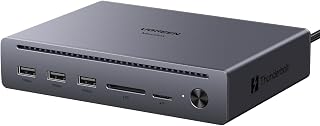
If you're chasing a true multi-monitor Thunderbolt 5 setup, triple 4K@144Hz output across three TBT5 ports makes this the pick for creative pros and competitive gamers who need high refresh rates on every screen at once, not just one. With 10 total ports and 140 watts of delivery, it still charges a demanding laptop while driving that display trio.
Pros
- Triple 4K@144Hz or dual 8K@60Hz display support
- 120Gbps Thunderbolt 5 for near-instant large file transfers
- 140W power delivery charges 16-inch MacBook Pro at full load
- Fanless aluminum build with silent thermal management
Cons
- No DP++ passthrough, requires active adapter for HDMI monitors
- Mac compatibility requires macOS 15 or later
If your shortlist for a Thunderbolt dock starts and ends with raw display output, the UGREEN Maxidok earns its spot. It pushes triple 4K monitors at 144Hz or dual 8K at 60Hz off DisplayPort 2.1 and dual Thunderbolt 5 downstream ports, which is the kind of multi-monitor headroom most docks in this roundup cannot match. The 120Gbps Thunderbolt 5 link also means a 6GB file moves in roughly a second, so it pairs display muscle with genuine transfer speed. Ten ports cover the essentials: three USB-A at 10Gbps, a 170MB/s SD/TF reader, Gigabit Ethernet, and 140W of power delivery strong enough for a 16-inch MacBook Pro at full tilt. Aluminum construction with built-in thermal management keeps it fanless and quiet, which matters if this dock lives on a desk all day. A security lock slot is a nice touch for shared offices. The one catch for a display-heavy pick like this: no DP++ passthrough, so HDMI monitors need an active adapter rather than a basic cable.
Connectivity: 3x USB-A 10Gbps, 2x Thunderbolt 5 downstream, 1x DisplayPort 2.1, 1x Gigabit Ethernet, 1x SD card slot, 1x microSD card slot, 1x 3.5mm audio jack
Performance: Thunderbolt 5 at 120Gbps uni-directional or 80Gbps bi-directional. Supports dual 8K@60Hz or triple 4K@144Hz displays. Card reader at 170MB/s transfer speed
Power Delivery: 140W total power, with up to 100W PD charging for laptops
Design: Aluminum alloy construction, fanless operation, 1.6kg weight, includes security lock
Compatibility: MacBook M1/M2/M3/M4/M5 Pro/Max, Mac Mini M4/M5/M6 Pro, Thunderbolt 5/4 Windows laptops. Backward compatible with Thunderbolt 4, Thunderbolt 3, and USB4
Warranty: 2 years
Buy this if multi-display output is your top priority and you already own Thunderbolt 5/4 or USB4 hardware, since triple 4K or dual 8K support is the headline feature. Mac users need macOS 15 or later. Skip it if you mainly connect HDMI monitors, since the lack of DP++ passthrough forces an active adapter purchase, or if you just need basic single-monitor connectivity without the premium feature set.

Surface users who want guaranteed compatibility without compatibility guesswork will appreciate that this dock is built specifically for Microsoft Surface devices. Its compact footprint and 8 total ports with 6 USB connections make it well suited to a tidy Surface-based desk setup rather than a sprawling multi-brand workstation.
Pros
- Thunderbolt 4 speed with fast Surface charging
- Dual 4K monitor support
- Compact and lightweight at 14.4 ounces
- Tactile port indicators for easy blind connections
Cons
- Modern monitors often need a USB-C adapter
- Fewer ports than higher-tier Thunderbolt docks
Not every reader shopping this roundup wants the biggest port count, and the Microsoft Surface Thunderbolt 4 Docking Station fits that smaller, simpler need well. It's built specifically for Surface laptops, delivering Thunderbolt 4 speeds alongside charging fast enough to bring a Surface laptop to full power in about 2.5 hours. It supports two 4K monitors at once, which covers most multitasking or content work without needing a higher-tier dock. At 11 inches long and 14.4 ounces, it's noticeably lighter and smaller than the bulkier docks elsewhere in this list, making it a reasonable pick for anyone who moves between home and office setups. Six USB ports plus 2.5G Ethernet and an audio jack round out the connectivity, and raised tactile markers on each port make plugging in without looking easier than it sounds. It's also made with 20% recycled ocean-bound plastic.
Best for Surface laptop owners who want dual 4K monitor support and fast charging in a compact, portable dock rather than a maximalist Thunderbolt 5 hub. Fits people who switch between desks or locations often. Skip it if you need Thunderbolt 5 speeds, more than two external displays, or a large number of USB ports, since this one is scaled for lighter, Surface-focused setups.
Connectivity
Thunderbolt 4 ports (high-speed data and charging), 3x USB-C ports, 3x USB-A ports, 1x 3.5mm audio jack, 2.5G Ethernet, Kensington security lock slot
Display Support
Up to two 4K monitors via USB-C connections
Charging
Rapid charging technology, 2.5-hour full charge time
Physical
Dimensions: 11 inches L x 4.4 inches W x 3.2 inches H
Weight: 14.4 ounces
Color: Black
Material: 20% recycled ocean-bound plastic
Model: T8H-00001
Compatibility
Microsoft Surface devices with Thunderbolt 4 support
Warranty
1 year manufacturer warranty

For someone running dual 4K monitors off a Thunderbolt 4 laptop without needing top-tier bandwidth, 8 total ports and 140 watts of delivery hit a practical middle ground. Broad compatibility with Thunderbolt 3, 4, and USB4 devices including tablets makes this a flexible fit for mixed-device households rather than a single-brand setup.
Pros
- Dual 4K@60Hz or single 8K display support
- 40Gbps Thunderbolt 4 with verified 300+ MBps transfer speeds
- Solid aluminum build with compact 9.5" x 9.5" footprint
- 85W charging reduces cable and adapter clutter
Cons
- Some users report audio interference linked to AC adapter grounding
- Only 8 ports total, fewer than some competitors in this category
If dual-monitor output and fast file transfers are what you're shopping a Thunderbolt dock for, this UGREEN model earns its spot on the list. It pushes dual 4K@60Hz across two displays (or single 8K on supported setups) and moves data at a genuine 40Gbps, with real-world transfers clocked above 300 MBps. That combination turns a laptop into a proper multi-display workstation rather than a stopgap setup. The aluminum build adds to the case: it sits solidly on a desk thanks to good weight distribution, and the 9.5 inch square footprint keeps it from taking over your workspace. With 8 ports total and 85W charging, it consolidates the cable mess that usually comes with running multiple monitors and peripherals off one laptop. The one caveat worth flagging for this audience is a reported audio interference issue tied to AC adapter grounding, which affects a minority of users running audio through the dock while powered. For anyone prioritizing display count and transfer speed over absolute port variety, this dock holds up well against the rest of the field.
Connectivity Specs: 3x Thunderbolt 4 ports (40Gbps, 15W each), 3x USB-A 3.2 (10Gbps), 1x Gigabit Ethernet, 1x 140W DC power input. Display support: dual 4K@60Hz or single 8K@30Hz on Windows, dual 4K@60Hz on MacBook Pro/Max, single 4K@60Hz on base M-Chip MacBooks.
Power Delivery: 85W maximum laptop charging output when connected to included 140W GaN power adapter. The dock requires power connection to operate all features.
Compatibility: Works with Thunderbolt 4, Thunderbolt 3, USB4, or USB-C devices including MacBooks (macOS 11.4+), Windows laptops (Windows 10+), iPads, and tablets. Not compatible with Mac mini 2018 Intel models.
Physical: Dimensions 9.5" L x 9.5" W x 2.5" H. Weight 1.4 kg. Dark gray aluminum construction. Includes 140W GaN power adapter. 2-year manufacturer warranty.
Best for MacBook Pro/Max owners, Windows professionals with Thunderbolt ports, and anyone who runs dual external displays or moves large files regularly, such as video editors and developers. Skip it if your setup requires extensive legacy port variety (no Ethernet or SD card slot here) or if you've had grounding-related audio issues with similar docks before, since a small subset of users report that problem here too.

Dual monitor users will like that this dock lists extensive certified compatibility across Dell, HP, Lenovo, and Surface business laptops, reducing guesswork for IT-managed fleets. With 13 total ports, 2 HDMI outputs, and 100W charging, it's built for an office deployment where consistent dual-display support across many laptop models matters most.
Pros
- Genuine dual 4K 60Hz support, not display mirroring
- 13 total ports including 2 HDMI, SD slot, and Ethernet
- 100W power delivery for demanding creative workloads
- Driverless plug-and-play with Wirecutter and Intel Evo recognition
Cons
- Dual monitor support limited to M1 Pro and newer Macs
- Some users report reliability issues in the first few months
For readers comparing Thunderbolt docks specifically for multi-monitor setups, this Plugable model stands out on port count and genuine dual-display support. It handles true dual 4K 60Hz output on compatible Thunderbolt 4 Macs and Windows machines, a real differentiator from docks that only mirror rather than extend displays. With 13 total ports, including 2 HDMI outputs, 6 USB ports, SD card slot, and Gigabit Ethernet, it covers nearly every connection a desktop workstation setup would need. The 100W power delivery keeps a laptop charged through demanding workloads without a separate power brick. Build quality punches above expectations, with a compact footprint and ports placed thoughtfully on front and back. It's driverless, so displays and peripherals connect without software installs. Industry recognition, including Wirecutter's Best Thunderbolt Dock 2025 pick and Intel Evo certification, backs up its reputation among dock buyers. The main caveats are scattered early reliability reports and dual-monitor support limited to M1 Pro or newer Macs, with base M1 and M2 models capped at a single display.
Connectivity & Performance: Thunderbolt 4 (40Gbps), 13 total ports, 2x HDMI 2.0, 1x Thunderbolt 4 downstream (15W charging), 4x USB (10Gbps and 5Gbps), 1x USB-C (10Gbps), SD/microSD, audio combo jack, Gigabit Ethernet, K-lock slot.
Power & Dimensions: 100W power delivery (96W certified), 134 watt power adapter, 8.9 inches L x 3.3 inches W x 0.9 inches H, 2.4 pounds, black finish.
Display Support: Dual 4K 60Hz HDMI or single 8K Thunderbolt 4 display. M5, M4, M3 Pro/Max, M2 Pro/Max, M1 Pro/Max MacBooks support dual displays. Base M1, M2, M3 models limited to single display (dual only in clamshell mode on M3). Windows Thunderbolt systems support dual 4K, TB3 and USB-C systems support single display.
Compatibility: Windows 10 and up with Thunderbolt 4, Thunderbolt 5, or USB4. macOS 11 and newer on compatible Mac models. Leading brand support includes HP, Dell, Lenovo, Microsoft Surface Pro, ASUS, Framework, and others.
Warranty: 2-year limited parts and labor warranty.
Best for buyers who want maximum port variety alongside dual-monitor support, including hybrid home office setups and teams standardizing Windows or Mac deployments. Also strong for those who value third-party recognition like Wirecutter and Intel Evo. Skip it if you're on a base M1 or M2 MacBook, since dual display support requires M1 Pro or newer, or if you've been burned by early reliability issues with other docks in this price range.

Anyone building a storage-heavy editing rig will appreciate that this dock supports an 8TB M.2 NVMe SSD directly, turning the dock itself into fast internal-speed storage rather than relying on external drives. Paired with 17 total ports and 240 watts of delivery, it's suited to a single-cable workstation that still needs serious local capacity.
Pros
- 17-in-1 design with 6 USB ports for extensive peripheral support
- Built-in M.2 PCIe Gen4x4 slot supports up to 8TB NVMe storage
- Dual 8K@60Hz display support on Windows systems
- 240W total power delivery for demanding multi-device setups
Cons
- M.2 slot rejects some popular heatsink SSD variants
- HDMI monitors require an additional active DisplayPort adapter
For anyone comparing Thunderbolt docks on sheer port count and display flexibility, this 17-in-1 Maxidok variant stands out by combining dual 8K@60Hz output with onboard storage expansion. The integrated M.2 PCIe Gen4x4 slot takes up to 8TB of NVMe storage directly into the dock, which is a genuinely different angle from docks that only pass through ports. Thunderbolt 5 delivers certified 120Gbps bandwidth, and with 17 total ports and six USB connections, it is built to be the single cable that replaces an entire desk setup. The aluminum unibody chassis and a 60mm smart cooling fan are meant to keep things stable when displays, storage, and peripherals are all running at once. 240W of total power delivery is among the higher outputs in this category, useful for driving a demanding multi-monitor and storage setup simultaneously. Two things to plan around: the M.2 slot does not accept every SSD, notably ruling out some heatsink-equipped drives, and HDMI displays still need an active DisplayPort adapter since there is no native HDMI passthrough.
Connectivity: 3 Thunderbolt 5 downstream ports, 3 USB-A 10Gbps, 3 USB-C 10Gbps (2 share 60W charging), 1 DisplayPort 1.4, 2.5GbE Ethernet, SD/TF 4.0 card reader, 3x 3.5mm audio jacks.
Storage: Built-in M.2 NVMe PCIe Gen4x4 slot supports 2230-2280 SSDs up to 8TB. Heatsink compatibility: height maximum 12mm, width maximum 24mm.
Display Output: Windows supports triple independent displays (dual 8K@60Hz via 2x TB5 + DP), Mac supports dual displays. Note: DP port does not support DP++.
Power: 240W total system power, up to 60W Power Delivery output on USB-C ports. Supports region-specific power cables included.
Design: Premium aluminum unibody chassis with AI-smart cooling fan, security lock, bronze color finish. Dimensions optimized for compact desk footprint.
Compatibility: MacBook M5/M4/M1/M2/M3, Mac Mini M6/M5/M4 Pro, Windows 10+ with Thunderbolt 5/4 ports. macOS 15+ required for Mac compatibility.
This fits buyers who want display output and internal storage expansion combined in one dock, particularly those juggling large video or 3D project files without a separate external drive. Thunderbolt 5/4 or USB4 hardware is required, with macOS 15+ for Mac. Skip it if you already have external storage sorted or plan to use a specific heatsink-style NVMe drive, since compatibility is limited there.

For buyers wanting a clean, do-everything Thunderbolt 5 hub without digging through spec sheets, 11 ports and 7 USB connections cover peripherals, storage, and displays in one unit. Official certification across ChromeOS, macOS Sonoma, and Windows 11 makes it a safe choice for mixed-OS households or offices standardizing on one dock.
Pros
- Three Thunderbolt 5 ports at 80-120Gb/s with multi-8K display support
- 2.5GbE Ethernet for faster uploads than standard Gigabit docks
- Built-in SD and microSD card readers
- Fanless aluminum design with two-year warranty and included cable
Cons
- Requires Thunderbolt 5/4/3 or USB4, excluding many Windows laptops
- Aluminum build is less portable than smaller USB-C alternatives
Among Thunderbolt 5 docks worth shortlisting in 2026, the OWC stands out for balancing display performance with networking speed that outpaces typical dock hardware. Three Thunderbolt 5 ports running at 80-120Gb/s support multiple 8K displays, and alongside that you get 2.5GbE Ethernet, a step up from the Gigabit found on most competitors and genuinely useful for cloud uploads or large file syncing. The full port count reaches 11, including dual USB-A at 10Gb/s, a USB-A at 5Gb/s, and built-in SD and microSD readers so field photographers or videographers can skip separate card adapters. 140W power delivery keeps a laptop charged through sustained workloads. The fanless aluminum enclosure stays cool and silent, and OWC backs it with a two-year warranty plus an included Thunderbolt cable, both of which add confidence for a dock meant to anchor a workstation long term. It requires Thunderbolt 5/4/3 or USB4 to function, so it is not a match for older or budget laptops, and the solid aluminum body trades off portability for durability.
Connectivity: Four Thunderbolt 5 ports (80/120Gb/s), two USB-A 10Gb/s ports, one USB-A 5Gb/s port, 2.5GbE Ethernet, SD 4.0 UHS-II and microSD card readers, 3.5mm audio in/out
Power: 140W USB Power Delivery supports charging most modern laptops simultaneously with connected peripherals
Display Support: Up to three 8K displays or equivalent high-resolution configurations
Compatibility: Thunderbolt 5, Thunderbolt 4, Thunderbolt 3, USB4, and USB-C devices running Chrome OS 134+, macOS 14 Sonoma+, or Windows 11+
Physical: Fanless aluminum enclosure, weighs 530g, includes Thunderbolt cable, two-year OWC Limited Warranty

With 14 total ports including 8 USB connections and an HDMI output, this dock suits power users running several peripherals and a monitor simultaneously without juggling adapters. The 140 watt delivery handles charging a Thunderbolt 5 or 4 laptop while everything stays connected, making it a strong fit for a permanent multi-device desk setup.
Pros
- Thunderbolt 5 speed handles massive transfers in seconds
- Dual 8K 60Hz display support
- 140W charging keeps laptops powered under load
- Aluminum build with active cooling prevents throttling
Cons
- Only one HDMI/DisplayPort output
- Needs adapters for more than two extra displays
If your shortlist for a Thunderbolt dock starts and ends with raw throughput, the Anker Prime TB5 earns its spot among the top picks. It runs on Thunderbolt 5, and that 120Gbps ceiling is the real draw here: a 150GB file transfer finishes in about 25 seconds, which separates this dock from the Thunderbolt 4 crowd in this roundup. Dual 8K displays at 60Hz give it genuine multi-monitor range, and 140W of upstream charging means a demanding laptop still charges while driving everything else. The aluminum build adds weight that keeps it planted on a desk, and active cooling keeps that performance consistent instead of throttling under sustained load. With 14 ports total and support for the latest MacBook and Windows Thunderbolt 5/4 machines, it's built for people who've outgrown basic docks and want one box that replaces a desk full of adapters.
Connectivity and Ports: 14-in-1 configuration with 1 Thunderbolt 5 upstream, 2 Thunderbolt 5 downstream, 2 USB-C, 3 USB-A, SD card reader, TF card reader, 2.5Gbps Ethernet, 3.5mm audio jack, and HDMI 2.1/DisplayPort 2.1 output.
Video Output: Supports dual 8K@60Hz on Thunderbolt 5 Windows laptops, or single 8K@60Hz plus one HDMI/DisplayPort output. Delivers high-bandwidth video without compromise.
Power Delivery: 140W maximum through Thunderbolt 5 upstream port supporting USB Power Delivery 3.1 protocol. Front-facing dual USB-C ports share 45W total for additional device charging.
Physical Dimensions: 4.56 inches length, 4.56 inches width, 2.95 inches height. Weight is 2.4 pounds with a durable gray finish. Compact footprint designed for desk mounting.
Compatibility: Works with MacBook M1, M2, M3, M4 (Standard/Pro/Max), and Thunderbolt 4/5 Windows laptops. Requires Mac OS 15 Sequoia minimum. Includes 3.3-foot Thunderbolt 5 cable, 6-foot AC power cable, and 24-month manufacturer warranty.
Buy this if you work with huge files, run dual 8K monitors, or need a laptop that charges at full tilt while docked. It suits creative pros and developers on recent MacBook or Thunderbolt 5/4 Windows laptops. Skip it if you only need one external display or a couple of USB ports, since the single HDMI/DisplayPort output means extra adapters for multi-monitor setups beyond the Thunderbolt connections.

ThinkPad owners needing serious bandwidth for file transfers will value the 120Gbps throughput here, paired with 180 watts of power delivery that's enough for even larger mobile workstations. Built-in 2.5Gbps Ethernet also makes it the natural choice for anyone prioritizing wired network speed over Wi-Fi at their desk.
Pros
- Three 8K 60Hz or high-refresh display configurations
- 180W Power Delivery replaces a separate charger
- 11 ports including dual Thunderbolt 5 and 2.5Gbps Ethernet
- AWS cloud management for IT device fleets
Cons
- Requires Thunderbolt 5 compatible hardware for full benefit
- Feature set may be more than casual users need
For anyone comparing top Thunderbolt docks on display flexibility alone, the Lenovo ThinkPad Thunderbolt 5 Smart Dock 7500 is worth a close look. It's built around Thunderbolt 5's 120Gbps bandwidth, and the display options go further than most competitors in this category: three 8K monitors at 60Hz, or high-refresh configurations up to 240Hz. That range makes it a strong fit for anyone running demanding multi-monitor setups rather than just a single external screen. The 180W Power Delivery 3.1 is enough to replace a separate laptop charger entirely, and 11 ports including dual Thunderbolt 5, HDMI 2.1, DisplayPort 2.1, USB-A/C, and 2.5Gbps Ethernet cover most workspace needs without extra hubs. The 9.25-inch footprint keeps it desk-friendly despite the port count, and AWS-powered cloud management adds a layer of fleet oversight that's unusual for a dock in this price tier, useful for IT-managed environments.
Connectivity: Thunderbolt 5, HDMI 2.1, DisplayPort 2.1, USB-A/C ports, 2.5Gbps Ethernet (RJ45), Combo Audio
Performance: 120Gbps data transfer speed, 180W Power Delivery 3.1, Supports up to three 8K 60Hz displays or four monitors in various configurations
Ports: 11 total ports including 4 USB ports and 1 HDMI port
Physical: 9.25"L x 3.15"W x 1.18"H, 1.3 pounds, Eclipse Black color
Management: Lenovo Accessories Fleet Manager cloud console powered by AWS, Intel vPro technology support
Warranty: 3-Year Manufacturer Warranty
Good for professionals or enterprise users running multiple high-resolution displays who want one dock to also handle networking and device management. Also fits ThinkPad and other Thunderbolt 5 laptop owners who want headroom for future hardware. Skip it if your laptop is Thunderbolt 3 or older, since you won't get the full display or speed benefits, or if you just need a simple single-monitor setup.
What to Look for in a Thunderbolt Docking Station
Thunderbolt Generation and Bandwidth
Thunderbolt 4 and Thunderbolt 5 are not the same thing, and that gap matters depending on your workflow. Thunderbolt 4 delivers up to 40Gbps, which handles dual 4K displays and fast storage without issue. Thunderbolt 5 doubles that ceiling to 120Gbps, making it the smarter choice for triple 8K setups or high-speed NVMe storage.
The UGREEN Maxidok Thunderbolt 5 Docking Station and the Anker Prime TB5 Docking Station both carry Intel-certified Thunderbolt 5, so they are worth prioritizing if your laptop supports the newer standard. For most users, a Thunderbolt 4 dock like the Plugable Thunderbolt 4 Dock with 100W Charging is plenty capable and more widely compatible.
Display Output and Multi-Monitor Support
How many monitors you want to drive, and at what resolution, should shape your buying decision from the start. Most Thunderbolt 4 docks support dual 4K at 60Hz, which is the sweet spot for productivity and content creation. Thunderbolt 5 docks push further, with options like the Lenovo ThinkPad Thunderbolt 5 Smart Dock 7500 supporting up to three 8K displays or four monitors in mixed high-refresh configurations.
Mac users should pay close attention to chip compatibility. Base M1 and M2 MacBooks are limited to a single external display regardless of the dock, while M-Pro and M-Max chips unlock full multi-monitor support. The product listings for the UGREEN 8-in-1 Thunderbolt 4 Docking Station spell this out clearly, so always verify before you buy. If you rely on a laptop for demanding work, our roundup of top laptops for medical students also covers display-heavy use cases worth reading alongside this guide.
Power Delivery
A good dock should charge your laptop at full speed while every port is in use. Look for at least 85W to 100W of upstream power delivery if you are running a 15-inch or 16-inch laptop. The Microsoft Surface Thunderbolt 4 Docking Station can fully charge a Surface laptop in about two and a half hours, while the UGREEN Maxidok Thunderbolt 5 Docking Station delivers up to 240W total system power for the most demanding setups.
The OWC Thunderbolt 5 Dock 11-Port Connectivity tops out at 140W, which is more than enough to keep a power-hungry notebook charged while driving multiple displays. Always match the dock’s power output to your laptop’s actual requirement, not just a rough estimate.
Port Selection and Build Quality
Port count matters, but so does the variety. A dock that offers four USB-A ports without a card reader or audio jack forces you back to adapters, which defeats the purpose. The Anker Prime TB5 Docking Station earns its 14-in-1 label with SD and TF card readers, a 2.5Gbps Ethernet port, and both HDMI 2.1 and DisplayPort 2.1 outputs on the same unit.
Build quality also affects long-term reliability. Aluminum chassis designs, like those used by UGREEN and OWC, dissipate heat more effectively than plastic housings. The UGREEN Maxidok Thunderbolt 5 Docking Station adds AI-driven active cooling to manage thermals under heavy sustained load, keeping performance stable during long sessions. If staying organized at your desk is a priority, pairing your dock with a solid laptop privacy screen can complete the workstation feel.
Final Thoughts
For most users who want reliable dual-display support and broad compatibility, the Plugable Thunderbolt 4 Dock with 100W Charging is the easiest recommendation to make, backed by strong third-party recognition and a comprehensive 13-port layout. If you are ready to invest in a forward-looking setup with Thunderbolt 5 speeds and built-in NVMe storage, the UGREEN Maxidok Thunderbolt 5 Docking Station with M.2 support is the most versatile option on this list for power users who want everything in one chassis.
Frequently Asked Questions
What is the difference between Thunderbolt 4 and Thunderbolt 5 docking stations?
Thunderbolt 4 runs at up to 40Gbps and supports dual 4K displays, which is sufficient for the majority of professional workflows. Thunderbolt 5 raises the ceiling to 120Gbps, enabling triple 8K display output and much faster external storage transfers. If your laptop was released in 2026 with a newer Intel or Apple silicon chip, it likely supports Thunderbolt 5, making the upgrade worthwhile for demanding tasks.
Are Thunderbolt docking stations compatible with MacBooks?
Most Thunderbolt docks work with MacBooks, but display support depends on the specific chip inside your machine. MacBooks with base M1 or M2 chips are limited to one external display, while Pro and Max variants support two or more. Always check the dock’s compatibility notes for macOS before purchasing, since multi-monitor behavior varies by model.
Do I need a Thunderbolt laptop to use a Thunderbolt dock?
Not entirely. Most Thunderbolt 4 and Thunderbolt 5 docks are backward compatible with USB4 and USB-C laptops, though you will not get the full bandwidth or multi-display capability without a native Thunderbolt port. For USB-C only laptops, the dock still functions as a useful hub, but display output is typically limited to a single monitor. If you are shopping for a compatible laptop to pair with a dock, our guide to travel-ready laptops highlights several Thunderbolt-equipped options worth considering.
How many monitors can a Thunderbolt docking station support in 2026?
It depends on the dock’s generation and your laptop. A Thunderbolt 4 dock typically supports dual 4K monitors at 60Hz. Thunderbolt 5 docks push that further, with the Lenovo ThinkPad Thunderbolt 5 Smart Dock 7500 supporting up to four displays in mixed configurations including high-refresh 4K panels. Always factor in your laptop’s output limitations alongside the dock’s rated maximums.
Common questions
How does Thunderbolt actually compare to regular USB C ports?
Thunderbolt delivers higher sustained bandwidth and guaranteed data, video, and power delivery performance, while plain USB C varies a lot by implementation. A Thunderbolt port is always USB C shaped, but not every USB C port supports Thunderbolt. For docks, Thunderbolt matters because it reliably handles multiple high resolution displays plus fast storage at once, something generic USB C hubs often cannot guarantee under load.
What exactly does daisy chaining mean when using a Thunderbolt dock?
Daisy chaining means connecting multiple Thunderbolt displays or devices in a single line from one port, instead of wiring each one directly to your laptop. Thunderbolt's protocol allows data to pass through one device to the next, so a monitor can connect to the dock and then to a second monitor. This cuts cable clutter on a desk, though total bandwidth is still shared across the chain.
Are there bandwidth limits to worry about with these docks?
Yes, bandwidth limits are real because every port on a dock shares one Thunderbolt connection back to your laptop. Running multiple 4K displays, fast external SSDs, and Ethernet at the same time can approach that ceiling, which is why higher throughput docks like the OWC Thunderbolt 5 model or Lenovo's 120Gbps dock handle demanding multi display setups more comfortably than entry level hubs.





Write Your Review
No reviews yet. Be the first to share your experience!