

Engineering coursework pushes laptops harder than almost any other field of study. Between running CAD software, compiling code, modeling finite element simulations, and collaborating on group projects, you need a machine that keeps up without freezing mid-calculation. The wrong laptop wastes your time and your budget.
This guide rounds up the top laptops for engineering students in 2026, covering everything from compact workstations to accessible everyday performers. Whether you are in mechanical, electrical, civil, or computer engineering, you will find an option here that fits your workload. For a broader look at components that pair well with high-performance laptops, check out our Home Office category.
Quick answer
This guide compares 8 picks, with HP 17 Inch FHD Laptop, AMD Ryzen 5, 32GB RAM, 1TB SSD ranked first. Dell 15.6" FHD Laptop Intel Core i5-1334U, Windows 11 has the most customer reviews.
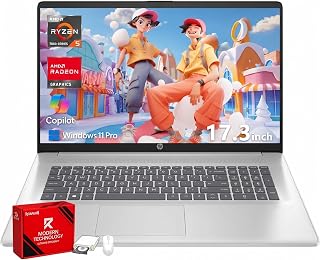
The 17.3-inch FHD display gives engineering students extra screen real estate for working with CAD software and circuit diagrams side by side. The 32GB RAM handles demanding simulations and multitasking between design tools, compilers, and documentation without slowdown. The 1TB SSD provides ample storage for large project files, software packages, and datasets that accumulate throughout coursework.
Pros
- 32GB RAM handles multiple engineering applications simultaneously
- 1TB storage accommodates full software suites and project archives
- 17.3-inch screen enables split-screen technical workflows
- Fast charge recovers battery quickly between classes
Cons
- Integrated graphics limit GPU-dependent engineering tasks
- 17-inch size reduces portability for multi-location schedules
Engineering coursework demands juggling multiple applications simultaneously: reference PDFs, programming IDEs, simulation software, calculation tools, and video lectures all open at once. The 32GB RAM configuration eliminates the performance bottleneck that forces students to constantly close and reopen applications. The AMD Ryzen 5 7430U delivers the processing headroom needed for compiling larger codebases, running statistical analysis, and handling technical documentation workflows without lag. That 1TB SSD matters when storing semester after semester of project archives, software toolchains, datasets, and research materials. The 17.3-inch FHD IPS display provides the workspace to view code alongside documentation or compare engineering drawings side by side without endless window switching. The anti-glare coating proves practical during afternoon lab sessions with overhead fluorescent lighting. Wi-Fi 6 ensures stable connectivity for submitting assignments, accessing cloud-based engineering tools, and attending remote lectures. HP Fast Charge addresses the reality of forgetting to charge overnight, recovering 50% battery in 45 minutes between classes.
Display: 17.3-inch Full HD (1920x1080) IPS anti-glare, 250 nits brightness, 178-degree viewing angles
Processor: AMD Ryzen 5 7430U with 6 cores, 12 threads, and 4.3GHz max boost clock
Memory and Storage: 32GB DDR4 RAM at 3200MHz, 1TB PCIe NVMe SSD
Graphics: AMD Radeon integrated graphics
Connectivity: Wi-Fi 6 (802.11ax), Bluetooth 5.4, USB-C, 2x USB-A, HDMI 1.4b, 3.5mm headphone/microphone combo jack
Battery: Lithium-ion with HP Fast Charge (0-50% in 45 minutes)
Keyboard: Full-size with dedicated numeric keypad
Operating System: Windows 11 Pro with BitLocker security
Dimensions: 15.78 inches (L) x 10.15 inches (W) x 0.81 inches (thickness)
Engineering students tackling memory-intensive coursework like data science, software development, or computational engineering will benefit most from the RAM and storage capacity. The large screen suits stationary desk work in dorms or apartments. Students needing frequent portability between multiple daily locations should consider smaller alternatives, and those requiring GPU-accelerated workflows for rendering or advanced simulation need dedicated graphics instead of integrated AMD Radeon.

The NVIDIA RTX 2000 Ada with 8GB dedicated GDDR6 memory accelerates GPU-intensive tasks like 3D rendering, machine learning model training, and ray-traced visualizations that advanced engineering students encounter. Combined with 64GB DDR5 RAM, it handles parallel simulations and large assemblies in mechanical design software without compromising responsiveness. The 2TB storage accommodates extensive project archives and multiple development environments.
Pros
- NVIDIA RTX 2000 Ada handles demanding CAD and simulation software
- 64GB RAM supports virtual machines and multitasking heavy workloads
- MIL-STD-810H durability withstands campus transport and daily use
- Supports four external 4K monitors for comprehensive workspace setup
Cons
- 45% NTSC color gamut limits precision color work
- Arrives resealed with upgraded SSD rather than factory-sealed
Engineering students working with demanding software like SolidWorks, MATLAB, AutoCAD, or simulation tools need workstation-grade hardware, and the Dell Precision 7680 delivers exactly that. The NVIDIA RTX 2000 Ada GPU handles complex 3D modeling and rendering tasks that integrated graphics cannot, while the i7-13850HX processor powers through multithreaded simulations and compilations. With 64GB of DDR5 RAM, you can run virtual machines, multiple engineering applications, and background processes without slowdowns. The 2TB SSD provides ample space for large project files, datasets, and installation libraries. MIL-STD-810H durability testing means this laptop survives the wear of being transported between dorm, lab, and library. The 16-inch FHD+ anti-glare display reduces eye strain during long study sessions, and support for four external 4K monitors lets you build a serious multi-screen setup in your room. Thunderbolt 4, USB-C, HDMI, and Ethernet connectivity handle every peripheral and network requirement on campus. At 5.9 pounds, it remains portable enough for daily campus commutes while delivering professional power that will serve you through graduation and into your career.
Buy this if you are in mechanical, civil, aerospace, or electrical engineering programs requiring intensive CAD work, finite element analysis, or computational modeling. It is overkill for students who primarily write reports, browse research papers, and run lightweight programming tasks. The investment makes sense if your coursework demands professional-grade performance and you plan to use the laptop for internships or personal projects that justify workstation capabilities. Skip it if your program focuses mainly on coursework that runs fine on standard laptops with integrated graphics.
Processor: Intel Core i7-13850HX vPro, 13th generation mobile processor optimized for professional workloads and remote management capabilities.
Memory: 64GB DDR5 CAMM RAM, delivering faster speeds than traditional SODIMM while enabling thinner laptop design.
Storage: 2TB PCIe NVMe M.2 SSD for rapid file access and project loading.
Graphics: NVIDIA RTX 2000 Ada with 8GB GDDR6 dedicated memory, specifically designed for professional 3D work, simulation, and content creation.
Display: 16-inch FHD+ (1920x1200) LCD with anti-glare coating and 45% NTSC color gamut. Supports up to 4 external 4K monitors at 60Hz via HDMI, USB-C, and Thunderbolt.
Connectivity: 2x Thunderbolt 4, USB-C, 2x USB-A, HDMI 2.0, Ethernet (RJ-45), audio combo jack. Wi-Fi 6E (802.11ax) and Bluetooth 5.2 for wireless connectivity.
Operating System: Windows 11 Pro 64-bit with AI Copilot, enterprise security, and IT manageability features.
Physical: 14.02 inches L x 10.18 inches W x 1.03 inches thick, weighing 5.9 pounds. Full-size QWERTY keyboard with dedicated numeric keypad.
Warranty: Three-year warranty on upgraded SSD from Issaquah Highlands Tech, Dell support on remaining components through February 2029.

The 17.3-inch FHD display offers extra screen real estate for viewing complex technical drawings and running multiple engineering applications side by side. AMD Ryzen 3 30 with 4 cores handles multitasking between design tools, research browsers, and document preparation. The 512 GB SSD stores large project files and software packages, while dual USB Type-C ports with DisplayPort support easy connection to external monitors in lab environments.
Pros
- 14+ hour battery eliminates midday charging concerns
- 17.3-inch screen improves readability for technical materials
- Sufficient performance for introductory engineering coursework
- Comprehensive port selection for lab and presentation equipment
Cons
- Ryzen 3 processor struggles with advanced engineering software
- No keyboard backlighting for late-night study sessions
First-year engineering students often face unpredictable daily schedules: early lectures, afternoon labs, evening study groups, and late-night problem sets. The 14-hour 15-minute battery life means attending classes all day without hunting for outlets or carrying chargers. The 17.3-inch FHD IPS display at 300 nits brightness delivers clear visibility for reading technical textbooks, following coding tutorials, and reviewing lecture slides captured during class. The AMD Ryzen 3 with 8GB RAM handles foundational coursework effectively: writing lab reports, running introductory MATLAB scripts, managing spreadsheets for data collection, and completing programming assignments in Python or C. The 512GB SSD provides sufficient space for course materials and standard software installations without requiring external drives. Dual USB-C and dual USB-A ports accommodate lab equipment connections, external displays for presentations, and legacy peripherals still common in engineering departments. The FHD camera with AI noise reduction delivers clear video quality for remote office hours and group project calls. At 4.4 pounds, it remains manageable for daily transport across campus.
Display: 17.3-inch FHD IPS, 1920x1080, 300 nits, 62.5% sRGB, anti-glare, 178-degree viewing angles
Processor: AMD Ryzen 3 30, 4 cores, 8 threads, up to 4.1 GHz boost, 4MB L3 cache
Memory: 8GB LPDDR5-5500 MT/s onboard
Storage: 512GB PCIe NVMe M.2 SSD
Graphics: AMD Radeon 610M integrated
Connectivity: Wi-Fi 6 (802.11ax), Bluetooth 5.4, 2x USB-A 5Gbps, 2x USB-C 10Gbps (USB-PD 3.1, DisplayPort 1.4), 1x HDMI 2.1, 1x 3.5mm audio jack
Camera: 1080p FHD with HDR auto-switch, dual array microphones
Battery: Up to 14 hours 15 minutes, 45W USB-C GaN fast charger (0-50% in 45 minutes)
Weight: 4.4 pounds
Dimensions: 15.65" x 10.09" x 0.65"
Operating System: Windows 11 Home with Copilot Key
Sustainability: EPEAT Silver Climate+ registered, ENERGY STAR certified

With 16GB RAM and a 512GB SSD, this model handles typical engineering coursework including MATLAB scripts, basic CAD work, and programming assignments with ease. The 15.6-inch FHD screen offers a practical balance between portability for lectures and sufficient workspace for coding and data analysis. Windows 11 Home ensures compatibility with essential engineering software used in most undergraduate programs.
Pros
- 16GB RAM handles multiple engineering applications simultaneously
- Full numeric keypad accelerates data entry and calculations
- Eight-hour battery supports full academic schedules
- Anti-glare display reduces eye strain during extended study sessions
Cons
- Entry-level processor struggles with demanding simulations and rendering
- 512GB storage fills quickly with large engineering project files
Engineering coursework demands a laptop that can juggle CAD software, MATLAB simulations, programming environments, and research documentation without stalling. This HP Pavilion delivers surprisingly capable multitasking through its 16GB RAM and responsive 512GB SSD, handling Visual Studio alongside browser research tabs and PDF textbooks. The Intel N100 processor manages everyday engineering tasks like Python scripting, spreadsheet analysis, and light AutoCAD work, though it won't power through intensive 3D rendering or finite element analysis. The 15.6-inch Full HD anti-glare display provides enough screen space for side-by-side code and documentation windows, while the full-size keyboard with numeric keypad speeds up data entry during lab reports. Battery life exceeding eight hours covers lecture marathons and library study sessions. At 3.64 pounds, it travels easily between dorm, classroom, and lab. The complete port selection connects to projectors for presentations and lab equipment without hunting for dongles. For students tackling standard engineering curricula without specialized computational requirements, this machine balances capability with budget constraints effectively.
Display: 15.6-inch Full HD (1920x1080), IPS, anti-glare, 250 nits, 60Hz refresh rate
Processor: Intel Processor N100, 4-core, 0.8GHz base, up to 3.4GHz boost, 6MB cache
Memory: 16GB DDR4 RAM, upgradeable to 32GB maximum
Storage: 512GB PCIe NVMe M.2 SSD with one free M.2 slot for expansion
Graphics: Intel UHD Graphics (integrated, shared system RAM)
Connectivity: WiFi 6 (802.11ax), Bluetooth 5.3, 3x USB 3.0, 1x HDMI, 1x headphone/mic combo jack
Camera: HP True Vision 720p HD with dual-array microphones
Audio: Dual stereo speakers
Keyboard: Full-size chiclet keyboard with numeric keypad
Dimensions: 14.17 inches L x 9.29 inches W x 0.73 inches thick
Weight: 3.64 pounds
Operating System: Windows 11 Home
Software: Microsoft 365 web version (Word, Excel, PowerPoint, OneNote)
Warranty: 1-year limited warranty
Best suited for first and second-year engineering students handling introductory programming, mathematics software, and standard productivity tasks on a tight budget. Computer science students writing code and running compilers will find adequate performance. Skip this if your program requires heavy CAD modeling, computational fluid dynamics, machine learning training, or professional-grade rendering. Mechanical, aerospace, and civil engineering students should consider more powerful options once upper-division courses demand specialized software.

The Intel 10-core i7-13620H processor delivers the multi-threaded performance engineering students need for compiling large codebases and running simulations concurrently. With 24GB RAM, it manages resource-intensive applications like SolidWorks, ANSYS, and virtual machines without bottlenecks. The 1TB NVMe SSD ensures fast boot times and quick access to project files during tight assignment deadlines.
Pros
- 24GB RAM and 10-core processor handle demanding engineering software smoothly
- 1TB storage accommodates large project files and multiple software installations
- Lightweight 1.65kg design with military-grade durability for campus mobility
- WiFi 6 and comprehensive port expander support lab equipment connectivity
Cons
- Integrated graphics limit performance in GPU-accelerated engineering applications
- FHD resolution adequate but not premium for detailed technical work
Engineering students working with computational software, circuit simulation, coding projects, and moderate CAD modeling need processing power that doesn't compromise portability. The Lenovo V15 G4 delivers through its 10-core i7-13620H reaching 4.9GHz, providing headroom for multithreaded engineering applications like ANSYS, SolidWorks, and MATLAB while maintaining a lightweight 1.65kg frame. The 24GB RAM configuration keeps simulation software responsive even when running alongside documentation, reference materials, and communication tools. A 1TB PCIe 4.0 SSD accommodates semester-long project files, datasets, code repositories, and software installations without storage anxiety. The 15.6-inch FHD display with anti-glare coating and minimal bezels creates a comfortable workspace for technical drawings and code editors during long project sessions. Dolby Audio speakers improve online lecture clarity, while the HD privacy shutter camera protects during video study groups. MIL-STD-810H durability certification withstands the daily abuse of backpack transport between classes, labs, and library. WiFi 6 and the included 8-in-1 port expander provide connectivity flexibility for connecting to lab equipment, external monitors, and peripherals. For engineering students balancing demanding coursework with mobility requirements, this configuration hits a productive middle ground.
Processor: Intel Core i7-13620H (10 cores, 6P+4E, 16 threads, up to 4.9GHz)
Memory: 24GB DDR4 RAM (dual-channel)
Storage: 1TB PCIe 4.0 NVMe SSD
Display: 15.6-inch FHD (1920x1080) anti-glare, 87% screen-to-body ratio
Graphics: Integrated Intel Graphics
Operating System: Windows 11 Home
Connectivity: WiFi 6, Bluetooth 5.2, Gigabit Ethernet, USB-C with Power Delivery and DisplayPort, HDMI 1.4b, multiple USB 3.0 ports, SD card slot, Micro SD card slot
Audio: Dolby Audio stereo speakers
Camera: HD 720p with privacy shutter
Security: TPM 2.0, Kensington lock slot, MIL-STD-810H durability tested
Weight: 1.65kg
Accessories: 8-in-1 USB Type-C port expander included

The Intel i9-13950HX processor and 32GB DDR5 RAM provide workstation-grade computing power for advanced finite element analysis and computational fluid dynamics projects. The 16-inch FHD+ anti-glare screen reduces eye strain during long design sessions while offering enough space for detailed technical drawings. The numeric keypad streamlines data entry for spreadsheet-heavy courses like thermodynamics and statistics.
Pros
- 24-core processor and 32GB DDR5 power professional engineering simulations and rendering
- ISV certifications ensure compatibility with specialized engineering software
- 16:10 display ratio provides extra vertical workspace for technical drawings and code
- Comprehensive connectivity supports multi-monitor lab setups and equipment interfaces
Cons
- 5.9 pounds makes daily campus carry more taxing than lighter alternatives
- Workstation investment exceeds budget needs for underclassmen with lighter coursework
Senior engineering students and those in specialized programs face coursework that pushes typical student laptops beyond their limits. Complex finite element analysis, computational fluid dynamics, large assembly modeling in SolidWorks, and machine learning projects demand workstation-class hardware. The Dell Precision 7680 meets these requirements head-on with its 24-core i9-13950HX vPro processor turboing to 5.5GHz, designed specifically for the engineering software students encounter in advanced courses. The 32GB DDR5 CAMM memory keeps simulations responsive while rendering, compiling, and analyzing results simultaneously. ISV certifications guarantee compatibility with professional engineering applications that universities license for student use. The 16-inch 16:10 display provides extra vertical space compared to standard laptops, valuable when working with CAD assemblies, circuit schematics, or code that benefits from seeing more content without scrolling. Anti-glare coating and ComfortView Plus technology reduce eye fatigue during overnight project deadlines. MIL-STD 810H certification ensures this machine survives the rigors of senior design labs, internship travel, and thesis research. Dual Thunderbolt 4, USB-A, HDMI, Ethernet, and WiFi 6E connectivity support multi-monitor setups for presentations and complex workflows. At 5.9 pounds, it trades ultraportability for computational capability that matches what students will encounter in professional engineering roles.
Best for senior engineering students in mechanical, aerospace, civil, or electrical programs running professional-grade CAD, simulation, and analysis software. Graduate students conducting computational research and thesis work need this level of performance. Computer engineering students working with virtual machines, large compilations, and hardware simulations benefit from the core count. Skip this if you're in early coursework with modest software requirements, where the weight and investment exceed actual needs.
Processor: Intel Core i9-13950HX vPro (24 Cores, 32 Threads, 36 MB Cache, up to 5.5GHz)
Memory: 32GB DDR5 CAMM 5600MHz
Storage: 1TB PCIe NVMe M.2 SSD
Display: 16-inch FHD+ (1920 x 1200) anti-glare, 250 nits, 45% NTSC, wide-viewing angle
Graphics: Integrated Intel UHD Graphics
Networking: Wi-Fi 6E, Bluetooth 5.0, Gigabit Ethernet
Operating System: Windows 11 Pro 64-bit
Battery: 6-cell, 83 Wh
Ports: 2x Thunderbolt 4 USB 3.2 Gen 2 Type-C, 2x USB 3.2 Type-A, HDMI, 3.5mm audio jack, Ethernet
Camera: 1080p FHD with privacy shutter
Dimensions: 14.02 x 10.18 x 1.03 inches
Weight: 5.9 lbs
Keyboard: English, backlit, numeric keypad
Durability: MIL-STD 810H certified

The Intel Core i5 1334U delivers reliable performance for CAD software and simulations that engineering coursework demands. The 512 GB storage provides ample room for project files, design software, and technical documentation. The backlit keyboard enables late-night study sessions in labs or dorms, while the numeric keypad accelerates data entry during calculations and spreadsheet work common in engineering assignments.
Pros
- Ergonomic keyboard with numeric keypad for technical data entry
- ComfortView reduces eye strain during extended study sessions
- 512GB SSD fits multiple engineering software installations
- Lightweight enough for daily campus transport
Cons
- Integrated graphics unsuitable for intensive CAD or simulation
- Fan noise under load distracts in quiet study environments
Engineering students working through problem sets, CAD tutorials, and programming assignments need a laptop that stays comfortable during marathon study sessions. The DC15250 addresses that with its lifted hinge design and full numeric keypad, essential for entering coordinates, matrix values, and calculation-heavy coursework. The 512GB SSD provides ample room for engineering software installations, project files, and reference materials without constant storage juggling. ComfortView blue light reduction becomes relevant when you're debugging code at midnight or reviewing technical documentation for hours. The Intel Core i5-1334U handles MATLAB scripts, Python environments, and typical engineering coursework smoothly, though the integrated graphics limit it to lighter simulation work. The FHD display with matte coating reduces glare in lecture halls and library study spaces. At 3.6 pounds with a 0.75-inch profile, it transitions easily between dorm, classroom, and group project meetings. The 120Hz refresh rate keeps the interface responsive when switching between reference materials and active work.
Processor: Intel Core i5-1334U with Integrated Intel UHD Graphics
Display: 15.6-inch FHD LED (1920x1080, 120Hz, matte anti-glare coating)
Memory and Storage: 512GB SSD with solid state hard disk interface
Operating System: Windows 11 Home
Connectivity: Wi-Fi 6 (802.11ax), Bluetooth 5.3, 3 USB ports, HDMI output, SD card reader
Camera: Built-in FHD front camera
Design: Clamshell form factor, platinum silver finish, 0.75-inch thickness, 3.6 pounds
Keyboard: Backlit keyboard with separate numeric keypad and ergonomic lifted hinges
Warranty: 1-year onsite service with remote support included
Best suited for engineering students focused on computational work, programming, and coursework that doesn't demand discrete graphics. Those pursuing mechanical, civil, or industrial engineering with heavy CAD rendering should skip this, as the integrated graphics won't handle complex 3D modeling or finite element analysis effectively. Students who primarily work at desks will appreciate the typing comfort more than those constantly working on the go.

The 14-inch form factor makes this workstation highly portable for students moving between labs, libraries, and classrooms while maintaining professional-grade capabilities. The Intel Core Ultra 5 processor and 32GB DDR5 RAM deliver strong performance for engineering applications in a compact package. Windows 11 Pro offers enhanced security and remote desktop features useful for accessing campus computing resources.
Pros
- At 3.09 pounds, genuinely portable for constant campus mobility
- 14-core processor handles multitasking and computational coursework effectively
- MIL-STD 810H certification survives daily backpack transport
- Drives three external 4K monitors for serious dorm workspace setups
Cons
- Integrated graphics limit sustained heavy 3D rendering performance
- FHD resolution trails higher-res screens for detail-intensive design tasks
Engineering students who split time between campus buildings, study groups, and home need mobility without sacrificing computational power. The Dell Precision 3490 addresses this balance at 3.09 pounds, making it easy to carry between lecture halls, lab sessions, and library study spots. The Intel Core Ultra 5 135H processor with 14 cores handles computational tasks like MATLAB simulations, code compilation, and multitasking across engineering applications smoothly. With 32GB DDR5 RAM, you can run solidworks, virtual machines for embedded systems coursework, and multiple browser tabs for research without performance drops. The 1TB SSD stores semester projects, software installations, and datasets comfortably. Military-grade MIL-STD 810H durability certification means it survives being stuffed in backpacks and moved constantly. The ability to connect three external 4K monitors transforms your dorm room into a productive workspace with proper screen real estate for comparing designs, documentation, and references. Windows 11 Pro provides the professional features and security engineering programs often require. Dual Thunderbolt 4 ports, USB-A, HDMI, and Ethernet cover lab equipment connections and campus network requirements. The 14-inch FHD display delivers clear visuals for CAD work and technical documents.
Processor: Intel Core Ultra 5 135H (14 cores, up to 4.6GHz)
Memory: 32GB DDR5 RAM
Storage: 1TB SSD
Display: 14-inch FHD (1920x1080) with LED backlighting
Graphics: Integrated Intel Graphics
Operating System: Windows 11 Pro 64-bit
Connectivity: 2x Thunderbolt 4, 2x USB-A, HDMI, Ethernet, 3.5mm audio combo jack, Wi-Fi 6, Bluetooth
Weight: 3.09 lbs
Durability: MIL-STD 810H tested
Webcam: 1080p FHD HDR RGB with privacy shutter
Keyboard: Backlit
Warranty: 3-year on upgraded memory/SSD (third-party seller), Dell support through March 2027 on base components
This suits engineering students in programs like computer science, industrial engineering, or electrical engineering where projects demand solid computing power but not necessarily dedicated GPUs. It works well if you move frequently around campus and value portability alongside performance. Skip it if your coursework requires heavy 3D rendering or GPU-accelerated simulations, where integrated graphics become a bottleneck. Also reconsider if you need the highest screen resolution for detailed CAD work, as the FHD display may feel limiting compared to higher-resolution options.
How to Choose the Right Laptop for Engineering School
Processor and Core Count
Engineering applications are CPU-intensive. Simulation tools, compilers, and CAD programs all benefit from a high core count and fast clock speeds. A processor like the Intel Core i7-13850HX in the Dell Precision 7680 Laptop or the i9-13950HX powering the Dell Precision 7680 Laptop, 16″ FHD can handle multi-threaded rendering and simultaneous virtual machines without breaking a sweat.
If your budget is tighter, the Intel Core i7-13620H in the Lenovo Laptop, 15.6″ FHD, Intel 10-Core i7-13620H still delivers 10 cores and speeds up to 4.9GHz, which handles most undergraduate workloads with ease. Prioritize raw core count and clock speed over brand loyalty.
RAM and Storage
Engineering software is notoriously memory-hungry. ANSYS, MATLAB, SolidWorks, and AutoCAD all benefit from 16GB at minimum, while professional workflows run more smoothly with 32GB or more. The Dell Precision 7680 Laptop ships with 64GB DDR5 CAMM RAM, an architecture designed specifically to exceed the performance ceiling of traditional SODIMM modules.
On the storage side, a PCIe NVMe SSD dramatically shortens load times for large project files and assemblies. The HP 17 Inch FHD Laptop Computer for Business pairs 32GB of RAM with a 1TB SSD, giving you ample headroom for both active projects and archived coursework. Never settle for a spinning hard drive in an engineering machine.
Display Quality and Size
Detailed schematics, circuit layouts, and 3D models require a sharp, accurate display. An FHD IPS panel with wide viewing angles reduces eye strain during long lab sessions and ensures your design work looks consistent from multiple perspectives. The 16:10 aspect ratio on the Dell Precision 7680 lineup provides extra vertical real estate that is genuinely useful in engineering software interfaces.
Screen size is a personal trade-off between portability and workspace. A 17-inch laptop like the HP OmniBook 3 17.3 inch Laptop PC, FHD Display gives you a larger canvas for detailed work, while the compact 14-inch Dell Precision 3490 Mobile Workstation Laptop slips easily between the lab and the library. For students who commute, portability often wins.
Durability and Connectivity
Engineering students carry their laptops everywhere, from fieldwork to lab environments to crowded lecture halls. MIL-STD-810H certification, found on options like the Lenovo and Dell Precision models here, means the chassis has been validated against temperature extremes, humidity, drops, and vibration. That kind of resilience matters when your laptop is also your primary design workstation.
Connectivity is equally critical. Thunderbolt 4 ports let you attach external monitors, high-speed storage, and docking stations through a single cable. Wi-Fi 6E ensures you stay fast on congested campus networks. Look for at least one USB-C with DisplayPort support, HDMI out, and Ethernet for wired lab connections. If you build your own workstation peripherals, our guides on the best RAM for Blender and silent mechanical keyboards can help round out your setup.
Final Thoughts
Whether you are running demanding simulations or just need a reliable machine for coursework and collaboration, there is a strong option on this list for every type of engineering student. For maximum professional-grade power with workstation-class GPU support and enterprise durability, the Dell Precision 7680 Laptop is the standout choice, while students who need a capable, portable workhorse without the flagship investment will find the Dell Precision 3490 Mobile Workstation Laptop hits an excellent balance of performance, weight, and build quality.
Frequently Asked Questions
What specs do engineering students actually need in a laptop?
Most engineering programs require at least a modern multi-core processor (i5 or above), 16GB of RAM, and a fast NVMe SSD. If your coursework involves CAD, simulation, or rendering, aim for 32GB of RAM and a discrete GPU. Wi-Fi 6 and multiple USB-C or Thunderbolt ports are also strongly recommended for campus and lab use in 2026.
Is a dedicated GPU necessary for engineering software?
It depends on your discipline. Mechanical and civil engineering students running SolidWorks, CATIA, or Revit benefit significantly from a certified workstation GPU like the NVIDIA RTX 2000 Ada found in the Dell Precision 7680 Laptop. Computer and electrical engineering students focused on coding, simulations, and data analysis can often get by with powerful integrated graphics. Check your specific software’s system requirements before deciding.
How much storage do I need as an engineering student?
A 512GB SSD is a reasonable minimum, but 1TB gives you much more breathing room for large assembly files, software installations, and project archives. Engineering software suites alone can consume 50GB or more. Options like the Lenovo Laptop, 15.6″ FHD, Intel 10-Core i7-13620H ship with a 1TB PCIe 4.0 NVMe SSD, which strikes a solid balance for most students.
Should engineering students choose Windows or macOS?
For most engineering programs in 2026, Windows remains the safer choice. The majority of industry-standard engineering applications, including ANSYS, AutoCAD, SolidWorks, and MATLAB, are developed primarily for Windows environments. All eight laptops in this guide run Windows 11, ensuring broad compatibility with both university lab software and professional tools. If your program specifically supports macOS, verify software compatibility before committing to a platform. You can also explore our Laptops category for additional options across different use cases.
Common questions
What are the best laptops for mechanical engineering students?
Laptops with dedicated GPUs like the Dell Precision 3490 with 32GB RAM and 1TB storage work well for mechanical engineering. You need enough memory for CAD software like SolidWorks or CATIA, and a workstation-grade build ensures reliability during rendering and simulation tasks. Look for at least 16GB RAM, discrete graphics, and professional certification if your program uses demanding modeling software.
What are the best laptops for civil engineering students?
Civil engineering students should prioritize RAM and storage over GPU power. The Dell Precision 3490 with 32GB RAM handles AutoCAD Civil 3D and structural analysis software smoothly. A 15-inch or larger display makes drafting easier, and a full keyboard with numeric keypad speeds up data entry. Integrated graphics suffice for most coursework, but 16GB minimum RAM is essential for multitasking between design tools and documentation.
What are the best gaming laptops for engineering students?
Gaming laptops with RTX 5060 or higher GPUs handle both engineering software and gaming well. They offer the dedicated graphics power needed for rendering and simulation while delivering solid gaming performance. Look for models with 16GB RAM minimum and adequate cooling, since engineering tasks and gaming both push the system hard. Current pricing varies by retailer, so check each listing for deals ahead of Prime Big Deal Days in October.








Write Your Review
No reviews yet. Be the first to share your experience!