

Your laptop has one USB-C port and a monitor, a keyboard, an external drive, and a wired network all competing for it. That single bottleneck slows you down more than any app or setting ever could. A quality docking station solves it instantly, and Anker has built some of the most reliable options on the market. Whether you need a compact travel hub or a full desktop replacement, this guide breaks down the best Anker docking station picks for every type of user. If you are also setting up a full workstation, you might want to check out the best laptop privacy screen options to round out your setup.
We evaluated eight Anker hubs and docks across port selection, display output quality, charging capacity, and real-world compatibility. The lineup ranges from ultra-affordable five-port hubs to a flagship Thunderbolt 5 powerhouse, so there is a strong match for nearly every budget and workflow.
Quick answer
This guide compares 8 picks, with Anker 7-in-1 USB-C Hub with 4K HDMI, 100W Charging ranked first. Anker 8-in-1 USB-C Docking Station, Dual 4K HDMI, 85W holds the highest customer rating among them.

A 4K@60Hz HDMI splitter paired with an SD/TF card reader makes this seven-port hub a fit for readers who need a compact, portable solution for an external display plus card offloading. Its 5 gigabits_per_second rate and broad compatibility with USB4, Thunderbolt, and DP Alt Mode laptops suit professionals who travel between desks and need one adapter that just works.
Pros
- Built-in SD and TF card slots save carrying extra readers
- 4K@60Hz HDMI output for smooth video
- Up to 100W Power Delivery for full-speed laptop charging
- Works with Windows, macOS, and Thunderbolt 3/4/5 devices
Cons
- Only one HDMI port, so no dual external display support
- USB-C data port doesn't handle video output
For shoppers comparing docking stations by sheer connection variety, this 7-in-1 hub packs a lot into a small footprint. It's not a dual monitor dock, but it earns a place here as the pick for anyone who wants a single reliable connection point without needing multi-screen output. The 4K@60Hz HDMI port handles video smoothly, and the built-in SD and TF card slots stand out as a genuine convenience for photographers and creators who'd otherwise carry a separate card reader. Dual USB-A 3.0 ports at 5Gbps cover peripherals and external drives, while up to 100W Power Delivery means it can charge a laptop at full speed while everything else runs. It works across Windows and macOS, and compatibility extends to Thunderbolt 3, 4, and 5 devices. Build quality holds up to Anker's usual standard, with a metal enclosure that feels sturdy rather than disposable. If your docking station need is centered on consolidating ports rather than running multiple monitors, this covers the essentials well.
Ports and Connectivity: HDMI (4K@60Hz), 2x USB-A 3.0 (5Gbps each), 1x USB-C data (5Gbps), 1x USB-C Power Delivery input (up to 100W), SD card slot, TF card slot
Technical Details: Color: Gray, Hardware Interface: USB 3.0, Compatible with USB-C, USB4, Thunderbolt 3/4/5 devices, Works with Windows and MacOS
What's Included: Anker USB-C Hub (7-in-1), welcome guide, 18-month warranty, and customer support

Anker 8-in-1 USB-C Docking Station, Dual 4K HDMI
With Ethernet, MicroSD, and 4K HDMI packed into an 8-port layout, this dock suits anyone building a dual monitor setup at a desk that needs wired internet reliability, not just Wi-Fi. The 5120 megabytes_per_second transfer rate keeps file transfers snappy while both external displays stay active, making it a solid pick for Dell, HP, or Lenovo laptop owners running a two-screen workstation.
Pros
- Dual HDMI supports two 4K/30Hz monitors or one at 4K/60Hz
- Up to 85W Power Delivery pass-through charging
- Compact 4.65 x 2.01 inch, 3.2-ounce build
- Built-in microSD reader and Gigabit Ethernet
Cons
- macOS mirrors both external displays instead of extending
- No Linux support, and a 100W adapter is needed for full charging
If your goal is simply running two external monitors off one USB-C laptop port, this 8-in-1 Anker hub covers the basics without overcomplicating things. It splits a single port into 8, including dual HDMI for two 4K/30Hz displays or one at 4K/60Hz, plus Ethernet, USB 3.0, and a microSD slot. For a dual monitor docking setup, the pass-through Power Delivery (up to 85W with the right adapter) means you're not juggling a separate laptop charger alongside your monitor cables. Data moves at up to 5120 MB/s on the USB 3.0 ports, which is plenty for everyday files and peripherals. The small ABS housing and 3.2-ounce weight mean it can live permanently behind a monitor or travel in a bag between desks. It's built around Windows and USB-C laptops from Lenovo, HP, and Dell, with Mac support present but limited. For a straightforward dual monitor upgrade on a Windows machine, it covers the essentials in one compact unit.
Connectivity Ports: 1x USB-C PD-IN (charging), 2x USB-A 3.0 data, 2x HDMI 2.0, 1x Gigabit Ethernet, 1x microSD/SD card reader
Video Performance: Dual HDMI at 4K@30Hz, or single HDMI at 4K@60Hz. Supports DP Alt Mode for display output.
Power Delivery: Up to 85W pass-through charging (requires 100W PD adapter). Charges laptop while all ports remain active.
Compatibility: USB-C, USB4, and Thunderbolt 3/4 ports. Works with Windows 10+, ChromeOS, and laptops with DP Alt Mode. Not compatible with Linux or older operating systems.
Physical Specs: Dimensions 4.65L x 2.01W x 0.69H inches. Weight 3.2 ounces. ABS plastic construction. Available in gray. Model A83800A1.
Warranty: 18-month worry-free warranty with Anker customer support.
Buy this if you run a Windows USB-C laptop and want two external monitors plus Ethernet and charging from one cable. Good for remote workers and professionals who hop between desks. Skip it if you're on macOS and need two independent extended displays, since both monitors will mirror the same content rather than extend your desktop. Linux users should also look elsewhere.

With five ports centered on a 4K HDMI splitter and pass through charging, this hub fits users who want a minimal, grab-and-go solution for adding a single external display. The 5 gigabits_per_second transfer rate and broad USB-C, USB4, and Thunderbolt compatibility make it practical for anyone who mainly needs one extra screen without a full multi-monitor dock.
Pros
- Compact and lightweight at 1.44 ounces
- 4K HDMI output with 85W pass-through charging
- Dual 5Gbps USB-A ports for fast transfers
- Works across Windows, macOS, and Chrome OS
Cons
- 85W charging may not fully power higher-wattage laptops
- USB-C port handles data only, not video output
This 5-in-1 hub is the budget-minded, grab-and-go entry on this docking station list. It won't satisfy anyone chasing multi-monitor expansion, but for single display setups where simplicity and portability matter more than port count, it does the job. The 4K HDMI output pairs with 85W pass-through charging, so you can display to an external monitor, charge your laptop, and move files all through one connection. Dual 5Gbps USB-A ports plus a dedicated USB-C data port round out the practical side. At just 1.44 ounces and a slim footprint, it's genuinely pocketable, making it a reasonable pick for anyone who wants a docking solution they can toss in a bag rather than leave permanently at a desk. The ABS enclosure is lighter duty than aluminum alternatives, but it holds up fine for everyday use. Just know that it undershoots on charging for higher-power laptops and that video output runs through HDMI only, not the USB-C port.
This hub is compatible with any laptop featuring USB-C, USB4, or Thunderbolt 3/4/5 ports with DisplayPort Alt Mode and Power Delivery support. This includes MacBook Air and Pro (macOS 12+), Windows 10/11 laptops, and Chrome OS devices. However, Linux compatibility is not supported.
Setup is plug-and-play. Simply connect the hub to your laptop's USB-C port, and connect your HDMI display, USB devices, and charger. For optimal iPad charging, Anker recommends using a 45W wall charger or higher. No drivers or software installation is required for Windows or macOS systems.
Ports and Connections: 1 x 4K HDMI, 1 x USB-C 5Gbps data, 2 x USB-A 3.0 5Gbps, 1 x USB-C 100W PD input (charging only)
Power Delivery: Up to 85W pass-through charging
Data Transfer: 5 Gbps (USB 3.0 equivalent)
Video Output: 4K@30Hz via HDMI
Dimensions: 4.78" L x 1.59" W x 0.45" H
Weight: 1.44 ounces
Material: ABS plastic
Warranty: 18 months
Model: A8355011

Built around USB Type C with Thunderbolt 3/4/5 compatibility, this nano dock fits users who want dual monitor output without a bulky footprint. Its 10 gigabits_per_second data rate and fast charging make it practical for Windows laptop owners juggling peripherals and displays from one cable, though Mac users should note the external screens mirror rather than extend.
Pros
- Dual 4K/60Hz monitor output via HDMI
- 10 Gbps data transfer on USB-A and USB-C
- 85W pass-through charging for the laptop
- Durable aluminum-finish casing in a compact size
Cons
- macOS only mirrors external displays, not extends them
- Requires a 100W adapter to reach full 85W charging
For a dual monitor dock that doesn't eat up desk space, the Anker Nano's 7.87-inch footprint and 8-in-1 port layout make it an easy pick. It drives two external displays at 4K/60Hz through HDMI, which covers the core ask of running a proper dual monitor setup from a laptop. USB-A and USB-C ports move data at 10 Gbps, fast enough for video editing or shuttling large project files, and 85W pass-through charging keeps your laptop topped up while both monitors stay connected. The aluminum-finish casing feels sturdier than the plastic you'll find on cheaper hubs, and the SD/TF card slots (104 MB/s) are a nice bonus for anyone pulling footage off cards. It's compatible with Thunderbolt 3/4/5 laptops as well as standard USB-C, widening the range of machines it works with. The tradeoff is that this dock is built with Windows in mind, so Mac users won't get the full dual monitor benefit even though macOS is technically supported.
Connectivity: 1x USB-C upstream (85W max), 1x USB-C PD input (100W max), 1x USB-C data (10 Gbps), 2x USB-A data (10 Gbps each), 2x HDMI (4K@60Hz), SD/TF card slots (104 MB/s)
Performance: Data transfer rate up to 10 gigabits per second on all USB ports. Dual 4K@60Hz video output with DP 1.4 and DSC 3:1 support. 85W max pass-through charging with 100W PD input.
Physical: Dimensions 7.87"L x 4.13"W x 0.79"H. Weight 3.84 ounces. Color gray. Model A210B.
Compatibility: Windows 10/11, Chrome OS, and USB-C devices supporting DP Alt Mode and Power Delivery. Full functionality with USB-C, USB4, Thunderbolt 3/4/5 laptops from Dell, Lenovo, HP, and others. macOS compatible with display mirroring only.
Warranty: 18-month hassle-free warranty with Anker customer support included.
Good for Windows professionals, developers, and video editors who want dual 4K monitor output plus fast data transfer in a compact dock. Hybrid workers who move between office and home will appreciate the small size. Skip it if you're on a Mac expecting extended displays, since macOS only mirrors the two external monitors, or if you need Linux support, which isn't offered.
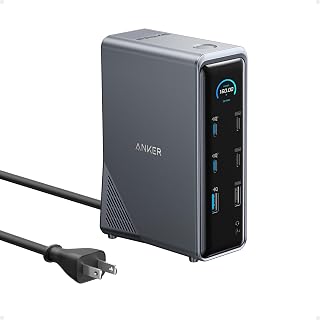
Pros
- Exceptional power delivery with 160W output handles charging laptops, phones, and tablets together
- Dual 4K HDMI ports eliminate the need for multiple adapters and improve workflow efficiency
- Universal compatibility across Windows 10/11, macOS, and ChromeOS platforms
- 10Gbps data transfer speeds significantly faster than standard USB hubs
- All-in-one solution reduces cable clutter and simplifies desk setup
Cons
- Not compatible with Linux operating systems, limiting flexibility for some users
- Maximum resolution on dual monitors is 2K at 60Hz with DP 1.2 laptops, requiring newer DP 1.4 hardware for full 4K performance
- Plastic construction, while lightweight, may feel less premium than metal alternatives at this price point
The Anker Prime 14-in-1 docking station is a comprehensive connectivity hub designed for professionals who work with multiple devices and displays. It targets remote workers, creative professionals, and power users who need seamless integration between laptops, monitors, and peripherals without juggling multiple cables and adapters.
What sets this dock apart is its exceptional power delivery and display versatility. With 160W of total output across three USB-C ports at up to 100W each, it can simultaneously charge a laptop, tablet, and smartphone without performance compromises. The dual 4K HDMI ports with DP 1.4 support deliver crystal-clear dual-display setups, essential for professionals managing multiple windows and applications throughout the day.
The 14-port architecture provides genuine versatility. Beyond power delivery, you get 10Gbps data transfer speeds, Gigabit Ethernet, 3.5mm audio, and multiple USB-A ports. This breadth eliminates the need for secondary hubs and adapters, creating a genuinely streamlined desk experience. Compatibility spans Windows 10/11, macOS, and ChromeOS through universal USB-C and Thunderbolt support.
Build quality feels solid despite the plastic enclosure. At 1.28 kg, it's portable enough for frequent travelers yet stable enough for permanent desk setups. The included 3.3 ft USB-C cable and safety documentation indicate thoughtful product design, backed by a 24-month warranty and responsive customer support.
The main limitation is resolution support on macOS systems where both external monitors display identically. Linux users are also excluded from compatibility. Despite these constraints, the Anker Prime delivers exceptional value as an all-in-one docking solution for most professional workflows, particularly those requiring simultaneous charging and dual-monitor support.
Connectivity and Ports
14 total ports including 3 USB-C ports, 1 USB-A port, 2 HDMI ports, 1 DisplayPort 1.4, 1 Gigabit Ethernet port, 1 3.5mm audio jack, and additional connectivity options.
Power Delivery
160W total output with up to 100W per USB-C port and 12W for USB-A port. Supports simultaneous charging of up to 4 devices.
Data Transfer
10Gbps high-speed data transfer on compatible ports. Dual 4K display support at 60Hz with DP 1.4 laptops, 1080p at 60Hz with DP 1.2 laptops.
Compatibility
USB-C, USB4, and Thunderbolt connections. Supports Windows 10, Windows 11, macOS 14 Sonoma or later, and ChromeOS 137 or later. Compatible with Dell, HP, Lenovo, MacBook, and iMac devices.
Physical Specifications
Weight: 1.28 kg. Material: Plastic construction. Color: Grey. Includes USB-C cable (3.3 ft, 100W, 10Gbps), safety sheet, and customer support access.

Combining HDMI and DP outputs with Ethernet and a MicroSD slot, this 11-port hub targets dual monitor users who also need wired networking and card reading in one connection. The 10 gigabits_per_second transfer speed and cargo passthrough feature make it a fit for creators moving footage off memory cards while keeping two displays running.
Pros
- 11 ports cover monitors, ethernet, and USB in one unit
- Dual 10 Gbps ports for fast data transfer
- Aluminum build feels premium and compact
- Supports dual display output via HDMI and DisplayPort
Cons
- macOS mirrors rather than extends dual displays
- Fixed cable makes device swapping less convenient
If your goal is a proper docking station rather than a basic hub, the Anker 565 earns its spot on this list through sheer expansion capability. With 11 ports crammed into one aluminum unit, it's built for people who want to land their laptop at a desk and immediately have a full dual monitor workstation, wired ethernet, and fast storage access ready to go. The dual 10 Gbps ports (USB-C and USB-A) handle demanding file transfers well, and the combination of DisplayPort and HDMI outputs covers most dual screen setups. Ethernet support matters here too, since a dock aimed at serious desk setups should offer wired networking rather than relying on Wi-Fi. The aluminum shell keeps things looking professional and resists the fingerprint smudging that plagues plastic docks. For anyone comparing docking stations specifically for multi-monitor productivity, this is one of the more complete options on the market, provided you can work around its macOS display mirroring limitation.
Connectivity: 1x USB-C 10 Gbps, 1x USB-A 10 Gbps, 2x USB-A 480 Mbps, 1x HDMI 4K, 1x DisplayPort 4K, 1x Gigabit Ethernet, 1x 3.5mm audio, microSD/SD card slots, 1x USB-C Power Delivery (100W input, 85W pass-through max)
Performance: 10 Gbps data transfer rate on high-speed ports, 104 MB/s card reader, DisplayPort 1.4 support for 2K@60Hz, HDMI for 4K display output
Physical: 5.39 inches x 2.24 inches x 0.55 inches, 4.8 ounces, aluminum construction, gray color
Compatibility: USB-C, USB4, and Thunderbolt equipped devices, macOS 12+, Windows 10/11, ChromeOS, DP Alt Mode support. Note: Not compatible with Linux
Warranty: 18-month manufacturer warranty with customer support
Best for professionals and remote workers who want one dock to run dual monitors, ethernet, and fast peripherals from a single cable. Content creators needing serious port variety will appreciate the expansion. Skip it if you're on macOS and need extended (not mirrored) dual displays, or if you move between devices often, since the fixed cable design isn't as flexible as a detachable one.
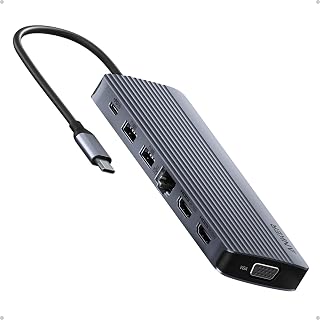
Fourteen ports and dual HDMI outputs let this dock drive three monitors at once, which is exactly what a reader setting up a triple display workstation needs. Six USB ports cover keyboards, mice, and external drives simultaneously, and since it's built for Windows 10 systems, it suits office or home setups centered on a Windows laptop feeding three screens.
Pros
- Supports triple monitor output via dual HDMI and VGA
- 14 total ports including Gigabit Ethernet and SD reader
- 80W pass-through charging for the laptop
- Solid metal chassis with a compact footprint
Cons
- No extended desktop support on macOS, and no Linux support
- Requires a separately purchased 100W wall charger
For anyone whose dual monitor needs have outgrown two displays, this 14-in-1 dock jumps straight to triple monitor support, making it worth a look even in a dual-monitor roundup for the extra headroom it offers. Two HDMI ports handle high-resolution output while a VGA port adds a third display option, including backward compatibility with older monitors. Six USB ports and 5 Gbps transfer speeds keep file movement quick, and 80W pass-through charging means the laptop stays powered through a full workday without a separate charger cable. The grey metal chassis feels solid for the category, and the compact footprint keeps desk clutter down despite packing in 14 total ports, including Gigabit Ethernet, an SD card reader, and AUX output. It's aimed at Windows laptops and doesn't promise an extended desktop on macOS. If two monitors is your ceiling, this may be more hub than you need, but if you want room to add a third display later, it's a capable option.
Connectivity: 2x 4K HDMI, 1x 1080p VGA, 1x USB-C (5 Gbps), 1x USB-C PD-IN (100W), 5x USB-A, 1x Gigabit Ethernet, 1x SD/microSD slot, 1x AUX audio
Compatibility: USB-C, USB4, Thunderbolt. Works with MacBook (macOS 12+), Windows 10/11, ChromeOS. Requires DP Alt Mode and Power Delivery support. Not compatible with Linux.
Physical: Weight 0.13 kg, Grey color, Model A8389. Includes 18-month warranty and welcome guide.
Consider this if you want a dock with room to grow into three monitors, or you need Ethernet, SD, and AUX alongside your displays. Good for traders, developers, and content creators managing several apps at once. Skip it if you only need two displays and nothing more, or if you're on macOS expecting an extended desktop, since that isn't supported here.

Fourteen ports, eight of them USB, plus 140-watt output make this dock suited for power users running demanding Thunderbolt 5 or 4 laptops, including MacBooks with M1 through M4 chips. Anyone needing a single-cable dock that charges a high-performance laptop while handling heavy peripheral loads will find the wattage and port count line up with that workload.
Pros
- 14 ports including 8 USB and 1 HDMI in one hub
- 140W upstream charging through the Thunderbolt 5 cable
- Dual 8K 60Hz display support for demanding multitasking
- Aluminum chassis with active cooling to prevent throttling
Cons
- Only one HDMI/DisplayPort output limits multi-monitor setups beyond two screens
- Requires a modern Thunderbolt 5/4 laptop or recent MacBook to use fully
If you're shortlisting docking stations and want the one that pushes connectivity furthest, the Anker Prime TB5 belongs at the top of the list. It packs 14 ports into a single hub, including 8 USB ports and an HDMI output, all routed through one Thunderbolt 5 cable. That single connection also carries 140W of power, so your laptop charges while it drives peripherals, storage, and displays. For anyone evaluating docks on raw capability, the standout spec is dual 8K 60Hz display support, letting you run two ultra-high-res monitors without a secondary adapter for the second screen. It works with the latest MacBook M4 lineup, M1 through M3 Pro and Max models, and Thunderbolt 5 or 4 Windows laptops, which covers most high-end setups buyers compare docks against. The aluminum build adds weight that keeps it planted on a desk, and an active cooling system is built in to prevent throttling during sustained heavy use. Among docking stations built for demanding workloads, this one is positioned for users who need the most ports and the most bandwidth in one box.
Connectivity and Ports: 14-in-1 configuration with 1 Thunderbolt 5 upstream, 2 Thunderbolt 5 downstream, 2 USB-C, 3 USB-A, SD card reader, TF card reader, 2.5Gbps Ethernet, 3.5mm audio jack, and HDMI 2.1/DisplayPort 2.1 output.
Video Output: Supports dual 8K@60Hz on Thunderbolt 5 Windows laptops, or single 8K@60Hz plus one HDMI/DisplayPort output. Delivers high-bandwidth video without compromise.
Power Delivery: 140W maximum through Thunderbolt 5 upstream port supporting USB Power Delivery 3.1 protocol. Front-facing dual USB-C ports share 45W total for additional device charging.
Physical Dimensions: 4.56 inches length, 4.56 inches width, 2.95 inches height. Weight is 2.4 pounds with a durable gray finish. Compact footprint designed for desk mounting.
Compatibility: Works with MacBook M1, M2, M3, M4 (Standard/Pro/Max), and Thunderbolt 4/5 Windows laptops. Requires Mac OS 15 Sequoia minimum. Includes 3.3-foot Thunderbolt 5 cable, 6-foot AC power cable, and 24-month manufacturer warranty.
Best for creative professionals, developers, and power users running modern MacBooks or Thunderbolt 5/4 Windows laptops who want one cable to replace a desk full of adapters. Also fits anyone who needs dual 8K monitor support or heavy file transfer speeds. Skip it if you only need a couple of extra ports or a second display, since simpler and lighter docks in this lineup cover that without the extra bulk and port count.
Buying Guide: What to Look for in an Anker Docking Station
Number of Ports and Port Types
The most important question to ask is how many devices you need to connect at once. A compact hub like the Anker USB C Hub, 5-in-1 USBC to HDMI Splitter covers the basics with two USB-A ports, a USB-C data port, and HDMI, which is enough for a simple home desk. If you run multiple peripherals, a higher port count like the 14-in-1 on the Anker Laptop Docking Station 3 Monitors gives you room to grow.
Pay attention to whether you need Ethernet, an SD card slot, or an audio jack, since not every hub includes all three. Matching port types to your actual devices prevents the frustration of needing an extra adapter on day one.
Display Output and Monitor Count
Single-monitor users can get excellent results from the Anker USB C Hub, 7in1 Multi-Port USB Adapter, which delivers a sharp 4K at 60Hz over its HDMI port. If dual monitors are your goal, the Anker Laptop Docking Station Dual Monitor and the Anker Nano Laptop Docking Station Dual both support two HDMI displays at up to 4K resolution.
For triple-display workflows, the Anker Laptop Docking Station 3 Monitors adds a VGA port alongside dual HDMI, covering three screens simultaneously. Windows users get the most flexibility here since macOS mirrors content across external displays rather than extending them independently. That is a hardware limitation, not an Anker issue, so keep it in mind when planning your setup. For more on building a productive mobile office, take a look at travel-ready laptops that pair well with a compact hub.
Charging and Power Delivery
Pass-through charging is a must if you want to keep your laptop powered without occupying a second outlet. Most Anker hubs top out at 85W of pass-through, which is sufficient for the majority of modern ultrabooks and mid-range laptops. The Anker Prime Docking Station raises the bar with 160W total output and the ability to charge up to four devices at once.
At the top end, the Anker Prime TB5 Docking Station supports 140W charging over its Thunderbolt 5 upstream port using the PD 3.1 protocol, which future-proofs it for the next generation of power-hungry laptops and creative workstations.
Data Transfer Speed
If you regularly move large video files, RAW photos, or project archives, transfer speed matters more than you might expect. The Anker USB-C Hub, 11-in-1 Docking Station Dual and the Anker Nano Laptop Docking Station Dual both offer 10 Gbps across every USB port, keeping transfers fast across all connected devices simultaneously.
The Anker Prime TB5 Docking Station is in a different league entirely, moving a 150GB file in roughly 25 seconds over its Thunderbolt 5 connection. That kind of throughput is genuinely useful for video editors and data-intensive professionals. If you also rely on a well-configured laptop for demanding work, the picks in our roundup of the best laptops for medical students show what kind of hardware pairs well with a high-bandwidth dock. And if you want to protect your machine while it travels between home and the office, a solid laptop keyboard cover is a small but worthwhile addition.
Final Thoughts
Anker makes it easy to find a dock that fits your exact situation, whether you are a student needing a clean single-monitor setup or a power user running dual 8K displays. For most people upgrading to a dual-display desk, the Anker Laptop Docking Station Dual Monitor delivers a well-rounded feature set at a comfortable entry point. If you need the absolute maximum in speed, display fidelity, and charging power, the Anker Prime TB5 Docking Station is the one to invest in for a future-ready workstation.
Frequently Asked Questions
Are Anker docking stations compatible with MacBooks?
Most Anker docks support MacBook via USB-C, USB4, and Thunderbolt connections. macOS 12 and newer is required for full compatibility on several models, including the 11-in-1 and the 5-in-1 hubs. Keep in mind that macOS mirrors external displays rather than extending them independently, so if you need a true extended multi-monitor workspace, a Windows laptop gives you more flexibility with these docks in 2026.
What is the difference between a USB-C hub and a docking station?
A USB-C hub is a compact, portable expander that adds a handful of ports and is designed for on-the-go use. A docking station typically offers more ports, higher wattage charging, and dedicated display outputs suited for a permanent desk setup. Anker offers both form factors, from the slim Anker USB C Hub, 5-in-1 USBC to HDMI Splitter to the full-featured Anker Prime Docking Station. Your choice depends on whether you prioritize portability or maximum connectivity.
Do Anker docking stations work with Linux?
No, Anker currently specifies that none of the docks and hubs in this lineup are compatible with Linux. They are designed for Windows 10 and 11, ChromeOS, and macOS, with specific version requirements for each platform. If you run Linux, you will want to verify compatibility separately before purchasing any hub in this lineup. This is a consistent note across the entire Anker range as of 2026.
How do I know which Anker dock is right for my laptop?
Start by confirming your laptop has a USB-C port that supports DisplayPort Alt Mode and Power Delivery, since those features are required for video output and pass-through charging to work correctly. Next, count the peripherals you need to connect daily and check whether you need dual or triple display support. If you are building out a full desk environment, our guide to the best laptops for law school also covers which port configurations matter most when pairing a laptop with a dock. Matching your laptop’s bandwidth capability to the dock’s specs ensures you get the performance you are paying for.
Common questions
How many monitors can an Anker docking station support at once?
It depends on the model, with options supporting two or three external monitors. The 8-in-1 and 11-in-1 hubs are built for dual monitor setups, while the 14-in-1 triple display model adds a second HDMI port to drive a third screen. The right pick comes down to how many displays your workflow needs, since stepping up to three monitors means choosing a dock specifically listed as triple display capable.
What power delivery wattage do these Anker docking stations offer?
The product data here doesn't list specific wattage figures for these docks. What is confirmed is that the 8-in-1 model is powered, meaning it can pass charging power to a connected laptop through its USB-C connection. For exact power delivery specs, checking the listing directly is the safest bet, since wattage details vary by model and aren't always printed on the main spec sheet.
Are these Anker docking stations compatible with a MacBook?
Yes, several models explicitly support MacBook and iMac alongside Windows laptops. The 8-in-1 and 14-in-1 Prime docks list full MacBook and iMac compatibility, though Anker notes that on macOS both external monitors show identical displays rather than extended desktops. The 11-in-1 hub goes further, requiring macOS 13 Ventura or later, so matching your Mac's OS version to the dock's minimum requirement matters before buying.






Write Your Review
No reviews yet. Be the first to share your experience!