

Publishing from a café, airport gate, or cramped hotel desk puts unusual pressure on a laptop. You need a machine that slips into a day bag, stays responsive when image edits and browser tabs compete for memory, and keeps you connected when a weak café network or scarce outlet disrupts the plan.
Our roundup of the best laptop for travel bloggers weighs portable 14-inch machines, larger creative workspaces, ChromeOS simplicity, and Windows configurations with more local editing headroom. We prioritized carrying comfort, display usability, memory, storage, connectivity, and stated battery features, because an excellent desk laptop can still be inconvenient between flights; a protective travel laptop case designed for frequent movement is a smart companion.
Quick answer
This guide compares 8 picks, with ASUS Vivobook 14 Snapdragon X Laptop, 16GB RAM, 512GB ranked first. Acer Aspire 14 AI Laptop, Intel Core Ultra 7, 32GB RAM holds the highest customer rating among them. Lenovo 14" FHD Touchscreen Chromebook, MediaTek has the most customer reviews.

The Snapdragon X processor delivers exceptional battery life for long-haul flights where power outlets are scarce or occupied. At 14 inches and with 512GB storage, it balances portability with enough space for photo libraries and video drafts. The Copilot+ AI features can help bloggers draft outlines, summarize research, and generate alt text without switching apps or burning through mobile data abroad.
Pros
- Exceptional battery life from Snapdragon architecture means full workdays unplugged
- Lightweight 14-inch form factor genuinely comfortable for travel
- 16GB RAM handles typical blogger multitasking without slowdown
- AI-powered Copilot+ features assist with writing and research tasks
Cons
- 512GB storage limiting for video-focused travel blogs
- Integrated graphics insufficient for serious video editing or gaming
Bloggers who spend half their time in coffee shops and the other half on planes need a laptop that travels without compromise, and the ASUS Vivobook 14 delivers exactly that. The Snapdragon X processor architecture prioritizes battery efficiency over raw speed, which translates to longer writing sessions between charges and fewer frantic searches for outlets in airports. At 14 inches with lightweight construction, it slips into carry-ons and shoulder bags without the heft that makes travel exhausting. The 16GB RAM handles the typical blogger workflow smoothly: a dozen Chrome tabs for research, WordPress or Medium open in the editor, Canva for quick graphics, and Slack running in the background. The FHD+ display at 1920x1200 gives you the vertical space to see full paragraphs without constant scrolling, which matters when you're editing long-form content. Windows 11 Home with Copilot+ PC features means AI writing assistance is baked in, useful for drafting, brainstorming headlines, or summarizing research. The Quiet Blue finish looks professional in co-working spaces and video calls without screaming for attention.
Processor: Qualcomm Snapdragon X with Qualcomm Adreno GPU
RAM: 16GB LPDDR5X
Storage: 512GB SSD
Display: 14-inch FHD+ (1920 x 1200) WUXGA
Operating System: Windows 11 Home
Color: Quiet Blue
Weight: Lightweight design (typical ultrabooks: 3-3.5 lbs)
Graphics: Qualcomm Adreno Integrated GPU
Special Features: Copilot+ PC, AI-powered capabilities, Neural Processing Unit
Warranty: 1-year manufacturer warranty (parts and labor)
This laptop suits bloggers who prioritize portability and battery life over maximum performance, especially those writing text-heavy content with moderate photo editing. Travel bloggers working across time zones will appreciate the efficiency. Skip it if your blog workflow involves heavy video editing, managing massive photo libraries from professional cameras, or running resource-intensive creative software. The 512GB storage fills quickly with 4K footage, and content creators shooting daily vlogs will need external drives. Also not ideal for bloggers who game between writing sessions or need discrete graphics for 3D work.
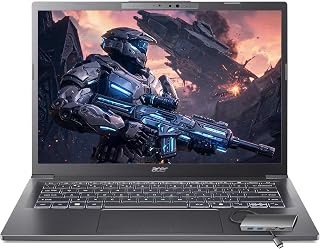
The Intel Ultra 7 258V with 32GB RAM powers smooth 4K video editing and bulk photo processing after a day of shooting travel content. The 1TB SSD stores months of raw footage and high-resolution images without external drives that add weight and risk loss in transit. The Intel Arc 140V graphics accelerate export times for YouTube thumbnails and Instagram Reels, letting bloggers publish faster from hotel rooms.
Pros
- 3.09 pounds makes it the lightest option for constant travel
- 32GB RAM and dedicated NPU accelerate content workflows
- Dual Thunderbolt 4 enables fast transfers and simple docking
- Intel Arc 140V handles 1080p video editing smoothly
Cons
- 60Hz display lacks appeal for media consumption
- Only web-based Office access included despite descriptions
Bloggers who travel constantly and work from cafés, coworking spaces, and hotel rooms across multiple cities will find this Acer Aspire's extreme portability transformative. At 3.09 pounds with a 0.67-inch profile, it practically disappears in backpacks and day bags, eliminating the shoulder strain that heavier laptops cause during long travel days. The Intel Core Ultra 7 258V processor and 32GB RAM deliver performance that verified users describe as exceptionally smooth even when running dozens of browser tabs, WordPress, photo editors, and communication tools simultaneously. The dedicated 47 TOPS NPU accelerates AI-powered writing assistants, auto-tagging for photo libraries, and background removal tools that travel bloggers use daily. The Intel Arc 140V GPU handles 1080p video editing in Premiere Pro without lag, letting you cut and publish travel vlogs from anywhere. The 14-inch touchscreen adds intuitive photo cropping and annotation capabilities. Dual Thunderbolt 4 USB-C ports enable fast file transfers and single-cable docking when you reach your destination. The included 8-in-1 USB hub expands connectivity without carrying separate adapters. WiFi 6 maintains stable connections for uploading large photo galleries and video files from unreliable hotel networks. Battery performance supports full work sessions between charges.
Processor: Intel Core Ultra 7 258V, 8-core (4P + 4LPE), up to 4.8GHz, with 47 TOPS Intel AI Boost NPU.
Memory and Storage: 32GB LPDDR5X RAM, 1TB PCIe NVMe SSD providing instant boot and app launch times.
Display: 14.0-inch IPS WUXGA touchscreen, 1920x1200 resolution, 60Hz refresh rate, 16:10 aspect ratio.
Graphics: Intel Arc 140V integrated GPU with 8 Xe cores for photo and video editing acceleration.
Connectivity: WiFi 6 (802.11ax), Bluetooth 5.3, 2x USB-C Thunderbolt 4, 2x USB-A 3.2, HDMI 1.4, audio jack.
Design: 3.09 lbs, 12.6x8.9x0.67 inches, Midnight Gray color, backlit English keyboard, 720p HD webcam.
Operating System: Windows 11 Home with AI Copilot. Accessories included: 65W USB-C charger and 8-in-1 USB hub.
Perfect for professional travel bloggers and digital nomads who move between locations frequently and need desktop-level performance without desktop weight. Ideal if you edit video content regularly, run multiple professional applications simultaneously, and value premium build quality with comprehensive connectivity. Skip this if you prioritize entertainment features or need the absolute longest battery life. The 60Hz display disappoints for watching movies, and the price reflects professional rather than casual use.

The 2-in-1 form factor and 16-inch 2K touchscreen make this ideal for bloggers who need to edit photos on the road, then fold it into tablet mode for reviewing drafts in tight airplane seats. The 1TB drive handles large media libraries without constant cloud syncing, while the fingerprint reader speeds up secure logins at coffee shops and coworking spaces where you're switching between writing and research.
Pros
- 360-degree hinge adapts to any workspace constraint
- 16-inch 2K touchscreen handles detailed creative work
- 12-core processor manages video editing and multitasking
- SD card reader simplifies camera-to-laptop transfers
Cons
- 4.6 pounds feels heavy for extended carry
- 1TB storage fills quickly with video projects
Travel bloggers who create diverse content types will find the Yoga 7i's 360-degree convertible design genuinely useful on the road. The four-mode flexibility transforms your workspace depending on location: laptop mode for writing in airport lounges, tablet mode for sketching travel maps or reviewing photos with one hand, tent mode for conducting interviews in tight hotel rooms, and stand mode for watching reference footage on trains. The Intel Core Ultra 7 processor with 12 cores handles simultaneous video editing, photo batch processing, and browser-based research without slowdowns. The 16-inch 2K touchscreen offers enough resolution for detailed photo work while the 300-nit brightness remains visible in outdoor cafés and bright hostel common areas. At 4.6 pounds and 0.75 inches thin, it balances screen size with reasonable portability. The 1TB SSD accommodates several weeks of travel content before requiring offloading. WiFi 6E future-proofs connectivity as newer networks roll out globally, while the SD card slot enables direct photo imports from cameras. Windows 11 Pro includes BitLocker encryption for protecting sensitive travel documents and client work across borders. The aluminum chassis withstands the wear of frequent packing and unpacking better than plastic alternatives.
Processor and Performance: Intel Core Ultra 7 155U (12-core, 14-way processing), Intel Turbo Boost technology, integrated Intel Graphics with DDR4 memory
Display: 16-inch IPS LCD touchscreen, 1920x1200 (2K) native resolution, 300-nit brightness, capacitive touch, glossy finish
Memory and Storage: 1TB SSD (solid state drive), compatible with external storage devices and memory card readers
Operating System: Windows 11 Pro with professional features and security tools
Connectivity: WiFi 6E (802.11ax), Bluetooth 5.2, Gigabit Ethernet (1000 Mbps), 2x USB Type-C with Power Delivery, 2x USB Type-A, HDMI output, 3.5mm headphone/microphone combo, microSD card reader
Design and Build: Storm Grey color, 14.24" L x 9.84" W x 0.75" thickness, 4.6 pounds, 360-degree convertible hinge, backlit keyboard, fingerprint biometric reader, limited warranty
Audio and Video: HD audio speakers, front-facing camera, HDMI video output
Ideal for serious travel bloggers and digital nomads who produce video content, conduct remote interviews, edit photos extensively, and need genuine tablet functionality for field work. Perfect if you value a large, color-accurate display and multi-position flexibility in varied working environments. Skip this if weight is your primary concern or you rarely use touchscreen features. The 4.6-pound weight and premium price won't suit minimalist travelers or those focused purely on text-based blogging.
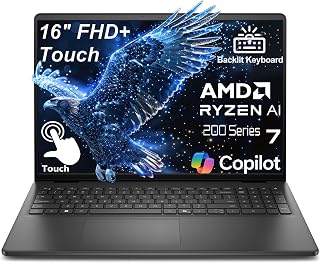
The AMD Ryzen 7 170 and 16GB DDR5 RAM handle multitasking between WordPress, Lightroom, and a dozen research tabs without lag. The 16-inch touchscreen gives bloggers room to view full-width layouts and edit featured images side-by-side with text. Touchscreen navigation speeds up photo selection and cropping when you're working without a mouse in cramped train compartments or hostel common areas.
Pros
- 16-inch display with 16:10 aspect ratio provides workspace for video and photo editing
- AMD Ryzen 7 with DDR5 RAM handles demanding multimedia workflows smoothly
- Touchscreen useful for editing photos and navigating creative software
- Still reasonably portable at 4.18 pounds despite larger screen size
Cons
- 256GB storage insufficient for bloggers managing video projects or extensive photo libraries
- Integrated graphics limit performance for professional 3D rendering or intensive video effects
Bloggers creating video content, comprehensive photo essays, or multimedia travel guides need screen real estate and processing power that typical ultraportables can't deliver, which is where the Dell 16-inch comes in. That 16-inch FHD+ touchscreen with 16:10 aspect ratio provides 11% more vertical space than standard laptops, genuinely useful when you're editing video timelines in Premiere or arranging photo galleries in Lightroom. The AMD Ryzen 7 processor with 16GB DDR5 RAM handles the demanding workflow of a multimedia blogger: rendering video exports, batch-processing RAW photos, running WordPress with heavy page builders, and keeping dozens of research tabs open simultaneously. The touchscreen adds practical value when you're sketching layouts, marking up photos, or navigating editing software without constantly reaching for a mouse. At 4.18 pounds with a 0.78-inch profile, it's heavier than pure writing machines but still travels reasonably well in backpacks or dedicated laptop bags. The backlit keyboard means you can work in dim hostel rooms, overnight buses, or early morning flights. Wi-Fi 6 keeps uploads fast when you're publishing from hotel connections, and USB-C with DisplayPort 1.4 lets you connect to 4K monitors in co-working spaces or Airbnb setups.
Processor: AMD Ryzen 7 250, 8 cores, up to 5.1GHz
Memory: 16GB DDR5 RAM
Storage: 256GB PCIe NVMe SSD
Display: 16-inch FHD+ (1920x1200), 16:10 aspect ratio, 300-nit IPS, touchscreen, ComfortView blue light reduction
Graphics: Integrated
Connectivity: Wi-Fi 6 (802.11ax), Bluetooth 5.0, USB-C with DisplayPort 1.4 and Power Delivery, 2x USB 3.2, HDMI 1.4, 3.5mm headphone jack
Webcam: FHD (1920x1080) with built-in microphone
Design: Carbon black chassis, backlit keyboard, 4.18 lbs, 0.78 inches thin
Charging: 65W fast charging
Operating System: Windows 11 Home pre-installed
This laptop suits bloggers producing video content, photo-heavy travel essays, or multimedia projects who need desktop-class performance on the road. Vloggers editing daily footage will appreciate the screen size and processing power. Skip it if your blog is primarily text-based with minimal media editing, as you're carrying extra weight and screen size you won't use. Also not ideal for minimalist travelers prioritizing the lightest possible pack, or bloggers who rarely edit photos beyond basic cropping and filters. The 256GB storage fills fast with video projects.

The 2K OLED display with 100% DCI-P3 color accuracy lets travel bloggers edit photos and video thumbnails with confidence that colors will match what readers see. The Snapdragon X chip's efficiency means all-day battery life through airport layovers and train rides. Two USB-C ports with Power Delivery let you charge from portable batteries or borrow a cable at a hostel without hunting for proprietary adapters.
Pros
- OLED display with 100% DCI-P3 delivers accurate colors for photo editing on location
- 41+ hour battery life eliminates power anxiety during long travel days
- Ultra-portable at 3.1 pounds without feeling fragile or cheap
- Fast charging restores 50% capacity in 45 minutes between flights
Cons
- 256GB storage inadequate for bloggers shooting video or managing large photo libraries
- Runs warm during sustained workloads and benefits from elevated airflow
Travel bloggers juggling airport lounges, hotel desks, and rooftop cafes need a machine that combines visual accuracy with genuine portability, and the HP OmniBook 3 nails both requirements. The 2K OLED display with 100% DCI-P3 color coverage means your travel photos look accurate when you're editing and publishing on the road, not washed out or oversaturated like budget laptop screens. That 16:10 aspect ratio gives you more vertical workspace for scrolling through WordPress drafts or Notion travel databases without constant mouse movement. At 3.1 pounds and 0.58 inches thin, this laptop disappears into travel backpacks and doesn't add shoulder strain during long transit days. The Snapdragon X X1-26-100 processor delivers the efficiency travel bloggers actually need: 41+ hours of battery life in real-world use means you can write through transcontinental flights, train journeys, and full festival days without hunting for power. Fast charging restores 50% in 45 minutes, perfect for quick airport top-ups. The 16GB LPDDR5x RAM keeps performance smooth when you're running photo editing software alongside research tabs, email, and video calls with editors or sponsors.
Processor and Performance: Snapdragon X X1-26-100 (up to 2.97 GHz, 8 cores), Qualcomm Adreno GPU, 16GB LPDDR5x-8448 MT/s RAM (onboard), 256GB PCIe Gen4 NVMe M.2 SSD.
Display: 14 inch diagonal, 2K resolution (1920x1200), OLED panel, 0.2ms response time, 100% DCI-P3 color gamut, 300 nits brightness, Low Blue Light, micro-edge BrightView finish, UWVA viewing angle.
Battery and Charging: Up to 41 hours 45 minutes battery life, 65W USB Type-C GaN power adapter, 0 to 50% charge in approximately 45 minutes.
Connectivity: Wi-Fi 6E (802.11ax, 2x2), Bluetooth 5.3, 2x USB Type-A 5Gbps, 2x USB Type-C 10Gbps with USB Power Delivery 3.0 and DisplayPort 1.4, 1x HDMI 2.1, 1x 3.5mm audio jack.
Camera and Audio: 1080p FHD IR camera with HDR auto-switch, temporal noise reduction, integrated dual-array digital microphones.
Design and Build: 12.38 inch L x 8.9 inch W x 0.58 inch thickness, 3.1 pounds, anodized aluminum cover and base, matte keyboard frame, full-size QWERTY keyboard with darker nouvelle silver finish, HP Imagepad touchpad. Color: Nouvelle Silver.
Operating System: Windows 11 Home with Copilot+ PC features, 1-month Microsoft 365 trial, 30-day McAfee Online Protection trial.
Environmental: EPEAT Silver Climate+ registered, ENERGY STAR Certified, made with post-consumer recycled materials and recycled metal.
Best for travel bloggers focused on photography and long-form written content who need accurate color for editing images on location. The extreme battery life suits digital nomads moving between cities and time zones without reliable power access. Skip this if video editing is central to your blog workflow, as the 256GB storage fills instantly with footage and the integrated GPU won't handle 4K timelines smoothly. Also not suitable if you need to run virtual machines, heavy development tools, or AAA games during downtime.

Chrome OS boots in seconds and updates silently, perfect for travel bloggers who need to write and publish quickly between flights. The 8-core MediaTek processor handles Google Docs and WordPress dashboards smoothly, while the compact 14-inch touchscreen and lightweight build slip easily into a daypack. WiFi 6 ensures fast uploads when you find reliable hotel or cafe connections during extended trips.
Pros
- Extremely portable at 2.9 pounds and 0.73 inches thin
- Full HD touchscreen with vibrant IPS color
- WiFi 6 for fast uploads in crowded networks
- Long battery life handles full travel days
Cons
- 64GB storage limits local media storage
- Wider keyboard spacing may require adjustment
Bloggers who travel light will appreciate this Chromebook's 2.9-pound build and slim 0.73-inch profile, making it easy to slip into a daypack or carry-on without adding bulk. The 14-inch Full HD touchscreen with IPS technology delivers vibrant color and wide viewing angles, useful for reviewing photos on the road or editing drafts in varied lighting conditions. Chrome OS ensures fast boot times and automatic updates, so you're not troubleshooting software issues in hotel lobbies or airport lounges. The MediaTek Kompanio 520 octa-core processor handles multiple browser tabs and cloud-based writing tools smoothly, while WiFi 6 connectivity keeps uploads and syncing fast in congested networks. The 720p webcam with privacy shutter and dual-array microphones support video calls with editors or collaborators from anywhere. Battery life is a standout, stretching through long travel days without constant charging. The 4GB RAM and 64GB eMMC storage work well for blogging workflows centered on Google Docs, WordPress, and cloud storage, though heavy local media libraries won't fit comfortably.
Display: 14-inch Full HD (1920x1080) IPS touchscreen, 300 nit brightness, LED backlight, capacitive touch technology
Processor: MediaTek Kompanio 520 octa-core (4x A73 @2.0GHz + 4x A53 @2.0GHz) with integrated ARM Mali-G52 2EE MC2 GPU
Memory: 4GB RAM, 64GB eMMC storage with microSD card reader support
Connectivity: WiFi 6 (802.11ax 2x2), Bluetooth 5.1, 1x USB-A 3.2, 1x USB-C 3.2, 3.5mm audio jack
Camera & Audio: 720p HD front webcam with privacy shutter, dual-array microphones
Build: 12.83 inches L x 8.73 inches W x 0.73 inches thick, 2.9 pounds, Abyss Blue color
Operating System: Chrome OS with automatic updates and cloud backup

Pros
- 3.6-pound design with a 15.6-inch FHD display
- 512GB SSD for files and everyday workflow
- Fast charging reaches 50% in 30 minutes
- USB-A, USB-C, HDMI, and webcam shield
Cons
- Integrated graphics are not for professional video editing
- 8GB RAM limits heavy multitasking
For a blogger working from hotel desks, cafés, or between destinations, the ASUS Vivobook Go 15 puts a full-size 15.6-inch FHD workspace in a 3.6-pound Windows 11 laptop. Its AMD Ryzen 5 7520U processor, 8GB of RAM, and 512GB SSD are geared toward the practical parts of publishing: drafting posts, editing documents, researching, managing files, streaming reference material, and joining video calls. Integrated AMD Radeon graphics can support everyday graphic work, but this is not a machine for professional video editing or demanding gaming. Travel usefulness comes from the details. Fast charging can bring the battery to 50% in 30 minutes, while military-grade durability is intended for regular carrying. An ergonomic ErgoSense keyboard, physical webcam shield, AI noise-canceling technology, and a 180-degree lay-flat hinge help it suit writing sessions and remote interviews. USB-A, USB-C, and HDMI connections make it easier to attach accessories or an external display. IceCool thermal technology is designed to maintain stable performance, though the vents should be kept clear. It is a sensible travel companion when blogging centers on writing, research, calls, and light visual tasks rather than heavy media production.
Processor: AMD Ryzen 5 7520U
Memory: 8GB LPDDR5 RAM at 2400 MHz
Storage: 512GB SSD via PCIe
Display: 15.6 inch FHD (1920x1080) with NanoEdge bezels
Graphics: AMD Radeon (Integrated)
Connectivity: Wi-Fi 6E, Bluetooth 5, USB-A, USB-C, HDMI
Battery: 42 Wh Lithium-Ion, 30-minute fast charging to 50%
Weight: 3.6 pounds
Dimensions: 14.9 inches L x 9.15 inches W x 0.7 inches Thickness
Operating System: Windows 11 Home
Special Features: Military-grade durability, ErgoSense keyboard, physical webcam shield, 180-degree lay-flat hinge, AI Noise-Canceling Technology
Warranty: Limited
Buy the Vivobook Go 15 if your travel-blogging routine revolves around writing articles, organizing photos and files, conducting research, streaming, and taking video calls. Its 15.6-inch FHD display offers more room for a publishing workspace than a smaller laptop, while its 3.6-pound weight, fast charging, and durable design support frequent travel. Skip it if your blog requires professional video editing, serious gaming, or routinely running many demanding applications at once, since it has integrated graphics and 8GB of RAM.
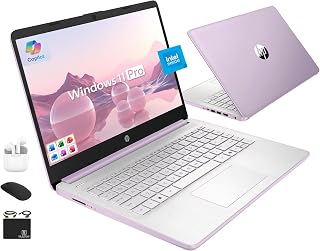
Lifetime Microsoft Office included means no subscription headaches when writing abroad or worrying about renewal reminders mid-trip. The quad-core Intel CPU and 16GB RAM keep Word and Edge responsive for research-heavy blog posts. At 128GB internal storage plus a 500GB external drive, you can keep active projects local and archive older content without paying for extra cloud tiers while traveling long-term.
Pros
- Just 3.2 pounds with 9-hour battery for all-day mobility
- Anti-glare display works well in varied lighting conditions
- Lifetime Office eliminates subscription costs on the road
- WiFi 6 handles crowded public network environments
Cons
- HD resolution limits photo editing precision
- Quad-core Intel N150 struggles with video rendering
Travel bloggers working on tight budgets will appreciate this HP Ultrabook's combination of genuine portability and practical everyday performance. At just 3.2 pounds, it slips into any carry-on without adding bulk, while the quad-core Intel processor and 16GB RAM handle WordPress editing, photo uploads, social media management, and light content work without hesitation. The 14-inch anti-glare display reduces eye strain during long airport layovers or outdoor café sessions where glare typically disrupts workflow. WiFi 6 keeps you connected in crowded hotel lobbies and coworking spaces with reliable speeds. The dual storage approach gives you 128GB fast internal UFS for your active projects and a 500GB external drive for archiving trip photos and video footage. Lifetime Microsoft Office means you can draft articles and manage spreadsheets anywhere without subscription worries. Windows 11 Pro adds remote desktop capabilities for accessing home servers. Battery life stretches to around 9 hours with moderate use, covering most travel days between charging opportunities. The 720p webcam and dual microphones support video interviews or live streaming from the road when needed.
This bundle includes everything you need to get started immediately. The HubxcelAccessory package features wireless earbuds, a 500GB external USB drive for backup and extra storage, a wireless mouse, USB extension cord, HDMI cable, and mouse pad. You also receive lifetime access to Microsoft Office 2024, eliminating recurring subscription costs.
Best for budget-conscious travel bloggers who prioritize weight and battery life over screen quality and processing power. Perfect if your workflow centers on writing, web-based tools, social media scheduling, and light photo editing. Skip this if you shoot and edit video content regularly, need color-accurate displays for professional photography work, or run resource-intensive creative applications. The entry-level processor and HD resolution will frustrate anyone working with 4K footage or Adobe Creative Suite.
How to Choose a Travel Blogging Laptop
Put carry weight and battery habits first
Start with the bag you actually use and the kind of days you have. The Lenovo Flagship Chromebook weighs 2.86 pounds and pairs a 14-inch FHD touchscreen with Wi-Fi 6, making it practical for cloud documents, posting, and light image organization. Its 4GB memory and 64GB eMMC storage, however, call for a deliberately lean, online-first workflow.
For a fuller Windows setup, the ASUS Vivobook 14, Snapdragon X, 14 Inch, 16GB RAM combines 16GB of memory with a 512GB SSD in a compact class. The HP OmniBook 3 14 inch Next Gen AI PC, 2K Display adds a Snapdragon platform and manufacturer-rated extended battery endurance for long transit days. Whichever path you choose, a laptop hard shell case for frequent travel offers more crush protection than a loose sleeve.
Choose a display that fits your creative work
Photo-heavy posts benefit from a tall 16:10 panel, which leaves more room for captions, timelines, and browser research than a standard wide display. The ASUS 14-inch Snapdragon model supplies a 1920 x 1200 screen, while the Lenovo Yoga 7i 2-in-1 Laptop gives you a 16-inch touch canvas and a fold-back design for reviewing layouts, presenting work, or marking up ideas.
Touch capability is useful for quick cropping and on-location navigation, but resolution, brightness, and usable surface area matter more than the label. The Acer 14-inch touchscreen configuration combines Intel Arc graphics, 32GB of RAM, and 1TB of storage for demanding creative libraries. The Dell 16-inch touch configuration offers a roomy 1920 x 1200 panel, but its 256GB drive may require stricter file management; for hotel screens, pack a USB-C to HDMI adapter that suits your setup.
Match your editing workload to the platform
Choose ChromeOS only when its browser and Android app approach matches the tools you rely on. The Lenovo Flagship Chromebook is well suited to Google Docs, web publishing, meetings, and cloud storage, yet it is not the natural fit for extensive local RAW processing or desktop-only applications. A 15.6-inch ASUS Ryzen configuration with 8GB memory and a 512GB SSD offers a more familiar Windows route for basic writing, uploads, and casual editing.
More complex itineraries often demand more memory than an entry-level machine supplies. The Acer configuration’s 32GB capacity supports many tabs and media apps at once, while the Lenovo Yoga 7i 2-in-1 Laptop uses an Intel Core Ultra 7 processor for a stronger productivity profile. Dell’s 16-inch Ryzen-based option also has 16GB DDR5 memory, whereas HP’s compact Intel N150 configuration bundles 16GB memory with external storage for organized backups.
Treat ports and file transfers as travel essentials
Do not assume every slim laptop can accept your camera card, drive, and display without help. The Lenovo Yoga includes a microSD reader, HDMI, two USB-A ports, and two Type-C ports, while the Acer configuration’s included hub adds HDMI, SD, Ethernet, USB-A, and USB-C connections. That flexibility is valuable when copying media quickly before your next departure.
Look beyond the laptop itself when your workday ends at a home base. A compact hub protects ports from constant swapping, and a laptop docking station for dual monitors can turn a travel computer into a capable desk setup. Also confirm webcam needs: the HP OmniBook has an FHD IR camera, and the ASUS 15.6-inch model uses AI noise canceling to improve calls in busy surroundings.
Final Thoughts
Your ideal travel blogging machine should match your editing workload rather than simply chase the lightest specification. Choose the Lenovo Yoga 7i 2-in-1 Laptop if a large convertible touchscreen and broad ports support your visual workflow, or the HP OmniBook 3 14 inch Next Gen AI PC, 2K Display if battery-focused mobility and a compact OLED screen better suit your routine. Both represent clear paths to publishing smoothly away from home.
Frequently Asked Questions
What should travel bloggers prioritize in a laptop in 2026?
Prioritize enough memory to keep your writing platform, browser research, image organizer, and communication apps open without friction. For most travelers, 16GB is a sensible baseline for a Windows workflow, while 32GB gives heavier photo or video projects more breathing room. Fast SSD storage also reduces waits when opening files, and a separate backup drive helps protect work during multi-stop trips.
Is a 14-inch or 16-inch laptop better for a travel blog?
A 14-inch laptop is usually easier to pack, use in economy seating, and carry during full-day excursions. A 16-inch system gives you more room for image editing, video timelines, split-screen research, and long-form writing. Choose based on whether your work is mainly publishing and planning or requires frequent visual editing away from a dedicated monitor.
Can I run a travel blog from a Chromebook?
Yes, if your workflow centers on web-based writing tools, cloud storage, social scheduling, email, and browser editing. A Chromebook can be especially convenient for writers who travel light and upload photos from a phone or camera through cloud services. However, 4GB of memory and modest local storage are limiting for large RAW libraries, advanced video projects, or software that requires Windows.
What accessories make a travel blogging laptop more useful?
Start with a protective case, a compact card reader or hub, a backup drive, and the cable needed for hotel or client displays. At your home workspace, one of these vertical laptop stands for a cleaner desk can free space while your computer connects to an external monitor. A small wireless mouse and a portable charger can also make long writing sessions far more comfortable.








Write Your Review
No reviews yet. Be the first to share your experience!