

Whether you print a few pages a week or churn through hundreds of documents a month, picking the right printer makes a real difference. Epson has one of the broadest lineups in the industry, spanning budget-friendly home models to high-volume office machines, and the variety can feel overwhelming fast.
This guide covers seven of the best Epson printer options available right now, with a focus on everyday usability, ink costs, and print quality. If you want a broader look at home printing options beyond Epson, check out our roundup of the best home printer picks for 2026.
Quick answer
This guide compares 7 picks, with Epson EcoTank ET-2803 Wireless All-in-One Printer ranked first. Epson EcoTank ET-2800 Wireless All-in-One Printer has the most customer reviews.
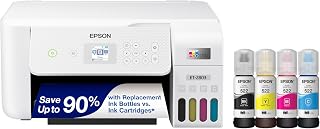
Anyone furnishing a small home office on a tight footprint will appreciate that this model keeps things simple: Wi-Fi and USB connectivity cover wired or wireless setups, and the refillable ink tank paired with scanning means everyday copying and printing tasks are handled without hunting for extra cartridges.
Pros
- Up to 4,500 black or 7,500 color pages per ink refill
- Roughly two years of included ink reduces restocking
- Wireless, voice-activated, and mobile app printing support
- Functional scanner and copier with clear color display
Cons
- Color print speed is slow at 5 pages per minute
- Genuine Epson ink required to keep warranty valid
Choosing the best Epson printer for a home or small office often comes down to running costs, and the ET-2803 makes a strong case on that front alone. Instead of cartridges, it relies on refillable EcoTank bottles that ship with roughly two years of ink for typical use, covering up to 4,500 black pages or 7,500 color pages per fill. For a 2026 buyer comparing models, that kind of yield means fewer interruptions and far less recurring spending over the printer's life. It also covers the core jobs most households need from a single machine: printing, scanning, and copying, with wireless and mobile app support for shared use. Build quality feels solid for its class, and color output is sharp enough for everyday documents and casual photos. It's not the fastest unit here, and the tank design takes up more desk space, but for anyone prioritizing long-term value over speed, the ET-2803 earns its spot on this list.
Model: Epson EcoTank ET-2803
Printer Type: Wireless All-in-One Inkjet (Print, Scan, Copy)
Print Speed: 10 pages per minute (black), 5 pages per minute (color)
Connectivity: Wi-Fi, USB
Special Features: Refillable ink tank, high-resolution scanner, color display, voice-activated printing, AirPrint, Epson Smart Panel app
Ink System: EcoFit refillable bottles (equivalent to 80 cartridges per set)
Page Yield: Up to 4,500 pages black, 7,500 pages color per ink set
Included Ink: 2 years of ink supply in the box
Color: White
Weight: 8.8 pounds
Warranty: Limited warranty (genuine Epson ink required for coverage)

A home office that handles double-sided reports and letters benefits from auto 2-sided printing built in, saving the hassle of manually flipping pages. The refillable ink tank keeps ongoing upkeep simple, and the 11.9 pound body in white suits a shared desk or shelf in a living space.
Pros
- Automatic 2-sided printing built in
- Up to 7,500 black or 6,000 color pages per ink fill
- Roughly two years of included ink reduces refills
- Supports glossy photo paper and envelopes
Cons
- Color print speed is slow at 5 pages per minute
- Requires genuine Epson ink to maintain warranty coverage
If automatic double-sided printing matters to you, the ET-2850 is the EcoTank model on this list built for it. It shares the refillable ink tank system that defines Epson's low-cost lineup, with bottle sets rated for up to 7,500 black pages and 6,000 color pages, plus about two years of ink included in the box. That makes it a practical choice for home offices that print a steady mix of documents and want to avoid both cartridge costs and wasted paper. Print quality benefits from Micro Piezo Heat-Free Technology and pigment black ink, producing sharp text and solid color output across different paper types, including glossy photo paper. The flatbed scanner, 3.5-inch color LCD, and auto 2-sided printing make it genuinely easy to use for less tech-savvy household members too. Color speed at 5 pages per minute is on the slower side, and Epson ink is required to preserve the warranty, but for a household weighing paper savings and ease of use against raw speed, the ET-2850 fits the brief well.
Print Performance: Maximum resolution of 4800 x 1200 dpi for both black and color output. Color print speed of 5 pages per minute; black and white copy speed of 10.5 pages per minute. Auto-duplex printing supports 2-sided documents.
Connectivity and Control: Wireless printing with Android controller support. Voice-activated printing via Epson Smart Panel app. USB and network connectivity for flexible device integration. Compatible with laptops and smart devices.
Scanner and Copier: Flatbed scanner with 1200 x 2400 dpi color resolution and 600 dpi black and white resolution. Maximum copy resolution matches scanner capabilities. Up to 100 copies per run with color LCD display for easy operation.
Physical Specifications: Dimensions of 22.3 inches wide by 14.8 inches deep by 10.2 inches high. Weight of 11.9 pounds. Includes 1 black ink bottle (127 mL) and 3 color ink bottles (70 mL each). 1-year limited warranty covers defects in materials and workmanship.
Good for households and small offices that print two-sided documents often and want to save paper automatically, plus anyone who values an easy-to-navigate color display. Also suits multi-device homes thanks to wireless and voice-activated printing. Skip it if fast color output or frequent heavy printing is the priority, since 5 ppm color speed may feel limiting for larger projects.

Offices dealing with wide-format documents like spreadsheets or posters need the larger footprint here, and the auto document feeder plus auto-duplex printing speed up scanning and double-sided jobs. Energy Star certification also matters for workplaces tracking power use across multiple shared devices running throughout the day.
Pros
- Wide-format printing up to 13x19 inches
- Refillable tanks cut long-term ink costs
- Auto document feeder and auto-duplex included
- Voice-activated printing and broad connectivity
Cons
- Large, heavy footprint needs dedicated space
- Longer setup than cartridge-based printers
If your home or office needs output bigger than a standard letter page, the ET-15000 earns its spot on this list through sheer versatility. It handles printing, scanning, copying, and faxing in one machine, and its rear-feed tray prints up to 13x19 inches for posters, photos, and specialty layouts that the rest of this lineup simply cannot produce. For households or small offices that print often, the refillable tank system cuts ongoing costs dramatically, with each ink set rated for around 6,000 pages and savings claimed up to 90 percent versus cartridges. Black output hits 17 ppm with 4800x2400 dpi sharpness, and the 2.7-inch touchscreen plus auto document feeder make daily operation straightforward. Wi-Fi, USB, LAN, and voice-activated printing round out the connectivity. The tradeoff is size. At nearly 30 inches deep and 26.5 pounds, this is a furniture commitment, not a desk accessory, so it suits homes and offices with room to spare rather than tight workspaces.
Best for home offices or small studios that regularly need wide-format prints, like posters, photos, or marketing materials, alongside everyday document work. Also a good fit for anyone who prints enough volume to benefit from refillable tanks over cartridges. Skip it if your space is limited or you rarely print beyond standard letter-size pages, since the footprint and setup don't pay off for light, occasional use.

Families juggling photos, forms, and crafts get more flexibility from the touch screen, memory card slot, and two-sided printing, which suit a busy home office handling varied jobs. At 21.5 pounds it's heavier than supertank models, reflecting the added hardware like the auto document feeder for scanning stacks of paper.
Pros
- All-in-one printing, scanning, and copying with auto document feeder
- Strong photo output with borderless printing up to 8x10 inches
- Flexible wireless options including Wi-Fi Direct and Alexa support
- Intuitive 4.3-inch touchscreen for easy shared use
Cons
- Requires genuine Epson cartridges, raising ongoing ink costs
- Manual duplex printing and rear-feed-only specialty media
For a 2026 roundup of home and office printers, the XP-7100 earns its spot by covering both worlds at once. It is a full all-in-one, printing, scanning, and copying, with a 30-page auto document feeder that makes it practical for office paperwork, while the 5-color photo-focused output and borderless printing up to 8x10 inches satisfy anyone who also wants sharp photo results at home. The 4.3-inch touchscreen makes it approachable for shared use between family members and coworkers who are not tech-savvy, and the memory card slot plus CD printing add flexibility beyond typical office machines. Wireless setup is straightforward thanks to Wi-Fi, Wi-Fi Direct, and Ethernet options, plus Alexa compatibility for voice-triggered print jobs. At 21.5 pounds with a compact footprint relative to its feature set, it fits on a shared desk without feeling like dedicated office equipment. For a household or small office that wants one printer to handle documents, photos, and occasional creative projects, this is a solid all-around choice.
Printing Technology: 5-color inkjet (Black, Cyan, Magenta, Yellow, Photo Black)
Maximum Print Speed: 4x6 photos in 12 seconds (draft mode on premium glossy)
Photo Capabilities: Borderless printing up to 8x10 inches
Document Handling: 30-page auto document feeder with 60-page maximum copy run
Duplex Printing: Automatic 2-sided printing for documents
Display: 4.3-inch color touchscreen LCD
Connectivity: Wi-Fi, Wi-Fi Direct, Ethernet, USB
Supported Media: Paper, specialty paper (rear feed), CDs
Dimensions: 23.5 inches wide by 17.2 inches deep by 8.1 inches tall
Weight: 21.5 pounds
Included: 5 Claria Premium ink cartridges, software CD, power cord, manuals

Compact home desks benefit from the smaller 13.7 by 14.8 by 7.4 inch footprint, while the display screen makes navigating settings easier without a phone nearby. Auto-duplex and borderless printing round out everyday needs, from double-sided homework to edge-to-edge photos, without demanding much desk space.
Pros
- Compact 14.8-inch-wide design fits small spaces
- High-yield ink tanks rated for years of use
- Permanent printhead built to last the printer's life
- Mobile printing via Epson Smart Panel app
Cons
- Color printing speed trails black and white
- No automatic document feeder for multi-page scans
For anyone shopping this roundup who wants an Epson that fits on a normal desk without the wide-format bulk, the ET-2980 is the compact answer. At just 14.8 inches wide and 11.5 pounds, it slots into tight home or office corners while still delivering the EcoTank value that makes these printers worth considering in the first place. Included ink is rated for about 6,600 black and 5,500 color pages, enough for roughly three years of typical home use, and Epson estimates each bottle set replaces about 90 cartridges. A permanent PrecisionCore printhead is built to last the printer's lifetime, which matters for long-term reliability. Speeds of 15 ppm black and 8 ppm color are reasonable for home workloads, and the Epson Smart Panel app plus Wi-Fi make printing from phones and tablets simple. Auto-duplex and borderless photo printing add nice touches. The catch is that color lags noticeably behind black and white, so mixed-media printing feels slower.
Printing Capabilities: Color inkjet with 4800 x 1200 resolution, 15 ppm black and white, 8 ppm color, automatic duplex printing, and borderless printing support.
Tank System: Large refillable EcoTank with included ink bottles for up to 6,600 black and 5,500 color pages. Replacement bottle sets equivalent to approximately 90 individual cartridges.
Scanning and Copying: Flatbed scanner with maximum 8.5 x 14 inch media support and 100-sheet tray capacity for copying.
Connectivity: Wireless Wi-Fi, USB 2.0, compatible with Windows PCs, Macs, smartphones, and tablets via Epson Smart Panel app.
Physical Specs: 14.8 inches wide, 13.7 inches deep, 7.4 inches tall, weighing 11.5 pounds. Includes 1-year limited warranty.
A strong pick for families or home office users who print often and want a small, budget-friendly footprint without sacrificing EcoTank savings. Good for everyday documents, school work, and occasional photos. Skip it if you need wide-format output, a built-in document feeder for multi-page scanning, or fast color printing, since this model trades those for compact size and simplicity.

For households that print often but hate buying cartridges, the refillable supertank system is the draw here. At 11.4 pounds it's light enough to tuck on a desk, and mobile printing capability means sending jobs straight from a phone fits the casual home setup most buyers want without extra configuration.
Pros
- Ink bottles equivalent to about 90 cartridges each
- Roughly two years of included ink for typical use
- Compact, lightweight design at 11.4 pounds
- Wireless and voice-activated printing included
Cons
- Double-sided printing requires manual intervention
- 100-sheet paper tray needs frequent reloading for bigger jobs
For shoppers narrowing down the best Epson printer for everyday home use, the ET-2800 stands out as the compact, no-fuss option. It's built around the same EcoTank refill system that defines this lineup, with each ink bottle set equivalent to about 90 cartridges and enough ink included for roughly two years of typical printing. That makes it a sensible pick for anyone who wants to stop managing cartridge replacements without investing in a larger, pricier unit. Print quality holds up well too, with 5760 x 1440 dpi resolution and Micro Piezo Heat-Free Technology producing clean text and vivid color. A flatbed scanner, LCD display, and wireless and voice-activated printing round out the feature set for home office basics. At 11.4 pounds it's also easier to move or tuck into a smaller space than bulkier all-in-ones. The tradeoffs are manual double-sided printing and a 100-sheet tray, so it suits moderate, steady use rather than heavy daily output.
Printer Type: Inkjet with refillable EcoTank system
Print Speed: 10 ISO pages per minute (black and color)
Resolution: 5760 x 1440 dpi (color), 5760 dpi (black and white)
Ink Capacity: Up to 4,500 black pages and 7,500 color pages per set
Functions: Print, scan, copy in one device
Scanner: Flatbed with 720 x 720 dpi color resolution
Connectivity: Wireless, mobile app support, voice-activated printing
Media Support: Plain paper, glossy photo paper, envelopes up to 8.5 x 14 inches
Paper Capacity: 100-sheet single tray
Display: LCD color display for easy navigation
Dimensions: 22.8 x 14.8 x 10 inches
Weight: 11.4 pounds
Power Consumption: 12 watts
Warranty: 1-year limited warranty
Best for home users and small home offices with limited space who want low ink costs and basic scanning and copying built in. Also a fit for anyone who values a lightweight, compact design over extra features. Skip it if you need automatic double-sided printing or print large batches regularly, since the single 100-sheet tray and manual duplexing mean more frequent attention during bigger jobs.

Small offices with heavier print volume lean toward this one for its Pro-tier build, which pairs the refillable ink tank with sturdier construction at 15 pounds. The larger 18.1 by 25.9 inch frame suggests room for higher-capacity components, fitting teams that print more pages between refills than a typical home user.
Pros
- Fast 40 ppm black and white copy speed
- Low per-page cost, as little as 2 cents in color
- High-yield ink bottles reduce refill frequency
- Permanent printhead built for long-term reliability
Cons
- No borderless printing support
- Some users report occasional paper jams
For this list's office and small business audience, the ET-5150 stands out on speed and running costs rather than size or flash. Its 40 ppm black and white copy speed and 17 ppm black print speed suit busy workflows where turnaround matters, and Epson cites a per-page cost as low as 2 cents in color against 14 cents for standard cartridges. Each ink set is rated for up to 7,500 black or 6,000 color pages, which means fewer refill interruptions during heavy use. A permanent printhead is engineered to last the printer's lifetime, avoiding one of the hidden long-term costs of ownership. At 25.9 inches wide and 15 pounds, it is more compact than its wide-format sibling, making it workable for space-conscious offices. An LCD display and wireless connectivity keep daily use simple. The lack of borderless printing and occasional reports of paper jams are worth knowing, though most users find jams easy to clear with basic maintenance.
One of the primary advantages of the EcoTank ET-5150 is its dramatically lower cost per page. At approximately 2 cents per color page compared to 14 cents with traditional color laser cartridges, the savings compound quickly in high-volume environments. A business printing 5,000 pages monthly would save roughly $600 per year in ink costs alone.
Initial investment is higher than entry-level cartridge printers, but the payback period for busy offices is typically 6 to 12 months depending on volume. Replacement ink bottles are inexpensive, and the maintenance box that occasionally needs replacement is a fraction of the cost of cartridge sets. Over three to five years of typical use, total cost of ownership strongly favors the EcoTank system.
The zero-cartridge-waste benefit also appeals to environmentally conscious organizations seeking to reduce their landfill contribution while lowering expenses.
Epson Printer Buying Guide
Ink System: EcoTank vs. Cartridge
The single biggest decision you will make is choosing between Epson’s EcoTank refillable ink tank system and a traditional cartridge-based printer. EcoTank models like the Epson EcoTank ET-2803 Wireless Color All-in-One eliminate cartridges entirely, using supersized ink tanks you refill from bottles. The upfront investment is higher, but ongoing ink costs drop dramatically compared to replacing cartridges.
If you print infrequently or want a lower entry point, a cartridge printer like the Epson Expression Premium XP-7100 Wireless Color gives you solid quality with more flexibility on paper types and specialty media. Evaluate your monthly print volume honestly before committing to either path.
Print Volume and Speed
Home users printing the occasional school project or boarding pass have very different needs from a small business processing invoices daily. For high-volume environments, the Epson EcoTank Pro ET-5150 Wireless Color delivers up to 17 black ISO pages per minute with no warmup time, making it a practical choice for busy offices.
For lighter everyday use, the Epson EcoTank ET-2800 Wireless Color All-in-One hits a comfortable 10 ISO pages per minute, which is more than enough for typical family printing. Matching speed to your real workload keeps you from overspending on capacity you will never use. Our guide to the best printers for small business goes deeper on high-volume options if that is your priority.
Print Size and Format Support
Most Epson printers handle standard letter and legal sizes, but if you regularly work with larger formats, the Epson EcoTank ET-15000 Wireless All-in-One stands out. It supports wide-format printing with a resolution up to 4800 x 2400 dpi, making it well suited for photos, posters, and oversized documents.
For photo printing specifically, the Epson Expression Premium XP-7100 Wireless Color supports borderless prints up to 8×10 inches and can print directly onto DVDs. If photo output is central to your workflow, our list of the best printers for photos is worth a read alongside this guide.
Connectivity and App Support
Modern Epson printers go well beyond a simple USB connection. Most models in this roundup support Wi-Fi, and several include voice-activated printing and full compatibility with the Epson Smart Panel app. The Epson EcoTank ET-2980 Wireless Color All-in-One and the Epson EcoTank ET-2850 Wireless Color All-in-One both offer strong mobile printing support, letting you send jobs from a smartphone without touching a laptop.
If your setup requires a wired network connection, look for models with built-in ethernet, like the ET-15000, which includes a LAN port alongside Wi-Fi. Reliable connectivity reduces the frustration of failed print jobs mid-document. You can also explore our broader printers category for more connectivity-focused comparisons.
Final Thoughts
Epson offers a well-rounded lineup that genuinely covers most use cases. For families and casual home users who want to stop buying cartridges, the Epson EcoTank ET-2803 Wireless Color All-in-One delivers excellent long-term value with two years of ink included right out of the box. If you need wide-format output and fast speeds for a demanding office environment, the Epson EcoTank ET-15000 Wireless All-in-One is the most capable all-rounder in this group, handling everything from faxing to high-resolution wide prints without breaking a sweat.
Frequently Asked Questions
Are Epson EcoTank printers worth it in 2026?
For most households and small offices, yes. The EcoTank system replaces expensive cartridges with low-cost ink bottles, and each bottle set can be equivalent to 80 to 90 individual cartridges. If you print regularly, the savings on replacement ink add up quickly over the life of the printer.
What is the difference between Epson EcoTank and Expression series printers?
EcoTank printers use refillable ink tanks and are designed to minimize ongoing ink costs over time. Expression series printers, like the Epson Expression Premium XP-7100 Wireless Color, use traditional ink cartridges and tend to have a lower initial cost while offering strong photo quality and creative media flexibility. Your choice depends on how often you print and what you prioritize.
Which Epson printer is best for home office use?
It depends on your volume and features needed. The Epson EcoTank Pro ET-5150 Wireless Color is built for high-output environments with fast speeds and pigment inks that resist smearing. For lighter home office workloads, the Epson EcoTank ET-2850 Wireless Color All-in-One covers printing, scanning, copying, and auto two-sided printing in a compact footprint. For even more options tailored to professional settings, see our guide on the best printers for small business.
How long does ink last in an Epson EcoTank printer?
Most EcoTank models include enough ink in the box to last up to two years for average users, and some newer models like the Epson EcoTank ET-2980 Wireless Color All-in-One include up to three years of ink. Actual longevity depends on your print volume and whether you print more color or black-and-white pages. Replacement ink bottles are widely available and relatively affordable compared to cartridge refills.
Common questions
How much does an EcoTank printer actually cost per page compared to ink cartridges?
EcoTank printers cost far less per page because they use refillable ink tanks instead of cartridges. Models like the ET-2800, ET-2803, and ET-15000 all feature refillable tank systems, so you buy ink bottles in bulk rather than replacing small cartridges repeatedly. Over time this lowers the cost of every page printed, especially for households or offices that print often, making the higher upfront price worth it long term.}
Which Epson printers in this lineup are best suited for photo printing?
The Expression Premium XP-7100 is the strongest pick for photo printing here. It includes a dedicated photo scanner type, a memory card slot for importing images directly, and a touch screen for easy navigation. The EcoTank models also support glossy photo paper, but the XP-7100's features are specifically built around photo workflows, making it the better choice if images are a priority.
Does the Epson Expression Premium XP-7100 support borderless printing for photos?
Yes, the XP-7100 lists borderless printing as one of its special features. This lets photos and documents print edge to edge without the usual white margins, which matters most for photo prints meant to look like lab prints. None of the other printers in this lineup, including the EcoTank models, specifically list borderless printing as a supported feature.




Write Your Review
No reviews yet. Be the first to share your experience!