

A shoebox of receipts, a stack of client forms, or boxes of family photos can turn digitizing into a project you keep postponing. The best document scanner makes that work manageable by feeding paper reliably, creating useful files, and fitting the way you actually organize records in 2026.
This guide separates high-volume desktop machines from portable single-sheet models and photo-focused options, so you can match the scanner to your workload. Once your files are digitized, pair them with a reliable external hard drive for backup or a portable SSD for Mac workflows to keep important records accessible.
Quick answer
This guide compares 10 picks, with Plustek ePhoto Z300 Photo Scanner: Scan 4x6 Photos in 2 ranked first.

Pros
- Exceptional speed makes large digitization projects feasible in hours rather than weeks
- Automatic image enhancement and deskew eliminate tedious manual editing
- Intuitive setup and operation requires no technical knowledge
- Compact and lightweight design fits easily on any desk
- Reliable workhorse performance handles thousands of photos without mechanical issues
Cons
- Single-photo feed limits batch efficiency compared to ADF document scanners
- Requires periodic cleaning if photos are dusty, adding minimal maintenance
- No document holding guide provided, making paper scanning slightly less convenient than photos
The Plustek ePhoto Z300 is purpose-built for anyone with boxes of aging family photos gathering dust in basements and attics. Whether you are preserving decades of travel souvenirs, recovering faded photographs from the pre-digital era, or simply creating a digital backup of your photo collection, this dedicated photo scanner delivers the speed and ease that general-purpose flatbed scanners cannot match.
The standout feature is raw speed. At 2 seconds per 4x6 photo and 5 seconds per 8x10 photo at 300 DPI, users report scanning 200 to 300 photos in under an hour. The automatic crop and deskew eliminate the tedium of manual alignment, while the built-in image enhancement restores faded originals to lifelike clarity. Feed the photos one by one, and the scanner handles the rest with no buttons or adjustments needed.
Build quality is solid for the price point. At 1.5 kg and compact dimensions, the scanner fits easily on a desk or shelf. The CCD sensor delivers crisp 600 DPI scans, and the LED light source is energy efficient at just 18 watts. Real-world users report processing over 1700 photos without mechanical failure, though occasional cleaning with the included cloth is necessary for dusty originals.
The main limitation is single-photo feeding, which requires patience for truly massive collections. Documents also lack a dedicated guide, making paper feeding slightly awkward compared to photo scanning. For anyone converting a few hundred photos, this is negligible. For archive projects exceeding 5000 items, consider higher-end feeders with automatic batch scanning.
For digitizing family photo collections, the ePhoto Z300 is the practical choice. It combines speed, ease of use, and reliable performance at a mid-range price, turning a daunting preservation project into an achievable afternoon task. Recommended for households, genealogy enthusiasts, and anyone reclaiming buried memories.
Scanner Type: Document and Photo
Optical Resolution: 600 DPI x 600 DPI (also 300 DPI mode)
Color Depth: 24-bit
Optical Sensor: CCD
Light Source: LED
Connection: USB
Power Consumption: 18 watts
Dimensions: 19.3 inches D x 4 inches W x 11.4 inches H
Weight: 1.5 kg
Supported Media: Photos (3x5, 4x6, 5x7, 8x10 inches), Documents (Letter, A4)
Compatibility: Windows 7 and later, Mac OS X 10.12 through 15.x
Warranty: 1 Year
Best For: This scanner excels at digitizing family photo collections, travel memorabilia, and aged prints. It is ideal for genealogy projects, estate documentation, and anyone seeking to preserve physical photos before they deteriorate further. Real users report success with projects ranging from 200 to 1700+ photos.
Speed Considerations: At 2-5 seconds per photo, expect roughly 600 to 1800 photos per hour depending on resolution and photo condition. For a 1000-photo project, budget 1-2 afternoons. Larger archives (5000+ photos) may warrant commercial scanning services unless you have patience for extended projects.
Quality Expectations: The 600 DPI maximum is suitable for printing at original sizes and creating archive-quality digital files. The automatic image enhancement works exceptionally well on faded originals, though heavily damaged photos may require manual editing in the included software or an external editor.
Maintenance: Include a cleaning schedule for heavily used units. Dust buildup is normal with aging photos, and the included cloth handles regular maintenance. Filter out sand and debris before scanning to avoid mechanical wear.
Alternatives to Consider: If you need faster batch scanning, higher-end photo scanners with automatic feeders exist but cost significantly more. For minimal photo collections under 100 items, a smartphone app or professional scanning service may be more practical.

Pros
- Exceptionally fast scanning speed makes processing large document stacks efficient and time-saving
- Duplex scanning captures both sides simultaneously, cutting workflow time in half compared to single-sided scanners
- User-friendly Epson ScanSmart software with automatic file naming and one-click cloud uploads
- Reliable double-feed detection and dynamic skew correction ensure no missed or misaligned pages
- Outstanding image quality produces crisp, high-resolution scans suitable for professional archiving
Cons
- USB-only connectivity limits this scanner to a single connected PC, not ideal for shared network environments
- No wireless option means moving the scanner or connecting multiple devices requires manual reconfiguration
- Lacks battery backup or mobile scanning capabilities for on-the-go document capture
The Epson WorkForce ES-400 II is a high-speed desktop document scanner built for professionals, small business owners, and home office workers who need to digitize paper documents quickly and reliably. With its 35-page-per-minute scanning speed and automatic duplex capability, it handles both single-sided and double-sided documents in one pass, making it a genuine productivity tool for anyone managing document-heavy workflows.
Performance is the ES-400 II's strongest suit. The scanner blazes through document stacks with consistent quality, delivering crisp color and black-and-white scans at 300 dpi. The 50-sheet auto-feed hopper keeps you scanning without constant reloading, while advanced image processing like auto crop, background removal, and blank page skip ensures professional results every time. The included OCR technology transforms scans into searchable, editable PDFs, making it easy to find and repurpose document content later.
The build quality is solid and the desktop design is thoughtfully compact. At 11.6 by 11.6 inches, it occupies minimal desk space while remaining stable during scanning. Setup is straightforward with USB connectivity and included drivers for Windows and Mac. The Epson ScanSmart software is intuitive, offering one-click uploads to Dropbox, Google Drive, OneDrive, and other cloud services, plus automatic file naming that saves configuration time.
The main limitation is connectivity. This scanner is USB-only with no wireless or network capability, so it works best in a dedicated home office or single-workstation setup. If you need to share the scanner across multiple computers or require mobile flexibility, you may need to consider a different model. Additionally, the 300 dpi resolution, while standard, may not suit high-detail archival or photography scanning.
Overall, the Epson WorkForce ES-400 II delivers exceptional value for individuals and small teams who want a fast, reliable, and easy-to-use document scanner. Its speed, build quality, and software integration make it a standout choice for anyone tired of manual document management, provided your workspace is stationary and USB-connected.
This scanner is ideal for home office professionals, accountants, attorneys, small business owners, and anyone who regularly handles paper documents. It's perfect for tax preparation, legal document filing, eBay resellers managing product listings, and professionals who need to digitize contracts or agreements quickly.
Skip this model if you need wireless scanning, network sharing across multiple computers, or mobile scanning capabilities. You should also look elsewhere if your workflow requires scanning photos or archival documents at higher resolutions than 300 dpi.
Scanning Performance: 35 pages per minute (letter-sized at 300 dpi in color, grayscale, or black and white). Duplex scanning captures both sides in one pass.
Physical: 11.6 inches deep by 11.6 inches wide by 6.9 inches high. Weight: 3.7 kg. 50-sheet auto-feed document hopper.
Connectivity: USB 2.0 only. Compatible with Windows PC and Mac. Includes TWAIN driver for document management software integration.
Image Quality: 300 dpi optical resolution. 8-bit color depth. CCD optical sensor technology with LED light source.
Warranty: 1-year limited warranty in the U.S. and Canada.

Pros
- Extremely fast duplex scanning at 45 PPM saves significant time on large document batches
- Innovative feeding system reliably handles varied paper types without jamming
- Genuinely compact footprint (approximately 6.5 x 10.5 x 6.5 inches) fits tight office spaces
- Straightforward setup with USB-C connection and intuitive scanning software
- Consistent high-quality scans of text, graphics, and mixed content per verified user experience
Cons
- Designed exclusively for Canon CaptureOnTouch software; TWAIN and ISIS drivers not supported limits third-party compatibility
- 1-bit color depth (black and white only) unsuitable for photo scanning or color document preservation
- Requires initial software configuration call for some users despite marketed easy setup
The Canon imageFORMULA R40II is a document scanner built for small businesses and home offices that need efficient batch scanning without unnecessary complexity. It targets users managing receipts, contracts, medical records, reports, and business correspondence who want rapid digital conversion at an affordable price point.
The standout performance metric is its 45 pages-per-minute duplex scanning speed paired with a reliable automatic feeder that handles 60 sheets at once. Real-world testing confirms it delivers on speed: users report scanning a dozen sheets in seconds and processing hundreds of pages without mechanical issues. The innovative feeding system accommodates diverse materials from thin receipts to thick business cards, which is rare in this class.
Design quality reflects its office heritage. The compact body (under 6.5 inches wide) includes a foldable paper feed tray that protects the control panel when folded, minimizing desk footprint. Build materials feel sturdy, and the monochrome LCD display provides essential feedback without unnecessary complexity. Setup involves connecting the USB-C cable and installing the included CaptureOnTouch software, which most users accomplish without assistance.
Two limitations merit consideration: the scanner outputs black and white only (1-bit color), making it unsuitable for photo scanning or preserving colored documents, and it requires Canon's proprietary software rather than supporting industry-standard TWAIN drivers. Some users encountered minor software configuration issues requiring a support call, though this appears occasional rather than systemic.
The R40II excels at its specific task: converting business documents to searchable digital files quickly and reliably. For small offices prioritizing speed and reliability over color capability or software flexibility, it delivers strong value with straightforward operation and dependable hardware.
Scanner Type: Document
Resolution: 600 dpi
Connection: USB-C
Scanning Speed: 45 pages per minute (duplex)
Color Depth: 1 bit per pixel (black and white)
Sheet Capacity: 60 sheets automatic feeder
Power Consumption: 15.6 watts
Weight: 7.1 pounds
Dimensions (closed): Approximately 6.5 x 10.5 x 6.5 inches
Software: Canon CaptureOnTouch (included)
Warranty: 1 year manufacturer, U.S.-based support
Model: Canon imageFORMULA R40II
UPC: 013803388121
Best For: Small business owners, home office professionals, and individuals managing high volumes of text-based documents needing rapid digitization and archival. Ideal for accounting records, medical files, contracts, and business correspondence.
Consider This If: You need color scanning, require TWAIN driver compatibility with legacy software, or plan to scan photographs or graphics-heavy documents. The R40II's black-and-white output and proprietary software ecosystem make it less versatile for these use cases.
Not Recommended For: Photo scanning, artwork digitization, or environments requiring integration with third-party scanning applications. Users requiring color preservation should explore multifunction scanners with 24-bit color capabilities.
Value Proposition: At its price point, the R40II combines speed and reliability that typically cost significantly more. The 45 PPM duplex rate and robust feeding system justify investment for anyone processing 50+ pages weekly, offering genuine productivity gains over flatbed scanners or slower document feeders.
Pros
- Best-in-class scanning speed at 45ppm with dual-sided capability saves hours on large digitization projects
- Intuitive touchscreen interface and Quick Menu drag-and-drop feature eliminate the learning curve for all users
- Robust paper-handling system with skew detection and multi-feed sensors ensures zero document loss or damage
- Native cloud integration and automatic optimization reduce manual post-processing and folder management tasks
- Premium build quality and modern design work as desk furniture, not an eyesore in professional spaces
Cons
- 100-sheet capacity, while generous, may still require reloading for high-volume scanning in busy offices
- Wi-Fi 6 and touchscreen add complexity compared to basic USB-only models, which some users may not need
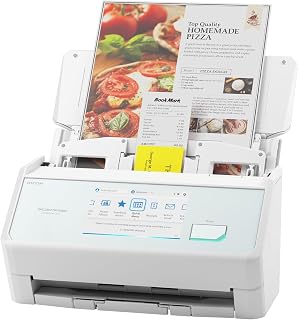
The ScanSnap iX2500 is a premium business document scanner designed for professionals, small business owners, and home offices that handle regular document workflows. If you're managing receipts, contracts, medical records, or general correspondence, this device transforms paper into searchable digital files with minimal effort. It sits at the intersection of speed, intelligence, and ease of use that most businesses desperately need.
The standout performance feature is the 45ppm dual-sided scanning speed combined with the 100-sheet document feeder. Real-world impact: a stack of 200 pages takes roughly 5 minutes to digitize rather than 15-20 minutes on slower competitors. The large smartphone-style touchscreen and customizable profiles mean you can configure scanning tasks directly on the device without touching a computer. The Quick Menu drag-and-drop functionality makes it trivial to send scans to your favorite apps or cloud services with one tap.
Build quality reflects its premium positioning. The faceted design is genuinely elegant in both white and black finishes, with robust materials that feel substantial on a desk. The brake roller system and multi-feed sensor combination actively prevent paper jams and skew, addressing the most common failure modes of cheaper scanners. At 7.7 pounds with compact dimensions, it occupies minimal desk space without feeling fragile.
The main drawback is price. At $379.99, it commands a premium over basic document scanners, though the speed, build quality, and feature set justify the investment for regular use. The Wi-Fi 6 connectivity and touchscreen add sophistication that some users simply won't need if they only scan occasionally or have basic cloud requirements.
The ScanSnap iX2500 is the best choice for professionals who value their time and document integrity. Its combination of blazing speed, intelligent file handling, and multi-platform integration eliminates the friction that makes scanning feel like a chore. For businesses processing documents weekly or monthly, the time savings alone recoup the investment within the first year.
Core Scanning Performance: 45 pages per minute (ppm) at 600 dpi resolution, dual-sided capability, 48-bit color depth. Document feeder holds 100 sheets with automatic brake roller and multi-feed detection.
Connectivity and Control: Wi-Fi 6 (802.11ax) for secure wireless scanning plus USB-C wired connection. Large capacitive touchscreen with customizable profiles and drag-and-drop Quick Menu for direct cloud and app routing.
Physical Specifications: 11.5 inches wide by 6.26 inches deep by 6.34 inches tall, weighing 7.7 pounds. Available in white or black finishes. Power consumption: 17 watts.
Compatibility and Software: Windows 10/11 (32 and 64-bit), macOS Monterey or later, iOS 16+, iPadOS 16+, Android 10+, and ChromeOS 138+. ScanSnap Cloud integration enables automatic text recognition, file optimization, naming, sorting, and routing to 50+ services without a computer.
Warranty and Support: 1-year manufacturer warranty. Ranked 1 in Document Scanners category and 830 in overall Office Products.
Best For: This scanner is ideal for small business owners, accountants, medical practices, law offices, and home office professionals who process 20+ documents weekly. Anyone digitizing tax records, contracts, receipts, medical files, or business correspondence benefits from the speed and automatic organization features.
Cloud-First Users: If you rely on Google Drive, Dropbox, OneDrive, Evernote, or similar services, the direct Wi-Fi routing and automatic file sorting eliminate manual uploads and organization work. The touchscreen scanning to cloud means you don't need a computer at all.
High-Volume Processing: Offices scanning 500+ pages per month see significant time and efficiency gains compared to slower models. The 100-sheet feeder and 45ppm speed reduce scanning sessions from hours to minutes.
Design-Conscious Professionals: If your workspace is visible to clients or customers, the elegant faceted design in white or black actually looks professional on a desk, unlike clunky office equipment.
Not Ideal For: Casual home users scanning fewer than 5 documents per month should consider budget alternatives. Basic USB-only scanners cost half the price if Wi-Fi and touchscreen aren't needed. High-volume enterprise environments may benefit from larger networked models.

Pros
- Exceptional speed and reliability for high-volume scanning with proven track record in professional settings
- Dual-sided scanning with automatic document feeder eliminates manual page flipping and saves hours of work
- Wireless flexibility lets you scan to multiple destinations including cloud services without tethering to a computer
- Smart image processing delivers professional-quality scans with automatic cleanup and correction
- Intuitive touchscreen interface and straightforward wireless setup make it accessible to non-technical users
Cons
- Initial wireless setup and software configuration requires patience and attention to detail
- Higher wattage consumption may be a consideration in energy-conscious offices
- Best suited for document-heavy workflows rather than occasional home users
The Epson WorkForce ES-580W is a wireless desktop document scanner built for professionals, small businesses, notaries, and anyone handling high volumes of paperwork. It combines workhorse reliability with modern connectivity, making it ideal for digitizing files, creating searchable archives, and streamlining document workflows without overwhelming complexity.
The standout performance comes from its dual-sided scanning at 35 pages per minute, 100-sheet automatic feeder, and intelligent image processing that handles backgrounds, blank pages, and paper skew automatically. Users report that these features transform hours of manual scanning into minutes of mostly automated work. The 4.3-inch touchscreen and wireless connectivity mean you can send scans to your phone, tablet, computer, or cloud storage without managing cables or software constantly.
Build quality is solid and purpose-built rather than premium. The scanner is compact at 11.6 by 11.6 by 6.6 inches yet heavy enough to feel substantial. The design prioritizes function and durability for daily office use. Optical character recognition and file conversion features work reliably, producing searchable PDFs and editable Word or Excel documents from your scans.
The main drawback is setup complexity. Getting wireless features working smoothly requires installing Epson ScanSmart Software and configuring the network connection, which may frustrate less technical users. The device also draws 580 watts during operation, making it a consideration for power-conscious environments. It is purpose-built for serious document scanning rather than occasional home use.
This scanner earns its reputation as a workhorse. Customer feedback consistently highlights time savings, professional output quality, and reliability in demanding settings like notary offices, non-profit archiving, and busy corporate workflows. If you process documents daily and want to reclaim hours of your time, the investment pays for itself quickly.
Best for small business owners, professional practices, notaries, and office managers who scan documents daily or handle batch digitization projects. If you need fast, reliable dual-sided scanning with wireless convenience and don't mind straightforward setup, this scanner excels.
Also excellent for non-profits, legal firms, accounting offices, and anyone archiving large volumes of paper records. The speed and image quality justify the investment in these settings.
Not ideal for occasional home users who scan a few documents per month or those seeking a simple plug-and-play experience. This scanner rewards active use but becomes overkill for light workloads.
Scanning Performance: 35 pages per minute at 300 dpi, 1200 dpi maximum resolution, 30-bit color depth for accurate reproduction. Dual-sided single-step scanning captures both sides in one pass.
Feeder Capacity: 100-sheet automatic document feeder handles various paper types and sizes. Removable top design for easy storage and maintenance.
Connectivity: Wi-Fi wireless scanning to phones, tablets, computers, and cloud services (Dropbox, Google Drive, OneDrive, Evernote). Direct USB saving and email capabilities. Compatible with Windows 7 through 11 and macOS 10.7.x to 13.x.
Output Options: Searchable PDFs via OCR, editable Word and Excel conversion, automatic background removal, blank page deletion, dirt detection, and paper skew correction.
Physical: 11.6 inches deep, 11.6 inches wide, 6.6 inches high. 3.7 kg weight. 4.3-inch touchscreen interface. 580-watt power consumption.
Warranty: 1-year limited warranty in the U.S. and Canada.
Pros
- Exceptional portability without sacrificing scan speed or quality
- USB-powered operation enables scanning from any location with a laptop
- Fast, straightforward setup with clean, intuitive software interface
- Strong build quality with reliable performance for daily heavy use
- Competitive price point for professional-grade portable scanning capability
Cons
- Single-sheet feed means scanning large document batches requires manual feeding
- Includes micro USB 3.0 cable but not USB-C adapter, which some modern laptops require
- May need hub or adapter for computers with USB-C only ports
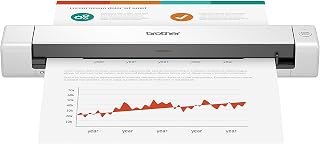
The Brother DS-640 is a compact mobile document scanner designed for professionals who need on-the-go digitization without compromising on performance. Whether you work from home, travel frequently, or manage a small office, this device bridges the gap between smartphone scanning convenience and desktop scanner quality, delivering professional-grade results in a bag-friendly package.
Performance is impressive where it counts. The scanner delivers 16ppm scan speeds for both color and black/white documents at 300dpi resolution, meaning color scanning doesn't slow you down. Real-world users report fantastic scan quality with fast processing, and the included OCR software successfully converts hardcopy documents into editable Word files for storage and retrieval. Automatic image optimization handles color detection, background removal, text enhancement, and bleed-through prevention to deliver consistently polished results.
Design and portability are where this scanner excels. At under 12 inches long and just 1.5 pounds, it truly fits into a laptop bag, purse, or even a large pocket. USB 3.0 power means you eliminate the need for power outlets or batteries, simply plug into your laptop and start scanning. Build quality feels solid and durable, with users reporting reliable daily use over months without issues.
The main limitation is single-sheet feeding, which means scanning a large stack of documents requires manual feeding one page at a time. Additionally, the included micro USB 3.0 cable may require adapters for newer USB-C only laptops, though this is easily resolved with an inexpensive USB 3.0 to USB-C cable.
The Brother DS-640 excels as a portable scanning solution for professionals, remote workers, and small businesses. If you scan documents regularly but lack dedicated office space, value portability without sacrificing quality, or need reliable digitization for business cards and ID documents, this scanner delivers exceptional value and performance at a budget-friendly price point.
Scanning Performance: 16ppm color and black/white, 300dpi resolution, 48-bit and 24-bit color depth, 8-bit grayscale
Connectivity: USB 3.0 powered, TWAIN/WIA drivers for PC, ICA for Mac, SANE for Linux
Physical Dimensions: 11.9 inches wide x 1.99 inches deep x 1.45 inches high, weighs 1 pound
Media Support: Plain paper, business cards, embossed cards, ID cards, laminated cards, plastic cards, receipts, documents up to 72 inches long and 72 pound bond weight
Software: iPrint and Scan desktop app, OCR software, document management suite, scan-to multiple destinations including File, Email, Cloud services
Compatibility: Windows, Mac, and Linux operating systems
Warranty: 1-year limited warranty
Best For: Remote workers, traveling professionals, freelancers, small office/home office setups, anyone needing portable document scanning without permanent desk space
Consider If You Need: High-volume automatic document feeding (this scanner feeds one sheet at a time), fast multi-page scanning without manual intervention, or integrated shredding capabilities
USB Connection Requirements: The included cable is micro USB 3.0. If your laptop has only USB-C ports, you will need a separate USB 3.0 to USB-C adapter cable, which is readily available and inexpensive.
Software Setup: Drivers and bundled software download from Brother solutions website. Internet connection required for initial setup. Software is straightforward and works cleanly with minimal bloatware or advertising.
Real-World Usage: Perfect for scanning a few documents daily to a dozen pages per session. Users report it excels for business card digitization, invoice management, receipt capture, and occasional ID document scanning. Less ideal if you need to scan 100+ page batches without breaks.

Pros
- Exceptionally fast scanning speed saves significant time for high-volume document processing
- Incredibly lightweight and compact design makes it the ideal travel companion for mobile professionals
- Zero setup complexity, USB plug-and-play operation with no driver hassles for most users
- Included Nuance OCR software adds substantial value without additional subscription costs
- Handles diverse document types from thermal receipts to crumpled papers with consistent results
Cons
- Sheet-fed design means documents may not emerge perfectly straight compared to flatbed scanners
- Single-sheet capacity requires manual feeding for large batch scanning sessions
- Lacks wireless connectivity, limiting it to single-computer or direct USB connection scenarios
The Epson WorkForce ES-50 is a portable sheet-fed document scanner designed for professionals and small business owners who need fast, reliable digitization without the bulk of traditional flatbed scanners. Its lightweight 9.44-ounce frame and compact 10.7-inch footprint make it perfect for mobile workers, accountants managing receipts, or anyone juggling multiple scanning tasks throughout the day.
The standout feature is undoubtedly its blazing 5.5-second scan speed combined with powerful included OCR technology that transforms documents into searchable, editable digital files. Customer reviews consistently praise its ability to handle everything from standard documents and crumpled receipts to thermal paper and ID cards, all without requiring external power or batteries when connected via USB. The automatic feeding mode intelligently combines multi-page batches into single files, streamlining workflows significantly.
Build quality is solid despite the minimalist design. The LED optical sensor delivers crisp 1200 DPI scans at 16-bit color depth, and users note that image quality is consistently clear and reliable. The device's tiny footprint means it occupies virtually no desk or shelf space, while the included ScanSmart software remains intuitive enough that users report setup taking less than 15 minutes. Mac and Windows compatibility adds flexibility for diverse computing environments.
The primary trade-off involves the sheet-fed mechanism, which means documents may not exit perfectly straight compared to flatbed alternatives, though this matters little for digitization purposes. The single-sheet capacity also means batch scanning requires manual feeding rather than continuous operation. Additionally, this model lacks wireless connectivity, so shared network scanning would require purchasing the ES-60W upgrade.
For price-conscious professionals needing fast, portable document scanning without unnecessary features, the WorkForce ES-50 delivers exceptional value. It excels at its core mission of quick, reliable digitization for mobile workflows, receipts, and document organization tasks.
This scanner suits mobile professionals, accountants managing expense receipts, freelancers requiring document signatures, and small business owners needing desk-space-efficient digitization. It's perfect for anyone prioritizing speed and portability over flatbed scanner versatility, or those seeking to organize paper documents without a large financial commitment.
Scanning Performance: 5.5-second single-page speed, 1200 DPI optical resolution, 16-bit color depth, 256-level grayscale, LED light source
Physical Design: 10.7 inches deep, 10.7 inches wide, 1.3 inches high; weighs 9.44 ounces
Compatibility: USB 2.0 connection, Windows 7 or later, Mac OS; includes TWAIN driver
Paper Handling: Single-sheet feed, accepts documents up to 8.5 by 72 inches, handles receipts and ID cards
Software Included: Epson ScanSmart, Nuance OCR, cloud scanning capability

Pros
- Genuine portability with USB power and 1.4-pound weight eliminates desk clutter
- Duplex scanning capability cuts document processing time significantly
- Fast 16 ppm speed matches color and monochrome performance
- Flexible software suite handles OCR, email routing, and cloud uploads
- Strong rating with over 2,300 customer reviews backing reliability
Cons
- Limited to 25-sheet capacity, requiring more frequent feeding for large batch jobs
- Requires internet connection for cloud and email features
- Free technical support restricted to USA only
The Brother DS-740D is a portable document scanner designed specifically for professionals who work outside traditional office environments. Whether you're a consultant juggling multiple client sites, a small business owner with limited desk space, or a home office worker seeking efficiency, this scanner bridges the gap between functionality and mobility that stationary scanners cannot match.
The standout feature is duplex scanning at 16 ppm, meaning it captures both sides of a document in a single pass. This alone saves significant time compared to manual flipping and rescanning. Color scanning operates at the same speed as black and white, eliminating the typical performance penalty. The automatic image enhancement suite handles common scanning challenges like text sharpening, background removal, and bleed-through prevention, producing clean, professional results without manual editing.
At 11.85 inches with a minimal 1.78-inch height and weighing just 1.4 pounds, the DS-740D delivers genuine portability. The Desk Saving Design shrinks the footprint even further by 11 inches, making it practical for cramped desks or mobile setups. USB-only power means you operate wherever your laptop goes, no power outlet required. The included iPrint and Scan software routes documents to multiple destinations including cloud storage, email, and OCR processing.
The main limitation is the 25-sheet feed capacity, which requires manual reloading during large scanning projects. Internet connectivity is required for cloud and email routing features. Additionally, free technical support is USA-only, though the one-year warranty and product guides provide baseline coverage.
The Brother DS-740D succeeds as a portable solution for professionals prioritizing mobility and space efficiency over high-volume throughput. With strong customer ratings and practical features, it delivers reliable performance for users who refuse to let scanning requirements chain them to a desk.
Scanning Performance: Duplex speed up to 16 ppm (color and monochrome), 300 dpi optical resolution, 48-bit and 24-bit color depth, 8-bit grayscale.
Physical Design: Dimensions 11.85 inches D x 11.85 inches W x 1.78 inches H. Weight 1.4 pounds. Sheet capacity 25 pages. Optical sensor uses CCD technology.
Connectivity and Power: USB 3.0 micro connection for both data transfer and power supply. No separate power adapter required.
Compatibility: Windows 7 and later, macOS, Linux. Supports TWAIN/WIA drivers for PC, ICA for Mac, SANE for Linux. Software includes OCR, document management, and image enhancement tools.
Media Support: Handles plain paper, business cards, embossed cards, laminated cards, plastic cards, and receipts.
Ideal For: Mobile professionals, consultants, small office and home office workers, field service technicians, and anyone with limited desk space needing regular scanning capability.
Consider Instead If: You need high-volume scanning (over 500+ pages daily), require automatic document feeding for oversized batches, or need scan-to-network features without internet access. Traditional desktop or production scanners may be more efficient for large-scale operations.
Best For: Users who value portability, desk space savings, and flexibility over maximum throughput. The DS-740D excels when versatility and mobility outweigh bulk scanning requirements.

Pros
- Exceptional scan speed at 45 PPM saves significant time on large document batches
- Automatic image enhancement delivers clean, professional-quality scans without manual editing
- Compact footprint makes it practical for home offices and space-constrained workspaces
- Proven durability with 10+ year track record from predecessor models
- Straightforward USB connection eliminates network configuration headaches
Cons
- Setup and driver installation can be problematic for users unfamiliar with software troubleshooting
- Higher price point compared to basic flatbed or ADF scanners
- Heavy scanning volumes may require additional maintenance or faster replacement cycles
The ScanSnap iX2400 is a high-performance document scanner built for professionals and small business owners who need to convert paper to digital quickly and reliably. It's ideal for anyone managing receipts, contracts, photos, business cards, or archival documents who wants to eliminate paper clutter without spending hours at a scanner.
The standout feature is its 45-page-per-minute duplex scanning speed, powered by a 100-sheet automatic document feeder. In real-world use, this means you can scan a stack of documents in minutes rather than hours. The one-touch operation automatically detects color depth, removes streaks, de-skews pages, and deletes blanks, so your scans are publication-ready without post-processing.
Design and build quality are solid. At 7.1 pounds with compact dimensions of 11.5 inches wide, it fits comfortably on a desk without dominating workspace. The construction feels durable, and the feeder mechanism is smooth and reliable. USB connectivity ensures stable performance and simple setup on both Windows and macOS systems.
One drawback: some users report software setup challenges, particularly with driver installation and troubleshooting. The support experience can vary, and inexperienced users may need technical assistance. Additionally, at this price point, it's a meaningful investment, though long-term durability makes it cost-effective over years of use.
The iX2400 is a capable workhorse for anyone ready to go digital. It delivers speed, quality, and ease of use that justify the investment for home offices, small teams, and professionals managing regular document workflows.
Scanning Performance: 45 pages per minute (duplex), 600 dpi optical resolution, 100-sheet automatic document feeder capacity.
Connectivity and Power: USB connection, 17 watts power consumption, compatible with Windows 10/11 and macOS Monterey or later.
Physical Dimensions: 11.5 inches wide by 6.26 inches deep by 6.34 inches high, weighing 7.1 pounds.
Media Support: Documents, business cards, photos, receipts, ID cards, and insurance cards. Optical sensor uses CIS technology for reliable capture.
Warranty and Support: 1-year manufacturer warranty included with purchase.
Best For: Home office professionals, small business owners, real estate agents, accountants, lawyers, and anyone handling regular document scanning needs. Works well for people transitioning from flatbed scanners to automated scanning.
Consider Alternatives If: You only scan occasional documents (a basic scanner may suffice) or need network scanning capabilities and advanced software features (enterprise models may be better suited).
Long-Term Value: Proven longevity from the brand means the iX2400 should serve reliably for 5-10 years, making it a solid investment for serious document digitization projects.

Pros
- Exceptional speed and capacity reduce scanning projects from hours to minutes
- Wireless and USB flexibility means you can place it anywhere that works for you
- Large touchscreen and simple setup get you scanning in under 5 minutes
- Automatic document optimization, naming, and cloud routing save hours on organization
- Multi-feed sensors and skew detection prevent paper jams and data loss
Cons
- Smaller photos and business cards occasionally jam despite advanced sensors
- Requires compatible devices and cloud accounts for full feature set
The ScanSnap iX2500 is a business-class document scanner designed for anyone overwhelmed by paperwork. Whether you're a small business owner, freelancer, accountant, or home office worker managing taxes and receipts, this scanner transforms stacks of paper into organized, searchable digital files in minutes.
The standout feature is raw speed and automation. At 45 pages per minute with automatic double-sided scanning and a 100-sheet feeder, large projects that would take hours on a flatbed scanner finish in minutes. The intuitive 6-inch touchscreen works like a smartphone, eliminating any setup friction. Connectivity is flexible, with both Wi-Fi 6 and USB-C letting you place the scanner where it makes sense in your workspace.
Build quality is premium. The faceted design in black or white looks professional, and the construction feels solid. The brake roller system, multi-feed sensor, and skew detection work together to prevent paper jams and protect your documents. Real-world testing shows the feeder handles standard documents, receipts, business cards, and photos reliably, though very small photos occasionally catch.
The main limitation is price. At nearly $400, this is an investment for serious document management, not a casual home scanner. Additionally, you get the most value by using cloud services and compatible apps, so the software ecosystem matters. A handful of users report occasional connectivity hiccups, though these are rare.
The ScanSnap iX2500 delivers on its promise: fast, reliable document scanning with minimal friction. If you process documents regularly and value your time, this scanner pays for itself through sheer efficiency. For casual scanning, a budget scanner works fine. For anyone serious about going paperless, this is the best-in-class choice.
Key Specs: Scan speed: 45 ppm double-sided. Document feeder: 100 sheets. Resolution: 600 dpi. Optical sensor: CIS. Color depth: 24-bit. Connectivity: Wi-Fi 6, USB-C. Dimensions: 11.5" W x 6.26" D x 6.34" H. Weight: 7.7 lbs. Power: 17 watts. Warranty: 1 year manufacturer.
Compatibility: Windows 10/11 (32/64-bit), macOS Monterey or later, iOS 16+, iPadOS 16+, Android 10+, ChromeOS 138+. Compatible with major cloud services including Google Drive, Dropbox, OneDrive, and others.
Perfect for: Tax professionals, accountants, real estate agents, small business owners, freelancers, and anyone managing high volumes of paperwork. Ideal for home offices where space and efficiency matter.
Not the best fit for: Casual users scanning a few documents per year, those on a tight budget, or organizations needing to scan large volumes of oversized documents.
How to Choose the Best Document Scanner
Match feeder capacity to your paper volume
An automatic document feeder matters most when you regularly scan invoices, mail, class notes, or multipage agreements. The Epson Workforce ES-400 II High-Speed Color Duplex combines a 50-sheet feeder with speeds up to 35 pages per minute, while the Epson Workforce ES-580W Wireless Color Duplex raises feeder capacity to 100 sheets for larger recurring batches.
For demanding home offices, the ScanSnap iX2500 Wireless or USB High-Speed and ScanSnap iX2400 High-Speed One-Touch Button Color both support 100-sheet loads and scan up to 45 pages per minute. If your scanner shares a shallow desk with a laptop and a space-saving tenkeyless keyboard, also consider whether the input tray and output area have room to operate comfortably.
Decide whether duplex scanning is essential
Single-pass duplex scanning captures both sides of a page at once, which saves substantial time with statements, contracts, and medical paperwork. The Canon imageFORMULA R40II Office Document Scanner scans both sides in color at up to 45 pages per minute and has a 60-sheet feeder, while the Brother DS-740D Duplex Compact Mobile Document brings duplex capability to a smaller USB-powered format.
A compact single-sheet scanner remains a practical choice if you digitize only a few pages at a time while traveling. The Brother DS-640 Compact Mobile Document Scanner and Epson Workforce ES-50 Compact & Lightweight Mobile take minimal space in a bag, but you should expect to feed sheets individually and give two-sided originals a little more attention.
Prioritize OCR, software, and scan destinations
Clean images are useful, but optical character recognition makes scans easier to locate and reuse later. Epson ScanSmart supports searchable PDFs and editable Word or Excel files on compatible Epson models, and the Epson Workforce ES-400 II High-Speed Color Duplex also includes a TWAIN driver for broader document-management compatibility.
Choose a workflow that does not add extra steps to your day. The Epson Workforce ES-580W Wireless Color Duplex can send files directly to USB, email, or supported cloud services without a computer, while the ScanSnap iX2500 Wireless or USB High-Speed offers touchscreen profiles, Wi-Fi 6, USB-C, and customizable destinations. The Canon imageFORMULA R40II Office Document Scanner uses Canon CaptureOnTouch software exclusively, which is worth noting if you depend on TWAIN or ISIS drivers.
Account for photos, receipts, and long-term storage
Paperwork scanners can often handle receipts and cards, but old photographs deserve a more specialized approach. The Plustek Photo Scanner ePhoto Z300 handles photo sizes from 3 x 5 through 8 x 10 inches, supports letter and A4 paper, and offers 300 or 600 dpi settings with image-enhancement tools for faded images.
Build an archive plan before you begin scanning large collections. A NAS hard drive for shared storage can suit household or team access, while an 8TB hard drive for large archives gives photo libraries and long-term paperwork more room to grow. Use clear folder names, dates, and file labels from the start.
Final Thoughts
For a busy office that values wireless convenience, a touchscreen, and generous feeder capacity, the Epson Workforce ES-580W Wireless Color Duplex is an especially capable choice. If your priority is taking dependable duplex scanning on the road without giving up a compact footprint, the Brother DS-740D Duplex Compact Mobile Document is the more natural fit.
Frequently Asked Questions
Which is the best document scanner for a home office in 2026?
The right home-office scanner depends mainly on how often you handle multipage paperwork. A feeder-equipped option such as the Epson Workforce ES-400 II High-Speed Color Duplex suits regular document stacks, while the ScanSnap iX2500 Wireless or USB High-Speed is better suited to users who want more on-device controls and flexible wireless destinations. For occasional receipts and forms, a compact single-sheet model can be enough.
Do I need a duplex document scanner?
Duplex scanning is worthwhile if you frequently digitize double-sided documents such as contracts, bank statements, or tax records. A single-pass duplex model captures both sides during one feed, reducing manual work and lowering the chance that a reverse side is missed. If you only scan one-sided receipts or short forms, a basic portable scanner may be all you need.
Can a document scanner create searchable PDFs and editable files?
Many modern document scanners include OCR software that recognizes printed text and turns scans into searchable PDFs. Some models also export editable Word or Excel files, which is useful for invoices, forms, and records that require data entry. When you regularly transfer figures from paper, one of these number pads for efficient data entry can make the follow-up work faster.
Can one scanner handle both documents and old photos?
Some office scanners accept photos, but their strengths are fast paper workflows rather than photo restoration. The Plustek Photo Scanner ePhoto Z300 is a stronger match for digitizing family prints because it supports common photo sizes, automatic cropping and deskewing, and image enhancement. Keep fragile, curled, or damaged photos separate from ordinary office paper to help protect them during digitization.





Write Your Review
No reviews yet. Be the first to share your experience!