

When a client needs an invoice, a shipment label, and a signed agreement in the same hour, an unreliable office printer quickly slows the entire business. The right model should move from print jobs to scans without forcing you to babysit paper trays, Wi-Fi, or routine document backups.
This guide to the best printer for small business compares practical options for home offices, storefronts, and growing teams. We focus on speed, paper handling, color needs, and scan workflows, plus equipment that supports them, such as an external hard drive for secure record backups.
Quick answer
This guide compares 10 picks, with Brother MFC-L2820DW XL Wireless Monochrome Laser ranked first. HP LaserJet Pro MFP 3101sdw Wireless All-in-One Laser holds the highest customer rating among them. Brother DCP-L2640DW Wireless Monochrome Laser Printer has the most customer reviews.

Pros
- Exceptional page yield reduces toner replacement frequency and lowers cost per page
- Fast 34 ppm print speed and 50-page ADF keep small teams productive on high-volume jobs
- Multiple connectivity options including modern dual-band WiFi ensure broad device compatibility
- Intuitive touchscreen and mobile app enable printing from smartphones and tablets on the go
- Compact design maximizes workspace efficiency without sacrificing multifunction capabilities
Cons
- Monochrome only, not suitable for businesses that need color printing or photo output
- Initial investment higher than basic single-function laser printers, though offset by low per-page costs
- 50-page ADF capacity may require frequent batch reloading for very high-volume scanning
The Brother MFC-L2820DW XL is a compact multifunction laser printer designed specifically for small businesses and busy offices that prioritize speed, efficiency, and low operating costs. It combines printing, copying, scanning, and faxing in one space-saving unit, making it an ideal choice for teams with limited desk real estate but significant document volume.
The standout feature is its massive included toner yield, delivering up to 4,200 pages out of the box. Print speed tops out at 34 pages per minute with crisp, professional monochrome output. The 50-page automatic document feeder and dual-band wireless connectivity keep workflows smooth, while the 2.7 inch touchscreen and cloud app integration (Google Drive, Dropbox, OneNote, more) make it simple to print and scan from multiple devices without desk clutter.
Build quality is solid for the price point. The 250-sheet paper tray, auto-duplex printing, and sturdy flatbed scanner base feel durable for regular office use. At just 22.7 pounds and 16 inches wide, it won't dominate your workspace, making it genuinely practical for compact offices where every square inch matters.
The primary limitation is that this is a black and white only printer, so it won't handle color documents or photo work. The 50-page ADF, while convenient, requires more frequent reloading than larger machines on truly high-volume jobs. Toner costs are low per page thanks to Brother's genuine supplies, but the initial purchase is higher than basic single-function printers.
The Brother MFC-L2820DW XL delivers impressive value for small offices that need reliable, fast monochrome multifunction printing without premium pricing or excessive space requirements. Combine the included high-yield toner with low cost per page and solid performance, and this is a smart investment for productivity-focused teams.
This printer is best for small offices, home-based businesses, and professional practices that print high volumes of black and white documents regularly. Ideal buyers include law firms, accounting offices, consulting practices, and administrative teams where monochrome output is sufficient and cost control is important.
Skip this model if you need color printing, photo output, or primarily handle small print volumes. Basic single-function laser printers may be cheaper upfront if you don't need scanning and faxing capabilities. However, if you print more than 50 pages per week in black and white, the multifunction convenience and included toner value make this a smart long-term purchase.
The Brother Refresh EZ Print Subscription service is worth evaluating for offices with predictable, steady print volumes, as it can reduce toner costs by up to 50 percent and eliminates supply management headaches. The machine's compact size and quiet operation make it suitable for open office environments where space and noise are concerns.

The LaserJet Pro MFP 3101sdw delivers fast monochrome output and wireless mobile printing, ideal for teams that draft proposals and agreements on the go. Two-sided printing and scan-to-email streamline document workflows, and laser reliability reduces downtime compared to inkjet alternatives in moderate-volume office settings.
Pros
- 35-page-per-minute black-and-white output
- 250-sheet input tray
- 50-sheet feeder and duplex printing
- Wireless, AirPrint, and Mopria support
Cons
- No color printing
- Requires HP cartridges with factory chips
For a busy small business, a printer has to be easy to share and quick enough that routine reports, proposals, and forms do not create a queue. The HP LaserJet Pro MFP 3101sdw addresses that core need with black-and-white printing, scanning, and copying in a 23.1-pound all-in-one. Its 35-page-per-minute speed, 250-sheet input tray, and 50-sheet automatic document feeder give a small team useful capacity for day-to-day paperwork, while automatic two-sided printing can reduce paper use. The unit is also built around straightforward document distribution. It supports wireless printing and can print from phones or tablets, with Apple AirPrint and Mopria support for mobile workflows. Scan-to-email gives teams a direct route for sending scanned documents, and its ADF and flatbed scanner accommodate different source types. The 1200 x 1200 dpi resolution is intended for crisp reports, proposals, and other professional black-and-white material. At 15.7 by 16.5 by 12.3 inches, it is compact enough for a small office, rather than requiring a large shared-print area. Firmware protection is another consideration for businesses that want a dependable device. This is a focused choice, not a color solution, and it requires HP cartridges with factory chips.
Printing: Monochrome laser, 35 ppm, 1200x1200 dpi resolution, up to 250-sheet input tray, automatic two-sided printing.
Scanning & Copying: 50-sheet automatic document feeder plus flatbed scanner, up to 35 ppm copy speed, up to 999 copies per run, 1200x1200 dpi maximum copy resolution.
Connectivity: Wi-Fi, Ethernet, USB, Apple AirPrint, Mopria, Print Anywhere capability. Works with laptops, PCs, smartphones, and tablets.
Physical: Dimensions 16.5"W x 15.7"D x 12.3"H, weighs 23.1 pounds. Media capacity supports 8.5x11, 8.27x11.7, and 8.5x14 inch paper.
Warranty & Support: One-year limited warranty, HP LaserJet toner introductory cartridge included with ~1000 page yield.
Buy the 3101sdw for a small business or workgroup that primarily produces black-and-white documents and values quick output, a 50-sheet feeder, duplex printing, and simple phone or tablet access. It is a good fit where a 250-sheet tray can reduce interruptions during regular office printing. Skip it if color graphics are essential, if you need a touchscreen interface, or if your supply strategy depends on third-party cartridges. It will be less suitable for offices whose printing goes beyond the model's black-and-white, paper-focused setup.
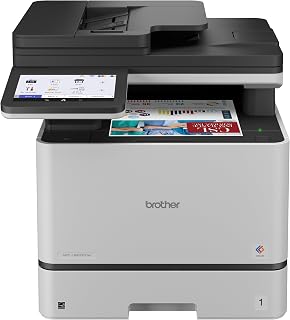
For a busy small business that needs polished client materials alongside daily paperwork, this color laser all-in-one combines color output with auto-duplex printing and double-sided scanning. Its auto document feeder helps staff move through multi-page invoices and contracts without manually feeding sheets, while network readiness and scan-to-email simplify shared workflows across a small team.
Pros
- 33-page-per-minute color and monochrome output
- 80-page feeder with two-sided scanning
- Security features and badge authentication
- 7-inch touchscreen with customizable shortcuts
Cons
- Heavy 71.2-pound machine
- Needs a dedicated shared-office location
Small businesses that have outgrown a basic desktop printer need a central document hub, and the Brother MFC-L8930CDW is aimed at that role. This color laser all-in-one combines printing, copying, flatbed and sheetfed scanning, and scan-to-email capability, so a team can keep routine paperwork moving from one machine. Its 33-page-per-minute output suits a busy shared office, while the 80-page automatic document feeder and two-sided scanning speed up the conversion of multi-page records into digital files. Automatic duplex printing further supports everyday document work. This model also brings features that matter when several people share equipment. A 7-inch color touchscreen with customizable shortcuts can streamline repeat tasks, and laptops, PCs, smartphones, and tablets can connect through dual-band wireless or Gigabit Ethernet. Scan destinations include cloud services, email, and SharePoint. Triple Layer Security and an NFC card reader for badge authentication add protections that a growing business may value. Although its redesigned chassis is 25% smaller than its predecessor, this is still a 71.2-pound machine. It fits best where a dedicated, well-considered spot is available and color documents are part of the workload.
Print Performance
Color and B&W: 33 ppm, 9.9 seconds first page. Resolution: 2400 x 600 dpi. Media: Plain paper, envelopes, card stock, labels, glossy photo paper. Maximum sheet capacity: 1,340 pages.
Scanning
Two-sided scanning up to 104 ipm. Flatbed and sheetfed with 80-page auto document feeder. Maximum legal-size (8.5 x 14 inches). Supports searchable PDF and editable Microsoft Office formats.
Connectivity
Dual-band Wi-Fi (2.4GHz / 5GHz), Gigabit Ethernet, USB 2.0. Mobile printing and scanning supported (may require free app download). Cloud scanning to email, SharePoint, and other services.
Security and Features
Triple Layer Security with NFC card reader. 7-inch color touchscreen with up to 64 customizable shortcuts. Dimensions: 20.7 x 16.1 x 21.6 inches. Weight: 71.2 pounds. 1-year limited warranty with exchange service.

Adding fax capability to laser speed and duplex makes the MFC-L2820DW a complete solution for businesses that still handle signed contracts and vendor forms over legacy channels. The auto document feeder and scan-to-email feature speed up multi-page workflows, and Alexa integration lets staff check status or start jobs hands-free.
Pros
- 34 ppm black-and-white copy speed
- 50-page automatic document feeder
- 250-sheet paper tray
- Duplex printing and fax
Cons
- Monochrome output only
- 22.5-pound weight
Document-heavy small businesses often need fewer devices, not more. The Brother MFC-L2820DW brings black-and-white printing, copying, flatbed and sheetfed scanning, and faxing together in a compact laser machine measuring 15.7 by 16.1 by 12.5 inches. For a team processing multi-page forms, the 50-page automatic document feeder helps distinguish it from an all-in-one limited to a flatbed, and a 250-sheet paper tray can reduce paper-loading interruptions. Its maximum black-and-white copy speed is 34 pages per minute, while automatic duplex printing supports two-sided documents. The printer handles plain paper, labels, and envelopes, which makes it relevant for office correspondence and mailing tasks as well as standard reports. Wireless use extends to laptops, PCs, smartphones, tablets, and iPhones; Ethernet and USB are also listed connection options. A touchscreen display, Scan to Email, and direct cloud integration with Google Drive, Dropbox, Evernote, and OneNote further suit a business that shares and files documents electronically. It is a strong small-business option when monochrome output meets the team's needs and document flow matters more than color presentation.
Print Performance: Monochrome laser, 34 ppm print speed, 1200 x 1200 dpi maximum resolution, automatic duplex, up to 99 copies per run.
Scanning: Flatbed and automatic document feeder (50-page capacity), 23.6 ppm black and white scan speed, 600 x 600 dpi copy resolution, scan to email and cloud apps.
Connectivity: Dual-band wireless (2.4GHz and 5GHz), Ethernet, USB 2.0. Compatible with Windows, Mac, Linux, iOS, Android, and Alexa integration.
Paper Handling: 250-sheet main tray, supports plain paper, envelopes, and labels. Maximum media weight handled and paper specifications available from Brother.
Physical: Dimensions 16.1 inches wide by 15.7 inches deep by 12.5 inches high. Weight 22.5 pounds. User-friendly 2.7-inch LED touchscreen display.
Toner and Supplies: Compatible with TN830, TN830XL, and TN830V cartridges. DR830 drum unit included. ENERGY STAR certified and EPEAT Silver rated. 1-year limited warranty with lifetime customer support.
Pros
- 50 ppm monochrome print and copy speed
- 70-page automatic document feeder
- 56 ipm two-sided scanning
- Dual-band Wi-Fi and Gigabit Ethernet
Cons
- Monochrome output only
- Paper-size changes require manual tray swaps
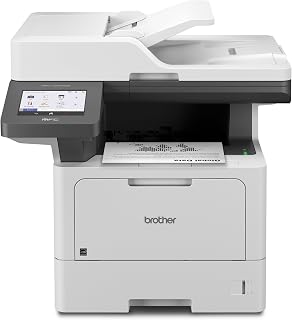
For a busy small business that runs on invoices, forms, reports, and scanned records rather than color marketing materials, the Brother MFC-L5915DW puts throughput first. This monochrome laser all-in-one prints and copies at up to 50 ppm, so a shared office can move routine paperwork along quickly. Its 70-page automatic document feeder and 56 ipm two-sided scanning are particularly relevant for digitizing contracts or processing multi-page copies without feeding each sheet by hand. Network flexibility also supports a team setting: dual-band Wi-Fi and Gigabit Ethernet let it fit into an established office network, while compatible laptops, PCs, phones, and tablets give staff several ways to access it. A 5-inch color touchscreen can hold customized workflow shortcuts, and cloud scan/print functions plus USB-host printing or scanning extend its document options. The 250-sheet capacity and support for plain paper, card stock, labels, and envelopes suit varied administrative tasks. At 38.3 pounds and roughly 19.5 inches wide, it needs a deliberate shared location. The tradeoff for that productivity focus is absolute: output is black only, not color.
Buy this Brother if your small business shares one device for frequent black-and-white documents, copies, and batches of scanned paperwork. It makes the most sense for teams that value 50 ppm output, an automatic document feeder, duplex functions, and both Wi-Fi and Ethernet networking, and that have room for its 38.3-pound frame. Skip it if color handouts, graphics, or photos are a regular part of your work. It is also less suitable where space is tight or where automatic switching between different paper sizes is important.
Core Performance: 50ppm print and copy speed, 1200x1200 dpi resolution, 70-page auto document feeder with 56ipm scanning speed, 5-inch color touchscreen display.
Connectivity: Dual-band WiFi, Gigabit Ethernet, USB 2.0 ports, mobile device printing compatible with laptops, PCs, smartphones, tablets, and iPhones.
Paper Handling: 250-sheet maximum capacity, supports 8.5x14 inch maximum media size, compatible with plain paper, envelopes, labels, and card stock. 99 maximum copies per run.
Security: Triple-layer security features for document and network protection. Includes 3000-page toner cartridge with optional 18000-page ultra high-yield replacement available.

Wireless printing and scanning make the Envy 6155 a practical choice when multiple team members need quick access without cable runs. The included three-month Instant Ink trial helps control consumable costs during the ramp-up period, and duplex printing cuts paper use in half for internal drafts and reports.
Pros
- Compact 11.2-pound design
- Color printing with P3 true-to-screen technology
- Print, scan, copy, and duplex functions
- 100-sheet input tray
Cons
- 7 ppm color print speed
- Flatbed scanner has no automatic document feeder
Small businesses that need occasional color capability in a compact shared device may find the HP Envy 6155 practical, but its role is clearly light-duty rather than high-throughput. This wireless inkjet prints, scans, copies, and produces duplex pages, covering the core tasks for a microbusiness, a client-facing home office, or a small team with modest document flow. At 11.2 pounds and 17.05 by 14.21 by 5.35 inches, it is notably easier to place than a large office machine, while its 100-sheet input tray helps limit interruptions. Color is the reason to consider it over monochrome laser models. P3 true-to-screen technology is intended to reproduce colors accurately, and it handles plain paper, envelopes, labels, and transparencies. Its AI printing feature can remove unwanted material from web pages and emails, useful when staff print online reference documents. Wireless setup, dual-band Wi-Fi connection troubleshooting, and a 2.4-inch color touchscreen aim to simplify routine operation. However, black printing reaches 10 ppm and color reaches 7 ppm, so a growing office with continuous printing, large scan batches, or a need for an automatic document feeder should look elsewhere. This is a compact color all-in-one for manageable workloads, not a central production printer.
Print Performance: Black printing up to 10 ppm, color up to 7 ppm. Maximum resolution 4800 x 1200 dpi. Automatic duplex printing included.
Connectivity: Dual-band Wi-Fi with automatic connection detection. USB and mobile app printing via HP's smartphone application. Works with any device on your network.
Paper Handling: 100-sheet input tray. Supports letter size (8.5 x 11 inches) and specialty media including envelopes, labels, transparencies, and photo paper up to 8 x 10 inches.
Design: Compact dimensions 17.05 inches deep, 5.35 inches wide, 14.21 inches tall. Weighs 11.2 pounds. Available in white with 60% recycled plastic construction. Includes one-year limited hardware warranty.
Choose the Envy 6155 for a very small business, solo operation, or home-based team that needs color documents, scans, copies, and occasional double-sided printing without giving up much desk space. It suits light, varied work such as correspondence, labels, envelopes, and online material. Skip it if multiple people will regularly send large print queues, if fast color output is essential, or if you scan multi-page stacks often. Its 7 ppm color speed and flatbed-only scanning are limiting for a busy office.

Fast laser output and easy mobile printing help the LaserJet MFP M234sdw keep pace with teams that print frequently throughout the day. Auto-duplex and cloud connectivity streamline remote and in-office workflows, while the 19-pound weight and compact footprint make placement flexible in shared or satellite offices.
Pros
- 30 ppm single-sided print speed
- 40-page automatic document feeder
- Automatic two-sided printing
- Compact 19-pound laser all-in-one
Cons
- Monochrome output only
- Scanning depends on the app
The HP LaserJet MFP M234sdw is shaped for a small business that wants a single, compact machine for fast black-and-white paperwork. Measuring 16.46 inches wide, 12.13 inches deep, and 11.59 inches high, the 19-pound laser all-in-one can serve a small shared desk or office counter without the footprint of a larger departmental printer. It prints, scans, and copies, with 30 ppm single-sided printing and 19 ppm automatic two-sided printing. That balance is useful for invoices, forms, letters, and internal documents where turnaround and paper conservation matter more than color. The 40-page automatic document feeder adds value for a team that copies or scans multi-page records, avoiding one-page-at-a-time flatbed work. Network-ready wireless connectivity, mobile print and scan functions through the HP Smart app, cloud printing, and an Ethernet option support different ways a small team may work. Energy Star certification is another practical operating consideration. This model is monochrome only, so it cannot cover color proposals or graphic-heavy materials. Also consider its scanning workflow: scanning depends on the app rather than a physical scan button. Businesses comfortable with that approach and focused on everyday document volume get a streamlined, space-conscious laser option.
Buy the M234sdw if a small office mainly produces black-and-white forms, invoices, letters, and copied or scanned records, and needs a compact shared machine with automatic duplex printing. The 40-page feeder and 30 ppm print speed make more sense for a working team than a basic single-function printer. Skip it if color output is necessary for customer material, if your scanning process must use physical controls instead of an app, or if your wireless network is known to be difficult to configure.
Printing Capacity: 30 pages per minute single-sided, 19 pages per minute two-sided. Maximum resolution 600x600 dpi.
Scanning and Copying: 40-page auto document feeder, 20,000 copies maximum per run, 600x600 dpi copy resolution.
Connectivity: Dual-band Wi-Fi with self-reset, Ethernet, USB 2.0. Compatible with Windows, Mac, iOS, Android, Chromebook, AirPrint.
Physical: 16.46 inches wide by 12.13 inches deep by 11.59 inches high. Weighs 19 pounds. Gray color.
Additional Features: Auto-duplex printing, Energy Star certified, Cloud Print enabled, Alexa compatible, one-year limited warranty.

Pros
- 35 ppm black-and-white copy speed
- Automatic duplex printing
- Print, scan, copy, and fax
- Works with PCs, laptops, and smartphones
Cons
- Monochrome output only
- Reported network-scanning setup complications
Small businesses that circulate invoices, contracts, reports, and other text-first documents can keep four routine jobs at one workstation with the HP LaserJet Pro MFP 3101fdw. This monochrome laser model prints, scans, copies, and faxes, making it suited to teams that do not need color output but do need a shared document hub. Its stated black-and-white copy speed reaches 35 pages per minute, while automatic duplex printing can reduce paper use on two-sided documents. The flatbed scanner gives the business a scanning function, and the printer works with laptops, PCs, and smartphones. That device coverage can help a small team send jobs from both desk-bound and mobile work setups. It also accepts plain paper, labels, glossy film, and glossy photo paper, adding flexibility for business paperwork and labels. At 16.5 by 12.3 by 15.7 inches and 10.5 kg, it consolidates office functions without requiring several separate devices. Choose it when fast, professional monochrome paperwork matters more than color graphics.
Buy this HP if your small business primarily produces black-and-white forms, correspondence, reports, or labels and wants printing, scanning, copying, and faxing in one machine. It is particularly relevant for teams that value automatic two-sided printing and need to print from PCs, laptops, or smartphones. Skip it if color documents are part of your daily customer-facing work, or if your business needs consistent color output for its regular customer-facing workflows.
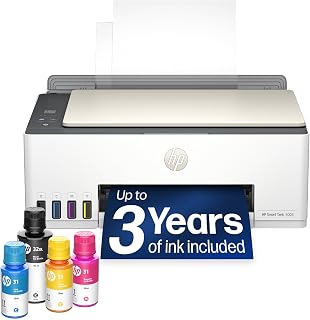
The Smart Tank 5003 ships with up to three years of ink in the box, eliminating frequent cartridge orders and surprise supply runs. Cartridge-free refillable tanks mean lower cost per page over thousands of prints, a strong fit for offices that produce high volumes of proposals, contracts, and client materials daily.
Pros
- Up to three years of included ink
- Cartridge-free refillable tank
- Color print, scan, and copy
- Wi-Fi, USB, and mobile printing
Cons
- 10 ppm maximum monochrome speed
- 5 ppm maximum color speed
Rather than relying on replacement cartridges, the HP Smart Tank 5003 uses a refillable ink tank system, a practical distinction for a small business that prints color materials regularly. It combines color printing, scanning, and copying in one wireless unit, so a very small team can cover everyday paperwork and simple color-document needs without dedicating space to separate machines. Up to three years of ink are included, and the existing information states this supply is approximately 6,000 pages. Connection options include Wi-Fi, USB, Apple AirPrint, HP ePrint, Mopria, and Print Anywhere. That range is useful when a business has a mix of computers, phones, and tablets, while Scan to PDF helps turn paper records into digital files. At 11.1 pounds, it is also relatively easy to accommodate in a home office or compact business workspace. The trade-off is throughput: maximum speeds are 10 pages per minute in monochrome and 5 pages per minute in color. For a busy team, those figures make it a better fit for steady, modest-volume color work than frequent large print batches.
Connectivity: Wireless (Wi-Fi), USB, Apple AirPrint, HP ePrint, Mopria Print Anywhere
Printing Technology: HP Thermal Inkjet
Print Speed: 10 pages per minute (black and white), 5 pages per minute (color)
Special Features: Wireless printing, high-volume refillable ink tank, print from phone or tablet, scan to PDF, borderless printing
Output: Color
Color: Oatmeal White with Portobello accents
Weight: 11.1 pounds
Model: HP Smart Tank 5003 All-in-One Printer (9B2D3A)
Buy the Smart Tank 5003 if a microbusiness, home office, or small team needs occasional color printing alongside scanning and copying, and values a cartridge-free refillable design with up to three years of included ink. Its phone and tablet printing options also suit a mobile-friendly workflow. Skip it if your operation routinely produces lengthy packets or has several people printing at once: its maximum speeds of 10 ppm black and 5 ppm color favor lighter-volume jobs.

Laser speed and wireless connectivity make the DCP-L2640DW a reliable workhorse for document-heavy teams. Auto-duplex and a compact footprint suit shared desks or tight corners, while the auto document feeder handles multi-page contracts and reports without manual flipping, keeping throughput high during busy periods.
Pros
- Up to 36-page-per-minute monochrome printing
- Compact 15.7-by-16.1-by-12.5-inch footprint
- 50-page automatic document feeder
- Wi-Fi, Ethernet, USB, and mobile support
Cons
- Monochrome output only
- No built-in fax capability
Not every small business needs a color-capable office center. For invoices, packing documents, forms, and internal paperwork, the Brother DCP-L2640DW concentrates on fast monochrome work while keeping printing, copying, and scanning together. It produces up to 36 pages per minute and includes automatic two-sided printing, which makes it a sensible shared device for teams trying to reduce paper use without adding steps to their workflow. The compact 15.7-by-16.1-by-12.5-inch body is a practical advantage for a crowded office, front counter, or home-based business. A 50-page automatic document feeder handles multi-page scan and copy jobs, with scan speeds of up to 23.6 ipm in black and 7.9 ipm in color. Connectivity is flexible: Wi-Fi, Ethernet, and USB are available, while Brother Mobile Connect supports printing and scanning from mobile devices. Scan-to-email expands its usefulness for routine document circulation. At 25 pounds, it is more manageable than a larger workgroup model. The key decision is simple: this printer is designed for businesses whose output can remain black and white, and it does not include fax capability.
Connectivity: Dual-band Wi-Fi (2.4GHz / 5GHz), Ethernet, USB
Print Technology: Laser, Monochrome
Print Speed: 36 pages per minute (monochrome)
Scan Speed: 23.6 ipm (black), 7.9 ipm (color)
Auto Document Feeder: 50 pages
Key Features: Auto-duplex printing, Energy Star certified, EPEAT qualified, envelope printing, scan to email, network-ready
Dimensions: 15.7 inches D x 16.1 inches W x 12.5 inches H
Weight: 25 pounds
Model: DCP-L2640DW
Color: Black
Choose this Brother for a small team or home office that mainly prints black-and-white documents and wants scanning, copying, duplexing, and multiple connection options in a compact laser unit. It makes sense for offices that can use Wi-Fi, Ethernet, USB, or mobile printing rather than a single fixed workflow. Pass if customer materials, presentations, or other work require color printing. Businesses that still rely on faxing, or that need the cartridge capacity of a larger enterprise machine, should also look elsewhere.
How to Choose a Printer for a Small Business
Match Print Technology to Your Documents
If invoices, contracts, packing slips, and internal forms make up most of your output, a monochrome laser usually delivers the clean text and quick warm-up a busy desk needs. The Brother MFC-L2820DW XL pairs print, copy, scan, and fax functions with a 50-sheet automatic document feeder, duplex printing, and output of up to 36 pages per minute.
Choose color only when it serves a recurring business purpose, such as proposals, branded handouts, proof sheets, or photo-oriented collateral. The Brother MFC-L8930CDW offers sharp business color with a large touchscreen and advanced two-sided scanning, while the HP Envy 6155 suits lighter color tasks and borderless images. To move final files between client locations, pair a printer with a portable SSD for a Mac-based workflow.
Plan for the Busiest Hour, Not Average Output
Print speed only helps when the machine also feeds paper and originals without frequent pauses. The HP LaserJet Pro MFP 3101sdw combines output of up to 35 pages per minute with a 250-sheet input tray, 50-sheet feeder, automatic two-sided printing, scanning, and copying, making it a solid fit for recurring black-and-white document batches.
Teams that scan signed packets, delivery records, or intake forms should place equal weight on feeder capacity and duplex scan speed. The Brother Professional Laser Printer All-in-One produces up to 50 pages per minute and has a 70-sheet feeder for single-pass two-sided scans, so it is better aligned with sustained office traffic than occasional desk use. Store those scans in an organized shared archive with NAS drive options for a shared archive.
Decide Which All-in-One Functions You Actually Need
Print, scan, copy, and fax are not interchangeable needs. If you still receive vendor orders or service authorizations by fax, the HP LaserJet Pro MFP 3101fdw adds that channel while keeping mobile printing, Ethernet, Bluetooth, a feeder, and automatic two-sided printing in one small-team device.
Conversely, the Brother DCP-L2640DW is a streamlined print, scan, and copy choice for businesses that do not need fax. Its 50-sheet feeder, duplex printing, dual-band Wi-Fi, Ethernet, and mobile controls cover core paperwork, while fewer functions can make day-to-day navigation simpler in a compact workspace.
Check Connectivity, Security, and Supplies
Look for dual-band Wi-Fi, Ethernet, and mobile printing before assuming every employee can use the device easily. The Brother MFC-L2820DW series supports dual-band wireless, Ethernet, USB, cloud destinations, and a touchscreen; that mix is useful when a workstation, laptop, and phone all send jobs.
Also consider how often you print color and how you want to replenish ink or toner. The HP Smart Tank 5003 includes an ink supply rated for up to 6,000 black or color pages and has a bottle-based refill system, whereas laser options suit teams focused on high-volume text. For invoice-heavy desks, a dedicated number pad for invoicing can make the surrounding workflow faster.
Final Thoughts
For frequent forms, invoices, and multi-page scanning, the Brother MFC-L2820DW XL Wireless Compact Monochrome gives a compact office fast output, fax capability, and a substantial in-box toner supply. If your work depends on color documents and recurring graphics, the HP Smart Tank 5003 Wireless All-in-One Ink Tank is the more natural match, so choose by workflow rather than by feature count.
Frequently Asked Questions
Is a laser or inkjet printer better for a small business in 2026?
A monochrome laser is generally the smarter direction when your business prints contracts, labels, invoices, and text-heavy forms throughout the week. It is built for quick, crisp black-and-white output and typically makes more sense than color ink when images are secondary.
An inkjet or ink-tank printer is better when color pages, marketing materials, photos, or borderless prints are regular work. Choose one with the tray capacity and refill approach that fits your realistic monthly output, not an occasional peak week.
What printer features matter most for a home-based business?
Start with automatic two-sided printing and an automatic document feeder, because both remove repetitive handling from ordinary admin work. Reliable Wi-Fi and mobile printing are equally important if you print from a phone, laptop, or shared home network.
Space matters too. The HP LaserJet MFP M234sdw is designed for one to five people and pairs a 40-page feeder with quick duplex output, while a larger tray may be preferable if you frequently print labels or long packets.
Do I need fax capability on a small-business printer?
No, but it remains useful for fields where signed forms, purchase orders, or service documents arrive through established fax channels. A four-function model prevents a separate device from taking up room when this communication method still appears in your workflow.
If every document enters through email, cloud storage, or a customer portal, a three-function printer can be the cleaner choice. Document your actual incoming and outgoing steps for a week before adding fax merely because it is available.
How can I keep printing and digital files organized?
Create simple destinations for invoices, client records, receipts, and signed documents, then teach everyone the same scan names and folder rules. Printers with scan-to-cloud or scan-to-email functions can reduce detours and make files easier to locate later.
Your desk equipment can help as well, especially when you enter many figures alongside printed paperwork. A custom keyboard kit for your desk can be paired with a compact printer layout, while a labeled storage routine keeps paper and digital copies aligned.



Write Your Review
No reviews yet. Be the first to share your experience!