

Paperwork stacks up quickly when school forms, shipping labels, household records, and occasional photo projects all rely on one small home workspace. A capable printer should connect without drama, handle everyday scanning and copying, and fit the way your household actually uses paper.
This guide narrows the best home printer choices to ten practical models for families, students, remote workers, and occasional creators. We compare refillable ink tanks, conventional inkjets, and a monochrome laser, while also considering how printed records fit into a reliable home backup routine.
Quick answer
This guide compares 10 picks, with Canon PIXMA TS6520 Wireless All-in-One Inkjet Printer ranked first. Epson EcoTank ET-2803 Wireless All-in-One Printer holds the highest customer rating among them. Epson EcoTank ET-2800 Wireless All-in-One Printer has the most customer reviews.

Pros
- Compact 14.8 by 14 by 6.7-inch body
- Color printing with borderless option
- Automatic duplex printing
- OLED display and mobile device support
Cons
- No automatic document feeder
- Up to 11 ppm black-and-white copying
An everyday home printer has to cover small, mixed tasks without claiming too much room, and the PIXMA TS6520 is built around that role. This color inkjet prints, scans, and copies from a compact body measuring 14.8 by 14 by 6.7 inches and weighing 15.4 pounds. Its flatbed scanner supports occasional copies and scans, while automatic duplex printing helps with two-sided documents. Borderless printing is also included. The 1.42-inch OLED display provides at-a-glance printer status and ink-level information, making it easier to manage routine jobs from the device. For printing away from a computer, it works with smartphones and tablets as well as laptops and PCs. Wireless printing is supported through Canon PRINT App, Apple AirPrint, and Mopria Print Service. Its hybrid two-cartridge ink system is intended for sharp black text and vibrant color output. With black-and-white copy speeds up to 11 pages per minute, it fits intermittent home use rather than continual batch work. The key limitation is its lack of an automatic document feeder, so multi-page scanning and copying take page-by-page attention.
Printer Type: Inkjet all-in-one (print, scan, copy)
Print Speed: 11 pages per minute (black and white)
Resolution: 600 x 600 dpi
Color Output: Cyan, Magenta, Yellow, Black (CMYK)
Media Support: Plain paper, letter size (8.5 x 11 inches), with and without borders
Features: Automatic duplex (2-sided) printing, flatbed scanner, borderless printing, OLED display
Connectivity: Wi-Fi dual-band (2.4GHz and 5GHz), USB, mobile printing (Canon PRINT App, Apple AirPrint, Mopria)
Display: 1.42-inch monochrome OLED screen
Dimensions: 14.8 inches deep, 14 inches wide, 6.7 inches high
Weight: 15.4 pounds
Warranty: 3-year manufacturer limited warranty
Compatible Cartridges: PG-295 pigment-based black ink and CL-286 dye-based color ink tanks
Compatible Devices: Laptops, PCs, smartphones, tablets
Voice Control: Amazon Alexa compatible
Choose the TS6520 for a household that prints a modest mix of color documents, photos, and occasional two-sided pages, then needs a simple flatbed scan or copy. It is a sensible fit for students, shared workspaces, and smaller home desks because of its compact dimensions and support for phones, tablets, laptops, and PCs. Skip it if you routinely scan or copy multi-page packets, as there is no automatic document feeder. Heavy-volume users may also find its up-to-11-page-per-minute black-and-white copy speed limiting.

For everyday household printing without a big footprint, this model fits nicely thanks to its compact 17.05"D x 5.35"W x 14.21"H frame and light 11.2-pound build, so it tucks onto a shelf or desk corner easily. Duplex printing saves paper on school assignments and forms, while wireless connectivity means everyone in the house can print without cable clutter near the router or desk.
Pros
- Color print, scan, and copy functions
- Automatic duplex printing
- 2.4-inch color touchscreen and 100-sheet tray
- Supports envelopes, labels, and transparencies
Cons
- Third-party and refilled cartridges unsupported
- Not intended for high-volume output
Rather than aiming at document-heavy workloads, the HP Envy 6155 is a color all-in-one for the changing mix of printing common at home. It prints, scans, and copies, and supports automatic duplex printing to reduce the amount of paper used for multi-page jobs. The flatbed CIS scanner completes the scan-and-copy portion, while the printer accepts plain paper, envelopes, labels, and transparencies. Its compact, space-saving design weighs 11.2 pounds. Color is central to its appeal. HP's P3 true-to-screen technology is designed to reproduce colors accurately, and the printer can produce documents and photos. Its AI-powered printing can remove unwanted content from web pages and emails. A 2.4-inch color touchscreen and 100-sheet input tray keep regular tasks straightforward, while dual-band Wi-Fi detects and resolves connection issues. Print speeds of 10 ppm for black and 7 ppm for color suit normal household demand, not high-volume output. Before choosing it, account for its cartridge-locking technology: third-party and refilled cartridges cannot be used.
Print Performance: Black printing up to 10 ppm, color up to 7 ppm. Maximum resolution 4800 x 1200 dpi. Automatic duplex printing included.
Connectivity: Dual-band Wi-Fi with automatic connection detection. USB and mobile app printing via HP's smartphone application. Works with any device on your network.
Paper Handling: 100-sheet input tray. Supports letter size (8.5 x 11 inches) and specialty media including envelopes, labels, transparencies, and photo paper up to 8 x 10 inches.
Design: Compact dimensions 17.05 inches deep, 5.35 inches wide, 14.21 inches tall. Weighs 11.2 pounds. Available in white with 60% recycled plastic construction. Includes one-year limited hardware warranty.
Buy the Envy 6155 for household printing that mixes color documents, photos, schoolwork, web pages, and occasional labels or envelopes. It will appeal to people who want a color touchscreen, a 100-sheet tray, automatic duplex printing, and assistance keeping wireless connections working. The 10 ppm black and 7 ppm color speeds make sense for ordinary home demand. Skip it for frequent high-volume jobs or multi-page scan and copy batches. Also look elsewhere if using third-party or refilled ink cartridges is important to you.

Households juggling paperwork will appreciate the auto document feeder, which handles multi-page scans and copies without babysitting each sheet. Paired with auto-duplex printing for double-sided homework or bills, plus a display screen for quick menu navigation, this is built for the daily grind of family admin rather than occasional one-off print jobs.
Pros
- Automatic document feeder for multi-page jobs
- Automatic two-sided printing
- Compact all-in-one design
- Supports mobile printing services
Cons
- 100-sheet paper tray
- Modest print speed for large batches
For a household printer that has to cover school papers, forms, photos, and occasional home-office work, the Canon PIXMA TR7120 brings useful document tools without a desk-filling body. At 14.8 by 14 by 8.2 inches, it is compact enough for a shared workspace, while its print, copy, and scan functions address routine tasks in one machine. The automatic document feeder is its key everyday advantage: it can take over multi-page scanning or copying rather than requiring each sheet to be placed on the flatbed. Automatic two-sided printing also makes it more practical for documents that can be printed on both sides. A 1.42-inch monochrome OLED display keeps status and menu navigation straightforward, and dual-band Wi-Fi plus Canon PRINT, Apple AirPrint, and Mopria offer several ways to send jobs. Its two-cartridge hybrid ink system is designed for crisp text and vibrant color, with support for plain paper, labels, envelopes, and glossy photo paper. This is not the home printer for frequent large batches: printing runs at 9 to 14 pages per minute, the tray holds 100 sheets, and paper tops out at 8.5 by 14 inches.
Buy the TR7120 if everyday home use includes recurring school paperwork, contracts, receipts, or other multi-page originals to scan and copy, alongside color documents and photos. Its compact size suits a home desk, kitchen workspace, or shared work area, and automatic duplex printing helps with routine documents. Skip it if large print runs are normal, if you need paper larger than 8.5 by 14 inches, or if a bigger tray and faster output are essential.

Pros
- Refillable ink tanks with up to three years of included ink
- Wireless color printing, copying, and scanning
- Compact 9.3-pound all-in-one design
- Borderless printing and a 100-sheet paper tray
Cons
- Slow 6 ppm color output
- Small 1.44-inch color display
For a roundup of home printers, the EcoTank ET-2903 earns attention through the everyday basics: color printing, copying, scanning, and a refillable ink-tank system that avoids traditional cartridges. This wireless all-in-one can handle school assignments, household documents, occasional copies, and borderless prints without requiring separate devices. Its flatbed scanner provides a straightforward way to digitize single pages, while the 100-sheet paper tray is sized for routine home use. Epson includes up to three years of ink, and the tanks accept keyed bottles designed to prevent color mix-ups during refills. The compact printer measures 14.2 by 12.5 by 6.4 inches and weighs 9.3 pounds. A 1.44-inch color display handles navigation. Source information describes output with sharp colors and clean text, useful for a household that switches between documents and photos. The important limitation is speed: 11 ppm black and 6 ppm color favor moderate workloads rather than frequent large print runs. As an inkjet pick for everyday home duties, its all-in-one design and refillable tanks are the main appeal.
Buy the ET-2903 if your household needs one compact color machine for routine documents, schoolwork, scanning, copying, and occasional photos, and you prefer refillable tanks to standard cartridges. It is also a sensible match for moderate printing volumes, especially where its included ink and 100-sheet tray suit typical home routines. Skip it if you regularly produce large batches or need quicker color output, since it is rated at 11 ppm black and 6 ppm color. Shoppers wanting a larger display should also look elsewhere.
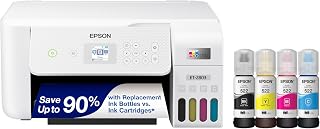
Pros
- Refillable tanks rather than cartridges
- Up to 4,500 black or 7,500 color pages per refill
- Print, scan, and copy in one unit
- Wi-Fi and USB connectivity
Cons
- Modest 5 ppm color speed
- Larger footprint than compact models
An everyday home printer has to cover schoolwork, forms, copies, and occasional color projects without making ink replacement a constant chore. The Epson EcoTank ET-2803 addresses that routine with refillable tanks rather than standard cartridges, while also combining printing, scanning, and copying in one wireless inkjet unit. Its supplied ink is stated to last up to two years, and a refill set can produce up to 4,500 black pages or 7,500 color pages. That makes the model particularly relevant for homes where document volume adds up over time. Wi-Fi and USB support give a household more than one connection option, while mobile app support and voice-activated printing add flexibility for shared use. The 10-page-per-minute black and 5-page-per-minute color ratings suit steady, smaller tasks, not rushed batches. Sharp text and vibrant color output are appropriate for most family documents and general home needs, although it is not positioned to replace a professional photo printer or color laser. At 8.8 pounds, this white all-in-one gives regular home printing a cartridge-free focus, with a scanner available when paperwork needs digitizing.
Model: Epson EcoTank ET-2803
Printer Type: Wireless All-in-One Inkjet (Print, Scan, Copy)
Print Speed: 10 pages per minute (black), 5 pages per minute (color)
Connectivity: Wi-Fi, USB
Special Features: Refillable ink tank, high-resolution scanner, color display, voice-activated printing, AirPrint, Epson Smart Panel app
Ink System: EcoFit refillable bottles (equivalent to 80 cartridges per set)
Page Yield: Up to 4,500 pages black, 7,500 pages color per ink set
Included Ink: 2 years of ink supply in the box
Color: White
Weight: 8.8 pounds
Warranty: Limited warranty (genuine Epson ink required for coverage)

For anyone tired of buying ink cartridges, the tank-based inkjet system paired with borderless printing makes this a practical everyday workhorse. Wi-Fi and USB connectivity cover both wireless convenience and a reliable wired backup, while Energy Star certification appeals to households mindful of running a printer often without driving up electricity use.
Pros
- Up to 6,000 black or 7,700 color pages per ink set
- Two years of included ink
- Borderless printing option
- Wireless, USB, and built-in LCD
Cons
- Single-sided printing only
- 6 ppm color speed
For a home printer, the important question is not simply whether it can produce a color page. It is whether routine documents, copies, and scans can be handled without frequent ink interruptions. Canon’s PIXMA G3270 answers that question with a MegaTank design, pairing refillable ink tanks with print, scan, and copy functions in a network-ready all-in-one. It includes two years of ink and is rated for up to 6,000 black-and-white pages or 7,700 color pages per ink set, a compelling setup for homes with recurring paper needs. Wireless and USB connectivity let it serve computers and other devices, and its built-in LCD puts core functions within easy reach. Borderless printing gives family photos and creative projects an additional option, while Energy Star and EPEAT qualifications support its efficiency-focused positioning. Output speeds of 11 pages per minute in black and 6 in color are suitable for everyday use, but large, time-sensitive jobs may feel slow. It also prints only one side at a time, so double-sided document jobs require manual handling. For a home where ink longevity matters more than automatic duplexing or speedy color output, this black MegaTank printer is a practical all-purpose choice.
Choose the G3270 for a household, home office, or small creative setup that prints regularly and wants a large stated page yield from a tank system. It is best for buyers who can accept manual handling of two-sided documents and do not need especially quick color printing. Skip it if automatic duplex printing is essential, if color-heavy work must move faster than 6 pages per minute, or if you need a printer focused on premium output rather than everyday value.
Connectivity: USB and Wi-Fi for flexible printing and network sharing
Print Technology: Inkjet with borderless printing capability
Print Speed: 11 pages per minute monochrome, 6 pages per minute color
Display: 1.35-inch square LCD screen
Functions: Print, copy, and scan in one device
Special Features: Energy Star certified, EPEAT qualified, network-ready, borderless printing support
Physical: 13.2 pounds, compact footprint suitable for desks and small workspaces
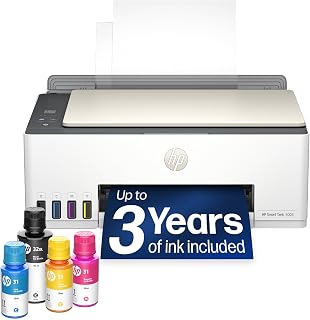
Families who print constantly but hate reordering cartridges will like the cartridge-free refillable tank system backed by up to three years of included ink. Support for AirPrint, Mopria, and scanning to PDF means phones, tablets, and laptops across the household can all connect easily, making this a low-maintenance hub for daily home printing and document scanning.
Pros
- Up to three years of included ink
- Cartridge-free refillable tank system
- AirPrint, Mopria, HP ePrint, and Wi-Fi support
- Print, scan, copy, and scan to PDF
Cons
- 5 ppm color printing
- Large jobs can take time
Households that want one printer for forms, assignments, copies, and scanning often benefit most from a machine designed to keep supplies simple. The HP Smart Tank 5003 uses a cartridge-free, refillable tank system and combines color printing, scanning, and copying in a single home-oriented unit. Its included ink is rated for up to three years, or approximately 6,000 pages, which gives everyday users a long runway before replacement ink becomes a concern. Connection choices are a major part of its home appeal. In addition to Wi-Fi and USB, it supports Apple AirPrint, Mopria, HP ePrint, and Print Anywhere, making it suited to homes where printing begins from phones, tablets, and computers. Scan-to-PDF capability helps keep paperwork digital without a separate scanner. At 11.1 pounds, it is a manageable all-in-one for residential spaces, with mess-free refilling intended to reduce the fuss of tank maintenance. Its performance is tuned for ordinary home output: black printing reaches 10 pages per minute and color printing 5. That is sufficient for smaller recurring jobs, but a poor match for users who regularly send large batches or need faster color production. Crisp black text and acceptable color support its role as an everyday home workhorse.
Connectivity: Wireless (Wi-Fi), USB, Apple AirPrint, HP ePrint, Mopria Print Anywhere
Printing Technology: HP Thermal Inkjet
Print Speed: 10 pages per minute (black and white), 5 pages per minute (color)
Special Features: Wireless printing, high-volume refillable ink tank, print from phone or tablet, scan to PDF, borderless printing
Output: Color
Color: Oatmeal White with Portobello accents
Weight: 11.1 pounds
Model: HP Smart Tank 5003 All-in-One Printer (9B2D3A)
Buy the Smart Tank 5003 if your household wants long-lasting included ink, a cartridge-free design, and flexible mobile printing for day-to-day documents. It suits people who also need occasional copies, scans, or PDFs but do not have a separate scanner. Skip it if high-speed output is central to your routine, especially for large color jobs. It is also less suitable for buyers who expect the included ink to cover all long-term ownership.

Pros
- 36 ppm monochrome laser output
- Automatic duplex and envelope printing
- 50-page automatic document feeder
- Wi-Fi, Ethernet, USB, and mobile support
Cons
- Monochrome output only
- No built-in fax
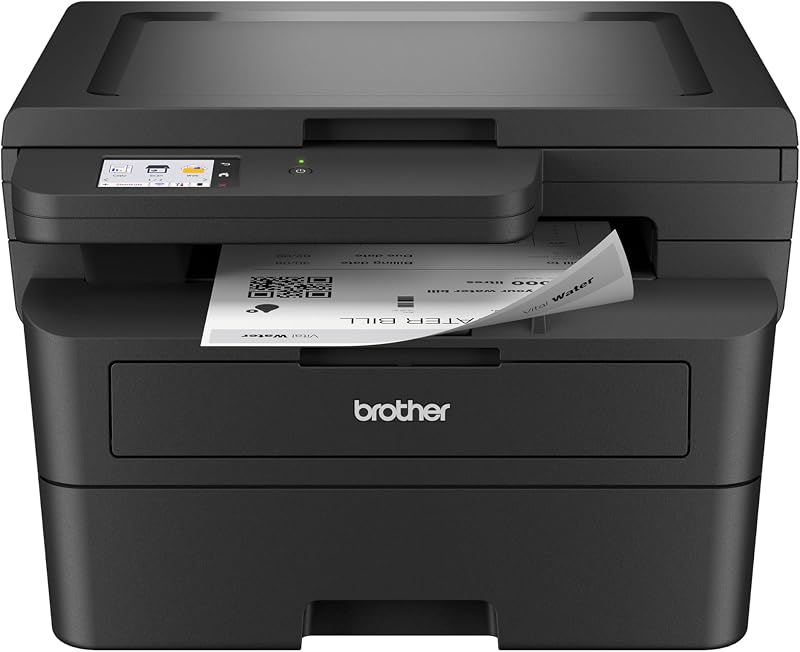
Home printing does not always require color, and the Brother DCP-L2640DW centers its value on everyday black-and-white paperwork. It combines printing, copying, and scanning in one laser machine, with a 36-page-per-minute monochrome print speed for home offices and households that regularly produce text documents. Automatic duplex printing is especially useful when those documents run to several pages, while envelope printing broadens its routine utility. Its 50-page automatic document feeder separates it from basic home all-in-ones: stacks of pages can be copied or scanned rather than processed one sheet at a time. The scanner can also send files to email, and Brother Mobile Connect supports printing and scanning from mobile devices. Wi-Fi, Ethernet, and USB provide several ways to connect it. At 15.7 by 16.1 by 12.5 inches, it is compact enough for a home office surface, though it still weighs 25 pounds. The tradeoff for its document focus is decisive: output is monochrome only, with no fax capability.
Connectivity: Dual-band Wi-Fi (2.4GHz / 5GHz), Ethernet, USB
Print Technology: Laser, Monochrome
Print Speed: 36 pages per minute (monochrome)
Scan Speed: 23.6 ipm (black), 7.9 ipm (color)
Auto Document Feeder: 50 pages
Key Features: Auto-duplex printing, Energy Star certified, EPEAT qualified, envelope printing, scan to email, network-ready
Dimensions: 15.7 inches D x 16.1 inches W x 12.5 inches H
Weight: 25 pounds
Model: DCP-L2640DW
Color: Black
Buy it for a home office or household where text-based printing and quick monochrome output matter. It suits people who scan or copy multi-page paperwork often, since its automatic document feeder eliminates repeated flatbed loading. Its Wi-Fi, Ethernet, USB, and mobile printing and scanning options also accommodate varied device setups. Skip it if household tasks include color output. It is also not the right match for anyone who needs faxing or wants a printer that is easy to move frequently.

The touch screen and auto power on feature make this an easy pick for a shared family printer, cutting down on fumbling through buttons for quick jobs. Auto-duplex handles double-sided printing automatically, and borderless printing is a nice bonus for photos or flyers, all wrapped in a supertank design that suits frequent, ink-heavy home use.
Pros
- Refillable ink system with high page yields
- Automatic two-sided printing
- Borderless photos up to 8.5 by 11 inches
- Touchscreen and smartphone compatibility
Cons
- Mobile app is basic
- Initial Wi-Fi pairing can be clunky
Among home printers, the Canon PIXMA G3290 MegaTank makes the strongest case for families or home offices that print often enough to value a refillable ink system. An ink set is rated for up to 6,000 black pages and 7,700 color pages, making the printer's central strength clear before considering its other all-in-one functions. It also prints, scans, and copies, with automatic two-sided printing for everyday paperwork and borderless photos up to 8.5 by 11 inches for family images. The 2.7-inch color touchscreen provides guided setup and control, while Auto Power On adds convenience for a printer that may sit unused between jobs. It accepts plain paper, cardstock, labels, envelopes, glossy photo paper, and high-resolution paper, so it can move between household documents and creative projects. Wireless connectivity and smartphone compatibility suit a home where several people may send print jobs. Sharp text and vibrant color come from its hybrid pigment-black and dye-color ink system. There are a few practical limits: the mobile app is basic, and initial Wi-Fi pairing can be clunky on some mobile devices. Still, this is an especially well-rounded everyday inkjet when frequent color and document printing are part of the routine.
Printer Type: Inkjet SuperTank multifunction (print, copy, scan)
Print Speed: Up to 11 pages per minute black and white
Print Resolution: 4800 x 1200 dpi
Paper Capacity: 100 sheets (plain), 20 sheets (photo)
Ink System: 4-color (black, cyan, magenta, yellow) with page yields of 6,000 black and 7,700 color pages per set
Connectivity: USB 2.0, WiFi wireless
Display: 2.7-inch LCD color touchscreen
Dimensions: 16.4 inches wide x 14.3 inches deep x 7 inches high
Weight: 14.2 pounds
Warranty: 1-year limited warranty with Canon support
Choose the G3290 for a household or small home office that prints documents and color photos regularly, wants a refillable-ink format, and has room for its 16.4-inch width. The touchscreen, automatic duplexing, borderless photo capability, and support for cardstock, labels, and envelopes make it versatile for daily projects. Skip it if trouble-free mobile setup is your first priority or if you want a feature-rich mobile app, as initial Wi-Fi pairing can be clunky on some devices.

For a home office corner or small household setup, the refillable ink tank keeps ongoing costs low without sacrificing color output for everyday documents and photos. Mobile printing capability lets you send jobs straight from a phone, and at just 11.4 pounds it is easy to reposition as your desk or workspace needs change.
Pros
- Refillable ink tank system
- Print, copy, and flatbed scanning
- High-resolution color output
- Mobile and voice-activated printing
Cons
- Manual double-sided printing
- Moderate speed and 100-sheet tray
Printing a few pages at a time does not require a bulky home-office machine, and the Epson EcoTank ET-2800 is aimed at that everyday home role. Its refillable ink tank is the defining feature: the included bottles provide up to two years of ink for typical home use, and each replacement set is equivalent to approximately 90 individual cartridges. For a household that regularly produces forms, school documents, and photos, that format is more central to its appeal than raw speed. The printer prints, copies, and scans, with a built-in flatbed scanner, mobile printing capability, and voice-activated printing. Its 5760 by 1440 dpi color resolution and Micro Piezo Heat-Free Technology support vivid, detailed documents and photos, while it accepts plain paper, envelopes, and glossy photo paper. At 11.4 pounds, it is relatively light. The trade-off is a more basic workflow: its 10-page-per-minute print speed is moderate, double-sided documents need manual intervention, and the 100-sheet tray will need reloading during substantial sessions. It is a sensible everyday inkjet choice when refillable ink matters more than automated two-sided jobs or fast batch output.
Printer Type: Inkjet with refillable EcoTank system
Print Speed: 10 ISO pages per minute (black and color)
Resolution: 5760 x 1440 dpi (color), 5760 dpi (black and white)
Ink Capacity: Up to 4,500 black pages and 7,500 color pages per set
Functions: Print, scan, copy in one device
Scanner: Flatbed with 720 x 720 dpi color resolution
Connectivity: Wireless, mobile app support, voice-activated printing
Media Support: Plain paper, glossy photo paper, envelopes up to 8.5 x 14 inches
Paper Capacity: 100-sheet single tray
Display: LCD color display for easy navigation
Dimensions: 22.8 x 14.8 x 10 inches
Weight: 11.4 pounds
Power Consumption: 12 watts
Warranty: 1-year limited warranty
Buy the ET-2800 for routine home printing where a refillable ink tank, scanning, copying, and mobile printing are the priority. It suits households that want color documents and photos but do not need to process heavy print batches quickly. Skip it if automatic duplex printing is nonnegotiable, if you regularly send large jobs that exhaust a 100-sheet tray, or if you want output faster than its 10-page-per-minute pace.
Buying Guide
Ink Type and Your Real Printing Volume
Start with the pages your household produces in an ordinary month, not a one-time project. Refillable tanks make sense when color worksheets, forms, and photos appear frequently because their large reservoirs reduce replacement interruptions. The Epson EcoTank ET-2903 Wireless All-in-One Color combines stated high yields with a color screen, a 100-sheet tray, and a flatbed scanner.
The Epson EcoTank ET-2803 Wireless Color All-in-One and Epson EcoTank ET-2800 Wireless Color All-in-One focus on cartridge-free everyday printing, with refill bottles intended to reduce cartridge waste. Canon MegaTank G3270 All-in-One Wireless Color has substantial stated page yields but single-sided printing, while Canon Megatank G3290 All-in-One Wireless Printer adds automatic two-sided output and a color touchscreen. Choose a tank model if your ongoing page volume can take advantage of that supply design.
Scanning, Copying, and Paper-Saving Features
A flatbed scanner is enough for a permission slip, photo, or single-page form, but an automatic document feeder changes the routine for multi-page packets. The Canon PIXMA TR7120 Wireless Color Inkjet Printer includes an ADF alongside automatic two-sided printing, making it a strong fit for recurring home-office paperwork. The Brother DCP-L2640DW Wireless Compact Monochrome also has a 50-page ADF for higher-volume black-and-white scanning and copying.
For lighter document chores, the Canon PIXMA TS6520 Wireless Color Inkjet Printer combines scanning, copying, and automatic two-sided printing in a compact all-in-one. The HP Envy 6155 Wireless All-in-One Color Inkjet adds a 100-sheet input tray and a responsive color touchscreen for straightforward everyday control. When important scans need to move between devices, pair your workflow with one of these portable SSD options for Mac.
Color Output or Fast Monochrome Documents
Choose a color inkjet or tank printer if your list includes family photos, school visuals, craft materials, or charts that need colored details. The HP Envy 6155 Wireless All-in-One Color Inkjet uses true-to-screen technology for vivid documents and photos, while the Epson EcoTank ET-2903 Wireless All-in-One Color is rated for high-resolution output. Borderless printing on the HP Smart Tank 5003 Wireless All-in-One Ink Tank is useful for photo-oriented projects and invitations.
If your printer mostly handles letters, invoices, reading packets, and shipping paperwork, monochrome laser output is the more focused route. The Brother DCP-L2640DW Wireless Compact Monochrome produces up to 36 pages per minute and includes duplex printing, an ADF, Ethernet, and dual-band wireless. You give up color, but gain a machine designed around quick black-and-white document flow rather than occasional photo work.
Connectivity, Controls, and Workspace Fit
Wireless convenience matters most when several people print from phones, tablets, and laptops. Canon PIXMA TS6520 Wireless Color Inkjet Printer, Canon PIXMA TR7120 Wireless Color Inkjet Printer, HP Envy 6155 Wireless All-in-One Color Inkjet, and Brother DCP-L2640DW Wireless Compact Monochrome all offer dual-band Wi-Fi. Epson EcoTank models support mobile printing through the Epson Smart Panel app, Apple AirPrint, and related mobile services.
Think beyond printing when you set up a shared work area. If scanned documents will live in a household archive, a NAS hard drive guide can help you plan storage alongside the printer. Measure desk depth and leave space for paper loading, especially if the printer shares a surface with a tenkeyless keyboard or a dedicated number pad.
Final Thoughts
For a household with recurring documents and color pages, the Epson EcoTank ET-2903 Wireless All-in-One Color is a compelling long-run choice because of its refillable tanks and generous included ink supply. If rapid black-and-white paperwork is your priority, the Brother DCP-L2640DW Wireless Compact Monochrome offers a faster, ADF-equipped path, so choose according to what fills your paper tray most often.
Frequently Asked Questions
What is the best home printer for a family that prints often?
Families with regular homework, forms, and color pages should give refillable tank printers serious consideration. The Epson EcoTank ET-2903 Wireless All-in-One Color, Epson EcoTank ET-2803 Wireless Color All-in-One, and HP Smart Tank 5003 Wireless All-in-One Ink Tank are built around high-capacity ink supplies. Pick the model whose scanner, display, duplex capability, and paper handling align with your daily routine.
Are refillable ink tank printers a smart choice for occasional use?
They can be, especially if you want fewer cartridge changes and expect your printing needs to grow over time. However, the benefit is clearest for households that print often enough to use their ink supply steadily. If you only print a few simple pages now and then, a conventional cartridge all-in-one such as the Canon PIXMA TS6520 Wireless Color Inkjet Printer may be the more straightforward fit.
Should I choose a monochrome laser or a color inkjet for home?
Choose monochrome laser when speed, crisp text, and frequent black-and-white documents matter more than color. The Brother DCP-L2640DW Wireless Compact Monochrome also brings duplex printing and a 50-page ADF, which helps with batches of paperwork. Select a color inkjet or tank printer if photos, classroom graphics, borderless prints, or colorful documents are part of your regular mix.
Which features matter most in a home printer in 2026?
Start with dependable wireless access, a scanner and copier, and the ink system that suits your page volume. Automatic two-sided printing reduces paper use, while an ADF saves time if you scan or copy multi-page documents. A clear display, mobile app support, and a paper tray sized for your routine make the printer easier to live with long after setup day.





Write Your Review
No reviews yet. Be the first to share your experience!