

Whether you need crisp documents for a home office or vibrant photo prints to share with family, Canon offers a lineup that covers nearly every use case. The challenge is narrowing down which model actually fits your workflow, especially when the options range from compact portable printers to full-featured color laser machines. If you are also weighing options from other brands, our roundup of best home printer picks for 2026 is worth a look before committing.
This guide evaluates eight Canon printers across different categories so you can match the right model to your needs. We assessed print quality, connectivity, running costs, and overall value to give you a clear picture of what each machine delivers.
Quick answer
This guide compares 8 picks, with Canon SELPHY CP1500 Portable Wireless Photo Printer ranked first. Canon PIXMA G3270 Wireless All-in-One Ink Tank Printer has the most customer reviews.

Capturing physical photos on the go, say at a party or while traveling, calls for something pocketable, and this dye sublimation printer weighs just 1.58 kg with a footprint barely larger than a stack of photo paper. Wireless connectivity and Android compatibility let a phone send images directly, producing lab-quality snapshots without needing a computer nearby.
Pros
- Lab quality, water resistant prints rated to last up to 100 years
- Compact and portable at 1.58 kg with optional battery pack
- LCD screen for previewing, cropping, and filtering before printing
- Wireless printing via WiFi and Bluetooth through Canon PRINT app
Cons
- Inconsistent USB/WiFi connection reliability with desktop computers
- All-in-one cartridge system raises cost per print
Among Canon's 2026 lineup, the SELPHY CP1500 fills a completely different need than the document-focused models on this list: it's the one to pick if photo printing, not paperwork, is the priority. It uses dye sublimation rather than inkjet, producing lab quality prints with sharp detail and vibrant color that come out dry and water resistant, rated to last up to 100 years. The 3.5 inch LCD lets you preview, crop, and apply filters before printing, so you get creative control without hooking up a computer. At 1.58 kg with a small footprint, it is genuinely portable, and it connects over WiFi or Bluetooth through the Canon PRINT app, plus USB and memory card options for older devices. An optional battery pack lets it run cordless. The tradeoff is desktop support: some users have had trouble connecting it reliably to Windows or Mac machines. It also uses an all-in-one cartridge system, which raises the cost per print compared to standard document printers. If your printing need is photos on the go rather than documents at a desk, this is the model on the list built for that.
Event photographers and party hosts who want instant physical prints to share with guests as memories are made. The portable design and fast print speed work perfectly for weddings, reunions, and celebrations.
Photography enthusiasts and hobbyists who store thousands of photos digitally but rarely print them. This printer removes friction and makes physical prints feel special and intentional.
Families wanting a dedicated photo printer for scrapbooking, memory preservation, and daily printing without the hassle of online orders. The 100-year durability and water-resistant prints provide peace of mind for precious moments.
Content creators and social media users who want to bridge digital and physical worlds, creating tangible merchandise from digital content or gifting physical prints to followers and collaborators.
Physical: Dimensions 7.2 x 5.2 x 2.3 inches, Weight 1.58 kg, Compact and portable design
Print Quality: Dye-sublimation technology, 300 x 300 DPI resolution, Instant-dry water-resistant prints
Media Support: 4x6 inch photos, 2.1x2.1 square prints, mini label stickers, glossy photo paper
Connectivity: WiFi, USB 2.0, memory card reader, smartphone app (iOS/Android), AirPrint compatible
Display: 3.5-inch LCD with editing and filter capabilities
Speed: Approximately 1.5 pages per minute
Capacity: 10-sheet output capacity
Warranty: Limited warranty with 100-year spare parts availability

Someone who wants crisp borderless prints for photos or greeting cards without a bulky machine will appreciate the compact 14.8 by 14 by 6.7 inch frame and the 1.42 inch OLED display for quick menu navigation. Auto-duplex printing adds everyday practicality for reports, while Alexa control fits a household that already manages other devices by voice.
Pros
- Compact, lightweight design at 15.4 pounds
- Automatic duplex printing and solid photo quality
- Simple wireless setup from phones, tablets, and laptops
- Clear OLED display for ink and status feedback
Cons
- No automatic document feeder for batch scanning or copying
- 11 ppm print speed limits higher-volume use
Not every need calls for a laser workhorse, and the PIXMA TS6520 rounds out this lineup as the lightweight, budget-conscious option for home users and students. Its compact chassis and 15.4-pound weight make it easy to fit into a dorm room or small home office, and it covers printing, scanning, and copying in one unit. Wireless setup is simple, and once connected it prints reliably from smartphones and tablets through the Canon PRINT App, AirPrint, and Mopria. Automatic duplex printing helps cut down on paper use, and the hybrid 2-cartridge ink system delivers sharp text alongside solid photo output for everyday needs. The 1.42-inch OLED display offers quick, clear feedback on ink levels and status without overcomplicating things. For anyone shopping this Canon lineup who wants a low-fuss machine for occasional home or school printing rather than office-scale output, this is the model that fits that specific need best.
Printer Type: Inkjet all-in-one (print, scan, copy)
Print Speed: 11 pages per minute (black and white)
Resolution: 600 x 600 dpi
Color Output: Cyan, Magenta, Yellow, Black (CMYK)
Media Support: Plain paper, letter size (8.5 x 11 inches), with and without borders
Features: Automatic duplex (2-sided) printing, flatbed scanner, borderless printing, OLED display
Connectivity: Wi-Fi dual-band (2.4GHz and 5GHz), USB, mobile printing (Canon PRINT App, Apple AirPrint, Mopria)
Display: 1.42-inch monochrome OLED screen
Dimensions: 14.8 inches deep, 14 inches wide, 6.7 inches high
Weight: 15.4 pounds
Warranty: 3-year manufacturer limited warranty
Compatible Cartridges: PG-295 pigment-based black ink and CL-286 dye-based color ink tanks
Compatible Devices: Laptops, PCs, smartphones, tablets
Voice Control: Amazon Alexa compatible
This suits home users, students, or anyone who prints occasionally and wants an easy, compact all-in-one. It is a good fit for small spaces like dorms or shared workspaces. Skip it if you need to scan or copy multiple pages at once, since there is no automatic document feeder, or if you print frequently, since 11 pages per minute and ongoing ink cartridge costs will add up for high-volume use.

A household juggling homework, forms, and the occasional scanned document benefits from the auto document feeder and auto-duplex printing here, which saves paper and manual flipping. At 18 pounds and under 15 inches wide, it tucks into a small desk or kitchen counter, while the Alexa-compatible control panel lets anyone in the house start a print job hands-free.
Pros
- Auto Document Feeder for multi-page originals
- Automatic duplex printing included
- Compact footprint fits most desks
- Supports AirPrint, Mopria, and Alexa control
Cons
- Single 100-sheet paper tray
- Maximum paper size limited to 8.5 x 14 inches
For readers scanning this roundup for an all-rounder rather than a specialist, the PIXMA TR7120 fits the brief well. It covers the core needs most households and hybrid workers actually have: printing, scanning, and copying, plus an Auto Document Feeder that handles multi-page originals without manual page-by-page feeding. Automatic duplex printing adds another layer of everyday convenience for anything from school assignments to contracts. The compact 14.8 x 14 x 8.2 inch footprint and 18-pound weight keep it desk-friendly, and a monochrome display makes navigation straightforward. Connectivity is a strong point here, with support for Canon PRINT App, Apple AirPrint, Mopria Print Service, and even Amazon Alexa control, so it fits into a variety of home tech setups. Print speeds are modest and the single 100-sheet tray caps how much paper you can load at once, so this is better suited to everyday document work than high-volume output. Maximum paper size is 8.5 x 14 inches, so oversized print jobs are out. As an all-purpose home model among the eight printers covered, it's a sensible middle-ground choice.
Good for home offices and hybrid workers who regularly scan or copy multi-page documents and want duplex printing without extra steps. The compact size and Alexa support suit shared living spaces too. Skip it if you need high-volume output, oversized paper handling beyond 8.5 x 14 inches, or more than a single 100-sheet tray, since this model is built for moderate, everyday use rather than heavy document workloads.
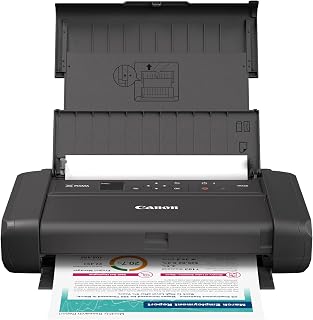
A student or remote worker who prints occasionally from different locations, like a dorm room or coffee shop, benefits from the lightweight, portable build and USB connectivity that avoids dependence on home Wi-Fi. Energy Star efficiency also suits intermittent use, making this a sensible pick for someone who values grab-and-go convenience over built-in scanning or copying features.
Pros
- Weighs just 4.5 pounds for portability
- 5-color hybrid ink system for text and color
- Energy Star certified
- Simple USB connectivity
Cons
- Print speeds of 5.5 and 9 pages per minute are slow
- Maximum print size limited to 8.5x11 inches
Among the eight models in this lineup, the PIXMA TR160 stands out as the one built for printing on the move rather than sitting in a fixed office. At 4.5 pounds, it's light enough to carry between a home desk, a coffee shop, or a shared workspace, which makes it the pick for anyone whose printing need is tied to flexibility rather than a dedicated setup. It handles color and monochrome printing over USB, with a 5-color hybrid ink system aimed at producing sharp text alongside usable color output. Speeds of 5.5 pages per minute in color and 9 in monochrome are modest, in line with what you'd expect from a portable unit rather than a desktop workhorse. Energy Star certification reflects sensible power use for a device meant to travel. The maximum print size tops out at 8.5x11 inches, so it's built for standard documents, not larger formats. For this list's purpose, it fills the niche of a genuinely mobile Canon option when the other picks are better suited to a stationary desk or office.
Model: Canon PIXMA TR160
Printing Technology: Inkjet
Color Capability: Full color with 5-color hybrid ink system
Maximum Print Size: 8.5 x 11 inches
Print Speed (Color): 5.5 pages per minute
Print Speed (Monochrome): 9 pages per minute
Connectivity: USB, Wireless (Wi-Fi), Canon PRINT app, Apple AirPrint, Mopria Print Service
Weight: 4.5 pounds
Display: 1.44-inch monochrome OLED
Special Features: Energy Star certified, borderless printing, square format printing, wireless direct mode
Best for students, remote workers, or anyone who needs a printer that travels between locations and only needs occasional output. Its light weight and simple USB connection make it easy to set up anywhere. Skip it if you need wireless networking, faster print speeds, or regular high-volume printing, since the modest 5.5 and 9 pages per minute speeds and 8.5x11 inch maximum size limit it to light, standard-document use.

A busy office printing contracts, marketing materials, and daily correspondence in bulk needs laser speed and consistency, and this all-in-one color duplex unit is built for that workload with plain paper handling and Energy Star efficiency. At 50 pounds, it's clearly designed to sit permanently in a workspace rather than move around, matching heavier daily print demands.
Pros
- 35 ppm speed keeps busy offices moving
- Noticeably cheaper Canon toner versus HP equivalents
- 4-in-1 functionality with 50-sheet duplex ADF
- Responsive 5-inch color touchscreen and wireless printing
Cons
- Base 250-sheet paper tray may need frequent refills
- Expanding to 850-sheet capacity requires optional cassettes
If your office needs are outgrowing a basic printer, the imageCLASS MF753Cdw II earns its spot on this list as the pick for teams that print often and in volume. The 35 page-per-minute output and 1200 x 1200 dpi quality mean it keeps pace with busy workdays, handling everything from internal memos to client-facing materials without slowing down. What really justifies calling this a top model for 2026 is the ownership cost story: Canon Genuine Toner 069 runs noticeably cheaper than comparable HP cartridges, which matters a lot once you factor in months of use. The 4-in-1 design adds scanning, copying, and faxing, and the 50-sheet duplex ADF makes multi-page jobs painless. Add wireless printing from laptops, PCs, and smartphones, and a touchscreen that keeps navigation simple, and you have a machine built to be the workhorse of a small office rather than just an occasional printer.
Printing: 35 pages per minute color and black-and-white, 1200 x 1200 dpi resolution, supports legal-size paper (8.5 x 14 inches), standard cassette holds 250 sheets plus 50-sheet multipurpose tray.
Scanning and Document Handling: 50-sheet duplex automatic document feeder, 1200 x 1200 dpi color copy resolution (600 x 600 dpi black-and-white), supports up to legal size.
Connectivity and Control: Wireless networking, Canon PRINT mobile app compatible with laptops, PCs, and smartphones, 5-inch color touchscreen interface, Energy Star certified.
Physical and Support: 50 pounds, 18.2 inches deep by 16.8 inches wide by 17 inches tall, uses Canon Genuine Toner 069 or 069H cartridges, 3-year limited manufacturer warranty included.
Buy this if you run a small office or hybrid team that prints frequently and wants to keep toner costs down over time. The speed, duplex ADF, and 4-in-1 functions suit anyone replacing an aging inkjet or budget laser. Skip it if you print only occasionally, have very limited desk space, or need high paper capacity out of the box, since the base 250-sheet tray may mean frequent refills unless you add optional cassettes.

Anyone printing in high volume, like a home office churning out invoices or school handouts, wants refillable ink over cartridges, and this MegaTank system delivers that along with borderless printing for edge-to-edge photos or flyers. The display screen simplifies status checks, and Energy Star and Epeat qualifications matter to buyers weighing long-term running costs and environmental impact.
Pros
- Up to 6,000 BW or 7,700 color pages per ink set
- Two years of ink included from the start
- Wireless printing from multiple devices
- Energy Star and EPEAT certified
Cons
- No automatic duplex printing
- Color print speed limited to 6 pages per minute
If your idea of the best Canon printer is one you barely have to feed money into, the PIXMA G3270 earns its spot on this list. Among the eight models here, it is the clear pick for anyone whose printing need is volume rather than speed or frills. The MegaTank refillable ink system is rated for up to 6,000 black and white or 7,700 color pages per set, and two years of ink ship with the unit, so the usual cycle of buying cartridges disappears for a long stretch. It still covers the all-in-one basics, printing, copying, and scanning, with Wi-Fi so multiple devices in a home office or small studio can send jobs to it. An LCD screen keeps setup and monitoring simple. Color output tops out at 6 pages per minute, which is modest, and there is no auto-duplex, so double-sided jobs take manual flipping. For this article's angle, those are acceptable trade-offs given what you gain in running costs. Energy Star and EPEAT credentials are a nice bonus for efficiency-minded buyers.
Best for home offices, small businesses, or creative studios that print often enough to care about cost per page, since the tank system and two years of included ink pay off with volume. Skip it if you need fast color output, automatic duplex printing, or only print occasionally, since a cartridge printer may suit light, infrequent use better and the 6 pages per minute color speed will feel slow for anyone with regular color-heavy jobs.
Connectivity: USB and Wi-Fi for flexible printing and network sharing
Print Technology: Inkjet with borderless printing capability
Print Speed: 11 pages per minute monochrome, 6 pages per minute color
Display: 1.35-inch square LCD screen
Functions: Print, copy, and scan in one device
Special Features: Energy Star certified, EPEAT qualified, network-ready, borderless printing support
Physical: 13.2 pounds, compact footprint suitable for desks and small workspaces

For a shared family or small business setup needing fast, low-cost refills, the SuperTank design paired with auto-duplex and a touch screen makes repetitive two-sided printing straightforward without constantly swapping cartridges. Auto power on means it wakes the moment a job is sent, which suits users who want a printer that behaves more like a convenience appliance than a chore.
Pros
- MegaTank refill system cuts long term ink costs
- Compact all-in-one: print, scan, copy in one unit
- Auto-duplex printing and touchscreen controls
- Handles varied media: cardstock, envelopes, glossy photo paper
Cons
- WiFi pairing can be inconsistent on some mobile devices
- Minimal printed documentation, relies on on-screen or online guides
When you're narrowing down the best Canon printer for 2026, the G3290 earns its spot as the pick for anyone who prints a lot and wants to stop worrying about ink. Instead of cartridges, it runs on Canon's MegaTank refill system, which keeps per-page costs low for households and small offices that print constantly. For this list, what matters most is versatility: it prints, scans, and copies from a compact body that fits on a crowded desk, and the 2.7 inch touchscreen keeps daily operation simple. It handles plain paper, glossy photo stock, envelopes, labels, and cardstock, with automatic two sided printing built in. Copy speed sits at 11 pages per minute, which is reasonable for home or small office copy jobs. Wireless setup can be a bit finicky on some Android phones, and the printed manual is sparse, but once connected it runs reliably. For buyers comparing Canon models by need rather than brand loyalty, this one serves the high volume, low cost per page need best.
Printer Type: Inkjet SuperTank multifunction (print, copy, scan)
Print Speed: Up to 11 pages per minute black and white
Print Resolution: 4800 x 1200 dpi
Paper Capacity: 100 sheets (plain), 20 sheets (photo)
Ink System: 4-color (black, cyan, magenta, yellow) with page yields of 6,000 black and 7,700 color pages per set
Connectivity: USB 2.0, WiFi wireless
Display: 2.7-inch LCD color touchscreen
Dimensions: 16.4 inches wide x 14.3 inches deep x 7 inches high
Weight: 14.2 pounds
Warranty: 1-year limited warranty with Canon support
Best for home offices, families, or small businesses that print frequently and want to cut long term ink costs without sacrificing scan and copy functions. The compact size suits tight spaces like dorms or kitchens. Skip it if you mainly print photos occasionally or want the absolute simplest out of box wireless setup, since initial WiFi pairing has tripped up some users and the included documentation is minimal.

Teams that only need reliable output, not scanning or copying, will find the 26 pages per minute speed and wireless duplex printing suited to fast document turnaround in a shared office. Weighing 27.6 pounds with plain paper support, it's positioned as a focused workhorse for print queues rather than an all-in-one, which keeps operation simple for IT to maintain.
Pros
- 26 ppm with a fast 10.3-second first print
- Automatic duplex printing saves paper
- Compact 16.8-inch-wide footprint
- Wireless printing via Wi-Fi, AirPrint, and Mopria
Cons
- Print-only, no scanning or copying
- High-volume environments may find better per-page costs elsewhere
For anyone whose main need is dependable color output without the bells and whistles, the LBP646Cdw makes the case for going print-only. It earns its place here as the model built for speed and simplicity rather than versatility. At 26 pages per minute with a 10.3-second first print, it keeps queues short, and automatic duplex printing cuts paper use while high-capacity toner cartridges mean fewer replacement cycles. Wireless support through Wi-Fi, AirPrint, and Mopria covers printing from laptops, PCs, and smartphones, so it fits into a modern, device-flexible office. Its compact 16.8-inch-wide frame does not take up much room, and the 5-line LCD keeps setup and daily operation uncomplicated. Backed by a 1-year limited warranty and Canon's reliability reputation, this is the printer for anyone who has decided an all-in-one is more machine than they need, and would rather pay for fast, clean color pages than for scanning or copying they will rarely use.
Choose this if you need fast, high-quality color printing and have no real use for scanning or copying. It suits small offices or home setups where desk space is limited and simplicity matters. Skip it if your workflow depends on scanning, copying, or faxing, since this is print-only by design, and also skip it if you print at very high volumes where larger-capacity systems offer better per-page value.
How to Choose the Right Canon Printer
Print Type: Photos vs. Documents
Your primary use case should drive everything else. If you mainly print family photos or creative projects, a dedicated photo printer like the Canon Selphy CP1500 Wireless Compact Photo Printer delivers dye-sublimation quality with water-resistant results that last up to 100 years. For everyday documents, an inkjet or laser all-in-one will serve you much better.
Photo-specific printers optimize for color accuracy and finish, while general-purpose inkjets balance text sharpness with color output. Knowing which you prioritize saves you from buying more machine than you need, or too little.
Ink System and Running Costs
Ink costs can easily outpace the printer itself over time. Canon’s MegaTank series, including the Canon MegaTank G3270 All-in-One Wireless Color and the Canon Megatank G3290 All-in-One Wireless Printer, uses refillable ink tanks that can produce thousands of pages per fill. That makes them a strong fit for households or small offices with high print volume.
If you print infrequently, a standard cartridge-based inkjet like the Canon PIXMA TS6520 Wireless Color Inkjet Printer may be a more practical choice. For laser printing, the Canon Color imageCLASS MF753Cdw II uses high-capacity toner that delivers consistent output with low per-page costs. Our guide to the best laser printer for home digs deeper into this category if laser is your preference.
All-in-One Features vs. Print-Only
If you need to scan, copy, or fax, an all-in-one saves you space and money compared to separate devices. The Canon PIXMA TR7120 Wireless Color Inkjet Printer adds an Auto Document Feeder for handling multi-page scans and copies without manual feeding. That one feature alone can save significant time if you regularly process contracts, forms, or school paperwork.
If you only need printing, a dedicated print-only machine like the Canon Color imageCLASS LBP646Cdw Wireless Laser tends to be faster and more reliable, since it does one job without compromise. For small business environments, our roundup of the best printer for small business covers more options worth considering.
Portability and Space
Not everyone has a dedicated office. If you work from multiple locations or have limited desk space, a compact or portable model changes the game. The Canon PIXMA TR160 Color Wireless Portable Printer is slim enough to fit in a backpack and supports wireless direct mode, so you can connect your phone without needing a router at all.
Compact photo printers like the Selphy CP1500 are also worth considering for occasional photo printing without taking up permanent counter space. If photo output is a priority, our best printer for photos guide covers the full landscape of dedicated options.
Final Thoughts
Canon’s lineup covers a wide range of needs without sacrificing quality at any tier. For high-volume home or office printing where ink costs matter most, the Canon Megatank G3290 All-in-One Wireless Printer is hard to beat with its touchscreen, auto duplex, and massive page yields. If you want a compact, capable all-in-one that handles everyday tasks reliably without a lot of complexity, the Canon PIXMA TS6520 Wireless Color Inkjet Printer delivers strong performance at an approachable level. Either way, you are in good hands with Canon.
Frequently Asked Questions
Which Canon printer is best for home use in 2026?
It depends on what you print most. For general home use including documents, school projects, and occasional photos, the Canon PIXMA TS6520 or PIXMA TR7120 are both solid all-in-one choices with wireless connectivity and auto duplex. If photo printing is your main goal, the Canon Selphy CP1500 is purpose-built for that and delivers exceptional results.
Is Canon MegaTank worth it for home printing?
Yes, if you print regularly. The MegaTank series uses refillable ink tanks rather than replaceable cartridges, which dramatically lowers the per-page cost over time. The Canon Megatank G3290 adds a color touchscreen and auto 2-sided printing, making it one of the more well-rounded options in Canon’s current lineup for home and home office users.
What is the difference between Canon PIXMA and Canon imageCLASS printers?
Canon PIXMA printers are inkjet models designed for home and light office use, offering flexible media support including photos and documents. Canon imageCLASS printers are laser-based and built for faster, higher-volume output in small office or business environments. The imageCLASS MF753Cdw II and LBP646Cdw are good examples of that speed-focused, business-ready design.
Can I print from my phone with a Canon printer?
Yes, nearly every current Canon model supports mobile printing. Options include the Canon PRINT app, Apple AirPrint, and Mopria Print Service, all of which work over your home Wi-Fi. The Canon PIXMA TR160 goes a step further with Wireless Direct mode, letting you connect your phone directly to the printer without a router. You can explore more versatile home office setups at our Home Office category page.
Common questions
Should I buy an inkjet or laser printer for home use?
Inkjet is the better pick for most home users, especially for color photos and documents. Canon's inkjet lineup, like the PIXMA TS6520 and the MegaTank series, handles borderless photo printing, plain paper, and even card stock or glossy photo paper. Laser printers suit high-volume black and white text printing better, but lack the color photo quality and paper flexibility that Canon's inkjet models offer for everyday mixed use at home or in a small office.
What is the running cost of a Canon MegaTank printer?
The running cost is low because MegaTank models like the G3270 and G3290 use refillable ink tanks instead of cartridges. This SuperTank inkjet design means you buy ink bottles rather than replacing individual cartridges, which cuts the cost per page significantly over time. Both models also support borderless printing and a range of media, including card stock and glossy photo paper, without adding to the per-print expense you'd see with cartridge-based inkjets.
Does Canon offer printers with automatic duplex printing?
Yes, several Canon models support automatic duplex printing. The PIXMA TS6520 and the MegaTank G3290 both include Auto-Duplex as a listed feature, meaning they print on both sides of the page without you flipping the paper manually. This saves paper and time for everyday document printing. The G3290 pairs this with a touch screen and flatbed scanner, while the TS6520 adds Alexa control and an OLED display for easier operation.





Write Your Review
No reviews yet. Be the first to share your experience!