

Your printer becomes a bottleneck when a simple form turns into a scan, copy, print, and email task. The right all-in-one unit keeps those jobs moving without taking over your desk or forcing you to manage features you will never use.
This guide compares versatile options for households, students, hybrid workers, and busy offices. If printed documents are part of your filing routine, pair your printer with a reliable external hard drive for backup or a portable SSD for Mac so important scans have a second home.
Quick answer
This guide compares 10 picks, with HP Envy 6155 Wireless All-in-One Color Inkjet Printer ranked first. Canon PIXMA TR7120 Wireless All-in-One Printer holds the highest customer rating among them. Epson EcoTank ET-2800 Wireless All-in-One Printer has the most customer reviews.

Pros
- Compact 11.2-pound design
- Automatic duplex printing
- 100-sheet input tray and color touchscreen
- AI-powered content removal for web pages and emails
Cons
- Color printing reaches 7 pages per minute
- Does not accept third-party or refilled cartridges
An everyday all-in-one needs to be easy to place, simple to operate, and ready for documents, copies, and occasional color output. The HP Envy 6155 addresses that mix with printing, scanning, copying, wireless connectivity, and duplex printing in an 11.2-pound inkjet body. Its compact dimensions and flatbed CIS scanner make it a practical fit where one machine handles homework, remote-work paperwork, and household records. The printer has a 100-sheet input tray, a 2.4-inch color touchscreen, and black copy speeds up to 10 pages per minute. It prints black and color, supports plain paper, envelopes, labels, and transparencies, and uses black, cyan, magenta, and yellow ink. AI-powered tools can remove unwanted content from web pages and emails, helping focus a page on what is needed. P3 true-to-screen technology is intended to reproduce colors accurately, which is useful when everyday work includes photos or color documents. Wireless setup is designed to be user-friendly, and dual-band Wi-Fi can automatically detect and resolve connection issues. This model favors straightforward home use over demanding output: color printing reaches 7 pages per minute, and its cartridge-locking technology prevents third-party or refilled cartridges. It is best for steady, ordinary tasks rather than high-volume workloads.
Print Performance: Black printing up to 10 ppm, color up to 7 ppm. Maximum resolution 4800 x 1200 dpi. Automatic duplex printing included.
Connectivity: Dual-band Wi-Fi with automatic connection detection. USB and mobile app printing via HP's smartphone application. Works with any device on your network.
Paper Handling: 100-sheet input tray. Supports letter size (8.5 x 11 inches) and specialty media including envelopes, labels, transparencies, and photo paper up to 8 x 10 inches.
Design: Compact dimensions 17.05 inches deep, 5.35 inches wide, 14.21 inches tall. Weighs 11.2 pounds. Available in white with 60% recycled plastic construction. Includes one-year limited hardware warranty.
Choose the Envy 6155 for a home desk that regularly produces homework, household documents, web pages, email printouts, copies, and photos. It is particularly suitable for users who value a compact 11.2-pound design, touchscreen controls, wireless setup assistance, and automatic two-sided printing. Skip it for heavy everyday output, where 7-page-per-minute color printing may be limiting. It is also a poor fit for buyers who specifically want third-party or refilled cartridge options, because cartridge-locking technology blocks them.

Pros
- Automatic document feeder
- Automatic duplex printing
- Compact 14.8 by 14 by 8.2-inch body
- Flatbed and ADF scanning
Cons
- Single 100-sheet paper tray
- Not intended for high-volume printing
Routine desk work becomes less cumbersome when a printer can handle double-sided pages and a stack of originals without repeated manual intervention. The Canon PIXMA TR7120 brings automatic duplex printing, a flatbed scanner, and an automatic document feeder into a compact 14.8 by 14 by 8.2-inch all-in-one. That combination makes it suited to copying contracts, scanning receipts, and producing two-sided school or home-office documents. It prints in color and accepts plain paper, envelopes, labels, and glossy photo paper, letting the same machine cover standard daily documents and occasional specialty jobs. A display screen and intuitive control panel provide at-device controls. Mobile printing compatibility through the Canon PRINT App, Apple AirPrint, and Mopria Print Service supports shared, device-flexible use. It is built for occasional to moderate demand rather than a busy document station: the single 100-sheet tray and 9 to 14 ppm speeds mean sizable print runs will take time. For everyday administrative work, however, the feeder and duplex feature tackle two of the most repetitive tasks.
Choose the PIXMA TR7120 for a home, dorm, or hybrid workspace where everyday work often includes multi-page scanning, copying, and two-sided documents. The automatic document feeder and auto-duplex printing make more sense here than a basic print-only model, while the compact footprint helps on a crowded desk. Skip it for high-volume use, frequent oversized prints, or rapid production needs. Its 100-sheet tray, 8.5 by 14-inch maximum paper size, and modest print speeds favor routine small-to-medium tasks.

Pros
- Bulk ink tank system for frequent printing
- Up to 6,000 black-and-white or 7,700 color pages per ink set
- Wi-Fi and USB connectivity
- Borderless printing with an LCD display
Cons
- No automatic duplex printing
- 6-page-per-minute maximum color speed
Everyday work can generate a steady stream of pages, so the supplies behind an all-in-one matter as much as its basic functions. The Canon PIXMA G3270 combines wireless printing, scanning, and copying with a bulk ink tank system aimed at frequent printing. One ink set is rated for up to 6,000 black-and-white pages or 7,700 color pages, and the printer includes two years of ink from the start. That capacity makes its core appeal clear: fewer ink-related interruptions for users whose routine work adds up over time. The G3270 connects through Wi-Fi or USB, supports color output, and includes an LCD display for access to its core functions. Borderless printing expands its usefulness beyond standard document pages, while its Energy Star and EPEAT qualifications speak to efficiency. At 13.2 pounds, it is a compact choice for a home office or small workspace. Its maximum print speeds are 11 pages per minute in monochrome and 6 pages per minute in color. The trade-off is convenience on longer two-sided jobs, because printing is single-sided and duplex pages must be handled manually. It suits patient, frequent printers more than people needing rapid color output.
Buy the PIXMA G3270 if everyday work means frequent printing and you want a printer designed to stretch an ink set across thousands of pages. It fits home offices, small businesses, and creative studios that need wireless printing, scanning, copying, and occasional borderless output, and can work at its measured pace. Skip it if automatic two-sided printing is essential or color jobs must move quickly. Its 6-page-per-minute color speed and manual duplex process are less suitable for time-sensitive, high-speed workflows.
Connectivity: USB and Wi-Fi for flexible printing and network sharing
Print Technology: Inkjet with borderless printing capability
Print Speed: 11 pages per minute monochrome, 6 pages per minute color
Display: 1.35-inch square LCD screen
Functions: Print, copy, and scan in one device
Special Features: Energy Star certified, EPEAT qualified, network-ready, borderless printing support
Physical: 13.2 pounds, compact footprint suitable for desks and small workspaces
Pros
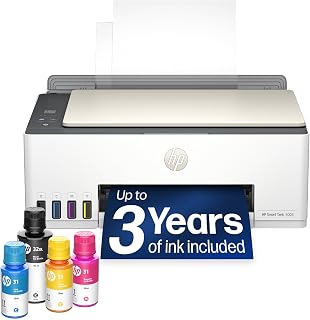
- Up to three years of ink included
- Cartridge-free refillable tank
- Print, scan, and copy functions
- AirPrint, Mopria, Wi-Fi, and USB
Cons
- Modest 10 ppm black print speed
- Color printing maxes out at 5 ppm
Everyday work tends to involve a mix of forms, school pages, occasional color handouts, copies, and scans rather than nonstop production printing. The HP Smart Tank 5003 covers those basics with printing, scanning, and copying in one 11.1-pound unit. Its refillable, cartridge-free tank is the practical draw for households that print routinely: HP includes up to three years of ink, estimated at about 6,000 pages. That gives regular document users less reason to interrupt their workflow for cartridge changes. Wireless options support Apple AirPrint, Mopria, HP ePrint, Wi-Fi, and Print Anywhere, while USB is available when a wired connection makes more sense. Phone and tablet printing, plus scan-to-PDF capability, further suit everyday paperwork. Color output lets one machine handle text documents and casual color needs. The tradeoff is speed: it reaches up to 10 pages per minute in black and 5 in color. It is therefore better for steady household or light home-office tasks than recurring large batches.
Connectivity: Wireless (Wi-Fi), USB, Apple AirPrint, HP ePrint, Mopria Print Anywhere
Printing Technology: HP Thermal Inkjet
Print Speed: 10 pages per minute (black and white), 5 pages per minute (color)
Special Features: Wireless printing, high-volume refillable ink tank, print from phone or tablet, scan to PDF, borderless printing
Output: Color
Color: Oatmeal White with Portobello accents
Weight: 11.1 pounds
Model: HP Smart Tank 5003 All-in-One Printer (9B2D3A)
Buy the Smart Tank 5003 if everyday work means consistent home printing, copying, and PDF scanning, and you value a cartridge-free system with a long included ink supply. It is especially appropriate for people who print from phones or tablets as well as computers, using AirPrint, Mopria, HP ePrint, Wi-Fi, or USB. Skip it if fast turnaround on long documents is essential. Its 10 ppm black and 5 ppm color speeds suit regular personal use, not demanding, high-volume work queues.

Pros
- Refillable MegaTank with high page yields
- Automatic duplex printing
- 2.7-inch color touchscreen
- Handles paper, envelopes, labels, and cardstock
Cons
- Flatbed scanner only
- 11 ppm maximum black-and-white copy speed
The best all-in-one for everyday work is not necessarily the fastest, it is one that removes recurring upkeep while covering document chores in a limited space. Canon's MegaTank G3290 combines color printing, flatbed scanning, and copying in a 14.3 by 16.4 by 7-inch chassis. Its refillable SuperTank system is central to the appeal: each ink set is rated for up to 6,000 black pages and 7,700 color pages, a useful foundation for households or home offices with regular printing needs. Automatic two-sided printing can reduce paper use on routine documents. The 2.7-inch color touchscreen provides on-printer guidance and controls, while wireless use with smartphones supports device-led jobs. It can accept plain paper, envelopes, labels, cardstock, glossy photo paper, and high-resolution paper, and it produces borderless photos up to 8.5 by 11 inches. Auto Power On further suits intermittent use. Everyday work limitations include its flatbed scanner and 11 ppm maximum black-and-white copy speed. It suits repeated small jobs, not continuous multipage scanning or high-speed document production.
Printer Type: Inkjet SuperTank multifunction (print, copy, scan)
Print Speed: Up to 11 pages per minute black and white
Print Resolution: 4800 x 1200 dpi
Paper Capacity: 100 sheets (plain), 20 sheets (photo)
Ink System: 4-color (black, cyan, magenta, yellow) with page yields of 6,000 black and 7,700 color pages per set
Connectivity: USB 2.0, WiFi wireless
Display: 2.7-inch LCD color touchscreen
Dimensions: 16.4 inches wide x 14.3 inches deep x 7 inches high
Weight: 14.2 pounds
Warranty: 1-year limited warranty with Canon support
Buy the MegaTank G3290 if everyday work consists of frequent home or home-office documents, copies, and occasional color output, and you want a refillable ink system with high stated page yields. It also fits users who print from smartphones, need automatic double-sided pages, or use varied media such as envelopes, labels, and cardstock. Skip it if your normal workload starts with stacks of originals to scan. The listed flatbed scanner favors page-by-page scanning, and its 11 ppm maximum black-and-white copy speed is not aimed at fast production work.
Pros
- Easy setup with quick wireless connection and intuitive touchscreen interface
- Excellent print quality with vibrant colors and crisp black text
- Reliable performance with strong customer satisfaction and minimal paper jams
- Compact footprint ideal for limited desk space in home offices
- Mobile printing capability gives flexibility to print from anywhere in your home or office
Cons
- Some users report compatibility issues with specific software like Adobe Photoshop Elements
- Wireless connectivity may require reconfiguration after power outages on some networks
- Monthly Refresh subscription includes overage fees that can add to total cost if you exceed page limits
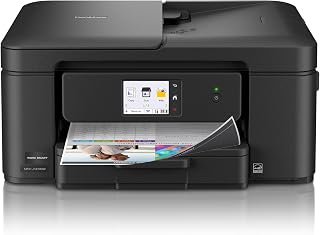
The Brother Work Smart 1410 is a multifunction inkjet printer designed for home offices and small businesses that need reliable everyday printing without excessive complexity. It combines essential functions, printing, copying, scanning, and faxing, into a compact device that won't dominate your workspace.
Standout features include fast print speeds reaching 16 ppm for black pages and 9 ppm for color, which is respectable for personal and small office use. The 2.7 inch color touchscreen provides intuitive access to functions and cloud app connections, while the automatic duplex printing and 20-sheet document feeder streamline workflow. Real-world feedback shows customers appreciate the reliable scanning performance, smooth wireless connectivity, and mobile printing capabilities via the Brother Mobile Connect app.
The printer feels well-built with a sturdy construction and thoughtful design touches like a front-facing paper tray drawer that doesn't require you to access the back of the unit. Print quality is consistently good with vibrant colors and clean black text, and users report the ink consumption is reasonable compared to competitor models. The included Refresh subscription trial offers potential long-term savings on supplies.
A few limitations exist: compatibility with certain software applications like Adobe Photoshop Elements has caused issues for some users, and wireless setup can be finicky after power disruptions on certain networks. The Refresh subscription, while cost-effective, includes overage charges if you exceed your monthly page allowance.
Overall, the Brother MFC-J1410DW is a solid choice for anyone seeking a dependable, compact all-in-one printer for home or small office use. It delivers strong performance, easy mobile connectivity, and good value without the learning curve of more complex office equipment.
Printing: 16 ppm black, 9 ppm color at 1,200 x 6,000 dpi resolution. Automatic duplex printing for double-sided pages. Compatible with plain paper, envelopes, and glossy photo paper up to 8.5 x 14 inches.
Scanning and Copying: Flatbed and sheetfed scanner with 1,200 x 1,200 dpi maximum resolution. 20-sheet automatic document feeder. Copy speeds up to 11 ppm. Maximum 99 copies per run.
Connectivity and Control: WiFi and USB 2.0 connections. 2.7 inch LCD color touchscreen. Brother Mobile Connect app for remote printing and scanning. Compatible with Windows PCs, Macs, smartphones, and tablets.
Capacity and Design: 150-sheet paper tray capacity. Dimensions 15.4 x 13.5 x 7.2 inches. Weighs 16.8 pounds. Includes LC501 ink cartridges in black, cyan, magenta, and yellow.
Warranty and Supplies: 1-year limited warranty. Energy Star certified. Genuine Brother LC501 cartridges available in standard and high-yield options, plus Refresh automatic replenishment service.
Ideal For: Home offices, small businesses, students, and households that need to print regularly but don't require high-volume professional printing. Perfect if you want printing, copying, and scanning in one space-saving device.
Consider This If: You use Adobe Photoshop Elements or other specialized design software and need guaranteed compatibility, test the printer with your software first. If you use Refresh subscription, calculate your actual monthly page volume to avoid overage fees.
Setup Expectations: Most users complete setup in 10 to 15 minutes using the Brother app or software. Wireless connection is generally smooth, though older or unstable home networks may require manual USB connection during initial setup.
Cost Considerations: The 2-month free Refresh trial gives you time to evaluate automatic ink delivery. After the trial, standard LC501 cartridges cost less than high-volume printers but more than budget inkjet models. Subscription plans range based on your monthly print needs.
Support and Alternatives: Brother has strong online support and community forums. Competitors like HP and Canon offer similar multifunction printers, but this Brother model stands out for reliable WiFi, touchscreen simplicity, and lower monthly operating costs via Refresh.

Pros
- Refillable ink tank system
- Prints, copies, and flatbed scans
- Wireless and mobile printing
- Handles plain paper, envelopes, and glossy photo paper
Cons
- Two-sided printing requires manual steps
- 100-sheet tray and moderate print speed
Everyday work at home often means a mix of forms, school pages, occasional color materials, and scans rather than constant high-volume output. The Epson EcoTank ET-2800 approaches that routine with print, copy, and flatbed scanning in a relatively lightweight 11.4-pound all-in-one. Its refillable ink-tank setup is the central advantage for households that print regularly: each bottle set is equivalent to about 90 individual cartridges, while the included ink is rated for up to two years of typical home use. That helps reduce interruptions and cartridge waste. Wireless and mobile printing make it easier to send jobs from compatible devices, and the printer handles plain paper, envelopes, and glossy photo paper. Color output reaches 5760 x 1440 dpi, with Micro Piezo Heat-Free Technology for detailed documents and photos. The tradeoff is productivity: black-and-white copying is listed at up to 10 pages per minute, manual steps are required for two-sided printing, and the 100-sheet single tray needs attention during bigger jobs. For regular everyday tasks, its low-maintenance ink system matters more than raw speed.
Printer Type: Inkjet with refillable EcoTank system
Print Speed: 10 ISO pages per minute (black and color)
Resolution: 5760 x 1440 dpi (color), 5760 dpi (black and white)
Ink Capacity: Up to 4,500 black pages and 7,500 color pages per set
Functions: Print, scan, copy in one device
Scanner: Flatbed with 720 x 720 dpi color resolution
Connectivity: Wireless, mobile app support, voice-activated printing
Media Support: Plain paper, glossy photo paper, envelopes up to 8.5 x 14 inches
Paper Capacity: 100-sheet single tray
Display: LCD color display for easy navigation
Dimensions: 22.8 x 14.8 x 10 inches
Weight: 11.4 pounds
Power Consumption: 12 watts
Warranty: 1-year limited warranty
Buy the ET-2800 if everyday work means a steady flow of home documents, copies, scans, and occasional color or photo printing, and you value a refillable ink system more than rapid batch output. It is also a sensible match for limited desk space and people who want wireless or mobile printing. Skip it if automatic two-sided printing is essential, you routinely run large print jobs, or a faster machine is required. Its single 100-sheet tray and moderate speed are better suited to regular light-to-moderate use.

Pros
- Excellent print speeds and quality for professional documents and marketing collateral
- AI-powered scanning removes content intelligently for cleaner, more efficient printing
- Robust wireless connectivity with automatic issue resolution prevents connectivity headaches
- Substantial paper capacity and dual input trays minimize interruptions during heavy use
- Built-in security features protect networked data and office systems from cyber threats
Cons
- Printer is locked to HP genuine cartridges only, blocking third-party options and potentially raising long-term ink costs
- Heavier unit at 26 pounds requires dedicated desk space and careful placement
- Instant Ink subscription costs apply after 3-month trial unless manually cancelled
The HP OfficeJet Pro 9135 is a comprehensive all-in-one printer built for small to medium-sized office environments and work teams. It combines printing, scanning, copying, and faxing capabilities in a single device, eliminating the need for multiple machines and saving valuable desk space.
Performance is strong across the board. Print speeds reach 25 ppm for black and 20 ppm for color, with fade-resistant output suitable for professional presentations and marketing materials. The standout feature is HP AI, which intelligently removes unwanted content from emails and web pages before printing, eliminating wasted pages and awkward layouts. The 500-sheet paper capacity with dual input trays and single-pass duplex scanning make this printer efficient for busy offices handling high-volume document processing.
The design balances functionality with usability. The large 4.3-inch color touchscreen and smartphone-like interface make navigation intuitive, even for users unfamiliar with complex office equipment. Dual-band Wi-Fi with automatic connection troubleshooting keeps the printer reliably networked, and the HP Wolf Pro Security features provide solid protection against cyber threats. The sustainable design incorporates over 40% recycled plastic content.
The main drawback is HP's strict cartridge policy. This printer accepts only HP genuine cartridges with original HP chips, blocking third-party alternatives and potentially raising ongoing ink costs despite the initial 3-month free Instant Ink trial. Additionally, the unit weighs 26 pounds and requires a dedicated workspace.
The HP OfficeJet Pro 9135 is a capable, well-rounded office printer for teams prioritizing print quality, productivity features, and security. The inclusion of AI-powered optimization and reliable wireless connectivity makes it a solid investment for professional environments, though users should budget for genuine HP cartridges long-term.
Print Performance: Up to 25 ppm black, 20 ppm color; Maximum resolution 4800 x 1200 dpi (color, optimized); 1200 x 1200 dpi (black and white rendered)
Scanning and Copying: Single-pass duplex ADF with easy slide-off glass; Up to 23 cpm black and white; Maximum copy resolution 600 dpi; Up to 99 copies per run
Paper and Media: 500-sheet total capacity with two 250-sheet input trays; Supports letter, legal, A4, and other standard sizes; Compatible with glossy photo paper
Connectivity and Control: Dual-band Wi-Fi wireless printing; HP mobile app for print, scan, copy, fax from smartphones; 4.3-inch color touchscreen; USB flash drive port
Physical: Dimensions 17.2 inches W x 15.6 inches D x 12.53 inches H; Weight 26.1 pounds; One-year limited hardware warranty

Pros
- Color laser printing, scanning, copying, and faxing
- 50-sheet automatic document feeder
- 250-sheet capacity with automatic duplex printing
- Wireless, Wi-Fi Direct, and mobile app connectivity
Cons
- Large 44-pound unit
- Setup may involve firmware updates and toner preparation
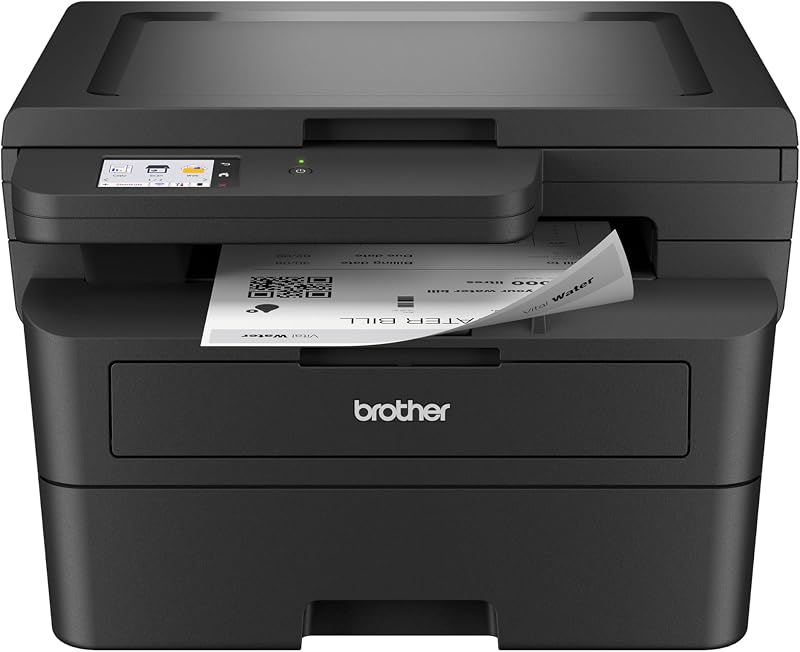
Everyday work often means moving between routine documents, incoming forms, copies, and occasional color materials; the Brother MFC-L3720CDW keeps those tasks in one color laser unit. It prints, scans, copies, and faxes, so a home office or small team can avoid maintaining separate machines. Its flatbed and sheetfed scanner options suit different source documents, while the 50-sheet automatic document feeder can reduce the handling required for multi-page scanning or copying. A 250-sheet paper capacity supports busier days with fewer reloads, and automatic duplex printing helps with two-sided documents. For shared or flexible setups, the printer works with laptops, PCs, smartphones, and tablets. Wireless networking, Wi-Fi Direct, and mobile app connectivity give several ways to send jobs, while the 3.5-inch color touchscreen offers customizable shortcuts. It can print on plain paper, card stock, envelopes, labels, and glossy photo paper. At up to 19 pages per minute in color and monochrome, it is positioned for moderate to high document use. Its 44-pound body and initial setup, which may involve firmware updates and toner preparation, make it better as a settled workspace printer than a portable household device.
Printing: Color laser, 19 ppm (black and color), 2400x600 dpi resolution, automatic duplex printing
Scanning: Flatbed and sheetfed, up to 29 ppm (black) and 22 ppm (color) at 300 dpi, 50-sheet auto document feeder
Paper Handling: 250-sheet main tray, supports plain paper, envelopes, labels, glossy photo paper, and card stock up to 8.5x14 inches
Connectivity: Dual-band wireless (2.4GHz/5GHz), Wi-Fi Direct, USB 2.0, mobile app support for iOS and Android
Display: 3.5-inch color touchscreen with 48 customizable shortcuts
Dimensions: 17.5W x 16.1D x 15.8H inches, weighs 44 pounds
Power: 500 watts consumption, ENERGY STAR and EPEAT Silver certified
Buy the MFC-L3720CDW if everyday work involves recurring document batches, multi-page originals, two-sided pages, and color output from several kinds of devices. It suits a fixed home office, small office, or business that can accommodate a 44-pound printer and benefit from the 250-sheet tray and automatic document feeder. Skip it if desk space is tight, portability matters, or simple low-volume printing is the priority. Those who want to avoid possible setup friction may also prefer a more basic machine.
Pros
- Excellent value at under $110 with included trial ink and professional-quality color output
- AI features genuinely reduce wasted pages by optimizing layouts and removing clutter automatically
- Touchscreen interface and mobile app make printing from smartphones and laptops seamless
- Robust security features and automatic firmware updates protect your network from cyber threats
- Compact footprint and quiet mode option suit small home office spaces well
Cons
- Color printing speed at 10 ppm is noticeably slower than black and white, limiting efficiency for color-heavy workloads
- Printer requires genuine HP chips in cartridges and blocks third-party alternatives, potentially increasing long-term ink costs
- 3.9 out of 5 star rating with 449 reviews suggests some users experienced reliability or quality issues
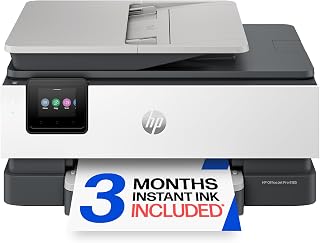
The HP OfficeJet Pro 8125 is a versatile all-in-one printer built for home office workers and small business owners who need dependable color printing without overwhelming complexity. It combines printing, scanning, copying, and faxing capabilities in a compact footprint, making it perfect for tight desk spaces where productivity matters.
The standout feature is HP's AI-powered print optimization, which intelligently removes unwanted content from emails and web pages before printing. Combined with automatic duplex printing and a generous 225-sheet paper tray, this printer minimizes wasted pages and interruptions. The 2.7-inch color touchscreen feels intuitive and responsive, resembling smartphone navigation rather than traditional printer interfaces, which helps users find functions quickly.
Build quality reflects the product's mid-range positioning. At 17.6 pounds with 45% recycled plastic content, it balances durability with sustainability. Performance is solid for a machine at this price point, delivering professional-quality color documents suitable for business proposals and marketing materials. The inclusion of a 3-month Instant Ink trial eliminates initial setup friction, and the security features through HP Wolf Essential help protect your network.
The main drawback is color printing speed at 10 ppm versus 20 ppm for black and white, which creates a noticeable gap for color-heavy projects. Additionally, the printer enforces genuine HP cartridge chips, blocking third-party alternatives and potentially raising per-page costs long-term compared to competing models. The 3.9 star rating also suggests some users encountered reliability concerns worth investigating through detailed reviews.
For budget-conscious home offices prioritizing reliability and color quality over speed, the OfficeJet Pro 8125 delivers genuine value. The AI features and touchscreen justify the investment, though users printing predominantly in black and white or seeking rock-bottom ink costs should explore alternatives.
Printing and Speed: Thermal inkjet technology with 20 ppm black, 10 ppm color. Maximum resolution up to 4800 x 1200 optimized dpi on photo paper. Supports letter, legal, and various other paper sizes up to 8.5 x 11.7 inches with 225-sheet capacity.
Scanning and Copying: Flatbed scanner with one-sided automatic document feeder. Supports up to 99 copies per run at 12 ppm for black and white. Auto duplex printing standard.
Display and Control: 2.7-inch color touchscreen with phone-like interface. Compatible with laptops, PCs, and smartphones via HP app and dual-band Wi-Fi connectivity.
Cartridges and Sustainability: Uses HP 923 cartridges in black, cyan, magenta, and yellow. Newer HP 923e EvoMore cartridges planned for April 2024. Device made from 45% recycled plastic content with one-year limited hardware warranty.
Security and Power: HP Wolf Essential Security included for network protection. Consumes 4.07 watts during operation. Dimensions are 18.11 inches wide by 13.29 inches deep by 9.17 inches high.
Best For: Home office professionals, freelancers, and small business owners who need reliable all-in-one functionality without premium pricing. Ideal if you print a mix of documents and occasional color projects, scan receipts and contracts, and value ease of use over maximum speed.
Consider Alternatives If: You print primarily in black and white (color speed is relatively slow), require extremely low per-page ink costs (third-party cartridges are blocked), or need industrial-grade reliability for high-volume printing. Users in business environments printing 500+ pages monthly should explore higher-tier models.
Ink Cost Reality: The 3-month Instant Ink trial is genuine value, but after expiration, Instant Ink subscriptions range from budget to premium tiers. Factor this into long-term costs, as genuine HP cartridges cost more than compatible alternatives available for competing brands. Setup cartridges yield approximately 255 to 270 pages per color.
Setup and Support: Includes power cord, setup cartridges for all four colors, and reference guide. One-year limited hardware warranty covers manufacturer defects. For technical support beyond the first year, visit support.hp.com directly.
How to Choose the Right All-in-One Printer
Start with the work you actually send to a printer each week, not just the headline features. A good match should make routine printing, copying, and scanning feel simple while providing enough paper handling and ink capacity for your normal workload.
Manufacturer speed and yield figures are useful reference points, but your results also depend on page coverage, photo use, wireless conditions, and how often the machine sits idle. These practical checkpoints make the comparison easier.
Match the Ink System to Your Monthly Volume
For occasional homework, forms, and color handouts, cartridge models such as the HP Envy 6155 Wireless All-in-One Color Inkjet and Canon PIXMA TR7120 Wireless Color Inkjet Printer are straightforward choices. They combine everyday document capability with wireless convenience, scanning, copying, and automatic two-sided printing.
If your household regularly prints school materials, worksheets, shipping labels, or business documents, refillable tanks deserve closer attention. The Canon MegaTank G3270 All-in-One Wireless Color, Canon Megatank G3290 All-in-One Wireless Printer, HP Smart Tank 5003 Wireless All-in-One Ink Tank, and Epson EcoTank ET-2800 Wireless Color All-in-One use refillable reservoirs and arrive with substantial ink supplies for recurring output.
Prioritize Scanning and Paper Handling
A flatbed scanner works well for one photo, ID card, or page at a time. For multi-page agreements, school packets, or expense records, an automatic document feeder is far more convenient: the Canon PIXMA TR7120 Wireless Color Inkjet Printer includes one, while the Brother Work Smart 1410 Wireless Color Inkjet has a 20-sheet single-sided feeder.
Higher-volume workflows benefit from deeper trays and more capable scan functions. The HP OfficeJet Pro 9135 Wireless All-in-One Color offers two 250-sheet input trays and single-pass two-sided scanning, while the Brother MFC-L3720CDW Wireless Color Laser Printer combines a 50-sheet feeder, a 250-sheet tray, duplex printing, and fax capability.
Choose Print Quality and Speed for Your Output
Inkjet machines are a natural fit when your mix includes colorful flyers, family photos, creative projects, and ordinary documents. The HP Envy 6155 Wireless All-in-One Color Inkjet supports borderless photos, while the HP Smart Tank 5003 Wireless All-in-One Ink Tank and Canon models offer strong flexibility for documents and color pages.
For an office that mainly produces reports, presentations, and client-facing documents, color laser output can be the better fit. The Brother MFC-L3720CDW Wireless Color Laser Printer reaches up to 19 pages per minute, while the HP OfficeJet Pro 9135 Wireless All-in-One Color is built for fast professional color work at up to 25 pages per minute in black.
Check Connectivity, Controls, and Desk Fit
Reliable Wi-Fi matters when several people print from phones, laptops, and tablets. Dual-band wireless support on models such as the HP Envy 6155 Wireless All-in-One Color Inkjet, HP OfficeJet Pro 8125 Wireless All-in-One Color, HP OfficeJet Pro 9135 Wireless All-in-One Color, and Brother MFC-L3720CDW Wireless Color Laser Printer can make shared printing less complicated.
Consider how scanned files will move beyond the printer as well. A NAS hard drive for document storage can support a shared archive, and a compact desk benefits from deliberate layout choices such as the space-saving options in our best tenkeyless keyboard guide.
Final Thoughts
For homes that produce recurring color pages, the Canon MegaTank G3270 All-in-One Wireless Color is a sensible match thanks to its refillable system and high page-yield design. For a shared office that needs speed, fax, and more robust document handling, the Brother MFC-L3720CDW Wireless Color Laser Printer brings a capable color-laser workflow with generous paper management.
Frequently Asked Questions
What is the best all in one printer for a home in 2026?
For lighter home use, prioritize simple wireless setup, automatic two-sided printing, an intuitive display, and the ability to handle both documents and photos. The HP Envy 6155 Wireless All-in-One Color Inkjet suits everyday color printing, while the Canon PIXMA TR7120 Wireless Color Inkjet Printer adds an automatic document feeder for periodic multi-page copies. Families with frequent school printing may get more value from a refillable tank design.
Are ink tank all-in-one printers a good choice for students and families?
They can be an excellent fit when you print frequently enough to benefit from large ink reservoirs. Models such as the Canon Megatank G3290 All-in-One Wireless Printer, HP Smart Tank 5003 Wireless All-in-One Ink Tank, and Epson EcoTank ET-2800 Wireless Color All-in-One are designed to reduce refill interruptions. Choose a tank printer when recurring page volume matters more than the smallest possible footprint.
Is automatic duplex printing the same as double-sided scanning?
No. Automatic duplex printing means the printer can produce both sides of a page without manual flipping, while double-sided scanning captures both sides of an original document. The HP OfficeJet Pro 9135 Wireless All-in-One Color provides single-pass two-sided scanning, which is particularly useful for forms, records, and longer two-sided documents.
How do I choose an all-in-one printer for a small home office?
Begin with the tasks that repeat most often: printing reports, copying forms, scanning receipts, or sending occasional faxes. Look for an automatic document feeder, enough paper capacity, automatic duplexing, and dependable mobile printing before paying attention to extra features. If desk surface is limited, our guide to the best number pad options can also help you build a more efficient work area around your printer.





Write Your Review
No reviews yet. Be the first to share your experience!