

If your laptop lacks a dedicated numeric section or your full-size keyboard just isn’t cutting it for spreadsheet-heavy work, a standalone number pad can make a real difference. Whether you’re an accountant crunching numbers all day, a data analyst managing large tables, or someone who just wants faster input, the right numpad transforms your desk setup into a more efficient workspace. If you’re also building out a productivity-focused setup, check out our roundup of keyboard and mouse deals worth grabbing for more ways to upgrade your gear.
This guide covers ten of the best number pads available right now, spanning wireless Bluetooth models, plug-and-play wired options, and fully programmable mechanical numpads. There’s something here for every budget and use case.
Quick answer
This guide compares 10 picks, with Nulea Wireless Bluetooth Number Pad for Laptop, USB-C ranked first. havit Bluetooth Numeric Keypad 26-Key Wireless Numpad has the most customer reviews.
Pros
- Exceptional battery life lets you work for weeks without recharging, perfect for on-the-go professionals
- Dual Bluetooth and 2.4G connectivity provides flexibility and reliable connection across multiple devices
- Lightweight and compact design makes it genuinely portable without sacrificing key responsiveness or build quality
- Silent operation keeps your workspace quiet, especially valuable in shared office environments
- Strong customer satisfaction with multiple 5-star reviews praising reliability and value
Cons
- USB-C only charging means it won't work with older USB-A cables without an adapter
- Non-standard numeric keypad layout may require an adjustment period for touch typists accustomed to full keyboards
- Not programmable, limiting customization options for advanced users with specific macro needs
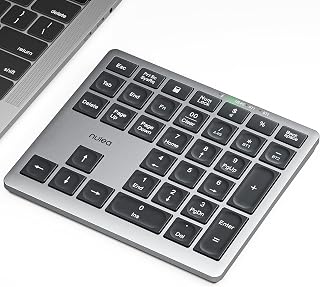
The Nulea Wireless Number Pad is a compact peripheral designed for professionals who spend significant time entering numeric data, from accountants managing spreadsheets to financial analysts processing daily figures. This 34-key pad brings dedicated number entry efficiency to laptops and tablets without the bulk of a full-sized keyboard.
The standout feature is its dual connectivity system. Bluetooth 5.0 with multi-device pairing lets you switch between your laptop, tablet, and smartphone instantly, while the 2.4G wireless mode provides rock-solid stability for intensive spreadsheet work. The scissor-switch keys deliver satisfying tactile feedback with minimal noise, crucial for shared workspaces. Real users report exceptional battery performance, with some going weeks between charges despite daily use.
Build quality is solid throughout. The plastic construction feels weighty and durable rather than cheap, the magnetic USB-C storage slot keeps your charging cable organized, and fold-out kickstands provide comfortable viewing angles. The anti-slip base prevents sliding during fast data entry sessions. For accountants and left-handed professionals, having numeric keys separate from a full keyboard on the left side significantly improves ergonomics and workflow efficiency.
The main limitation is the USB-C only charging, which requires an adapter if your other devices use USB-A. Some touch typists report a brief adjustment period with the non-standard key layout. Additionally, the keypad cannot be programmed, so it lacks macro functionality for power users.
Overall, this is a well-engineered, genuinely useful productivity tool that delivers excellent value. Its combination of reliable dual connectivity, exceptional battery life, and portable design makes it a smart choice for anyone doing regular numeric data entry work.
Accountants and bookkeepers managing spreadsheets and financial data entry will see immediate productivity gains from dedicated number keys positioned for ergonomic access.
Data analysts and financial professionals who value silent operation in collaborative office settings while maintaining fast numeric input speeds.
Remote workers and on-the-go professionals who need a lightweight, portable solution that works across multiple devices without dedicated charging cables.
Users with 60% or compact keyboards who want to reclaim desk space while maintaining full numeric entry capability for work or gaming.
Connectivity: Bluetooth 5.0 + 2.4G wireless dual mode with multi-device pairing support.
Compatibility: Windows 8/10/11, macOS, iOS, Android, Chrome OS. Works with laptops, PCs, tablets, and smartphones.
Keys: 34-key full-size numeric layout with scissor-switch mechanical keys.
Battery: 280mAh rechargeable lithium-ion with 96-day standby time and auto-sleep mode. Charges via USB-C.
Design: Slim, portable profile (approximately hand width when spread). Includes fold-out kickstands for 7.5 degree tilt angle and anti-slip base.
Material: ABS plastic construction with magnetic USB-C cable storage slot.
Warranty: 1-year manufacturer warranty included.

Pros
- Mechanical switches provide superior responsiveness compared to rubber dome numpads
- Multi-connectivity options reduce clutter with single device for work and gaming
- Compact footprint fits cramped desks and portable setups without sacrificing functionality
- Calculator mode adds practical utility beyond standard numpad use
- Solid customer satisfaction with 4.6 out of 5 rating from verified purchasers
Cons
- 18-key layout eliminates some function keys found on full-size keyboards, limiting advanced shortcuts
- Battery-powered operation requires regular charging or frequent battery replacements depending on usage
- Retro styling may not suit all desk aesthetics or professional office environments
The 8BitDo Retro 18 Mechanical Numpad is a purpose-built input device for anyone who spends significant time entering numbers. Whether you're a programmer needing precise keystroke feedback, an accountant managing spreadsheets, or a data analyst processing datasets, this compact peripheral delivers mechanical switch satisfaction in a focused package. The retro design appeals to both productivity enthusiasts and gaming setups seeking authentic mechanical input without a full keyboard commitment.
What sets this numpad apart is its versatile connectivity ecosystem. The triple-mode system (Bluetooth, 2.4GHz wireless, and wired USB) eliminates the friction of switching between devices or desk setups. Pair it with your laptop for work, toggle to your Android tablet for mobile input, or plug it directly into your desktop. The Kailh Box White V2 mechanical switches provide consistent, audible feedback that beats rubber dome alternatives by a significant margin. Each keystroke feels intentional and responsive, reducing input errors during high-volume data entry sessions.
Build quality follows 8BitDo's proven playbook: durable ABS construction with practical design that prioritizes function over flash. The 18-key layout strips away unnecessary complexity and dedicates every button to essential numpad operations plus calculator mode functionality. Battery-powered operation keeps cables off your desk, though you'll need to manage charging cycles based on usage intensity. The ambidextrous design accommodates both left and right-handed users equally well.
The main limitation is the focused scope. This is strictly a numpad, not a productivity keyboard. You won't find arrow keys, function rows, or modifier combinations beyond what the 18-key layout allows. For basic number entry and calculations, that's perfectly fine. For complex workflows requiring extensive shortcuts, you'll need to complement this with a primary keyboard or accept some operational friction.
The 8BitDo Retro 18 Mechanical Numpad is the right choice if you value mechanical precision, wireless convenience, and retro styling in a compact footprint. It excels as a dedicated numpad for specialists and pairs well with minimalist desk setups. With solid durability, proven connectivity, and strong user satisfaction, it justifies its mid-range price for serious data-entry professionals and gaming enthusiasts alike.
Mechanical Switch: Kailh Box White V2 switches for tactile, audible feedback with rapid actuation.
Connectivity Options: Bluetooth, 2.4GHz wireless receiver, and wired USB for flexible device pairing.
Key Count: 18 keys including numpad layout, calculator functions, and programmable buttons.
Compatibility: Windows 10 or higher, Android devices, fully ambidextrous for any hand orientation.
Power Source: Battery-powered operation with USB charging capability for wireless modes.
Materials: Acrylonitrile Butadiene Styrene (ABS) housing with mechanical switch assembly.
Warranty: 1-year manufacturer coverage through 8BitDo, including 1st generation specifications.

Pros
- Superior 2.4G wireless stability outperforms Bluetooth alternatives in signal-heavy environments
- Exceptional build quality with durable membrane switches and low-profile tactile feedback
- Genuinely portable design with compact footprint and integrated receiver storage compartment
- Straightforward plug-and-play compatibility across Windows systems without driver hassles
- Built-in shortcuts for calculator and email boost productivity for data-heavy workflows
Cons
- Calculator and Email function keys only work on Windows, limiting use on Mac or Linux systems
- Requires USB hub or adapter if your device only has USB-C ports, adding extra cost
- No customer reviews available yet, so real-world reliability and durability feedback is limited
The Rapoo K50 is a wireless numeric keypad designed for professionals and everyday users who spend significant time entering numbers into spreadsheets, accounting software, or data management systems. It addresses a genuine problem: laptops and compact keyboards lack dedicated number pads, forcing users to stretch across their keyboard or use slower on-screen calculators. This device brings back the efficiency of a full-sized numpad in a portable format.
What sets the K50 apart is its responsive 2.4G wireless connection operating at 1000Hz polling rate, which is eight times faster than typical Bluetooth numpads at 125Hz. In practical terms, this means zero input lag, no dropped numbers, and reliable performance in offices with heavy wireless interference. The 22-key layout includes standard number and operator keys plus dedicated shortcuts for your system calculator and email client, allowing you to switch contexts without leaving your workflow.
The build quality feels solid and durable with quiet membrane switches that won't disrupt coworkers or family members. The low-profile key design keeps your hand in a natural position, reducing fatigue during marathon data entry sessions. At just 97 grams and measuring 5.2 inches by 3.4 inches, it's genuinely portable, and the clever USB receiver storage compartment means you won't lose the wireless dongle when traveling between offices or home and workplace.
The main limitations are straightforward: the calculator and email shortcuts only work on Windows systems, so Mac or Linux users will need to rely on standard number input only. Additionally, if your device exclusively uses USB-C ports, you'll need to purchase a USB hub or adapter separately, as only a USB-A receiver comes in the box. While the rating is solid, the product currently has no verified customer reviews, so long-term durability remains to be proven in real-world use.
The Rapoo K50 is a smart buy for accountants, financial analysts, data entry specialists, and anyone spending hours with spreadsheets or calculation software. It's equally valuable for left-handed users who rarely find peripheral options designed with their needs in mind. If you're looking for a fast, reliable, and portable way to reclaim numpad efficiency on a modern laptop, this keypad delivers excellent value and performance.
Connectivity: 2.4G wireless, 1000Hz polling rate
Compatibility: Windows PC, Laptop, Desktop, Notebook via USB-A port
Layout: 22 keys including number pad, operators, calculator, and email shortcuts
Dimensions: 5.2" L x 3.4" W x 0.8" H
Weight: 97 grams
Power: 1x AAA battery (included)
Switch Type: Membrane, low-profile, tactile
Color: Black
Material: Plastic enclosure
Included: Wireless numpad, USB-A receiver, 1x AAA battery, user guide
Warranty: 1 year
Operating Systems: Windows 11, Windows, Linux

Pros
- Extremely affordable and durable alternative to wireless or premium keypads
- Works immediately out of the box without any setup or driver downloads
- Quiet operation and comfortable key feel make it ideal for shared workspaces
- Excellent for lefties who struggle finding accessible numpad options
- Compact size fits most desk setups without taking up much space
Cons
- Wired connection limits desk flexibility compared to wireless alternatives
- Cable reported as feeling thin or cheap, though easily managed
- NumLock functionality does not work on macOS, limiting some use cases
The TechGarden USB Numeric Keypad is a straightforward wired numpad designed for anyone who needs faster number entry without upgrading their entire keyboard. It's perfect for accountants, data analysts, spreadsheet users, and left-handed users who struggle finding accessible numpad solutions. At this price point, it's an incredibly practical upgrade for laptops or compact keyboards that don't include a dedicated numpad section.
The standout feature is how truly plug-and-play this device is. Simply connect the USB cable to your computer and start typing, no drivers, no batteries, no configuration. The 19 keys are full-size at 19mm, which significantly improves accuracy compared to cramped alternatives. The soft-touch crater-switch keys deliver a comfortable typing experience with noticeably low noise, making this suitable for offices, libraries, or shared workspaces where quiet operation matters.
Build quality meets expectations for the price. The plastic construction feels solid and durable, and users consistently report the numpad feels well-made. The ergonomic tilt design genuinely helps reduce wrist strain during extended number entry sessions. Ambidextrous design means it works equally well for left and right-handed users, addressing a genuine gap in the market for accessible tech.
A few limitations exist worth considering. The wired design lacks the freedom of wireless alternatives, and some users note the cable feels thin, though it's easily managed on most desks. macOS users should know that NumLock functionality doesn't work as expected on Apple systems, limiting certain function key applications. The plus key is also notably smaller than ideal.
Verdict: This is an exceptional value numpad that solves a real problem for spreadsheet workers, data entry professionals, and left-handed users. It prioritizes reliability and comfort over premium features, making it one of the best budget-friendly numeric keypads available. Highly recommended for anyone needing dependable number entry without breaking the bank.
Ideal for accountants, bookkeepers, and financial professionals who spend hours entering numbers daily. The dedicated numpad layout dramatically speeds up data entry compared to using laptop number rows.
Left-handed users will appreciate this product fills a significant gap in accessible tech. Finding affordable left-handed numpad solutions is notoriously difficult, making this an excellent value option that works ambidextrously.
Spreadsheet power users in Excel, Google Sheets, or similar software will notice measurable productivity gains. The larger keys and dedicated layout make repetitive number entry faster and less error-prone than using a compact keyboard.
Home office workers and students needing extra organization at their desks benefit from the compact, portable design that fits any desk setup without clutter.

Pros
- Shared USB receiver eliminates cable clutter and frees up connectivity ports
- Silent mouse operation perfect for shared workspaces, offices and late-night sessions
- Compact design with low profile makes it genuinely portable for travel
- Dedicated calculator key provides quick access without menu navigation
- Responsive scissor switches deliver tactile feedback for accurate number entry
Cons
- Requires 3 AAA batteries total, 2 for keypad and 1 for mouse, which are not included
- At 0 user reviews, you cannot verify real-world durability or long-term reliability from other buyers
- Slim profile design may feel cramped for users with larger hands seeking extended numpad layouts
The Lekvey wireless number pad and mouse combo is a productivity tool designed specifically for professionals who spend hours entering data. Accountants, financial analysts, spreadsheet power users, and remote workers will appreciate the focused feature set that eliminates the friction of switching between separate input devices. This is not a full keyboard replacement, but a dedicated acceleration tool for the most repetitive part of your workday.
The standout feature is the unified 2.4GHz USB receiver that powers both the 22-key numeric keypad and the optical mouse from a single port. The keypad itself features responsive scissor-switch keys with a comfortable 15-degree tilt, while the mouse includes near-silent click technology that won't interrupt office environments or library sessions. Setup takes seconds: plug the USB receiver into your computer and start working. No drivers, no software, no pairing delays.
Build quality reflects the product's modest price point. The plastic construction is functional and lightweight at just 0.3 lb total, making it genuinely portable for professionals who move between home, office, and co-working spaces. The compact dimensions (5 inches by 3.5 inches for the keypad) ensure it fits naturally into laptop bags alongside your notebook or MacBook. The USB receiver nests in a dedicated slot on the keypad, reducing the risk of losing it.
The main limitation is battery management. The keypad requires 2 AAA batteries while the mouse needs 1 AA battery, and these are not included with your purchase. Users will also need to supply their own batteries initially. Additionally, without user reviews available, it is difficult to assess how well these components hold up to daily professional use over months and years, despite the three-year warranty backing.
The Lekvey combo delivers genuine value for accountants and data analysts seeking faster input without the expense or complexity of mechanical numpad keyboards. If you value portability, silent operation, and simplified cable management over cutting-edge features, this combo earns its position as a practical workhorse for data-heavy workflows.
This product excels for professionals whose work centers on rapid data entry: accountants reconciling ledgers, financial analysts building spreadsheets, data entry specialists processing information, and remote workers managing multiple laptops. The compact design suits anyone balancing work across home offices, coffee shops, and co-working spaces.
It is also ideal for users with limited USB ports who want to consolidate connectivity. The single receiver approach frees up ports for external drives, adapters, or charging cables. Students managing coursework with calculations and business professionals tracking expenses will find the dedicated calculator key particularly useful.
Avoid this if you need a full mechanical keyboard experience or require extensive programmable macros. This is a specialist tool, not a universal input device replacement.

Pros
- Exceptional build quality with solid aluminum that resists wobbling during typing
- Battery life extends weeks of daily use without recharging
- Sleek minimal design coordinates seamlessly with modern laptops and setups
- Bluetooth connection is rock-solid with no disconnection issues reported
- Great value for the durability and premium materials at this price point
Cons
- Scissor switch keys lack tactile feedback needed for fast data entry without looking
- Does not support modifier key combinations on Mac (Cmd+Num, Ctrl+Num), limiting gaming and shortcut use
- Requires external Bluetooth adapter for desktop computers without built-in Bluetooth
The Lekvey Bluetooth Number Pad is a compact wireless keypad designed for MacBook users, iPad professionals, and Windows laptop owners who need numeric input without a full-sized keyboard. It fills a practical gap for accountants, data entry specialists, financial analysts, and remote workers who frequently work on spreadsheets or accounting software.
The standout feature is the combination of premium aluminum construction with exceptional battery performance. Users consistently report that the battery lasts weeks on a single charge thanks to intelligent auto-sleep technology that activates after periods of inactivity. The Bluetooth 5.0 connection is rock-solid with no lag or disconnection issues, and the 34-key layout includes full arrow keys and an oversized plus key that make number pad work feel natural.
Build quality genuinely impresses. The aluminum chassis feels substantial and doesn't wobble during typing, while the low-profile scissor switches deliver quiet keystrokes suitable for offices and shared spaces. The compact 5.7 x 4.4 inch footprint and feather-light 0.46 lb weight make this genuinely portable, fitting easily into laptop sleeves or bags for travel and remote work.
The main drawback is that chiclet-style keys lack the tactile feedback that professional data entry operators prefer when typing without looking. Additionally, the keypad doesn't support modifier key combinations on macOS, so gamers or power users needing Cmd+Number or Ctrl+Number combinations will find this limiting. Desktop PC users without Bluetooth also need a separate adapter.
This is an excellent choice for anyone using a modern laptop who wants a professional-grade number pad that matches their device aesthetics and reliably handles daily data entry tasks. The combination of build quality, battery life, and portability makes it worth the investment for work-from-home setups and frequent travelers.
Data Entry Professionals: Accountants, bookkeepers, and financial analysts who spend hours in spreadsheets benefit most from the reliable wireless connection and responsive keys.
Mac and iPad Users: The premium aluminum design perfectly complements Apple devices and the keypad syncs instantly with all macOS and iPadOS systems.
Remote and Hybrid Workers: Lightweight and portable, this keypad travels easily between home offices, coffee shops, and client sites without taking up valuable laptop bag space.
Students: College students in accounting, finance, or engineering courses can improve data entry speed during coursework and exams.
Not Ideal For: Gamers needing modifier key combinations, or anyone requiring tactile feedback for blind number entry at high speeds.
Connectivity: Bluetooth 5.0, 10-meter range
Keys: 34 total with scissor-switch mechanism
Battery: 160 mAh lithium-ion, rechargeable via USB-C
Dimensions: 5.7 inches L x 4.4 inches W x 0.47 inches H
Weight: 0.46 lbs
Material: Premium aluminum frame and plate
Compatibility: Windows, macOS 10.0+, iOS, iPadOS, Android
Includes: Keypad, USB-A to USB-C charging cable, user manual
Warranty: 2 years manufacturer coverage
Color: Black
Best Sellers Rank: #7 in Numeric Keypads category

Pros
- No dongle required, Bluetooth pairing is straightforward and pairs reliably with Windows devices
- Rechargeable battery eliminates ongoing costs and environmental waste from disposable batteries
- Quiet scissor-switch keys are responsive with good tactile feedback without disturbing coworkers
- Lightweight and compact design makes it genuinely portable for remote workers and travelers
- Long battery life means minimal charging interruptions during workdays
Cons
- Windows only, does not support Mac or iOS devices, limiting compatibility for multi-device users
- Bluetooth pairing process requires manual instruction review and isn't immediately intuitive for first-time setup
- No backlit keys, making it less practical for low-light work environments or nighttime use
The havit Smart26 is a wireless numeric keypad designed specifically for Windows users who need a dedicated numpad for accounting, spreadsheet work, data entry, or financial tasks. At just 4.1 by 4.8 inches, it's genuinely portable and addresses a real problem for laptop users whose machines lack a numpad.
The standout feature is its rechargeable lithium battery, which lasts 1-2 months per charge and eliminates the constant cycle of buying new batteries. Bluetooth connectivity extends 33 feet with stable Bluetooth 3.0, and users consistently report reliable pairing and no lag during use. The 26-key layout includes calculator shortcuts and function keys alongside standard numpad digits, giving you quick access to commonly needed tools.
Build quality feels solid with quiet scissor-switch keys that provide good tactile feedback and responsive typing. The 15-degree tilt design sits comfortably in your hand during extended use, and anti-skid feet keep it stable on your desk. USB-C charging is convenient and uses standard computer USB ports as recommended by the manufacturer.
The main limitations are Windows-only compatibility and a Bluetooth pairing process that requires reading instructions. There's also no key backlighting, which matters only if you frequently work in very dim conditions. Some users report occasional interference from multiple Bluetooth devices on the same computer, though this is rare and resolves by reconnecting.
This keypad delivers genuine value if you need a numpad for Windows work and want to avoid cable clutter or USB dongle overhead. The rechargeable battery and reliable Bluetooth make it a practical long-term investment, especially for professionals who spend hours on data-heavy tasks.
Accountants, bookkeepers, and financial professionals who need fast, comfortable numeric entry for hours at a time. The quiet keys and ergonomic design minimize hand fatigue during long accounting sessions.
Spreadsheet power users and data analysts working on Windows laptops without built-in numpads. Quick calculator access and dedicated function keys speed up workflow significantly.
Remote workers and travel-heavy professionals who want to eliminate USB dongles and cable clutter while maintaining reliable input peripheral connectivity. The compact size fits in laptop bags without taking meaningful space.
Anyone tired of replacing batteries in wireless peripherals. The 1-2 month battery life and USB-C charging make this a set-and-forget solution for months at a time.
Connectivity: Bluetooth 3.0 with 33-foot range, no USB dongle required
Keys: 26-key layout including NumLock, ESC, Delete, function keys, and calculator shortcut
Battery: Rechargeable lithium battery, lasts 1-2 months per charge, USB-C charging cable included
Design: 4.1L x 4.8W x 0.6H inches, 15-degree ergonomic tilt, ABS plastic construction with anti-skid feet
Key Type: Scissor-switch (quiet, responsive, good tactile rebound)
Compatibility: Windows 7 and later on PC, laptop, and desktop computers. Also compatible with select Amazon Fire tablets and iPad 10th generation (limited testing)
Power Management: Auto-sleep after 1 hour idle, press any key to wake. Sleep mode preserves battery life
Warranty: 18 months manufacturer warranty
Weight: Lightweight and portable

Pros
- Exceptional battery life keeps you working for up to 2 months between charges
- Multi-device support and dual wireless modes reduce hassle when switching between gadgets
- Quiet mechanical keys make it perfect for open offices, libraries, and shared workspaces
- Lightweight and portable design suits laptop users, freelancers, and frequent travelers
- Fast Bluetooth 5.0 pairing with strong anti-interference signal quality
Cons
- 2-3 second reconnection delay when switching between Bluetooth and 2.4G modes may disrupt workflow
- Low battery triggers frequent disconnections, requiring proactive charging management
- Plastic construction feels less premium than metal alternatives at this price point
The JOYEKY L330 is a wireless numeric keypad designed specifically for laptop users, accountants, data analysts, and office professionals who spend hours inputting numbers. With Bluetooth 5.0 and 2.4G dual connectivity, this compact keyboard bridges the gap between portability and functionality, offering a practical solution for anyone tired of relying on laptop number rows or external full-size keyboards.
Performance-wise, the standout feature is its battery longevity. A single charge delivers up to 60 days of use, making it one of the most convenient options for remote workers and travelers who can't afford frequent charging sessions. The Type-C port charges fully in just 2 hours, and the dual wireless modes provide flexibility for office environments where you might need to switch between a laptop and desktop. The 34 specialized keys, including calculator functions and navigation shortcuts, genuinely speed up repetitive data entry tasks compared to using a standard keyboard.
The build quality reflects the affordable price point. The plastic construction feels lightweight and portable rather than premium, but this also means it slides easily into laptop bags without adding bulk. The quiet scissor-switch keys and ergonomic 7.5-degree tilt angle demonstrate thoughtful design, making extended typing sessions comfortable and office-friendly. Universal compatibility across major operating systems ensures this pad works with virtually any device you own.
The main drawback is the 2-3 second delay when switching between Bluetooth and 2.4G modes, which can interrupt workflow if you frequently toggle between devices. Additionally, low battery causes disconnections, so you'll need to stay on top of charging to avoid frustrating mid-session interruptions. The plastic frame won't appeal to users seeking a premium feel.
Overall, the JOYEKY L330 delivers solid value for professionals handling frequent numeric input. Its exceptional battery life, quiet operation, and multi-device compatibility make it a practical choice for office workers, while its compact design suits anyone prioritizing portability. If you need reliable data entry speed without breaking the bank, this keyboard justifies its investment.
Brand: JOYEKY
Model: L330
Connectivity: Bluetooth 5.0 + 2.4G Wireless
Key Count: 34 Keys
Switch Type: Quiet Scissor-Switch
Tilt Angle: 7.5 degrees
Battery: 110mAh Rechargeable
Battery Life: Up to 60 days
Charging Time: 2 hours via Type-C
Color: Black
Material: Plastic
Style: Contemporary
Compatibility: Windows, macOS, iOS, Android, Chrome OS
Recommended Use: Office, Data Entry, Business Productivity
Who Should Buy This? The JOYEKY L330 is ideal for accountants, data analysts, remote workers, and anyone who spends significant time entering numbers. It's perfect for laptop users who want external numeric input without a full-size keyboard, and for professionals who value quiet, distraction-free office environments.
Who Might Want to Look Elsewhere? If you demand premium build quality or metal construction, budget models under $15, or need instant switching between multiple devices without delay, consider alternatives. Users who charge their peripherals infrequently may find the need for regular charging burdensome.
Key Considerations: Verify your primary device is on the compatibility list before purchasing. Test the Bluetooth range in your typical work environment, as obstructions can affect signal stability. Keep the Type-C cable accessible since proactive charging prevents low-battery disconnections. The compact size suits laptop bags but may feel cramped for users accustomed to full-size keyboards.

Pros
- Exceptional build quality with CNC-precision plate and premium materials that feel professional and durable
- VIA software customization is powerful and intuitive, giving you complete control over every key and function
- Quiet, cushioned typing experience thanks to the Poron bottom layer and IXPE switch pad design
- Flexible connectivity lets you seamlessly switch between wired, Bluetooth, and 2.4GHz wireless modes
- Compact, lightweight design is portable without sacrificing premium construction or comfort
Cons
- At 20 keys, the layout is compact, which may feel limiting if you regularly use the full numeric keypad for data entry
- The 1000mAh battery, while solid, may require weekly charging for very heavy daily users
- AZERTY layout limits compatibility for users accustomed to QWERTY numpad layouts
The EPOMAKER EK21 is a premium numeric keypad built for professionals, gamers, and productivity enthusiasts who want more from their peripherals. With its compact 20-key layout, aluminum accents, and hot-swappable mechanical switches, it bridges the gap between everyday utility and high-end customization. This numpad works seamlessly across Windows, Mac, and Android devices, making it a versatile addition to any desk setup.
What truly sets the EK21 apart is its programmability through VIA software. You can assign custom macros, remap keys, and even customize the aluminum knob's function to match your specific workflow. Combined with triple connectivity options, wireless 2.4GHz, Bluetooth 5.0, and USB-C wired modes, you get genuine flexibility that most numpads simply don't offer. The 1000mAh battery keeps it running for days between charges, ensuring consistent performance whether you're working at your desk or traveling.
Build quality is genuinely premium. The PC plate is precision-cut using CNC machinery and sandblasted for durability and aesthetics. Underneath, a Poron bottom layer paired with sandwich foam and IXPE switch pads creates a noticeably quieter, more cushioned typing experience than standard numpads. The fine-tuned stabilizers deliver satisfying, consistent keypresses every single time. At just 3.66 inches by 5.43 inches, the compact design doesn't compromise on comfort or functionality.
The main limitations are the AZERTY layout, which may not suit everyone, and the 20-key compact design, which offers less real estate than full-size numeric pads for rapid data entry. Heavy users may also want to consider wireless range if they work far from their primary device, though the included 2.4GHz dongle and Bluetooth connectivity generally handle most scenarios well.
The EK21 delivers genuine value for anyone who wants a programmable, customizable numpad that feels as good as it performs. Whether you're optimizing for gaming, productivity, or both, this is a well-engineered peripheral that rewards the investment.
The EPOMAKER EK21 is ideal for content creators, spreadsheet-heavy professionals, gamers, and anyone who benefits from custom key programming. If you regularly use numeric input for work, gaming macros, or specialized software, the VIA customization and hot-swap design make it a smart choice. Students and educators working with data entry or mathematical software will also appreciate the ergonomic design and extended battery life.
The triple connectivity modes make it especially suited for users who switch between devices frequently, such as freelancers working on multiple computers or professionals with desk and laptop setups. If you value build quality, quiet operation, and premium materials over budget options, this numpad delivers the durability and performance to justify the investment.
Connectivity: 2.4GHz wireless, Bluetooth 5.0, USB-C wired
Battery: 1000mAh rechargeable
Keys: 20 hot-swappable mechanical switches with AZERTY layout
Backlighting: RGB customizable
Materials: CNC-cut PC plate, ABS plastic panels, aluminum alloy knob, Poron bottom layer
Dimensions: 3.66 inches L x 5.43 inches W x 1.14 inches H
Weight: Lightweight design
Compatibility: Windows, Mac, Android, iOS
Included: 1.8m USB A-to-C braided cable, 2-in-1 keycap and switch puller, 2.4GHz wireless dongle, extra back keycap, user manual
Warranty: 1 year manufacturer warranty

Pros
- Display screen is genuinely useful, showing battery status, connection mode, and custom animations
- Multiple connectivity options make it flexible for different setups and devices
- Hot-swap capability lets you experiment with different mechanical switches
- Solid build quality with gasket mounting and quality materials throughout
- Programmable keys give professionals and gamers serious customization power
Cons
- Learning curve required to set up custom keymaps and display settings via software
- Display screen adds cost and complexity that basic numpad users may not need
- Screen mode knob lacks mute functionality, limiting one-handed control in that mode
The BOYI TD31Pro is a premium mechanical numpad designed for professionals and enthusiasts who want more than just number entry. It combines a 30-key layout with a smart TFT display screen, making it stand out in a crowded market of basic keypads. This is built for accountants, data entry specialists, programmers, and gamers who appreciate quality hardware and customization.
The standout feature is the integrated TFT display that shows system information, battery status, connection mode, and even custom GIF images. The hot-swappable mechanical switches use BOYI's Jadeite Green linear switches with a smooth, consistent feel. Tri-mode connectivity lets you pair with up to three devices simultaneously, switching between Bluetooth 5.0, 2.4GHz wireless, and wired USB-C as needed. Battery life from the 1000mAh cell is solid for wireless use.
Build quality is impressive with its gasket-mounted design, quality PBT keycaps with dye sublimation printing, and a metal knob for volume and screen control. The RGB backlighting offers 16.8 million color presets with music rhythm lighting effects. Ergonomic design and programmable keys mean you can remap the entire layout to match your workflow. Included accessories like extra switches, keycaps, and a dust cover add value.
The main drawbacks are that the display and customization features have a learning curve, and not everyone needs a smart screen on their numpad. The knob lacks mute functionality in screen mode, which is a minor design oversight. Additionally, the premium features command a higher price than basic numpads.
The TD31Pro is a solid choice if you spend significant time with numeric data entry or want a mechanical keyboard that doubles as a personalized desk accessory. The display is genuinely useful rather than gimmicky, and build quality backs up the mid-tier price point. It delivers real functionality for professionals while offering customization that appeals to enthusiasts.
Connectivity: Bluetooth 5.0, 2.4GHz wireless, USB-C wired (tri-mode with multi-device support)
Keys: 30-key layout with mechanical hot-swap switches, programmable keys
Switch Type: BOYI Jadeite Green HIFI Linear switches, hot-swappable for 3-pin and 5-pin compatibility
Display: TFT smart display with custom GIF support, shows numlock status, connection mode, battery level, and RGB mode
Lighting: South-facing RGB LEDs, 16.8 million color presets, music rhythm lighting effects
Battery: 1000mAh rechargeable, charged via USB-C
Keycaps: PBT dye sublimated, wear-resistant, anti-oil and anti-gloss properties
Design: Gasket-mounted structure, ambidextrous layout, water-resistant
Dimensions: 5.9 inches L x 5.1 inches W x 1.5 inches H
Weight: 1.1 pounds
Compatibility: Windows, Mac, Linux, Android, iOS
Warranty: 1 year
Included: TD31Pro numpad, 4 extra keycaps, 2 extra switches, keycap and switch puller, USB cable, 2.4G receiver, dust cover, user manual
Best For: Data entry professionals, accountants, spreadsheet power users, programmers, gamers, and anyone who values mechanical keyboard quality and customization.
Consider If: You want a wireless numpad with modern features, need multi-device connectivity, appreciate personalization, or spend extended periods entering numeric data and want ergonomic quality.
Skip If: You need a basic, budget numpad for occasional use, prefer minimal setup and no software installation, or don't value the smart display features that justify the premium price.
Real-World Use: Accountants and financial analysts benefit from the dedicated number keys and programmable shortcuts. Programmers appreciate multi-device switching and RGB customization. Gamers like the mechanical switches and programmable keys. Anyone doing data entry will notice the ergonomic gasket design and quality keycaps reduce fatigue during long sessions.
What to Look for When Buying a Number Pad
Connectivity: Wired, 2.4G, or Bluetooth
The connection type shapes everything about how you use your numpad. Wired options like the TechGarden Wired Number Pad offer zero-latency input and never need charging, making them a solid choice for a fixed desk setup. If you move between devices or prefer a cleaner desk, wireless is worth the investment.
For wireless, 2.4G (like the Rapoo K50 Wireless Number Pad) delivers a faster polling rate and more stable signal in interference-heavy environments. Bluetooth is more convenient for multi-device switching, as seen in the Nulea Wireless Number Pad for Laptop, which pairs with up to two devices simultaneously via Bluetooth 5.0.
Key Switch Type and Typing Feel
Most budget and mid-range numpads use scissor-switch keys, which are quiet and have a low profile. These work well for office environments where noise is a concern. The havit Bluetooth Number Pad Wireless Numeric Keypad and the JOYEKY Wireless Number Pad Bluetooth Numeric both use scissor switches with a comfortable tilt angle for extended sessions.
If you prefer the tactile feedback of mechanical switches, options like the 8BitDo Retro 18 Mechanical Numpad and the BOYI TD31Pro Mechanical Numpad,Mini Keyboard deliver a satisfying keystroke with hot-swappable PCBs so you can swap switches without soldering. The EPOMAKER EK21 VIA Gasket Number Pad w/ 1000mAh takes it further with a gasket-mounted structure and Poron foam layering for a cushioned, quieter mechanical feel. For more peripheral inspiration, our guide to gifts for tech lovers covers other desk upgrades worth considering.
Battery Life and Charging
For wireless models, battery life varies significantly. The Nulea Wireless Number Pad for Laptop offers up to 96 days of standby on its 280mAh battery, while the EPOMAKER EK21 VIA Gasket Number Pad w/ 1000mAh and BOYI TD31Pro Mechanical Numpad,Mini Keyboard both pack a 1000mAh cell for extended use between charges.
Modern USB-C charging is a welcome convenience on most of these models. If you prefer to avoid charging altogether, the Lekvey Wireless Number Pad and mouse combo runs on standard AAA and AA batteries, which some users find more practical for travel.
Extra Features and Compatibility
Some numpads go well beyond basic number input. The BOYI TD31Pro Mechanical Numpad,Mini Keyboard features a TFT display screen that shows battery status, RGB mode, and even custom GIF images. The EPOMAKER EK21 VIA Gasket Number Pad w/ 1000mAh supports full key remapping and macro creation through VIA software, making it a strong pick for power users.
Compatibility also matters. Most options here support Windows and macOS, but note that the havit Bluetooth Number Pad Wireless Numeric Keypad is Windows-only, and the Lekvey Bluetooth Number Pad does not work with Chromebook. Always confirm OS compatibility before purchasing, especially if you work across multiple platforms. If you’re shopping for someone else, our list of gifts for gamers has some solid peripheral ideas worth pairing with a numpad.
Final Thoughts
For most users who want a reliable, no-fuss wireless numpad, the Nulea Wireless Number Pad for Laptop stands out with its dual-mode connectivity, long battery life, and broad OS support. If you want something with more personality and tactile depth, the BOYI TD31Pro Mechanical Numpad,Mini Keyboard delivers a premium mechanical experience with a display screen, hot-swap switches, and deep customization that serious users will appreciate.
Frequently Asked Questions
What is the best number pad for a laptop in 2026?
The best number pad for a laptop depends on your priorities. For wireless flexibility across multiple devices, the Nulea Wireless Number Pad for Laptop is a strong all-rounder with Bluetooth 5.0 and 2.4G support. If you need something simple and wired, the TechGarden Wired Number Pad is a plug-and-play option that works instantly without any setup.
Is a Bluetooth number pad better than a wired one?
It depends on your workflow. Bluetooth numpads give you a cleaner desk and the freedom to pair with tablets or smartphones, which is great for mobile professionals. Wired numpads have zero latency and no battery to manage, making them more dependable for high-volume data entry at a fixed workstation. If you’re in an office with lots of wireless interference, a 2.4G model like the Rapoo K50 Wireless Number Pad offers the best of both worlds.
Do mechanical numpads feel different from regular ones?
Yes, noticeably so. Mechanical numpads use individual switches under each key, delivering tactile or clicky feedback that many typists prefer for accuracy and feel. Models like the 8BitDo Retro 18 Mechanical Numpad and the EPOMAKER EK21 VIA Gasket Number Pad w/ 1000mAh also support hot-swappable switches, so you can change the feel without buying a new device. If you’re curious about other mechanical peripherals, our gifts for esports fans roundup covers some great options.
Can I use a number pad with a Mac?
Most number pads in 2026 support macOS, but there are exceptions. The havit Bluetooth Number Pad Wireless Numeric Keypad is confirmed Windows-only, and some shortcut keys on the Lekvey Bluetooth Number Pad do not function on macOS. If you’re on a Mac, look for models that explicitly list macOS compatibility, such as the Nulea Wireless Number Pad for Laptop or the EPOMAKER EK21 VIA Gasket Number Pad w/ 1000mAh.



Write Your Review
No reviews yet. Be the first to share your experience!