

You’re building a gaming setup on a tight budget, and every dollar counts. A quality gaming mouse doesn’t have to drain your wallet to deliver the precision, responsiveness, and comfort you need for competitive play.
This guide reviews 10 budget-friendly gaming mice that punch above their weight class, featuring adjustable DPI, programmable buttons, and ergonomic designs. Whether you’re hunting for a wired workhorse or a wireless option with extended battery life, you’ll find a mouse that matches your gaming style and budget-conscious build.
Quick answer
This guide compares 10 picks, with Redragon M602 Ergonomic RGB Gaming Mouse, 7200 DPI, 9 ranked first. Logitech G502 HERO Gaming Mouse - 25600 DPI Optical holds the highest customer rating among them.
Pros
- 7200 DPI sensor with 9 programmable buttons and macro editing
- Ergonomic shape with textured grips fits multiple grip styles
- Multi-year reliability backed by thousands of user reports
- Seven customizable RGB modes controlled via button or software
Cons
- No lift-off calibration causes minor cursor drift when elevated
- Right-handed design only, no left-handed option available
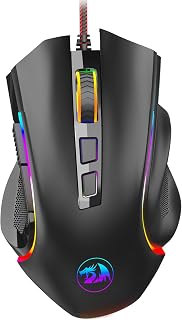
Budget gaming mice often compromise on core features, but the Redragon M602 breaks that pattern with a genuine 7200 DPI optical sensor and 9 programmable buttons backed by full macro editing software. This wired mouse has earned its reputation since 2015 through consistent performance across competitive gaming and daily tasks, with users reporting reliability measured in years rather than months. The ergonomic right-handed design features textured side grips that maintain control during marathon sessions, and the weight distribution feels closer to premium offerings than entry-level hardware. Seven RGB lighting modes provide personalization through either button control or software interface. The optical tracking remains responsive and stable whether you're clutching a ranked match or working through spreadsheets. Free software unlocks complete button customization and DPI adjustment, though the mouse functions immediately out of the box. One minor quirk involves cursor movement when the mouse lifts slightly off the pad due to lack of lift-off calibration. For gamers seeking maximum features and proven durability without stretching their budget, the M602 delivers performance that rivals mice costing triple its price.
Connectivity: Wired USB connection with 6-foot range
Sensor: Optical with 7200 DPI adjustable setting
Buttons: 9 programmable buttons for gaming and macros
Lighting: 7 RGB modes and effects, software or button controlled
Design: Right-handed ergonomic shape, 5 inches long x 3.2 inches wide
Weight: 0.27 kg with substantial feel
Compatibility: Windows 8+, Mac, Linux, gaming consoles, laptops
Software: Professional customization software available free from Redragon.com
Included: User manual and software download access
Right-handed gamers who want professional-grade customization and sensor performance at an accessible price should consider the M602, especially those who grip mice in varied styles and value long-term reliability. The textured grips and balanced weight suit extended play sessions across competitive shooters, MOBAs, and casual gaming. Skip this if you're left-handed, as no mirrored variant exists. Also pass if you need lift-off distance calibration for competitive FPS play or prefer wireless freedom over the consistency of wired connections.

Pros
- 11 programmable buttons with dedicated rapid-fire and macro keys
- 8000 DPI optical sensor with five adjustable profiles
- Frosted matte finish resists fingerprints with textured rubber grips
- Lightweight 126g build balances agility with stability
Cons
- Wired connection limits cable management flexibility
- Claw-grip ergonomics may not suit palm or fingertip users
The optical sensor scales from 500 to 8000 DPI across five profiles, letting you toggle between precision sniping and rapid turning without diving into menus. Competitive players get the responsive tracking they expect from a quality optical sensor, with a 10-meter range that eliminates lag concerns. The frosted matte coating resists fingerprint buildup while textured rubber side panels deliver grip security during clutch moments. At 126 grams, the mouse balances lightweight agility with enough heft to prevent accidental movement. The ergonomic claw-grip design uses solid ABS construction that feels durable enough to survive years of intense use. Five RGB backlight modes coordinate with other Redragon gear if you're building an ecosystem. Full button remapping and expanded DPI ranges require software installation on Windows or macOS, adding a setup step but unlocking complete personalization. The wired USB connection eliminates battery anxiety and wireless latency, though it does require thoughtful cable routing on your desk. For budget-conscious gamers who need extensive programmability and reliable optical performance, the M612 packs premium features into an accessible package.
Connectivity: Wired USB connection with 10-meter range
Sensor: Optical movement detection
DPI: 8000 maximum, 5 preset levels (500, 1000, 2000, 3000, 4000), software adjustable up to 8000
Buttons: 11 programmable buttons including 1 rapid-fire key and 2 side macro buttons
Design: Right-handed ergonomic claw-grip with frosted matte finish and textured grip panels
Lighting: RGB with 5 backlit modes
Weight: 126 grams
Dimensions: 5.43 inches length x 3.43 inches width
Compatibility: Windows 10+, macOS 10.15 Catalina+
Material: ABS plastic with matte finish
Warranty: 1 year manufacturer warranty
Competitive gamers and MMO players who rely on extensive button mapping should grab the M612, particularly those using claw grip who want rapid-fire and macro capabilities without premium pricing. The high DPI range and remappable controls suit fast-paced shooters and complex strategy games equally well. Left-handed players and those preferring palm or fingertip grips should test the ergonomics first, as the design specifically targets claw-grip users. Skip this if wireless connectivity is mandatory or if minimal software setup is a priority.

Pros
- 8000 DPI sensor with zero filtering for tournament-grade accuracy
- Metal spring button tensioning provides durability and tactile feedback
- LIGHTSYNC RGB with 16.8 million colors and reactive modes
- Lightweight design reduces hand fatigue during long sessions
Cons
- Wired connection reduces mobility and requires cable management
- Plastic construction lacks premium feel of higher-end mice
Logitech brings tournament-grade tracking to the budget segment with the G203, anchored by an 8000 DPI optical sensor that eliminates filtering and smoothing for raw accuracy. Fast flick shots and pixel-precise aiming both register consistently, giving competitive players the responsiveness they need without the typical budget compromises. Six programmable buttons and five DPI profiles adapt to any game type, from MOBA team fights to tactical shooter matches. Metal spring tensioning inside the primary buttons creates satisfying click feedback while extending lifespan beyond typical budget mouse standards. The 2.1-meter USB cable accommodates most desk configurations, and the lightweight build reduces fatigue during extended ranked grinds. LIGHTSYNC RGB with 16.8 million colors offers reactive lighting modes and full customization through G HUB software, adding visual personality to your setup. The right-handed ergonomic shape suits casual and competitive grip styles comfortably, though left-handed gamers won't find accommodation here. Build quality prioritizes function over luxury with durable plastic construction that skips premium materials but maintains structural integrity. The wired connection trades mobility for zero latency and no battery concerns, a sensible compromise for stationary gaming. For Windows 7, Mac, and PC users upgrading from office mice or building their first dedicated gaming setup, the G203 delivers Logitech reliability and sensor precision at an entry-level investment.
Sensor and Performance: 8000 DPI optical sensor with 32-bit ARM processor, zero filtering and smoothing for accurate tracking.
Design: Six programmable buttons with mechanical primary buttons using metal springs. Right-handed ergonomic shape. Dimensions 4.59 inches length by 2.45 inches width. Weight 4.8 ounces.
Lighting: LIGHTSYNC RGB with 16.8 million colors, customizable patterns, wave effects, and reactive modes. Syncable with other LIGHTSYNC devices.
Connectivity: Wired USB Type-A connection. Cable length 2.1 meters (6.89 feet). Works with PC, Mac, and most laptops running Windows 7 or later.
Warranty and Support: Two-year limited hardware warranty. Compatible with Logitech G HUB software for customization and macro programming.
Casual competitive gamers and esports enthusiasts on tight budgets should consider the G203, especially those upgrading from basic peripherals who want proven sensor accuracy and customizable controls. Right-handed players across PC and Mac platforms benefit from the lightweight ergonomics and metal-tensioned buttons. Skip this if you're left-handed, need wireless freedom for portability, or expect premium materials and build aesthetics. The plastic construction feels functional rather than luxurious despite solid durability.
Pros
- HERO 12k sensor with 12,000 DPI and 400 IPS tracking precision
- LIGHTSPEED 1ms wireless matches wired response times
- 250-hour battery life on one AA, up to 9 months in efficiency mode
- Lightweight 99-gram design with ambidextrous shape
Cons
- 1-meter wireless range limits desk positioning
- Minimal RGB customization compared to premium alternatives
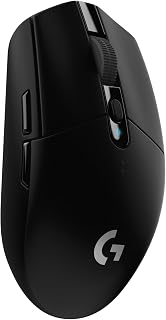
When hunting for a budget gaming mouse that doesn't compromise on performance, the Logitech G305 Lightspeed stands out by delivering wireless freedom alongside tournament-grade specs. The HERO 12k sensor tracks up to 12,000 DPI with 400 IPS precision, offering the accuracy serious gamers need without the cable drag. Logitech's LIGHTSPEED wireless technology achieves 1ms response times that match wired competitors, while the 6 programmable buttons through G HUB software let you customize controls for any game. Battery efficiency is exceptional: a single AA powers 250 hours of gameplay, or up to 9 months in energy-saving mode, meaning you'll rarely think about charging. At just 99 grams, this mouse feels nimble during fast flicks and long sessions. The ambidextrous design accommodates both left and right-handed users, and the nano receiver tucks inside for travel. The 1-meter wireless range keeps you tethered closer to your desk than some would prefer, and RGB customization is minimal compared to flashier options. Still, for gamers prioritizing responsive wireless performance and marathon battery life on a tight budget, the G305 delivers where it counts.
Sensor: HERO 12k Optical Sensor, 200-12,000 DPI, 400 IPS
Connectivity: LIGHTSPEED Wireless, 1ms report rate
Buttons: 6 programmable buttons
Weight: 99 grams (3.4 oz)
Battery: 1 AA battery included, 250 hours runtime
Design: Ambidextrous, compact portable form factor
Compatibility: Windows 10+, Mac, works with PC and laptop
Storage: Built-in nano receiver storage compartment
Dimensions: 4.59 inches L x 2.45 inches W
Color: Black
Model Number: 910-005280
Perfect for competitive FPS and MOBA players who want wireless performance without lag, travelers attending LANs or gaming on the go, and anyone tired of cable management. Left-handed users benefit from the ambidextrous shape. Skip this if you game more than a meter from your PC, need extensive RGB lighting effects, or prefer heavier mice with more palm support during extended sessions.

Pros
- 26K DPI optical sensor with zero smoothing for precise tracking
- 11 programmable buttons for extensive macro customization
- Optical switches with 0.2ms actuation and 70-million-click rating
- Dual-mode HyperScroll wheel toggles between speed and tactile scrolling
Cons
- Wired connection sacrifices mobility for zero latency
- Extensive features require time in Razer Synapse for optimization
Finding wired precision under budget constraints leads straight to the Razer Basilisk V3, which packs professional features typically reserved for pricier peripherals. The 26K DPI optical sensor tracks with zero smoothing for pixel-accurate targeting, while optical switches rated for 70 million clicks actuate in just 0.2ms for lightning-fast response. Eleven programmable buttons transform this into a macro powerhouse for MMO rotations and tactical shooter loadouts, all configurable through Razer Synapse. The dual-mode HyperScroll wheel switches between frictionless speed scrolling for inventory management and tactile precision for weapon selection with one click. Ergonomic design with a thumb rest supports marathon sessions without cramping, though the right-handed shape limits left-handed players. The rubberized finish adds grip during intense moments, and construction feels solid enough for years of heavy use. Eleven RGB lighting zones sync with over 150 games through Chroma integration, adding visual flair beyond basic backlighting. The wired connection guarantees zero latency and eliminates battery anxiety, though it sacrifices desk mobility. Extensive customization requires upfront time in software, which might overwhelm casual players seeking plug-and-play simplicity. For gamers prioritizing tournament-level accuracy and deep control options on a budget, this mouse delivers serious performance.
Connectivity: Wired USB
DPI Sensor: Optical 26K DPI with FOCUS Plus technology
Programmable Buttons: 11 total
Mouse Switches: Optical Gen 2 with 0.2ms actuation and 70 million click lifespan
RGB Lighting: 11 Chroma zones, 16.8 million colors, 150+ game integration support
Scroll Wheel: Dual-mode HyperScroll (free-spin and tactile)
Compatibility: Windows 10 and 11, Mac, PC, and laptops
Weight: 3.56 ounces
Dimensions: 5.12 inches L x 2.96 inches W
Color: Black with rubberized finish
Warranty: 2-year manufacturer coverage
Included: Mouse, product information guide, Razer Synapse software access
Ideal for competitive FPS and MMO players who value zero-latency wired reliability, esports enthusiasts needing programmable macros, and anyone willing to invest time customizing controls for peak performance. Right-handed users benefit most from the ergonomic shape. Skip if you're left-handed, need wireless mobility, or prefer simple plug-and-play mice without software configuration.

Pros
- HERO sensor with 25600 DPI delivers sub-micron tracking accuracy
- 11 programmable buttons support complex macros and keybinds
- Adjustable weight system with five removable weights
- Wired design eliminates input lag and battery management
Cons
- Configuration software requires learning curve
- Right-hand design only, no left-handed option
The Logitech G502 HERO delivers flagship sensor technology and extensive customization at a price that fits within budget gaming constraints. Its HERO optical sensor tracks with sub-micron precision across a massive 25600 DPI range, offering zero smoothing or acceleration for pixel-perfect aim in competitive shooters. Eleven programmable buttons let you bind abilities, macros, and commands without reaching for the keyboard, while the hyper-fast scroll wheel switches between notched and free-spin modes for rapid weapon cycling or menu navigation. The adjustable weight system with five removable weights allows fine-tuning to match your grip and play style. Metal spring tensioning ensures crisp, tactile clicks that survive millions of actuations. The ergonomic right-hand shape supports palm and claw grips comfortably through marathon sessions. LIGHTSYNC RGB lighting syncs across compatible Logitech gear. The wired connection eliminates wireless lag and battery concerns entirely, keeping you focused on gameplay.
Sensor Technology: HERO 16K Optical, 25600 DPI max, sub-micron precision tracking
Connectivity: Wired USB (1.0 meter range)
Buttons: 11 programmable buttons plus dual-mode scroll wheel
Customization: 5 adjustable weights (3.6g each), RGB LIGHTSYNC lighting, game profiles
Build: Metal spring tensioning and pivot hinges, ergonomic right-hand design
Weight: 4.32 ounces
Dimensions: 2.95L x 1.57W inches
Compatibility: PC, Windows 7 or later
Power: USB powered (no batteries required)
Warranty: 1-year hardware limited

Pros
- Wireless 2.4GHz connection with 10-meter range and minimal lag
- Five adjustable DPI levels (1000-4000) switchable on the fly
- Seven programmable buttons via Redragon Pro driver
- Lightweight 3-ounce design reduces hand fatigue
Cons
- Requires AA battery replacements (not included)
- Right-handed ergonomics exclude left-handed users
The Redragon M656 combines wireless freedom with competitive responsiveness at a fraction of typical wireless gaming mouse costs. Its 2.4GHz connection maintains reliable signal across a 10-meter range with no perceptible lag, while the PAW3104 optical sensor and 500Hz polling rate provide tracking accuracy suitable for fast-paced shooters and MOBAs. Five adjustable DPI levels from 1000 to 4000 let you switch sensitivity on the fly to match different game scenarios or desktop tasks. All seven buttons accept custom programming through the Redragon Pro driver, enabling one-click macros and ability chains. The ergonomic right-hand design keeps your palm supported during extended sessions, and the lightweight 3-ounce build allows quick, natural movements across your mousepad. Smart ECO sleep mode conserves battery when idle. Red LED accent lighting adds visual interest to budget setups without excessive RGB effects.
Connectivity: 2.4GHz Wireless with 10-meter range
Sensor: PAW3104 Optical Pixart
Polling Rate: 500Hz in 3 adjustable levels
DPI Levels: 5 levels (1000, 1500, 2000, 2400, 4000 DPI)
Programmable Buttons: 7 total with macro support
Ergonomics: Right-handed design
Weight: 2.88 ounces
Dimensions: 8.07 inches (L) x 5.91 inches (W)
Power: 1 AA battery (not included)
Lighting: Red LED logo (always on), scroll wheel (off)
Compatibility: PC and Mac (macOS 12 Monterey and Windows 10 or later)
Warranty: 1 year
Budget-conscious gamers seeking wireless convenience without sacrificing competitive performance will find strong value here. The programmable buttons and adjustable DPI appeal to FPS and MOBA players who need tactical flexibility. Casual gamers wanting to eliminate cable clutter while maintaining solid tracking will appreciate the 2.4GHz reliability. Avoid this if you prefer rechargeable mice over AA battery dependency, game left-handed, or need sensor specs beyond 4000 DPI.

Pros
- 12,800 DPI sensor with 1000Hz polling rate for competitive precision
- Eight programmable buttons with macro support for tactical flexibility
- Drag-free paracord and smooth skates create wireless-like glide
- Solid build quality with braided cable and rubber-coated grip
Cons
- Scroll wheel can occasionally double-scroll during rapid use
- Larger frame may feel unwieldy for smaller hands or palm grip users
When you need competitive performance on a tight budget, the Acer OMW317 delivers where it counts. The 12,800 DPI optical sensor paired with a 1000Hz polling rate and 20G acceleration provides the precision and responsiveness required for FPS and MOBA play without the premium price tag. Eight programmable buttons let you map abilities and macros for tactical flexibility, while the drag-free paracord cable and smooth skates minimize friction during quick flicks and tracking. The mid-hand ergonomic design with balanced weight distribution supports comfort during marathon sessions, and the rubber-coated grip keeps control secure when things heat up. Build quality stands out in this price range: the braided USB cable resists wear, the optical sensor tracks consistently across surfaces, and the overall construction feels solid rather than cheap. Customizable RGB lighting adds personality if you want it, or disable it entirely for a clean setup. Real-world feedback highlights its tracking consistency and responsiveness across both competitive gaming and everyday use, making it a versatile performer that punches well above its cost.
Sensor: 12,800 DPI Optical Sensor with 7000 FPS scanning
Polling Rate: 1000Hz for ultra-responsive tracking
Acceleration: 20G maximum acceleration
Buttons: 8 programmable buttons with macro and rapid-fire support
Connectivity: USB-A wired connection with drag-free paracord
RGB Lighting: 12 customizable modes with music synchronization
DPI Settings: 4 preset levels (1200, 2400, 3200, 6400) or up to 12,800 via driver
Weight: 190 grams with balanced distribution
Dimensions: 4.7 inches long by 2.9 inches wide
Operating Systems: Windows, macOS, Linux, Chrome OS
Warranty: 1 year manufacturer warranty
This mouse suits competitive players and enthusiasts with medium to larger hands who want high-spec performance without stretching their budget. If you play FPS titles, MOBAs, or fast-paced games and need programmable buttons for macros, this delivers excellent value. It works equally well for productivity tasks requiring precision. Skip it if you have smaller hands or strongly prefer a palm grip, as the larger frame may feel awkward. Also pass if you need flawless scroll wheel performance, since occasional double-scrolling has been reported during rapid use.

Pros
- Ergonomic right-hand design supports extended gaming sessions
- 6400 DPI optical sensor with wired zero-latency connection
- Mechanical switches rated for 10 million clicks
- Two-year warranty backs durability claims
Cons
- Wired connection requires cable management
- No left-handed version available
The Razer DeathAdder Essential brings proven ergonomics and durable construction to the budget gaming category without sacrificing core performance. Its 6400 DPI optical sensor tracks movements accurately across cloth and hard pads, providing responsiveness needed for competitive shooters and fast-paced action games. Five programmable buttons accept custom macros and remapping through Razer Synapse software, letting you execute abilities and commands without keyboard distractions. The textured scroll wheel with ridged grip delivers precise notch feedback even during intense firefights. Mechanical switches rated for 10 million clicks ensure this mouse survives years of heavy use, backed by a two-year manufacturer warranty that reinforces build confidence. The wired connection eliminates charging routines and wireless latency entirely. Lightweight construction reduces strain during marathon sessions, while rubberized side grips maintain control through sweaty palms and rapid flicks. The ergonomic right-hand shape supports both palm and claw grip styles comfortably.
Sensor: 6400 DPI optical sensor with programmable sensitivity buttons
Buttons: 5 programmable buttons with macro support via Razer Synapse
Switches: Durable mechanical switches rated for 10 million clicks
Connectivity: Wired (5.0 meter range)
Scroll Wheel: Ridged, rubberized design for improved grip and accuracy
Design: Ergonomic right-handed orientation
Weight: 0.13 kg (lightweight construction)
Dimensions: 5 inches long x 2.43 inches wide
Compatibility: Windows, macOS, Linux, PC, laptop, gaming console
Warranty: 2-year manufacturer coverage
Model: RZ01-03850100-R3U1
Budget gamers prioritizing durability and ergonomic comfort over wireless convenience will find exceptional value here. The proven shape suits players with small to medium hands who favor right-handed designs. FPS and MOBA competitors needing reliable zero-latency tracking will appreciate the wired connection. Skip this if wireless freedom is essential, you game left-handed, or need sensor precision beyond 6400 DPI for ultra-wide monitors.

Pros
- 10000 DPI optical sensor with five adjustable sensitivity levels
- Eight programmable buttons with macro and rapid-fire support
- 45-hour battery life covers extended gaming sessions
- 1000Hz polling rate ensures responsive cursor tracking
Cons
- Right-handed design only excludes left-handed gamers
- Wireless may not satisfy professional esports players demanding absolute zero latency
Budget gamers seeking wireless versatility without sacrificing competitive specs will appreciate what the Redragon M810 PRO brings to the table. The 10000 DPI optical sensor adjusts across five sensitivity levels on the fly, letting you switch from pixel-perfect aiming to rapid turns mid-match. Eight programmable buttons support macros and rapid-fire commands, giving MMO and MOBA players the shortcuts they need for complex rotations. The 1000Hz polling rate keeps cursor tracking responsive during intense firefights, while 2.4GHz wireless eliminates cable snags without noticeable latency for most gaming scenarios. Battery performance impresses with 45 hours per charge, covering multiple gaming sessions before needing a top-up. The comfort grip design with matte ABS finish reduces hand fatigue and resists smudges during marathon play. USB-C charging adds modern convenience, and compatibility spans PCs, tablets, and gaming consoles. The right-handed ergonomic shape won't suit lefties, and hardcore esports competitors obsessed with eliminating every microsecond of potential wireless delay might lean toward wired options. For the vast majority chasing quality wireless gaming without breaking the bank, this mouse packs serious value.
Connectivity and Performance: 2.4GHz wireless with 10-meter range, 1000Hz polling rate, USB-C charging
Sensor: PAW3325 optical sensor with up to 12000 DPI
Buttons: 8 programmable buttons including rapid-fire and 2 side macro buttons
Battery: Lithium polymer, 45-hour average life (eco-mode)
Design: Right-handed, ABS plastic with matte finish, comfort grip
Dimensions: 8.07 inches L x 6.1 inches W, 4 ounces
RGB: Customizable lighting with dynamic streaming, breathing, and waving modes
Compatibility: Windows XP/Vista/7/8/10, gaming consoles, tablets
Warranty: 1 year
Best suited for right-handed FPS, MOBA, and MMO players who want wireless flexibility with programmable controls. Great for gamers juggling multiple devices or genres requiring different DPI profiles. Skip if you're left-handed, demand absolute zero-latency wired connections for professional competition, or need more than eight programmable buttons for complex MMO rotations.
Buying Guide: What to Look For in a Budget Gaming Mouse
DPI Range and Adjustability
DPI (dots per inch) determines how far your cursor moves relative to physical mouse movement. Higher DPI enables faster on-screen tracking, while lower DPI offers precision for pixel-perfect aiming.
Budget gaming mice in 2026 typically offer 4,000 to 12,800 DPI ranges with on-the-fly adjustment buttons. Look for models with at least five preset DPI levels so you can switch between sensitivity settings mid-game without opening software. The Redragon M602 Gaming Mouse and Redragon M612 Wired RGB Optical Gaming Mouse 8000 both deliver adjustable DPI up to 7,200 and 8,000 respectively, giving you flexibility across different game genres.
Sensor Quality and Tracking Accuracy
The optical sensor is the brain of your mouse. Budget models often use reliable sensors like the PixArt PAW3325 or similar optics that track movement accurately without smoothing or acceleration artifacts.
Premium budget options like the Logitech G502 Hero Wired Gaming Mouse – Black feature Logitech’s HERO 16K sensor that tracks at sub-micron precision with zero smoothing, while the Logitech G305 Lightspeed Wireless Gaming Mouse delivers 400 IPS tracking with its HERO 12K sensor. Even entry-level models now provide consistent tracking across cloth and hard mouse pads, making sensor performance less of a compromise than in previous generations.
Programmable Buttons and Software Support
Programmable buttons transform a basic mouse into a customizable gaming tool. Budget mice typically offer 6 to 11 programmable buttons that you can remap for macros, key binds, and tactical shortcuts.
Software matters as much as hardware. Redragon mice use the Redragon Pro driver for button remapping, RGB customization, and macro editing, while Logitech models leverage the robust G HUB platform. The right combination of hardware and software lets you create game-specific profiles that load automatically when you launch your favorite titles.
Ergonomics and Build Quality
Comfort directly impacts performance during extended gaming sessions. Most budget gaming mice adopt a right-handed ergonomic shape with textured side grips and contoured thumb rests.
Pay attention to weight distribution and coating materials. The Razer Basilisk V3 Customizable RGB Wired Ergonomic features a sculpted thumb rest that reduces fatigue, while the Acer Wired Gaming Mouse, 12,800 DPI RGB Ergonomic offers a balanced weight design for stability without bulk. Frosted coatings resist fingerprints better than glossy finishes, and rubberized side panels improve grip during intense gameplay. Even at budget-friendly price points, mechanical switches rated for 10 to 70 million clicks ensure your mouse survives years of competitive play.
Wired vs. Wireless: Which Fits Your Setup?
Wired mice eliminate battery anxiety and deliver consistent 1ms response times through USB connections. They’re ideal for stationary desktop setups where cable management isn’t a concern.
Wireless models like the Redragon M810 PRO Wireless RGB Gaming Mouse 10000 and Redragon M656 Wireless Optical Gaming Mouse 4000 use 2.4GHz nano receivers for lag-free performance that rivals wired connections. Modern wireless mice offer 45+ hours of battery life per charge, and some models like the G305 can run for months on a single AA battery. Choose wired for guaranteed reliability or wireless for clean desk aesthetics and portability.
Final Thoughts
Budget gaming mice in 2026 deliver impressive performance without compromising on essential features. If you want a wireless option with exceptional battery life and high DPI, the Redragon M810 PRO Wireless RGB Gaming Mouse 10000 offers 10,000 DPI and 45-hour battery life for cable-free competitive play. For wired precision with advanced features, the Logitech G502 Hero Wired Gaming Mouse – Black combines a HERO 16K sensor, 11 programmable buttons, and adjustable weights for complete customization. Both prove you don’t need to spend a fortune to game like a pro.
Frequently Asked Questions
What DPI setting should I use for FPS games?
Most competitive FPS players use 400 to 1,600 DPI paired with low in-game sensitivity for precise aim control. Higher DPI values above 3,200 work better for fast-paced MOBAs or real-time strategy games where you need to cover more screen space quickly. Start at 800 DPI and adjust based on your mouse pad size and personal preference.
Do wireless gaming mice have input lag?
Modern wireless gaming mice using 2.4GHz connections deliver 1ms report rates identical to wired mice, making input lag imperceptible for competitive gaming. Budget wireless models in 2026 use reliable PixArt sensors and optimized firmware that eliminate the latency issues that plagued older wireless technology. Just avoid Bluetooth-only mice for gaming since Bluetooth introduces higher latency than dedicated 2.4GHz receivers.
How many programmable buttons do I actually need?
Six to eight programmable buttons handle most gaming scenarios comfortably. Two side buttons for weapon switching or ability casting, a DPI toggle, and a few top-mounted buttons for secondary functions cover typical needs in FPS, MOBA, and RPG games. MMO players or creative professionals might benefit from 10+ button layouts, but casual and competitive gamers rarely use more than eight regularly.
Can I use a gaming mouse for work and productivity?
Absolutely. Programmable buttons excel at productivity tasks like copy-paste shortcuts, application switching, and browser navigation. Adjustable DPI lets you fine-tune cursor speed for precise photo editing or quick document scrolling. Many budget gaming mice include software that lets you create separate profiles for gaming and work, automatically switching settings based on which application you’re using.
Common questions
What is the best gaming mouse under $30 for most gamers?
The Redragon M602 is a strong pick for gamers who want solid features without spending much. It offers 7200 adjustable DPI, 9 programmable buttons, RGB lighting, and macro editing software, making it genuinely competitive at its price point. It works across Windows, Mac, and Linux, and connects to PCs, laptops, and gaming consoles. Check the live price on its listing to see where it sits right now.
What is the best gaming mouse under $20 for tight budgets?
The Logitech G203 is the easiest recommendation at the lower end of the budget range. It keeps things simple with 6 buttons, wired USB connectivity, and Lightsync RGB lighting, giving you a reliable, well-built mouse without unnecessary complexity. It works with Windows, Mac, and laptops. The live price is on its listing, since street prices shift frequently.
What is the best gaming mouse for beginners just starting out?
The Logitech G203 is ideal for beginners because it is lightweight, straightforward, and from a brand with strong driver support. It has no overwhelming button layout or complicated software to learn. If you want a step up with more customization from day one, the Redragon M602 adds programmable buttons and macro editing while remaining beginner-friendly. Both are wired, so there are no batteries or pairing steps to worry about.



Write Your Review
No reviews yet. Be the first to share your experience!