

Your mouse keeps running out of room mid-swipe. You are cramped at your desk, elbowing peripherals, and losing precision at the worst moments. A tenkeyless keyboard solves this by trimming the numpad and reclaiming that desk real estate, without cutting a single key you actually reach for. Whether you game competitively, type for hours, or just want a cleaner workspace, the TKL layout hits a sweet spot that full-size keyboards simply cannot match.
This guide breaks down the top TKL keyboards in 2026 across gaming, wireless, and productivity use cases. If you are also exploring even more compact options, check out our roundup of the best 65 percent keyboards for a smaller footprint. For everyone else, read on.
Quick answer
This guide compares 8 picks, with Corsair K55 CORE TKL RGB Gaming Keyboard - Compact ranked first. EPOMAKER F75 MAX Wireless Mechanical Gaming Keyboard holds the highest customer rating among them. SteelSeries Apex 3 TKL RGB Gaming Keyboard - Compact has the most customer reviews.
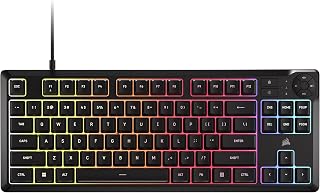
For readers who want a quiet TKL board for shared spaces or late night sessions, the quiet membrane keys stand out immediately, especially combined with spill resistant construction for desks that see drinks nearby. The 1000Hz polling rate still keeps response times sharp, so quieter typing doesn't come at the cost of gaming performance.
Pros
- Spill resistant up to 300mL
- Quiet membrane keys with responsive feel
- 1000Hz polling and 12-key rollover
- 8-zone RGB with iCUE customization
Cons
- Membrane switches wear faster than mechanical
- No numpad, which affects productivity tasks
For a TKL guide aimed at every kind of setup, the K55 CORE fills the budget-friendly, low-maintenance slot. It trims the numpad for extra mouse room, the core reason to choose tenkeyless in the first place, while keeping things practical with quiet membrane keys and 300mL spill resistance. The 1000Hz polling rate and 12-key rollover mean input lag isn't a concern despite the membrane switches, so it still holds up for fast-paced games. Eight-zone RGB backlighting through iCUE lets you personalize the look, even if it's less granular than per-key lighting on pricier boards. A tangle-free 6-foot cable and adjustable height settings round out a straightforward, no-fuss package. It's a sensible pick for anyone who wants the desk-space benefit of a TKL layout without paying for mechanical switches or premium materials.
Well suited to students, budget-conscious gamers, and anyone moving to a smaller desk who wants tenkeyless space savings without a big investment. Skip it if you want mechanical switch feel and longevity, need per-key RGB control, or regularly rely on a numpad for productivity work. Mac and Linux users should also look elsewhere since it's Windows-compatible only.
Layout and Design: Tenkeyless form factor with 87 keys, compact dimensions of 14.56 inches wide by 5.56 inches deep.
Backlighting: 8-zone RGB with 16.8 million colors, per-zone programmable through iCUE software.
Performance: 1000Hz polling rate, 12-key selective rollover, responsive membrane switches.
Connectivity: USB 2.0 Type-A with 6-foot cable, compatible with Windows PC.
Controls: Four dedicated media hotkeys (play/pause, mute, volume up/down), brightness adjustment, Windows lock key, adjustable height.
Durability: 300mL spill resistance, 2-year manufacturer warranty.

For anyone building a TKL setup that still wants full customization, this 81-key layout hits the sweet spot between compact footprint and functionality, keeping arrow keys and navigation cluster while ditching the numpad. The 5-layer noise dampening with gasket mount gives that cushioned, quieter feel many enthusiasts chase, and triple connectivity via 2.4GHz, Bluetooth, and USB-C means it slots into a multi-device desk without cable clutter or dongle juggling.
Pros
- Three connectivity modes for switching between PC, laptop, tablet
- Gasket mount and 5-layer dampening for quiet, smooth typing
- Media knob controls both brightness and volume
- Hot-swappable switches with included spares for customization
Cons
- Linear switches feel mushy for those wanting tactile feedback
- Advanced customization requires companion software
If your setup spans a desktop, laptop, and tablet, the K673 PRO's three connectivity modes make it a strong tenkeyless candidate for anyone juggling devices without wanting three keyboards. The 81-key layout keeps things compact, and the gasket-mounted, five-layer noise-dampened construction gives it a smooth, quiet typing feel that suits both gaming and late-night typing. The media knob doubles up on brightness and volume control in one dial, a nice touch of efficiency for a board this size. Wireless responsiveness holds up for both gaming and extended work sessions, and hot-swappable switches mean you can adjust the feel later without buying a new board. Build quality feels sturdier than the price suggests, which matters if you're choosing a TKL to anchor a setup meant to last. The linear switches lean toward a softer, less clicky feedback, so it may not satisfy anyone who wants a crisp tactile bump. Overall, it's a flexible, quiet, well-built option for a multi-device tenkeyless setup.
The K673 PRO offers three distinct connectivity options to match your workflow. The 2.4GHz wireless mode provides the lowest latency and works universally across Windows, Mac, and Linux systems without software installation. Simply plug in the USB receiver and start gaming immediately.
Bluetooth connectivity supports both 3.0 and 5.0 standards, making it compatible with older tablets and modern smartphones alike. Pairing takes seconds, and the keyboard remembers up to three paired devices for quick switching. Battery efficiency in Bluetooth mode rivals the 2.4GHz option despite the older protocol's reputation.
USB-C wired mode unlocks the fastest possible connection with zero wireless latency overhead. This mode also charges the battery simultaneously, making it ideal for all-day gaming sessions or when you want guaranteed power throughout extended tournaments.
The K673 PRO comes with RGB lighting fully configurable directly from the keyboard using the control knob and dedicated buttons. No software required for basic brightness and preset lighting modes, giving you instant customization out of the box.
The optional Pro Software unlocks advanced features including custom lighting effect design, macro programming, and key rebinding. The interface is intuitive and avoids unnecessary complexity. Whether you customize extensively or stick with on-board presets, the keyboard adapts to your preferences without forcing additional downloads.
Included keycap and switch pullers make maintenance and swaps effortless. The hot-swappable socket accepts virtually any 3-pin or 5-pin mechanical switch, opening countless upgrade paths as your preferences evolve.

Console gamers wanting a straightforward compact TKL will appreciate the tactile switches paired with anti-ghosting and multi-key rollover, which keep simultaneous inputs accurate during fast sequences. Its heat resistant and wear resistant build also suits anyone planning long term daily use without worrying about keys degrading from repeated hard presses.
Pros
- PBT keycaps resist wear and shine over time
- Aluminum top case and frame reduce flex and wobble
- 6-key rollover anti-ghosting for clean rapid input
- 12 programmable media keys add functionality
Cons
- No number pad, which affects data entry work
- Fixed white LED only, no RGB customization
For a setup built around durability and a clean desk footprint, the G413 TKL SE fits naturally into the tenkeyless category by pairing gaming-grade switches with materials that outlast typical budget boards. The PBT keycaps resist the shine and wear that cheaper ABS caps develop over time, and the tactile switches keep feedback consistent through long sessions, which matters when a compact layout is your primary space-saving move. The brushed aluminum top case and aluminum-magnesium frame eliminate flex, giving the smaller footprint a sturdier feel than many TKL boards achieve. Twelve programmable media keys keep functionality intact even after losing the number pad, and white LED backlighting keeps the aesthetic clean if you're not chasing RGB. For anyone assembling a setup where reliability and a minimal desk footprint take priority over lighting effects, this is a straightforward, well-built option. It's a practical pick when the goal is more desk space without a drop in typing quality or long-term durability.
Switch Type: Tactile mechanical switches
Keycaps: PBT, heat and wear-resistant
Layout: Tenkeyless (87-key), QWERTY
Backlighting: White LED with 12 media control hotkeys
Anti-Ghosting: 6-key rollover
Connectivity: Wired USB
Case Material: Brushed aluminum with aluminum-magnesium alloy frame
Dimensions: 16L x 7W x 2H inches
Weight: 650g
Compatibility: Windows and macOS
Warranty: 1-year limited hardware warranty
Best for gamers and typists who want a tenkeyless board built to last, with premium keycaps and a rigid aluminum frame, and who don't mind single-color lighting. Not ideal if you rely on a number pad for data entry, want RGB customization, or need wireless freedom, since this is wired-only with fixed white backlighting.

This one leans toward TKL buyers who want flexibility across devices, since it pairs 2.4GHz wireless, Bluetooth 5.0, and USB-C so you can hop between PC, laptop, and even a tablet without juggling cables. The gasket-mounted 75% build with hot swappable pre-lubed cream switches also appeals to anyone who plans to tinker with feel and sound over time.
Pros
- Hot-swappable pre-lubed linear switches
- TFT screen and knob for on-the-fly control
- Gasket-mount design cuts harsh bottoming-out
- Multiple connectivity options including wireless
Cons
- 75% layout, not a traditional TKL numpad-free full row
- Software learning curve for macros and remapping
If you want a TKL-adjacent board that still packs in extras, the F75 MAX's 75% layout is worth a look. It keeps arrow keys and function row within reach while trimming the numpad, and the TFT screen with knob adds control over RGB and battery status without touching software. For a 2026 TKL roundup, it stands out because it goes beyond a stripped-down layout: hot-swappable sockets, pre-lubed linear switches, and a gasket-mount design mean you get a cushioned, quiet typing feel alongside the space savings. Wireless flexibility via 2.4GHz or Bluetooth, plus USB-C wired mode, makes it adaptable across PC, Mac, and Linux setups. The two-stage kickstand and low front height support long sessions at a desk. It suits anyone who wants a tenkeyless-style footprint but isn't willing to give up customization, display feedback, or acoustic comfort to get there.
Layout and Keys: 75% compact layout with 80 programmable keys, QWERTY configuration, south-facing per-key RGB LEDs with light diffusers on Reaper switches.
Connectivity: 2.4GHz wireless, Bluetooth 5.0, USB-C wired mode. Wireless polling rate: 1000Hz USB and 2.4GHz. Full NKRO support for simultaneous multi-key input.
Switches and Customization: Pre-lubed linear cream switches (factory-lubed and tuned). Hot-swappable design compatible with 3-pin and 5-pin mechanical switches and screw-in stabilizers.
Display and Controls: Colorful smart TFT display with GIF support. Dedicated volume knob. Battery monitor and connectivity indicator lights. RGB backlight with 16.8 million colors, adjustable via software, on-screen menu, or keyboard shortcuts.
Physical Design: Gasket-mount structure with flex-cut polycarbonate plate. Dimensions: 5.62L x 12.87W x 1.69H inches. Two-stage adjustable kickstand with 2cm low front height. Ambidextrous hand orientation. Plastic enclosure. Water resistance: not water-resistant.
Compatibility: Windows, Mac, Linux, Android (14.0+), iOS. Compatible with gaming consoles, laptops, PCs, smartphones, and tablets. Includes detachable USB-A to USB-C cable, extra switches, keycap and switch puller, and user manual. One-year warranty.
Good for gamers, programmers, and desk-space-conscious typists who want a compact layout with modern extras like a display screen and hot-swap sockets. Skip it if you specifically need a true TKL with a numpad-free but otherwise standard layout, or if you'd rather avoid spending time on software setup for macros and lighting. Also not ideal if you need guaranteed long-term durability data, since customer feedback is still limited.
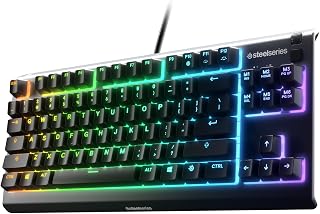
Anyone considering a TKL for a console setup near messy environments will notice the IP32 water and dust resistance, a spec rarely paired with whisper quiet switches at this compact size. Add gaming grade anti-ghosting and the lightweight tenkeyless frame, and it fits people who want a durable, low profile board without sacrificing responsiveness.
Pros
- Whisper-quiet switches good for shared spaces
- Space-saving TKL layout frees up desk room
- IP32 water and dust resistance for peace of mind
- 8-zone RGB with PrismSync customization
Cons
- Keycaps aren't removable, limiting personalization and cleaning
- Macro keys lack independent binding found on higher-end models
When you're picking a TKL for competitive play, switch noise and layout efficiency matter more than flashy extras, and the Apex 3 TKL handles both well. The whisper-quiet switches let you game late without disturbing roommates or family, while the tenkeyless footprint frees up desk space for wider mouse swings, a common priority for anyone building a focused gaming setup. Anti-ghosting and a 20 million keystroke lifespan mean the compact form factor doesn't come at the cost of durability. The 8-zone RGB adds visual flair synced through PrismSync, and the IP32 rating gives peace of mind against spills, a nice bonus for a battle station that sees long sessions and drinks nearby. Build quality feels solid rather than cheap, and the clickable volume roller is a small but welcome convenience. It's not the most premium TKL on the market, but for shoppers wanting a space-saving, quiet, responsive board without stretching their budget, it checks the right boxes for a dedicated gaming setup.
Connectivity: Wired USB
Layout: QWERTY, 87 Keys, Tenkeyless (TKL)
Switch Type: SteelSeries Omnipoint, Whisper Quiet
Backlighting: 8-Zone RGB with PrismSync
Water Resistance: IP32 rated
Special Features: Anti-ghosting, Volume roller, Multimedia controls
Dimensions: 14.3" L x 5.9" W x 1.57" H
Weight: 1.4 lbs
Material: ABS plastic
Compatibility: Windows, Mac OS X, PS4, PS5, Xbox Series S/X
Warranty: 1 Year
Pros
- Excellent build quality at mid-range price point, with braided cable and quality tactile feel
- Exceptional battery life lasts for weeks between charges, ideal for mobile professionals
- Smooth Bluetooth connectivity and reliable multi-device switching works seamlessly in real-world use
- Compact size saves desk real estate while maintaining full navigation and function key access
- Responsive customer service and support from Keychron team
Cons
- Non-hotswap switches prevent easy switch customization, limiting modification options for enthusiasts
- Included USB-C cable is relatively short and may require a longer cable for some desk setups
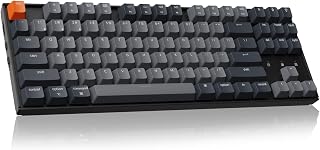
The Keychron K8 is a tenkeyless wireless mechanical keyboard designed for users who want a compact, productivity-focused typing solution without sacrificing comfort or quality. It bridges the gap between portable Bluetooth keyboards and full-size gaming boards, making it ideal for professionals working across multiple devices, remote workers, and users who prefer mechanical switches but need flexible connectivity.
The standout feature is undoubtedly the tactile brown switches paired with an impressive 200-hour battery life. Users consistently praise the satisfying keystroke feedback and balanced sound signature. The keyboard connects to three devices simultaneously via Bluetooth 5.1 and supports seamless switching, while the USB-C wired mode provides a reliable fallback for gaming or situations where wireless connectivity matters. Real-world performance shows the Bluetooth stays consistent, and the battery life genuinely lasts weeks of typical daily use.
Build quality punches well above its price point. The braided USB-C cable, OEM-profile shine-through keycaps, and sturdy construction feel premium. The 87-key layout intelligently retains navigation keys like Home, End, and Page Up despite the compact size, and the adjustable feet with inclined frame provide solid ergonomic support for extended typing sessions. Included Mac and Windows keycap sets show attention to cross-platform users.
The main limitations stem from design choices rather than quality issues. The switches are not hot-swappable, which means you cannot easily customize or replace them. The included USB-C cable is noticeably short, potentially requiring a separate longer cable depending on your desk configuration. Some users may find the brown switch actuation force on the heavier side, though most find it workable and preferable to lighter alternatives.
The Keychron K8 delivers genuine value for multi-device users and professionals seeking a compact mechanical keyboard. It excels at balancing portability, battery life, build quality, and typing comfort. While not designed for switch enthusiasts or those requiring hot-swap modularity, it represents one of the best mechanical keyboards at its price point for everyday productivity and light gaming.
Physical: 87-key tenkeyless layout, 14.1 inches length, 4.84 inches width, 1.65 inches height, 1 kg weight
Switches: Keychron Super Brown tactile switches, 2.0mm plus or minus 0.4mm pre-travel, 55 gf plus or minus 10 actuation force, 50 million keystroke lifespan, NKRO in wired mode, 6KRO in wireless mode
Battery and Power: 4000 mAh rechargeable battery, 200 hours battery life with backlight off, USB Type-C charging, dual power modes (wireless Bluetooth and wired USB-C)
Connectivity: Bluetooth 5.1 with support for up to 3 simultaneous device connections, USB Type-C wired connection
Compatibility: macOS (Macbook Pro, Macbook Air, Mac Mini), Windows (10 and higher), iPad (all models), Chromebook, Lenovo, Asus, Dell, and other Bluetooth-equipped devices. Includes Mac and Windows specific keycaps.
Features: Single-color white backlight, shine-through OEM-profile keycaps, two-level adjustable feet, inclined bottom frame, included keycap puller and braided USB-C cable
Who Should Buy This Keyboard: The K8 is perfect for professionals who work across multiple devices (Mac laptop, Windows PC, iPad), remote workers prioritizing battery life and portability, typists who appreciate mechanical switches but need wireless flexibility, and light gamers seeking a compact board with tactile feedback. It's also excellent for anyone upgrading from flat laptop keyboards or basic wireless boards who wants genuine quality without full-size bulk.
Who Might Want to Consider Alternatives: Mechanical keyboard enthusiasts who want hot-swappable switches for customization should explore other options. Users who absolutely require shorter actuation force or linear (non-tactile) switches may find the brown switches too heavy. Those needing advanced gaming features like programmable macros should consider larger boards with more robust gaming-focused software.
Key Considerations Before Purchasing: Verify your desk has adequate space for the 14.1-inch length. If you use exclusively one device, the multi-device connectivity advantage diminishes. Consider bringing a longer USB-C cable if your current one is short. Test that your devices support Bluetooth 5.1 or USB-C wired connection. The brown switches are slightly heavier than typical mechanical keyboards, so try one in-person if possible or verify this tactile profile suits your preference.
Value Assessment: The K8 offers exceptional value compared to both standard wireless keyboards and specialty mechanical boards. The combination of 200-hour battery life, solid build quality, multi-device support, and responsive brown switches at this price point is difficult to find. Budget approximately 5-7 minutes for initial Bluetooth pairing and key customization setup. Expect the keyboard to perform reliably for 3+ years with normal use.
Pros
- Exceptional wireless stability with ultra-low latency suitable for competitive FPS and esports titles
- Hot-swappable architecture gives you complete control over switch customization and typing experience
- Outstanding battery longevity delivers weeks of use between charges in both wireless and Bluetooth modes
- Thoughtful design touches like stainless steel plate and sound dampening create a polished typing experience
- Razer Chroma ecosystem integration enables dynamic per-game lighting synchronized across your setup
Cons
- Limited switch variety out of the box, pre-loaded with Orange switches only, requiring separate purchases for alternatives
- Premium price point may exceed budget-conscious gamers' expectations for a TKL keyboard
- Plastic enclosure feels less premium than metal alternatives at this price tier
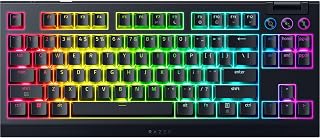
The Razer BlackWidow V4 TKL Wireless is a compact mechanical gaming keyboard engineered for players and professionals who demand both portability and performance. This 87-key tenkeyless design targets competitive gamers, content creators, and desk-space-conscious users who refuse to compromise on responsiveness or customization.
The keyboard's star feature is its hot-swappable architecture, paired with an ultra-responsive 2.4 GHz HyperSpeed wireless connection that delivers lag-free gaming. Pre-loaded Orange tactile switches provide tactile feedback with clean, controlled acoustics. The multi-device Bluetooth support enables effortless switching between three devices, making it versatile for both gaming sessions and productivity work. The 980-hour battery life is genuinely exceptional, offering weeks of continuous use.
Build quality reflects Razer's premium positioning, with a stainless steel top-mounted plate, tape-enhanced PCB, lubricated stabilizers, and dual-layer sound dampening foam that together create a refined typing experience. The multi-function roller and three programmable control buttons provide intuitive media and volume management without disrupting your gaming flow. Razer Chroma RGB customization with 16.8 million colors and hundreds of game integrations adds visual immersion.
Realistic drawbacks include the plastic enclosure, which feels less substantial than metal alternatives, and the premium pricing that sits above many competing compact wireless keyboards. The pre-loaded Orange switches, while excellent, limit immediate customization unless you purchase compatible switches separately.
The BlackWidow V4 TKL Wireless earns its position as a top-tier compact gaming keyboard for players seeking wireless reliability, deep customization, and professional build quality. It excels for competitive gaming and mixed-use environments where battery life and multi-device connectivity matter.
Connectivity: 2.4 GHz HyperSpeed Wireless, Bluetooth multi-device support (up to 3 devices)
Layout: 87-key Tenkeyless (TKL) QWERTY with ambidextrous design
Switches: Razer Orange Tactile Gen-3 switches, pre-loaded, hot-swappable for both 3-pin and 5-pin compatibility
Lighting: Razer Chroma RGB with per-key customization, 16.8 million colors, Chroma game integration
Battery: Up to 980 hours in both wireless and Bluetooth modes, fast charging supported
Build Materials: Plastic enclosure, stainless steel top-mounted plate, tape-enhanced PCB, lubricated stabilizers, dual-layer sound dampening foam
Controls: Multi-function roller with three remappable control buttons for audio, media, and battery management
Compatibility: Windows 10 and later, macOS 14 Sonoma and later, multi-device Bluetooth support
Dimensions: 14.3 inches L x 6.05 inches W x 1.71 inches H, 3.8 pounds
Warranty: 2-year manufacturer warranty
Who Should Buy This: Competitive gamers prioritizing wireless reliability and lag-free performance, streamers and content creators needing multi-device connectivity, desk-space-conscious users who prefer compact layouts, enthusiasts who value switch customization and RGB personalization.
Who Should Consider Alternatives: Users on a strict budget seeking affordable wireless gaming keyboards, players specifically requiring a numpad (full-size layout), those preferring wired connections for maximum simplicity, buyers who value metal construction as a priority.
Key Considerations: The hot-swappable design is a major advantage if you plan to experiment with different switch types, though premium switches require separate investment. The exceptional battery life minimizes maintenance but relies on the wireless connection remaining stable. Razer Chroma integration works best if you own other Razer peripherals for ecosystem cohesion. The TKL form factor is ideal for gaming but removes the numpad entirely, so verify this suits your workflow before purchasing.
Best Value Proposition: If wireless reliability, hot-swappability, multi-device support, and premium build quality matter more to you than minimalist pricing, the BlackWidow V4 TKL Wireless justifies its investment. It outperforms budget wireless keyboards in latency performance and customization depth.

Competitive gamers shopping the TKL category often want proven clicky feedback, and this keyboard's mechanical clicky switches deliver that tactile confirmation on every keystroke. Being wired and PC focused keeps input lag out of the equation, which matters more than extra features when the whole point of going tenkeyless is a cleaner, faster setup near the mouse.
Pros
- Tactile, audible GX Blue clicky switches
- Detachable cable with secure connector
- Onboard memory stores RGB settings
- Lightweight at 2.2 pounds for portability
Cons
- No numeric keypad, and Windows 10 only
- Clicky switches can be loud in shared spaces
This is a tenkeyless keyboard built specifically around what TKL is for: freeing up mouse space without sacrificing input precision. The GX Blue clicky switches give clear tactile and audible confirmation on every keystroke, which matters when reaction time counts. Logitech backed this with a tournament-ready design, including a detachable, secure 1.8m cable and onboard memory for RGB lighting so settings travel with the keyboard even on systems without G HUB installed. At 2.2 pounds it's light enough to pack for LAN events or venue changes, and the 3-step angle adjustment lets you tune positioning for long play sessions. For anyone assembling a setup where every inch of desk space and every millisecond matters, this keyboard's whole design philosophy centers on that tradeoff, making it a strong fit for a TKL-focused buying guide rather than a general-purpose pick.
Physical Dimensions: 14.96 inches L x 6.3 inches W x 1.97 inches H, weighing 2.2 pounds
Switch Type: GX Blue Clicky mechanical switches with audible and tactile feedback
Layout: Tenkeyless (87 keys) QWERTY, ambidextrous hand orientation
Lighting: LIGHTSYNC RGB with 16.8 million color options, programmable with onboard memory storage
Connectivity: Wired via 1.8m detachable Micro USB cable with three-pronged connector
Compatibility: Windows 10 and later, PC only
Additional Features: 3-step angle adjustment, rubber feet for stability, F-key programmable macros (F1-F12), 2-year manufacturer warranty
Best for competitive gamers, streamers, and esports players who want proven TKL space savings paired with tactile, clicky feedback. Skip it if you need a numpad for spreadsheet work or data entry, use Mac or Linux, or find clicky switches too loud for shared spaces. Also not the right pick if you want silent typing for late-night sessions.
TKL Keyboard Buying Guide
Switch Type: Mechanical vs. Membrane
Switch type shapes the entire feel of a keyboard. Mechanical switches, like the GX Blue clickers in the Logitech G PRO Mechanical TKL Tenkeyless or the tactile browns in the Keychron K8, give you physical feedback with every press and a lifespan rated in the tens of millions of keystrokes. They reward fast typists and gamers who want to feel every input.
Membrane keyboards, like the Corsair K55 CORE TKL RGB Gaming Keyboard and the SteelSeries Apex 3 TKL RGB Gaming Keyboard, operate more quietly and usually cost less. If you share an office or prefer near-silent keystrokes, a membrane or whisper-quiet switch board is worth a serious look.
Wired vs. Wireless Connectivity
Wired keyboards guarantee zero latency and never need charging, making them the go-to for competitive play. The Logitech G413 TKL SE Mechanical Gaming Keyboard keeps it simple with a dependable USB connection and a sturdy aluminum chassis.
Wireless TKL boards have closed the gap considerably. The Razer BlackWidow V4 TKL Wireless Gaming Keyboard uses HyperSpeed 2.4 GHz technology with a battery life that can stretch to nearly 980 hours. The EPOMAKER X Aula F75 MAX Wireless Mechanical and the Redragon K673 PRO Wireless 81-Key RGB Gasket both offer tri-mode connectivity, letting you flip between USB-C, Bluetooth, and 2.4 GHz without re-pairing. If your setup spans a PC, laptop, and tablet, that flexibility is genuinely useful. You might also want to pair a wireless TKL with one of our top picks from the best gaming mouse pads to complete a clean wireless desk.
Build Quality and Sound Dampening
How a keyboard feels under your fingers goes beyond the switch. Gasket-mount construction, found in both the EPOMAKER X Aula F75 MAX Wireless Mechanical and the Redragon K673 PRO Wireless 81-Key RGB Gasket, floats the PCB on a gasket layer so each keystroke lands softly rather than clacking against a hard base. Paired with foam layers and silicone dampening, these boards produce a smooth, thocky sound that enthusiasts chase.
At the other end, boards like the Logitech G413 TKL SE use a brushed aluminum-magnesium alloy top case that resists flex and feels premium without any gasket engineering. The Razer BlackWidow V4 TKL uses a top-mounted steel plate with tape-enhanced PCB and lubricated stabilizers for a clean, consistent sound. Your preference here comes down to whether you want bounce and warmth or rigidity and precision.
Extra Features Worth Considering
Dedicated media controls add real daily convenience. The SteelSeries Apex 3 TKL RGB Gaming Keyboard includes a clickable volume roller and media keys, while the Redragon K673 PRO handles brightness and playback through a single control knob. The EPOMAKER X Aula F75 MAX takes it further with a TFT screen that displays GIFs, battery level, and backlight status at a glance.
Hot-swap support is another feature worth prioritizing if you ever want to experiment with different switches. Both the Razer BlackWidow V4 TKL and the EPOMAKER X Aula F75 MAX accept 3-pin and 5-pin switches without soldering. For cross-platform users, the Keychron K8 Tenkeyless Wireless Mechanical ships with keycap sets for both macOS and Windows, making it one of the most versatile options on this list. If you are building out a full desk setup, pairing any of these with a great peripheral matters too, so browse our picks for the best FPS gaming mice and top budget gaming mice to round things out.
Final Thoughts
The TKL format remains one of the smartest keyboard choices in 2026, balancing a compact footprint with a complete key set that covers everything from gaming macros to daily typing. If you want an affordable entry point with solid membrane performance, the Corsair K55 CORE TKL RGB Gaming Keyboard delivers reliable daily use with spill resistance and media controls at a low commitment. If wireless freedom and enthusiast-grade build quality are your priorities, the Razer BlackWidow V4 TKL Wireless Gaming Keyboard brings hot-swap flexibility, HyperSpeed connectivity, and standout battery life to a polished, competition-ready package.
Frequently Asked Questions
What is a tenkeyless keyboard?
A tenkeyless keyboard, often called a TKL, is a keyboard layout that removes the numpad found on full-size boards. This trims the overall width by roughly 20 to 25 percent, freeing up desk space for wider mouse movements. All other standard keys, including function row, arrow keys, and navigation cluster, remain intact.
Is a TKL keyboard good for gaming?
Yes, the TKL layout is arguably the most popular form factor among competitive gamers in 2026. Removing the numpad lets you center your keyboard and shift your mouse further left, which is especially helpful at low sensitivity. Boards like the Logitech G PRO Mechanical TKL Tenkeyless were literally co-developed with esports professionals for this reason.
How does a TKL keyboard compare to a 65% or 60% keyboard?
A TKL keeps the full function row and a dedicated navigation cluster, which makes it a more practical daily driver than a 65% or 60% layout. Smaller boards sacrifice those keys for an even more compact form, often requiring layered key combinations to access them. If you are curious about ultra-compact alternatives, our guide to the best 60 percent keyboard covers that territory in detail.
Do TKL keyboards work on both Mac and Windows?
Most TKL keyboards are cross-platform compatible, though the key labels and some function shortcuts differ between operating systems. The Keychron K8 Tenkeyless Wireless Mechanical is a standout here, as it ships with dedicated keycap sets for both macOS and Windows and includes all necessary multimedia and function keys for each. Always check if the board you are considering includes software or alternate keycaps for your primary OS before buying.
Common questions
What exactly is a TKL keyboard and why choose one?
A TKL keyboard is a tenkeyless layout that drops the numpad, keeping only the main alpha keys, function row, and arrow cluster. The main draw is desk space, since removing the numpad shortens the board significantly, which helps for gaming since your mouse hand has more room to move. Boards like the Logitech G PRO TKL and SteelSeries Apex 3 TKL follow this exact layout, trading numpad convenience for a tighter, more mouse-friendly footprint.



Write Your Review
No reviews yet. Be the first to share your experience!