

Whether you spend long hours at a desk or want a reliable gaming peripheral without breaking the budget, the right mouse makes a real difference. The market is full of solid options, but sorting through them takes time you probably do not have. That is why we put together this guide covering the top picks available right now, across office work, gaming, and ergonomic use cases. If you are also building out your setup, check out our roundup of the best keyboards under $100 for pairing ideas.
Every mouse on this list was selected based on sensor quality, comfort, connectivity, and real-world usability. Whether you prefer wired or wireless, compact or full-size, there is something here for you.
Quick answer
This guide compares 9 picks, with AOC MS610 Ergonomic Vertical Mouse - 4800 DPI ranked first. Logitech G502 HERO Gaming Mouse - 25600 DPI Optical holds the highest customer rating among them.
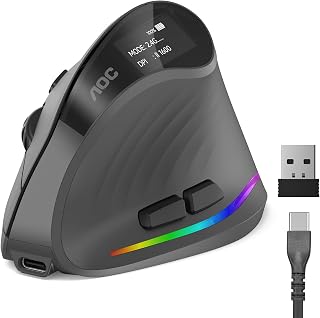
The vertical orientation promotes a neutral wrist angle that reduces strain during extended use, ideal for anyone spending hours at the desk. Triple connectivity options (2.4GHz, Bluetooth, and wired USB-A) ensure compatibility across laptops, desktops, and tablets without dongle juggling. Seven programmable buttons streamline repetitive tasks, while the rechargeable battery eliminates the ongoing cost of replacements.
Pros
- 52-degree vertical angle reduces forearm strain
- Triple connectivity across Bluetooth, 2.4GHz, and USB-A
- Up to 200 hours battery life per charge
- Silent main clicks under 35dB for quiet environments
Cons
- Optimized only for small to medium hand sizes
- Only left and right clicks are silent, other buttons produce normal sound
The 52-degree vertical angle keeps your forearm and wrist in a natural handshake position, addressing the repetitive strain that comes from long work sessions. You get optical tracking up to 4800 DPI with five adjustable levels, ensuring smooth cursor control for everything from spreadsheets to photo editing. Triple connectivity stands out at this price point: Bluetooth 5.4, 2.4GHz wireless, and wired USB-A let you switch between three devices without re-pairing. Silent left and right clicks keep noise below 35dB, ideal for shared workspaces. Battery life reaches 200 hours without RGB or over 40 hours with lighting enabled, and Type-C charging supports working while plugged in. Seven programmable buttons add workflow shortcuts. The matte ABS construction feels durable, and the LED battery indicator prevents surprise shutdowns. Limitations include sizing optimized for small to medium hands, making it unsuitable for larger users, and only the main clicks are silent while other buttons produce normal sounds.
Connectivity and Compatibility: Bluetooth 5.4, 2.4GHz wireless receiver, and USB wired connection. Compatible with Windows, Mac, Linux, and Chrome OS devices. Supports connection to up to three devices simultaneously in Bluetooth mode.
Performance and Input: Optical movement detection with adjustable DPI levels: 1000, 1600, 2400, 3200, and 4800 DPI. Seven programmable buttons with customizable RGB lighting (adjustable via downloadable app). Silent left and right clicks under 35dB.
Power and Battery: 800mAh rechargeable battery provides 200 hours runtime without RGB or 40+ hours with RGB active. Type-C charging cable supports use-while-charging. LED battery percentage display included.
Physical Design: 52-degree vertical ergonomic angle, matte ABS construction, gray color finish. Dimensions: 4.33 inches length x 2.91 inches width. Weight: 3.68 ounces. Optimized for small to medium hands.
Package Contents: Ergonomic vertical mouse, 2.4GHz USB receiver, Type-C charging cable, quick start guide, user manual. Backed by 12-month warranty and 45-day return guarantee.

Pros
- Exceptionally quiet operation with 90% less click noise than standard mice
- Impressive battery life eliminates frequent charging or battery swaps
- Comfortable, well-designed ergonomics with multiple size and handedness options
- Reliable multi-platform compatibility and seamless pairing with Bluetooth or dongle
- Lightweight and portable design with durable rubber construction
Cons
- Bluetooth reconnection can be finicky when switching between multiple devices
- May feel small for users with larger hands despite size options available
- DPI sensitivity may be insufficient for precision-demanding tasks like photo editing
The Logitech Signature M650 is a wireless mouse engineered for everyday productivity, particularly suited for professionals with small to medium-sized hands who value comfort and quiet operation. Available in right-handed and left-handed configurations, this mouse prioritizes ergonomics and distraction-free work over gaming features or flashy aesthetics.
The standout feature is its SilentTouch technology, which reduces click noise by 90% compared to standard mice, making it ideal for shared office spaces or home environments. The adaptive SmartWheel delivers precision line-by-line scrolling for documents and can switch to rapid free-spin mode with a flick for browsing long web pages. Real-world performance is solid with reliable optical tracking and customizable side buttons that integrate well with Logitech Options+ software.
Design and build quality reflect Logitech's reputation. The matte finish off-white chassis features soft rubber grips on the sides and a comfortable thumb rest that supports extended use without hand fatigue. The mouse weighs 101 grams with balanced weight distribution. Construction includes 26% post-consumer recycled plastic in the off-white model, aligning with eco-conscious manufacturing.
Drawbacks include occasional Bluetooth reconnection delays when switching between multiple paired devices, and the DPI maximum of 4000 may limit precision for demanding design or gaming work. Some users with larger hands report the small-to-medium sizing runs undersized. Battery notifications could be clearer before the AA battery depletes.
Verdict: The M650 delivers excellent value for office workers and casual users prioritizing comfort, silence, and reliability. Its exceptional 24-month battery life and cross-platform compatibility make it practical for mixed-device workflows. Recommended for anyone seeking a quiet, ergonomic everyday mouse without premium gaming features.
Connectivity and Compatibility
Wireless connectivity via Bluetooth Low Energy or Logi Bolt USB receiver. Compatible with Windows 11+, macOS, Linux, ChromeOS, iPadOS, Android, and Chromebook certified. Wireless range up to 30 feet.
Performance
Optical movement detection with maximum sensitivity of 4000 DPI. Five-button configuration with customizable side buttons. SmartWheel adaptive scrolling technology for precision and high-speed modes.
Power and Battery
Single AA battery included with up to 24 months average battery life. Battery life varies based on usage and computing conditions.
Physical Specifications
Dimensions: 4.22 inches length x 2.43 inches width. Weight: 101.2 grams. Right-handed configuration in small-to-medium size. Matte off-white finish with rubber enclosure material.
Warranty and Support
1-year limited hardware warranty included. Logitech Options+ software provides button customization and additional features on Windows and macOS.

The Hero sensor delivers pinpoint accuracy for precise cursor control, whether you're editing spreadsheets or navigating design software. Eleven programmable buttons let you map shortcuts for faster workflow, eliminating repetitive clicks. The right-handed contour and adjustable weight system provide comfortable grip during long sessions, making it ideal for users who need reliable performance without breaking the budget.
Pros
- HERO sensor delivers 25600 DPI precision with zero smoothing
- Eleven programmable buttons and dual-mode scroll wheel
- Adjustable weight system for personalized balance
- Wired connection eliminates input lag and battery management
Cons
- G HUB software can be complex to configure
- Right-hand design only, no left-handed option
The Logitech G502 HERO delivers exceptional performance at a competitive price point, combining precision engineering with practical versatility. Its HERO optical sensor tracks movements at sub-micron accuracy across a full 25600 DPI range without smoothing or acceleration, giving you reliable control whether you're gaming or working through detailed design tasks. Eleven programmable buttons provide shortcuts for any workflow, while the hyper-fast dual-mode scroll wheel switches between precision and free-spin modes instantly. The adjustable weight system includes five 3.6g weights, letting you dial in the exact balance that suits your grip. At 4.32 ounces base weight, it offers stable tracking without fatigue during long sessions. Metal spring tensioning and pivot hinges ensure every click feels crisp and responsive. The ergonomic right-hand shape fits naturally for extended use, and the wired USB connection eliminates battery concerns entirely. LIGHTSYNC RGB lighting adds visual appeal without affecting functionality. Build quality is solid throughout, from the textured grips to the braided cable.
Sensor Technology: HERO 16K Optical, 25600 DPI max, sub-micron precision tracking
Connectivity: Wired USB (1.0 meter range)
Buttons: 11 programmable buttons plus dual-mode scroll wheel
Customization: 5 adjustable weights (3.6g each), RGB LIGHTSYNC lighting, game profiles
Build: Metal spring tensioning and pivot hinges, ergonomic right-hand design
Weight: 4.32 ounces
Dimensions: 2.95L x 1.57W inches
Compatibility: PC, Windows 7 or later
Power: USB powered (no batteries required)
Warranty: 1-year hardware limited

Pros
- Exceptionally quiet operation reduces distractions in offices, coffee shops, and open workspaces
- Ergonomic shape and rubber grips provide genuine comfort during extended use
- Impressively long battery life means minimal charging interruptions
- Flexible connectivity options via Bluetooth or USB receiver for different workspace setups
- Multi-platform support eliminates compatibility issues across devices and operating systems
Cons
- Sized specifically for small to medium hands, which limits options for users with larger hands
- Customization features require Logitech Options+ software installation on Windows or macOS
- Lacks advanced gaming features like programmable macros or high polling rates
The Logitech Signature M650 is a wireless mouse engineered for professionals and everyday computer users who prioritize comfort and quiet operation. It's especially well-suited for office workers, remote workers, students, and anyone who spends hours at their desk and values a distraction-free environment.
The standout feature is the SmartWheel technology, which lets you toggle between precise line-by-line scrolling for documents and rapid scrolling for web pages with a simple flick. Combined with SilentTouch technology that reduces click noise by 90%, this mouse transforms the daily clicking experience into something genuinely pleasant, particularly in shared workspaces where noise matters.
Build quality and design are solid throughout. The ergonomic shape naturally fits small to medium hands, and the soft thumb rest paired with rubber side grips creates a secure, comfortable hold during long work sessions. The lightweight design and portable form factor make it easy to carry between locations. The use of recycled plastic in the construction adds an environmental consideration without compromising durability.
Battery life is exceptional at up to 24 months on a single AA battery, eliminating the need for frequent charging or replacement. Connectivity is flexible, offering both Bluetooth Low Energy and Logi Bolt USB receiver options depending on your workspace setup. The mouse works seamlessly across Windows, macOS, Linux, ChromeOS, iPadOS, and Android, making it a genuinely universal peripheral.
The main limitation is the hand-size specification: users with larger hands may find the ergonomic design less suitable. Additionally, while the side button customization is handy, it requires Logitech Options+ software installation. If you need gaming-grade features or programmable macros, this isn't the right mouse. For most professionals and general users, however, the Signature M650 delivers reliable, comfortable, quiet computing at an accessible price point.
Connectivity: Bluetooth Low Energy and Logi Bolt USB receiver
Movement Detection: Optical
Design: Lightweight, portable, ergonomic
Sound: 90% less click noise with SilentTouch technology
Battery: Up to 24 months on single AA battery
Compatibility: Windows, macOS, Linux, ChromeOS, iPadOS, Android
Hand Size: Small to Medium
Color: Black
Materials: Recycled plastic content (64% post-consumer recycled plastic)
Perfect for: Remote workers and office professionals who want a quiet mouse, students who study in libraries or shared spaces, anyone with small to medium hands seeking all-day comfort, multi-device users who switch between computers regularly, environmentally conscious consumers who prefer recycled materials.
Consider alternatives if: You have large hands, require advanced gaming performance, need extensive programmable buttons, or prefer mice with built-in charging rather than replaceable batteries.

Pros
- Exceptional battery life eliminates the frustration of frequent replacements
- Laser tracking handles glossy, wood-grain, and other difficult surfaces that optical mice struggle with
- Comfortable right-hand ergonomic shape reduces hand fatigue during all-day use
- Small receiver design stays permanently connected without risk of being lost or damaged
- Strong customer loyalty with reviews citing multiple purchases and 10-year lifespans
Cons
- Right-hand design only, not suitable for left-handed users
- Some long-term users report occasional double-click issues after years of heavy use
- Requires AA batteries rather than built-in rechargeable option
The Logitech M705 Marathon is a full-size wireless mouse designed for office workers, students, and everyday computer users who prioritize reliability and low maintenance. This mouse excels in productivity-focused environments where dependable performance matters more than gaming-grade responsiveness.
The standout feature is its exceptional 3-year battery life, powered by two included AA batteries. Combined with laser-grade tracking that works on challenging surfaces like polished wood and glass desks, the M705 delivers responsive, precise cursor control without the drift problems that plague standard optical mice. The hyper-fast scrolling wheel lets you fly through long spreadsheets and documents with minimal friction.
The sculpted, right-hand ergonomic design guides your hand into a naturally comfortable position and places two programmable thumb buttons within easy reach for quick web page navigation. The tiny USB receiver plugs into your computer and stays there, compatible with Logitech's Unifying technology so you can add other wireless keyboards and mice to the same receiver.
The main limitation is that this mouse is designed exclusively for right-handed users. Additionally, while most customers report exceptional durability with lifespans of 8-10 years, a small percentage mention occasional double-click issues after years of heavy use. The reliance on AA batteries, while practical for the long battery life, means this isn't a rechargeable option.
The M705 Marathon represents outstanding value for anyone seeking a durable, low-maintenance wireless mouse that simply works day after day. Its proven track record among repeat customers and its ability to outlast multiple computers make it a solid investment for long-term use.
Connectivity: Wireless via 2.4 GHz USB receiver (33-foot range)
Movement Detection: Laser tracking, 1000 DPI maximum sensitivity
Design: Sculpted right-hand ergonomic shape, 5 programmable buttons including 2 thumb buttons
Battery: 2 AA batteries included, up to 3 years battery life
Compatibility: Windows 10/11+, macOS 10.5+, Linux; Personal computers
Build: Plastic enclosure with glossy or matte finish, 4.76 ounces, 4.29 inch length x 2.8 inch width
Warranty: Manufacturer's warranty available through customer service
Pros
- Exceptional value for a feature-rich wireless mouse at mid-range pricing
- Silent operation significantly reduces distraction in quiet office environments or during video calls
- Impressive 24-month battery life eliminates frequent battery changes and reduces waste
- Reliable optical tracking with 4000 DPI sensitivity handles everyday computing tasks smoothly
- Universal compatibility across operating systems and devices simplifies multi-device workflows
Cons
- Size runs smaller than expected for large hands, may feel more like a medium rather than truly large
- Limited programmable buttons and features compared to premium gaming or professional mouse models
- Lacks advanced features like PTFE skates or premium scroll wheels found in higher-end alternatives
The Logitech Signature M650 L is a full-size wireless mouse built for comfort-focused professionals and office workers who spend long hours at their desks. Unlike gaming mice with aggressive designs and complex controls, this mouse prioritizes everyday usability, reliability, and quiet operation. Its large, ergonomic shape with soft thumb grips and rubber side paneling makes it ideal for people with larger hands who value comfort over performance intensity.
The standout feature is the adaptive SmartWheel, which intelligently switches between precise line-by-line scrolling for document work and fast free-spin mode for browsing long web pages. Combined with SilentTouch technology that cuts click noise by 90 percent, this mouse excels in shared workspaces and video calls where noise matters. The 24-month battery life on a single AA battery is genuinely impressive, translating to two full years of uninterrupted use without frequent replacements or charging hassles.
Build quality feels solid without excess weight, and the inclusion of customizable side buttons via Logitech Options+ adds practical flexibility for workflows without overwhelming complexity. Multi-platform compatibility across Windows, macOS, Linux, ChromeOS, and iOS means you can use this mouse across your entire device ecosystem. The use of up to 65 percent recycled plastic in the design also appeals to environmentally conscious buyers.
The main limitation is that the large size runs smaller than advertised, which may disappoint users with particularly large hands. It lacks premium features like PTFE skates, advanced scroll wheels, or extensive programmable buttons found in higher-end alternatives, but that's reflected in the pricing. Some users report minor build issues, though the mouse is easily disassembled for cleaning and minor repairs.
The Logitech Signature M650 L delivers excellent value for professionals seeking a comfortable, quiet, reliable wireless mouse that prioritizes practicality and longevity over gaming features. It's a smart choice for office environments, remote work setups, and anyone tired of replacing their mouse every year.
This mouse is perfect for office workers, remote professionals, and anyone who spends 6+ hours daily at a computer and prioritizes comfort and quiet operation. If you attend frequent video calls or work in shared spaces, the silent clicks are a genuine advantage. It's also an excellent choice for users tired of cheap bundled mice that wear out quickly or gaming mice that are overkill for everyday work.
Skip this if you need a gaming mouse with high DPI precision, extensive programmable buttons, or ultra-responsive clicks for competitive play. Similarly, users with small hands or left-handed preferences should measure carefully, as the large size may not be ideal.
Connectivity: Bluetooth Low Energy or Logi Bolt USB receiver. Movement: Optical sensor with 4000 DPI maximum sensitivity. Battery: 1 AA battery, included. Up to 24 months of battery life. Wireless Range: 30 feet. Buttons: 3 (left, right, middle) plus 2 customizable side buttons. Weight: 111.2 grams. Dimensions: 4.65 inches long by 2.58 inches wide. Compatibility: Windows, macOS, Linux, ChromeOS, iPadOS, Android. Minimum ChromeOS version 137. Material: 65 percent post-consumer recycled plastic (Black/Graphite). Warranty: Available through Logitech customer service.
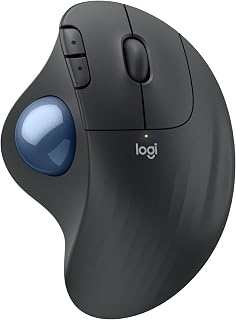
The trackball design eliminates wrist movement entirely, letting your thumb control the cursor while your hand stays stationary for reduced fatigue. Bluetooth and USB connectivity work seamlessly with PCs and tablets, offering flexibility for multi-device setups. Its compact footprint saves desk space, and the wireless operation keeps your workspace clean and portable, perfect for tight workstations or frequent travelers.
Pros
- HERO sensor up to 25600 DPI with zero smoothing or filtering
- Eleven programmable buttons plus dual-mode scroll wheel
- Adjustable weight system with five 3.6g weights
- Wired design eliminates input lag entirely
Cons
- G HUB software requires patience to master
- Cable management necessary with corded design
The HERO optical sensor tracks at up to 25600 DPI with sub-micron precision, delivering zero smoothing, filtering, or acceleration across the full range. This translates to reliable cursor control whether you're gaming or working through detailed design tasks. Eleven programmable buttons and a dual-mode scroll wheel give you extensive customization, letting you map macros and shortcuts that eliminate keyboard trips. The adjustable weight system includes five 3.6g weights so you can tune balance to your grip preference. Metal spring tensioning and pivot hinges produce crisp, tactile clicks that feel responsive under heavy use. The ergonomic right-hand shape supports extended sessions comfortably at just 4.32 ounces. LIGHTSYNC RGB lighting syncs with other Logitech G gear if you want cohesive desktop aesthetics. The wired USB connection removes latency concerns entirely, making this a solid all-day mouse for productivity alongside gaming. Configuration requires patience with Logitech's G HUB software, which some find less intuitive than older tools. Right-hand-only design excludes lefties, and cable management is necessary.
The Ergo M575S was developed in collaboration with Logitech's Ergo Lab and certified by independent ergonomists. Studies show 25% reduction in forearm muscle strain compared to traditional mice, measured through electromyography testing. The benefit comes from eliminating the repetitive reaching and wrist rotation required by standard mice.
The sculpted grip maintains your hand in a neutral, relaxed position for hours without fatigue. By keeping your arm stationary and using only thumb movement, you reduce cumulative strain on muscles, tendons, and nerves. This is particularly valuable for individuals with carpal tunnel syndrome, tendinitis, or general repetitive strain injury (RSI) concerns.
Users report measurable improvements in wrist pain, reduced end-of-day hand fatigue, and better overall posture at the desk. The mouse supports most hand sizes effectively, though very small or very large hands may need a test period to ensure comfort.
Connectivity: Bluetooth and USB Bolt receiver. DPI: up to 2,000 dots per inch. Buttons: 2 primary buttons plus 3 customizable programmable buttons. Battery: 1 AA battery included, lasts up to 18 months. Range: 100mm effective control range. Colors: Graphite with blue ball, or Off-White options.
Compatible with Windows and macOS systems. Supports PC and tablet devices. Full feature support requires Logi Options+ software (free download for recent Windows and macOS versions). Basic mouse functions work without drivers on most operating systems.
Weight and portability make it ideal for traveling professionals or those switching between workstations. The included USB receiver eliminates Bluetooth pairing hassles on shared computers.

Pros
- Exceptionally compact and lightweight for travel and commuting
- Darkfield tracking works reliably on challenging surfaces where standard mice fail
- Long Bluetooth range provides freedom of movement without signal drops
- Rechargeable battery offers weeks of use between charges
- Responsive 4000 DPI sensor delivers precise cursor control for design and productivity work
Cons
- Button layout may feel cramped for users with larger hands
- Bluetooth connectivity can occasionally require re-pairing after extended standby
- No physical profile switching, requiring software adjustments for different DPI preferences
The Logitech MX Anywhere 2S is a premium compact mouse designed for professionals who work across multiple locations. Whether you're a frequent traveler, remote worker, or someone who simply values portability, this wireless mouse combines mobility with the precision you'd expect from Logitech's professional lineup.
The standout feature is the Darkfield tracking technology, which works reliably on virtually any surface, including glass desks and glossy materials where standard optical mice struggle. Paired with a solid 4000 DPI sensor, the MX Anywhere 2S delivers responsive, accurate cursor control for everything from document editing to creative work. The 33-foot Bluetooth range gives you genuine freedom to work from anywhere in your space without worrying about signal loss.
Build quality is solid throughout. The lightweight design makes this mouse a natural fit for a laptop bag or backpack, while the rubberized side grips provide confidence during use. The rechargeable battery is a practical feature that eliminates the need to carry spare batteries, and battery life spans weeks per charge depending on usage patterns.
The main limitation is that this mouse works best for people with average to small hands. Users with larger hands may find the compact design and button placement slightly cramped during extended sessions. Additionally, while Bluetooth is convenient, occasional re-pairing may be needed after the mouse sits idle for extended periods.
Overall, the Logitech MX Anywhere 2S delivers excellent value for professionals who need a reliable, portable mouse. The combination of Darkfield tracking, solid precision, and genuine portability makes this a smart investment for anyone working on the move or across multiple workspaces.
Connectivity: Bluetooth and 2.4 GHz wireless via USB receiver
Operating Range: 33 feet
Sensor Technology: Darkfield optical sensor
DPI: 4000 maximum
Battery: Rechargeable lithium-ion (weeks per charge)
Color: Graphite
Special Features: Lightweight, portable, rechargeable, wireless
Ideal For: Remote workers, frequent travelers, digital professionals, and anyone who uses multiple devices and needs a reliable portable mouse.
Best Use Cases: Working from coffee shops or co-working spaces, commuting between office and home, managing multiple monitors, and working on challenging surfaces like glass desks.
May Not Be Ideal For: Users with larger hands who prefer full-size ergonomic mice, or those who work exclusively at a desktop and prioritize maximum customization options.

Pros
- Dual wireless connectivity with exceptional battery life in both modes
- 18K DPI optical sensor delivers precise tracking for gaming
- Nine programmable buttons for custom macros and keybinds
- Second-gen mechanical switches provide responsive tactile clicks
Cons
- Right-handed shape excludes left-handed users
- Requires AA batteries instead of built-in rechargeable power
Finding a wireless gaming mouse that doesn't compromise on features while staying budget-friendly is rare, but the Razer Basilisk V3 X HyperSpeed delivers exactly that. The dual wireless modes give you flexibility: HyperSpeed mode offers 285 hours of battery life when you need zero-latency gaming, while Bluetooth extends that to 535 hours for everyday tasks. The 18K DPI optical sensor provides precision tracking whether you're landing headshots or navigating spreadsheets. Nine programmable controls mean you can map abilities, macros, or shortcuts without reaching for your keyboard. Razer's second-generation mechanical switches deliver satisfying tactile feedback with each click. The right-handed ergonomic shape fits comfortably during extended sessions, and Chroma RGB lighting adds personalization without draining the single AA battery. Both Windows and macOS are supported, making this a versatile pick for any gaming setup. For anyone seeking serious wireless gaming performance without breaking the fifty-dollar threshold, this mouse checks every essential box.
Brand: Razer
Color: Classic Black
Sensor: 5G Advanced 18K Optical
Battery Life: 285 hours (HyperSpeed), 535 hours (Bluetooth)
Connectivity: Razer HyperSpeed Wireless, Bluetooth, USB receiver
Programmable Buttons: 9 customizable controls
Switches: Razer Mechanical Gen-2 with gold-plated contacts, rated for 60 million clicks
Lighting: Razer Chroma RGB with 16.8 million colors and hundreds of effects
Grip Support: Ergonomic design supporting palm, claw, and fingertip grips
Software: Razer Synapse for customization and optimization
This mouse suits right-handed gamers who want true wireless freedom with programmable buttons for competitive or MMO play. The dual wireless modes appeal to users who need one mouse for both gaming marathons and office work. Skip it if you're left-handed or prefer an ambidextrous design. Buyers who prioritize ultralight weight for fast-paced FPS games may find the Basilisk too hefty compared to minimalist alternatives. The single AA battery requirement won't appeal to users who prefer rechargeable built-in cells.
Buying Guide: What to Look for in a Budget Mouse
Connectivity and Compatibility
Wired mice offer zero-latency input and never need charging, making them a strong choice for gaming. Wireless options, on the other hand, give you a cleaner desk setup and more freedom of movement.
Look for mice that support both Bluetooth and a USB receiver if you switch between devices. The AOC Ergonomic Mouse, 2.4GHz Wireless Bluetooth covers all three modes: Bluetooth 5.4, 2.4GHz wireless, and wired USB, giving you maximum flexibility.
Ergonomics and Hand Size
A mouse that fits your hand reduces fatigue during long sessions. Vertical mice like the AOC Ergonomic Mouse position your wrist in a natural handshake orientation, which can noticeably reduce forearm strain over time.
For standard designs, Logitech offers the Signature M650 in two sizes. The best mice for extended sessions all share one trait: they keep your hand in a relaxed, neutral position. If you have larger hands, the Logitech Signature M650 L Full Size Wireless Mouse is specifically shaped for that fit.
Sensor Precision and DPI Range
DPI determines how sensitive the cursor is to movement. Office users typically do fine with 1000 to 1600 DPI, while gamers and designers often prefer higher ceilings with adjustable steps.
The Logitech G502 Hero Wired Gaming Mouse – Black reaches up to 25,600 DPI using its HERO sensor, with zero smoothing or acceleration. The Razer Basilisk V3 X HyperSpeed Customizable brings an 18K optical sensor that delivers precise, responsive tracking across surface types. Both are strong picks if accuracy is your top priority.
Battery Life and Charging
Battery life varies significantly across wireless mice. The Logitech M705 Marathon Full Size 2.4 GHz is named for a reason: it runs up to three years on a single set of batteries, making it one of the most low-maintenance options on the list.
If you prefer rechargeable options, the AOC Ergonomic Mouse comes with an 800mAh cell that supports use-while-charging via USB-C. The Razer Basilisk V3 X HyperSpeed Customizable lasts up to 285 hours on HyperSpeed and even longer on Bluetooth. Think about how often you want to deal with power management before choosing. For more gear that pairs well with a long-lasting mouse setup, browse our keyboards and mice category.
Final Thoughts
The options on this list cover a wide range of needs without requiring you to spend a lot. For everyday office use and all-day comfort, the AOC Ergonomic Mouse, 2.4GHz Wireless Bluetooth stands out with its vertical design, quiet clicks, and triple-mode connectivity. If gaming performance is your priority, the Logitech G502 Hero Wired Gaming Mouse – Black delivers a flagship-grade sensor and customizable weight system at a budget-friendly point. Either way, you are getting a well-rounded peripheral that holds its own against options that cost significantly more.
Frequently Asked Questions
What is the best wireless mouse for office use in 2026?
The Logitech Signature M650 series is a reliable choice for office environments, offering quiet SilentTouch clicks, SmartWheel scrolling, and up to two years of battery life on a single AA battery. It comes in multiple sizes and colors to match different hand sizes and desk aesthetics. Bluetooth and Logi Bolt USB connectivity mean it works across Windows, macOS, ChromeOS, and more.
Is a vertical mouse worth it for reducing wrist pain?
Yes, for many users a vertical mouse makes a noticeable difference. By keeping your hand in a more natural upright position, it reduces the forearm rotation that causes strain with traditional flat mice. The AOC Ergonomic Mouse uses a 52-degree vertical angle specifically designed to minimize wrist twisting during long work sessions. If you are dealing with discomfort, it is worth giving one a genuine evaluation period of a few weeks.
Can a trackball mouse replace a regular mouse?
For many users, absolutely. The Logitech Ergo M575S Wireless Bluetooth Trackball lets you move the cursor with your thumb while your hand stays stationary, which is ideal for small desks or anyone looking to cut down on arm movement. Ergonomists have validated its design for reducing forearm muscle strain. There is a learning curve of a few days, but most users adapt quickly and find it just as precise as a standard mouse. You can explore more ergonomic peripheral options in our low profile keyboard guide for a full ergonomic desk setup.
What should I look for in a budget gaming mouse?
Focus on sensor quality, click durability, and programmable buttons. A high-precision optical sensor with adjustable DPI is more important than RGB lighting. The Razer Basilisk V3 X HyperSpeed Customizable offers Gen-2 mechanical switches rated for up to 60 million clicks, which is a strong durability benchmark at this price range. Dual wireless modes and 9 customizable buttons round out a package that holds up well against pricier gaming mice.
Common questions
What is the best gaming mouse under $50 for most players?
It offers an optical sensor, 11 programmable buttons, customizable LED lighting, and a right-handed ergonomic design built for precision play. The adjustable weight system and broad button layout give it a competitive edge over simpler office mice. Check the live price on each listing, as street prices shift regularly and sales like Prime Big Deal Days in October can push it lower.



Write Your Review
No reviews yet. Be the first to share your experience!