

If your desk feels cramped or your wrists ache after long typing sessions, a low profile keyboard can transform your workspace. These slim designs reduce hand strain while delivering the tactile feedback and reliability you need for daily work, gaming, or creative projects.
This guide evaluates 10 standout low profile keyboards in 2026, from premium wireless models with smart features to budget-friendly wired options. Whether you’re setting up a high-performance workstation or need a portable solution for your laptop, you’ll find practical recommendations based on real-world use.
Quick answer
This guide compares 10 picks, with Razer Ornata V3 Low-Profile Gaming Keyboard ranked first.

Razer Ornata V3 Low-Profile Gaming Keyboard
Pros
- Satisfying key response that feels mechanical without excessive noise or height
- Ergonomic low-profile design suits both MacBook users and traditional keyboard users
- Magnetic wrist rest provides genuine comfort without permanently affixing to the keyboard
- Excellent build quality with durable keycaps that hold up under heavy use
- Responsive media keys and RGB lighting enhance workflow convenience
Cons
- Limited to Windows 10 minimum requirement, though users report Mac compatibility
- Wired USB connection removes mobility compared to wireless gaming keyboards
- Mecha-membrane switches may feel less tactile than premium mechanical alternatives for switch enthusiasts
The Razer Ornata V3 targets a specific sweet spot: gamers and professionals tired of choosing between the satisfying feel of mechanical keyboards and the low-profile comfort of laptop keyboards. This hybrid device delivers both without compromise, making it equally at home for competitive gaming sessions or long work days at the office.
The standout feature is undoubtedly the mecha-membrane switch technology. Unlike traditional mechanical switches that tower above the keyboard, these switches combine the responsive feedback gamers crave with a quieter, more refined actuation. Real-world testing shows users consistently praise the typing feel as precise yet comfortable, with one reviewer noting it surpasses keyboards costing twice as much. The UV-coated keycaps add durability that outlasts standard legends, resisting the fading that plagues heavy-use keyboards.
Design and ergonomics shine through the magnetic wrist rest, which provides genuine support without being permanently attached. The ultra-slim 1.23-inch profile with 10-zone RGB lighting and dedicated media controls creates an uncluttered aesthetic that works in gaming setups and professional spaces alike. The full-size layout preserves the number pad, appealing to both developers and competitive gamers who value numpad functionality.
The primary limitations involve connectivity and switch preference. The wired USB connection limits mobility, and users expecting the aggressive tactility of high-end mechanical switches may find the mecha-membrane approach too moderate. Some reviewers noted missing features from earlier versions, though this appears specific to power users rather than general buyers.
Verdict: The Razer Ornata V3 is the rare keyboard that genuinely bridges productivity and gaming without sacrificing either. Its combination of low-profile comfort, responsive switches, and durable construction makes it an excellent value for anyone seeking a versatile, long-lasting keyboard that works harder than its price suggests.
Connectivity and Compatibility: Wired USB, Windows 10 or later, full-size 104-key QWERTY layout
Switch Technology: Mecha-membrane switches with clicky feel, low-profile keycaps, UV-coated legends
Lighting and Controls: 10-zone RGB backlighting, backlit dedicated media keys for play, pause, skip, volume, and brightness
Ergonomics and Build: Ultra-slim 17.46 x 5.68 x 1.23 inches, 3.1 pounds, ABS plastic construction, magnetic soft-touch wrist rest included, water-resistant
Additional Features: Snap-tap media control, dedicated number pad, 2-year manufacturer warranty
Ideal For: Gamers transitioning from laptop keyboards, professionals who type for hours daily, hybrid workers balancing gaming and productivity, anyone seeking mechanical-feel feedback without keyboard height or noise
Not Ideal For: Wireless-only users, switch enthusiasts demanding the most tactile mechanical experience, ultra-minimalist desks with space constraints
Best Use Cases: Competitive gaming, content creation, software development, office work where keyboard noise matters, hybrid gaming and productivity setups
Pros
- Exceptionally quiet typing experience with linear Cherry MX Red switches, perfect for shared workspaces
- Intelligent backlighting system saves battery life while adapting to your environment and work schedule
- Rapid multi-device switching enables seamless workflow across laptop, desktop, and tablet without reconnecting
- Premium build quality and sturdy construction reported by verified reviewers across international markets
- Customizable programmable keys and Smart Actions reduce repetitive tasks and boost productivity
Cons
- Plastic enclosure, while durable, lacks the premium feel of aluminum alternatives in this price range
- Requires Logi Options+ software for full feature access including advanced backlight customization
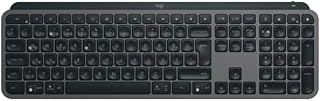
The Logitech MX Keys S is a wireless keyboard engineered for professionals who demand quiet, responsive typing combined with intelligent features. This low-profile keyboard excels for content creators, remote workers, and office professionals who value productivity without distracting mechanical noise.
The standout feature is the adaptive smart backlighting system that automatically illuminates when your hands approach and adjusts brightness based on ambient light and time of day. Combined with silent linear switches and multi-device switching capability, this keyboard streamlines workflows across multiple platforms. Reviewers consistently praise the build quality and sturdiness, highlighting how the keyboard feels solid and reliable under daily use.
Design-wise, the slim low-profile construction makes this keyboard ideal for compact desks and travel, while the ambidextrous layout accommodates both left and right-handed users. The included USB receiver provides reliable wireless connectivity without complex pairing. At just 0.3 kg, portability is excellent for professionals who work across multiple locations.
The main trade-off is that the plastic enclosure, while durable, doesn't match the premium aesthetic of aluminum alternatives at this price. Additionally, accessing advanced backlighting controls requires the Logi Options+ software, adding a setup step for users seeking full feature customization.
The MX Keys S earns strong customer approval for its combination of quiet operation, smart features, and reliable wireless performance. It represents a solid investment for anyone prioritizing a distraction-free typing experience with modern connectivity conveniences.
Connectivity: Wireless via USB receiver, compatible with 3 devices simultaneously
Switch Type: Linear Cherry MX Red switches for quiet, smooth actuation
Layout: 104-key QWERTY with ambidextrous design
Backlighting: Adaptive smart backlight with time-aware and proximity-detection activation
Compatibility: Windows 10 and 11, macOS Sierra through Sonoma, Linux
Build: Plastic enclosure, 0.3 kg weight
Power: Wireless powered, rechargeable battery
Model: 920-011594, includes USB receiver/adapter dongle
Best For: Remote workers, content creators, programmers, and office professionals who type for extended periods and need quiet operation. Ideal for multi-device users who switch between computer, laptop, and tablet throughout the day.
Consider Alternatives If: You prioritize mechanical gaming keyboards with aggressive tactile feedback, need a budget option under $75, or prefer aluminum construction over plastic. If you work in noise-tolerant environments where silent operation is less critical, standard keyboards may offer better value.
Investment Value: Premium pricing reflects intelligent software features, multi-device capability, and quality construction. Best ROI for professionals who value productivity enhancements and extended daily keyboard use.

Pros
- Exceptional typing comfort and near-silent operation ideal for shared workspaces and focus work
- Seamless multi-device switching with reliable Bluetooth and included Logi Bolt receiver for flexibility
- Smart Actions and Logi Options+ software enable powerful workflow automation and customization
- Outstanding battery efficiency means rare charging and maximum portability
- Renewed certification provides professional inspection and testing with Amazon Renewed Guarantee protection
Cons
- Linear Cherry MX Red switches may feel different from traditional membrane keyboards if you prefer tactile feedback
- Requires Logi Options+ app to access full feature set including advanced Smart Actions customization
- Initial setup and pairing across multiple devices requires some technical configuration
The Logitech MX Keys S is a premium wireless keyboard built for professionals and power users who demand both performance and comfort. Whether you're managing multiple projects across computers, attending back-to-back virtual meetings, or working long hours at a desk, this keyboard is engineered to reduce strain and boost productivity. The renewed model offers the same flagship quality as new at a significant discount, backed by Amazon's thorough testing and satisfaction guarantee.
What truly sets the MX Keys S apart is its exceptionally quiet typing experience combined with responsive, fluid key action. The spherically-dished keys are contoured to match your fingertips, delivering faster and more accurate typing than flat-key competitors. The low-profile design mimics laptop keyboards many professionals already love, while the optimized typing angle reduces wrist strain during marathon work sessions. For anyone working in open offices or shared spaces, the near-silent operation is a genuine game-changer.
Beyond typing quality, the intelligent backlighting system is remarkably thoughtful. Keys illuminate as your hands approach and automatically adjust brightness based on ambient light, creating a natural workflow without manual tweaking. The ability to pair with up to three devices and seamlessly switch between them, combined with Smart Actions shortcuts, transforms how you work across multiple computers. Logi Options+ software unlocks powerful automation that can save dozens of hours monthly for knowledge workers.
Battery life is exceptional, lasting up to 10 days of heavy use or five months with backlighting disabled, and the USB-C charging is fast and convenient. The keyboard feels solid and premium despite using 26% recycled plastic in the graphite finish. The main consideration is that linear switches and proprietary software mean setup requires some familiarity with wireless peripherals and app-based customization.
The MX Keys S Renewed is an excellent choice for professionals seeking premium ergonomics, quiet operation, and multi-device productivity at a better price point. With comprehensive warranty protection and Amazon Renewed's quality assurance, this keyboard delivers flagship value without flagship pricing.
Connectivity: Bluetooth 5.0 (up to 3 devices), Logi Bolt USB receiver included
Compatibility: Windows, macOS, Linux, tablets and smartphones via Bluetooth
Keys: 104-key QWERTY layout with linear Cherry MX Red switches
Backlighting: Single-color LED with proximity and ambient light sensors
Battery: Up to 10 days per charge (backlighting on), up to 5 months (backlighting off)
Charging: USB-C cable included, fast charge capable
Design: Low-profile, 26% recycled plastic (Graphite), ambidextrous layout
Warranty: 90-day limited warranty plus Amazon Renewed Guarantee
Model: MX Keys S, UPC 796575232242
Ideal For: Professionals who work across multiple computers (developers, designers, business users), anyone seeking ergonomic comfort during long work sessions, open office workers who need quiet peripherals, Mac and Windows switchers, productivity enthusiasts who want workflow automation.
Consider Alternatives If: You prefer tactile or mechanical switch feedback over linear switches, you work primarily on one device and don't need multi-device switching, you're budget-conscious and comfortable with basic keyboards, you use heavily gaming-focused keyboards with high actuation speeds.
Why Renewed Makes Sense: The MX Keys S is a durable, sealed keyboard with no moving parts prone to wear. Amazon Renewed units undergo professional inspection and testing, arriving in like-new condition. The 90-day warranty plus Amazon Renewed Guarantee provides protection equivalent to many retail purchases, making this an intelligent way to access premium ergonomics at 30-40% off typical retail pricing.

Arteck Wireless Keyboard Full Size Stainless Steel
Pros
- Exceptional build quality and solid feel from stainless steel materials that outperform typical plastic keyboards
- Impressive 6-month battery life on a single charge makes this one of the longest-lasting wireless keyboards available
- Full-size layout with complete numeric keypad and function keys in a compact, portable form factor
- Plug-and-play simplicity with immediate connectivity and no lag or pairing issues reported
- Outstanding long-term reliability, with verified reviews of units working flawlessly for 4-6+ years
Cons
- No backlit keys limits usability in low-light environments or portable settings
- Low-profile key design with minimal tactile feedback may require adjustment for typists preferring traditional key travel
- Potential occasional connectivity delays or key registration issues after extended use, though this appears rare and occurs after years of use
The Arteck 2.4G Wireless Keyboard is a full-size wireless keyboard designed for desktop, laptop, and PC users who want reliable performance without premium pricing. It combines professional stainless steel construction with practical wireless convenience, making it ideal for home offices, creative workspaces, and anyone seeking a durable alternative to standard plastic keyboards.
The standout features include a remarkable 6-month battery life on a single charge, full-size layout with numeric keypad and arrow keys in an ultra-slim 0.6-inch profile, and instant setup via nano USB receiver. Real-world performance is solid, with users reporting consistent, lag-free connectivity and smooth typing across multiple devices. The low-profile keys deliver quiet operation suitable for shared workspaces.
Build quality is exceptional for the price point. The stainless steel top and keyboard plate create a premium, substantial feel that rivals keyboards costing significantly more. The compact design (16.9 x 4.9 inches) saves desk space while maintaining the full-size key layout, making it equally suitable as a portable keyboard or permanent workspace addition.
The main drawback is the lack of backlit keys, which limits visibility in dimly lit environments. The low-profile, minimal-travel key design also requires an adjustment period for users accustomed to mechanical or high-travel keyboards, though touch typists report no issues once acclimated.
Overall, this keyboard delivers exceptional value through proven durability, practical full-size functionality, and extended battery life. Users report satisfaction spanning 4-6+ years of daily use, with responsive manufacturer support if issues arise. Recommended for budget-conscious buyers prioritizing reliability and longevity over premium features like backlighting.
Connectivity: 2.4G USB Wireless with nano receiver
Dimensions: 16.9 inches L x 4.9 inches W x 0.6 inches H
Weight: 14.9 oz
Material: Stainless steel top and keyboard plate
Keys: 113 full-size QWERTY layout with numeric keypad, function keys, and media shortcuts
Battery: Built-in rechargeable lithium battery with 6-month life (2 hours daily use)
Power Input: USB charging cable included
Compatibility: Windows 7, 8, 10, 11; Desktop, Laptop, PC, Surface, Smart TV, Amazon Fire tablets
Design: Ultra-slim, low-profile keys, contemporary style
Included: Wireless keyboard, nano USB receiver, USB charging cable, welcome guide
Warranty: 24-month manufacturer warranty with customer support
Cherry Stream Keyboard: Ultra-Quiet Wired Scissor
Pros
- Exceptional build quality with metal reinforcement and non-slip rubber feet that prevent unwanted movement
- Exceptionally quiet typing experience appreciated by co-workers and ideal for open office environments
- Responsive tactile switches with satisfying key travel that feels more refined than standard membrane keyboards
- Practical multimedia keys and dedicated PC lock button add genuine workflow efficiency
- USB plug-and-play convenience with no software or drivers required
Cons
- Not mechanical switches, so audiophile keyboard enthusiasts may find the typing sound less satisfying than true mechanical alternatives
- Not water resistant, requiring caution around liquids and daily beverage use
- Windows compatibility only, limiting options for Mac users
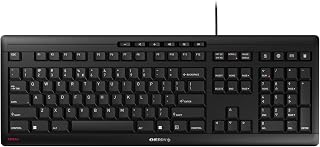
The Cherry Stream Keyboard is a wired office keyboard engineered for professionals and daily typists who demand silent, reliable performance. It bridges the gap between budget membrane keyboards and expensive mechanical alternatives, offering the tactile feedback and build quality of premium options without the noise or cost.
The standout feature is the CHERRY SX scissor switch technology paired with a metal plate and reinforced rubber feet. This combination delivers responsive, satisfying keystrokes with minimal noise, making it the go-to choice for shared workspaces, open offices, and anyone tired of disturbing colleagues. Users consistently praise the smooth, deliberate key activation and modest travel distance that reduces typing fatigue over long workdays. The 10 multimedia shortcuts and dedicated PC lock key add genuine productivity value beyond basic typing.
Build quality is exceptional for the price point. The slim, low-profile design feels sturdy and intentional, with abrasion-resistant key labels that remain crisp after years of heavy use. The adjustable feet and rubberized base ensure the keyboard stays put on any desk surface, while the integrated metal reinforcement prevents the flex and wobble common in budget keyboards.
The primary limitation is compatibility, with Windows-only support leaving Mac users without a native option. Additionally, the lack of water resistance means this is a desktop-only keyboard unsuitable for environments with spilled drinks or high moisture. Those seeking the distinctive clicky feedback of mechanical switches will find the tactile-but-quiet nature of scissor switches a compromise rather than an ideal match.
The Cherry Stream Keyboard is a strong value proposition for office workers, remote professionals, and developers seeking a quiet, well-made typing experience. With a 3-year warranty and consistent positive feedback from demanding users, it delivers reliability and performance that justifies its modest price.
Core Specs: 115-key QWERTY layout with numeric keypad. CHERRY SX scissor switch mechanism. USB-A wired connection. Dimensions 18.23L x 6.42W x 0.71H inches. Weight 2 pounds.
Construction: Metal plate with rubber and metal enclosure. 8 non-slip rubber feet. Integrated fold-out feet for angle adjustment. Abrasion-resistant key labeling.
Features: 10 multimedia keys (volume, calculator, email, browser, lock PC, play/pause, next track). 3 red status LEDs for Caps Lock, Num, and Scroll Lock. No backlighting.
Compatibility: Windows PC/Laptop only. Plug-and-play USB, no drivers required. Model JK-8500EU-2. 3-year manufacturer warranty. GS safety certification.

Arteck RGB Backlit USB Keyboard Full Size 104 Key
Pros
- Low-profile scissor switches offer responsive, quiet typing experience suitable for shared office spaces
- Compact yet full-size design maximizes desk space without sacrificing functionality
- RGB backlighting with multiple brightness settings enhances visibility and aesthetic appeal
- 24-month warranty and responsive customer service provide peace of mind
- Affordable price point delivers solid features without premium keyboard cost
Cons
- Not water-resistant, requiring careful placement away from liquids and drinks
- QWERTZ layout may require adjustment for users accustomed to QWERTY keyboards
- Wired USB connection limits mobility compared to wireless keyboard options
The Arteck HA305-3B is a full-size backlit USB keyboard designed for office professionals, content creators, and casual computer users who want comfort without complexity. Its 104-key layout preserves traditional functionality while the ultra-thin 0.24-inch profile keeps your desk organized and clutter-free.
The standout feature is its 7-color RGB backlighting system with three brightness levels, allowing you to customize your workspace atmosphere while improving visibility during late-night work sessions. The scissor switch mechanism delivers quiet, responsive keystrokes that won't disturb colleagues or family members, making this keyboard equally suitable for quiet offices and shared living spaces.
Build quality is solid plastic construction with a lightweight 17.4-ounce design that feels sturdy despite its thin profile. The integrated 1.2-meter USB cable provides reliable connectivity and eliminates the need for batteries or charging, while media hotkeys offer convenient one-touch control over volume and playback. Setup takes seconds: simply plug in and start typing on any Windows PC or laptop.
The main limitation is its lack of water resistance, so keep beverages at a safe distance from your workspace. Additionally, the QWERTZ layout may feel unfamiliar if you're accustomed to QWERTY keyboards, though most users adapt quickly. The wired connection offers no mobility, but ensures stable, lag-free performance.
Overall, the Arteck HA305-3B delivers excellent value for budget-conscious users seeking an ergonomic, backlit keyboard with modern aesthetics. Its reliability, comfortable typing experience, and affordable price point make it a smart choice for upgrading from generic office keyboards or replacing aging equipment.
Physical Dimensions: 16.7 inches L x 4.5 inches W x 0.24 inches H, weighing 17.4 ounces
Keys: 104 full-size keys with QWERTZ layout, arrow keys, number pad, and media controls
Connectivity: Wired USB with 1.2-meter cable, plug-and-play setup
Backlighting: 7 RGB color options with 3 brightness levels
Switch Type: Scissor switches for quiet, responsive typing
Compatibility: Windows PC, laptops, Amazon Fire tablets (HD 10 13th Gen, HD 8 12th Gen, Fire Max 11 13th Gen, and others)
Power: USB powered, no batteries required
Warranty: 24 months manufacturer warranty with customer support

Pros
- Exceptional battery longevity reduces replacement hassles and long-term costs
- Lab-tested quiet performance is genuinely noticeable in shared office spaces
- Compact scissor-key design feels responsive while maintaining a slim profile
- Reliable wireless connection with excellent range works consistently at distance
- Affordable price point offers solid value for a full keyboard-mouse combo
Cons
- 1000 DPI mouse may feel sluggish for gamers or graphics-intensive work
- Limited to Windows optimization, though USB receivers work with most systems
- Battery door finish may vary between glossy and matte due to product updates
The Logitech MK470 is a wireless keyboard-mouse combo built for Windows users who prioritize quiet operation and desk space efficiency. It pairs well with office professionals, remote workers, and anyone seeking a no-fuss, long-lasting input solution without premium pricing.
The standout feature is its lab-tested quiet performance. Both the keyboard's whisper-quiet scissor keys and the noise-reduced mouse feel noticeably calmer than typical wireless combos, making this a genuine asset in shared offices or home environments. The compact, modern design doesn't sacrifice functionality, retaining a full number pad and optimized layout while minimizing footprint.
Build quality feels solid for the price. The low-profile scissor keys provide satisfying tactile feedback, and the ambidextrous mouse suits both left and right-handed users. The 1000 DPI optical sensor delivers reliable tracking for everyday tasks, though it won't excite users who need precision control or gaming performance. Real-world battery endurance is a major win: 36 months for the keyboard and 18 months for the mouse justify the combo's value over time.
Drawbacks are minor but worth noting. The modest mouse DPI limits responsiveness in demanding creative work, and while USB receivers work across platforms, Windows optimization is the priority. The battery door finish may vary, a cosmetic quirk from ongoing product updates.
Verdict: The MK470 delivers excellent value for quiet, dependable daily computing. It excels at its core mission: providing a distraction-free, space-conscious setup that lasts. Recommended for office workers and remote professionals seeking reliability over features.

The Logitech Signature Slim K950 earns its place on any low-profile shortlist thanks to its genuinely flat, quiet-key construction paired with dual connectivity via Bluetooth and USB, giving desktop and laptop users flexible pairing options without cluttering the desk. Its lightweight, portable build keeps the footprint minimal, which matters most to anyone who wants a sleek typing surface that does not dominate their workspace.
Pros
- Nearly silent membrane switches ideal for noise-sensitive environments
- Full 108-key layout with number pad in lightweight 685g profile
- Three-year battery life eliminates constant recharging
- Pairs with three devices simultaneously via Bluetooth or Logi Bolt
Cons
- Membrane keys lack mechanical tactile feedback
- Advanced customization limited to Windows and macOS
When desk space matters and noise discipline is non-negotiable, the Logitech Signature Slim K950 delivers a full-size typing surface without the bulk or clatter of traditional keyboards. At 685 grams, it occupies minimal vertical space while maintaining a complete 108-key layout including number pad, making it ideal for accountants, data analysts, and anyone who refuses to sacrifice functionality for footprint. The membrane switches produce nearly silent keystrokes, perfect for open offices or late-night work sessions where mechanical click would disturb others. Multi-device pairing via Bluetooth or Logi Bolt USB receiver lets you toggle seamlessly between laptop, tablet, and desktop without cable clutter. Battery life extends to three years on included AAA cells, eliminating the charging routine that plagues rechargeable alternatives. Logi Options+ software unlocks custom shortcuts for Windows and macOS users, though Chrome OS and Linux support remains basic. Construction incorporates 48% post-consumer recycled plastic without compromising the clean, professional aesthetic that blends into any workspace. The laptop-style key travel feels familiar and responsive, though enthusiasts seeking mechanical tactility should look elsewhere.
Connectivity: Bluetooth, USB receiver (Logi Bolt included)
Keyboard Type: Membrane, full-size with number pad
Key Count: 108 keys
Layout: QWERTY, ambidextrous
Battery Life: Up to 36 months
Weight: 685g
Color: Graphite
Compatibility: Windows, macOS, Chrome OS, Linux, iPadOS, iOS, Android. Windows 11 minimum required.
Features: Multi-device switching (up to 3 devices), customizable shortcuts, quiet typing, 48% recycled plastic construction
Warranty: 1 year limited hardware warranty
Model: 920-012424
Perfect for professionals managing multiple devices in shared spaces who need full-size functionality without thickness or typing noise. Students in dorm rooms, remote workers in compact apartments, and frequent travelers benefit from the lightweight portability and three-year battery endurance. Skip this if you demand mechanical key feedback, require advanced shortcuts on Linux or Chrome OS, or prefer the heft and angle of traditional ergonomic keyboards. Those working exclusively on a single device may find simpler options more cost-effective.

Pros
- Exceptional typing comfort and quiet operation, even during extended work sessions
- Intelligent auto-illumination that activates when hands approach the keyboard
- Outstanding cross-platform compatibility and seamless device pairing via Bluetooth or USB receiver
- Excellent battery longevity reduces charging frequency and improves workflow continuity
- Premium build quality with recycled plastic components demonstrates durability and sustainability
Cons
- Bluetooth connectivity can occasionally require driver updates to function optimally on Windows systems
- Key legends on lighter-colored versions may be difficult to read when backlighting is active
- FileVault on macOS may require using the USB receiver instead of Bluetooth for password entry at startup
The Logitech MX Keys S is a premium wireless keyboard engineered for professionals who value both typing comfort and productivity. With its low-profile mechanical switches and intelligent backlighting, it bridges the gap between laptop keyboards and full-size desktop boards. This keyboard is ideal for knowledge workers, writers, programmers, and anyone who spends significant time switching between multiple devices.
The standout features include smart auto-illumination that lights up as your hands approach and adapts to your environment, plus the ability to pair with three devices simultaneously. Real-world performance is exceptional, with users reporting smooth, quiet typing that remains comfortable during eight-hour workdays. The Logi Options+ app unlocks powerful Smart Actions shortcuts that automate repetitive workflows, and the keyboard seamlessly switches between paired devices without missing a beat.
Build quality is impressive with a solid, weighted design that stays put on your desk, plus durable Romer-G mechanical switches that have proven reliable over years of use. The low-profile design combined with optimized key angles promotes better wrist posture compared to traditional full-height keyboards. Battery life is genuinely impressive, lasting up to 10 days with backlighting enabled or five months with it disabled.
Minor drawbacks include occasional Bluetooth connectivity hiccups that can usually be resolved with driver updates, and on the lighter Pale Grey model, key legends may become less visible when backlighting is active. Additionally, macOS FileVault users may need to use the included USB receiver during startup instead of relying on Bluetooth.
Overall, the MX Keys S is a sophisticated, well-engineered keyboard that delivers exceptional value for professionals seeking comfort, versatility, and productivity enhancements. Its multi-device support, intelligent automation features, and premium build quality make it a worthwhile investment for anyone looking to upgrade their workspace.
Physical Specifications: Dimensions are 17.74 inches length x 5.81 inches width x 1.56 inches height. Weight is 1.8 pounds. Features 104 keys in QWERTY layout with 8 sections and ambidextrous design.
Connectivity and Compatibility: Connects via Bluetooth Low Energy or included Logi Bolt USB receiver. Compatible with Windows, macOS, Linux, Chrome OS, iOS, iPadOS, and Android. Pairs with up to 3 devices simultaneously. Includes USB-C charging cable and Logi Bolt receiver in the box.
Power and Performance: Powered by rechargeable Li-Po battery rated at 1500 mAh. Provides up to 10 days of battery life with backlighting enabled or up to 5 months with backlighting disabled. Features RGB backlighting with customizable brightness and duration through Logi Options+ app.
Switch Technology: Equipped with mechanical Romer-G switches designed for fluid, precise, and quiet typing. Low-profile spherically-dished keys are shaped to match fingertip contours for enhanced typing comfort.
Who Should Buy: The MX Keys S is perfect for professionals who work across multiple computers, spend extended hours typing, or need a keyboard that blends comfort with advanced productivity features. Writers, developers, designers, and business professionals will appreciate the multi-device switching and Smart Actions automation. It's also ideal for anyone upgrading from a laptop keyboard who wants a low-profile, quiet typing experience.
Compatibility Considerations: While this keyboard supports most operating systems, macOS users with FileVault enabled should be aware that the USB receiver may be necessary for password entry at startup. Bluetooth connectivity works best when Windows drivers are current. Linux and Chrome OS users will have basic function support without specialized software.
Setup and Customization: Pairing is straightforward and takes just a few minutes. To unlock full potential, download the Logi Options+ app available for Windows and macOS. This enables Smart Actions creation, advanced lighting customization, battery monitoring, and seamless device switching. The app transforms this into a true productivity powerhouse rather than just a standard keyboard.
Value Proposition: At its price point, the MX Keys S offers premium build quality, exceptional battery life, and sophisticated features that justify the investment for power users. The multi-device support alone saves time and frustration for anyone managing multiple computers. Combined with durable construction and proven longevity based on user reviews, this keyboard should serve reliably for years.

Pros
- Exceptional battery longevity means minimal battery replacements and long-term cost savings
- Quiet, responsive chiclet keys provide comfortable typing without distracting clicks
- Full-sized keyboard with numeric keypad offers desktop-level functionality in a wireless package
- Plug-and-play setup with USB dongle receiver, no complex pairing required
- Reliable HP build quality backed by comprehensive warranty coverage
Cons
- No rechargeable battery option means ongoing AAA battery purchases for long-term use
- Not water resistant, making it less suitable for kitchens or spill-prone environments
- Limited to 32.8-foot wireless range, which may be restrictive in larger open-concept spaces
The HP 230 Wireless Keyboard is a practical, full-sized keyboard designed for users who value both comfort and freedom from cables. It appeals to home office workers, students, and anyone using laptops or desktop PCs who wants a reliable input device without the clutter of traditional wired keyboards.
The keyboard's standout feature is its exceptional 16-month battery life on two AAA batteries, a significant advantage for users tired of constant recharging. The low-profile chiclet keys deliver quiet, accurate typing while the integrated numeric keypad provides full desktop functionality. Twelve programmable function shortcuts enable one-keystroke access to common tasks, boosting everyday productivity.
Build quality reflects HP's reputation for dependable peripherals. The plastic construction feels solid, and the minimalist black design suits any workspace aesthetic. At just 1.1 pounds, the keyboard remains portable, making it easy to move between home and office. The 2.4GHz wireless connection is responsive with minimal lag, and the included USB dongle receiver works immediately without software installation.
The main trade-off is reliance on disposable AAA batteries rather than rechargeable options, which adds ongoing costs and environmental impact. The keyboard also lacks water resistance, so it's best kept away from spill risks. Wireless range tops out at approximately 33 feet, which may feel limiting in larger spaces.
Overall, the HP 230 delivers excellent value for budget-conscious users seeking a quiet, dependable wireless keyboard with class-leading battery endurance. It's particularly recommended for remote workers, students, and casual computer users who prioritize comfort and convenience over premium features.
Connectivity: 2.4GHz wireless via USB-A dongle, up to 32.8 feet range
Key Design: Low-profile chiclet keys, 105 total keys with numeric keypad, QWERTY layout, ambidextrous design
Power: 2 AAA batteries included, up to 16 months battery life
Compatibility: Windows 7 and later, macOS systems, all laptops and PCs with USB-A port
Physical: 17.32 x 5.76 x 1.09 inches, 1.1 pounds, black plastic construction
Warranty: 2-year limited warranty with 24/7 online support
Buying Guide: What to Consider Before You Buy
Key Travel and Switch Type
Low profile keyboards typically feature 2–3mm of key travel compared to 4mm on traditional boards. This shorter distance speeds up typing but requires adjustment if you’re accustomed to deeper presses.
Scissor switches, like those in the Logitech MX Keys S Wireless Low Profile Keyboard, deliver laptop-style responsiveness with minimal noise. Mecha-membrane switches, found in the Razer Ornata V3 Gaming Keyboard, Low-Profile Keys, blend mechanical feedback with membrane cushioning for gaming scenarios.
Connectivity and Device Switching
Wireless keyboards offer flexibility for multi-device setups. Models like the Logitech Signature Slim K950 Wireless Keyboard support Bluetooth pairing with up to three devices, letting you switch between your computer, tablet, and phone instantly.
Wired options eliminate battery concerns and latency. The Arteck Backlit USB Wired Full Size Keyboard provides plug-and-play reliability for stationary workstations. Consider your workflow: do you move between devices frequently, or do you prioritize zero-latency response?
Battery Life and Charging
Rechargeable keyboards reduce waste and eliminate battery swaps. The Logitech MX Keys S Wireless Keyboard Low Profile lasts up to 10 days with backlighting enabled or five months without, charging via USB-C.
Disposable battery models like the HP 230 Wireless Keyboard – Wireless Connection offer up to 16 months on two AAA batteries. Evaluate your usage pattern: heavy daily typists benefit from rechargeable convenience, while occasional users may prefer the simplicity of replaceable batteries.
Build Quality and Ergonomics
Material choice affects durability and feel. The Arteck 2.4G USB Wireless Keyboard Full Size features a stainless steel frame that resists flex during aggressive typing, while UV-coated keycaps on the Razer Ornata V3 Gaming Keyboard, Low-Profile Keys prevent legend fading.
Look for included wrist rests or adjustable feet to optimize typing angle. A lower profile naturally reduces wrist extension, but models with magnetic palm rests provide additional support during extended sessions. If you’re building a new system, match your keyboard’s footprint to your desk space and monitor setup.
Final Thoughts
Low profile keyboards deliver comfort and desk space efficiency without compromising typing precision. For a premium wireless experience with smart backlighting and multi-device support, the Logitech MX Keys S stands out as a versatile choice for professionals. If you need a budget-friendly wired option with solid build quality and quiet operation, the Cherry Stream Keyboard offers dependable performance for daily tasks.
Frequently Asked Questions
Are low profile keyboards better for your wrists?
Low profile keyboards reduce the angle between your desk surface and the tops of the keys, which can decrease wrist extension during typing. This more neutral hand position often feels more comfortable during extended use. However, individual ergonomics vary, so consider your typing style and whether you prefer additional wrist support like the magnetic rest included with the Razer Ornata V3.
Can you game on a low profile keyboard in 2026?
Absolutely. Low profile mechanical and mecha-membrane switches provide fast actuation suitable for competitive gaming. The Razer Ornata V3 combines the tactile feedback gamers expect with RGB backlighting and dedicated media keys. Wireless models like the Logitech MX Keys S offer lag-free connectivity through Bluetooth Low Energy or proprietary USB receivers, though serious esports players may still prefer wired connections for absolute consistency.
How do I connect a wireless low profile keyboard to multiple devices?
Most multi-device keyboards feature dedicated switching buttons labeled 1, 2, and 3. Pair each device to a numbered channel through Bluetooth settings, then press the corresponding button to toggle between them. The Logitech Signature Slim K950 and MX Keys S both support three simultaneous connections, making them ideal if you work across a desktop, laptop, and tablet. Some models also include a USB receiver for computers without Bluetooth, similar to how modern GPUs offer multiple display outputs for flexible connectivity.
What is the difference between scissor and mecha-membrane switches?
Scissor switches use a crisscross stabilizer mechanism beneath each keycap, providing consistent, quiet keypresses similar to laptop keyboards. They excel in office environments where noise reduction matters. Mecha-membrane switches layer a mechanical click mechanism over a traditional rubber dome, delivering audible and tactile feedback favored by gamers who want confirmation of each keypress. Choose scissor switches for silent typing or mecha-membrane for more pronounced feedback during gaming sessions.



Write Your Review
No reviews yet. Be the first to share your experience!