

You’re deep into a raid boss encounter, your rotation demands split-second timing across dozens of abilities, and your standard mouse leaves you fumbling through hotbars. MMO gaming pushes hardware to its limits, and a purpose-built mouse transforms how you play. Whether you’re managing cooldowns in World of Warcraft or executing combos in Final Fantasy XIV, the right mouse puts every ability within instant reach.
This guide evaluates 10 leading MMO mice for 2026, covering everything from side button layouts to sensor accuracy. We’ll help you find the perfect match for your grip style, game preferences, and budget.
Quick answer
This guide compares 10 picks, with SM809 Pro MMO Gaming Mouse - 16 Programmable Buttons ranked first. UtechSmart Venus Pro MMO Gaming Mouse 16400 DPI, 12 holds the highest customer rating among them.

Pros
- Unmatched button customization with 16 programmable inputs and macro support, perfect for MMO players
- Flexible connectivity options reduce the need to repurchase mice for different devices
- Lightweight honeycomb construction combined with ergonomic right-hand design maximizes comfort
- Web-based driver eliminates software bloat while maintaining full customization capabilities
- Exceptional value proposition at this price point with premium-level features
Cons
- Right-hand ergonomic design excludes left-handed gamers from comfortable use
- High button count may feel overwhelming for casual users or productivity-focused buyers
- Browser-based configuration requires internet connection during initial setup
The SM809 Pro is a dedicated MMO gaming mouse designed for players who demand extensive customization and multi-button support. With 16 programmable buttons and full macro recording capabilities, this mouse caters specifically to MMORPG enthusiasts and esports competitors who rely on complex ability rotations and hotkey setups. The tri-mode connectivity makes it equally suitable for anyone juggling multiple devices without the hassle of constant repairing.
Performance-wise, the 24000 DPI PAW3311 optical sensor handles everything from pixel-perfect precision in aim-focused games to sweeping movements in strategy titles. The interchangeable magnetic side panels let you swap between configurations on the fly, meaning you can adapt from a compact 3-button layout for productivity work to the full 9-button grid for raid nights. The lightweight honeycomb shell genuinely reduces fatigue during marathon sessions, and the ergonomic right-hand curve fits naturally for extended comfort.
Build quality feels solid for the price range. The magnetic side plates snap into place reliably, and the USB-C charging connector is future-proof. The 1000mAh battery lasts through full gaming sessions and supports charging while playing, so you won't be stranded mid-game. The intelligent power-saving RGB lighting preserves battery life without sacrificing the aesthetic appeal that gamers expect from their peripherals.
The web-based configuration at solakakadriver.com removes software bloat while keeping full customization within reach. All settings sync to onboard memory, so the mouse functions immediately on any new device. This approach works exceptionally well and sets it apart from competitors that push invasive driver suites. The main limitation is that it's explicitly designed for right-handed users, which will disappoint the left-handed gaming community.
The SM809 Pro delivers serious value for anyone building an MMO-focused peripheral setup. The combination of 16 programmable buttons, high-precision tracking, flexible connectivity, and lightweight design makes it a practical choice for competitive play without breaking the budget. Casual users or left-handed players should consider alternatives, but for dedicated MMO enthusiasts, this mouse punches well above its price tier.
Brand: Strikonx
Model: SM809 Pro
Color: Black
DPI: Up to 24000 (adjustable)
Sensor: PAW3311 Gaming-Grade Optical
Programmable Buttons: 16 (fully remappable)
Connectivity: 2.4GHz Wireless, Bluetooth 5.0, USB-C Wired
Side Plates: 4 Interchangeable Magnetic Panels (3-button and 9-button configurations)
Shell Design: Lightweight Hollow Honeycomb
Battery: 1000mAh Rechargeable, supports charging while playing
RGB: Multi-mode adjustable with intelligent power-saving auto-dim
Configuration: Web-based via solakakadriver.com, no software required
Compatibility: Windows, Mac, Linux, PC, Laptop, Tablet, Smartphone
Hand Design: Ergonomic Right-Hand Contour
Best For: MMORPG players, MMO enthusiasts, competitive esports gamers, and users who manage multiple gaming devices.
Ideal Use Cases: Raid progression gaming, complex ability rotations, macro-heavy gameplay, multi-device setups where portability and quick switching matter, extended gaming sessions requiring ergonomic support.
Not Recommended For: Left-handed gamers, users seeking a minimalist mouse with fewer buttons, anyone uncomfortable with web-based configuration interfaces, or casual desktop users on a tight budget.
Consider This Mouse If: You play games requiring 6+ hotkeys, you switch between computer and tablet regularly, you value customization and don't want bloated driver software, or you want premium MMO features without premium pricing.
Pros
- Unbeatable value compared to premium alternatives that cost $80 or more
- Intuitive side button layout prevents accidental clicks despite the 12 programmable options
- Highly versatile for gaming, streaming, content creation, and productivity work
- Quality construction with durable materials and smooth gliding pads
- Extensive customization options through user-friendly software
Cons
- Ergonomics vary by hand size and grip style, may not feel comfortable for all users
- Software is basic in functionality, though it performs its job reliably
- Some users report occasional loose buttons after extended use
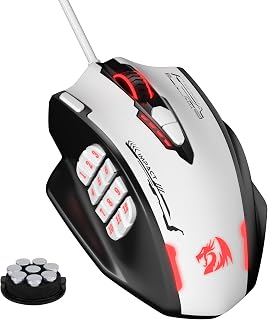
The Redragon M908 is a wired gaming mouse purpose-built for MMO players, streamers, and power users who demand extensive button customization. With 18 programmable buttons including 12 side buttons plus a rapid-fire button on top, this mouse transforms complex workflows into one-handed control. It's designed for those who want professional-grade functionality without the premium price tag.
What sets the M908 apart is its precision performance combined with genuine customization depth. The 24000 DPI optical sensor delivers competitive gaming accuracy with a 1000 Hz polling rate and 80G acceleration. Five adjustable DPI presets plus software-based fine-tuning from 100 to 24000 DPI meet any use case. The RGB lighting system offers 16.8 million color options with dedicated colors for each of the 5 memory profiles, making profile identification instant and visual customization seamless.
Build quality reflects real durability at this price point. The mouse features a weighted base with an 8-piece tuning system, letting you dial in the exact feel you want. Smooth TEFLON feet pads enable precise tracking, while the braided 6-foot cable with gold-plated USB connector shows attention to longevity. The overall design is aggressive and purposeful, though ergonomics vary based on individual hand size and grip preference.
The main trade-offs are practical rather than deal-breaking. The ergonomic profile won't suit every hand, and some users report occasional button looseness after heavy use. The accompanying software is straightforward rather than feature-rich, but it reliably handles all customization needs without the bloat found in some competitor software.
The M908 delivers genuine value for anyone who needs MMO-style programmable buttons or extensive macro support for streaming and content creation. At under $30, it significantly undercuts comparable mice while matching or exceeding their core functionality. This is the mouse to buy if button count and customization matter more to you than boutique ergonomics or minimal design.
Sensor and Performance: Optical movement detection, 24000 DPI maximum sensitivity, 1000 Hz polling rate, 80G acceleration, high-precision sensor.
Buttons and Controls: 18 total programmable buttons (6 main buttons plus 12 side buttons), dedicated mode switch button underneath, rapid-fire top button, 5 memory profiles with individual lighting colors.
Customization: 16.8 million RGB LED color options, adjustable DPI levels (400/800/1600/2400/3200 preset plus software adjustment from 100 to 24000), 8-piece weight tuning system (2.4g each).
Design and Build: Right-hand oriented, plastic construction with aggressive gaming aesthetic, smooth TEFLON feet pads, 6-foot braided-fiber cable with gold-plated USB connector, 1-year warranty.
Compatibility: USB wired connection, compatible with Windows 2000 through Windows 10, Mac OS, Linux, and Unix for programmable features.

UtechSmart Venus Pro MMO Gaming Mouse 16400 DPI
Pros
- Extensive button layout gives MMO players quick access to essential abilities and macros
- Precise laser sensor and high DPI range accommodate both sensitivity-heavy and precise playstyles
- Affordable price point for a gaming mouse with this level of customization and features
- Adjustable weight system provides personalized comfort and control
- Cross-platform profile persistence means your settings follow you across operating systems
Cons
- Windows software required for programming, which may limit Mac and Linux users in terms of setup flexibility
- Right-handed design only, leaving left-handed gamers without an option
- Wired connection can be restrictive for players who prefer the freedom of wireless mice
The UtechSmart Venus Pro is a dedicated MMO gaming mouse built for players who need serious button access and customization. If you play World of Warcraft, Final Fantasy XIV, Guild Wars 2, or competitive games like Fortnite and PUBG, the 12 programmable side buttons put complex ability rotations and macros within easy thumb reach. This mouse is specifically engineered for gamers who want to execute commands faster and reduce strain from repeated keyboard reaching.
Performance is where the Venus Pro shines. The 16400 DPI sensor paired with 1000 Hz polling rate and 30G acceleration delivers snappy, responsive gameplay. The adjustable sensitivity buttons on the mouse itself let you dial in your exact feel mid-game. The Avago laser sensor tracks precisely even at high speeds, and the 12000 FPS capability ensures no lag between your movement and on-screen action. For both MMO rotations and twitch-based FPS gameplay, the sensor keeps up.
Design and comfort were clearly a priority. The ergonomic right-handed shape fits most hand sizes, and the frosted textured surface prevents sweaty palms from compromising your grip. The included 8 removable weights let you customize how the mouse feels in your hand, adding up to 19.2 grams of adjustable heft. The thumb rest on the left side is a thoughtful touch that reduces fatigue during extended sessions. Teflon feet glide smoothly across any surface, and the 6-foot braided cable with gold-plated USB connector is built to last.
The 5 custom profiles with individual RGB colors solve a real problem: switching between your MMO rotation setup and your PvP setup becomes visual and instant. You can even customize over 16 million RGB colors and control breathing speed, though the LED can be disabled if you prefer minimal distraction. Programming is limited to Windows, but once configured, your profiles persist directly in the mouse hardware and work on Mac and Linux.
The main trade-off is the wired connection and right-handed-only design. Wireless preference is subjective, but the cable eliminates latency concerns entirely. Left-handed gamers won't find a good alternative here. Overall, the Venus Pro delivers real value for MMO and competitive players willing to embrace the extensive button layout and wired reliability.
Buy the Venus Pro if you play MMOs, MOBAs, or complex competitive games where macro execution and ability access matter. The button layout is purpose-built for rotations and quick commands. Casual players or FPS-only gamers may find 12 side buttons overwhelming, but dedicated MMO players will find them indispensable.
The adjustable weight system appeals to players who are picky about mouse feel, and the RGB profile switching is most useful for players who swap between multiple game types or competitive disciplines. If you play on Mac or Linux primarily, understand that initial programming requires Windows, though the mouse itself works fine once set up.
Sensor: High-precision Avago laser
DPI Range: 200 to 16400, adjustable via buttons
Polling Rate: 1000 Hz
Max Acceleration: 30G
Max Tracking Speed: 100-150 in/s
Buttons: 19 total (7 standard + 12 programmable side buttons)
Profiles: 5 custom profiles with individual RGB color modes
Weight System: 8 removable 2.4g weights (adjustable from base weight to +19.2g)
Connection: Wired USB, 6-foot braided cable with gold-plated connector
Compatibility: Windows 10/8/7/Vista/XP. Profiles work on Mac and Linux once configured
Dimensions: 4.6 inches L x 3 inches W
Weight: 7.8 ounces
Warranty: 18-month manufacturer's warranty
Cable Range: 5.0 meters effective reach

Pros
- Exceptional button count makes it ideal for MMO and MOBA games requiring multiple ability bindings
- Flexible DPI adjustment from 100 to 12400 via software gives precise control for any playstyle
- Weight tuning system lets you customize the mouse feel to match your preference and grip style
- High polling rate and precise sensor deliver responsive, lag-free gameplay
- Programmable RGB profiles with dedicated colors streamline in-game macro management
Cons
- No included software CD means you must download drivers from Redragon's website for full customization
- Mac OS compatibility limited to basic mouse functions without programmable button support
- High button count may feel overwhelming for casual gamers or those preferring simpler layouts
The Redragon M908 is a professional-grade MMO gaming mouse purpose-built for competitive players who demand extensive macro capabilities. With 18 programmable buttons and 5 customizable memory profiles, it caters directly to MMO, MOBA, and strategy game enthusiasts who rely on quick ability access during intense gameplay.
The standout feature is the combination of 12400 DPI sensitivity with freely adjustable increments and a high-precision Pixart PMW3327 sensor. The 1000 Hz polling rate and 30G acceleration ensure responsive tracking, while the weight tuning cartridge system with 8 included weights lets you dial in the perfect feel. These specs deliver the precision and customization serious gamers need to maintain competitive edge.
Build quality reflects the price point well. The mouse features durable smooth Teflon feet pads for reliable gliding, a 6ft braided-fiber cable with gold-plated connector, and an aggressive ergonomic design built for extended sessions. The 16.8 million RGB color options with profile-specific lighting add visual customization without compromising functionality.
One consideration is that there's no included software CD, requiring you to download drivers from Redragon's website to unlock programmable button features and DPI customization. Additionally, Mac OS users only get basic mouse functionality without full programmability support, making this primarily a Windows-focused option for power users.
The Redragon M908 delivers exceptional value for MMO and competitive gamers seeking a feature-rich mouse with extensive customization. Its programmable buttons, precise sensor, and weight tuning system make it a practical choice for players who want to optimize their setup without premium price tag.
Sensor and Performance: Pixart PMW3327 optical sensor, 12400 DPI maximum, 30G acceleration, 1000 Hz polling rate with switchable 125Hz/250Hz/500Hz options
Design: 18 programmable buttons, 5 memory profiles with dedicated LED colors, ergonomic ambidextrous design with metal and plastic construction, weighs 177g
Customization: 16.8 million RGB color options, 8-piece weight tuning cartridge system, DPI adjustable via buttons or software in 100-unit increments
Connectivity: USB wired connection with 6ft braided-fiber cable and gold-plated connector, 1.0 meter effective range
Compatibility: Windows 2000/ME/XP/03/Vista/7/8/10 with full programmability, Mac OS with basic mouse functions only
Build Quality: Durable smooth Teflon feet pads, 1-year manufacturer warranty
Who Should Buy: MMO and MOBA players who need extensive macro bindings, competitive gamers seeking precision sensor performance, players wanting customizable weight and DPI profiles, those prioritizing button count over minimalist design
Who Should Reconsider: Casual gamers who find 18 buttons excessive, Mac OS users needing full programmability, budget shoppers unwilling to download separate software, players preferring wireless connectivity or lighter weight mice
Key Considerations: Requires separate driver download for full customization features, primarily optimized for Windows, aggressive ergonomic design suits gaming hands better than office use, heavier than many modern gaming mice at 177g
Value Assessment: Excellent price-to-feature ratio for MMO enthusiasts and competitive gamers, outstanding button count and sensor precision at this price tier, solid warranty coverage and build durability justify the investment for serious players

Pros
- Exceptional customization depth with 19 remappable buttons and 5 dedicated memory profiles for different game scenarios
- Weight tuning system is genuinely useful, allowing you to dial in the exact feel that suits your playstyle
- Outstanding value compared to premium MMO mice like Razer Naga, with more buttons and better build quality
- Ergonomic design with skin-friendly materials provides genuine comfort during marathon gaming sessions
- Responsive optical sensor with high acceleration delivers precise tracking in fast-paced competitive games
Cons
- Smaller palm size may feel cramped for users with larger hands, though it remains comfortable with adjustment time
- Accidental side button clicks require intentional force, which takes time to master for new users
- Software customization requires download from Redragon Zone and may have a learning curve for beginners
The Redragon M901K is a purpose-built MMO and MOBA gaming mouse that delivers the programmable button density and customization depth you need to dominate competitive multiplayer games. With 19 total buttons including 12 side-mounted macros, this mouse is designed for players who want keyboard-equivalent functionality without reaching for secondary input devices. It's the smart choice for MMO veterans and competitive esports players looking to level up their game setup.
What sets the M901K apart is its genuine customization ecosystem. The 12400 DPI optical sensor with adjustable polling rates (125Hz-1000Hz) gives you the precision required for FPS and MOBA gameplay, while 5 independent memory profiles let you save entirely different button configurations for different games. Real users confirm the build quality surprises at this price point, with solid construction and responsive clicks. The weight tuning system with eight removable 2.4g weights is a standout feature that lets you dial in the exact mouse feel, something typically reserved for premium-tier gaming hardware.
Ergonomically, the M901K is built for right-handed players with extended gaming sessions in mind. The skin-friendly material and carefully sculpted palm rest minimize fatigue and hand cramping during long competitive matches or raid sessions. The design is noticeably smaller than competing MMO mice like the Razer Naga, which feels more comfortable for average to smaller hands but may require adjustment for users with larger palms. The 16.8 million color RGB lighting with 4 switchable modes looks impressive on your desk without being distracting.
Minor drawbacks exist worth considering. The smaller overall size takes time to adapt to if you're upgrading from a full-sized mouse, and the side buttons require intentional pressure to avoid accidental clicks. The Redragon software needs to be downloaded separately for full customization, which adds a setup step. These are minor hurdles compared to what you gain in functionality and customization depth.
Verdict: The Redragon M901K is a solid choice for any gamer prioritizing button functionality and customization over brand prestige. It delivers measurably better value than comparable premium MMO mice, with real-world performance that satisfies demanding players. This mouse earns its place in any esports enthusiast's arsenal.
Sensor and Performance: Optical sensor, 12400 DPI maximum (adjustable 100-12400), 40G acceleration, polling rates 125Hz-1000Hz
Button Configuration: 19 total programmable buttons, 12 side-mounted macro buttons, remappable through software
Weight Tuning: Eight removable 2.4g weights for customizable balance and feel
Memory: 5 dedicated memory profiles to save different button configurations
Lighting: 16.8 million color RGB with 4 switchable lighting modes
Connectivity: Wired USB connection
Compatibility: Windows, macOS, Linux, gaming consoles, tablets
Design: Right-handed ergonomic, matte black finish, skin-friendly materials
Warranty: 2-year manufacturer warranty
Model: M901K by Redragon
Ideal For: MMO and MOBA players who rely on macro commands, esports competitors seeking precision at reasonable cost, gamers upgrading from basic mice who want significant customization depth, players switching from premium brands like Razer who want better value without sacrificing functionality, content creators using mouse hotkeys for productivity workflows.
Not Ideal For: Left-handed users (right-handed design only), gamers with very large hands preferring full-sized mouse profiles, buyers prioritizing wireless connectivity (this is wired only), players seeking ultralight gaming mice under 100g (this model is heavier due to programmable button density).
Pros
- Exceptional build quality and durability, outlasts competing gaming mice
- 17 programmable side buttons dramatically speed up macro execution in MMOs and MOBAs
- Precise 16000 DPI optical sensor with surface calibration ensures consistent performance
- On-board storage lets you carry three gaming profiles to any PC without reconfiguration
- Intuitive macro system and CUE software make customization accessible even for casual gamers
Cons
- Scroll wheel reliability concerns reported by some users after 10-12 months of heavy use
- Wired design limits mobility compared to wireless gaming mice
- Right-handed ergonomics only, not suitable for left-handed gamers
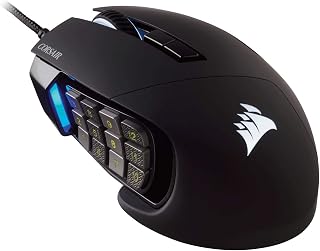
The Corsair Scimitar Pro RGB is a specialized MMO gaming mouse designed specifically for players who rely on macro commands and side button access. Its 17 programmable buttons make it an obvious choice for MMO and MOBA enthusiasts, but the solid construction and responsive sensor make it a strong pick for any competitive gamer willing to invest in a wired mouse.
The standout feature is the Key Slider macro button system with 17 mechanically optimized side buttons. The 16000 DPI optical sensor delivers pixel-perfect accuracy with individual DPI resolution steps, and the surface calibration utility ensures consistent performance across different gaming surfaces. CUE software opens up advanced customization including MMO timers, double macros, and DPI matrices that adapt to different in-game scenarios.
Build quality is excellent. The mouse features a braided 1.8m fiber cable, matte black finish, and buttons rated for 20 million clicks. Many users report this mouse outlasting several competitors, which speaks to Corsair's manufacturing standards. The 4-zone RGB lighting is a nice touch with virtually unlimited color customization options, and on-board storage for three profiles means you can switch between gaming setups without losing your configurations.
The primary drawback is scroll wheel durability. Some users have reported scroll wheel degradation after 10-12 months of heavy use, which is a concern for a mouse at this price point. Additionally, the wired design and right-handed ergonomics limit its appeal to left-handed gamers or those seeking wireless freedom.
The Corsair Scimitar Pro RGB delivers professional-grade macro support and durability for MMO and competitive gamers. If you regularly use side button macros and prioritize build quality over wireless convenience, this mouse represents solid value.
MMO and MOBA Gamers: The 17 programmable buttons are specifically engineered for games like World of Warcraft, Final Fantasy XIV, League of Legends, and Dota 2, where quick macro access directly impacts performance.
Competitive Shooters: The responsive 16000 DPI sensor and precise tracking support competitive play in titles like Call of Duty and Counter-Strike, which several users specifically praised.
Heavy-Use Gamers: If you play for extended sessions and want a mouse built to last, the proven durability and 20 million click rating make this a long-term investment.
Profile-Switching Players: The on-board storage for three gaming profiles is perfect for players who switch between multiple games or systems and want to avoid reconfiguring macros each time.
Sensor: 16000 DPI optical sensor with 1 DPI resolution steps, surface calibration utility
Buttons: 17 programmable mechanical buttons, 20 million click durability on left and right clicks
Connectivity: USB wired, 1.8m braided fiber cable, 5 meter range
Storage: On-board hardware storage for up to three gaming profiles
Lighting: 4-zone RGB multicolor backlighting with CUE software control
Compatibility: Windows 7, Windows 8, Windows 10; Xbox One, Xbox One S, Xbox One X
Included: Gaming mouse, user manual, warranty card, 1.8m braided fiber cable
Weight: 0.12 kg

Pros
- Superior button layout with 20 programmable keys and unique ring finger button that competitors lack
- Exceptional build quality, with verified users getting 6-7 years of heavy use before minor wear
- Laser sensor delivers responsive, accurate tracking for competitive gaming
- No-look thumb panel navigation speeds up ability rotations and ability macros in real-time combat
- 4-way scrolling adds versatility beyond standard mice for different game interfaces
Cons
- Discontinued product means stock is limited and prices may be inflated compared to original retail
- USB wired connection limits mobility compared to wireless alternatives, though it eliminates input lag
- Heavier than modern lightweight gaming mice, which some players prefer for faster flick movements
The Logitech G600 is a specialized MMO gaming mouse designed specifically for players who need rapid access to 20+ hotkeys in games like World of Warcraft, Final Fantasy XIV, and competitive MOBAs. This is not a general-purpose gaming mouse, but rather a precision tool built for games that reward button availability and macro execution.
What sets the G600 apart is its unique thumb panel with a dedicated ring finger button, a feature competitors still haven't replicated. The 20 programmable buttons can be customized across profiles for different games, and the no-look navigation design means you can execute complex ability rotations without looking away from your screen. The laser sensor tracks accurately up to 5 meters with the precision expected from gaming-grade hardware, while the 4-way scrolling adds unexpected utility for navigating MMO interfaces.
Build quality is where the G600 truly shines. Customer reviews consistently report 6-7 years of daily heavy use, with users logging millions of button clicks without failure. The wired USB connection eliminates input lag entirely, a trade-off many competitive players accept. The mouse feels durable and substantial without being uncomfortable for extended sessions.
The main drawbacks are that the mouse has been discontinued, making it harder to find at reasonable prices, and the wired design limits portability compared to modern wireless options. Some players also find it heavier than current lightweight gaming mice, though this appeals to palm-grip users with larger hands.
If you play button-heavy MMOs or MOBAs and value proven durability and specialized design over wireless convenience, the G600 remains unmatched in its niche. The extra investment pays dividends over years of reliable gameplay performance.
World of Warcraft raiders and healers who manage multiple ability bars and keybinds. Final Fantasy XIV players executing complex rotations with Macro systems. MOBA players in League of Legends or Dota 2 who benefit from thumb-accessible extra buttons. Players with larger hands who prefer palm-grip ergonomics. Gamers who have used this mouse before and need a replacement due to wear after years of use.
Connectivity: USB wired, 5-meter laser range
Buttons: 20 programmable buttons with dedicated thumb panel and ring finger button
Sensor: Laser movement detection
Design: Ambidextrous, modern style
Weight: 133 grams (4.7 oz)
Dimensions: 3.94 inch length, 0.79 inch width
Special Features: 4-way scrolling, RGB illumination, gaming-grade construction
Compatibility: Windows and macOS PCs
Color: Black
Model: G600, Part Number 910-003879
Pros
- Exceptional adaptability with three swappable side plates covering MMO, FPS, MOBA, and productivity workflows
- Industry-leading 50K DPI sensor with Frame Sync technology ensures pixel-perfect tracking in competitive titles
- Extended battery life up to 280 hours on Bluetooth mode keeps you gaming without constant charging
- Advanced customization through Razer Synapse including AI Prompt Master for intelligent macro creation
- Durable optical switches and premium build quality backed by 2-year manufacturer warranty
Cons
- Full customization features limited to Windows, with macOS supporting only core mouse functions
- Steep learning curve for programming 23 buttons may overwhelm casual gamers who prefer simplicity
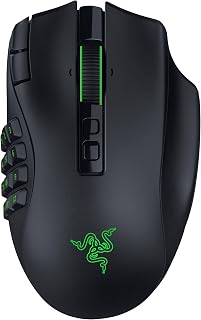
The Razer Naga V3 Pro is a premium wireless gaming mouse engineered for competitive players and content creators who demand versatility. It's specifically designed for MMO enthusiasts who need quick button access, but equally capable for FPS, MOBA, and productivity workflows thanks to its innovative modular design.
The standout innovation is the three interchangeable magnetic side plates offering 12, 6, or 2-button configurations plus two quick-access edge buttons. Combined with the 50K DPI Focus Pro optical sensor and 930 IPS tracking speed, this mouse delivers professional-grade precision for esports and casual gaming alike. The Razer HyperScroll Tilt Wheel Gen-2 with dual tactile modes, free-spin, and Smart-Reel technology provides intuitive navigation for both gaming and spreadsheet work.
Build quality is excellent, featuring Razer Optical Mouse Switches Gen-4 with 100+ million click durability and 12% lighter actuation. The multi-connectivity approach is practical, offering HyperSpeed Wireless for competitive play (155 hours battery), Bluetooth for casual use (280 hours), and USB-C wired charging for continuous sessions.
The main drawbacks are the $179.99 price point and full Razer Synapse customization limited to Windows. The 23 programmable buttons offer immense control but require time to master and configure effectively for your playstyle.
Verdict: The Naga V3 Pro justifies its premium price for serious gamers seeking adaptability, precision, and build quality. The modular side plates make it future-proof across game genre changes, while the responsive switches and advanced sensor deliver tournament-grade performance. Recommended for MMO players, esports competitors, and power users who value customization and versatility over simplicity.
Sensor and Tracking: Razer Focus Pro 50K Optical Sensor Gen-3 with up to 50,000 DPI, 930 IPS tracking speed, 90G acceleration, and Frame Sync technology for reduced latency.
Buttons and Customization: 23 programmable buttons including three interchangeable side plates (12, 6, 2-button layouts), two quick-access edge buttons, and one lockable ring finger button. Full remapping and macro support via Razer Synapse on Windows.
Mouse Switches: Razer Optical Mouse Switches Gen-4 with crisp tactile feedback, 12% lighter actuation, and 100+ million click lifecycle rating.
Connectivity: 2.4GHz Razer HyperSpeed Wireless (ultra-low-latency), Bluetooth, USB Type-C wired. Battery life: 155 hours HyperSpeed, 280 hours Bluetooth. Compatible with Razer HyperFlux V2 and Mouse Dock Pro wireless charging (sold separately).
Physical: Weight 4.16 ounces, dimensions 4.7 inches L x 2.97 inches W. Right-handed orientation. Includes wireless dongle, USB-C cable, 3 side plates, and product guide. 2-year manufacturer warranty.
Who Should Buy: MMO players prioritizing button customization, esports competitors seeking precision tracking, and content creators needing multi-connectivity and advanced macro support. Best for players willing to invest in premium gear and customize extensively.
Who Should Avoid: Budget-conscious gamers under $100, casual players who prefer simplicity over 23 buttons, and macOS-exclusive users limited to core functionality without full Synapse support.
Compared to Alternatives: The Naga V3 Pro positions itself as the premium modular gaming mouse. It offers more swappable configurations than competitors, advanced sensor technology matching professional esports mice, and versatility spanning MMO, FPS, and productivity workflows in one device.
Setup Tips: Start with the 12-button plate for MMO gameplay and experiment with configurations as your needs evolve. Use Razer Synapse on Windows for maximum customization, particularly the AI Prompt Master for intelligent macro creation. Consider the Razer HyperFlux V2 dock for wireless charging convenience.

Pros
- Exceptional build quality and durability with premium Omron switches rated for 50 million clicks
- Unmatched button customization with 17 programmable buttons and repositionable side panel
- Highly ergonomic design fits comfortably during extended gaming sessions across different hand sizes
- Precise 18,000 DPI sensor with granular 1 DPI adjustment for competitive accuracy
- Professional-grade macro programming capabilities deliver real advantage in complex MMO rotations
Cons
- iCUE software integration can be problematic with driver recognition and configuration complexity
- Side buttons positioned too low for some users, making certain buttons difficult to reach without hand repositioning
- RGB lighting only controllable through iCUE, incompatible with third-party software like OpenRGB
The Corsair Scimitar RGB Elite is a premium MMO and MOBA gaming mouse designed for players who demand extensive macro capabilities and customization. With 17 programmable buttons and a sophisticated iCUE software suite, it caters to competitive players who need rapid access to complex ability rotations and game commands.
The standout feature is the patented Key Slider control system, which lets you reposition the 12 mechanical side buttons to match your grip and hand size. Combined with the sculpted ergonomic shell and the native 18,000 DPI PixArt PMW3391 optical sensor, this mouse delivers both comfort and precision. Real-world testing confirms it excels during extended gaming sessions and competitive play.
Build quality is exceptional, with 50 million click-rated Omron switches, a braided cable, and a sturdy scroll wheel designed to withstand daily wear. The mouse feels premium compared to budget alternatives and delivers the durability expected at this price point. Ergonomic design accommodates various hand sizes and grip styles, including a dedicated finger rest for additional support.
The primary drawback involves the iCUE software, which some users report has recognition and configuration issues. Additionally, side buttons sit slightly low for some users, making certain buttons difficult to reach without adjusting hand position. RGB lighting is locked to iCUE only, so users preferring OpenRGB or other software will find this limiting.
The Corsair Scimitar RGB Elite is the right choice for serious MMO and MOBA players who prioritize macro execution and button accessibility over minimal design. Professional creative workers have also praised its comfort and durability for non-gaming workflows. If you need extensive customization and can work with iCUE software, this mouse delivers exceptional value.
Connectivity: Wired with braided cable
Buttons: 17 fully programmable (12 repositionable side buttons via Key Slider)
Sensor: Native 18,000 DPI PixArt PMW3391 optical sensor, adjustable in 1 DPI steps
Switches: Omron mechanical switches rated for 50 million clicks
Dimensions: 6.89 inches L x 4.49 inches W
Weight: 4.32 ounces
Orientation: Right-hand ergonomic design
Color: Black with RGB LED backlighting (4-zone dynamic)
Compatibility: Windows, macOS, Linux
Software: CORSAIR iCUE for macro programming, RGB synchronization, surface calibration
Storage: Onboard profile storage for portable customization
Warranty: 2-year manufacturer warranty
Best For: This mouse is ideal for MMO and MOBA players who need extensive macro capabilities, competitive shooters who value precision, and professionals doing creative work who benefit from customizable side buttons. Right-hand users of any hand size will find the ergonomic design comfortable.
Not Recommended For: Users who prefer minimal software dependencies should be aware that iCUE is required for full functionality, including RGB control and button remapping. Players seeking ambidextrous design or left-hand optimization should look elsewhere. Those preferring OpenRGB or other third-party RGB software will be disappointed by the iCUE-only restriction.
Setup Expectations: Factor in initial setup time to configure iCUE software and test button positioning with the Key Slider system. Some users report driver recognition delays, so ensure your system is updated before configuration. Onboard profile storage means your customizations transfer to other systems without reconfiguration.
Value Consideration: At this price point, you're paying for premium build quality, extensive customization, and proven durability. The Omron switches and braided cable justify the cost compared to budget gaming mice. If macro capability and ergonomic design match your needs, this delivers professional-grade reliability.

Pros
- Exceptional battery endurance eliminates frequent charging and supports extended gaming sessions
- Distinctly shaped side buttons prevent finger confusion during intense MMO gameplay
- Hot-swappable switches and included replacements provide long-term customization and repairability
- Magnetic charging dock offers elegant desktop aesthetics and hassle-free daily charging
- Dual connectivity modes deliver lag-free performance whether wireless or wired
Cons
- Heavy weight (168g) requires adjustment period and may not suit players preferring lighter mice
- Stock switches experience durability issues early in use, requiring replacement despite inclusion of spares
- Asymmetrical button layout differs from traditional grid patterns found on competing MMO mice
The ASUS ROG Spatha X is a wireless gaming mouse purpose-built for MMO and MOBA enthusiasts who demand extensive customization and reliable performance. This right-handed mouse combines 12 programmable buttons, hot-swappable switches, and advanced connectivity options to appeal to competitive and casual gamers alike.
The standout feature is the combination of exceptional battery life and dual-mode connectivity. With up to 67 hours per charge and the ability to swap between 2.4GHz wireless and USB-C wired modes, you get flexibility without performance compromises. The 19,000 DPI optical sensor maintains pixel-perfect accuracy, and the 1,000 Hz polling rate ensures responsive tracking during fast-paced gameplay. Real-world testing shows smooth gliding and consistent click registration across extended sessions.
Build quality impresses with its metal base and plastic composite construction, though the 168g weight polarizes users. The ergonomic shape suits larger hands, and the distinctly shaped side buttons prevent accidental misfires compared to uniform button grids. The magnetic charging dock is both functional and aesthetically pleasing on any gaming desk. ASUS includes replacement switches, cables, a travel pouch, and comprehensive documentation, demonstrating confidence in long-term use.
The primary concern is premature switch degradation. Some users report double-clicking after just two weeks despite included spares, suggesting the stock switches may not match the premium pricing. Additionally, the asymmetrical button layout and overall weight require an adjustment period, particularly if you prefer lighter, ambidextrous mice.
The ASUS ROG Spatha X delivers substantial value for MMO and MOBA players prioritizing customization, battery life, and wired fallback options. While the switch durability issue warrants consideration, the included replacements and hot-swap design mitigate long-term concerns. Recommended for serious gamers with right-handed preference and those who value extended wireless range and charging convenience.
The ASUS ROG Spatha X addresses the specific needs of MMO and MOBA gamers with 12 programmable buttons positioned for intuitive macro binding. The distinct tactile shape of each side button accelerates muscle memory, helping you maintain action bar consistency across multiple ability rotations and keybinds.
Battery longevity means you spend more time in Azeroth and less time tethered to a charging cable. The magnetic dock keeps your setup clean while enabling quick top-ups between play sessions. Dual-mode connectivity ensures you can switch to wired mode mid-raid if interference occurs, providing reliability when it matters most.
Connectivity and Performance: 2.4GHz RF wireless (10m range) and USB-C wired modes, 1,000 Hz polling rate, 19,000 DPI optical sensor, 1-second wireless latency.
Design and Control: 12 programmable buttons, push-fit hot-swappable switch sockets, ROG Micro Switches (70-million-click lifespan), ergonomic right-handed shape, 168g weight, metal base with rubber feet.
Power and Charging: Rechargeable lithium polymer battery, up to 67 hours per charge (RGB off), 15-minute quick charge for 12 hours of play, magnetic charging dock, USB-C charging cable included.
Compatibility and Features: Windows 10 and Windows 11, PC and Mac support, ASUS ROG Armoury Crate software for customization, RGB lighting, Paracord cable included.
In the Box: ROG Spatha X mouse, wireless receiver/charging dock, 2x ROG Paracord cables, 2x spare ROG Micro Switches, screwdriver, travel pouch, ROG sticker, user documentation, 1-year warranty.
Buying Guide: What Makes a Great MMO Mouse
Programmable Button Count and Layout
MMO mice typically feature 12 to 19 programmable buttons, with the majority positioned on the thumb side for quick access. The classic 12-button grid mirrors a keyboard numpad, letting you map entire action bars without stretching your fingers. Some models like the Razer Naga V3 Pro offer swappable side plates with 2, 6, or 12-button configurations, adapting to different genres when you switch between MMOs and shooters.
Consider how you currently manage abilities. If you rely heavily on modifier keys, a mouse with fewer but well-positioned buttons might serve you better than a cramped grid. The SM809 Pro Tri-Mode MMO Gaming Mouse provides magnetic swappable plates that let you test both compact 3-button and full 9-button thumb layouts.
Sensor Precision and DPI Range
Modern MMO mice pack sensors reaching 12,000 to 24,000 DPI, though most players settle between 800 and 3,200 DPI for actual gameplay. What matters more than raw DPI ceiling is sensor accuracy across surfaces and consistent tracking during rapid camera movements. The PAW3311 and PixArt PMW3391 sensors found in premium models deliver pixel-perfect precision without acceleration artifacts.
Adjustable DPI lets you switch sensitivity on the fly. Tab-targeting in crowded raids benefits from lower DPI for precision, while open-world exploration feels smoother at higher speeds. Look for mice offering dedicated DPI buttons or on-the-scroll adjustment, especially if you also enjoy games like competitive shooters that demand different sensitivity profiles.
Ergonomics and Weight Distribution
Long raid nights and grinding sessions demand comfort. MMO mice typically favor right-handed ergonomic shapes with contoured thumb rests and textured grips. Palm grip users should prioritize full-size mice with pronounced back support, while claw grip players might prefer lighter, shorter profiles that allow quick repositioning.
Weight tuning systems let you customize the mouse feel. Most MMO mice weigh between 100 and 170 grams, with options to add or remove small weights. The Redragon M908 includes eight 2.4-gram weights you can arrange to shift the balance point forward or back. Heavier mice offer stability for precise targeting, while lighter options reduce fatigue during extended play. If you’re building a complete setup, pairing your mouse with a high-performance motherboard ensures your system keeps pace with your reflexes.
Wired vs Wireless Connectivity
Wired mice guarantee zero latency and never need charging, making them reliable for competitive play. The UtechSmart Venus Pro features a braided cable and gold-plated USB connector built to survive years of cable drag across your desk.
Wireless technology has matured significantly. Modern 2.4GHz connections match wired latency while eliminating cable snag. Tri-mode mice supporting 2.4GHz, Bluetooth, and USB-C wired modes offer maximum flexibility. Battery life ranges from 67 hours to over 150 hours depending on RGB usage. Models with magnetic charging docks simplify the recharge routine. For players who also stream or create content, wireless mice clean up desk aesthetics and prevent cable interference with other peripherals in your setup.
Final Thoughts
Your ideal MMO mouse depends on your game, grip style, and how you manage abilities. For players who want modular flexibility and wireless freedom, the Razer Naga V3 Pro delivers swappable side plates and exceptional battery life. If you prefer a budget-friendly wired option with proven reliability, the UtechSmart Venus Pro provides 18 programmable buttons and durable construction that handles years of intensive raiding. Both choices give you the tools to execute complex rotations without hesitation.
Frequently Asked Questions
How many buttons do I actually need for MMO gaming?
Most MMO players find 12 side buttons sufficient for mapping core abilities, with additional top buttons handling modifiers, targeting macros, and consumables. Games like World of Warcraft and Final Fantasy XIV typically require 20 to 30 keybinds for optimal play. A 12-button mouse covers your primary rotation, while keyboard modifiers expand your options. If you play multiple classes or frequently switch between MMOs and other genres, consider mice with swappable button layouts.
Can I use an MMO mouse for other game genres?
Absolutely. The programmable buttons excel in MOBAs for item activations, in battle royales for building macros, and in productivity tasks for workflow shortcuts. Models with removable side plates let you switch to simpler 2 or 6-button configurations when playing first-person shooters. The high-DPI sensors and customizable profiles make these mice versatile tools beyond MMO content.
What DPI should I use for MMO gaming in 2026?
Most MMO players operate between 800 and 2,400 DPI, prioritizing precision over speed. Lower DPI settings around 800 to 1,200 help with accurate targeting during raid mechanics and PvP scenarios. Higher settings between 1,600 and 3,200 suit open-world exploration and fast camera panning. The key is matching your in-game sensitivity to create consistent muscle memory across characters and encounters.
Do wireless MMO mice have input lag compared to wired options?
Modern 2.4GHz wireless technology delivers latency identical to wired connections, typically under 1 millisecond. Premium wireless mice in 2026 use dedicated gaming receivers that prioritize signal stability over battery conservation. Bluetooth modes introduce slightly higher latency, making them better suited for productivity than competitive play. If you’re concerned about performance, look for mice explicitly marketed with low-latency wireless technology and verified polling rates of 1000Hz.
Common questions
What is the best gaming mouse for World of Warcraft in 2026?
The ASUS ROG Spatha X is a top pick for World of Warcraft, offering 12 programmable buttons ideal for mapping abilities and macros, plus dual wired and 2.4GHz wireless modes with up to 67 hours of battery life and a magnetic charging dock. If you prefer a wired option with even more buttons, the UtechSmart Venus Pro and Redragon M901K both pack 19 programmable buttons, giving WoW players extra room for complex action bars and skills.
What is the best 12 button gaming mouse for MMO gaming?
The ASUS ROG Spatha X stands out as the best 12 button gaming mouse for MMO gaming, placing all 12 programmable buttons on the thumb panel for quick access to skills and macros. Its 19K DPI optical sensor, wireless freedom, and magnetic charging dock add convenience for long sessions. The Redragon M908 and M901K are strong wired alternatives, both featuring 12 dedicated side buttons alongside additional controls for a full MMO layout.



Write Your Review
No reviews yet. Be the first to share your experience!