

Whether you are a video editor shuttling massive ProRes files between shoots or a creative professional backing up your MacBook before a big presentation, a slow external drive is a real liability. Mac users in particular need a drive that pairs seamlessly with USB-C ports, delivers consistent throughput, and fits in a pocket without drama.
This guide covers six of the strongest options on the market right now. We evaluated each drive on read and write speeds, build quality, Mac compatibility, and real-world reliability. If you also work with video projects, our roundup of the best SSDs for video editing covers internal and desktop-class options worth a look.
Quick answer
This guide compares 6 picks, with Samsung T7 1TB Portable SSD: 1,050MB/s External Storage ranked first. SanDisk 2TB Extreme Portable SSD - 1050MB/s, Rugged has the most customer reviews.

Mac users editing photos or backing up a laptop will appreciate read speeds up to 1050 MB/s paired with 256-bit AES hardware encryption, keeping client files or personal documents secure on the go. Listed as Mac compatible out of the box, this 1TB drive handles everyday transfers and business use without needing extra formatting steps or software.
Pros
- Up to 1,050MB/s read and 1,000MB/s write speeds
- Compact aluminum build at 2.08 ounces
- 256-bit AES hardware encryption
- Shock resistant with thermal control
Cons
- Can run warm during heavy sustained use
- Requires USB 3.2 Gen 2 for max speeds
If you're a Mac user who needs a drive that just works without fuss, the T7 fits the bill. It connects over USB 3.2 Gen 2 and supports up to 1,050MB/s reads and 1,000MB/s writes, which is plenty for moving Final Cut or Photos libraries, backing up a MacBook, or keeping a Time Machine style archive on the go. The aluminum unibody feels right at home next to a Mac, and at 2.08 ounces it disappears into a laptop sleeve alongside your charger. For Mac owners who shoot 4K video or manage RAW photo libraries, the sustained speeds mean you can work from the drive directly instead of waiting on copies. Shock resistance and thermal control add peace of mind for anyone who travels with their Mac setup. Built in 256-bit AES encryption is a nice bonus if your MacBook holds client or business files. It's a dependable, no-drama choice for everyday Mac storage needs.
Good fit for Mac users who want reliable everyday storage for backups, media libraries, or Time Machine style workflows, plus creators handling 4K footage or RAW photos. Skip it if you need the absolute fastest transfer speeds Thunderbolt Macs can support, or if your Mac is older and lacks USB 3.2 Gen 2, since you won't see full speed benefits.
This 2TB drive gives Mac owners room to store full video projects or extensive photo catalogs without running out of space. Shock resistance and thermal control keep performance steady during long editing sessions, and 256-bit AES encryption protects personal files for users who carry sensitive data between locations.
Pros
- 2TB capacity suits large video and photo libraries
- 1050MB/s read and 1000MB/s write speeds
- Solid aluminum build with 6-foot drop protection
- Thermal control helps sustain performance during long sessions
Cons
- Peak speeds need USB 3.2 Gen 2 with UASP support
- Older Macs or hosts may not reach full performance
Mac users working with 4K footage or large creative files need storage that won't become the bottleneck, and the Samsung T7 2TB is built for exactly that. Its 1050MB/s read and 1000MB/s write speeds let large video projects move in seconds rather than minutes, a meaningful difference for anyone editing on a MacBook with limited internal storage. The 2TB capacity gives Mac users real headroom for growing photo and video libraries without needing multiple drives. A solid aluminum unibody and 6-foot drop protection mean it can travel in a bag alongside a laptop without much worry, and built in thermal control helps it keep pace during longer editing sessions. USB-C compatibility makes it a natural fit for modern Macs, though hitting peak speeds depends on the host supporting USB 3.2 Gen 2 with UASP mode, so older machines may see less. For Mac based creative work that demands both capacity and speed, this drive holds up well.
Storage and Speed
Capacity: 2TB
Read Speed: Up to 1,050MB/s
Write Speed: Up to 1,000MB/s
Interface: PCIe NVMe
Design and Durability
Form Factor: Compact portable drive
Dimensions: 3.3 inches L x 2.2 inches W x 0.3 inches Thick
Weight: 2.08 ounces
Material: Aluminum unibody construction
Drop Protection: Up to 6 feet
Temperature Control: Maintains casing below 118.4°F
Security and Compatibility
Encryption: 256-bit AES hardware encryption
Connectivity: USB 3.2 Gen 2 (10 Gbps)
Compatible with: PC, Mac, PlayStation 5, Android devices, iOS devices
Included: USB Type-C to Type-C cable and USB Type-C to Type-A cable
Warranty: 3-year limited warranty
Well suited for Mac users editing 4K video, managing large photo libraries, or needing generous, fast storage for creative work. Skip it if your Mac is older and doesn't fully support USB 3.2 Gen 2 with UASP, since you won't see the drive's peak speeds, or if you only need light, occasional file backup where a smaller, simpler drive would do.
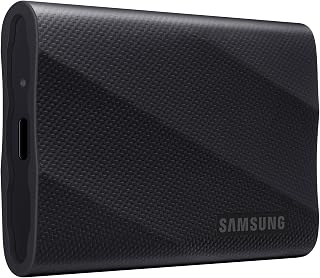
With read and write speeds up to 2,000 MB/s, this drive suits Mac owners moving large video files or Time Machine backups quickly. Dynamic Thermal Guard prevents slowdowns during extended transfers, and rugged durability rated for drops up to 9.8 feet makes it a solid choice for creatives who travel with their Mac setup.
Pros
- Up to 2,000MB/s read and write speeds
- Dynamic Thermal Guard prevents throttling
- Rugged design survives up to 9.8 ft drops
- AES 256-bit hardware encryption
Cons
- Requires USB 3.2 Gen 2x2 support to hit max speeds
- Cable cannot be swapped for standard USB-C cables
For Mac users who want serious speed without hunting down a Thunderbolt dock, the T9 is a strong match. It hits up to 2,000MB/s read and write over USB 3.2 Gen 2x2, fast enough to edit 4K footage directly from the drive on a MacBook Pro or handle large Final Cut and Logic project files without slowdown. The Dynamic Thermal Guard keeps performance steady during long editing sessions, which matters if you're working through a busy shoot day on battery power. Its compact 2.5 inch frame and rugged build, rated for a 9.8 foot drop, make it easy to toss in a bag alongside your Mac. Samsung's in house NAND and DRAM production also means fewer quality surprises compared to lower tier drives. The catch for Mac users is that hitting full speed requires a Mac with USB 3.2 Gen 2x2 support, so check your port specs before buying. AES 256-bit encryption rounds it out for anyone storing sensitive work files.
Storage Capacity: 1TB (also available in 2TB and 4TB options)
Interface: USB 3.2 Gen 2x2
Read/Write Speed: Up to 2000MB/s sustained
Form Factor: 2.5-inch compact design
Weight: 4.32 ounces
Dimensions: Portable and travel-friendly
Security: AES 256-bit hardware encryption
Durability: 9.8-foot drop protection
Operating Temperature: Stays below 140°F during normal use
Warranty: 5-year limited warranty
Compatibility: PC, Mac, iPad, iPhone 15/16, Xbox Series S/X, PlayStation 4/5
Best for Mac video editors, photographers, and developers who need near top tier transfer speeds and don't mind paying for it. Skip it if your Mac only has standard USB-C or older USB 3.0 ports, since you won't reach the drive's full 2,000MB/s potential and a cheaper drive would perform just as well for you.

Transfer speeds up to 2000 MB/s make this 1TB drive a strong fit for Mac users shuttling large video or photo libraries between devices quickly. Dust, shock, and water resistance suit creatives working outside a studio, while password protection adds a layer of security for portable project files.
Pros
- IP65 rated against dust and water
- 3-meter drop protection for mobile use
- Works across Mac, iPad, iPhone, and more
- 256-bit AES encryption with optional password protection
Cons
- Write speeds fall short of the 2000MB/s read spec
- Password protection needs a software download with OS limits
For Mac owners who work outside a desk, like on set, in a studio, or traveling, the SanDisk Extreme's rugged build makes it a strong contender. IP65 dust and water resistance plus 3-meter drop protection mean it can handle the kind of bumps and spills that come with mobile creative work, without needing a separate protective case. It pairs easily with Mac laptops, iPad, and iPhone, so it fits naturally into an Apple-centric workflow, and up to 2000MB/s read speeds keep large photo and video files moving quickly. Password protection adds a layer of security for sensitive projects, though setting it up requires a software download. Write speeds trail the headline read number, so heavy sustained writes take longer than the spec sheet suggests. Still, for anyone who needs a Mac-compatible SSD that can survive life outside a studio and comes backed by a 5-year warranty, this is a dependable option worth shortlisting.
Storage Capacity: 1TB
Interface: USB 3.0 / USB Type-C
Read Speed: Up to 2000MB/s
Dimensions: 3.35in L x 2in W x 0.39in Thickness
Weight: 1.6 ounces
Durability Rating: IP65 (water and dust resistant), 3-meter drop protection
Security: 256-bit AES encryption with password protection
Warranty: 5-year limited manufacturer warranty
Compatibility: Windows PC, Mac, iPad, iPhone, Android, PlayStation 5
Model Number: SDSSDE70-1T00-G25

For Mac users who need generous capacity without constant swapping, 2TB of storage handles large media libraries or archived projects easily. Dust and water resistance add peace of mac field work or studio use, while hardware encryption protects sensitive files stored on a drive that travels between locations frequently.
Pros
- 2TB capacity at up to 1050MB/s read speeds
- IP65 water and dust resistance
- Withstands drops up to 3 meters
- 256-bit AES hardware encryption
Cons
- Listed as an older model, verify current specs
- Requires USB 3.2 Gen 2 support for full speed
Mac users who want generous storage without spending on a 4TB drive should take a look at this 2TB SanDisk Extreme. It offers up to 1050MB/s read and 1000MB/s write speeds, enough to back up a Mac's Photos and Music libraries or edit 4K footage without lag. The IP65 rating for dust and water resistance plus 3 meter drop protection make it a practical choice for Mac users who work outdoors or travel frequently with their laptop. At 1.76 ounces with a built in carabiner loop, it clips easily onto a bag next to your MacBook charger. Hardware encryption with 256-bit AES adds a layer of protection for anyone storing client files or personal documents on their Mac setup. It's worth noting this listing is an older model, so double check current specs and compatibility before buying. For Mac users prioritizing capacity and toughness over cutting edge speed, it's a solid, no fuss option.
Speed Performance: Up to 1050MB/s read speeds and 1000MB/s write speeds (based on internal testing; actual performance varies by host device and USB 3.2 Gen 2 compatibility)
Storage Capacity: 2TB usable storage (1TB = 1,000,000,000,000 bytes; actual user capacity less due to formatting)
Durability Ratings: 3-meter drop protection and IP65 rating (water flow resistance at 30 kPa for 3 minutes; limited dust contact does not interfere with operation)
Security: 256-bit AES hardware encryption with password protection (Windows 8+, Windows 10, macOS 10.9+)
Physical Specs: 5 inches L x 2 inches W x 0.5 inches thickness, weighing 1.76 ounces
Connectivity: USB 3.2 Gen 2, eSATA interface support
Compatibility: PC, Mac, PlayStation 4, Xbox Series X, tablets, and compatible USB 3.2 devices
Warranty: 5-year limited manufacturer warranty

Its ultra slim, portable design makes this 1TB drive easy to slip into a laptop bag alongside a MacBook, ideal for anyone who prioritizes minimal bulk. Aimed at gaming, personal, and multimedia use, it fits Mac owners handling everyday file transfers or media storage without needing top tier transfer speeds.
Pros
- Compact 42g, 10.5mm design fits easily in a pocket
- USB-C cable works directly with Mac laptops
- 256-bit AES encryption for secure storage
- 1050MB/s read speed handles large media transfers
Cons
- Some users reported disconnection issues over time
- Only supports newer iPhone models, not iPhone 14 or older
Mac users hunting for a slim, no-fuss drive that won't weigh down a bag will find a lot to like in the Lexar ES3. At 42 grams and 10.5mm thick, it's one of the more pocketable options here, and the metal casing gives it a sturdier feel than its size suggests. USB-C connectivity means Mac laptops can plug in without extra adapters, and the 1050MB/s read speed is enough to move large photo and video libraries without long waits. For Mac owners who also shoot on iPhone, there's added convenience, though only newer iPhone models are supported, so check your device first. Built in 256-bit AES encryption is a nice bonus for anyone keeping client work or personal files on the go. A handful of users reported disconnects after heavy use, so it's worth keeping backups elsewhere. Overall, it's a practical pick for Mac users who want fast, ultra-portable storage without extra bulk.
The Lexar ES3 works with a wide range of devices, but compatibility is not universal. It fully supports iPhone 17 series, all Android smartphones, Windows and Mac laptops, gaming consoles (PlayStation 5, Xbox Series X, and PS4), and digital cameras. However, it is not compatible with iPhone 14 and earlier iPhone models, which is an important consideration for Apple users.
For maximum performance, ensure your device supports USB 3.2 Gen 2. Older systems with only USB 3.0 or 3.1 will still function but at reduced speeds (200-250 MB/s as reported by users). When using USB 2.0 connections or older hubs, expect significantly slower transfer rates.
Storage and Performance: 1TB capacity with 1050MB/s read speed and 1000MB/s write speed. Connectivity: USB 3.2 Gen 2, USB-C connector. Interface: External SSD with NAND Flash memory.
Physical Specifications: Dimensions: 3.96 inches L x 1.97 inches W x 0.41 inches thick. Weight: 45 grams. Color: Silver. Includes USB-C cable in the box.
Security and Warranty: Features 256-bit AES encryption (Lexar DataShield). Covered by a 3-year limited warranty from Lexar.
Model Information: Model LES3XXX001T-RNSAU, ASIN B0DYDHLN81. Manufactured by Lexar Co., LTD. Best Sellers Rank: #7 in External Solid State Drives.
Buying Guide: What to Look for in a Portable SSD for Mac
Transfer Speed and Interface
The interface determines your speed ceiling. USB 3.2 Gen 2 drives, like the Samsung T7 Portable SSD 1TB Titan Gray and the Lexar ES3 1TB Portable SSD Silver, top out around 1,050 MB/s read. That is plenty fast for most workflows, including 4K footage and large photo libraries.
If you regularly move enormous files or need near-instantaneous load times, USB 3.2 Gen 2×2 doubles that bandwidth. The Samsung T9 Portable SSD 1TB hits up to 2,000 MB/s, and the new Sandisk 1TB Extreme Portable SSD matches that ceiling. Just confirm your Mac’s port supports Gen 2×2 to get the full benefit.
Capacity and Storage Needs
A 1TB drive covers everyday backups, a working project folder, and a solid media archive. It is the sweet spot for most Mac users who want portability without constantly managing space. The Samsung T7 Portable SSD 2TB Titan Gray and the Sandisk 2TB Extreme Portable SSD both double that capacity for professionals who cannot afford to leave footage behind.
Think about your typical project size before choosing. If you shoot 4K RAW or work with large design assets, 2TB gives you room to breathe. For more budget-conscious storage decisions, our guide to the best SSDs under $100 is a useful reference for internal alternatives.
Durability and Build Quality
Portability means your drive will take bumps. The Sandisk 2TB Extreme Portable SSD and the newer Sandisk 1TB Extreme Portable SSD both carry IP65 ratings with up to three meters of drop protection, making them well-suited for outdoor shoots or travel.
Samsung’s T7 and T9 lines use solid aluminum unibody construction and offer up to six feet of drop resistance. The Lexar ES3 1TB Portable SSD Silver takes a different angle, coming in at just 42g and 10.5mm thick for users who prioritize a minimal carry. Check out our full storage category for more options across form factors.
Mac Compatibility and Encryption
Every drive on this list works with Mac out of the box via USB-C, though some may need reformatting to APFS or exFAT depending on your workflow. Hardware encryption is a meaningful bonus if you carry sensitive client work. The SanDisk drives include 256-bit AES hardware encryption, and the Lexar ES3 includes the DataShield software suite for the same level of protection.
Samsung’s Magician software does not run natively on macOS, but firmware updates and drive health monitoring are still accessible through other means. For users who need a dedicated boot drive solution, our breakdown of the best SSDs for Windows boot drives explores how these drives perform in other environments too.
Final Thoughts
For most Mac users, the Samsung T7 Portable SSD 1TB Titan Gray hits the right balance of speed, reliability, and compact design, making it a dependable everyday companion. If your work demands faster sustained throughput and larger capacity, the Sandisk 2TB Extreme Portable SSD brings rugged hardware-encrypted storage that holds up in demanding field conditions. Either way, any drive on this list is a genuine upgrade over spinning rust or slower USB-A options.
Frequently Asked Questions
Do portable SSDs work with all Mac models?
Yes, all six drives on this list connect via USB-C and are compatible with modern MacBooks and Mac desktops. Older Macs with USB-A ports will need an adapter, which can cap speeds on faster Gen 2×2 drives. In 2026, most new Macs ship with Thunderbolt or USB 3.2 Gen 2 ports that fully support these drives.
Should I format my portable SSD for Mac before using it?
Most portable SSDs ship formatted as exFAT, which works across Mac and Windows. If you only use the drive with Mac, reformatting to APFS in Disk Utility can improve performance and reliability. APFS also adds native encryption support, which pairs well with drives that already include hardware-level protection.
What is the fastest portable SSD I can use with a MacBook Pro?
The Samsung T9 Portable SSD 1TB and the Sandisk 1TB Extreme Portable SSD both reach up to 2,000 MB/s, making them the fastest options here. To hit those speeds, your MacBook Pro needs a USB 3.2 Gen 2×2 or Thunderbolt-compatible port. You can browse the full best SSDs with heatsinks guide if you are curious how high-end internal drives compare in sustained workloads.
Is a portable SSD better than an external hard drive for Mac?
Absolutely. Portable SSDs are significantly faster, quieter, and more durable than traditional external hard drives since they have no moving parts. For Mac users who work with large files, run apps from external storage, or need quick Time Machine-style backups, the speed difference in 2026 is substantial enough that there is very little reason to choose spinning storage for portable use.





Write Your Review
No reviews yet. Be the first to share your experience!