

Your computer feels sluggish. Applications take forever to launch, file transfers drag on, and boot times test your patience. The culprit is often your storage drive, and upgrading to an SSD can transform your experience without draining your wallet.
This guide evaluates six solid-state drives that balance speed, capacity, and reliability while staying budget-friendly. Whether you’re upgrading a laptop, building a desktop, or need portable storage for on-the-go work, you’ll find a drive that fits your needs. For builders looking at complete system upgrades, our budget motherboard guide covers compatible platforms for these storage solutions.
Quick answer
This guide compares 6 picks, with fanxiang S501Q 512GB NVMe SSD, PCle 3.0 M.2 2280, Up ranked first. KingSpec 512GB M.2 NVMe SSD Gen3 2280 - 2400MB/s Read holds the highest customer rating among them. SSK 500GB Portable SSD USB-C 1050MB/s External Solid has the most customer reviews.

Pros
- Excellent value for price with competitive read/write speeds matching drives at higher price points
- Graphene heat dissipation and 3D NAND technology reduce throttling and improve longevity
- Compact M.2 2280 form factor fits most modern laptops and desktop motherboards without adapter
- Reliable shock resistance design protects against physical damage during transport or use
- 3-year warranty and included installation tools reduce additional costs and complexity
Cons
- PCle 3.0 standard is slower than newer PCle 4.0 drives, though performance is still solid for most users
- Limited visibility from customer reviews makes it harder to verify real-world reliability compared to established brands
- 512GB capacity may feel tight for power users working with large video files or extensive game libraries
The fanxiang S501Q is a 512GB NVMe SSD designed for everyday users and gamers looking to upgrade their system storage without breaking the bank. It's best suited for laptop owners seeking faster boot times, content creators who need reliable storage for file work, and PC builders wanting a dependable system drive at an affordable price point.
Performance-wise, the S501Q delivers where it matters most. Read speeds hit 3000MB/s and writes reach 1300MB/s, making boot times snappy and large file transfers noticeably faster. The intelligent SLC cache technology smooths out performance inconsistencies, and the 160TBW endurance rating means this drive can handle years of regular use without degradation.
Build quality shines through thoughtful engineering choices. The graphene heat dissipation stickers actively manage thermal output, preventing the throttling issues common in budget SSDs during sustained activity. The shock-resistant design and lack of mechanical parts make this drive durable enough for portable workstations, and the lightweight 7-gram form factor slides into M.2 slots without fuss.
One realistic limitation is the PCle 3.0 interface, which trails newer PCle 4.0 and 5.0 drives in maximum theoretical speed. For most users this matters little, but content creators and power users pushing sustained high-speed transfers may notice the ceiling. Also, with limited customer reviews available yet, verification of long-term real-world reliability requires patience.
Overall, the fanxiang S501Q strikes a solid balance between performance, reliability, and price. The 3-year warranty, included installation kit, and proven 3D NAND architecture make this a safe upgrade choice for anyone modernizing an older system or building a budget-conscious PC that doesn't sacrifice speed.
Storage Capacity: 512GB
Form Factor: M.2 2280
Interface: PCle 3.0 x4
Read Speed: Up to 3000MB/s
Write Speed: Up to 1300MB/s
NAND Type: 3D NAND with SLC Cache
Endurance: 160TBW (TeraBytes Written)
Weight: 7g
Compatibility: Windows 8/10/11, Mac OS 10.9+
Warranty: 3 Years
Accessories Included: Installation screws and screwdriver
Who Should Buy This Drive: Budget-conscious laptop and desktop users seeking faster storage, gamers upgrading from mechanical drives, small business users storing documents and media, and anyone with an M.2 slot looking to breathe new life into an older PC.
Who Should Look Elsewhere: Professional video editors and 3D animators working with massive 4K files may benefit from PCle 4.0 drives, competitive esports players optimizing every millisecond, and users with extreme storage needs above 512GB on a single drive.
Installation Note: Ensure your motherboard has an available M.2 slot supporting NVMe drives. Most laptops and desktops from 2015 onward include this, but older systems may require a PCle adapter card instead.
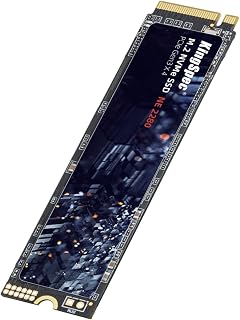
This drive delivers 2400MB/s sequential reads through its PCIe Gen3x4 interface, making it a solid performer for everyday computing tasks without overspending. The 3D NAND flash construction ensures reliable durability for years of use, while the standard M.2 2280 form factor guarantees compatibility with most modern desktops and laptops. Built-in features like TRIM and wear leveling help maintain consistent performance over time.
Pros
- 2400MB/s reads accelerate application launches and file access
- Enterprise-grade data protection with LDPC ECC and error checking
- Standard 2280 form factor fits most modern desktops and laptops
- Three-year warranty with lifetime technical support
Cons
- Write speeds lag behind reads at 2200MB/s
- No customer reviews to verify long-term reliability
For budget-focused builders, the KingSpec 512GB NVMe delivers Gen3x4 performance that transforms everyday computing without breaking the bank. Sequential reads hit 2400MB/s, enough to eliminate the sluggishness of mechanical drives and even outpace older SATA SSDs in application launches and file operations. The 3D NAND architecture paired with enterprise-grade protections like LDPC ECC and end-to-end error checking means your data stays safe while wear leveling and garbage collection maintain speed consistency over months of use. The standard 2280 form factor drops into nearly any desktop or laptop built in the last five years, making upgrades straightforward. Write speeds land at 2200MB/s, trailing the read numbers but still adequate for gaming libraries, productivity software, and media consumption. S.M.A.R.T monitoring and TRIM support keep the drive running optimally without manual intervention. A three-year warranty backs the hardware, though the absence of user reviews means long-term reliability remains unproven in the field. For those prioritizing value over cutting-edge specs, this drive offers a sensible path to faster storage.
Storage Capacity: 512GB
Form Factor: M.2 2280
Interface: NVMe Gen3x4 (PCIe 3.0)
Read Speed: Up to 2400MB/s
Write Speed: Up to 2200MB/s
Memory Technology: 3D NAND Flash (TLC/QLC)
Supported OS: Windows 7, Windows 8, Windows 10, RHEL, CentOS, Linux, Ubuntu
Features: S.M.A.R.T, TRIM, Wear Leveling, Garbage Collection, Native Command Queuing, LDPC ECC, E2E Data Protection
Compatibility: Desktop and Laptop computers with M.2 NVMe slots
Warranty: 3 Years (with Lifetime Technical Support)

Reaching 5,000MB/s through its PCIe Gen4 NVMe interface, this drive brings near-flagship speeds to an affordable capacity tier. The 500GB storage works well for a Windows installation plus your most-played games, while the Gen4 architecture ensures the drive won't hold back modern DirectStorage-enabled titles. Multiple use cases from gaming to business workloads benefit from the consistently fast random read performance Gen4 enables.
Pros
- Gen4 interface delivers 5000MB/s reads for faster boot and app launches
- nCache 4.0 sustains performance during everyday multitasking
- Single-sided design fits thin laptops and compact builds
- Acronis True Image simplifies drive migration
Cons
- Write speeds plateau at 2500MB/s
- Lacks advanced power management features
Western Digital brings Gen4 speed to the budget segment with the Green SN3000, a drive that prioritizes boot performance and system responsiveness over sustained throughput. The PCIe Gen4 interface pushes sequential reads to 5000MB/s, delivering noticeable improvements in OS loading, game launches, and multi-tab browser sessions compared to Gen3 alternatives. nCache 4.0 technology keeps performance stable during typical workloads while the single-sided M.2 2280 design fits seamlessly into compact laptops and mini-ITX builds where clearance matters. At just 5.4 grams, it adds negligible weight to ultraportable systems. Acronis True Image software simplifies cloning from older drives, removing the technical hurdles that often complicate upgrades. The limitation shows in write performance, capped at 2500MB/s, which steers this drive toward users who primarily consume media and run applications rather than generate large files. Western Digital's established reputation and three-year warranty provide reassurance that newer brands can't match. For general computing, web browsing, and gaming where read speeds dominate the experience, the Green SN3000 represents a smart allocation of limited funds.
Storage Capacity: 500 GB
Interface: PCIe Gen4 NVMe
Form Factor: M.2 2280 (single-sided)
Read Speed: Up to 5,000 MB/s
Write Speed: Up to 2,500 MB/s
Connectivity: PCIe x4
Dimensions: 3.15 inches L x 0.87 inches W x 0.09 inches Th
Weight: 5.4 grams
Warranty: 3-year limited manufacturer warranty
Compatibility: Desktop and laptop computers with M.2 NVMe slot
Model Number: WDS500G4G0E
Mainstream users upgrading from SATA SSDs or hard drives will appreciate the responsiveness boost, as will casual gamers who want faster level loading without overspending. It fits budget laptops and compact desktops where the slim profile and low power draw matter. Content creators working with 4K video or high-resolution photo editing should look elsewhere, as the write speed ceiling will bottleneck export and render operations. Anyone needing advanced power management or extended endurance ratings should consider higher-tier models.

The USB 3.0 interface delivers up to 1050MB/s transfer speeds, making this external option roughly ten times faster than traditional portable hard drives for moving large files. Its compact 2-inch form factor and included USB-C connectivity let you easily expand storage on laptops, tablets, and smartphones without sacrificing desk space. The portability suits users who need reliable high-speed storage they can take between devices or locations.
Pros
- 1050MB/s reads and 1000MB/s writes accelerate transfers
- 36.6 gram weight and pocket-friendly dimensions enable true portability
- Aluminum shell provides passive cooling and durability
- Includes both USB-C and USB-A cables for broad compatibility
Cons
- Windows shows ~35GB less capacity than marketed
- 500GB may feel limiting for large video libraries
The SSK SD500 portable SSD solves the capacity problem for users who need fast external storage without the bulk of traditional enclosures. Read speeds reach 1050MB/s while writes hit 1000MB/s over USB 3.2 Gen2, making large file transfers feel instant whether you're backing up a photo library or moving 4K footage between machines. The SLC cache dedicates 25% of available space to high-speed operations, preventing the performance dropoff that plagues budget drives during sustained transfers. At 36.6 grams and measuring just 2.6 x 1.5 x 0.5 inches, it disappears into laptop bags or pockets without adding noticeable weight. The aluminum alloy shell pulls double duty as both protection and passive cooling, keeping temperatures safely below 106°F even during extended use. Both USB-C and USB-A cables ship in the box, covering compatibility across desktops, laptops, tablets, and smartphones without hunting for adapters. TRIM support and S.M.A.R.T diagnostics maintain long-term performance automatically. One quirk: Windows reports roughly 35GB less than the advertised 500GB due to binary storage math, though macOS shows the full capacity. For mobile workflows, this drive delivers desktop-class speed in a truly portable package.
Storage Capacity: 500GB
Interface: USB 3.2 Gen2
Connectivity: USB Type-C (with USB-A adapter cable included)
Read Speed: Up to 1050MB/s
Write Speed: Up to 1000MB/s
Dimensions: 2.6 x 1.5 x 0.5 inches
Weight: 36.6 grams
Enclosure: 2mm aluminum alloy
Operating Temperature: Up to 105.58°F
Power Consumption: Less than 2.4 watts
Compatibility: Windows, macOS, Linux, iOS, Android
Cache: SLC cache (25% of available capacity)
Warranty: 3 years manufacturer
Included Accessories: USB-C to USB-C cable, USB-C to USB-A cable
Content creators shuttling video projects between field and studio will benefit from the speed and portability, as will photographers managing RAW libraries across multiple systems. It suits anyone needing fast backups for iPhone 4K ProRes recording or large file transfers between computers. The compact size makes it ideal for travel or daily commutes. Skip it if you need multi-terabyte capacity for archival storage or if you primarily work at a desk where a larger external drive would suffice at lower cost per gigabyte.

Pros
- Excellent value for budget-conscious users upgrading to NVMe storage
- Fast enough for everyday computing, gaming, and content creation tasks
- Wide device compatibility across laptops, desktops, and platforms
- Reliable build quality backed by 3-year hassle-free warranty
- Significantly faster than legacy SATA drives for system responsiveness
Cons
- Read speeds cap at 2200MB/s, slower than premium Gen3 or Gen4 alternatives
- Limited information available on sustained write performance and thermal management
- 512GB capacity may fill quickly for power users with large media libraries
The Acclamator N20 is an entry-level NVMe SSD designed for users looking to breathe new life into aging laptops and desktop computers. This 512GB drive targets budget-conscious buyers who want faster boot times and improved application performance without the premium price tag of high-end alternatives.
Performance-wise, the N20 delivers read speeds up to 2200MB/s with SLC caching, making it substantially faster than traditional SATA drives. For everyday tasks like launching applications, copying files, and booting your system, these speeds are more than adequate. Gaming performance is solid, and multimedia work flows smoothly without notable lag during normal use.
The M.2 2280 form factor ensures compatibility with virtually all modern laptops and desktops made in the last five years. The drive draws minimal power and generates no noise, making it ideal for thermal-sensitive systems and portable devices. Build quality is respectable, with a 1 million hour MTTF rating and robust shock resistance.
The main limitation is that 2200MB/s read speeds trail behind higher-end Gen3 and Gen4 drives. Heavy workload professionals might find write performance constraining, and the 512GB capacity may require careful management for users with extensive media collections.
The Acclamator N20 represents a smart entry point into NVMe storage for general users, offering genuine performance gains over SATA at a fair price with a reasonable warranty backing.
Capacity: 512GB
Form Factor: M.2 2280
Interface: PCIe 3.0 x4 NVMe
Read Speed: Up to 2200MB/s
Cache Memory: 512MB
Endurance: 250TBW
MTTF: 1,000,000 hours
Power Consumption: Ultra-low
Compatibility: PCIe Gen2, Gen3, Gen4 (backward/forward compatible)
Operating Systems: Linux, Mac, PC
Warranty: 3 years
Weight: 8g
Dimensions: 0.87in L x 3.15in W x 0.1in Thickness
Ideal For: Budget shoppers upgrading from SATA, laptop users needing faster storage, gaming enthusiasts on tight budgets, content creators seeking entry-level NVMe performance.
May Not Be Ideal For: Data center environments, heavy workload professionals requiring maximum sustained write speeds, users needing ultra-high performance for 4K video editing or large file transfers.
Best Use Cases: System boot drive upgrades, general computing acceleration, gaming load time reduction, everyday file storage on laptops and desktops.
Pros
- Excellent read/write speeds (3000MB/s read, 2200MB/s write) deliver noticeable real-world improvements
- Compact M.2 2280 form factor works with virtually all modern PCs and laptops
- Energy efficient operation reduces power draw and heat generation
- Straightforward installation requires no special tools or expertise
- Strong market ranking reflects reliability and user satisfaction
Cons
- No hardware warranty included with purchase, limiting protection options
- 512GB capacity may fill quickly for users with large media libraries or game collections
- Windows-only OS support listed, though NVMe drives typically work across operating systems
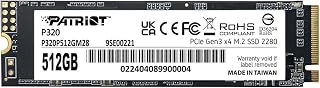
The Patriot P320 is a mainstream NVMe SSD built for users ready to leave mechanical hard drives behind. Whether you're upgrading an aging desktop or modernizing a laptop, this drive delivers the speed boost that transforms everyday computing. At 512GB, it provides ample space for Windows, applications, and active projects while remaining competitively priced.
Performance is the P320's strongest suit. Sequential read speeds hit 3000MB/s and writes reach 2200MB/s, translating to rapid boot sequences, instant application launches, and fast file transfers. Real-world differences versus SATA SSDs are substantial and immediately noticeable. The PCIe Gen 3x4 interface and NVMe 1.3 protocol ensure you're getting current-generation performance without the premium of bleeding-edge Gen 4 or Gen 5 drives.
The M.2 2280 form factor makes installation straightforward on any compatible system. The drive is physically compact yet internally efficient, with low power consumption that benefits laptop users through extended battery life. Backward compatibility ensures broad system support across consumer and prosumer builds without compatibility headaches.
The main limitation is the lack of included warranty, which may concern buyers seeking long-term protection. Additionally, the 512GB capacity, while practical, can fill quickly if you store large media collections, games, or work files locally. These are manageable trade-offs given the value proposition at this price point.
The P320 is a smart choice for budget-conscious upgraders, system builders, and anyone prioritizing speed over premium features. Its market ranking among top-selling internal SSDs validates the balance of performance, reliability, and pricing. For everyday users and gamers, this drive delivers exactly what's needed without unnecessary expense.
Storage Capacity: 512GB
Interface: M.2 2280 PCIe Gen 3x4 NVMe 1.3
Performance: Up to 3000MB/s sequential read, up to 2200MB/s sequential write
Form Factor: M.2 2280 (compact, low-profile)
Controller: Latest PCIe Gen 3 controller
Power Consumption: Low-power design optimized for extended battery life
Compatibility: Desktop computers and laptops with M.2 NVMe slots, Windows operating system
Warranty: No warranty included
Model: P320P512GM28
Manufacturer: Patriot Memory
Who Should Buy: Desktop and laptop users upgrading from HDDs or older SATA SSDs seeking faster boot and load times. Budget-conscious builders valuing reliability and performance over premium features. Gamers, students, and professionals needing responsive storage without ultra-high capacity.
When to Consider Alternatives: If you need sustained sequential workloads with very high throughput, a Gen 4 or Gen 5 NVMe drive may provide better performance. If you require large capacity (1TB+) at similar pricing, compare competing 1TB models. If warranty coverage is essential, verify extended protection plans before purchase.
Installation Tips: Ensure your motherboard or laptop has an available M.2 slot compatible with NVMe drives. Most systems built in the last 5 years support this. Installation typically takes minutes: locate the M.2 slot, insert the drive at a 30-degree angle, and secure with the provided screw. Consult your system manual if unsure.
Best Use Cases: Gaming library storage, operating system drive for faster startup, professional application workspace, content creation scratch drive, or general performance upgrade from mechanical storage. This drive excels in all these scenarios.
Buying Guide: What to Consider Before Purchasing
Interface and Form Factor
M.2 NVMe drives connect directly to your motherboard via PCIe lanes, delivering significantly faster speeds than SATA connections. The compact 2280 form factor (22mm wide, 80mm long) fits most modern laptops and desktops, but verify your system has an available M.2 slot before purchasing.
External SSDs like the SSK Portable offer versatility for users who need storage that moves between devices. These USB-C drives sacrifice some raw speed compared to internal NVMe options but gain universal compatibility with computers, tablets, and smartphones. If you’re building a complete system, check our Z890 motherboard recommendations for platforms with multiple M.2 slots.
Sequential vs. Random Performance
Sequential read speeds (the big numbers in marketing materials) matter for large file transfers like video editing or game installations. The Western Digital WD Green SN3000 NVMe reaches 5,000MB/s sequential reads thanks to its PCIe Gen4 interface, making it ideal for content creators who regularly move large project files.
Random 4K performance affects everyday responsiveness, how quickly your OS boots, applications launch, and small files save. Drives with SLC caching technology, like the fanxiang S501Q, allocate a portion of storage as high-speed cache to maintain snappy performance during typical workloads. This matters more for general computing than raw sequential speed.
Endurance and Warranty Coverage
TBW (terabytes written) ratings indicate drive longevity. The fanxiang S501Q offers 160TBW for its 512GB capacity, while the Acclamator provides 250TBW, both sufficient for years of typical use. Gaming systems and general computing rarely approach these limits, but video editors and users running virtual machines should prioritize higher endurance ratings.
Most drives in this range include three-year warranties with lifetime technical support. The KingSpec and fanxiang models both back their hardware with this standard coverage. Warranty terms signal manufacturer confidence and provide recourse if issues arise, making them valuable considerations alongside raw specifications. For high-performance builds that demand top-tier components, explore our DDR5 7200 RAM guide to match your storage upgrade with appropriate memory speeds.
Thermal Management
Sustained write operations generate heat that can throttle performance. The fanxiang S501Q includes graphene heat dissipation stickers to maintain consistent speeds during extended transfers. Single-sided M.2 designs like the Western Digital WD Green SN3000 naturally dissipate heat better in compact laptop chassis with limited airflow.
External drives face different thermal challenges. The SSK Portable uses a 2mm aluminum alloy case that keeps surface temperatures below 106°F during operation, ensuring reliable performance without thermal throttling when transferring large files on mobile devices.
Final Thoughts
Each drive here delivers genuine value, but your best choice depends on your specific workflow. For desktop builders seeking maximum speed, the Western Digital WD Green SN3000 NVMe provides PCIe Gen4 performance that keeps pace with demanding applications. Mobile professionals who need reliable portable storage will appreciate the SSK Portable SSD, which combines robust aluminum construction with consistent 1050MB/s speeds across platforms. Whatever your computing needs, upgrading from mechanical storage to solid-state technology remains one of the most impactful performance improvements you can make in 2026.
Frequently Asked Questions
Do I need PCIe Gen4 speeds for everyday computing?
For typical office work, web browsing, and casual gaming, PCIe Gen3 drives deliver plenty of speed. You’ll notice minimal real-world difference between a Gen3 drive running at 3,000MB/s and a Gen4 drive at 5,000MB/s when launching applications or booting your OS. Gen4 benefits become apparent when regularly transferring massive files like 4K video projects or working with large datasets. If you’re pairing your SSD with high-end graphics, our GPU recommendations under $250 can help balance your build.
Can I use an M.2 NVMe drive in any computer?
Your motherboard must have an M.2 slot that supports NVMe protocol. Most systems built after 2015 include at least one M.2 slot, but older boards may only support SATA M.2 drives or lack M.2 entirely. Check your motherboard specifications or look for the M.2 connector, it resembles a small horizontal slot near the CPU socket. Laptops typically have one M.2 slot accessible via a bottom panel.
How much storage capacity do I actually need in 2026?
For most users, 512GB provides adequate space for the operating system, essential applications, and a modest game library or photo collection. Windows 11 occupies roughly 20-25GB, leaving substantial room for programs and files. If you maintain large media libraries, edit video content, or install multiple modern games (which often exceed 100GB each), consider using your SSD for the OS and frequently-accessed files while storing archives on a secondary mechanical drive or external SSD.
Will an external SSD work with my iPhone for ProRes video?
iPhone 15 Pro and newer models support recording 4K ProRes video directly to external USB-C SSDs. The drive must support USB 3.2 Gen2 speeds (10Gbps) and draw less than 4.5 watts to avoid draining the phone battery excessively. The SSK Portable meets these requirements with 2.4-watt power consumption and maintains write speeds above the 1,000MB/s needed for ProRes capture. Ensure your iPhone runs iOS 17 or later for full external recording support.





Write Your Review
No reviews yet. Be the first to share your experience!