

When you’re scrubbing through 4K timelines or exporting a render-heavy project, your storage becomes the backbone of your workflow. A slow drive turns every preview into a waiting game and every export into a test of patience. The right SSD eliminates those delays entirely.
We’ve evaluated eight SSDs built specifically for the demands of video editing: sustained write speeds, high endurance ratings, and thermal management that keeps performance stable during long sessions. Whether you’re building a new editing rig or upgrading your current setup, this guide covers internal NVMe drives and portable options that handle everything from 1080p vlogs to 8K raw footage.
Quick answer
This guide compares 8 picks, with Samsung 990 PRO 4TB NVMe SSD PCIe 4.0 - 7,450MB/s ranked first. Samsung T7 Shield 2TB Portable SSD, IP65 Water/Dust holds the highest customer rating among them. SanDisk 2TB Extreme Portable SSD - 1050MB/s, Rugged has the most customer reviews.

At 4TB, this drive gives you the headroom to keep entire projects with their raw footage, previews, and exports on a single fast volume. Sequential reads reach 7,450 MB/s and writes hit 6,900 MB/s, so rendering and exporting finish faster. The NVMe interface over PCIe 4.0 ensures you're not bottlenecked when working with high-bitrate codecs or multi-layered timelines.
Pros
- 7,450 MB/s read and 6,900 MB/s write speeds handle 4K and 8K footage without hesitation
- 4TB in a single M.2 slot keeps large project libraries consolidated
- Heat Spreader and Dynamic Thermal Guard prevent throttling during long export sessions
- 432 GB cache buffer absorbs sustained burst writes comfortably
Cons
- Requires a PCIe 4.0 slot to reach advertised speeds; older systems are bottlenecked
- Premium performance tier means it is a significant investment compared to mid-range NVMe options
When your workflow demands the absolute ceiling of internal drive performance, the Samsung 990 PRO 4TB earns its place at the top of any video editing rig. Sequential reads hit 7,450 MB/s and writes reach 6,900 MB/s over PCIe 4.0, which means scrubbing through 4K or 8K timelines, ingesting raw camera footage, and rendering multi-track exports all happen without the stuttering hesitation that slower drives introduce. The 4TB capacity is equally important here: video files are enormous, and having a single M.2 2280 drive hold an entire project archive keeps your workspace clean. Sustained performance is where many competing drives quietly fall apart, but the integrated Heat Spreader and Dynamic Thermal Guard keep speeds stable through back-to-back export sessions. Samsung Magician handles firmware and optimization automatically, which frees editors to focus on the cut rather than drive housekeeping. Compatibility covers desktops, laptops, and even PS5. The 432 GB cache buffer also absorbs burst writes comfortably. The one real prerequisite is a PCIe 4.0 slot; without it, you will not see these speeds.
Storage Capacity: 4TB
Interface: NVMe M.2 PCIe 4.0
Form Factor: M.2 2280 (3.15 x 0.87 x 0.09 inches)
Sequential Read Speed: Up to 7,450MB/s
Sequential Write Speed: Up to 6,900MB/s
Cache Memory: 432GB
Thermal Management: Heat Spreader and Dynamic Thermal Guard
Compatibility: Desktop PCs, Laptops, PlayStation 5
Model Number: MZ-V9P4T0BW
Weight: 9 grams
Color: Black
Included Software: Samsung Magician
Best for professional editors, colorists, and motion graphics artists who run demanding software on a PCIe 4.0 desktop or laptop and need one high-capacity internal drive to handle both project storage and fast scratch duties. Skip it if your motherboard only supports PCIe 3.0, since you will pay a premium for speeds you cannot unlock, or if your editing workloads are light enough that a mid-range NVMe drive would serve just as well.

The 9100 PRO reaches 14,700 MB/s read speeds thanks to PCIe 5.0, cutting transfer times when ingesting footage or moving large sequences between drives. Hardware encryption protects your client work without slowing performance. If you're editing 6K or 8K material or stacking effects, this drive gives you the bandwidth to keep up with demanding workflows.
Pros
- 14,700MB/s reads eliminate timeline stuttering with 8K footage
- Thermal management prevents throttling during long exports
- 2,600K write IOPS speed up autosaves and cache writes
- In-house manufacturing ensures consistent reliability
Cons
- Requires PCIe 5.0 motherboard for full performance
- Premium cost exceeds budget for hobbyist editors
Video editors working with 4K, 6K, or 8K footage need storage that won't slow down their timeline. The Samsung 9100 PRO delivers exactly that with PCIe 5.0 speeds reaching 14,700MB/s read and 13,300MB/s write. These speeds cut render times and eliminate stuttering when scrubbing through high-resolution clips. The 1,850K read IOPS and 2,600K write IOPS mean your editing software responds instantly when loading effects, transitions, or color grading nodes. The 5nm controller provides 49% better power efficiency than previous generations, which matters during marathon editing sessions. Advanced thermal control prevents the performance drops that plague cheaper drives when exporting long projects. The compact 2280 form factor fits into most editing workstations and laptops without hassle. Samsung manufactures every component in-house, ensuring consistent performance across the board. For editors who regularly move massive RAW files between drives or run multiple timelines simultaneously, this drive handles the workload without breaking stride. The included heatspreader keeps temperatures stable even during multi-hour exports.
Interface: PCIe 5.0 x4 NVMe
Form Factor: M.2 2280
Capacity: 1TB (also available in 2TB, 4TB, 8TB)
Sequential Read Speed: Up to 14,700MB/s
Sequential Write Speed: Up to 13,300MB/s
Random Read IOPS: Up to 1,850K
Random Write IOPS: Up to 2,600K
Controller: 5nm Samsung proprietary controller
Security: Hardware encryption
Compatible Devices: Desktop PCs, Laptops (with PCIe 5.0 support)
Color: Black
Software: Samsung Magician with automatic firmware updates and drive health monitoring
Best suited for professional video editors working with high-resolution footage who need maximum throughput for scrubbing timelines and rendering projects. Also ideal for colorists managing large DPX or EXR sequences. Skip this if you're editing 1080p content on older hardware without PCIe 5.0 support, as you won't access the full speed advantage. Casual editors working with compressed formats can save money with a PCIe 4.0 drive that will feel nearly identical in everyday use. This drive makes sense when every second of render time matters to your workflow.

The 990 PRO delivers sequential reads up to 7,450 MB/s over PCIe 4.0, letting you scrub through 4K timelines without stuttering. With 2TB of capacity, you can store multiple projects locally and maintain fast access to raw footage during edits. The M.2 2280 form factor fits most modern laptops and desktops, making it a versatile internal upgrade for editors working across workstations.
Pros
- 7,450MB/s reads handle 4K multi-cam timelines smoothly
- 2TB capacity stores active projects and render cache
- 55% random performance boost speeds up file operations
- Intelligent Turbo Write sustains speed during long exports
Cons
- Full speed requires PCIe 4.0 compatible motherboard
- Premium pricing versus PCIe 3.0 alternatives
When you're assembling multi-track timelines with dozens of 4K clips, storage speed directly affects how smoothly your editing application responds. The Samsung 990 PRO 2TB provides 7,450MB/s sequential reads and benefits from a 55% boost in random performance compared to the previous generation. That improvement translates to faster media imports, snappier timeline scrubbing, and quicker project loads when you're switching between edits. The 2TB capacity gives video editors room for active projects, preview renders, and cache files without constant file juggling. Intelligent Turbo Write maintains consistent speeds during long rendering sessions instead of slowing down after the cache fills. Smart heat control keeps the drive operating at peak performance even when exporting hour-long timelines. The military-grade durability features including 9.8-foot drop resistance and dust protection matter when your workstation gets bumped or travels to client sites. This drive fits the standard M.2 2280 slot found in modern editing workstations and laptops. The five-year warranty backs up Samsung's confidence in long-term reliability for professional workflows.
Speed: Sequential Read 7,450 MB/s, Sequential Write 6,900 MB/s, significant random performance improvements over 980 PRO
Interface: PCIe 4.0 NVMe, M.2 2280 form factor, requires PCIe 4.0 slot on motherboard
Efficiency: 1,380 MB/Read per watt and 1,319 MB/Write per watt, representing 50% improvement in power efficiency over previous generation
Durability: 9.8-foot drop resistance, water and dust resistant, 5-year manufacturer warranty
Compatibility: Windows and MacOS systems, verified compatibility with PlayStation 5, works in any PCIe 4.0 compatible desktop or laptop
Perfect for freelance video editors and small studios working primarily with 4K footage who need a balance of speed and capacity. The 2TB size accommodates multiple active projects without requiring constant archival. Skip this if you're editing simple 1080p projects where a slower drive won't impact your workflow. Also pass if your motherboard lacks PCIe 4.0 support, as you'll waste money on speed you can't access. Budget-conscious editors working with highly compressed codecs may find a mid-tier PCIe 3.0 drive sufficient for their needs without the premium cost.

The T7 Shield offers rugged portability with drop resistance up to 9.8 feet and water and dust protection, so you can carry footage between shoots and edit bays safely. Read speeds hit 1,050 MB/s over USB 3.2 Gen 2, fast enough for editing 1080p and lighter 4K projects directly from the drive. At 2TB, it holds multiple jobs without constant offloading.
Pros
- Up to 1,050 MB/s read speed supports direct 4K editing without proxy conversion
- IP65 dust and water resistance plus 9.8-foot drop protection for field production environments
- 97-gram pocket-friendly build works across virtually every platform including iPhone 15/16 Pro
- AES hardware encryption keeps sensitive client footage protected
Cons
- Requires USB 3.2 Gen 2 on the host device to achieve maximum speeds
- Ruggedized elastomer shell makes the drive slightly thicker than slim portable alternatives
Location-based video work puts unique pressure on a drive: it has to survive a film set, connect to whatever laptop or monitor is on hand, and still move footage quickly enough to keep a production schedule intact. The Samsung T7 Shield 2TB addresses all three demands. USB 3.2 Gen 2 connectivity delivers up to 1,050 MB/s reads and 1,000 MB/s writes, which is fast enough for direct playback of high-bitrate 4K footage without relying on proxy files. That is roughly double the throughput of Samsung's previous T5 generation, a meaningful leap for anyone offloading cards between takes. The rugged elastomer exterior handles drops from up to 9.8 feet, and the IP65 rating resists water spray and dust, so rain on an outdoor shoot or dust on a dry-land set will not end a project. At 97 grams the drive fits in a jacket pocket, and broad compatibility across Windows, macOS, Android, iPhone 15/16 Pro, Nintendo Switch, and PlayStation consoles means one drive travels across every device in your kit. AES hardware encryption keeps client footage secure. The 2TB capacity holds a solid volume of raw files before an offload to a NAS becomes necessary.
Storage Capacity: 2TB
Interface: USB 3.2 Gen 2 (10 Gbps)
Read Speed: Up to 1,050 MB/s
Write Speed: Up to 1,000 MB/s
Form Factor: 2.5-inch portable SSD
Dimensions: 3.39L x 2.24W x 0.49Th inches
Weight: 97 grams
Protection Ratings: IP65 (water and dust resistant)
Drop Resistance: Up to 9.8 feet (3 meters)
Security: Hardware encryption with Samsung Magician software
Warranty: 3-year manufacturer warranty
Compatibility: PC, Mac, Android, iPhone 15/16, Nintendo Switch, PlayStation, Xbox, and more
Ideal for run-and-gun videographers, documentary crews, and on-set data wranglers who need a portable drive tough enough for field work and fast enough to edit from directly. Less suited to studio editors who never leave their desk and would get more speed per dollar from an internal NVMe, or users who cannot confirm their host device supports USB 3.2 Gen 2 for peak throughput.
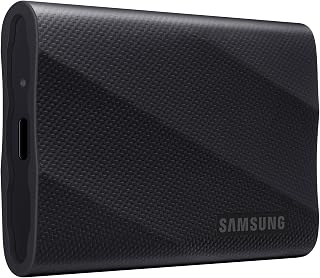
The T9 doubles external transfer speeds to 2,000 MB/s with USB 3.2 Gen 2x2, making it practical to edit heavier 4K timelines straight from the portable drive. AES 256-bit hardware encryption keeps client footage secure when moving between locations. It survives drops up to 9.8 feet, so you can toss it in a bag without worry.
Pros
- 2,000 MB/s read and write speeds enable direct editing of high-resolution footage
- Dynamic Thermal Guard prevents speed throttling during prolonged export sessions
- Survives 9.8-foot drops with AES 256-bit hardware encryption for secure on-location work
- In-house NAND and DRAM production supports consistent performance over time
Cons
- Full speed requires USB 3.2 Gen 2x2 and UASP mode; older devices are significantly bottlenecked
- 1TB capacity may be insufficient for editors who archive large raw video libraries on a single drive
The Samsung T9 1TB sits in a compelling middle ground for video editors: it delivers internal-SSD-class speeds in a form factor you can drop into a bag. USB 3.2 Gen 2x2 pushes reads and writes both to 2,000 MB/s, fast enough to edit high-resolution footage directly off the drive without ever touching proxy workflows. The 1,950 MB/s write figure is equally important for video work, where continuous ingestion of camera files taxes drives that only advertise strong reads. Dynamic Thermal Guard actively manages heat during extended sessions, so sustained 4K or 6K exports do not trigger speed throttling midway through a render. The compact 2.4-inch chassis survives 9.8-foot drops, a genuine consideration when drives travel between location shoots and the edit suite. AES 256-bit hardware encryption protects raw footage and finished deliverables alike. Samsung produces its own NAND and DRAM in-house, which contributes to component consistency over the drive's life. A five-year warranty backs that reliability promise. At 1TB the capacity suits editors who offload to a NAS regularly rather than those who need a deep portable archive.
Storage Capacity: 1TB (also available in 2TB and 4TB options)
Interface: USB 3.2 Gen 2x2
Read/Write Speed: Up to 2000MB/s sustained
Form Factor: 2.5-inch compact design
Weight: 4.32 ounces
Dimensions: Portable and travel-friendly
Security: AES 256-bit hardware encryption
Durability: 9.8-foot drop protection
Operating Temperature: Stays below 140°F during normal use
Warranty: 5-year limited warranty
Compatibility: PC, Mac, iPad, iPhone 15/16, Xbox Series S/X, PlayStation 4/5
A strong match for freelance editors and cinematographers who want near-desktop NVMe speeds on a portable drive and regularly work from machines with USB 3.2 Gen 2x2 support. Editors managing very large project archives may find 1TB limiting and should consider higher-capacity alternatives. Owners of older laptops without Gen 2x2 ports will not reach the advertised speeds and should look at the T7 Shield instead.

The Extreme Portable combines 1,050 MB/s read speeds with dust and water resistance, letting you edit in the field or on location without risking your footage. At 2TB, you can store multiple projects and bring them anywhere. Hardware encryption protects your work, and the rugged build means it can handle the bumps of mobile editing setups.
Pros
- 1050MB/s reads handle 4K and 8K footage transfers without bottlenecks
- IP65 rating and 3-meter drop spec survive real production environments
- Hardware encryption secures client projects without performance penalty
- Pocket-sized at 1.76 ounces with carabiner attachment for field work
Cons
- Requires USB 3.2 Gen 2 to achieve advertised speeds
- Formatted capacity below advertised 2TB
When editing video on location or backing up footage in the field, the SanDisk Extreme Portable SSD delivers the transfer speeds and ruggedness that production workflows demand. Its NVMe-based architecture pushes 1050MB/s reads and 1000MB/s writes over USB 3.2 Gen 2, meaning a 50GB project file moves in under a minute. That speed matters when you're offloading camera cards between takes or shuttling timelines to a colorist under deadline. The IP65 rating and 3-meter drop resistance handle the reality of on-set environments: dust, rain, and the occasional tumble from a cart. At 1.76 ounces with a carabiner loop, it disappears into a camera bag yet holds 2TB of raw footage or proxy files. Hardware AES 256-bit encryption secures client work without third-party software. The five-year warranty backs the professional build quality. Performance does require USB 3.2 Gen 2 on your editing machine to hit advertised speeds, and formatted capacity runs slightly below 2TB as expected.
Speed Performance: Up to 1050MB/s read speeds and 1000MB/s write speeds (based on internal testing; actual performance varies by host device and USB 3.2 Gen 2 compatibility)
Storage Capacity: 2TB usable storage (1TB = 1,000,000,000,000 bytes; actual user capacity less due to formatting)
Durability Ratings: 3-meter drop protection and IP65 rating (water flow resistance at 30 kPa for 3 minutes; limited dust contact does not interfere with operation)
Security: 256-bit AES hardware encryption with password protection (Windows 8+, Windows 10, macOS 10.9+)
Physical Specs: 5 inches L x 2 inches W x 0.5 inches thickness, weighing 1.76 ounces
Connectivity: USB 3.2 Gen 2, eSATA interface support
Compatibility: PC, Mac, PlayStation 4, Xbox Series X, tablets, and compatible USB 3.2 devices
Warranty: 5-year limited manufacturer warranty

PCIe Gen 5 pushes this drive to 14,000 MB/s reads and 10,000 MB/s writes, ideal for editors juggling high-resolution clips or working with uncompressed formats. With 1TB of space, you can dedicate it to your active project as a scratch disk. The M.2 2280 format drops into most modern editing rigs without adapters.
Pros
- 14,000MB/s reads enable real-time RAW playback without proxies
- Dual-cache system maintains speed during long exports
- Thermal management prevents throttling under sustained loads
- Shock and vibration resistance suits mobile editing setups
Cons
- Requires PCIe Gen 5 motherboard for full performance
- Premium cost versus capable Gen 4 alternatives
High-resolution video editing pushes storage systems hard, especially when you're working with RAW cinema camera files or uncompressed formats. The Lexar NM1090 PRO attacks this bottleneck with PCIe Gen 5 architecture that delivers 14,000MB/s reads and 10,000MB/s writes. For editors handling RED, ARRI, or Blackmagic RAW footage, these speeds mean you can scrub through timelines without proxy files and export projects in significantly less time compared to Gen 4 drives. The custom 6nm controller and dual-cache system combining DRAM with dynamic SLC cache maintain peak performance even during extended rendering sessions. This architecture prevents the slowdowns common in budget drives when the cache fills during a long export. Thermal management actively dissipates heat generated by sustained high-speed operation, which matters when you're batch processing multiple timelines or running color grading plugins that constantly read and write temp files. The M.2 2280 form factor fits standard slots in editing workstations and works with PlayStation 5 for game developers. Dust, shock, and vibration resistance add durability for mobile editors or studios with equipment constantly moving between edit bays.
Storage Capacity: 1TB
Interface: NVMe PCIe Gen 5x4
Form Factor: M.2 2280
Read Speed: Up to 14,000MB/s
Write Speed: Up to 10,000MB/s
Media Speed: 13,000MB/s
Controller: 6nm architecture
Cache: DRAM Cache and SLC Dynamic Cache
Compatibility: Desktop computers and Sony PlayStation 5
Protection: Dust resistant, shock resistant, vibration resistant
Warranty: Five-year limited warranty
Weight: 1.6 ounces
Model Number: LNM109P001T-RNNNU
Ideal for professional editors working with cinema camera RAW files, 8K footage, or uncompressed formats who own PCIe Gen 5 compatible workstations. Also suits post-production houses running multiple concurrent timelines where every performance advantage compounds across projects. Skip this if your system uses PCIe Gen 4 or older, as you won't benefit from the generational speed increase. Hobbyist editors working with compressed codecs don't need this level of performance. The premium positioning makes sense only when your workflow genuinely saturates Gen 4 bandwidth.

Pros
- Delivers twice the speed of PCIe 3.0 drives and 12.7x faster than SATA SSDs
- Superior thermal management keeps drive cool during intensive gaming and content creation sessions
- Windows 11 Direct Storage support unlocks next-generation gaming capabilities
- Excellent value for a flagship PCIe 4.0 drive with proven Samsung reliability
- Compact form factor maximizes compatibility across diverse system configurations
Cons
- Requires PCIe 4.0 capable motherboard to achieve advertised performance speeds
- Premium pricing compared to PCIe 3.0 alternatives, though performance gains justify the investment
- Heatspreader may require clearance verification in some system configurations
The Samsung 980 PRO represents the pinnacle of consumer NVMe storage, delivering exceptional performance for power users, gamers, and creative professionals. This is a no-compromise drive built for users who demand the fastest possible storage in their gaming rigs, content creation workstations, or next-gen console setups.
The standout feature is undeniable performance, with read speeds reaching 7000MB/s and write speeds up to 5000MB/s. Real-world benefits include near-instantaneous game loading times, rapid project file handling in video editing, and seamless asset streaming in 3D applications. The custom Samsung Elpis controller is purpose-built for PCIe 4.0, ensuring you get genuine performance gains on compatible systems, not just theoretical numbers.
Thermal management is thoughtfully engineered with a nickel-coated heatspreader and Dynamic Thermal Guard technology. This design prevents thermal throttling during extended gaming sessions or rendering jobs, maintaining peak performance even under sustained load. The compact M.2 2280 form factor fits nearly universal system configurations from ultrabooks to high-end desktop towers.
The main consideration is compatibility. You need a PCIe 4.0 motherboard to unlock full performance potential. Additionally, the premium price point reflects its flagship status, though performance advantages over PCIe 3.0 drives justify the investment for demanding workloads and PS5 users seeking maximum upgrade value.
Verdict: The Samsung 980 PRO is the drive to choose if you want the absolute fastest consumer NVMe storage available, backed by Samsung's proven reliability and comprehensive software support for optimization and updates.
Capacity: 1TB
Form Factor: M.2 2280
Interface: PCIe 4.0 NVMe
Read Speed: 7000MB/s
Write Speed: 5000MB/s
Cache Memory: 1GB LPDDR4
Durability: 600TB total bytes written
Heatspreader: Yes (integrated)
Compatible Platforms: Windows PC, Mac, PlayStation 5
Dimensions: 3.15in L x 0.87in W x 0.09in Th
Weight: 9g
Model Number: MZ-V8P1T0BW
Ideal For: This drive is perfect for PS5 owners upgrading storage, PC gamers seeking maximum loading speed performance, 4K and 8K video editors handling large project files, 3D artists and designers rendering complex scenes, and system builders prioritizing performance in high-end gaming or creative workstations.
Consider Alternatives If: You have a PCIe 3.0 system without upgrade capability, are budget-constrained and acceptable with slower speeds, or require capacity larger than 1TB for a single drive. For basic productivity and storage, less expensive options provide adequate performance at lower cost.
Buying Guide
Sequential Read and Write Speeds
Video editing workflows rely heavily on sequential performance rather than random access. When you’re importing raw footage or exporting a finished timeline, sustained write speeds determine how quickly your drive can handle large file transfers without throttling.
PCIe 4.0 drives like the Samsung 990 PRO deliver read speeds up to 7,450 MB/s, which keeps scrubbing smooth even with 4K ProRes files. PCIe 5.0 options like the Samsung 9100 PRO double that performance, reaching 14,700 MB/s, ideal if you’re working with 8K footage or uncompressed formats. Portable SSDs typically max out around 2,000 MB/s due to USB 3.2 Gen 2×2 limitations, but that’s still fast enough for field work and external project drives.
Thermal Management and Sustained Performance
High-speed SSDs generate heat during extended write operations, and thermal throttling can cut performance in half during long exports. Dynamic Thermal Guard technology monitors temperatures in real time and adjusts performance to prevent overheating without compromising reliability.
Internal drives with integrated heat spreaders maintain consistent speeds during sustained workloads. The Samsung 990 PRO uses a nickel-coated controller and heat spreader label to dissipate heat across the PCB. Portable drives like the Samsung T9 use advanced thermal solutions to stay cool even when transferring hundreds of gigabytes at once. If your motherboard supports M.2 heatsinks, use one, most PCIe 5.0 drives benefit from additional cooling during heavy workloads.
Endurance Ratings and Write Workloads
Video editors write massive amounts of data daily: raw captures, render files, proxy media, and exported deliverables. Total Bytes Written (TBW) ratings measure how much data a drive can handle over its lifespan, and higher endurance means fewer premature failures.
The Samsung 980 PRO offers up to 600 TBW for the 1TB model, while the 990 PRO extends that to 1,200 TBW for 2TB variants. These ratings reflect years of heavy professional use. Drives with DRAM cache maintain better write performance under sustained loads, and SLC dynamic cache allocates faster memory for burst writes before committing data to TLC NAND. If you’re managing multiple projects simultaneously, look for drives rated at 1,000 TBW or higher.
Form Factor and Compatibility
Internal NVMe drives use the M.2 2280 form factor and require an available PCIe slot on your motherboard. PCIe 4.0 drives work in both Gen 3 and Gen 4 slots but deliver full performance only in Gen 4 or higher. PCIe 5.0 drives like the Lexar NM1090 PRO require Gen 5-capable motherboards to reach their maximum speeds, though they’ll still outperform older drives in Gen 4 slots.
Portable SSDs connect via USB-C and work across laptops, desktops, and field recorders without installation. The Samsung T7 Shield adds IP65 water and dust resistance for outdoor shoots, while the T9 Portable SSD delivers 2,000 MB/s speeds for high-bitrate 4K workflows. If you’re building a new editing workstation, choose a motherboard with multiple M.2 slots so you can separate your OS, active projects, and media cache across dedicated drives.
Final Thoughts
For internal builds, the Samsung SSD 990 PRO 2TB delivers exceptional performance across 4K and 8K workflows with sustained speeds that won’t throttle during long exports. If you need portable storage for field work or client handoffs, the Samsung T9 Portable SSD 1TB combines durability with 2,000 MB/s transfer speeds in a compact, rugged design. Both options provide the speed, endurance, and thermal management video editors depend on daily.
Frequently Asked Questions
What SSD speed do I need for 4K video editing?
For smooth 4K editing, aim for sequential read speeds above 3,500 MB/s and write speeds above 3,000 MB/s. PCIe 4.0 NVMe drives easily meet this threshold and handle multiple 4K streams without dropped frames. If you’re working with 8K footage or high-bitrate codecs like ProRes RAW, PCIe 5.0 drives provide additional headroom during playback and export.
Do I need a PCIe 5.0 SSD for video editing in 2026?
PCIe 5.0 SSDs offer speeds up to 14,000 MB/s, which benefits 8K workflows, uncompressed formats, and AI-accelerated editing tasks. For most 4K projects, PCIe 4.0 drives provide more than enough bandwidth at a better value. Consider Gen 5 if you’re building a future-proof workstation or regularly work with massive raw files that strain conventional drives.
Should I use an internal or portable SSD for video editing?
Internal NVMe SSDs deliver the highest sustained performance and lowest latency, making them ideal for your primary editing drive and active project storage. Portable SSDs work well for field captures, client handoffs, and archive storage where convenience outweighs peak speed. Many editors use both: internal drives for active work and portable drives for backup and transport. If you’re building a desktop editing rig, pair your SSD with a capable GPU to handle GPU-accelerated effects and color grading.
How much storage capacity do video editors need?
A single hour of 4K footage at 100 Mbps consumes roughly 45GB, and that’s before adding proxies, renders, and project files. Start with at least 1TB for your editing drive, but consider 2TB or 4TB if you manage multiple projects simultaneously. Keep your OS and applications on a separate drive to prevent your system from slowing down when your project drive fills up.





Write Your Review
No reviews yet. Be the first to share your experience!