

You need a reliable printer, but the Brother lineup stretches across dozens of models with overlapping specs and similar names. Whether you’re setting up a home office, managing a small team, or just replacing an aging machine, the right choice depends on a few key factors: print volume, whether you need color, and how many functions you actually use day to day.
This guide covers eight Brother printers across a range of use cases, from compact monochrome laser printers to full-featured color all-in-ones. If you’re also weighing options beyond the Brother brand, our roundup of the best laser printers for home covers a broader field worth browsing.
Quick answer
This guide compares 8 picks, with Brother HL-L2480DW Wireless Monochrome Laser Printer ranked first. Brother DCP-L2640DW Wireless Monochrome Laser Printer has the most customer reviews.

Anyone wanting a no fuss black and white printer for a tight space will appreciate the compact footprint paired with auto duplex printing to save paper on double sided documents. Scan to email support and Alexa compatibility add convenience for quick digitization and voice activated print commands in a home office.
Pros
- Fast 36 ppm black and white print speed
- Dual-band wireless plus Ethernet and USB connectivity
- Toner-based printing avoids ink drying issues
- Energy Star certified with EPEAT Silver rating
Cons
- Monochrome output only, no color printing
- Manual's sparse illustrations can complicate toner setup
For this roundup of top Brother printers, the HL-L2480DW represents the speed-focused choice for anyone whose main workload is black and white documents. At 36 pages per minute, it's built for offices that print contracts, reports, and correspondence all day rather than photos or color graphics. It skips scanning-to-fax and color entirely, focusing instead on fast, sharp monochrome output at 1200x1200 resolution. Dual-band wireless, Ethernet, and USB give it flexible connectivity options for shared office setups, while the 2.7-inch touchscreen and Brother Mobile Connect app keep daily use simple. Toner-based printing also means no dried-out cartridges between print jobs, a real advantage for offices that print in bursts rather than constantly. Energy Star certification and EPEAT Silver rating add an efficiency angle for anyone comparing specs across this list. If the goal is picking the fastest, lowest-fuss printer for high-volume text work in 2026, this model stands out as the workhorse option among the eight reviewed here.
Print Performance: 36 pages per minute monochrome, 1200x1200 dpi resolution, 360 maximum copies per run
Connectivity: Dual-band wireless (2.4GHz/5GHz), Ethernet (1 port), USB 2.0 (1 port), mobile app support
Paper Handling: 250-sheet capacity tray, manual feed slot for envelopes and specialty media, automatic duplex printing
Scanner: Flatbed scanner with cloud integration (Google Drive, Dropbox, Evernote, OneNote)
Display: 2.7-inch LED touchscreen with app and touch controls
Physical: 16.1 inches W x 15.7 inches D x 10.7 inches H, 22.2 pounds
Compatibility: Works with laptops, PCs, smartphones, tablets, and iPhones
Warranty: 1-year limited warranty with free online, call, and live chat support for life of printer
This fits small offices or home workers whose printing is almost entirely black and white text at meaningful volume. It's a strong pick if you want toner reliability over ink and don't need color or fax. Skip it if you occasionally need color documents or fax capability, since this model offers neither, and the sparse manual illustrations may make first-time toner installation a bit confusing.

Households or small offices that need copying, scanning, and faxing in one monochrome unit get a touch screen display that makes navigating multi step jobs more intuitive. The auto document feeder handles stacks of pages unattended, while duplex printing keeps paper costs down for everyday document heavy workflows.
Pros
- True 4-in-1 with fax, copy, scan, and print
- 50-page automatic document feeder for high-volume jobs
- Fast scanning at 23.6 ppm plus automatic duplex printing
- Dual-band wireless with Ethernet and USB options
Cons
- Monochrome output only, no color printing
- Refresh subscription deactivates cartridges upon cancellation
Among the models considered for best Brother printers in 2026, the MFC-L2820DW stands out as the all-in-one answer for offices that want copy, scan, fax, and print without color. It rounds out this list as the choice for anyone who needs a true 4-in-1 device rather than a print-only workhorse. At 34 pages per minute and up to 1200x1200 dpi resolution, it keeps pace closely with faster mono laser options while adding the 50-page automatic document feeder and fax function that a print-only model skips. Scanning at 23.6 ppm and automatic duplex printing round out a feature set built for busy small offices. The 2.7-inch touchscreen handles most tasks directly, so you're not always reaching for a phone app, and dual-band wireless plus Ethernet and USB cover shared office setups. For anyone comparing the eight picks here by function count rather than raw speed, this is the most complete black and white package on the list.
Print Performance: Monochrome laser, 34 ppm print speed, 1200 x 1200 dpi maximum resolution, automatic duplex, up to 99 copies per run.
Scanning: Flatbed and automatic document feeder (50-page capacity), 23.6 ppm black and white scan speed, 600 x 600 dpi copy resolution, scan to email and cloud apps.
Connectivity: Dual-band wireless (2.4GHz and 5GHz), Ethernet, USB 2.0. Compatible with Windows, Mac, Linux, iOS, Android, and Alexa integration.
Paper Handling: 250-sheet main tray, supports plain paper, envelopes, and labels. Maximum media weight handled and paper specifications available from Brother.
Physical: Dimensions 16.1 inches wide by 15.7 inches deep by 12.5 inches high. Weight 22.5 pounds. User-friendly 2.7-inch LED touchscreen display.
Toner and Supplies: Compatible with TN830, TN830XL, and TN830V cartridges. DR830 drum unit included. ENERGY STAR certified and EPEAT Silver rated. 1-year limited warranty with lifetime customer support.
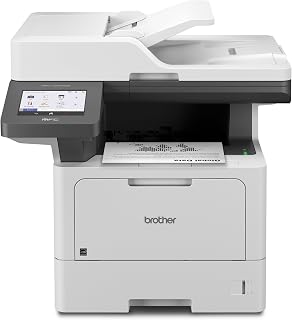
High volume home offices or small businesses printing lots of text documents benefit from the 50 ppm monochrome speed, which keeps queues moving during busy periods. The 5 inch color touchscreen and USB host support for flash memory make scanning to cloud services or removable storage straightforward for document heavy workflows.
Pros
- 50 ppm print and copy speed with 56 ipm duplex scanning
- 70-page auto document feeder for batch jobs
- Dual-band Wi-Fi and Gigabit Ethernet connectivity
- 5-inch touchscreen with custom workflow shortcuts
Cons
- Monochrome only, no color printing
- Manual tray swaps needed for different paper sizes
Among the models reviewed here, the MFC-L5915DW is the choice for offices that have outgrown smaller Brother units and need genuine high-volume performance. This is a monochrome laser all-in-one built around speed, with 50 ppm print and copy output and 56 ipm two-sided scanning that puts it well ahead of the compact picks elsewhere on this list. A 70-page auto document feeder handles batch scanning without constant intervention, and the 5-inch touchscreen supports custom workflow shortcuts for teams that process a lot of paperwork daily. Dual-band Wi-Fi and Gigabit Ethernet connectivity make it easy to slot into an existing office network, and the 250-sheet paper capacity with support for card stock, envelopes, and labels covers varied print jobs. At 38.3 pounds, it's a heavier, sturdier build than the other entries here, reflecting its positioning as the high-volume option for 2026. For anyone whose search for the best Brother printer centers on throughput and uptime over color capability, this is the model to shortlist.
Choose this if your office prints or copies in high volume and needs monochrome speed, a large document feeder, and robust network connectivity. It suits corporate offices, law firms, and similar workgroups with steady daily output. Skip it if you need color printing or have limited space, since this is the largest and heaviest model on this list and paper size changes require manual tray swaps.
Core Performance: 50ppm print and copy speed, 1200x1200 dpi resolution, 70-page auto document feeder with 56ipm scanning speed, 5-inch color touchscreen display.
Connectivity: Dual-band WiFi, Gigabit Ethernet, USB 2.0 ports, mobile device printing compatible with laptops, PCs, smartphones, tablets, and iPhones.
Paper Handling: 250-sheet maximum capacity, supports 8.5x14 inch maximum media size, compatible with plain paper, envelopes, labels, and card stock. 99 maximum copies per run.
Security: Triple-layer security features for document and network protection. Includes 3000-page toner cartridge with optional 18000-page ultra high-yield replacement available.

Readers after a straightforward, space saving monochrome printer will find the lighter 15.1 pound build and compact dimensions easy to tuck onto a crowded desk. Mobile printing and network readiness let it serve a household or small office without a dedicated computer connection, keeping setup minimal.
Pros
- Fast 30 ppm monochrome output
- Compact 14 x 14 x 7.2 inch footprint
- Dual-band wireless plus USB connectivity
- 250-sheet tray reduces refills
Cons
- No automatic duplex printing
- WiFi setup can be time-consuming for some users
If you're narrowing down the 2026 lineup to a no-fuss monochrome workhorse, the HL-L2405W earns its spot through sheer print speed and footprint efficiency. At 30 pages per minute, it outpaces inkjet rivals by a wide margin, and the 1200 x 1200 resolution keeps text sharp and smudge-free for everyday documents, labels, and envelopes. For this roundup, what makes it stand out among the eight picks is how little desk space it demands at 14 x 14 x 7.2 inches, paired with dual-band wireless that covers laptops, tablets, and phones without hassle. The 250-sheet tray means fewer interruptions during busy stretches. It's not the most feature-loaded model here since it skips automatic duplexing, but for buyers who just want dependable black and white output without extra bulk or complexity, it's one of the easiest recommendations in this list. Setup can take longer than expected if you're pairing by QR code instead of a laptop-first flow.
Best for home offices, students, or small businesses that print mostly text documents and want speed without color or duplexing. Skip it if two-sided printing matters to you, since pages must be flipped manually, or if you're not comfortable with a mobile-first wireless setup process. It also isn't the pick if you occasionally need color output alongside black and white.

For a compact monochrome unit that still covers copying and scanning, the mix of Ethernet, USB, and Wi Fi connectivity means it fits into almost any desk setup, wired or wireless. Auto document feeder support speeds up multi page scans, making it a practical pick for home offices handling routine paperwork.
Pros
- 36 ppm monochrome speed with 50-page auto document feeder
- Dual-band Wi-Fi plus USB and Ethernet connectivity
- Compact 15.7 x 16.1 x 12.5 inch footprint
- Auto-duplex printing reduces paper use
Cons
- Monochrome only, no color output
- No built-in fax capability
If you're narrowing down the best Brother printers for 2026 and want the simplest pick on the list, the DCP-L2640DW earns its spot as the compact all-rounder. It's a 3-in-1 laser unit built for home offices and small teams that just need dependable printing, scanning, and copying without wading through extra features they won't use. At 36 ppm with a 50-page auto document feeder, it moves through multi-page jobs quickly, and scan speeds of 23.6 ipm mono and 7.9 ipm color keep digitizing paperwork efficient. Dual-band Wi-Fi plus USB and Ethernet give you flexibility no matter how your office is set up, and auto-duplex printing is built in to cut paper costs. The 15.7 x 16.1 x 12.5 inch footprint means it won't dominate a desk, making it a smart fit for anyone shopping this year's lineup for a no-fuss, space-conscious monochrome workhorse.
Connectivity: Dual-band Wi-Fi (2.4GHz / 5GHz), Ethernet, USB
Print Technology: Laser, Monochrome
Print Speed: 36 pages per minute (monochrome)
Scan Speed: 23.6 ipm (black), 7.9 ipm (color)
Auto Document Feeder: 50 pages
Key Features: Auto-duplex printing, Energy Star certified, EPEAT qualified, envelope printing, scan to email, network-ready
Dimensions: 15.7 inches D x 16.1 inches W x 12.5 inches H
Weight: 25 pounds
Model: DCP-L2640DW
Color: Black
Buy this if you run a small office or home workspace and only need monochrome output with solid document feeding and mobile printing support. It suits buyers who want to consolidate print, scan, and copy into one compact machine. Skip it if you need color printing, built-in fax, or plan on heavy daily volume, since toner capacity is modest and there's no fax function for legacy workflows.
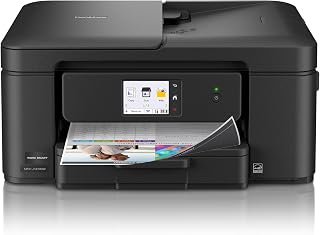
Home offices juggling photo prints, letters, and forms benefit from an inkjet that handles everything from envelopes to glossy photo paper without swapping cartridges constantly. The 2.7 inch touchscreen simplifies menu navigation for less technical users, while automatic duplex printing cuts paper waste on everyday multi-page documents like reports or school assignments.
Pros
- Color inkjet with photo paper support
- 2.7-inch touchscreen with cloud app access
- Automatic duplex printing and 20-sheet document feeder
- Compact design with front-facing paper tray
Cons
- Some reported compatibility issues with Adobe Photoshop Elements
- Wireless setup can be finicky after power disruptions
If you're narrowing down the best Brother printer for a home office that handles everything from kids' homework to color flyers, the MFC-J1410DW earns its spot on this list as the all-around pick. It's the only inkjet among the top contenders here, which matters if color output and photo printing are part of your daily mix, not just an occasional need. The 2.7-inch touchscreen and automatic duplex printing keep it easy to live with day to day, and the auto document feeder plus flatbed scanner cover copying and scanning without a second device. At 16.8 pounds and a compact footprint, it slots into a desk or shelf without eating the room. Wireless setup and mobile printing through the Brother Mobile Connect app mean you're not tethered to one computer. For a 2026 shortlist built around versatility rather than pure speed or volume, this model covers the widest range of everyday tasks, color and black and white, text and photos, in one box.
Printing: 16 ppm black, 9 ppm color at 1,200 x 6,000 dpi resolution. Automatic duplex printing for double-sided pages. Compatible with plain paper, envelopes, and glossy photo paper up to 8.5 x 14 inches.
Scanning and Copying: Flatbed and sheetfed scanner with 1,200 x 1,200 dpi maximum resolution. 20-sheet automatic document feeder. Copy speeds up to 11 ppm. Maximum 99 copies per run.
Connectivity and Control: WiFi and USB 2.0 connections. 2.7 inch LCD color touchscreen. Brother Mobile Connect app for remote printing and scanning. Compatible with Windows PCs, Macs, smartphones, and tablets.
Capacity and Design: 150-sheet paper tray capacity. Dimensions 15.4 x 13.5 x 7.2 inches. Weighs 16.8 pounds. Includes LC501 ink cartridges in black, cyan, magenta, and yellow.
Warranty and Supplies: 1-year limited warranty. Energy Star certified. Genuine Brother LC501 cartridges available in standard and high-yield options, plus Refresh automatic replenishment service.
Buy this if your household or small office needs color printing, photo-quality output, and occasional faxing alongside standard document work. It suits anyone who wants one machine instead of separate color and mono devices. Skip it if you print mostly black and white text in high volumes, since laser models on this list handle that faster and with less per-page fuss, or if you've had issues with certain creative software like Photoshop Elements.

This suits users who want duplex printing in a genuinely compact monochrome machine, since the 14 by 14 inch footprint barely takes up desk space. Mobile printing support and Alexa compatibility make it convenient for quick jobs sent from a phone, while double sided printing trims paper use over time.
Pros
- 36 ppm, the fastest monochrome speed in this lineup
- Automatic duplex printing saves paper and time
- Reliable wireless, Ethernet, and USB connectivity
- Energy Star and EPEAT qualified
Cons
- Monochrome only, no color output
- Some users report hardware issues after 1 to 2 years
Among the eight models in this guide, the HL-L2460DW is the pick for anyone who wants laser speed plus the convenience of automatic duplexing without stepping up to a pricier machine. It prints 36 pages per minute, the fastest monochrome speed in this comparison, with first pages landing in under 8 seconds so it never feels sluggish during quick jobs. Built-in auto-duplex cuts paper consumption in half, a meaningful upgrade over the non-duplexing models also featured here. Connectivity is a strength too: wireless, Ethernet, and USB all work reliably from the start, giving it flexibility across different office setups. The compact 14 x 14 x 7.2 inch body still fits easily on a shared desk. Being Energy Star and EPEAT qualified adds a nice sustainability angle for offices tracking that. The tradeoff is monochrome-only output, so it won't replace a color printer, and a small number of users report failures after a year or two of heavy use.
Print Technology: Monochrome laser
Print Speed: 36 pages per minute
Resolution: 1200 x 1200 dpi
Paper Tray Capacity: 250 sheets (20-lb. paper)
Connectivity: Dual-band wireless (2.4GHz/5GHz), Ethernet, USB 2.0
First Page Out: Under 8 seconds
Duplex Printing: Automatic
Dimensions: 14"W x 14.2"D x 7.2"H
Weight: 15.6 lbs
Power Consumption: 44 watts (operating), 470 watts (peak)
Compatible Media: Plain paper, envelopes
Display: LCD touch screen
Warranty: 1-year limited warranty
Certifications: Energy Star, EPEAT Silver rated
Great for small offices, students, or anyone printing high volumes of text documents who wants duplexing built in rather than manual flipping. Skip it if you need color printing for marketing materials or photos. Also worth skipping if you want to avoid tracking subscription trial terms, since the optional Refresh EZ Print program needs attention to avoid surprise charges after the trial ends.

Small teams needing color output alongside fax and copy functions get a workhorse here, backed by a 250 sheet capacity that reduces how often someone has to refill the tray during busy stretches. Auto duplex printing and network readiness make it easy to share across a shared office network without constant supervision.
Pros
- Color and monochrome printing at 19 ppm
- 250-sheet paper capacity with 50-sheet auto document feeder
- 3.5-inch touchscreen with cloud integration
- Built-in fax, ENERGY STAR and EPEAT Silver certified
Cons
- Some users report setup friction with firmware updates
- Customer support experiences have been mixed
For this year's Brother lineup, the MFC-L3720CDW stands out as the pick for anyone who needs color alongside the usual print, scan, copy, and fax functions. It targets small offices and home offices handling moderate to high volumes where color documents actually matter, not just black and white reports. Print speeds of 19 ppm apply to both color and monochrome, and the 250-sheet paper capacity combined with a 50-sheet auto document feeder means fewer interruptions during busy stretches. The 3.5-inch color touchscreen with cloud integration to Google Drive and Dropbox makes this one of the more connected options among Brother's 2026 picks, and Wi-Fi Direct lets you print without joining a full network. ENERGY STAR and EPEAT Silver certifications add an efficiency angle worth noting. If your shortlist criteria include fax support and color laser output in one machine, this model covers both boxes that several other entries on this list skip.
Printing: Color laser, 19 ppm (black and color), 2400x600 dpi resolution, automatic duplex printing
Scanning: Flatbed and sheetfed, up to 29 ppm (black) and 22 ppm (color) at 300 dpi, 50-sheet auto document feeder
Paper Handling: 250-sheet main tray, supports plain paper, envelopes, labels, glossy photo paper, and card stock up to 8.5x14 inches
Connectivity: Dual-band wireless (2.4GHz/5GHz), Wi-Fi Direct, USB 2.0, mobile app support for iOS and Android
Display: 3.5-inch color touchscreen with 48 customizable shortcuts
Dimensions: 17.5W x 16.1D x 15.8H inches, weighs 44 pounds
Power: 500 watts consumption, ENERGY STAR and EPEAT Silver certified
This fits small businesses or home offices that need color laser output plus fax, scanning, and copying in a single device. It's a good match if cloud printing and touchscreen shortcuts matter to your workflow. Skip it if you only print in black and white, since monochrome-only models on this list offer simpler setups, and be aware some users reported initial setup friction with firmware updates.
What to Look for in a Brother Printer
Print Technology: Laser vs. Inkjet
Most Brother printers in this list use laser technology, which delivers faster speeds, sharper black-and-white output, and lower per-page costs over time. The Brother Work Smart 1410 Wireless Color Inkjet is the exception here, using inkjet technology to produce vivid color at a more accessible entry point.
Laser is the better long-term choice for high-volume document printing. Inkjet shines when color quality and versatility matter more than raw speed or running costs.
Single-Function vs. All-in-One
If you only print, a dedicated laser printer like the best home printer options covered elsewhere may be all you need. But for most offices, an all-in-one that handles copy, scan, and fax saves desk space and money compared to buying separate devices.
The Brother MFC-L2820DW Wireless Compact Monochrome adds fax on top of print, copy, and scan, making it a capable four-in-one for under one roof. If fax is not a requirement, the three-in-one models from this lineup offer the same core functionality with a slightly simpler setup.
Print Speed and Volume Capacity
Speed matters when you’re printing stacks of documents on a deadline. Entry-level models like the Brother HL-L2405W Wireless Compact Monochrome top out at 30 pages per minute, which is plenty for light home use. Step up to the Brother Professional Laser Printer All-in-One and you’re looking at 50 pages per minute with a 70-page auto document feeder built for busy workgroups.
Match the speed rating to your realistic daily output. A home user printing a few dozen pages a week does not need the same throughput as a small business team sharing one machine all day.
Connectivity and Mobile Printing
Every model here supports dual-band wireless, which means you can connect over both 2.4GHz and 5GHz networks for a more stable signal. Most also offer Ethernet for wired office setups and USB for direct single-computer connections.
The Brother Mobile Connect app is available across the lineup and lets you print, scan, and monitor toner or ink from your phone. Higher-end models like the Brother MFC-L3720CDW Wireless Color Laser Printer add a 3.5-inch color touchscreen with 48 customizable shortcuts and direct cloud app access. For teams already working out of a small business setup, these smart features reduce friction in daily workflows.
Final Thoughts
Brother builds a dependable, well-rounded lineup that covers everything from basic home printing to high-volume office workloads. If you want a compact, versatile black-and-white workhorse for everyday use, the Brother HL-L2480DW Wireless Compact Monochrome delivers strong multi-function performance in a small footprint. For teams that need fast color output with full all-in-one capability, the Brother MFC-L3720CDW Wireless Color Laser Printer is the clear step up with professional-grade features to match.
Frequently Asked Questions
Are Brother printers good for home office use?
Yes, Brother is one of the most consistently reliable brands for home office printing. Models like the Brother HL-L2460DW and Brother DCP-L2640DW are specifically engineered for small-footprint spaces where you need dependable daily output without the bulk of a commercial machine. Their dual-band wireless support and mobile app compatibility make them especially practical for work-from-home setups in 2026.
What is the difference between Brother MFC and DCP models?
MFC stands for Multi-Function Center and typically includes fax capability alongside print, copy, and scan. DCP stands for Digital Copier and Printer, which covers the same three core functions but leaves out fax. If you never send faxes, a DCP model gives you the same everyday performance at a slightly simpler configuration.
How long do Brother laser toner cartridges last?
It depends on the cartridge type and your print volume. Standard Brother TN830 cartridges are rated for a few thousand pages, while high-yield TN830XL cartridges stretch significantly further. For the Brother Professional Laser Printer All-in-One, the ultra high-yield TN920UXXL cartridge is rated for up to 18,000 pages, which can dramatically lower your cost per page over time. Brother’s Refresh EZ Print Subscription Service is also worth considering if you want to automate reordering and reduce supply costs.
Should I choose a color or monochrome Brother printer?
If your printing is mostly documents, reports, and everyday office work, a monochrome laser printer is the more cost-efficient choice since black-and-white toner costs less per page and the hardware is typically more compact. Color makes sense if you regularly print marketing materials, presentations, or anything where visual quality matters. For a deeper look at how these trade-offs play out across brands, our guide to the best printers for small business walks through the decision in more detail.
Common questions
Is a laser printer or inkjet better for home use?
A laser printer is better for most home use focused on text documents, since models like the Brother DCP-L2640DW and HL-L2460DW print monochrome pages quickly, output crisp text, and avoid the clogged nozzle issues inkjets face when left unused. Inkjets still win for home photo printing since they handle color gradients and glossy paper better. For everyday homework, bills, and office documents, laser is the lower-hassle choice.
What is the toner yield on Brother printer cartridges?
Toner yield isn't listed in the specs for these models, so check the individual cartridge packaging or Brother's listing page before buying. What is confirmed is print speed, which affects how fast you'll cycle through a cartridge: the DCP-L2640DW and HL-L2460DW both print up to 36 pages per minute in monochrome, while the HL-L2405W tops out at 30 ppm. Higher-capacity XL cartridges are typically available for heavier print volumes.
How do you complete the wireless setup on a Brother printer?
Wireless setup is done through the printer's Wi-Fi connectivity using Brother's mobile app or control panel menu, since every model here, including the DCP-L2640DW, HL-L2460DW, HL-L2405W, and MFC-L3720CDW, supports Wi-Fi alongside USB and Ethernet. You select your network, enter the password, and the printer joins automatically. Network-Ready features also let it appear on shared networks once connected, so other devices can print without extra cables.






Write Your Review
No reviews yet. Be the first to share your experience!