

Buffering during a video call, lag spikes mid-match, or a network that slows to a crawl when everyone is home; these are signs your current router is hitting its limits. WiFi 6E solves this by adding the 6 GHz band to the mix, a wide-open frequency with no legacy device interference and dramatically lower latency.
Whether you are upgrading a single-router home or building out a whole-home mesh setup, this guide covers the top options for 2026. We also walk through what actually matters when choosing a WiFi 6E router, so you can skip the spec-sheet noise and buy with confidence. If you are also thinking about wired connections, check out our picks for the best Ethernet switch for gaming to complement your wireless setup.
Quick answer
This guide compares 5 picks, with TP-Link Archer AX21 AX1800 WiFi 6 Dual-Band Router ranked first.

TP-Link Archer AX21 AX1800 WiFi 6 Dual-Band Router
This one is dual-band WiFi 6, not 6E, so it fits readers on a budget who want a stepping stone rather than the 6 GHz band. Beamforming helps direct signal to gaming consoles, tablets, and phones spread across a home. It's a sensible entry point for anyone curious about WiFi 6 before committing to a full 6E upgrade.
Pros
- Noticeable speed and stability gains over WiFi 5 routers
- Beamforming and OFDMA handle multiple devices well
- Built-in VPN server, unusual at this level
- Simple app-based setup
Cons
- No 6 GHz band, so not true WiFi 6E
- Not future-proofed for upcoming 6E-only devices
If you're comparing WiFi 6E routers but your budget or your devices don't justify the jump yet, the Archer AX21 is worth a look as the value alternative on this list. It's dual-band WiFi 6, not 6E, so there's no 6 GHz spectrum here. What it does offer is a genuinely usable upgrade path: 1.8 Gbps combined throughput, OFDMA, and beamforming that keep streaming and gaming steady even with several devices connected. Four high-gain antennas and a front-end module chipset help it punch above its price class for coverage. A built-in VPN server is a nice extra most budget routers skip. The honest reason it's included here is contrast: it shows what you give up in future-proofing when you skip 6E, and it's a sensible pick if you're not ready to buy 6E-capable devices yet. Setup is simple through the Tether app, making it approachable for less technical households. For anyone building a network specifically to take advantage of WiFi 6E's cleaner, less congested 6 GHz band, this router isn't that tool, but as a budget-conscious stepping stone it earns its spot.
Model: TP-Link Archer AX21 V5
WiFi Standard: 802.11ax (WiFi 6), 802.11ac, 802.11n, 802.11g, 802.11b
Total Bandwidth: AX1800 with 1200 Mbps on 5 GHz and 574 Mbps on 2.4 GHz
Antenna Configuration: 4 high-gain antennas with beamforming technology
Technology: OFDMA, Beamforming, CISA Secure-by-Design certified
Security: VPN Server support (OpenVPN and PPTP)
Connectivity: WiFi and Ethernet, compatible with Gaming Consoles, PCs, Smartphones, and Tablets
Included: Power Adapter, Quick Installation Guide, RJ45 Ethernet Cable
Color: Black

Tri-band WiFi 6E with beamforming and QoS controls makes this a strong fit for readers who want the 6 GHz band's reduced interference without juggling a mesh system. Its recognition as a PCMag Editors' Choice signals reliable real-world performance, and parental controls plus internet security round it out for household use beyond gaming.
Pros
- True tri-band WiFi 6E with dedicated 6 GHz lane
- 5400 Mbps combined throughput across three bands
- EasyMesh compatible for extending coverage
- WPA3 security and PCMag Editors' Choice recognition
Cons
- Requires a separate modem from your ISP
- 6 GHz benefits only apply if your devices support 6E
For a best WiFi 6E router list, the Archer AXE75 makes the case as the well-rounded middle choice between budget and flagship. It's tri-band with the 6 GHz band that defines WiFi 6E, delivering 5400 Mbps combined throughput across 2.4, 5, and 6 GHz. That third band is the whole point of shopping WiFi 6E over standard WiFi 6, and it gives compatible devices a dedicated, low-latency lane free from the congestion of the 5 GHz band. OFDMA quadruples network capacity, which pairs well with the router's stated strength in dense, multi-device homes. A 1.0 GHz dual-core CPU and 512 MB of RAM back up the extra bandwidth with the processing power to actually use it, and eight fixed antennas plus EasyMesh compatibility support whole-home coverage rather than a single-router hotspot. Security options span WPA2, WPA2-Enterprise, and WPA3. As a 2025 PCMag Editors' Choice pick, it's positioned as a credible, well-reviewed option for anyone specifically prioritizing 6E performance and coverage without going all the way to a specialized gaming flagship.
Wireless Performance: WiFi 6E, 5400 Mbps total (6 GHz: 2402 Mbps, 5 GHz: 2402 Mbps, 2.4 GHz: 574 Mbps)
Connectivity: Tri-band 802.11ax, 8 fixed antennas, 5 Gigabit ports, WAN/LAN connectivity
Processing Power: 1.0 GHz dual-core CPU, 512 MB RAM
Security: WPA2, WPA2-Enterprise, WPA3, VPN Server/Client support (OpenVPN, PPTP, L2TP), HomeShield protection, High-level firewall
Features: EasyMesh compatibility, Beamforming, QoS, Parental Controls, Alexa Compatible, App control
Warranty: 2-year manufacturer warranty, 24/7 technical support
Solid for households and gamers who want real WiFi 6E performance, tri-band separation, and mesh-ready coverage without stepping up to a top-tier gaming router. Fits streamers and multi-device homes that want the 6 GHz band's low latency. Skip it if you don't have any 6E-capable devices yet, since the 6 GHz band adds nothing without them, or if you need a separate modem included, as this requires one from your ISP.
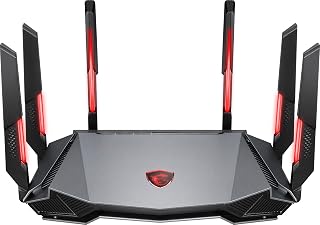
An 1.8GHz quad-core processor and 8-stream MU-MIMO give this tri-band 6E router the processing headroom serious gamers need for low-latency connections under heavy multi-device load. AI QoS prioritizes gaming traffic automatically, and access point mode adds flexibility for readers integrating it into an existing network setup.
Pros
- 4-stream 6GHz band for genuine WiFi 6E speed
- AI QoS keeps gaming and streaming traffic smooth
- Handles multi-story and plaster-wall homes well
- 1.8GHz quad-core processor manages heavy loads reliably
Cons
- 5GHz band limited to only 2 streams
- Configuration interface and MSI Center software feel dated
When you're comparing WiFi 6E routers for speed and coverage, the Radix AXE6600 earns its spot as the budget-friendly gateway into 6E territory. Its tri-band setup includes a 4-stream 6GHz band, giving you a clean, interference-free lane for compatible devices without paying flagship prices. The 1.8GHz quad-core processor and AI QoS engine keep gaming and streaming traffic prioritized automatically, which matters most in households running multiple high-demand devices at once. For coverage specifically, the 6-antenna layout with wide positioning has proven capable in multi-story homes and older buildings with dense plaster walls, areas where signal usually struggles. It won't outperform a dedicated mesh system in massive or oddly shaped homes, but for single-router coverage it holds up well. The tradeoff is a 5GHz band limited to 2 streams, so devices relying on that band see more modest gains. Setup takes about an hour, and the interface trails behind slicker competitor apps. Still, for speed-focused buyers who also need better reach, it's a practical entry point.
6GHz Performance: The standout feature. With 4-stream support at 6GHz, this router delivers excellent speeds for compatible devices like the Meta Quest 3 with Virtual Desktop streaming. Early adopters of 6GHz-capable devices will experience notably better performance than competitors in this price range.
5GHz Performance: Adequate but not impressive. The 2-stream limitation means speeds are moderate, suitable for basic streaming and web browsing but not ideal as a primary band. Most devices currently default to 5GHz, so this is a practical consideration for typical daily use.
Coverage and Stability: Real-world testing shows reliable coverage throughout large homes and buildings with challenging layouts. The wide-coverage antenna positioning effectively penetrates obstacles like plaster walls and hardwood floors. Firmware updates have resolved initial connection dropping issues, resulting in stable, consistent performance.
Gaming and Streaming: AI QoS successfully prioritizes gaming and streaming traffic, preventing bandwidth hogging from other devices. Multiplayer gaming remains smooth with multiple connected devices, and 4K streaming is handled without buffering on capable internet connections.
Best for gamers, remote workers, and fiber or gigabit subscribers with multi-story or older homes who want 6GHz speed without mesh pricing. Skip it if most of your devices are 5GHz-only, since that band is limited to 2 streams, or if you want a polished app experience. Also skip it if your home is large enough to need multiple access points, since a single router has range limits.

For anyone chasing whole-home speed and coverage in 2026, this tri-band AXE5400 mesh system makes sense as a top pick because it dedicates a full band to WiFi 6E's clearer 6GHz spectrum, cutting congestion in busy households. Built-in QoS prioritizes bandwidth-hungry devices automatically, while broad 802.11ax and legacy compatibility ensures every laptop, phone, and gaming console connects reliably across the 3-pack's extended range.
Pros
- 6GHz band delivers fast, low-interference WiFi 6E speed
- Proven coverage across 7,200+ square feet
- Tri-band design keeps smart home traffic separate
- Fast app-based setup, typically under 15 minutes
Cons
- Higher investment than a single router solution
- Some power users report inconsistent roaming between nodes
For anyone prioritizing coverage alongside WiFi 6E speed, the Deco XE75 3-pack is built around exactly that tradeoff. Rather than relying on one powerful router, it spreads three mesh nodes across your space, which is the more reliable way to eliminate dead zones in large or multi-story homes. The tri-band design gives smart home devices their own lane so they're not competing with laptops and phones, while the 6GHz band delivers the interference-free speed boost that defines WiFi 6E for compatible devices. Real-world coverage has held up across 7,200 plus square feet, including tricky spots like detached garages and back bedrooms that single routers often miss. Setup through the mobile app is fast, typically under 15 minutes, and AI-driven roaming reduces the lag that can occur when moving between nodes. The main caveats are mixed roaming reports from power users with heavy simultaneous demands, and it's a bigger investment than a standalone router. For most households with typical usage, though, it delivers dependable whole-home speed and coverage together.
Coverage and Performance: Up to 7,200 square feet, 5,400 Mbps total tri-band speeds (6GHz: 2,402 Mbps, 5GHz: 2,402 Mbps, 2.4GHz: 574 Mbps), supports 200+ devices.
Connectivity: WiFi 6E with 6GHz band, tri-band mesh, 802.11ax/ac/n/g/b compatible, Ethernet and WiFi connectivity, 9 ports total with 10/100/1000 Mbps LAN.
Technical Features: 512 MB RAM, internal antennas, WPA3 security, advanced firewall, QoS traffic management, app-based control with Alexa integration.
Package Contents: 3x Deco XE75 units, 3x power adapters, 1x Ethernet cable, quick start guide. 2-year manufacturer warranty included.
Ideal for two-plus story homes, properties with detached structures, or anyone replacing a router-and-extender setup plagued by dead zones. Also a good fit for smart-home-heavy households thanks to dedicated tri-band separation. Skip it if you live in a smaller single-level space where one router would suffice, or if you're a power user running latency-sensitive applications while frequently roaming between nodes, since some report inconsistency there.

ASUS ROG Rapture GT-AXE16000 WiFi 6E Gaming Router
Quad-band architecture gives this router a dedicated 6 GHz lane plus dual 10G ports, which matters for anyone building a high-throughput home network with mixed gaming consoles, smart TVs, and PCs. AiMesh support means coverage can extend room to room without losing the 6 GHz advantage that defines WiFi 6E performance.
Pros
- Quad-band with full 6 GHz WiFi 6E support
- Dual 10G ports plus 2.5G WAN for fast wired backbone
- AiMesh support for extending coverage
- Strong security with WPA3-Personal and WPA2-Enterprise
Cons
- Overkill if you lack 6E-capable devices
- Six ports and advanced features assume networking comfort
For readers who want the top of the WiFi 6E stack rather than an entry-level pick, the ROG Rapture GT-AXE16000 is built for exactly that ask. It's a quad-band router with full 6 GHz readiness, which is the headline feature anyone searching for WiFi 6E should care about most since it unlocks a cleaner, less congested band for compatible devices. Dual 10G ports and a 2.5G WAN port mean the wired backbone can keep pace with whatever the wireless side delivers, which matters if you're pairing this with a fast fiber connection. AiMesh support lets you extend 6E coverage across a larger home instead of settling for a single-router footprint. Triple-level game acceleration and six total ports point squarely at gaming households layering multiple consoles, PCs, and streaming devices on one network. Security is well covered with WPA3-Personal and WPA2-Enterprise options, plus Instant Guard and included internet security features. This is a router aimed at people who already know they want 6E and aren't looking for a compromise, which makes it a natural anchor pick for a best-of list built around speed and coverage.
Core Performance: WiFi 6E (802.11ax) quad-band router, 16000 Mbps total throughput, 6 GHz band support with 2.4 GHz and dual 5 GHz bands. 12 fixed antennas with extended coverage via RangeBoost Plus technology.
Connectivity: 6 total ports including dual 10 Gbps WAN/LAN ports, single 2.5 Gbps WAN port, 4 additional Gigabit LAN ports, 2 USB ports. Supports Ethernet, USB, and WiFi connectivity across multiple wireless standards including 802.11a, 802.11g, 802.11n, 802.11ac, and 802.11ax.
Hardware: 2GB RAM, 19V/3.42A power supply with 110V-240V input (50-60Hz). Item weight 5.4 pounds, dimensions 13.94 x 13.94 x 7.6 inches. Available in black finish.
Security and Control: WPA3-Personal and WPA2-Enterprise encryption, WPS support, high-level firewall protection, guest mode, parental controls, and internet security. Web GUI, mobile app, and push-button control options. Compatible with Alexa voice control.
Device Compatibility: Works with gaming consoles, PCs, smart TVs, smartphones, tablets, and all major operating systems including Windows, Mac OS, and Linux. 3-year manufacturer warranty included.
Best for gamers, tech enthusiasts, and larger households that want maximum WiFi 6E speed, wired backbone capacity, and mesh-ready coverage in one system. Also fits anyone running a mixed fleet of consoles, smart TVs, and computers who wants dedicated bandwidth per band. Skip it if you don't yet own 6 GHz-capable devices, since you won't see the benefit, or if you just need basic home coverage without gaming or multi-device demands.
WiFi 6E Router Buying Guide
Band Configuration: Dual, Tri, or Quad?
Most WiFi 6E routers operate on three bands: 2.4 GHz, 5 GHz, and the new 6 GHz. Tri-band setups like the TP-Link AXE5400 Tri-Band WiFi 6E Router use the 6 GHz band for high-speed client connections or as a dedicated backhaul in mesh systems.
If you want the absolute maximum throughput, the ASUS ROG Rapture WiFi 6E Gaming Router goes a step further with a quad-band design, splitting the 5 GHz band into two separate radios for even more bandwidth headroom. That is overkill for most households, but it is a real advantage in dense, device-heavy environments.
Single Router vs. Mesh System
A single router works well for apartments or smaller homes where one device can reach every corner. For larger spaces, a mesh system like the TP-Link Deco XE75 AXE5400 Tri-Band WiFi 6E System covers up to 7,200 square feet across three nodes, eliminating dead zones entirely.
Mesh systems also handle device roaming more gracefully, your phone or laptop hands off between nodes without dropping the connection. If whole-home coverage is the goal, a mesh system is usually the smarter investment. For broader reading on this topic, our guide on the best mesh WiFi system covers the top options in detail.
Processor and RAM: Why They Matter More Than You Think
A router’s CPU and memory directly affect how well it handles many simultaneous connections. The TP-Link AXE5400 Tri-Band WiFi 6E Router pairs a 1.0 GHz dual-core CPU with 512 MB of RAM, which keeps performance stable even when dozens of devices are active at once.
The MSI Radix AXE6600 WiFi 6E Tri-Band Gaming Router takes this further with a 1.8 GHz quad-core processor, which powers its AI QoS engine to automatically prioritize gaming and streaming traffic in real time. If your household mixes gaming, 4K streaming, and remote work simultaneously, processor power is worth factoring in.
Security and Parental Controls
Modern routers do more than route traffic, they actively protect your network. TP-Link’s HomeShield, included on models like the TP-Link AX1800 WiFi 6 Router (Archer AX21 V5), provides network security scanning, IoT device identification, and basic parental controls at no extra cost.
The ASUS ROG Rapture includes Lifetime Internet Security powered by Trend Micro, covering malicious site blocking and intrusion prevention. If you have kids at home or smart home devices on your network, built-in security features are a meaningful differentiator. You may also want to pair your router with a high-performance PCIe WiFi card on your desktop to take full advantage of 6 GHz speeds on a wired-adjacent connection.
Final Thoughts
For most households upgrading to WiFi 6E in 2026, the TP-Link AXE5400 Tri-Band WiFi 6E Router hits the sweet spot of genuine 6 GHz performance, solid security, and a manageable footprint, while power users and serious gamers who need absolute maximum throughput and advanced traffic management will find the ASUS ROG Rapture WiFi 6E Gaming Router worth every bit of its premium positioning.
Frequently Asked Questions
What is WiFi 6E and how is it different from WiFi 6?
WiFi 6E is an extension of WiFi 6 (802.11ax) that adds access to the 6 GHz frequency band. The 6 GHz band is uncrowded by older devices and supports wider 160 MHz channels, resulting in lower latency and faster sustained speeds. In practical terms, compatible devices on the 6 GHz band experience significantly less interference than they would on 2.4 GHz or 5 GHz.
Do I need a WiFi 6E router in 2026?
If you have a busy household with many simultaneous users or own WiFi 6E-capable devices like newer laptops, phones, or gaming consoles, the upgrade makes a real difference. The 6 GHz band is especially valuable in apartments or densely populated areas where the 5 GHz band is congested. If your current setup is reliable and your devices do not support 6E, WiFi 6 hardware like the TP-Link AX1800 WiFi 6 Router (Archer AX21 V5) remains a capable and cost-effective option.
What is the range of a WiFi 6E router?
Range varies by model, antenna design, and your home’s layout. A standard tri-band WiFi 6E router typically covers 2,000 to 3,500 square feet reliably. For larger homes, a mesh system like the TP-Link Deco XE75 AXE5400 Tri-Band WiFi 6E System extends that to 7,200 square feet across a three-node setup. Keep in mind that the 6 GHz band has a shorter effective range than 5 GHz, so it performs best in rooms closer to the router. Our roundup of the best WiFi adapters for PC can help you get the most out of your router on desktop systems.
Is WiFi 6E good for gaming?
Yes, WiFi 6E is well-suited for gaming because of its low latency and dedicated 6 GHz channel that is free from interference. The MSI Radix AXE6600 WiFi 6E Tri-Band Gaming Router adds a game accelerator feature that maintains a stable connection during sessions, while the ASUS ROG Rapture includes triple-level game acceleration and dual 10G ports for the most demanding setups. If you prefer wired stability at the switch level, see our picks for the best Ethernet switch for gaming to round out your network.



Write Your Review
No reviews yet. Be the first to share your experience!