

Your desktop PC’s wired connection might be reliable, but it’s not always practical. Whether you’re setting up a new gaming rig in a room without ethernet access, upgrading an older system to WiFi 6 standards, or simply need better wireless range, the right adapter makes all the difference. Modern WiFi adapters deliver speeds that rival wired connections while offering the flexibility to position your PC anywhere in your home.
This guide walks you through 10 WiFi adapters verified across PCIe and USB form factors, covering everything from budget-friendly dual-band options to cutting-edge WiFi 7 technology. You’ll learn which models excel for gaming, which offer the best range, and how to match an adapter to your router and usage patterns. If you’re also considering a complete system upgrade, check out our guide to the best laptops for computer science students for portable alternatives.
Quick answer
This guide compares 10 picks, with TP-Link Archer TX3000E WiFi 6 PCIe Card with Bluetooth ranked first. TP-Link Archer T2U Plus AC600 USB WiFi Adapter for PC has the most customer reviews.

Pros
- Exceptional installation ease with plug-and-play compatibility on Windows 10 and 11
- Dramatic speed improvements over legacy onboard WiFi cards and USB adapters
- External magnetized antennas deliver superior signal strength and broader coverage than internal alternatives
- Dual-band performance optimizes for both speed (5 GHz) and range (2.4 GHz)
- Bluetooth 5.3 adds versatile wireless connectivity without sacrificing performance
Cons
- Requires separate Bluetooth USB header cable connection to motherboard for Bluetooth functionality
- Some users report occasional driver installation hiccups on fresh Windows installations, though rollback typically resolves issues
- Not ideal for compact PC builds due to external antenna placement requirements
The TP-Link Archer TX3000E is a WiFi 6 PCIe network adapter designed for desktop users who need wireless connectivity without compromising on speed or stability. This card is ideal for gamers, content creators, remote workers, and anyone using a desktop PC positioned away from their router or unable to run Ethernet cables.
The standout feature is its dual external antennas with magnetized bases, which allow you to position them for maximum signal reception in your specific environment. Users report signal quality improvements from 50-60% to consistently strong readings after installation. The WiFi 6 technology delivers speeds up to 2.4 Gbps, with real-world performance showing 150-200 Mbps download speeds during peak usage. OFDMA and MU-MIMO technologies minimize lag for gaming and VR applications, while Bluetooth 5.3 provides 2x faster speeds and 4x broader coverage than older Bluetooth standards.
Build quality reflects the premium pricing, featuring gold-plated connectors, a custom heatsink, and a low-profile bracket that fits most PC cases. The included magnetized antenna base adds flexibility for signal optimization without requiring wall or window mounting. Installation takes under ten minutes for most users, with the card typically recognized immediately by Windows 10 and 11 systems.
The primary drawback is that Bluetooth requires an additional USB header cable connection to your motherboard. Additionally, some users encountered boot errors on initial driver installation, though Windows diagnostic mode resolved these issues automatically. The external antennas may pose space constraints in compact builds.
Overall, the Archer TX3000E offers excellent value for desktop users seeking significant WiFi performance upgrades. Its combination of WiFi 6 speeds, external antenna flexibility, and Bluetooth 5.3 support makes it a compelling choice over aging onboard cards or USB adapters.
Connectivity and Performance: WiFi 6 (802.11ax) with speeds up to 2.4 Gbps, dual-band support (2.4 GHz and 5 GHz), Bluetooth 5.3, MU-MIMO and OFDMA technology
Physical Design: Dimensions 4.76 inches length x 3.75 inches width x 0.85 inches height, weight 16 ounces, black color with magnetized antenna base and low-profile bracket
Compatibility: Windows 10 and Windows 11 (64-bit only), requires PCIe slot, motherboard F_USB connector for Bluetooth functionality
Included Accessories: Archer TX3000E card, Bluetooth header cable, quick installation guide, resource CD with drivers, low-profile bracket, magnetized antenna base with cable, two high-gain antennas
Warranty and Support: 2-year manufacturer warranty, driver and firmware downloads available from TP-Link support website

Pros
- Incredibly small form factor won't obstruct adjacent USB ports or create clutter
- Fast 5GHz band performance ideal for HD streaming and online gaming
- Excellent customer support with 2-year coverage, one year more than most competitors
- Works across multiple Windows versions and macOS without compatibility issues
- Strong dual-band range for both speed and stable long-distance connections
Cons
- Driver installation required, manual setup needed from TP-Link website
- Limited to AC600 speeds rather than modern WiFi 6 for newer routers
- Mac OS support capped at version 10.14, not compatible with current Big Sur or later
The TP-Link Archer T2U Nano is a pocket-sized USB WiFi adapter built for desktop PC users who need reliable wireless connectivity without extra clutter. This adapter excels for anyone upgrading older systems, adding WiFi to hardwired setups, or wanting a travel-friendly backup connection. Its nano form factor makes it nearly invisible once plugged in.
Performance stands out with AC600 dual-band speeds that prioritize the 5GHz band for lag-free gaming and 4K streaming at 433Mbps, while the 2.4GHz band provides reliable range at 200Mbps. Real-world testing shows consistent connections across typical home and office distances, making it genuinely useful rather than a gimmick. The dual-band switching happens automatically, so you get the best of both worlds without manual intervention.
Build quality reflects TP-Link's reputation, with solid plastic construction that feels durable despite its lightweight design. The adapter remains cool under normal use and integrates seamlessly into any workspace. At just 1.76 grams, it's truly portable enough to leave inserted without risk of damage to your equipment.
The main limitation is driver installation, which requires downloading files from TP-Link's website for newer operating systems. Older Macs running OS X 10.14 and later won't be supported, and Windows users on fresh installs will need to handle the setup manually. Also note that AC600 is now considered entry-level for WiFi specs compared to newer standards.
The Archer T2U Nano delivers solid value for budget-conscious buyers needing functional WiFi without premium pricing. Backed by a 2-year warranty and 24/7 support, this adapter proves especially worthwhile for cost-effective PC upgrades, travel needs, or as a reliable backup wireless solution.
Connectivity: AC600 dual-band wireless (433Mbps 5GHz, 200Mbps 2.4GHz)
Interface: USB 2.0 Type A connector
Compatibility: Windows 11, 10, 8.1, 8, 7, XP (32/64-bit), Mac OS X 10.9 through 10.14
Dimensions: 0.73L x 0.59W x 0.28H inches
Weight: 1.76 grams
Warranty: 2-year manufacturer coverage with free 24/7 technical support
Model: Archer T2U Nano (ASIN: B07PB1X4CN)
Best For: Desktop PC users needing wireless connectivity without a built-in WiFi card, anyone upgrading older systems to modern networks, frequent travelers requiring portable WiFi, and budget shoppers wanting reliable performance at entry-level pricing.
Consider Alternatives If: You need WiFi 6 support for the latest routers, require Mac compatibility beyond OS X 10.14, prefer zero-setup wireless without driver installation, or need professional-grade networking features.
Perfect For: Gaming setups, home offices, media centers, laptops requiring desktop-grade connectivity, emergency backup wireless access, and first-time WiFi adapter buyers.
Pros
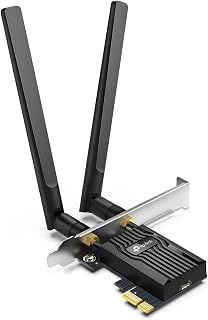
- Fast and reliable WiFi 6 performance with noticeable speed improvement over older standards
- Simple plug-and-play installation with clear instructions and minimal driver setup
- Excellent value at under $30 for a dual-band WiFi 6 card with Bluetooth
- Dual antennas deliver strong signal strength even at distance from router
- Bluetooth 5.2 connection stability without random disconnections
Cons
- Driver installation can be cumbersome if your CD drive is unavailable, pre-downloading recommended
- Requires F_USB header connection on motherboard for full Bluetooth functionality
- Windows 10 or 11 64-bit only, not compatible with older operating systems
The TP-Link Archer TX55E is a WiFi 6 PCIe adapter designed for desktop PC users who want fast wireless connectivity without sacrificing performance. This card is ideal for gamers, content creators, and anyone running a legacy system that needs a modern wireless upgrade on a budget.
WiFi 6 performance is the main draw here, delivering speeds up to 2.4 Gbps with OFDMA and MU-MIMO technology that reduces lag on congested networks. Real-world testing from reviewers confirms noticeably better speeds compared to older WiFi standards, with rock-solid stability and minimal disconnects. The addition of Bluetooth 5.2 means you get wireless connectivity for peripherals without additional adapters, and users report flawless pairing with headphones and controllers.
Build quality reflects TP-Link's attention to detail, featuring a thermal management heat sink to keep the card cool during heavy use and gold-plated connectors that prevent oxidation. The included high-gain antennas mount securely and deliver reliable signal at distance from your router. Both standard and low-profile brackets accommodate various PC case designs.
The main gotcha is driver installation, which can be tedious if your PC lacks a CD drive or internet connection at setup time. You'll need to download drivers beforehand or use the included CD. Additionally, the Bluetooth function requires connection to your motherboard's F_USB header, so check your board layout before purchasing.
Overall, this is a standout WiFi 6 solution for desktop users. At under $30, the Archer TX55E offers excellent performance, easy installation, and modern security features without premium pricing. Recommended for anyone upgrading a Windows PC to modern wireless connectivity.
Connectivity: WiFi 6 (802.11ax), Dual-band (2.4 GHz + 5 GHz), Bluetooth 5.2
Speeds: Maximum 2.4 Gbps total (2402 Mbps @ 5 GHz, 574 Mbps @ 2.4 GHz)
Technology: OFDMA, MU-MIMO, 1024-QAM, 160 MHz bandwidth, WPA3 security
Interface: PCIe slot with standard and low-profile mounting brackets
Antennas: Two 5 dBi high-gain external antennas
Compatibility: Windows 10 and 11 64-bit only, PCIe slot required
Dimensions: 4.72 inches L x 3.09 inches W x 0.83 inches H
Warranty: 2 years
Is this card right for you? The Archer TX55E is perfect if you need WiFi 6 and Bluetooth on a Windows desktop PC with a free PCIe slot. It's especially valuable for gamers who want lower latency, content creators needing faster file transfers, and anyone using wireless peripherals.
Before you buy: Confirm your motherboard has an available PCIe slot and an F_USB header for Bluetooth support. If your case is compact, verify the low-profile bracket option will fit. Download drivers in advance if your PC lacks a CD drive and internet connectivity.
Installation tips: The process is straightforward, taking 10-15 minutes. Mount the card in a PCIe slot, secure it to the case with the included bracket and screw, connect the USB cable to the F_USB header if using Bluetooth, install drivers from the CD or download them from TP-Link's website, and boot into Windows.
Performance expectations: Real-world speeds typically range from 200-800 Mbps depending on router, distance, and interference. WiFi 6 delivers noticeably better speed than older cards, particularly on 5 GHz bands. Latency is significantly lower for gaming and VR applications.

Pros
- Excellent value for upgrading legacy WiFi to faster AC600 speeds
- Adjustable antenna allows optimization for your specific room layout and router placement
- No internal installation required, works immediately on Windows systems
- Dual-band technology provides flexibility and reduces interference
- Award-winning bestseller status demonstrates proven reliability and customer satisfaction
Cons
- Windows only, not compatible with Mac, Linux, or other operating systems
- Performance depends heavily on distance to router and physical obstacles like walls
- 5dBi antenna adds bulk compared to some competitors, may not fit snugly in all USB port configurations
The TP-Link Archer T2U Plus is a straightforward USB WiFi adapter designed to modernize older desktop and laptop computers. If your device has an outdated WiFi card or relies on wired ethernet, this adapter provides a painless upgrade to AC600 wireless standards, making it a smart choice for gamers, remote workers, and streamers who demand faster connectivity.
Performance is solid across real-world scenarios. The dual-band design (2.4GHz and 5GHz) lets you choose between range and speed. The 5GHz band delivers up to 433 Mbps for bandwidth-heavy tasks like video streaming and online gaming, while the 2.4GHz band offers better wall penetration for extended range. The 5dBi high-gain antenna and adjustable positioning help you dial in the best signal strength in your space, though results vary based on router distance and physical obstacles.
Build quality is typical of TP-Link's budget offerings, solid without feeling premium. The compact form factor keeps your workspace uncluttered, and the adjustable antenna rotates to aim toward your router. Setup takes minutes on any Windows system, with drivers available directly from TP-Link's website. This simplicity is a major advantage for users uncomfortable with hardware installation.
The main limitation is Windows-only support. Mac and Linux users need to look elsewhere. Additionally, real-world speeds depend heavily on your proximity to the router and environmental factors, so your experience may differ from the advertised maximums. The antenna's external design is necessary for performance but does add some bulk to the port area.
The Archer T2U Plus delivers reliable, no-fuss WiFi upgrades at an unbeatable price. It is the right choice if you are using Windows, want easy installation, and need a meaningful speed boost from your current wireless connection.
Model: Archer T2U Plus
Interface: USB 2.0 / 3.0 compatible
Standards: 802.11ac (WiFi 5), 802.11n, 802.11g, 802.11b
Frequency Bands: 2.4GHz and 5GHz dual-band
Maximum Data Rate: 600 Mbps (433 Mbps on 5GHz + 200 Mbps on 2.4GHz)
Antenna: 5dBi external high-gain antenna, adjustable multi-directional
Security: WEP, WPA/WPA2, WPA-PSK/WPA2-PSK
Compatibility: Windows 11, 10, 8.1, 8, 7, XP
Operating System Requirements: Windows 7 or later
Dimensions: 2.28 inches L x 0.71 inches W x 6.83 inches H
Weight: 18.14 grams
Color: Black
Warranty: 2-year manufacturer warranty
Who Should Buy: Windows users with older computers or laptops lacking modern WiFi capabilities. Gamers and streamers seeking faster connectivity without replacing their device. Remote workers who need reliable dual-band wireless. Anyone looking for an affordable, easy-to-install WiFi upgrade.
Installation Tips: Plug the adapter into an available USB port and download the latest driver from the TP-Link support website for your Windows version. Position the antenna to point toward your router for optimal signal strength. Allow a few minutes for the driver to install and the connection to stabilize.
Performance Expectations: Real-world speeds depend on your distance from the router, number of obstacles (walls, metal), and network congestion. Best performance occurs on the 5GHz band at close range. The 2.4GHz band offers better range but slightly lower speeds. If you are beyond 50 feet or through multiple walls, expect reduced performance.
Alternatives to Consider: For Mac users, look at adapters specifically designed for macOS. For ultra-compact form factors, explore smaller USB adapters without external antennas, though they typically sacrifice range. For WiFi 6 support, consider newer AC1200 or AX models, though at higher price points.
Pros
- Fast USB 3.0 connection ensures speeds aren't bottlenecked by older USB 2.0 ports
- Plug-and-play simplicity with most modern systems recognizing the adapter immediately
- Excellent compatibility spanning older Windows versions through Windows 11 and Mac OS
- MU-MIMO support handles multiple devices efficiently without performance drops
- Affordable price point makes it accessible for budget-conscious upgrades
Cons
- Some users report driver installation challenges, particularly on Linux-based systems
- Limited warranty coverage of 2 years is standard but not exceptional for this product category
- Performance depends heavily on proximity to router and interference from other devices
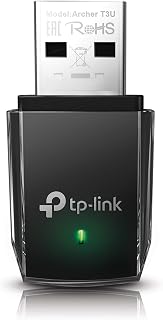
The TP-Link Archer T3U is a USB WiFi adapter designed to breathe new life into desktop and laptop computers that lack modern wireless connectivity. Whether you're working with an older PC, dealing with failed onboard WiFi hardware, or simply needing a portable solution, this compact adapter plugs directly into a USB 3.0 port and brings AC1300 dual-band performance to your system.
Performance and real-world usage paint a compelling picture. The adapter operates on both 2.4GHz and 5GHz bands simultaneously, allowing you to connect to whichever frequency offers the best speed and stability in your environment. MU-MIMO technology and Beamforming ensure your connection remains responsive and lag-free, even when multiple devices compete for bandwidth. Users report speeds ranging from 90 Mbps to over 300 Mbps depending on their internet plan and proximity to the router, with the adapter consistently delivering on its AC1300 specification.
Design and build quality focus on practicality over flash. The adapter measures just 0.78 inches by 1.59 inches, making it small enough to carry in a laptop bag or leave permanently attached without blocking adjacent USB ports on most computers. The compact form factor comes with an indicator light that provides visual feedback about connection status. At just over 9 grams, the device adds virtually no weight to your setup.
Potential drawbacks deserve mention. Installation typically takes under 10 minutes with the included driver CD, though users on Linux-based systems may encounter compatibility issues. Some reviews mention driver stability concerns, and the 2-year warranty is standard but not exceptional. Additionally, wireless performance remains subject to environmental factors like distance from your router and interference from other devices.
The TP-Link Archer T3U delivers reliable WiFi connectivity at an accessible price point. For users upgrading older computers, those experiencing hardware failures, or anyone needing portable wireless capability, this adapter represents solid value. Backed by TP-Link's reputation as the world's leading WiFi provider, it's a low-risk choice for WiFi adapter needs.
Connectivity and Performance
Wireless Standard: 802.11ac (AC1300)
Data Transfer Rate: 1300 Mbps
Frequency Bands: 2.4GHz and 5GHz dual band
Interface: USB 3.0 Type B Micro
Advanced Features: MU-MIMO, Beamforming technology
Compatibility and System Requirements
Operating Systems: Windows 11, 10, 8.1, 8, 7, XP and Mac OS X 10.9 to 10.14
Minimum OS Version: Windows 11
Supported Devices: Desktop computers, laptops
Model Name: Archer T3U
Physical Specifications
Dimensions: 0.78 inches length by 0.41 inches width by 1.59 inches height
Weight: 9.07 grams
Color: Black
Build: Compact and portable
Warranty and Support
Manufacturer Warranty: 2 years
Manufacturer: TP-Link
Package Contents: 1 adapter unit, driver CD, documentation
Who Should Buy This Adapter
This adapter suits several buyer profiles: owners of older PCs without modern WiFi capabilities, users experiencing failed onboard wireless hardware, remote workers needing a portable backup connection, and anyone upgrading from USB 2.0 wireless adapters seeking faster speeds and better stability.
Installation and Setup
Installation is straightforward for most users. Insert the included driver CD or download drivers from TP-Link's support site, install software, plug the adapter into a USB 3.0 port, and connect to your preferred WiFi network. Most systems complete setup in under 10 minutes. Linux users may need to source alternative drivers online.
Getting the Best Performance
Position your computer within reasonable range of your router for optimal speeds. The 5GHz band offers faster speeds but with shorter range, while 2.4GHz provides broader coverage. If your router supports it, connect to whichever band works best for your location. Keep the adapter away from metal objects and other wireless devices that may cause interference.
Comparing Alternatives
Other WiFi adapters in this price range exist, but few match the Archer T3U's combination of broad OS compatibility, proven reliability from an established manufacturer, and dual-band AC1300 performance. The built-in driver CD also simplifies setup compared to adapters requiring online driver searches.
Pros
- Excellent value for the price with strong dual-band performance
- Adjustable antenna design lets you optimize signal reception in any room layout
- MU-MIMO support reduces lag when multiple devices are streaming or gaming
- Wide OS compatibility spans legacy Windows versions through current systems
- Reliable 4.4-star rating from over 17,000 verified purchases
Cons
- Performance is limited by your router's maximum speed and capabilities
- USB port location on your desktop may require a USB extension cable for optimal antenna positioning
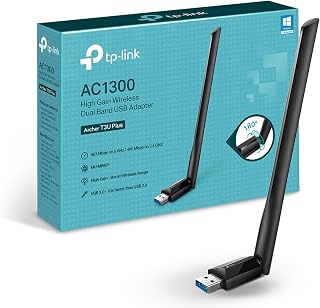
The TP-Link Archer T3U Plus is a USB WiFi adapter designed for desktop users seeking to add or upgrade wireless connectivity without replacing their router. It's particularly well-suited for gamers, content streamers, and professionals working from home who need reliable, fast WiFi speeds on machines without built-in wireless capabilities.
The standout feature is its AC1300 dual-band performance, delivering up to 867 Mbps on the 5 GHz band for demanding tasks like HD video streaming and online gaming, while the 2.4 GHz band offers 400 Mbps for everyday browsing and email. MU-MIMO technology ensures smooth performance even when multiple devices share your network, reducing interference and lag for a more responsive experience.
Design-wise, the adapter strikes a practical balance with its compact form factor and adjustable external antenna. The 5 dBi high-gain antenna can be rotated to face your router, letting you fine-tune signal strength and reception based on your room layout. This flexibility often makes the difference between marginal and excellent connectivity.
The main limitation is that actual speeds depend on your router's capabilities, so older or lower-tier routers won't unlock the adapter's full potential. Additionally, USB port positioning on your desktop might necessitate a USB extension cable to position the antenna optimally away from interference and obstructions.
Overall, the Archer T3U Plus delivers strong performance and reliability at an accessible price point, making it an excellent upgrade path for desktops with weak or no WiFi connectivity. The extensive OS compatibility and straightforward setup process add to its appeal for both tech-savvy users and beginners alike.
Wireless Standards: IEEE 802.11b/g/n on 2.4 GHz, IEEE 802.11a/n/ac on 5 GHz
Data Transfer Rate: 867 Mbps (5 GHz) or 400 Mbps (2.4 GHz)
Antenna: External high-gain, adjustable, multi-directional with 5 dBi gain
Interface: USB 3.0
Compatibility: Windows XP, Vista, 7, 8, 8.1, 10, 11 and macOS 10.9 through 10.15
Dimensions: 2.28 inches L x 0.71 inches W x 6.83 inches H
Weight: 18.14 grams
Warranty: 2-year manufacturer warranty
In the Box: AC1300 USB adapter, Quick Installation Guide, Resource CD
Ideal For: Desktop PC users needing faster WiFi connectivity, gamers experiencing lag on older connections, remote workers streaming video calls, content creators uploading large files, and anyone upgrading a desktop without built-in wireless capability.
Best Results When: You have a modern dual-band router supporting MU-MIMO, your desktop USB port is positioned to place the antenna with clear line-of-sight to your router, and your WiFi coverage area previously had weak or unreliable signal strength.
Consider Alternatives If: You have an older single-band router that won't support the adapter's full capabilities, your desktop is too far from your router for even high-gain antennas to provide strong signal, or you require WiFi 6 (802.11ax) speeds for professional video production.

Pros
- Exceptional speed gains: users report 2x+ improvement in download and upload speeds compared to standard adapters
- Seamless installation: drivers load automatically for most Windows 10/11 systems
- Versatile dual-mode operation works for both receiving and sharing internet connections
- Premium build quality with foldable antennas and ventilation slots for heat management
- Strong signal stability even in interference-heavy environments thanks to MLO and Multi-RU technologies
Cons
- Requires Windows 11 (version 21H2 or later) for full 6GHz band support, limiting compatibility
- High power draw may require bandwidth management on older motherboards with limited USB resources
- Full potential only unlocked with WiFi 7 routers; WiFi 6/6E routers will deliver limited performance gains
The WAVLINK BE6500 is a premium USB WiFi 7 adapter designed for desktop and laptop users seeking dramatic speed upgrades. It targets content creators, gamers, and professionals whose systems lack modern WiFi connectivity or need to supplement aging routers.
This adapter shines with its tri-band architecture supporting 2.4GHz (688Mbps), 5GHz (2,882Mbps), and 6GHz (2,882Mbps) bands for a combined 6.4Gbps throughput. Real-world testing by owners confirms the speed claims, with many reporting 2x or better improvement in download and upload performance. WiFi 7 tech like MLO and Multi-RU keeps connections stable even in dense networks.
Design and build quality are solid. Four foldable 5dBi high-gain antennas fold flat for storage while optimizing positioning for performance. The multicolor LED indicator provides useful status feedback, and ventilation slots on both sides prevent throttling during extended use. Installation is straightforward thanks to automatic driver detection on Windows 10/11 systems.
Drawbacks exist. Full 6GHz support requires Windows 11 (version 21H2 or later), and older motherboards may struggle with the adapter's substantial power demands. The adapter only reaches peak performance when paired with a WiFi 7 router, making it less useful as a quick upgrade with legacy WiFi 6 equipment.
Verdict: The BE6500 is an excellent choice for users with modern systems and WiFi 7 networks who need a speed boost. The 2-year warranty and responsive customer support add confidence. Not ideal for budget buyers or anyone with older hardware constraints.
This adapter is best for gamers who need low-latency, high-bandwidth connections for competitive online play and streaming. Content creators working with 4K/8K video will appreciate the tri-band speeds for fast file transfers and uploads.
Also ideal for users with new desktops lacking WiFi, professionals in home offices requiring reliable connectivity, and anyone with a WiFi 7 capable router looking to maximize network investment. Not recommended for budget-conscious buyers, systems with limited USB resources, or those still using WiFi 6 routers.
Connectivity: WiFi 7 tri-band (2.4GHz, 5GHz, 6GHz) with MLO and Multi-RU support. USB 3.0 interface delivers up to 10x faster throughput than USB 2.0. Performance: 688Mbps on 2.4GHz, 2,882Mbps on 5GHz, 2,882Mbps on 6GHz, total 6.4Gbps combined.
Hardware: 4 high-gain 5dBi foldable antennas. Multicolor status LED with touch control. 550g total weight. Includes quick-start guide, USB 3.0 cable, and adapter.
Compatibility: Windows 10/11 (6GHz requires Windows 11 build 21H2+). USB 3.0 port required for optimal performance. 2-year manufacturer warranty included.

Pros
- Fast WiFi 6 performance at an affordable price point for desktop/laptop upgrades
- USB 3.0 connection ensures stable, high-speed data transfer without bottlenecking
- Compact form factor won't interfere with other USB devices
- Latest WPA3 security keeps your wireless network protected
- No installation hassle on Windows systems with automatic driver support
Cons
- Windows 10/11 only, no support for Windows 7, macOS, or Linux systems
- Lacks external antenna for those needing extended range in larger homes
- Real-world speeds typically lower than theoretical maximum depending on router and environment
The Nineplus AX1800 is a compact USB WiFi adapter designed for desktop and laptop users running Windows 10 or 11 who need modern wireless connectivity without the expense of upgrading their entire system. It's especially useful for older PCs built before WiFi 6 became standard.
This adapter shines with its dual-band architecture, delivering up to 1201Mbps on 5GHz for speed-critical tasks like gaming and 4K streaming, or 574Mbps on 2.4GHz for reliable long-range coverage. The WiFi 6 standard means faster throughput, lower latency, and better performance in congested wireless environments compared to older WiFi 5 adapters.
The nano design is genuinely practical, sitting flush against your USB port without blocking adjacent slots. USB 3.0 connectivity ensures the adapter won't become a bottleneck, and it pairs that with dual high-gain antennas for solid signal strength. Setup is refreshingly simple, automatic on Windows systems with no driver disc required.
The main limitation is OS compatibility, as this adapter only works with Windows 10 and 11. If you're on Mac or Linux, or still running Windows 7, you'll need to look elsewhere. Additionally, while speeds on paper are impressive, real-world performance depends heavily on your router and distance from it.
For Windows users on a budget seeking a reliable WiFi 6 upgrade, the Nineplus AX1800 delivers solid value with modern security, strong performance, and hassle-free installation.
Connectivity: WiFi 6 (802.11AX), dual-band (5GHz and 2.4GHz), USB 3.0 interface
Speed: Up to 1800Mbps combined (1201Mbps on 5GHz, 574Mbps on 2.4GHz)
Security: WPA3, WPA2, WPA, WEP protocols
Compatibility: Windows 10 and Windows 11 only
Antenna: Dual high-gain external antennas
Dimensions: 1.89 inches (L) x 0.83 inches (W) x 0.35 inches (H)
Weight: 5 grams
Model: Nineplus N21CA
Ideal for: Desktop users needing wireless connectivity, laptop owners with outdated WiFi hardware, gamers requiring low-latency internet, streaming enthusiasts, and budget-conscious shoppers upgrading to WiFi 6.
Not recommended for: Mac or Linux users, Windows 7 users, those in areas with extreme WiFi congestion requiring professional-grade equipment, or setups that demand every last Mbps of performance.
Pros
- Strong dual-band performance provides noticeably faster speeds for web browsing, gaming, and video calls
- Dual high-gain antennas capture signals reliably across greater distances and through walls
- USB 3.0 ensures the adapter keeps pace with high-speed internet plans without bottlenecking
- Simple setup process with responsive customer support and online installation assistance
- Excellent value at under $30 with solid 4.3-star rating from over 22,000 users
Cons
- Windows only, not compatible with Mac, Linux, or Chromebooks, limiting device flexibility
- Windows 7 users must manually install drivers rather than using automatic detection
- Antenna size and design may look bulky on compact or minimalist desk setups
The Nineplus AC1300 USB WiFi adapter targets desktop and laptop users facing WiFi dead zones or dealing with broken onboard adapters. It delivers modern AC1300 dual-band performance at a price point that makes upgrading affordable, especially for older systems that lack 5GHz support.
Performance shines with its dual-band architecture. The 5GHz band reaches 867Mbps for low-latency gaming and 4K streaming, while the 2.4GHz band provides 400Mbps and superior range through walls and obstacles. Real-world speeds fall short of theoretical maximums but still enable smooth video calls, competitive gaming, and buffer-free streaming on most home networks.
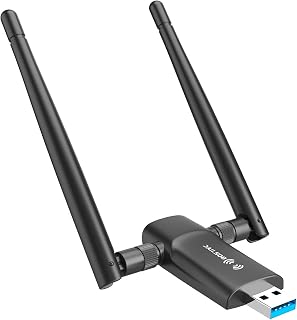
The dual 5dBi antennas are the standout hardware feature. Unlike single-antenna adapters, the dual setup significantly improves signal capture and transmission strength, making the difference between workable and excellent WiFi several rooms away from your router. USB 3.0 connectivity ensures the adapter won't bottleneck modern internet speeds.
Design is compact and functional. At 2.6 inches long and weighing just 12 grams, it won't dominate your desk or block nearby ports. The antenna design is the only aesthetic trade-off, as they extend several inches from the adapter body.
The main limitation is Windows-only support. Mac users and Linux enthusiasts will need to look elsewhere. Additionally, Windows 7 requires manual driver installation. For Windows 10 and 11 users seeking better WiFi on a tight budget, however, this adapter delivers strong performance and reliable support.
Wireless Standards: 802.11ac, 802.11n, 802.11g, 802.11b
Speed: AC1300 total (867Mbps on 5GHz, 400Mbps on 2.4GHz)
Antennas: Dual 5dBi external antennas
Interface: USB 3.0 (backward compatible with USB 2.0)
Dimensions: 2.6 inches L x 0.82 inches W x 0.39 inches H
Weight: 12 grams
Color: Black
Operating Systems: Windows 7, Windows 8, Windows 8.1, Windows 10, Windows 11
Warranty: 2 years with online technical support
Who Should Buy This: Windows PC users with weak WiFi signals, desktop computers without built-in WiFi, gamers seeking better 5GHz performance, and anyone looking for an affordable adapter upgrade without breaking the bank.
Who Should Skip It: Mac or Linux users, anyone on a Chromebook, users requiring WiFi 6 (802.11ax) speeds, or those in apartments where antenna size is a concern.
Installation Tips: Windows 10 and 11 users will likely see automatic driver detection, but keep the included CD or have the manufacturer website link handy just in case. For Windows 7, budget 10-15 minutes for manual driver installation. Position the antennas perpendicular to each other (one vertical, one horizontal) for optimal signal diversity and coverage.
Performance Expectations: This adapter excels in medium to large homes or offices where signal degradation is noticeable. In small apartments with the router nearby, you may not see dramatic speed improvements. Performance depends heavily on your internet plan, router quality, and wireless interference from neighbors.

Pros
- Excellent WiFi 6 performance with 1800Mbps total throughput ideal for bandwidth-heavy tasks
- Dual-band capability lets you choose between stability on 2.4GHz or speed on 5.8GHz
- Soft AP mode transforms any wired connection into a wireless hotspot for multiple devices
- Strong build quality with magnetic base and premium materials
- Responsive customer support with 2-year warranty and 8-hour response guarantee
Cons
- Windows 10 and 11 only, no support for macOS, Linux, or older Windows versions
- Requires a WiFi 6 router to achieve full 1800Mbps performance, limited by WiFi 5 routers
- Driver installation can be finicky, sometimes requiring manual setup from CD or website download
The WAVLINK AX1800 is a USB WiFi 6 adapter designed to bring modern wireless connectivity to desktop PCs that lack built-in WiFi or have outdated adapters. It's built for users who want fast, reliable internet without running Ethernet cables, particularly gamers, content creators, and remote workers who demand stable connections for bandwidth-intensive tasks like video streaming and online gaming.
This adapter delivers impressive specifications on paper: up to 600Mbps on the 2.4GHz band and 1200Mbps on the 5.8GHz band for a combined 1800Mbps throughput. The dual-band design means you get both range and speed, with the option to switch between stability and performance based on your needs. The four 3dBi high-gain antennas provide solid signal coverage, and users report low latency with minimal stuttering during gaming sessions.
The dual-mode functionality sets it apart from basic adapters. Beyond standard WiFi connectivity, the Soft AP mode transforms your wired network connection into a wireless hotspot, letting you share internet with phones, tablets, and laptops without needing a dedicated router. The magnetic base and 1-meter USB 3.0 cable provide flexibility in placement to optimize signal and avoid interference from other devices.
Drawbacks exist worth considering. Support is limited to Windows 10 and 11, making it incompatible with other operating systems. Full performance requires a WiFi 6 router, older WiFi 5 routers will significantly limit speeds. Driver installation occasionally requires manual intervention if Windows doesn't automatically detect the device, though support is responsive when issues arise.
Overall, the WAVLINK AX1800 delivers solid WiFi 6 performance for desktop users at a reasonable price point. If you're on Windows 10 or 11 and have a WiFi 6 router, this adapter offers tangible speed and stability improvements over older adapters. The 2-year warranty and responsive support add confidence to your purchase.
Wireless Standards: WiFi 6 (802.11ax), dual band (2.4GHz and 5.8GHz)
Speed: Up to 1800Mbps combined (600Mbps on 2.4GHz, 1200Mbps on 5.8GHz)
Antennas: 4x3dBi high-gain external antennas
Security: WPA3 encryption with WPA2/WPA backward compatibility
Interface: USB 3.0, 1-meter cable with magnetic base
Operating Systems: Windows 10 and Windows 11 (32-bit and 64-bit)
Features: Dual Mode operation (WiFi and Soft AP mode), MU-MIMO, OFDMA
Warranty: 2-year limited warranty with technical support
Package Contents: AX1800 adapter, USB 3.0 cable, quick start guide
Who Should Buy This: Desktop PC users with Windows 10 or 11 who need faster wireless speeds, gamers seeking low-latency connections, content creators requiring reliable uploads, and remote workers who benefit from Soft AP hotspot functionality.
Who Should Skip This: Mac or Linux users, those locked into older Windows versions, anyone without a WiFi 6 router who won't see the full performance benefit, or users who prefer simpler plug-and-play setups without driver management.
Tips for Best Performance: Use a USB 3.0 port (not USB 2.0) to avoid bottlenecking speeds. Place the adapter away from metal objects and microwave ovens to minimize interference. Position antennas in an L-shape or T-shape rather than parallel for optimal coverage. Pair with a WiFi 6 router to unlock full 1800Mbps potential.
Setup Expectations: Driver installation typically takes 5-10 minutes. The adapter usually auto-detects on Windows 10 and 11, but if not, manually run the driver from the included CD or download the latest version from WAVLINK's support page using model WN693A5.
Buying Guide: What to Consider Before Purchasing
WiFi Standard and Speed Requirements
The WiFi standard determines both maximum throughput and how efficiently your adapter handles congestion. WiFi 6 (802.11ax) adapters like the TP-Link WiFi 6 PCIe WiFi Card for PC deliver speeds up to 2.4 Gbps with improved performance in busy networks through OFDMA and MU-MIMO technology. WiFi 7 models such as the WAVLINK BE6500 USB WiFi 7 Adapter for Desktop PC push tri-band speeds even higher while reducing latency for real-time gaming.
Match the adapter’s standard to your router’s capabilities. A WiFi 6 adapter paired with a WiFi 5 router will still work, but you won’t see the full speed benefits until you upgrade both. For streaming 4K content or online gaming, aim for at least AC1300 speeds on dual-band adapters. Casual browsing and email work fine with AC600 models like the TP-Link Nano AC600 USB WiFi Adapter for Desktop.
Form Factor: PCIe vs USB
PCIe adapters install directly into your motherboard’s expansion slot, offering the most stable connection and typically better thermal management. They’re ideal if you have an available slot and don’t need to move the adapter between systems. Models like the TP-Link WiFi 6 PCIe WiFi Card for Desktop PC include both standard and low-profile brackets for compatibility with mini tower cases.
USB adapters provide plug-and-play convenience and portability. USB 3.0 models deliver speeds up to 10 times faster than USB 2.0, making them suitable for high-bandwidth tasks. Nano-sized adapters stay nearly flush with your port, while models with external antennas like the TP-Link USB WiFi Adapter for Desktop PC offer adjustable positioning for better signal reception. Choose USB if you need to switch the adapter between devices or lack internal expansion slots.
Antenna Configuration and Range
Antenna design directly impacts signal strength and coverage area. Adapters with external high-gain antennas (5dBi or higher) perform better at distance and through obstacles. The Nineplus Wireless USB WiFi Adapter for PC includes dual 5dBi antennas that you can rotate to face your router, optimizing reception in challenging layouts. Multi-directional antennas work well in multi-story homes or when the router sits in a different room.
Magnetized bases and extension cables provide placement flexibility. The WAVLINK AX1800 USB WiFi 6 Adapter for Desktop PC combines a magnetic base with a 1-meter USB 3.0 cable, letting you position the adapter away from your PC’s metal case for cleaner signal paths. Internal PCIe antennas offer cleaner aesthetics but may require strategic case positioning for optimal performance. For setups where your PC sits in a home office, our best laptops for working from home guide offers complementary wireless connectivity insights.
Operating System Compatibility and Driver Support
Driver availability determines whether your adapter will work out of the box or require manual installation. Many newer adapters designed for Windows 10 and 11 include built-in drivers that auto-install when you plug them in. The Nineplus USB WiFi Adapter for PC Desktop supports automatic driver detection on Windows 11 and 10, streamlining setup for non-technical users.
Check compatibility before purchasing if you run older Windows versions, macOS, or Linux. Some adapters work only with Windows, while others like the TP-Link AC1300 USB WiFi Adapter for Desktop PC support Mac OS X 10.9 through 10.14. Manufacturers typically host driver downloads on their support pages, but confirm that drivers exist for your specific OS version to avoid incompatibility surprises after purchase.
Final Thoughts
Choosing the right WiFi adapter comes down to matching your system’s capabilities with your actual usage patterns. For users seeking cutting-edge performance with a WiFi 7 router, the WAVLINK BE6500 delivers tri-band speeds and multi-link operation that minimize latency during bandwidth-intensive tasks. If you need a reliable PCIe solution that balances performance and value, the TP-Link WiFi 6 AX3000 offers WiFi 6 technology with Bluetooth 5.3 and a magnetized antenna base for flexible positioning. Both options represent solid investments that will keep your desktop connected as network standards continue evolving.
Frequently Asked Questions
Do WiFi adapters work with any desktop PC?
Most WiFi adapters work with any desktop PC that meets basic hardware requirements. USB adapters need an available USB port (USB 3.0 recommended for high-speed models), while PCIe adapters require an open PCIe x1 or larger expansion slot on your motherboard. Operating system compatibility matters more than hardware, verify that drivers exist for your Windows, macOS, or Linux version before purchasing. Some adapters include built-in drivers for Windows 10 and 11, while others require manual driver installation from the manufacturer’s website.
What’s the difference between dual-band and tri-band WiFi adapters?
Dual-band adapters connect to both 2.4 GHz and 5 GHz frequency bands, giving you flexibility between range (2.4 GHz) and speed (5 GHz). Tri-band adapters add a second 5 GHz band or a 6 GHz band, reducing congestion when multiple devices compete for bandwidth. The 6 GHz band, available on WiFi 6E and WiFi 7 adapters, offers even faster speeds and lower latency but requires Windows 11 version 21H2 or later and a compatible router. For most users in 2026, dual-band adapters provide sufficient performance unless you’re running multiple high-bandwidth tasks simultaneously.
Can a WiFi adapter improve my internet speed?
A WiFi adapter can improve speeds if your current adapter or built-in WiFi is outdated or malfunctioning, but it cannot exceed your internet plan’s maximum speed or your router’s capabilities. If you have gigabit internet and a WiFi 6 router but your old adapter only supports WiFi 5 at 433 Mbps, upgrading to a WiFi 6 adapter will deliver faster throughput. However, if your router maxes out at WiFi 5 speeds, even a WiFi 7 adapter won’t provide additional speed until you upgrade the router. The adapter’s role is to match or exceed what your router and internet plan can deliver, not to create speed from nothing. For professionals balancing remote work demands, our best laptops for freelancers guide explores devices with robust wireless capabilities.
How do I know if I need a PCIe or USB WiFi adapter?
Choose a PCIe adapter if you have an available expansion slot, want the most stable connection, and don’t plan to move the adapter between systems. PCIe models typically offer better thermal management and dedicated bandwidth. Opt for a USB adapter if you need portability, lack internal expansion slots (common in small form factor PCs), or prefer plug-and-play convenience without opening your case. USB 3.0 adapters deliver speeds comparable to PCIe for most applications, though USB 2.0 models create bottlenecks for high-speed networks. If you’re unsure about your PC’s internal configuration, USB adapters eliminate compatibility guesswork.
Common questions
What is the best USB WiFi adapter for PC in 2026?
The TP-Link Archer T3U Plus is the best overall USB WiFi adapter for most desktop PC users in 2026. It delivers AC1300 dual-band speeds with a high-gain external antenna for stronger signal reception, MU-MIMO support for efficient multi-device handling, and USB 3.0 connectivity to prevent bottlenecks. It balances performance, range, and value while maintaining broad compatibility with Windows 11/10/8/7 and macOS 10.9 through 10.15, making it a reliable choice for gaming, streaming, and general desktop use.



Write Your Review
No reviews yet. Be the first to share your experience!