

Picture this: it is finals week, your virtual machine is compiling a complex project, your IDE has a dozen files open, and your browser has thirty tabs of documentation loaded. If your laptop cannot handle that load, you are in trouble. Computer science students have some of the most demanding computing needs on any campus, and picking the wrong machine can slow you down at the worst possible moments.
This guide is built specifically for CS students navigating the 2026 laptop market. Whether you are writing algorithms, spinning up Docker containers, or grinding through data structures assignments, you will find a solid option here. We also cover what to look for before you buy, so you walk away with the right machine for your workflow. For more hardware recommendations, check out our full laptops category.
Quick answer
This guide compares 8 picks, with Lenovo V14 14" FHD Business Laptop, Intel i7-13620H ranked first. HP OmniBook 3 17.3" FHD Laptop, AMD Ryzen 3, 8GB RAM holds the highest customer rating among them. Dell Inspiron 15.6" Touchscreen Laptop, Intel i5, 32GB has the most customer reviews.
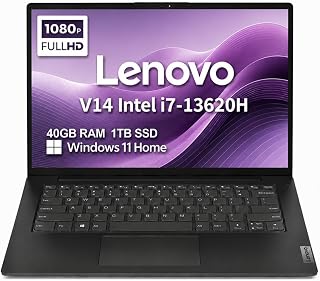
The Intel i7-13620H processor handles compiling large codebases and running virtual machines without slowdown, which matters when juggling multiple development environments. The 40GB RAM lets you run Docker containers, IDEs, and browser tabs simultaneously during debugging sessions. The 1TB SSD provides ample space for installing development tools, frameworks, and course project files. Windows 11 Home offers native compatibility with most programming environments and educational software required in CS curricula.
Pros
- Intel Core i7-13620H with 10 cores handles intensive compilation and virtualization
- 40GB RAM supports multiple VMs and heavyweight development environments simultaneously
- 1TB SSD provides ample space for repositories and virtual machine images
- MIL-STD-810H durability withstands campus life and commuting
Cons
- Integrated Intel UHD graphics limit GPU-accelerated coursework
- Native 1080p resolution modest for detailed design work
The Lenovo V14 targets computer science students whose coursework demands serious multitasking capacity and professional-grade durability. The Intel Core i7-13620H with 10 cores tears through compilation of large codebases, parallel build processes, and simultaneous virtual machines far faster than typical student laptops. With 40GB DDR4 RAM, you can run Docker containers, multiple development environments, heavyweight IDEs, and debugging tools without performance degradation. The 1TB PCIe NVMe SSD eliminates storage anxiety for students managing large repositories, datasets for algorithms courses, and virtual machine images. MIL-STD-810H certification means this machine survives the realities of student life including backpack tosses, accidental drops, and temperature swings between winter commutes and overheated dorm rooms. At 3.15 pounds, it remains genuinely portable for a performance-focused machine. The 14-inch FHD anti-glare display with TÜV low blue light certification reduces eye fatigue during extended debugging sessions, and the 720p camera with privacy shutter handles online office hours and group project calls. The main constraint is Intel UHD integrated graphics, which bottleneck coursework requiring GPU acceleration like deep learning model training, computer vision projects, or graphics rendering assignments common in specialized CS tracks.
Perfect for CS students in demanding programs with heavy virtualization, systems programming, or software engineering coursework requiring robust multitasking. The 40GB RAM and powerful processor suit students running resource-intensive development workflows or compiling large projects frequently. The military-grade durability fits students who travel, commute, or work in various campus locations. Avoid if your focus includes machine learning, computer graphics, or game development where GPU performance matters. Also skip if budget constraints make the premium RAM and processor configuration unnecessary for lighter coursework.
Processor and Memory: Intel Core i7-13620H (10-core), 40GB DDR4 RAM
Storage: 1TB PCIe NVMe M.2 SSD
Display: 14" FHD (1920x1080) anti-glare, 45% NTSC, 250 nits, TÜV Low Blue Light certified
Graphics: Intel UHD Graphics (integrated)
Camera: 720p HD with privacy shutter
Connectivity: Wi-Fi 6 (802.11ax), Bluetooth 5.2, USB-C 3.2, USB-A 3.2, USB 2.0, HDMI 1.4b, Ethernet, 3.5mm audio jack
External Display Support: Two monitors up to 4K (3840x2160) at 60Hz via HDMI and USB-C
Operating System: Windows 11 Home 64-bit with AI Copilot
Design: 3.15 lbs, 12.76" x 8.47" x 0.68", military-grade MIL-STD-810H durability
Warranty: 3-year on upgraded memory/SSD, 1-year on remaining components

The Intel N95 processor handles text editors, web development tools, and lightweight programming tasks that dominate introductory and intermediate coursework. With 16 GB RAM, you can run multiple browser tabs for research alongside your IDE without slowdowns. The 17.3-inch IPS display reduces eye strain during extended coding sessions. The 6000mAh battery provides enough runtime for lectures and study sessions between charges.
Pros
- Large 17.3" display is excellent for content creation, video editing, and document work
- Strong value proposition at under $500 with solid specs for work and education
- Intel N95 processor outperforms older Celeron and Pentium chips for faster application loading
- Pre-installed Windows 11 Pro eliminates setup hassles and licensing costs
- Comprehensive port selection for connecting peripherals, displays, and external storage
Cons
- Battery life of 5 hours is modest and may require frequent charging for all-day portability
- Intel N95 is entry-level and not suitable for gaming, video rendering, or intensive creative work
- Limited upgrade options with soldered components typical of budget laptops
The MALLRACE AX17 is a practical 17.3-inch laptop designed for students, remote workers, and professionals seeking reliable everyday computing without breaking the bank. With Windows 11 Pro pre-installed and solid mid-range specifications, it tackles email, web browsing, document creation, and multimedia consumption with ease.
The star feature is its expansive Full HD IPS display with minimal bezels, making it ideal for content creation, spreadsheet work, and enjoying videos. The Intel 12th Gen N95 processor paired with 16GB RAM and 256GB SSD delivers responsive performance for multitasking, with data transfer speeds up to 2.14GB/s ensuring quick file operations. However, this entry-level chip is not designed for gaming, video rendering, or heavy creative software.
Build quality reflects the budget price point. The 1.6kg weight and 0.66-inch thickness make it reasonably portable, while the 180-degree hinge enables convenient screen sharing. Connectivity is comprehensive with USB 3.2, Type-C, HDMI, microSD reader, and 3.5mm audio, supporting external displays and peripheral devices.
The 6000mAh battery delivers approximately 5 hours of typical use, which is adequate for office or school settings but may require midday charging for all-day mobility. Pre-shipment testing and a 1-year warranty provide baseline peace of mind for budget buyers.
Verdict: The MALLRACE AX17 offers genuine value for work, study, and everyday use. It is not a gaming or professional editing machine, but for its price and feature set, it represents a solid entry-level option with a large display that rivals costlier competitors.
Display: 17.3-inch IPS LCD, 1920x1080 Full HD resolution, 16:9 aspect ratio, 4mm ultra-narrow bezel
Processor: Intel 12th Gen Alder Lake N95, 4 cores, 3.4GHz turbo frequency
Graphics: Intel UHD Graphics, up to 1.2GHz
Memory: 16GB DDR4 SDRAM
Storage: 256GB M.2 SSD Serial ATA-600
Operating System: Windows 11 Pro
Camera: Front-facing HD webcam
Battery: 6000mAh lithium-ion, 54.72Wh capacity
Ports: 3x USB 3.2, 1x USB Type-C, 1x HDMI, 1x 3.5mm audio jack, microSD card reader, DC power jack
Connectivity: WiFi and Bluetooth
Dimensions: 14.07"L x 9"W x 0.66"Th
Weight: 1.6kg
Color: Gray Silver
Special Features: Numeric keypad, 180-degree hinge
Warranty: 1 year with 24/7 customer service
Who Should Buy: Students, remote workers, small business owners, and general users prioritizing screen real estate and reliable productivity over gaming or professional-grade performance.
Ideal Use Cases: Document editing, spreadsheets, web browsing, video conferencing, photo viewing, email, online research, content consumption, and light multimedia tasks.
Not Recommended For: Gaming, professional video rendering, 3D design, data science workloads, software development with heavy IDEs, or users requiring extended battery life without charging.
Value Consideration: At under $500, this laptop competes well against similarly-priced ultrabooks and standard-size laptops, with a particular advantage in display size. The pre-installed Windows 11 Pro and solid component selection justify its price point for mainstream use.
Support and Warranty: MALLRACE provides 24/7 customer service and a 1-year hardware warranty, plus comprehensive pre-shipment testing. Budget time for driver updates and occasional software optimization typical of new Windows systems.

The 17.3-inch FHD display gives you screen real estate to view code editor, documentation, and terminal output simultaneously without constant window switching. With 8 GB RAM and the Ryzen 3 30 quad-core processor, you can run development environments and compile projects reliably. The two USB Type-C ports with 10Gbps signaling and DisplayPort support let you connect external monitors for expanded workspace during intensive programming sessions.
Pros
- 17.3-inch FHD IPS display provides workspace for code and documentation simultaneously
- 14+ hour battery life covers full campus days without charging
- Dual USB-C and dual USB-A ports handle multiple development peripherals
- Fast charging reaches 50% in 45 minutes between classes
Cons
- AMD Ryzen 3 processor limits performance on large compilation tasks
- No keyboard backlighting for coding in dim lecture halls
The generous 17.3-inch FHD IPS display immediately addresses a core need for computer science students: screen real estate for side-by-side code and documentation. With 1920x1080 resolution, 300 nits brightness, and wide viewing angles, you can keep your IDE, terminal, and browser visible simultaneously without constant window switching. The AMD Ryzen 3 with 8GB LPDDR5 RAM handles typical CS workloads including compiling moderately sized projects, running lightweight virtual environments for Linux coursework, and managing development servers. The 512GB SSD loads IDEs and build tools quickly. Battery life reaching 14 hours 15 minutes means this laptop survives full days of lectures and lab sessions without hunting for outlets, critical when campus seating near power is limited. Fast charging to 50% in 45 minutes fits between classes. Comprehensive connectivity including dual USB-C, dual USB-A, and HDMI 2.1 simplifies connecting to projectors for presentations and external monitors for expanded workspace. At 4.4 pounds, it remains portable enough for daily campus transport despite the large screen. The AMD Radeon 610M integrated graphics support basic visualization tasks but constrain GPU-dependent coursework in graphics or machine learning tracks.
Display: 17.3-inch FHD IPS, 1920x1080, 300 nits, 62.5% sRGB, anti-glare, 178-degree viewing angles
Processor: AMD Ryzen 3 30, 4 cores, 8 threads, up to 4.1 GHz boost, 4MB L3 cache
Memory: 8GB LPDDR5-5500 MT/s onboard
Storage: 512GB PCIe NVMe M.2 SSD
Graphics: AMD Radeon 610M integrated
Connectivity: Wi-Fi 6 (802.11ax), Bluetooth 5.4, 2x USB-A 5Gbps, 2x USB-C 10Gbps (USB-PD 3.1, DisplayPort 1.4), 1x HDMI 2.1, 1x 3.5mm audio jack
Camera: 1080p FHD with HDR auto-switch, dual array microphones
Battery: Up to 14 hours 15 minutes, 45W USB-C GaN fast charger (0-50% in 45 minutes)
Weight: 4.4 pounds
Dimensions: 15.65" x 10.09" x 0.65"
Operating System: Windows 11 Home with Copilot Key
Sustainability: EPEAT Silver Climate+ registered, ENERGY STAR certified

The 10-core i7-13620H delivers computational power for compiling large codebases, running resource-intensive simulations, and handling machine learning frameworks required in advanced CS courses. The 24 GB RAM supports virtual machines for operating systems classes and containerized development environments. The 1 TB NVMe SSD provides fast read/write speeds for large datasets and eliminates storage anxiety when working with multiple semester projects simultaneously.
Pros
- 24GB RAM handles multiple VMs and IDEs simultaneously
- 10-core processor compiles code and runs builds quickly
- 1TB SSD stores large projects and development environments
- Lightweight at 1.65kg with military-grade durability
Cons
- Integrated graphics inadequate for GPU programming courses
- FHD resolution limits screen real estate for side-by-side code windows
Computer science coursework demands a laptop that can compile code quickly, run virtual machines, and handle multiple development environments without slowdown. The Lenovo V15 G4 meets these requirements with a 10-core Intel i7-13620H processor that reaches 4.9GHz and 24GB of dual-channel RAM. This configuration excels at running Docker containers, IDEs like Visual Studio or IntelliJ, and simultaneous browser tabs for documentation without thermal throttling or memory pressure. The 1TB PCIe 4.0 NVMe SSD provides ample storage for large project repositories, databases, and test environments while delivering fast read/write speeds for build operations. The anti-glare FHD display reduces eye strain during extended coding sessions, and the included privacy shutter protects against unauthorized camera access. At 1.65kg with MIL-STD-810H durability certification, it survives daily transport between classes and study spaces. WiFi 6 ensures reliable connectivity for remote development and video lectures. The included 8-in-1 port expander adds flexibility for connecting external monitors and peripherals commonly used in computer labs.
Processor: Intel Core i7-13620H (10 cores, 6P+4E, 16 threads, up to 4.9GHz)
Memory: 24GB DDR4 RAM (dual-channel)
Storage: 1TB PCIe 4.0 NVMe SSD
Display: 15.6-inch FHD (1920x1080) anti-glare, 87% screen-to-body ratio
Graphics: Integrated Intel Graphics
Operating System: Windows 11 Home
Connectivity: WiFi 6, Bluetooth 5.2, Gigabit Ethernet, USB-C with Power Delivery and DisplayPort, HDMI 1.4b, multiple USB 3.0 ports, SD card slot, Micro SD card slot
Audio: Dolby Audio stereo speakers
Camera: HD 720p with privacy shutter
Security: TPM 2.0, Kensington lock slot, MIL-STD-810H durability tested
Weight: 1.65kg
Accessories: 8-in-1 USB Type-C port expander included

The Core i5 1334U provides enough processing power for coding environments and virtual machines commonly used in computer science coursework. The 512 GB drive accommodates multiple IDEs, compilers, and project files without running out of space. The backlit keyboard is essential for late-night coding sessions in dorm rooms or libraries. The numeric keypad speeds up data entry when working with algorithms or statistical programming assignments.
Pros
- Ergonomic lifted-hinge keyboard with numeric keypad for extended coding
- 512GB SSD handles development tools and project repositories
- Matte FHD 120Hz display reduces eye strain during long sessions
- Lightweight 3.6 pounds makes campus carry manageable
Cons
- Integrated graphics inadequate for GPU-accelerated coursework
- Limited USB ports restrict peripheral connectivity
Computer science students need a laptop that can handle long coding sessions, run development environments, and survive the rigors of campus life. The Dell DC15250 delivers a workspace optimized for productivity with its lifted-hinge keyboard design and full numeric keypad, essential for quick data entry and navigating spreadsheets in algorithm courses. The Intel Core i5-1334U and 512GB SSD provide enough headroom for compiling code, running virtual machines for operating systems labs, and managing multiple browser tabs during research. The 15.6-inch FHD matte display at 120Hz keeps code readable without glare in lecture halls or libraries, while ComfortView blue light reduction helps during all-night debugging marathons. At 3.6 pounds with a slim 0.75-inch profile, it fits easily in a backpack between classes. The solid build quality and platinum silver finish look professional during group presentations. However, integrated Intel UHD graphics limit machine learning coursework requiring GPU acceleration, and restricted USB ports may frustrate students connecting multiple peripherals during hardware labs. Fan noise under sustained compilation loads can disrupt quiet study spaces.
Processor: Intel Core i5-1334U with Integrated Intel UHD Graphics
Display: 15.6-inch FHD LED (1920x1080, 120Hz, matte anti-glare coating)
Memory and Storage: 512GB SSD with solid state hard disk interface
Operating System: Windows 11 Home
Connectivity: Wi-Fi 6 (802.11ax), Bluetooth 5.3, 3 USB ports, HDMI output, SD card reader
Camera: Built-in FHD front camera
Design: Clamshell form factor, platinum silver finish, 0.75-inch thickness, 3.6 pounds
Keyboard: Backlit keyboard with separate numeric keypad and ergonomic lifted hinges
Warranty: 1-year onsite service with remote support included
Best for CS students focused on software development, web programming, and general coursework who value typing comfort and portability. The ergonomic keyboard and ample storage suit long coding sessions and project files. Skip this if your curriculum emphasizes GPU-intensive work like machine learning, graphics programming, or game development, where integrated graphics become a bottleneck. Also avoid if you need extensive peripheral connectivity for robotics or hardware projects.
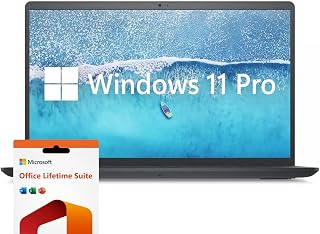
Pros
- Powerful 10-core i7 processor handles professional workloads and creative applications with ease
- Exceptional value with 32GB RAM and 1TB SSD included, plus lifetime Microsoft Office license
- 120Hz refresh rate and IPS panel provide vibrant visuals and wide viewing angles
- Numeric keypad and multiple ports make it ideal for office and business environments
- Windows 11 Pro offers enhanced security and performance features for professionals
Cons
- No touchscreen option limits interactive capabilities for some workflows
- IPS display brightness of 250 nits may be insufficient for outdoor or very bright environments
- Standard integrated graphics limit demanding gaming or professional 3D rendering tasks
The Dell Inspiron 15.6-inch laptop is a well-rounded productivity machine designed for professionals, students, and business users who need reliable daily computing. It combines practical features with solid performance, making it accessible for home offices, corporate environments, and educational settings.
At the core, the Intel Core i7-1255U processor with 10 cores and 12 threads delivers responsive multitasking alongside the generous 32GB RAM allocation. The 1TB SSD ensures fast application launches and smooth handling of creative work like photo and video editing. The 15.6-inch FHD display with 120Hz refresh rate and anti-glare coating creates a comfortable viewing experience, while the numeric keypad adds genuine value for spreadsheet work and data entry.
Build quality reflects Dell's reputation for sturdy, functional design. The 0.78-inch profile and 4.6-pound weight make the laptop reasonably portable, and the selection of ports (3 USB-A, HDMI, SD Card Reader) covers most connectivity needs. Windows 11 Pro provides enterprise-grade security features, and the included lifetime Microsoft Office license eliminates ongoing software subscriptions.
The main limitations are the lack of touchscreen capability, the modest 250-nit display brightness for outdoor use, and integrated graphics that won't handle intensive gaming or 3D rendering. These trade-offs are reasonable compromises at this price point for business and productivity-focused users.
This laptop delivers strong value for professionals seeking a dependable 15-inch workstation with modern specs, practical features like the numeric keypad, and the convenience of included productivity software. It excels as a replacement for aging business machines and serves students well for coursework and media creation.
Processor: Intel Core i7-1255U, 10 cores, 12 threads, up to 4.70 GHz
Memory: 32GB DDR4 RAM
Storage: 1TB PCIe SSD
Display: 15.6-inch FHD IPS LED, 1920 x 1080, 120Hz, anti-glare, 250 nits
Graphics: Intel Iris Xe Integrated
Operating System: Windows 11 Pro
Connectivity: Wi-Fi 5 (802.11ac), Bluetooth, 3x USB-A, 1x HDMI, SD Card Reader
Weight: 4.6 pounds
Dimensions: 14.14" L x 9.31" W x 0.78" Th
Battery: Extended life (duration not specified)
Software: Microsoft Office Lifetime License included
Warranty: Extended coverage
Who Should Buy: This Dell Inspiron is ideal for business professionals, remote workers, students, and content creators who need a reliable 15-inch laptop with strong everyday performance and practical productivity features.
Best For: Office work, remote work, video conferencing, photo and light video editing, spreadsheet work, web research, and media consumption.
Consider Alternatives If: You need a touchscreen display, require peak graphics performance for gaming, need maximum brightness for outdoor work, or prefer a smaller ultraportable form factor.
Value Consideration: The inclusion of 32GB RAM, 1TB SSD, and lifetime Microsoft Office makes this competitive for the price. The numeric keypad adds practical value often missing in this category, and Windows 11 Pro justifies the investment for business users requiring enhanced security features.

Pros
- Exceptional value with Office 365 included, saving $70+ immediately
- Lightweight and portable design ideal for students and remote workers on the move
- Solid 16GB RAM ensures smooth multitasking and browser performance
- Windows 11 Pro with professional-grade security and management tools
- Comprehensive warranty and support options provide genuine customer protection
Cons
- Pentium processor is entry-level, not suited for gaming, video editing, or heavy creative work
- 5000mAh battery offers moderate endurance, may require midday charging for heavy users
- IPS display at 60Hz refresh rate is functional but not ideal for demanding visual tasks
The MOONFISH UBOOK-03 is a practical 15.6-inch laptop designed for budget-conscious buyers who prioritize productivity over performance. It targets students, remote workers, and casual users seeking a reliable device for everyday tasks like word processing, web browsing, email, and video conferencing. The inclusion of Windows 11 Pro and Office 365 eliminates setup friction and adds significant value right out of the box.
Performance is respectable for its category. The Pentium 4425Y processor paired with 16GB RAM handles multitasking smoothly, allowing you to comfortably work with multiple browser tabs, office documents, and applications simultaneously. The 256GB SSD ensures snappy boot times and quick file access. However, this is not a machine for demanding workloads like video editing, 3D rendering, or gaming. For everyday productivity, the specs deliver what users need without excess.
The 15.6-inch FHD IPS display with anti-glare coating provides a crisp, comfortable viewing experience for extended work sessions. Colors are accurate and the stable 60Hz refresh rate is sufficient for standard productivity tasks and content consumption. The keyboard and touchpad are well-designed for comfortable typing and navigation during long work days. Build quality feels solid at this price point, and the sleek silver design is professional enough for any setting.
Battery life is adequate rather than exceptional. The 5000mAh battery supports a full workday for typical office users, though power-intensive tasks will drain it faster. Connectivity is comprehensive with USB 3.0, Type-C, Mini HDMI, and a microSD card slot, giving you flexibility to connect peripherals and expand storage. The 2-year warranty and 6-month return policy provide genuine peace of mind, backed by responsive 24/7 online support.
The MOONFISH UBOOK-03 delivers compelling value for budget-conscious professionals and students. While not a performance powerhouse, it excels at providing reliable, productive computing for everyday needs at an exceptional price. If you need a dependable Windows laptop with professional software included and portability matters, this is a smart choice.
Display: 15.6-inch FHD (1920x1080) IPS, 60Hz refresh rate, anti-glare coating
Processor: Pentium 4425Y
Memory: 16GB RAM
Storage: 256GB SSD
Graphics: Integrated
Operating System: Windows 11 Pro
Battery: 5000mAh
Weight: 3.5 lbs
Thickness: 0.8 inches
Color: Silver
Ports: USB 3.0, USB Type-C, Mini HDMI, microSD card slot
Keyboard: Full layout with numeric keypad
Special Features: HD Audio, lightweight design, memory card slot
Best For: This laptop excels for students, remote office workers, content consumers, and anyone needing reliable productivity computing without gaming or creative software demands.
Who Should Consider Alternatives: If you require sustained performance for video editing, 3D rendering, coding with heavy IDEs, gaming, or other demanding workloads, look for a laptop with a stronger processor like a Core i5 or Ryzen 5.
Key Considerations: The Pentium processor is the limiting factor for performance-intensive tasks. Battery life is moderate, not all-day for heavy users. The 60Hz display is functional but basic. These are honest trade-offs for the exceptional price and included software.
Why This Matters: At under $300 with Office 365 included, this laptop eliminates the typical hidden costs of Windows laptops. You get legitimate productivity software, professional security features in Windows 11 Pro, and comprehensive warranty coverage. The value proposition is genuinely strong for the intended audience.

Pros
- Excellent value for the price with enterprise-grade Windows 11 Pro and ample RAM
- Fast and responsive performance suitable for streaming lectures, video conferencing, and content creation
- Touchscreen display reduces eye strain and adds intuitive navigation capability
- Durable build quality with consistent positive feedback from long-term users
- Professional appearance and portability make it ideal for students and business professionals on the go
Cons
- Battery life realistically achieves 3-4 hours with typical use, not the optimistic 7-hour estimate sometimes cited
- Warranty coverage can be unclear, as evidenced by customer service issues reported by some users
The Dell Inspiron 15.6" Touchscreen Laptop is a well-engineered solution designed for students, business professionals, and remote workers who need reliable performance without breaking the bank. It combines practical specs with user-focused design elements that make daily computing more productive and enjoyable.
Performance-wise, the Intel Core i5-1155G7 processor paired with 32GB RAM delivers snappy responsiveness for multitasking, streaming classes, and video conferencing. The 1TB SSD ensures quick boot times and smooth app launches. Users consistently report excellent speed for everyday tasks including content creation and video editing, making this a versatile workhorse for creative professionals on a budget.
The 15.6" Full HD touchscreen with IPS technology and 220 nits brightness provides crisp visuals with good color accuracy. The touchscreen adds intuitive control for presentations and navigation, while the anti-glare coating helps reduce fatigue during extended study or work sessions. The numeric keypad and comfortable keyboard make this laptop particularly suitable for office work and data entry tasks.
Build quality and portability are notable strengths. At just 3.7 pounds with a slim 0.69" profile, it's genuinely portable while maintaining a premium look. Windows 11 Pro provides professional-grade security features and is ideal for business environments. One important caveat: battery life is modest at 3-4 hours under realistic use, so regular charging access is recommended.
Overall, the Dell Inspiron 15.6" represents strong value for students and professionals seeking a dependable daily driver with touchscreen convenience and solid performance. It excels as a business laptop and makes an excellent choice for college-bound students needing reliability and functionality at a reasonable price point.
Processor: Intel Core i5-1155G7 Quad-Core (4 cores, 8 threads, max 4.5GHz, 8MB cache)
Memory: 32GB DDR4 RAM
Storage: 1TB SSD
Display: 15.6" Full HD (1920x1080) IPS touchscreen, anti-glare, 220 nits
Graphics: Intel UHD Graphics integrated
Operating System: Windows 11 Professional 64-bit
Ports: 2x USB 3.2 Type-A, 1x USB 2.0 Type-A, HDMI 1.4, headphone/mic combo, SD card reader
Connectivity: Wi-Fi 5 (802.11ac), Bluetooth 5.0
Camera: 720p HD webcam
Keyboard: Full-size with numeric keypad
Weight: 3.7 pounds
Dimensions: 14.11" x 9.25" x 0.69"
Warranty: 1-year limited manufacturer warranty
College Students: Perfect for remote learning, streaming lectures, and note-taking with the touchscreen and numeric keypad. The 32GB RAM handles research and content creation while the portability suits campus life.
Business Professionals: Windows 11 Pro meets enterprise requirements while the touchscreen adds productivity. Lightweight design makes it suitable for traveling professionals and hot-desking environments.
Remote Workers: The excellent video conferencing performance, comfortable keyboard, and reliable Wi-Fi connectivity make this ideal for work-from-home setups. Strong performance for video streaming and multitasking.
Content Creators: The 32GB RAM and Core i5 processor handle video editing and image processing well. The touchscreen offers intuitive creative control for design work.
Who Should Reconsider: Those requiring all-day battery life should look elsewhere, as this laptop needs mid-day charging. Users requiring specialized software may need discrete graphics beyond the integrated Intel UHD.
What to Look for in a Laptop for Computer Science
Processor Power
The CPU is the heart of any developer machine. For serious CS work, you want at least a modern quad-core processor. Options like the Intel Core i7-13620H found in the Lenovo Laptop Computer, 14″ FHD, Intel i7-13620H deliver 10 cores capable of handling compilation, virtualization, and heavy multitasking without breaking a sweat.
Entry-level chips like the Intel N95 in the 2026 Laptop with Intel-N95 Processor work fine for lighter coursework such as web development or scripting. However, if you plan to run virtual machines or machine learning frameworks, prioritize a higher-tier processor from day one.
RAM: How Much Is Enough?
RAM directly determines how many processes, browser tabs, and development tools you can run simultaneously. For CS students, 16GB is a comfortable minimum, but 24GB or 32GB opens the door to running virtual machines, Android emulators, and containerized environments side by side.
The Dell Inspiron 15.6″ Laptop Computer ships with 32GB of RAM, making it one of the most capable multitaskers in this roundup. On the leaner end, the HP OmniBook 3 17.3 inch Laptop PC, FHD Display offers 8GB, which suits students focused on coursework rather than resource-intensive development environments. If your budget allows, err on the side of more RAM.
Storage Speed and Capacity
A fast NVMe SSD is non-negotiable for a developer machine. Slow storage kills productivity when you are building large projects, cloning repositories, or working with datasets. PCIe NVMe drives, like the 1TB SSD in the Lenovo Laptop, 15.6″ FHD, Intel 10-Core i7-13620H, deliver read speeds that make large file operations feel instant.
For capacity, 512GB is the practical minimum for a student who will install multiple SDKs, frameworks, and project directories. If you work with large datasets or media files for class projects, 1TB gives you room to breathe without constantly managing storage. Browse our home office category for complementary peripherals that can extend your workspace further.
Display Quality and Screen Real Estate
You will spend hours staring at code, so display quality matters more than most students realize. A Full HD IPS panel with anti-glare coating reduces eye strain during long study sessions. The 15.6-inch FHD display on the Dell 15.6″ Laptop DC15250, FHD hits that sweet spot of portability and usable screen space for split-screen coding.
If you frequently work with multiple windows open, a larger screen like the 17.3-inch panel on the 2026 Laptop with Intel-N95 Processor reduces the need for constant window switching. TÜV Rheinland Low Blue Light certification, found on the Lenovo V14 lineup, is a genuine advantage for students pulling late-night sessions. For an ergonomic peripheral setup to complement your display, our roundup of the best silent mechanical keyboards is worth a look.
Final Thoughts
For CS students who want maximum performance and future-proof specs, the Lenovo Laptop Computer, 14″ FHD, Intel i7-13620H stands out with its powerful 13th-generation processor, generous 40GB of RAM, and compact portability that suits commuters and campus life equally well. If you need a no-frills machine to get started without overcommitting your budget, the MOONFISH Laptop Computer Windows 11 delivers a surprisingly capable setup with Office 365 included and a reassuring two-year warranty that offers real peace of mind for freshman year and beyond.
Frequently Asked Questions
What specs do computer science students actually need in a laptop?
At minimum, look for a modern multi-core processor, 16GB of RAM, and a 512GB NVMe SSD. These three specs handle the majority of CS coursework including coding, compiling, and running local development servers. As you advance into upper-division courses involving machine learning, operating systems, or virtualization, bumping to 24GB or 32GB RAM makes a significant difference.
Is a touchscreen useful for a CS student laptop?
Touchscreens are a nice-to-have rather than a necessity for most CS students. The Dell Inspiron Touchscreen Laptop offers a Full HD touch display that some students find useful for annotating diagrams or navigating UI-heavy applications. That said, the majority of coding and terminal work is done entirely from the keyboard, so a touchscreen should not be a primary deciding factor.
Should a CS student choose Windows or another OS in 2026?
Windows 11 Pro is a strong choice for CS students because it supports Windows Subsystem for Linux (WSL2), which lets you run a full Linux development environment without dual-booting. Every laptop in this guide ships with Windows 11, and several include the Pro edition, which adds extra developer-friendly tools and security features. If your program specifically requires Linux or macOS, confirm compatibility with your coursework before purchasing.
How important is battery life for a computer science student?
Battery life is crucial if you move between classrooms, libraries, and study spaces throughout the day. The HP OmniBook 3 17.3 inch Laptop PC, FHD Display is a standout here, rated for up to 14 hours and 15 minutes with HP Fast Charge that restores 50% in about 45 minutes. For a deeper dive into building a complete home workstation around your laptop, our guide to the best RAM for Blender covers memory considerations that also apply to compute-heavy student workflows.
Common questions
What are the best laptops for software engineering students in 2026?
The best laptops for software engineering students are the same as those recommended for computer science students, since both need strong processors for compiling code, ample RAM for running development tools and virtual machines, and reliable storage. Look for models with Intel Core i5 or i7 processors (or AMD Ryzen equivalents), at least 16GB of RAM, and SSD storage of 512GB or more. The Dell Inspiron with i7-1255U and 32GB RAM is excellent for heavier workloads like Docker containers and Android Studio, while the Dell with i5-1155G7 offers solid performance for most coursework at a lower price point.








Write Your Review
No reviews yet. Be the first to share your experience!